



Table of contents

A keyword is what you choose; a search term is what a person actually typed. One is your input to Google Ads, the other is the query data Google reports back to you.
Key Takeaways
- Keywords are advertiser inputs, search terms are user outputs — you bid on the first and get reported the second.
- 1 keyword can trigger hundreds of queries, because all 3 Google Ads match types are eligible for close variants and there is no opt-out.
- Broad match sits at the widest end and is the default when you paste a keyword with no punctuation.
- Google Ads Quality Score runs 1-10 at keyword level and is judged against advertisers who showed for the same query in the last 90 days.
- Search Console shows queries, not the keywords you target — the organic equivalent of the same input-versus-output gap.
- With an all-industry search CPC of $5.42, a query report you never read is the fastest way to lose budget.
The two objects, defined in 40 words each
A keyword is a word or phrase you add to a Google Ads ad group so your ad can be matched to relevant searches, with a match type controlling how wide that match can go. It is a targeting instruction you control, priced in an auction.
A search term (also called a search query) is the exact string a person typed into the search box that caused your ad or page to appear. It is observed reality, reported after the fact, and you cannot edit it.
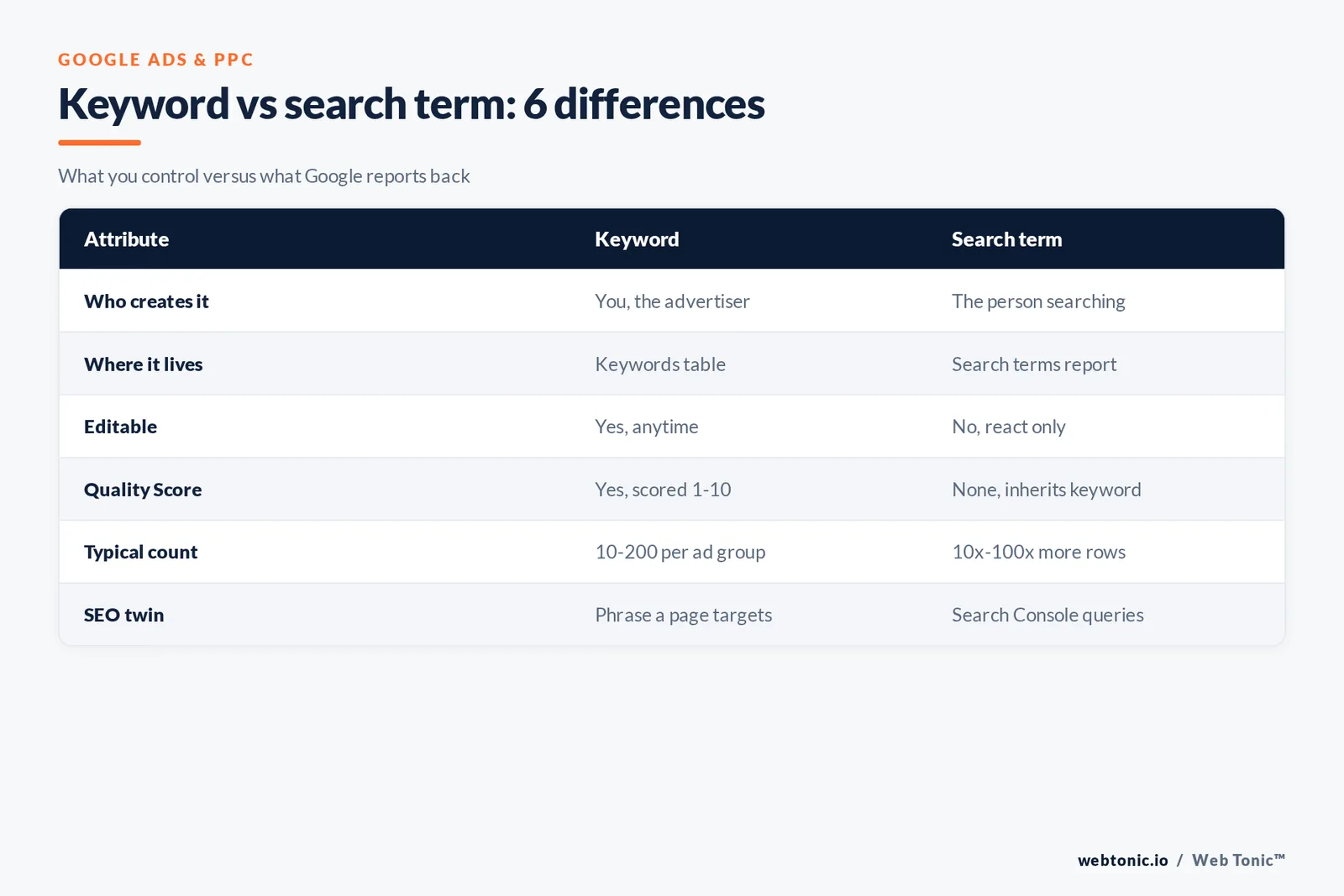
| Attribute | Keyword | Search term |
|---|---|---|
| Who creates it | You, the advertiser | The person searching |
| Where it lives | Keywords table in your ad group | Search terms report and Insights |
| Can you change it | Yes, add, pause or re-match anytime | No, only react to it |
| Has a bid and a Quality Score | Yes, scored 1-10 | No, it inherits the keyword it matched |
| Counted per campaign | Usually 10-200 per ad group | Often 10x-100x the keyword count |
| SEO equivalent | The phrase your page targets | The query rows in Search Console |
The confusion is old and mostly linguistic: Google renamed the old query report to the search terms report while keeping the field name search_term_view in the Google Ads API. Same object, three names, one distinction that matters.
One input, many queries: a worked example
Take a single broad keyword, running shoes, in a shop that only sells men's trail models. Google may match it to searches that never contain both of those words, because keywords in Search campaigns are matched on meaning, not on string identity.
| Query Google served it for | Contains the phrase | Commercially useful | Right action |
|---|---|---|---|
| buy running shoes | Yes | High | Keep, consider an exact-match row |
| best trail running shoes men | Partly | High | Promote to its own ad group |
| running shoes cheap | Yes | Low margin | Watch cost per order for 14 days |
| jogging sneakers | No | Medium | Add as a new phrase-match row |
| running shoe repair | No | None | Exclude the word repair |
| nike pegasus 41 review | No | None for a non-stockist | Exclude the brand |
Six rows, one input. That fan-out is exactly why the report is the campaign and the keyword list is only the starting hypothesis. Long-tail rows like the second one usually convert best and cost least; we cover the pattern in long-tail keywords.
Where each object appears in the interface
| Surface | Shows keywords | Shows queries | Best used for |
|---|---|---|---|
| Google Ads keywords table | Yes, with bids and status | No | Editing targeting and match types |
| Search terms report | The matched row is a column | Yes, row by row | Adding exclusions and finding new rows |
| Search terms insights | No | Grouped into themes | Spotting demand shifts at volume |
| Keyword Planner | Forecast ideas | Aggregate demand only | Sizing a market before launch |
| Search Console performance | No | Organic queries | SEO gap analysis |
| Analytics landing pages | No | Rarely, mostly not provided | Post-click behaviour |
Google's own note on the Insights view matters for reporting hygiene: theme labels are generated automatically and conversions are processed differently there than in the row-level report, so the 2 surfaces can disagree slightly because of conversion lag. Use rows for decisions and themes for narrative.
How match types widen the distance
Match types nest: phrase captures everything exact captures, and broad captures everything phrase captures plus more. If you paste a phrase with no punctuation you get broad match by default.
| Match type | Syntax | Matches on | Typical query-to-input distance |
|---|---|---|---|
| Broad | running shoes | Related meaning, order free | Widest, includes words never in the input |
| Phrase | quotation marks around it | Includes the meaning, extra words allowed | Medium, meaning preserved |
| Exact | square brackets around it | Same meaning or intent | Narrowest, still not literal |
| Negative broad | minus prefix, no punctuation | All words in any order | Blocks widely |
| Negative phrase | minus plus quotation marks | Same order, extras allowed | Blocks moderately |
| Negative exact | minus plus brackets | The query only | Blocks one row |
Two traps live here. Negative match types do not behave like positive ones, and they ignore close variants, so an exclusion on one spelling still lets the plural through. And in Performance Max, an exact keyword identical to the query wins priority 1 over any asset group, while phrase and broad rows only share priority with an identical search theme. Full mechanics sit in keyword match types and exact match keywords.
Close variants: why the two columns rarely match
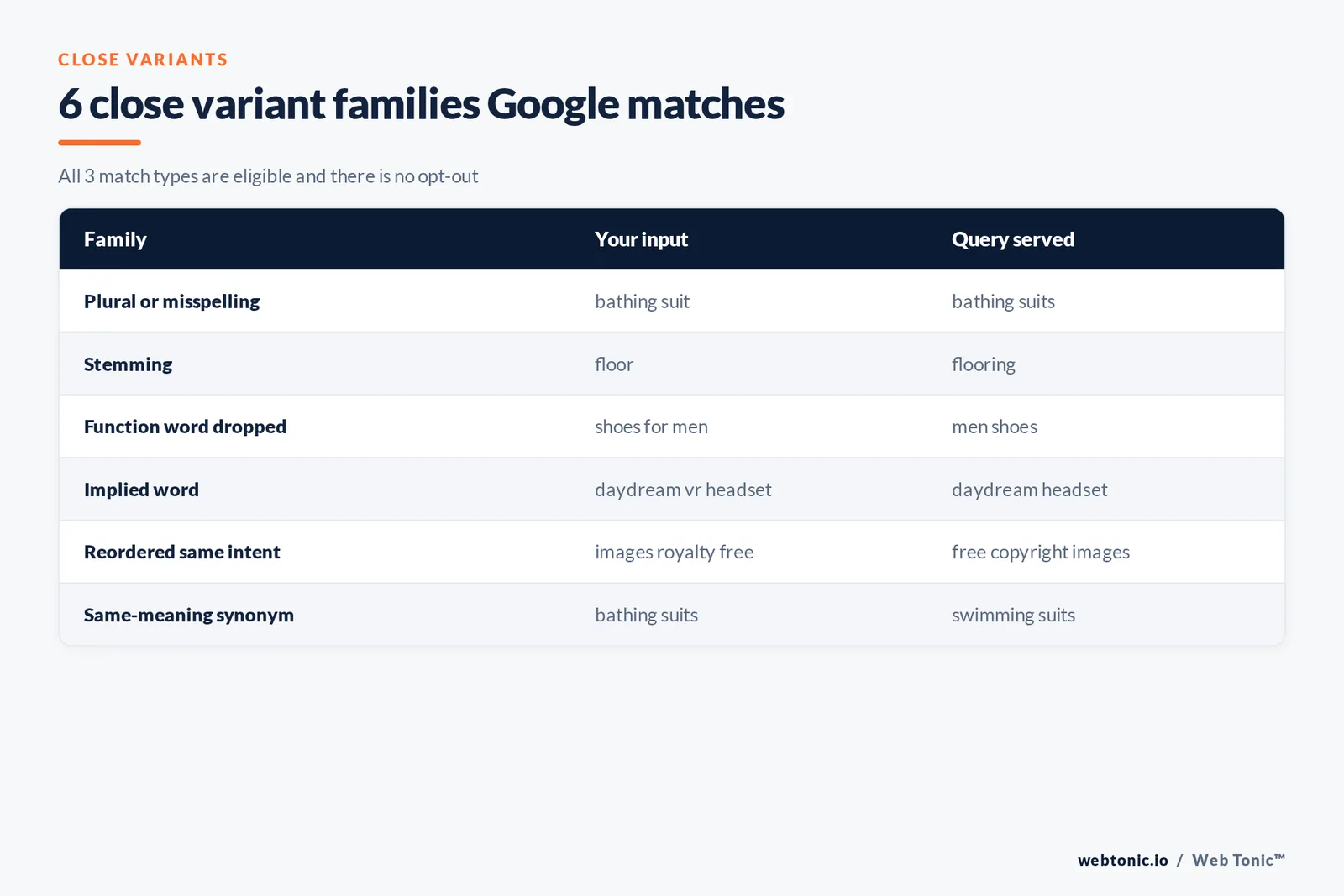
Close variants are the single biggest reason the query column looks nothing like your list. Google is explicit that all 3 match types are eligible and there is no opt-out.
| Variant family | Example input | Example query served | Applies to |
|---|---|---|---|
| Misspelling or plural | bathing suit | bathing suits | All 3 match types |
| Stemming | floor | flooring | All 3 match types |
| Function words dropped | shoes for men | men shoes | Exact and phrase |
| Implied word | daydream vr headset | daydream headset | Exact and phrase |
| Reordering with same intent | images royalty free | free copyright images | Exact and phrase |
| Same-meaning synonym | bathing suits | swimming suits | Exact and phrase |
Variant handling covers 27 languages, and language is inferred from the query, not from the country. A user searching in Spain with German words is treated as German demand. That single rule explains a lot of otherwise baffling geography in query reports.
What the query report can and cannot tell you
| Question | Answer from the report | Limit to remember |
|---|---|---|
| Which strings triggered my ads | Yes, row level | Low-volume queries are withheld for privacy |
| Which input matched each row | Yes, in the match column | Match type shown is the keyword's, not the query's |
| Revenue per row | Yes if conversions import cleanly | Conversion lag shifts recent rows |
| Themes and demand shifts | Insights view | Labels cover a rolling 56-day window |
| Competitor overlap | No | Use auction insights instead |
| Organic demand | No | That is a Search Console job |
Because thin rows are suppressed, the report is a majority sample, not a census. Budget decisions on rows with 3 clicks are noise; wait for 30-50 clicks or judge the theme instead of the row.
How queries feed cost, not just relevance
Quality Score is reported at keyword level on a 1-10 scale from 3 components — expected click-through rate, ad relevance and landing page experience — each labelled above average, average or below average against advertisers who showed for the exact same query in the past 90 days. So the queries you tolerate quietly re-price the input you bid on.
| Component | Driven mainly by | Query-side lever |
|---|---|---|
| Expected click-through rate | Historic clicks for the row | Exclude low-intent strings that never click |
| Ad relevance | Copy versus the query | Split mismatched themes into their own ad group |
| Landing page experience | Page usefulness for that intent | Send commercial and research intent to different pages |
The money case is simple. With LocaliQ's 2026 all-industry search averages of $5.42 CPC, 6.64% CTR, 8.18% conversion rate and $66.69 cost per lead (LocaliQ benchmarks), 20 irrelevant clicks a day is roughly $3,250 a month and about 49 leads of lost opportunity a month at those averages. Exclusion work is not housekeeping, it is media buying, and negative keywords are the instrument. Our walkthrough is in negative keywords for Google Ads.
The organic mirror: targets versus queries in SEO
SEO has the same split with different vocabulary. You target a phrase on a page; the Search Console performance report shows the queries you actually earned impressions for. Nobody bids, but the diagnostic loop is identical.
| Signal in Search Console | What it usually means | Content action |
|---|---|---|
| High impressions, low clicks | You rank but the intent mismatches | Rewrite the title and opening answer |
| Many unrelated queries | Page is topically vague | Split into 2 focused pages |
| Queries deeper than your target | Latent demand you never planned for | Add a section or a dedicated page |
| Position 8-15 on a commercial query | Nearly there | Improve internal links and depth |
| Brand queries only | No non-brand discovery yet | Build informational coverage |
Intent classification is the bridge between the two worlds: an ad group and a page both fail when they answer a different intent than the query implies. See Ahrefs on search intent and Moz's keyword research guide for the taxonomies most teams standardise on,. Our own view of the paid mechanics sits in what is PPC.
A third object arrived: search themes
Automation added a category that is neither an input you bid on nor a query you observe. Search themes in Performance Max and the newer AI-driven Search matching are hints you supply, priced like inventory rather than like a keyword.
| Object | You control it | Reported as a row | Carries a bid |
|---|---|---|---|
| Keyword | Fully | Yes | Yes |
| Search term | No | Yes | No |
| Search theme | You supply it as a hint | Indirectly | No |
| Audience signal | You supply it | As a segment | No |
| Negative keyword | Fully | As an exclusion | No |
Practically: keep exact rows for the queries you must own, use themes for intent you cannot enumerate, and treat the query report as the referee across both. Microsoft Advertising mirrors the same reporting model, documented in Microsoft Advertising Help, so the workflow ports across engines.
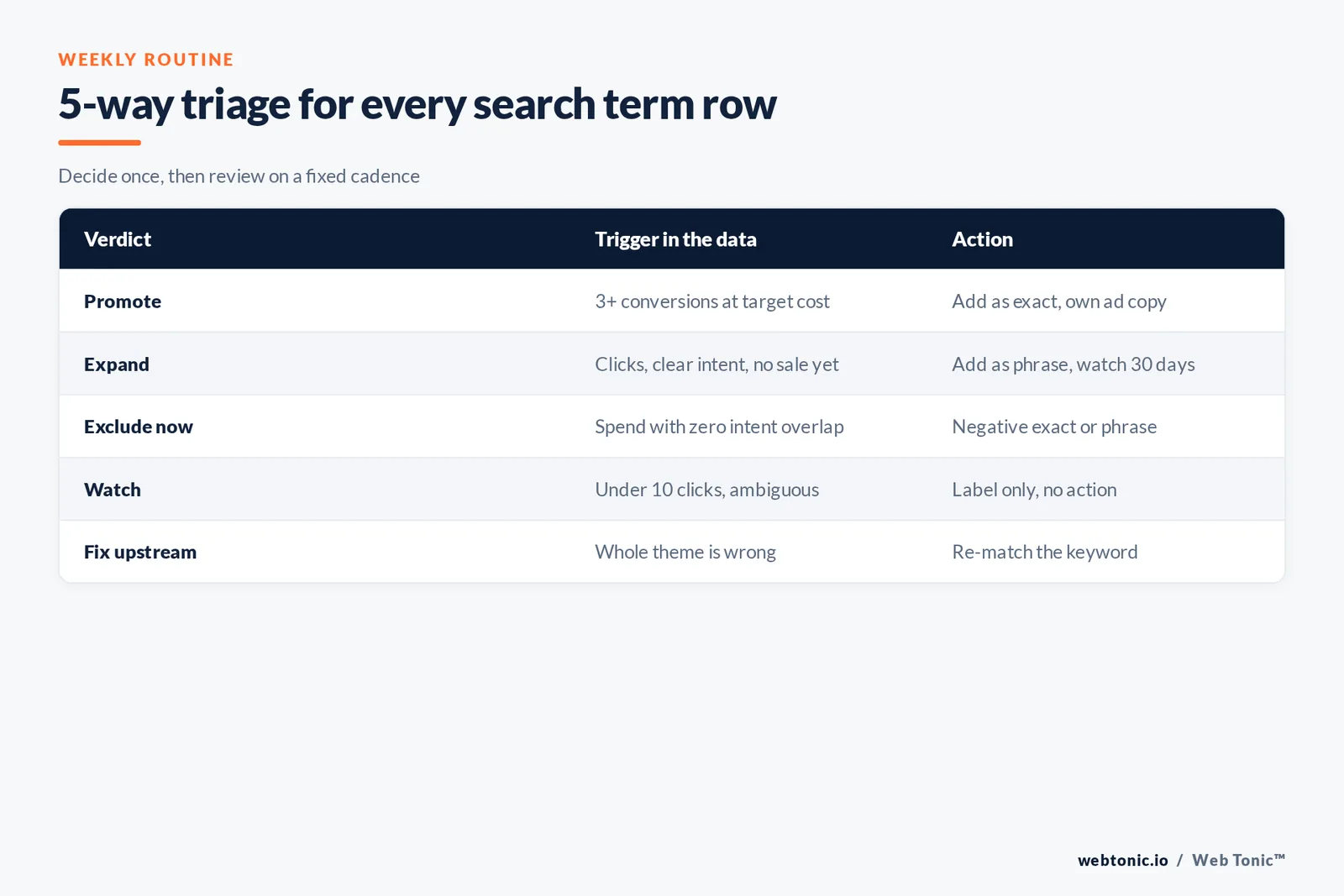
Turning queries into decisions: a 5-way triage
| Verdict | Trigger in the data | Action | Review cadence |
|---|---|---|---|
| Promote | Converts at or below target cost, 3 or more conversions | Add as exact, own ad copy | Weekly |
| Expand | Clicks with no conversions yet but clear intent | Add as phrase, watch 30 days | Weekly |
| Exclude now | Spend with zero intent overlap | Negative exact or phrase | Weekly |
| Watch | Fewer than 10 clicks, ambiguous | Label, no action | Monthly |
| Fix upstream | Whole theme is wrong | Re-match the input, not the row | Monthly |
Run it on a fixed rhythm: weekly for accounts over $10,000 a month, twice monthly under that, and always after any campaign change that widens matching. A disciplined 30-minute weekly pass beats a quarterly deep clean, because exclusions compound.
Vocabulary you will see next to these 2 words
| Term | Short definition | Which side it belongs to |
|---|---|---|
| Search query | Older synonym for a search term | User side |
| Query report | Legacy name of the search terms report | User side |
| Close variant | Automatic near-match expansion | Matching layer |
| Match type | Rule for how widely an input can match | Advertiser side |
| Negative keyword | An exclusion instruction | Advertiser side |
| Search theme | Intent hint used by automated campaigns | Advertiser side |
| Keyword cannibalisation | Two assets competing for one intent | Both sides |
| Impression share | Share of eligible auctions won | Reporting |
Five mistakes that keep the confusion alive
- Treating the report as a keyword list. Adding every converting row creates bloated ad groups; add the ones with repeatable volume, keep the rest under a broader row.
- Excluding on a single spelling. Exclusions ignore variant expansion, so 1 careless entry can leave the plural live.
- Judging rows with 2 clicks. At an 8.18% average conversion rate, a genuinely good row can show zero conversions in its first 12 clicks.
- Copying paid inputs into page titles. Organic demand rewards the phrasing in Search Console, which is often 2-4 words longer.
- Never checking the match column. Without it you cannot tell whether a bad row came from a loose input or from a variant.
Related reading
- Responsive Search Ads: The Complete Guide to RSA Best Practices
- Dynamic Search Ads: Complete Guide to DSA in Google Ads
- Dynamic Keyword Insertion: Setup, Best Practices & When to Use DKI
- Paid Search services at Web Tonic
FAQ
What is the main difference between a keyword and a search term?
A keyword is the phrase an advertiser adds to a campaign to be matched against searches; a search term is the exact string a person typed that triggered an ad or a listing. The first is an input you control and bid on, the second is reported evidence you can only react to.
Why do search terms differ from the keywords I bid on?
Because Google matches on meaning. Match types nest, broad match is the default when no punctuation is used, and close variants apply to all 3 match types with no opt-out, covering misspellings, plurals, stemmings, dropped function words, implied words and same-meaning synonyms across 27 languages.
How does the search terms report improve a Google Ads campaign?
It lets you promote converting queries into their own targeted rows, exclude waste with negative keywords, and diagnose whether a weak result came from a loose input, a mismatched ad or the wrong landing page. At an average search CPC of $5.42, removing 20 irrelevant clicks a day is worth roughly $3,250 a month.
Do keywords and search terms exist in SEO too?
Yes, under different names. The phrase a page targets plays the keyword role, and the query rows in the Search Console performance report play the search-term role. The same input-versus-output gap tells you whether the page answers the intent people actually express.
Is a search query the same thing as a search term?
Effectively yes. Search query is the older label, still used in the Google Ads API field name and in most SEO tooling, while search term is the current name in the Google Ads interface. Both describe what the user typed.

Sources
Google Ads Help: about keywords in Search Network campaigns, keyword matching options, close variants, search terms report and insights, negative keywords, Quality Score. Google Ads API reference: search_term_view. Google Search Central Help: performance report. LocaliQ 2026 search advertising benchmarks. Ahrefs on search intent. Moz beginner guide to keyword research. Microsoft Advertising Help. All URLs verified live in August 2026. Need a second pair of eyes on your query data? Talk to our growth marketing team or get in touch.


