



Table of contents
Keyword match types decide how closely a user's search query must resemble your keyword before Google Ads lets your ad into the auction. There are three positive match types — broad match, phrase match and exact match — plus negative keywords, which follow completely different rules.
Key Takeaways
- 3 positive keyword match types exist in Google Ads today: broad match, phrase match and exact match. The broad match modifier (BMM) was retired in 2021.
- Broad match is the default — every keyword you add with no punctuation is a broad match keyword.
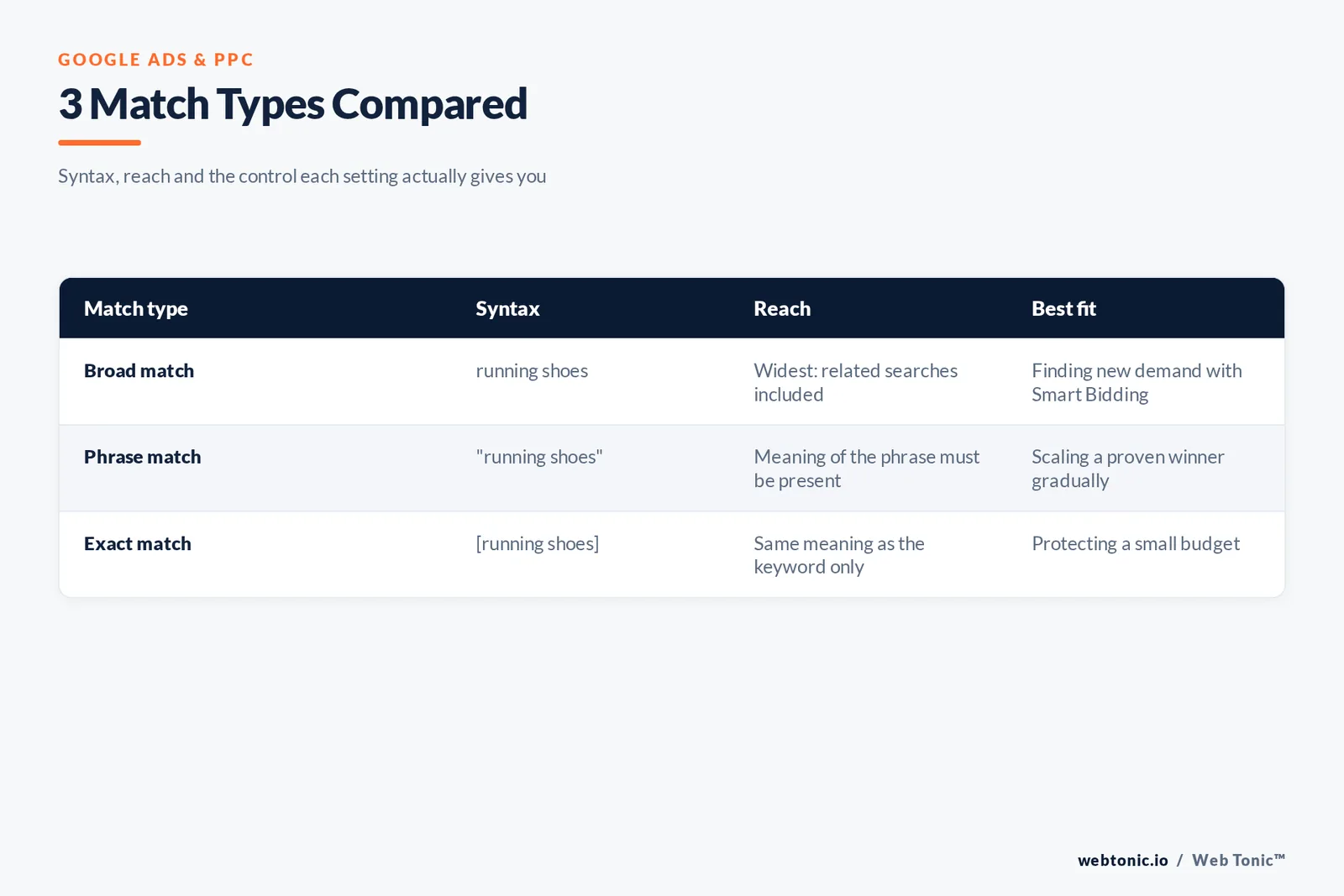
- Syntax is the whole interface: no marks = broad, "quotes" = phrase, [brackets] = exact.
- Broader match types swallow narrower ones, so 1 broad match keyword already covers the searches its phrase and exact twins would reach.
- Negative keywords do not match close variants: excluding "flowers" still lets an ad serve on "red flower".
- For Display and Video campaigns a maximum of 1,000 account-level negative keywords is considered.
What keyword match types are in Google Ads
Definition: a keyword match type is a setting attached to each keyword that tells Google Ads how loosely it may pair that keyword with a live search query. Google's own wording is that match types "dictate how closely the keyword needs to match with the user's search query so that the ad can be considered for the auction", per the Google Ads help page on keyword matching options.
Two things follow from that definition. First, a match type controls eligibility, not placement — winning the impression still depends on Ad Rank, bid and quality. Second, the match type is a property of the keyword, not of the campaign, so a single ad group can mix all three.
| Match type | Syntax | Example keyword | Reach | Steering |
|---|---|---|---|---|
| Broad match | No punctuation | running shoes | Widest | Lowest |
| Phrase match | Double quotes | "running shoes" | Medium | Medium |
| Exact match | Square brackets | [running shoes] | Narrowest | Highest |
| Negative broad | -keyword | -free | Blocks widest | Exclusion only |
| Negative phrase | -"keyword" | -"free shoes" | Blocks the phrase | Exclusion only |
| Negative exact | -[keyword] | -[free shoes] | Blocks one query | Exclusion only |
Rule 1 — the same 3 characters do all the work. A stray space inside brackets or a smart quote pasted from a document silently converts your intended exact match keyword into something else, which is why bulk uploads should always be re-checked in the keywords table.
The nesting rule: why 3 match types are not 3 separate audiences
Google states the relationship plainly: broader match types capture every query the narrower types capture, plus more. A phrase match keyword will match everything its exact match twin matches; a broad match keyword matches everything phrase and exact would, plus additional related searches.
| Search query | Exact: running shoes | Phrase: running shoes | Broad: running shoes |
|---|---|---|---|
| running shoes | Eligible | Eligible | Eligible |
| shoes for running | Eligible (same meaning) | Eligible | Eligible |
| buy running shoes online | Not eligible | Eligible | Eligible |
| best trail running trainers | Not eligible | Eligible (implied meaning) | Eligible |
| marathon training plan | Not eligible | Not eligible | Eligible (related) |
Limit 1 — adding the same keyword in all 3 match types buys you nothing except a messier account: duplicates are recognised as such and only 1 bid per advertiser enters any given auction, with the higher Ad Rank version chosen.
Fact 1 — Google explicitly notes that near-identical broad keywords such as "red car" and "car red" are treated as duplicates, and that keeping both "won't affect your costs or performance in any way" — it simply wastes your management time.
Broad match keywords and Smart Bidding
Broad match is the most comprehensive match type and the one every new keyword defaults to. To keep relevance up, it can also read signals beyond the keyword itself: the user's recent search activities, the content of your landing pages and assets, and the other keywords in the ad group that hint at intent.
That breadth is only safe with automated bidding. Google's guidance is unambiguous — it is "critical to use Smart Bidding with broad match", because every search query carries different auction-time context and each one deserves its own bid. Manual CPC across broad match is the fastest way to buy irrelevant clicks; if you are still on manual bids, read our breakdown of the campaign types available in Google Ads before widening anything.
| Account condition | Broad match verdict | Why |
|---|---|---|
| Smart Bidding live, 30+ conversions/month | Use freely | Enough signal to bid per query |
| Smart Bidding live, under 15 conversions/month | Test on 1-2 ad groups | Thin conversion data widens CPA variance |
| Manual CPC | Avoid | One bid cannot fit every related query |
| No conversion tracking | Do not use | No feedback loop on wasted spend |
| High-CPC legal or finance terms | Broad plus tight negatives | A single stray click can cost double digits |
Fact 2 — CPCs in the most competitive verticals routinely run past $50 per click, as Semrush's analysis of Google Ads costs shows; our own list of the most expensive keywords puts the ceiling higher still. Match-type discipline is a budget control, not a cosmetic setting.
Phrase match: the meaning-based middle ground
Phrase match keywords are eligible for searches that include the meaning of the keyword. The meaning can be implied, and the query may be a more specific form of it. Since the 2021 merger with the broad match modifier, word order no longer has to be preserved literally — implied meaning is what counts.
| Keyword | Query that matches | Query that does not | Reason |
|---|---|---|---|
| "moving services nyc" | nyc moving services cost | moving services boston | Location changes the meaning |
| "crm for agencies" | best agency crm software | crm for hospitals | Different audience |
| "hire a copywriter" | where to hire freelance copywriters | copywriter salary | Informational, not hiring intent |
| "gluten free bakery" | bakery with gluten free cakes | gluten free recipes | No purchase of a bakery product |
Rule 2 — keep phrase match keywords to 2-4 words. Longer strings pin down so much meaning that they behave like exact match while still reporting as phrase, which hides real reach loss.
Exact match keywords and close variants
Exact match gives you the most steering over who sees the ad and the least reach. It matches searches with the same meaning or same intent as the keyword — not only the literal string. That expansion is governed by Google's definition of keyword close variants, which covers misspellings, singular and plural forms, stemming, accents, abbreviations, reordered words with the same meaning, added function words, and paraphrases.
| Close variant type | Keyword | Query treated as exact |
|---|---|---|
| Misspelling | [dishwasher repair] | dishwaser repair |
| Plural / singular | [roof tile] | roof tiles |
| Reordered words | [cheap flights nyc] | nyc flights cheap |
| Added function word | [hotels paris] | hotels in paris |
| Paraphrase | [cheap flights] | low cost airfare |
| Abbreviation | [chief marketing officer coach] | cmo coach |
Fact 3 — the Google Ads API exposes exactly 3 positive values in its keyword match type enum — EXACT, PHRASE and BROAD — confirming there is no hidden fourth setting a tool can unlock for you.
Negative keyword match types behave differently
This is the single most misread part of the system. Negative keyword match types share the names of the positive ones, but not the behaviour, as Google's negative keywords documentation spells out.
| Behaviour | Positive keywords | Negative keywords |
|---|---|---|
| Close variants | Matched automatically | Not matched — plurals and synonyms must be added by hand |
| Misspellings and casing | Handled | Handled automatically |
| Word order (phrase) | Meaning-based | Literal order required |
| Display and Video campaigns | Contextual targeting | Excluded as a topic; up to 1,000 considered at account level |
| Scope | Ad group only | Ad group, campaign or one global account-level list |
Limit 2 — Google's own example is worth memorising: excluding the negative broad keyword "flowers" blocks "red flowers" but not "red flower". Build negative lists in singular and plural, and route the recurring wasters into the account-level list so every search and shopping campaign inherits them. WordStream's starter negative keyword list is a reasonable seed for the obvious junk ("free", "jobs", "diy", "reddit").
Fact 4 — for Display campaigns a set of negative keywords is excluded as a topic, so blocking "women's pants" also blocks a page about women's jeans — but not skirts or men's slacks.
Auditing match types with the search terms report
Match types are a hypothesis; the search terms report is the evidence. It shows the actual queries that triggered your ads, alongside the keyword and the match type that caught each one — the only place you can see whether broad match is finding new demand or new waste.
| Signal in the terms report | Diagnosis | Action |
|---|---|---|
| Broad match spend up, conversions flat | Query expansion drifting off-intent | Add negatives; pause broad on the worst ad group |
| A query converts repeatedly under broad | Proven demand pocket | Promote it to an exact match keyword |
| Exact match impressions near zero | Keyword too narrow or outbid | Widen to phrase match or raise the target |
| Competitor brand queries appearing | Close variant expansion | Negative exact each brand term |
| Many low-volume unique queries | Long-tail territory | Leave in broad; do not build 200 exact keywords |
Rule 3 — review search terms weekly at first, then monthly once the negative list stabilises. Promote a query to exact match only after 2 or more conversions, not after a single lucky click.
Choosing a match type by goal
There is no universally best match type — only a best fit for the budget, data volume and margin in front of you. Build the keyword list first (Google's basic tips for building a keyword list and Moz's keyword research primer both start from customer language, not syntax), then assign match types.
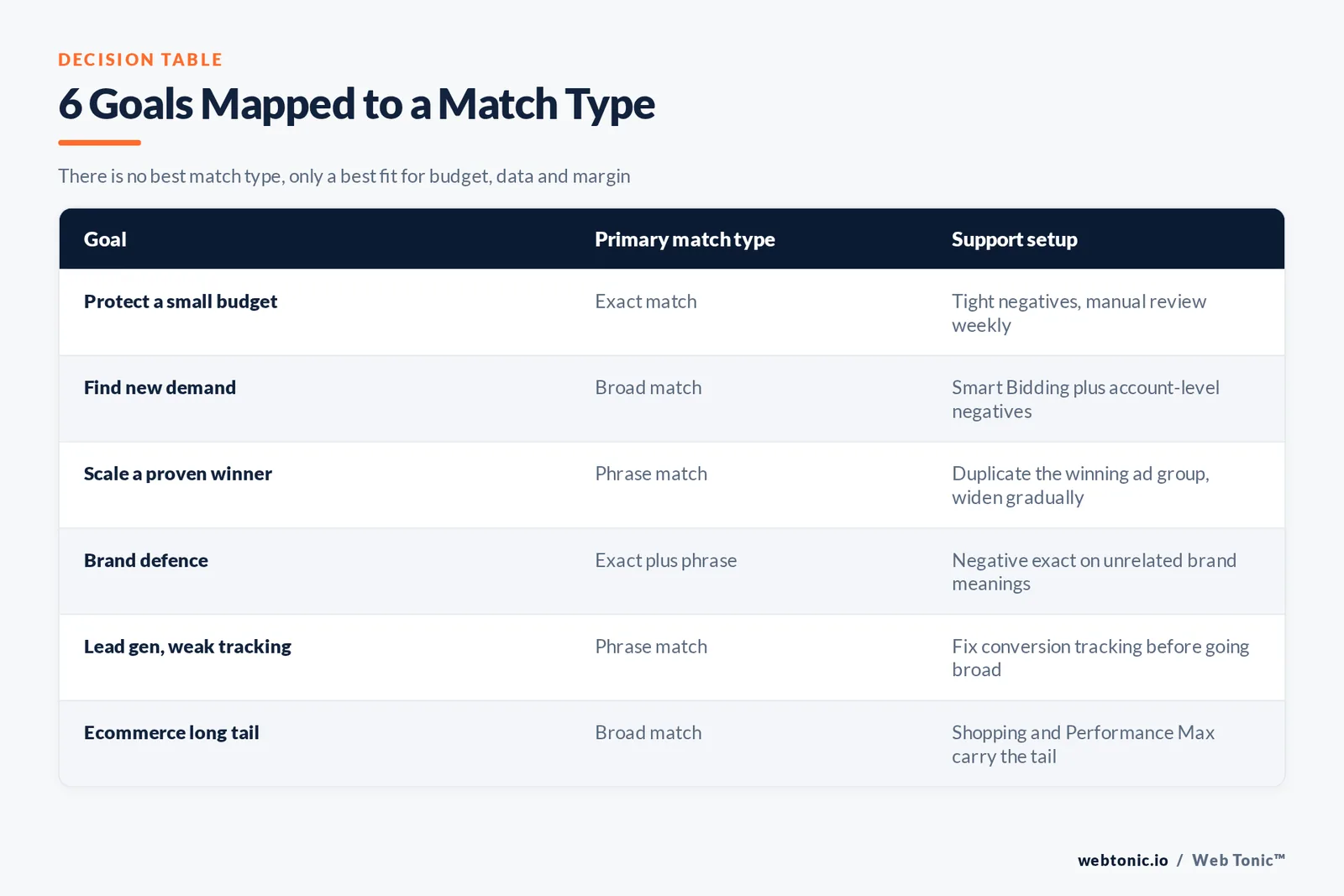
| Goal | Primary match type | Support setup |
|---|---|---|
| Protect a small budget | Exact match | Tight negatives, manual review weekly |
| Find new demand | Broad match | Smart Bidding plus account-level negatives |
| Scale a proven winner | Phrase match | Duplicate the winning ad group, widen gradually |
| Brand defence | Exact plus phrase | Negative exact on unrelated meanings of the brand |
| Lead gen with weak tracking | Phrase match | Fix conversion tracking before going broad |
| Ecommerce long tail | Broad match | Shopping and Performance Max cover the rest |
Volume estimates for each candidate keyword come from Keyword Planner, and you can filter proposals before they reach a campaign using Google's guidance on refining new keywords in Keyword Planner; our walkthrough of the AdWords keyword tool covers the reporting quirks. If search and organic sit in the same plan, align the list with your SEO keyword set so paid and organic are not bidding against your own rankings.
Match types outside classic Search campaigns
Automated campaign types changed what match types can do. Performance Max has no keywords at all; it uses your assets, feed and audience signals, and Search campaigns take priority over Performance Max when a query matches an eligible exact match keyword in the same account.
| Surface | Match types available | Practical note |
|---|---|---|
| Search campaigns | Broad, phrase, exact, negatives | Full control lives here |
| Performance Max | None (signals only) | Exact match keywords in Search take priority |
| Shopping | Negatives only | Feed attributes do the matching |
| Display and Video | Contextual keywords, negatives | Topic-level exclusion, 1,000-negative cap |
| Microsoft Advertising | Broad, phrase, exact, negatives | Same syntax; see the Microsoft match type reference |
Fact 5 — multi-lingual matching adds another layer: a user searching in Spanish can be served an English ad when Google is confident they understand the ad's language, so a keyword list in 1 language can still collect queries in another.
Six match type mistakes that cost money
| Trap | What it looks like | Fix |
|---|---|---|
| Trap 1 — the 3x duplicate | Every keyword added in all 3 match types | Keep 1 version; broader types nest the narrower ones |
| Trap 2 — broad on manual bids | Manual CPC with unpunctuated keywords | Move to Smart Bidding or narrow to phrase |
| Trap 3 — singular-only negatives | "-free" added, "-frees" ignored | Add plurals and synonyms by hand |
| Trap 4 — 200 exact keywords per ad group | Fragmented data, endless learning | Consolidate; let close variants do the work |
| Trap 5 — negatives that block winners | A broad negative shadowing a converting term | Check conflicts before every bulk upload |
| Trap 6 — no search terms review | Match types set once, never audited | Weekly review for the first 30 days |
Rule 4 — run the conflict check before, not after, the upload. A single mis-scoped negative can silence an entire ad group for weeks, and nothing in the interface alerts you.

A 30-day match type audit plan
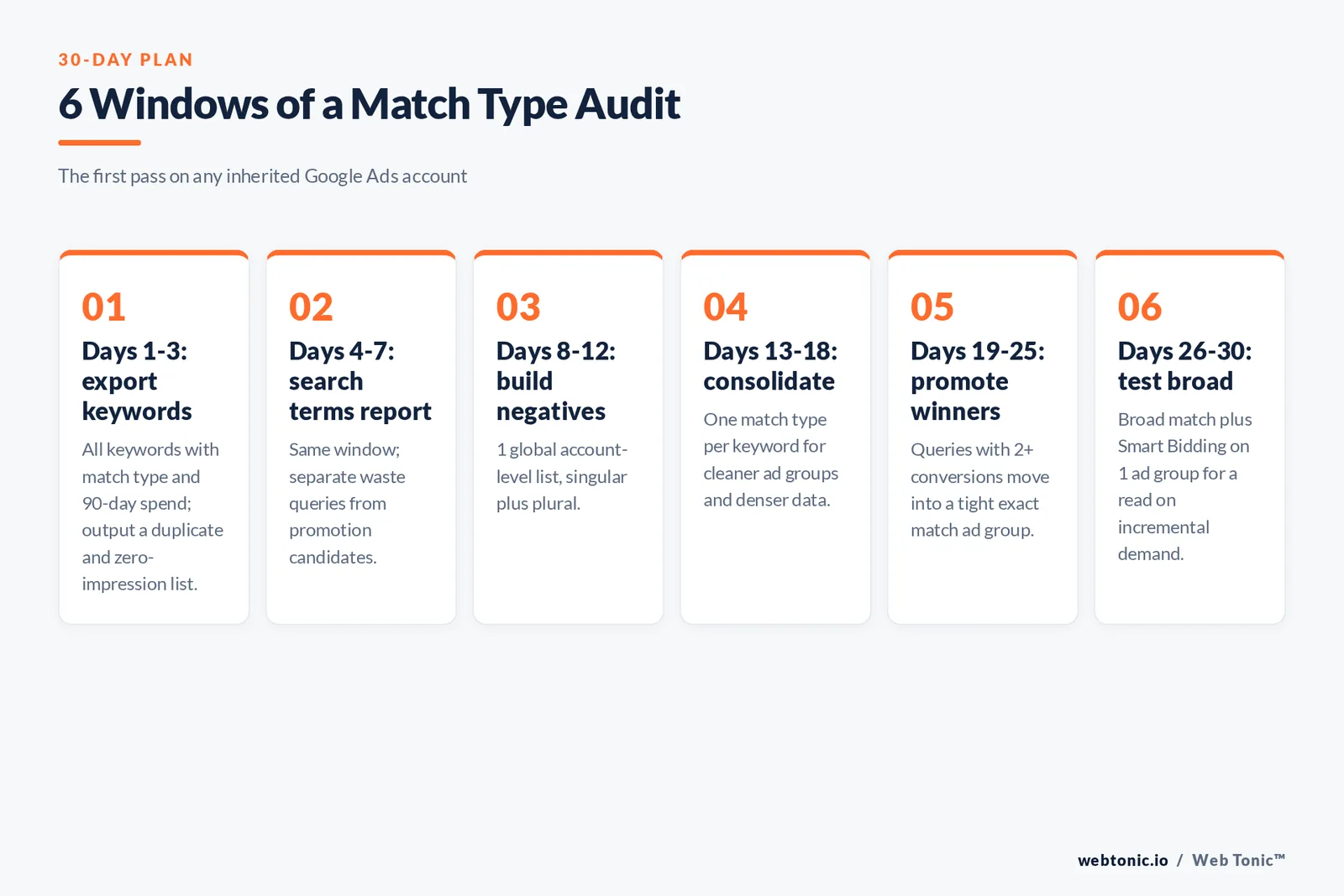
| Window | Task | Output |
|---|---|---|
| Days 1-3 | Export all keywords with match type and 90-day spend | Duplicate and zero-impression list |
| Days 4-7 | Pull the search terms report for the same window | Waste queries and promotion candidates |
| Days 8-12 | Build the account-level negative keyword list | 1 global list, singular plus plural |
| Days 13-18 | Consolidate duplicates to 1 match type per keyword | Cleaner ad groups, denser data |
| Days 19-25 | Promote queries with 2+ conversions to exact match | A tight high-intent ad group |
| Days 26-30 | Test broad match plus Smart Bidding on 1 ad group | A read on incremental demand |
Fact 6 — teams that run this loop usually find their waste concentrated in a handful of queries, not spread evenly — which is why 1 negative list maintained centrally beats hundreds of ad-group-level exclusions. Our growth marketing team runs this audit as the first pass on every inherited account, and you can tell us what your account looks like if you want a second opinion on the structure.
FAQ
What are the keyword match types in Google Ads?
There are three positive keyword match types — broad match, phrase match and exact match — plus negative keywords in broad, phrase and exact variants. Broad match is the default for any keyword you add without punctuation.
What happened to the broad match modifier?
The broad match modifier (BMM) was folded into phrase match during 2021. Its behaviour now lives inside phrase match, which matches queries that include the meaning of the keyword rather than requiring a literal word order.
Which keyword match type is best for a small budget?
Exact match, supported by a tight negative keyword list. It reaches the fewest searches but concentrates spend on the queries closest to your offer, which matters most when a single wasted click is a meaningful share of the daily budget.
Do negative keywords use close variants?
No. Negative keywords do not match close variants or expansions, so you must add plurals, synonyms and alternative spellings yourself. Casing and misspellings are handled automatically.
Should I add the same keyword in every match type?
No. Broader match types already cover every search their narrower equivalents reach, duplicates are collapsed into a single bid at auction, and maintaining three copies of one keyword only splits your reporting.
Sources
Google Ads Help — About keyword matching options; About negative keywords; Keyword close variants: Definition; About the search terms report; Basic tips for building a keyword list; Refine your new keywords in Keyword Planner. Google Ads API reference — KeywordMatchTypeEnum. Google Ads — Keyword Planner. Microsoft Advertising Help — keyword match types. Moz — Beginner's Guide to SEO, keyword research. Semrush — How much does Google Ads cost. WordStream — negative keyword list. Accessed August 2026.


