



Table of contents
Negative keywords tell Google Ads which searches should never trigger your ads. They behave nothing like the positive keywords they mirror: negatives ignore close variants, and each of the three match types blocks a different slice of traffic.
Key Takeaways
- Negative keywords do not match close variants. Excluding the broad negative "flowers" still lets an ad serve on "red flower" — you must add plurals and synonyms yourself.
- All 3 negative match types exist (broad, phrase, exact) but each behaves differently from its positive counterpart; negative broad requires all terms present, any order.
- Negatives can be added at 4 levels: account, campaign, ad group and shared list — and Display or Video campaigns consider a maximum of 1,000 account-level negatives.
- The search terms report is the only supply of real exclusion candidates, and the platform omits low-volume queries from it for privacy reasons.
- Google Search ads average $2.69 per click across industries, so a single junk theme running for a month can quietly consume a mid-size budget.
What negative keywords are and what they actually block
A negative keyword is an exclusion, not a bid. It removes your ad from the auction for searches that contain the terms you listed. The official framing is blunt about the purpose: exclusions "help you focus on only the keywords that matter to your customers". The mechanic worth internalising is that negatives never expand the way positive keywords do.
| Behaviour | Positive keyword | Exclusion | Consequence for you |
|---|---|---|---|
| Close variants | Matches plurals, misspellings, same-meaning terms | No expansion at all | Add singular and plural forms separately |
| Synonyms | Broad match reaches related meanings | Ignored | List the synonyms you want blocked |
| Casing | Case-insensitive | Case-insensitive | No need to duplicate capitalised forms |
| Misspellings | Handled automatically | Handled automatically | Skip typo variants |
| Accent marks | Treated flexibly | "cafe" and "café" count as 2 different entries | Add both spellings for accented markets |
Fact 1 — the plural gap is the most expensive detail on this page. The documented example is exact: exclude the broad term "flowers" and ads stay out of "red flowers", yet remain eligible for "red flower". Every audit we run at Web Tonic finds at least 3 or 4 singular forms missing from an otherwise mature exclusion list.
The 3 exclusion types, using one worked example
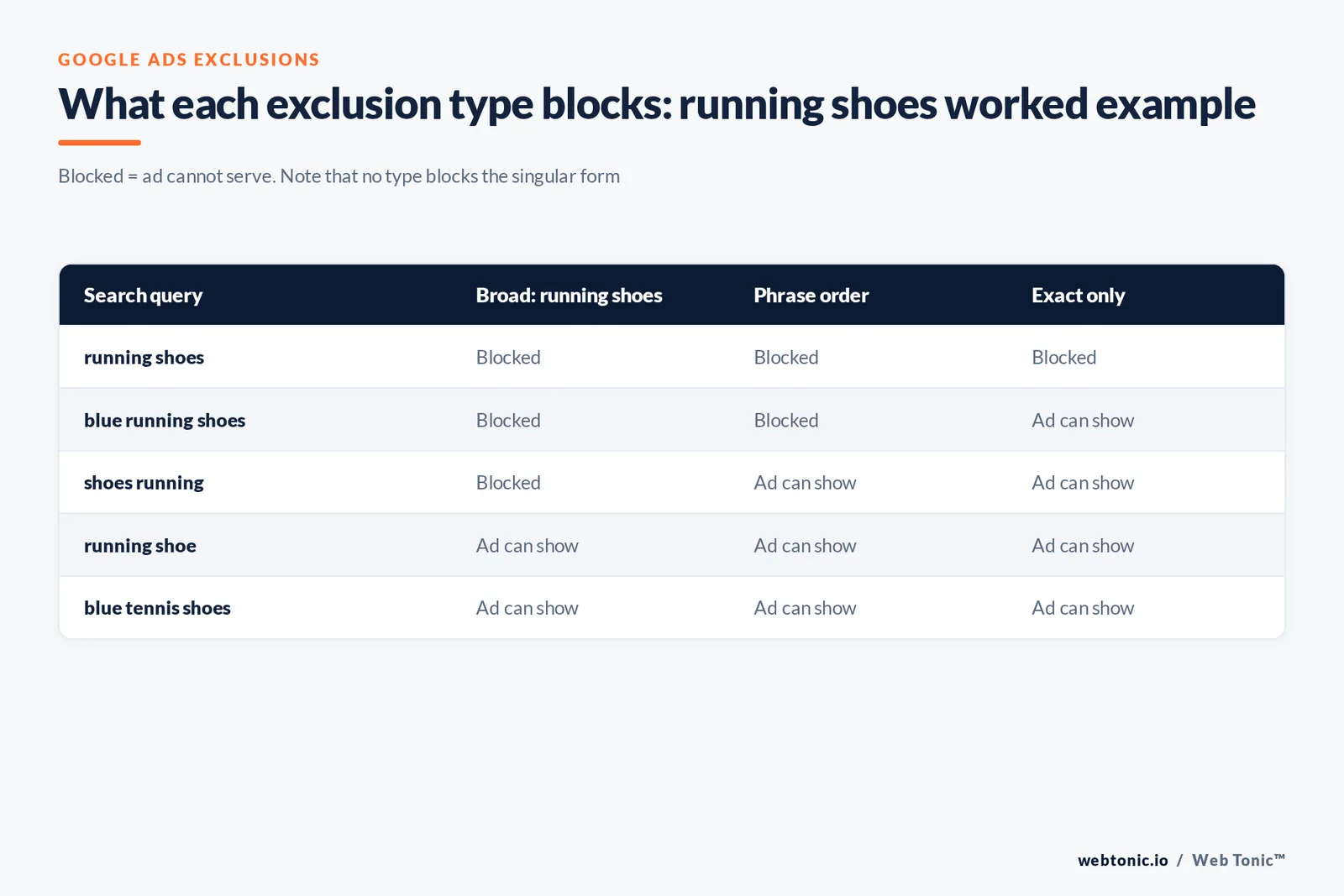
The canonical example uses the phrase running shoes. The table below reproduces that logic across five real searches so you can see exactly where each one stops working.
| Search query | Broad: running shoes | Phrase: running shoes | Exact: [running shoes] |
|---|---|---|---|
| running shoes | Blocked | Blocked | Blocked |
| blue running shoes | Blocked | Blocked | Ad can show |
| shoes running | Blocked | Ad can show | Ad can show |
| running shoe | Ad can show | Ad can show | Ad can show |
| blue tennis shoes | Ad can show | Ad can show | Ad can show |
Read the columns as widening filters. Rule 2 — broad blocks the most, exact the least. The broad type is the default for new entries and stops any query containing all of your words in any order. Phrase requires those words in the same order and tolerates extras around them. Exact blocks only the query itself, with nothing added. That is the inverse of how advertisers usually think about keyword matching options, where broader positive types simply capture more.
Where to add exclusions: the 4 tiers compared
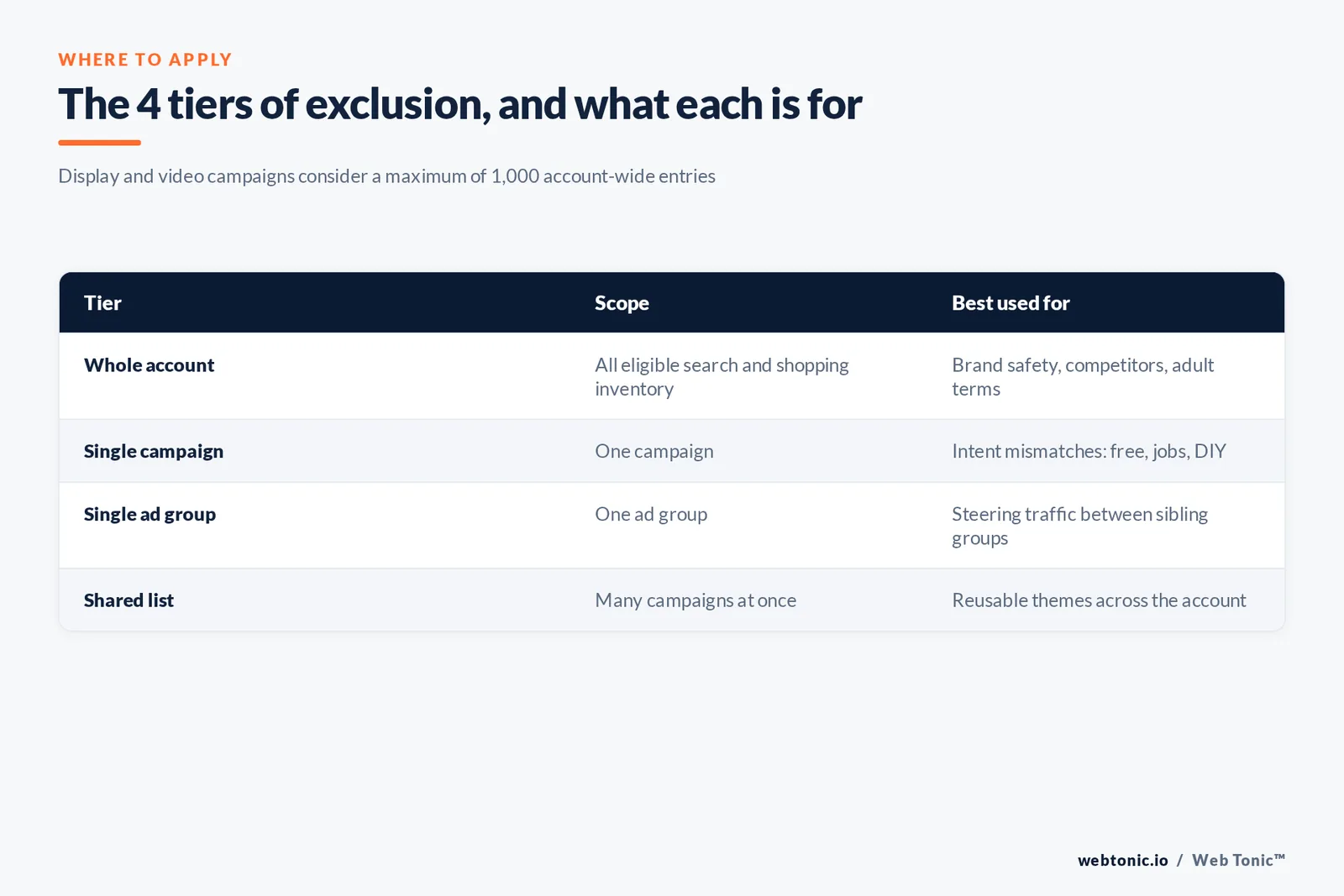
Your choice of tier decides blast radius. Get this wrong and you either block a converting product line account-wide or repeat the same list across 30 campaigns.
| Tier | Scope | Use it for | Watch out for |
|---|---|---|---|
| Whole account | All eligible search and shopping inventory | Brand safety, competitor names, adult or violent terms | Display and video consider only 1,000 entries |
| Single campaign | One campaign | Blocking commercial intent mismatches such as "free" or "jobs" | Duplication across similar campaigns |
| Single ad group | One ad group | Steering traffic between sibling groups | Blocking a term the group is meant to win |
| Shared list | Many campaigns at once | Reusable themes: jobs, DIY, competitors, wholesale | One edit changes every attached campaign |
Limit 3: a global list applies once, everywhere. Account-wide exclusions automatically apply across all eligible search and shopping inventory in relevant campaign types, which makes them the right home for the 10 to 20 terms that must never trigger an ad in any market you operate in.
How to add negative keywords, step by step
- In your Google Ads account, open Campaigns, then Search terms under the Insights and reports sub-menu.
- Set the date range to the last 30 to 90 days so low-volume junk has time to accumulate.
- Sort by cost descending and scan for searches with zero conversions and above-average cost.
- Select the offending rows and choose Add as negative keyword, then pick the level: ad group, campaign or list.
- Choose the match type: broad for whole themes, phrase for word orders, exact for a single query you must keep out.
- Re-check the singular and plural forms, then record the date and the reason in a shared change log.
Do the same pass on your Keyword Planner output before launch. Google's guidance on building a keyword list pushes advertisers toward high-intent and long-tail terms; the mirror image of that advice is drafting the exclusion themes at the same time you draft the keyword list, not six weeks later.
Reading the query report properly
This report is where exclusion candidates come from, and it has two limitations that change how you use it.
| Quirk | Official wording | How to work around it |
|---|---|---|
| Low-volume omissions | Queries without enough activity are omitted for privacy | Use broad exclusions for themes, not one entry per query |
| Search terms insights | Themes and subthemes are labelled from the last 56 days of data | Expect labels for terms that no longer serve |
| Conversion lag | Insights and the report process conversions differently | Never exclude on the last 3 days of data |
| Query versus keyword | A search term is what the person typed; a keyword is what you added | Exclude the term, then check which keyword triggered it |
The documentation on the search terms report gives the cleanest illustration of that last row: someone types "red roses", your keyword was "roses", and your ad becomes eligible. If you only ever exclude at the term level you fix symptoms; the underlying keyword may need a tighter match type instead. Our own match types breakdown covers that side of the decision, and the campaign setup walkthrough shows where both live.
Starter exclusion lists you can copy
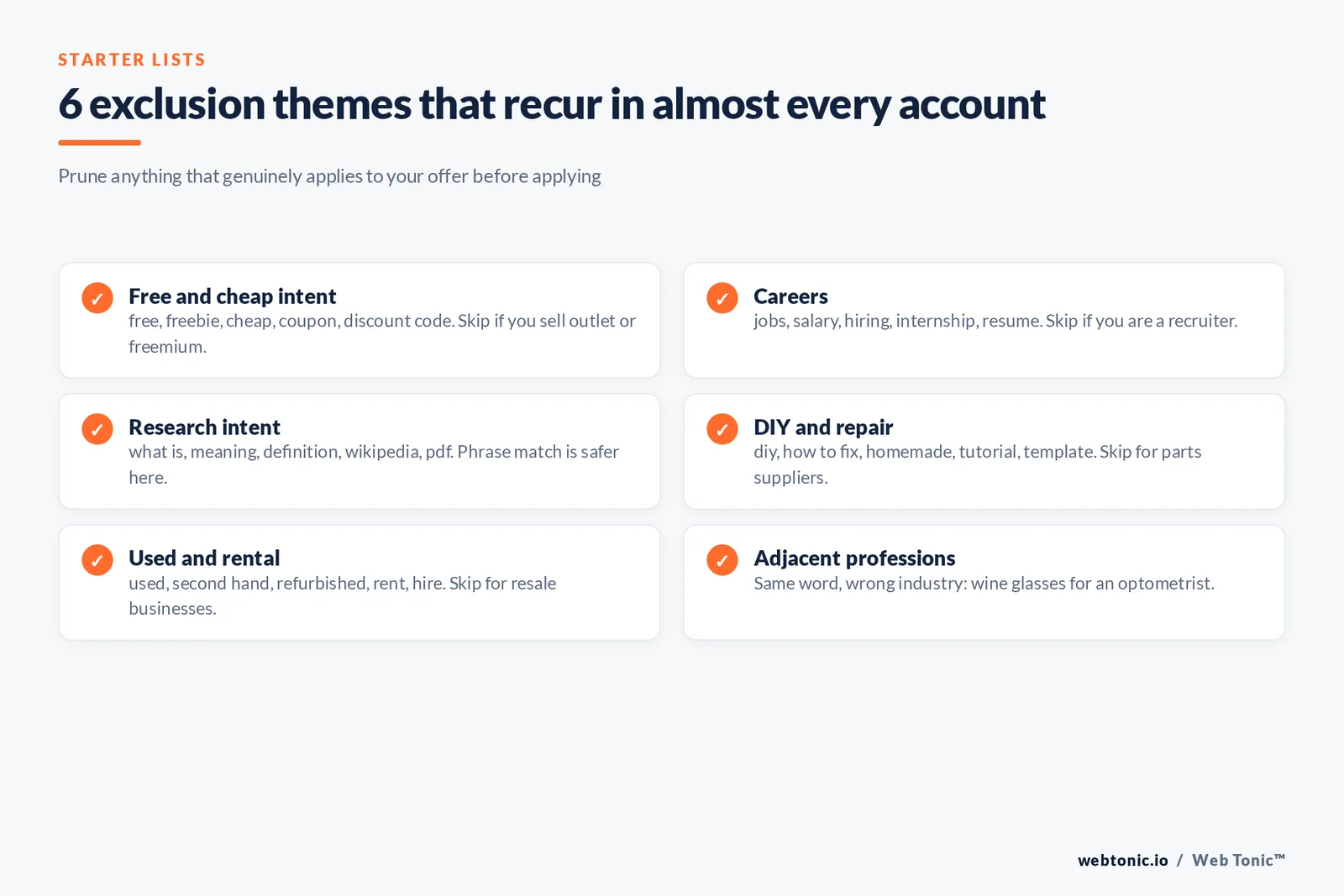
These are the themes that recur in nearly every account we audit. Add them as shared lists, then prune anything that genuinely applies to your offer.
| Theme | Sample entries | Match type | Who should skip it |
|---|---|---|---|
| Free and cheap intent | free, freebie, cheap, discount code, coupon | Broad | Freemium products and outlet retailers |
| Careers | jobs, job, salary, hiring, internship, resume | Broad | Recruitment advertisers |
| Research intent | what is, meaning, definition, wikipedia, pdf | Phrase | Lead magnets and course sellers |
| DIY and repair | diy, how to fix, homemade, tutorial, template | Broad | Parts and materials suppliers |
| Used and rental | used, second hand, refurbished, rent, hire | Broad | Rental and resale businesses |
| Adjacent professions | wine glasses, drinking glasses (for an optometrist) | Phrase | Anyone genuinely selling both |
That last row is the official example: an optometrist selling eyeglasses wants "wine glasses" and "drinking glasses" out of the account. Fact 4 — the best exclusion themes come from adjacent meanings, not obvious junk. Around 60% of the waste we remove in a first audit is same-word, different-industry traffic rather than spam.
Symbols, operators and the errors they cause
Exclusion syntax has quiet rules that break bulk uploads. Three symbols are supported, several are ignored and a handful throw errors outright.
| Symbol | Status | Effect |
|---|---|---|
| Ampersand, accents, asterisk | Supported | "socks & shoes" differs from "socks and shoes" |
| Period | Ignored | "Fifth Ave." equals "Fifth Ave" |
| Plus sign | Usually ignored | Kept only in cases such as C++ |
| Minus sign in front | Breaks matching | The entry is ignored entirely |
| site: and OR | Stripped | [site:example.com dark chocolate] becomes [dark chocolate] |
| Comma, exclamation, braces | Invalid | Upload returns an error message |
What waste actually costs, and how to size the win
Exclusions are a budget lever, so put a number on them before you argue for the time. Use your own cost per click; the industry reference points below are only for sanity checks.
| Metric | Published reference | What it means for exclusion work |
|---|---|---|
| Average Search CPC | $2.69 across industries on Search, $0.63 on Display | 100 junk clicks a month is roughly $269 gone |
| Most expensive verticals | Finance, insurance and fitness sit well above the $2.69 average | One junk theme can outweigh a month of optimisation |
| Average Search CTR | 4-6% on Google paid search | Irrelevant impressions drag CTR and Quality Score |
| Audit cadence | Weekly below $10,000 monthly spend | Monthly is enough only for stable, mature accounts |
Published averages from WordStream's benchmark data and Semrush's Google Ads cost analysis are useful only as order-of-magnitude anchors; the pay-per-click model means your own auction prices are the ones that matter. If you want the arithmetic done for you, that is part of every growth marketing engagement we run.
Six mistakes that make exclusion lists backfire
| Mistake | Symptom | Fix |
|---|---|---|
| Excluding a converting theme | Impressions drop 20%+ overnight | Check conversions before adding, not after |
| Broad-matching a two-word brand | Whole product line stops serving | Use phrase or exact for brand terms |
| Conflicts with your own keywords | A keyword shows 0 impressions | Run a conflict audit after every bulk upload |
| Forgetting singular forms | Junk traffic returns within 7 days | Add both forms in the same edit |
| Applying Search logic to Display | Topic-level blocking is wider than expected | Keep separate lists; Display excludes by topic |
| No change log | Nobody knows why a term was blocked | Log date, reason and owner per entry |
Trap 5 — Display and Video do not behave like Search. The help documentation notes that a set of Display exclusions is treated as an exact topic, so blocking "women's pants" also blocks a page about women's jeans, while never generalising to skirts or men's slacks. That is more aggressive than a Search exclusion and less predictable, which is why the two lists should never be shared.
A 30-day exclusion routine
Run this cadence and the report stops surprising you. It takes about 90 minutes a month for a mid-size account.
| When | Action | Output |
|---|---|---|
| Week 1 | Pull 90 days of search terms, sort by cost | Top 50 zero-conversion queries |
| Week 2 | Group them into themes and pick match types | 2-4 shared lists |
| Week 3 | Apply, then run a conflict check | Zero blocked active keywords |
| Week 4 | Compare CPA and impression volume week over week | Documented saving and any rollback |
Keyword research and exclusion work are the same job seen from two directions, a point Ahrefs makes well and Search Engine Journal's PPC guide reinforces. For the automated side, the Google Ads API keyword planning docs let you generate candidate themes at scale, and Shopify's Google Ads primer is a reasonable starting point for stores. Want a second pair of eyes on your account? Send us the numbers, or start with our service overview.

FAQ
What are negative keywords and why do they matter?
They are exclusions that stop your ads showing for searches containing the terms you list. They matter because irrelevant clicks cost the same as good ones: at the all-industry Search average of $2.69 per click, one junk theme running unchecked for a month can absorb hundreds of dollars while dragging your click-through rate down.
How do I add negative keywords to a Google Ads campaign?
Open Campaigns, go to Search terms under Insights and reports, set a 30 to 90 day window, sort by cost, select the queries with no conversions, and choose Add as negative keyword. Then pick the level (ad group, campaign or shared list) and the match type, and add both singular and plural forms.
Which negative match type should I use?
Broad for whole themes such as jobs or free, because it blocks any search containing all your terms in any order. Phrase when word order matters, such as a competitor brand followed by "reviews". Exact when a single query must be blocked but its longer variations should still serve.
Do exclusions apply to close variants and plurals?
No. Unlike positive keywords, exclusions never expand to close variants, so plurals and synonyms must be added individually. Casing and misspellings are the exception: those are handled automatically, so there is no value in adding typo versions.
Where can I find an exclusion list for my industry?
Start from your own search terms report rather than a downloaded list, then layer the universal themes: free, jobs, DIY, used, research intent and adjacent professions. Downloaded lists are a starting scaffold at best, since one advertiser's junk term is another's core product.
Sources
Google Ads Help, About negative keywords (match type behaviour, symbols, Display topic blocking, account-level limits) · Google Ads Help, About keyword matching options · Google Ads Help, About the search terms report (56-day insight labels, privacy omissions) · Google Ads Help, Basic tips for building a keyword list · Google Ads API, keyword planning documentation · Google Keyword Planner · WordStream, average click-through rate and cost benchmarks · Semrush, Google Ads cost analysis · Ahrefs, keyword research guide · Search Engine Journal, PPC guide · Shopify, Google Ads guide · Wikipedia, pay-per-click. Benchmarks are published averages; use your own account data for decisions.


