



Table of contents

DSA use your site content to automatically generate headlines and match searches that keyword-based campaigns miss — but Google has set them on a path to retirement, with automatic migration to AI Max scheduled for February 2027. Here is a complete guide to how DSA campaigns work, when to use them, and how to prepare for the transition.
Key Takeaways
- Dynamic Search Ads automatically generate ad headlines from your website content and match them to relevant queries without requiring manual keyword lists — making DSA campaigns ideal for large websites with frequently changing inventory (the Help Center, 2026).
- DSA campaigns will be automatically upgraded to AI Max for Search starting February 2027, after Google pushed back the original September 2026 deadline — advertisers should prepare for this migration now rather than scrambling at the last minute (PPC Land, 2026).
- The average conversion rate across search campaigns is 8.18% in 2026, and DSA campaigns that properly target high-converting pages often match or exceed this benchmark because they serve ads to queries with clear commercial intent (WordStream, 2026).
- Page feeds give advertisers precise control over which URLs DSA targets, letting you specify custom labels to organize landing pages by category, margin, or performance tier — far more effective than targeting your entire website domain.
- DSA campaigns perform best as a discovery and gap-filling tool alongside keyword-based campaigns, capturing long-tail queries that manual keyword research misses while feeding high-performing search terms back into standard groups for tighter control.
- Negative keywords are the single most important control mechanism for DSA campaigns because without them, Google will match your ads to irrelevant queries based on website content you never intended to advertise — including blog posts, job listings, and privacy policies.
What Are Dynamic Search Ads?
Dynamic Search Ads are a campaign type where the platform uses your website content — not a manual keyword list — to decide which queries trigger your ads and what headlines to display. According to the Help Center Center, DSA targeting works by matching people's searches on Google with specific pages on your site using Google's organic web index. You control this targeting by specifying individual web pages, groups of pages organized by URL, page title, or page content, or by targeting your entire website domain.
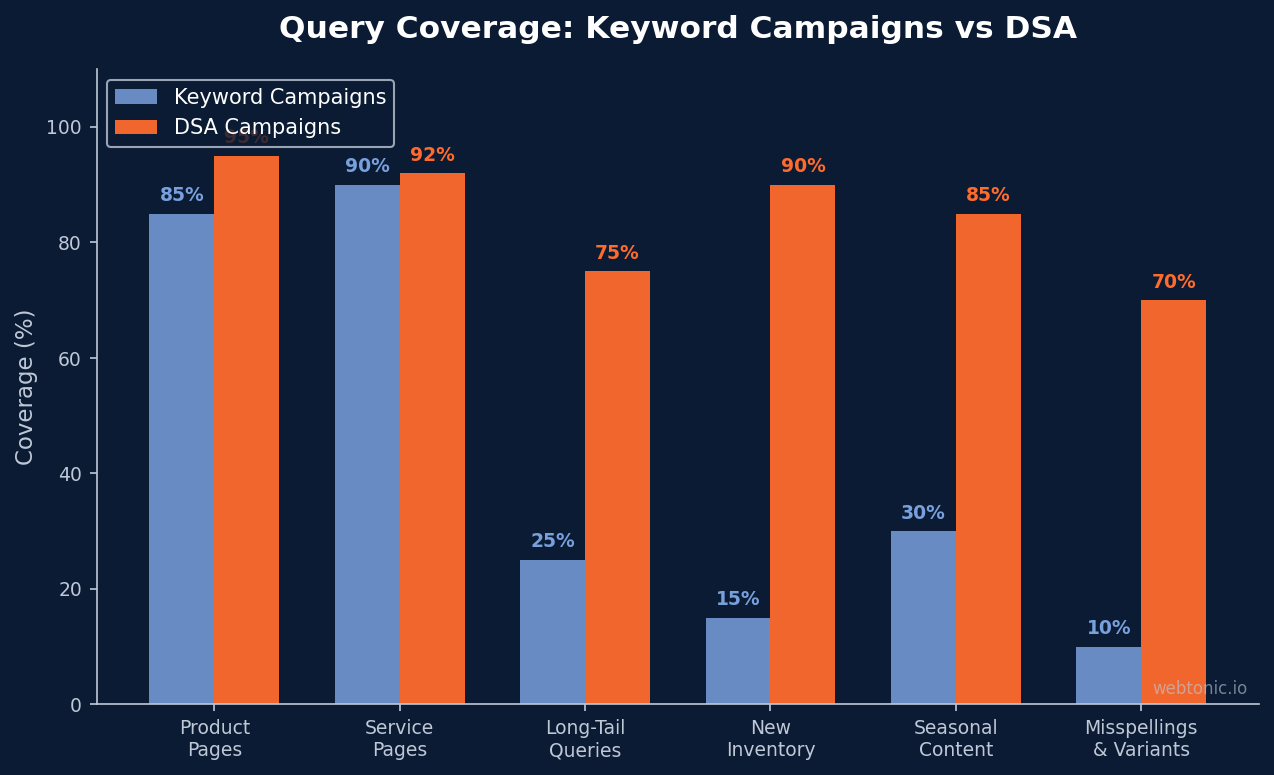
The practical value of DSA comes from scale and coverage. An ecommerce site with 10,000+ product pages cannot feasibly create keyword-targeted ad groups for every product variation. A travel site with hotel availability that changes daily cannot keep ads relevant through manual keyword management. This automation solves the problem by crawling your website, identifying the content on each page, and generating headlines that match what users are actually searching for — all in real time.
According to Omologist's 2026 DSA best practice guide, DSAs remain a productive tactic for the right accounts and should not be switched off prematurely. They are strongest at catching converting queries that keyword campaigns miss and at discovering new search demand at scale. However, These campaigns require proper setup and ongoing management to prevent wasted spend — without negative keywords, page exclusions, and careful targeting settings, DSA campaigns will match ads to pages you never intended to promote.
How Dynamic Search Ads Work: The Technical Process
Understanding how Google creates dynamic search ads helps you control them effectively. The process has four stages:
1. Google crawls and indexes your website. The organic web crawler scans your site pages, identifies the content and themes on each page, and builds an index of your website's content. This is the same index Google uses for organic search results. If a page isn't indexed by Google, DSA can't target it — this is why new pages may take up to 24 hours to start serving ads.
2. A user enters a search query on Google. The system compares the query against its index of your website content. If the query matches the themes on one of your indexed pages, the the campaign becomes eligible to enter the auction.
3. The headline is automatically generated. The ad headline is pulled dynamically from the content of the matching landing page — typically the page title or a prominent heading. You provide the descriptions (up to two description lines), the display URL path, and any ad extensions, but the headline is Google's creation.
4. The ad serves and directs the user to the matching final URL. The landing page URL is determined automatically based on which page matched the query. You don't set the final URL for these ads — the platform does. This is both the power and the risk of DSA: the right page matched to the right query is highly relevant, but a wrong match sends paid traffic to a page that won't convert.
| DSA Component | Automated by Google | Controlled by Advertiser |
|---|---|---|
| Headlines | Yes — pulled from page content | No manual control (descriptions only) |
| Search Query Matching | Yes — based on website index | Negative keywords and page exclusions |
| Landing Page / Final URL | Yes — matched page is the destination | Page feeds with custom labels |
| Descriptions | No | Fully manual — 2 description lines |
| Bidding | Optional (Smart Bidding recommended) | Manual CPC or automated strategies |
| Targeting Scope | No | Dynamic ad targets and page feeds |
When to Use Dynamic Search Ads
These campaigns are not a replacement for keyword-based campaigns — they are a complementary tool for specific situations. According to Semrush's DSA guide, the accounts that benefit most from Dynamic Search Ads share common characteristics:
Large websites with many products or pages. Ecommerce sites with hundreds or thousands of products, real estate platforms with frequently changing listings, and travel sites with dynamic availability are natural strong candidates for the format. Manually creating ad groups for every product SKU or listing is impractical — DSA automates this at scale.
Websites with frequently changing content. If your inventory, pricing, or page content changes daily, keyword-based campaigns struggle to keep ads relevant. DSA campaigns adapt automatically because they pull from your live website content.

Gap-filling alongside keyword campaigns. Even well-researched keyword campaigns miss long-tail queries. This approach catches long-tail queries by matching your website content to queries that don't exactly match your keyword list. The search terms report from DSA campaigns is a valuable source of keyword discovery — high-performing DSA search terms should be extracted and added to standard keyword groups for tighter control and better performance tracking.
When you're NOT a good fit: Small websites with few pages, businesses where landing page quality varies significantly, or sites with content you don't want advertised (blog posts, legal disclaimers, job boards) require extensive negative targeting to make the campaigns safe. If your website has fewer than 50 well-optimized pages, keyword-based campaigns with responsive search ads will typically outperform DSA. At Web Tonic, we evaluate each client's website structure before deciding whether DSA campaigns will help them discover new converting queries or simply waste budget on irrelevant matches.
Setting Up a DSA Campaign: Step by Step
Proper setup is the difference between a DSA campaign that discovers profitable queries and one that hemorrhages budget on irrelevant traffic. According to Google's page feed documentation, using a page feed to target Dynamic Search Ads gives you precise control over which URLs Google uses. Here is how to set up a the campaign correctly:
Step 1: Create your page feed. Build a spreadsheet with two columns: Page URL and Custom Label. Include only the pages you want to advertise — product pages, service pages, and high-converting landing pages. Exclude blog posts, about pages, careers pages, privacy policies, and any page without a clear conversion path. Custom labels let you organize pages by category (e.g., "shoes_mens," "shoes_womens") for bid adjustments at the campaign level.
Step 2: Configure dynamic ad targets. Within your campaign settings, create ad groups targeting specific page feed labels or URL patterns. Don't target your entire website domain unless every page has a clear commercial purpose. Group related pages together so you can write relevant descriptions for each dynamic ad group.
Step 3: Add comprehensive negative keywords. This is the most important step. Review your website content and proactively block queries related to pages you're not advertising: brand comparisons you don't want to rank for, informational queries that won't convert, and competitor names. Update negative keywords weekly based on the search terms report — These campaigns require more active negative keyword management than standard search campaigns.
Step 4: Write compelling descriptions. While Google controls the headline, you control the two description lines. Write descriptions that work broadly across the pages in each dynamic ad group — focus on your value proposition, credibility signals (years in business, number of customers served), and a clear call to action.
Step 5: Set appropriate bidding. Start with Target CPA or Maximize Conversions if you have conversion tracking properly configured. For new discovery campaigns without conversion history, begin with Manual CPC to establish baseline performance data before switching to automated bidding strategies.
DSA vs Responsive Search Ads: Understanding the Difference
Many advertisers confuse Dynamic Search Ads with Responsive Search Ads (RSA), but they serve fundamentally different purposes. According to Search Engine Journal's DSA guide, DSA is a campaign type that determines which queries trigger your ads and generates headlines automatically. RSA is an ad format used within standard campaigns where you provide multiple headlines and descriptions and machine learning assembles the best combination for each auction.
| Feature | Dynamic Search Ads (DSA) | Responsive Search Ads (RSA) |
|---|---|---|
| Type | Campaign type | Ad format |
| Keyword Targeting | Not required — uses website content | Required — manual keyword list |
| Headlines | Auto-generated from page content | Provided by advertiser (up to 15) |
| Landing Page | Auto-selected by Google | Set by advertiser |
| Best For | Large sites, gap filling, keyword discovery | Standard campaigns with known keywords |
| Control Level | Low (descriptions and negatives only) | High (all assets provided by advertiser) |
| Future Status | Migrating to AI Max (Feb 2027) | Standard ad format, no retirement planned |
The key insight: These are not competing options. They serve different roles within an account structure. The discovery format handles discovery and scale, while RSA ads within keyword-targeted campaigns give you maximum control over your highest-value search terms. A well-structured account uses both — discovery campaigns for breadth and RSA for depth.

The AI Max Migration: What Happens to DSA
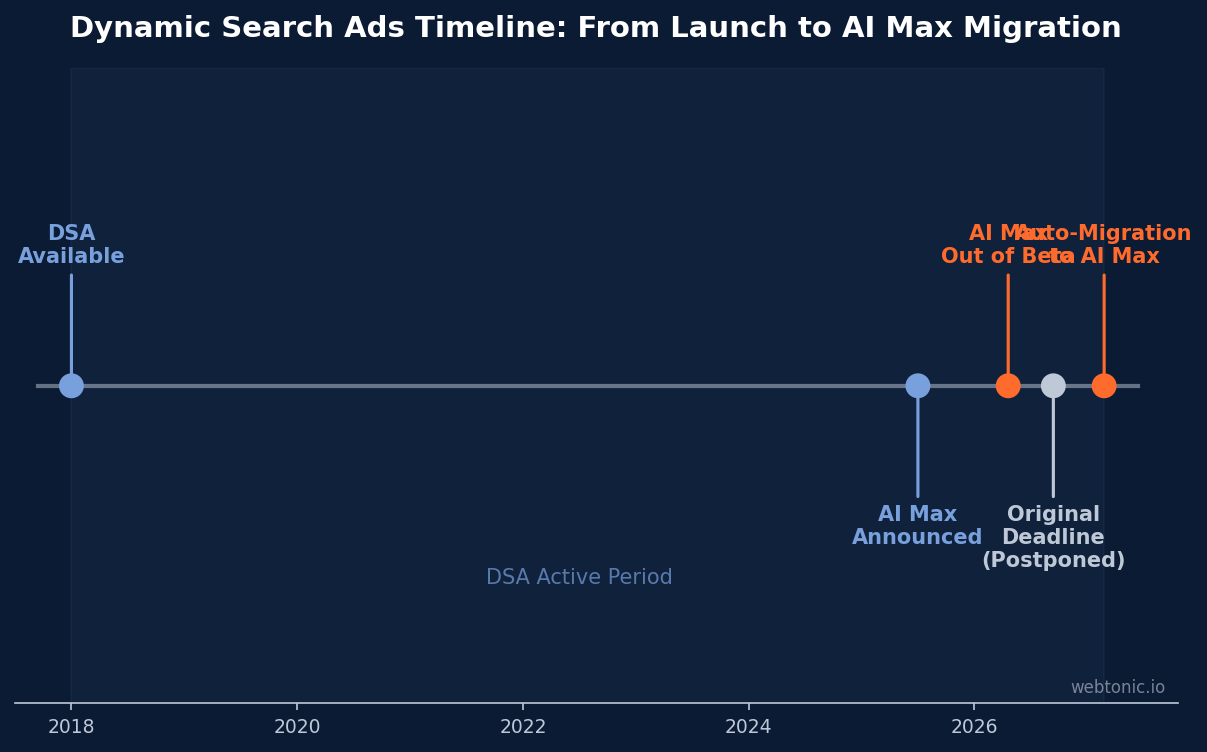
Google announced on April 15, 2026 that Dynamic Search Ads will be automatically upgraded to AI Max campaigns. According to PPC Land's analysis of the timeline, Google initially set a September 2026 deadline but quietly pushed it back to February 2027 in updated help documentation published June 23, 2026. This delay gives advertisers additional time to prepare, but the direction is clear: the format as a standalone campaign type will be retired.
AI Max for Search takes the core DSA concept — using website content to match queries and generate ads — and layers additional automation on top. AI Max automatically expands your keyword targeting beyond exact and phrase match, generates ad assets beyond headlines, and optimizes landing pages across your entire site. The practical difference is that AI Max operates at the campaign level rather than requiring a separate DSA campaign, and it integrates with Performance Max's machine learning models for cross-channel optimization.
What advertisers should do now: don't disable DSA campaigns prematurely, but start testing AI Max for Search in a controlled environment. Enable AI Max on a single campaign, monitor search term reports closely, and compare performance metrics against your existing these campaigns. The February 2027 automatic upgrade will migrate your DSA settings into AI Max — but advertisers who migrate proactively maintain tighter control over the transition settings than those who let Google auto-migrate. At Web Tonic, we help clients plan the DSA-to-AI Max transition so they maintain campaign performance through the migration rather than experiencing the disruption that automatic upgrades typically cause.
Common DSA Mistakes to Avoid
Even well-intentioned campaigns of this type fail when advertisers skip critical setup steps. According to Google's DSA troubleshooting guide, common issues include "No matching landing pages," "Destination not working," and "Overlapping target" statuses that prevent ads from serving. Here are the most expensive mistakes:
Targeting your entire website without exclusions. Pointing DSA at your entire website domain means Google will match ads to every indexed page — including blog posts, team bios, terms of service, and expired product pages. Always use page feeds or category-level targeting to restrict DSA to pages with clear commercial intent and conversion paths.
Neglecting negative keywords. These campaigns generate more irrelevant query matches than keyword campaigns because Google interprets website content broadly. Review the search terms report weekly and add negative keywords aggressively. Missing this step can waste 30–40% of DSA budget on clicks that will never convert.
Running DSA without conversion tracking. DSA campaigns need conversion data to optimize delivery. Without proper conversion tracking — including conversion tags and enhanced conversions — the algorithm has no signal to learn from, and performance stagnates. Set up conversion tracking before launching any discovery campaign.
Not reviewing auto-generated headlines. Auto-generated headlines are only as good as your page content. If your page titles are generic ("Products" or "Category Page"), the DSA headlines will be generic too. Optimize your website page titles and H1 headings to be specific and compelling — they directly determine your ad quality.
Ignoring the search terms report. The DSA search terms report is your most valuable optimization tool. It shows exactly which queries triggered your ads, which pages were served, and how each combination performed. Use this report to extract winning search terms into keyword-based campaigns, block wasteful queries with negative keywords, and identify pages that attract traffic but don't convert. Review this report at least weekly — it's the only way to learn what DSA is actually doing with your budget. For more on search term management, explore our blog for detailed guides on mining search terms effectively.
Related reading
- Responsive Search Ads: The Complete Guide to RSA Best Practices
- Search Advertising Trends: What's Shaping Paid Search in 2025 and Beyond
- Microsoft Ads: What It Costs, Who It Reaches and How to Launch
- Paid Search services at Web Tonic
FAQ
What are Dynamic Search Ads in Google Ads?
DSA is a campaign type that uses your website content to generate ad headlines and match them to relevant queries automatically. Instead of creating keyword lists, you point DSA at your website or specific pages, and the index determines which search queries trigger your ads and which landing page (final URL) to use. This approach helps cover queries that keyword campaigns miss, making it valuable for large sites with many products or changing content.
Are Dynamic Search Ads being discontinued?
Yes — Google will automatically upgrade DSA campaigns to AI Max starting February 2027. Google originally announced a September 2026 deadline but pushed the migration date back. DSA campaigns are still fully functional and worth running through 2026, but advertisers should begin testing AI Max for Search now to understand how AI Max performs with their settings before migration happens.
How do I control which pages DSA targets?
You control DSA targeting through three mechanisms: page feeds (uploaded spreadsheets specifying exactly which URLs to target, with custom labels for organization), dynamic ad targets (rules based on URL patterns, page titles, or page content categories), and negative keywords plus page exclusions (blocking specific queries and pages from triggering ads). Page feeds offer the most precise control and are recommended for any a campaign targeting more than a few dozen pages.
Should I use DSA or RSA for my campaigns?
Use both — they serve different purposes. One is a campaign type for discovering new queries across large websites. The other is an ad format within standard campaigns where you provide headlines and descriptions. DSA handles breadth and keyword discovery, while RSA within keyword campaigns provides depth and control. Use the discovery campaign to find converting queries, then move proven search terms into keyword campaigns with RSA ads for maximum performance control.
What is the difference between DSA and PMax?
DSA runs exclusively on Google Search, using your site content to match queries and generate text ads. Performance Max (PMax) campaigns run across all Google channels — Search, Shopping, Display, YouTube, Gmail, Discover, and Maps — using a combination of your assets and automated targeting. The format focuses on text-based ad discovery, while PMax is a cross-channel type that includes search coverage as one component. For keyword discovery on the search network, the format typically provides more transparent query data than PMax.
Sources
Help Center — Create Targets for DSA
Help Center — Use a Feed to Target DSA
Help Center — DSA Search Terms Report
Help Center — Fix Issues With DSA
Omologist — Dynamic Search Ads Best Practice & AI Max 2026
PPC Land — DSA Deadline Moves to 2027
Semrush — Dynamic Search Ads Guide
Search Engine Journal — DSA Optimization Guide
WordStream — PPC Benchmarks 2026


