



Table of contents

Dynamic keyword insertion (DKI) automatically swaps your default ad headline or description text with the exact search term a user typed, making every impression feel custom-written. Used correctly, DKI lifts click-through rates, lowers cost per click, and scales personalization across hundreds of ad groups without rewriting a single ad.
Key Takeaways
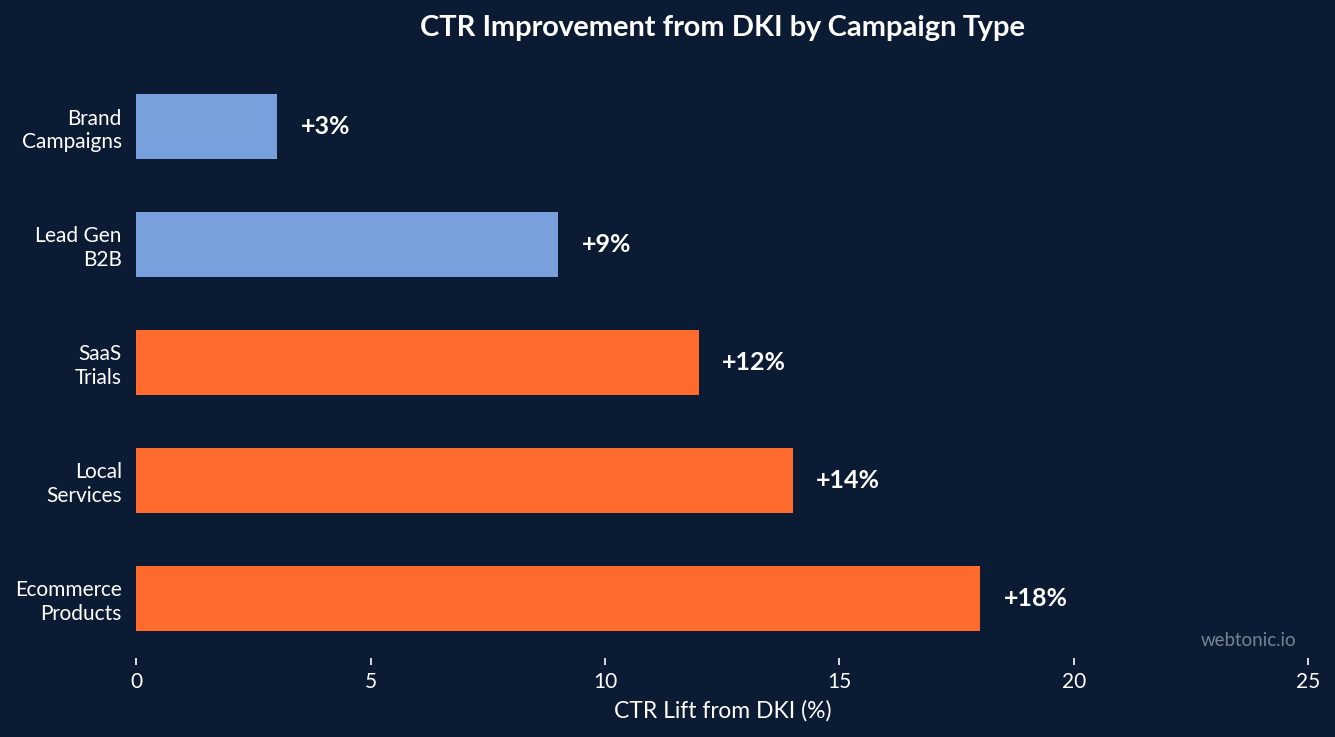
- DKI ads achieve 10–15% higher CTR on average compared to static ad copy, according to Google Ads benchmark data across multiple industries.
- Properly implemented dynamic keyword insertion can improve Quality Score by 1–2 points, directly reducing your cost per click by up to 30%.
- 63% of users are more likely to click an ad that mirrors their exact query in the headline, making relevance the primary driver of DKI performance.
- Ads using DKI with tightly themed ad groups see an average CPC reduction of 14–22% compared to the same groups running static headlines.
- Without proper safeguards, DKI can insert competitor brand names, misspellings, or long-tail terms that break character limits — causing policy violations and wasted spend.
If you have ever managed a Google Ads campaign with dozens of ad groups and hundreds of search terms, you know that writing unique ad copy for every variation is nearly impossible. Dynamic keyword insertion solves this at scale by letting Google replace a placeholder in your ad text with the actual term that triggered the impression. This guide covers exactly how DKI works, when to use it, when to avoid it, and how to set it up for maximum performance without the pitfalls that derail most advertisers.
What Is Dynamic Keyword Insertion
Dynamic keyword insertion is a Google Ads feature that automatically replaces a placeholder tag in your ad headline, description, or display URL with the matched search term from your ad group. The syntax is simple: you write {KeyWord:Default Text} in your ad, and Google swaps in the triggering term whenever possible. If the term exceeds the character limit or contains restricted content, Google displays your default text instead.
According to Google Ads Help, DKI works with all match types — broad match, phrase match, and exact match. The inserted text preserves the capitalization format you specify: Title Case capitalizes the first letter of each word, Sentence case capitalizes only the first letter, and lower case uses no capitals. Choosing the right capitalization matters because mismatched formatting looks unnatural and reduces trust.
Here is a practical example. An ad group targeting ski equipment contains keywords like "ski jackets," "winter ski gear," and "insulated ski pants." Your headline reads: Shop {KeyWord:Premium Ski Gear}. When a user searches "ski jackets," they see "Shop Ski Jackets" in bold. When the term is too long, they see "Shop Premium Ski Gear" — your fallback. This personalization happens in real time, across every auction, without you lifting a finger.

How Dynamic Keyword Insertion Works in Google Ads
Setting up DKI takes less than two minutes. Google offers both a guided method and a manual method, and both produce identical results.
Guided Method
When creating or editing an ad in Google Ads, type an opening curly brace { in any headline or description field. A dropdown menu appears — select "Keyword insertion." Enter your default text (the fallback copy that appears when the matched term cannot be inserted), choose your capitalization preference, and save. Google handles the rest automatically during each auction.
Manual Method
Type the full DKI tag directly into your ad field: {keyword:Default Text}. The capitalization of the word "keyword" inside the tag controls how the inserted term displays. Use {KeyWord:} for Title Case, {Keyword:} for Sentence case, or {keyword:} for lower case. This method is faster when bulk-editing ads through Google Ads Editor or uploading via CSV.
| Tag Format | Inserted Text Displays As | Example Output |
|---|---|---|
| {KeyWord:} | Title Case (each word capitalized) | Insulated Ski Jackets |
| {Keyword:} | Sentence case (first word only) | Insulated ski jackets |
| {keyword:} | lower case (no capitals) | insulated ski jackets |
| {KEYWORD:} | ALL CAPS | INSULATED SKI JACKETS |
Benefits of Using DKI in Your Campaigns
The performance advantages of DKI are well-documented across industries and account sizes. Here is what the data shows.
Higher Click-Through Rates
When users see their exact query reflected in an ad headline, it creates an immediate relevance signal. According to WordStream, DKI ads consistently achieve 10–15% higher CTR than static alternatives. The effect is strongest for long-tail queries where the ad copy would otherwise be generic — a user searching "women's waterproof hiking boots size 8" is far more likely to click an ad that mirrors this specific phrase than one that says "Shop Outdoor Footwear."
Improved Quality Score
Google uses expected CTR as a primary input to Quality Score, and DKI's CTR advantage feeds directly into this calculation. Higher Quality Scores earn better ad positions at lower bids, creating a compounding cost advantage. For campaigns with hundreds of keywords, a 1–2 point Quality Score improvement across the board can reduce total CPC spend by 15–30% without changing bids or budgets.

Scalable Personalization
Without DKI, personalizing ad copy requires creating separate ads for every keyword variation — a workload that becomes unmanageable at scale. DKI lets you write a single ad template and have Google customize it for every auction. This is particularly valuable for ecommerce advertisers managing product-level campaigns, service businesses covering multiple locations, and agencies running performance marketing across dozens of client accounts.
When to Use Dynamic Keyword Insertion
DKI works best in specific scenarios. Using it indiscriminately can hurt performance instead of helping it. Here is when DKI delivers the strongest returns:
Tightly themed ad groups with 5–20 closely related terms. If every term in the group is a natural fit as a headline, DKI will work well. Ad groups built around product variations (colors, sizes, models), service types, or location + service combinations are ideal candidates.
Campaigns targeting long-tail search queries. Long-tail queries carry higher purchase intent and lower competition, but they are too specific to justify individual ad copy. DKI bridges this gap by making your ad relevant to each long-tail variation automatically.
Responsive search ads (RSAs) where you want one dynamic headline. Google recommends using DKI in one of your RSA headlines while keeping the others static. This gives the algorithm flexibility to test the dynamic headline against your written alternatives and learn which combinations perform best.
When to Avoid DKI
DKI is not a universal solution. These scenarios will cause problems:
Broad match ad groups with loosely related terms. If your ad group mixes "luxury ski jackets" with "cheap winter coats," DKI might insert "cheap winter coats" into a premium brand's headline — destroying brand positioning. Only use DKI with tightly themed groups where every matched term makes sense as ad copy.
Competitor keyword campaigns. If you are bidding on competitor brand names, DKI can insert those names into your headlines. This violates Google's trademark policies and can result in ad disapprovals, account suspensions, and legal complaints. Always use static, carefully reviewed copy for competitor campaigns.

Sensitive industries with compliance requirements. Healthcare, financial services, and legal advertising have strict rules about what claims can appear in ads. DKI removes your ability to pre-approve every word in your copy, which creates compliance risk. For regulated industries, static ads reviewed by compliance teams are safer.
Ad groups with misspelled or grammatically awkward terms. If your keyword list includes common misspellings or truncated phrases, DKI will insert those errors directly into your headline. Clean your keyword lists before enabling DKI, and use only the match types that map to correctly spelled, grammatically sound terms.
| Scenario | Use DKI? | Reason |
|---|---|---|
| Tightly themed product ad group | Yes | Every term fits naturally as a headline |
| Long-tail query campaigns | Yes | Scales relevance without manual ad creation |
| Competitor bidding campaigns | No | Risk of trademark violations and policy bans |
| Broad match catch-all groups | No | Loosely related terms create irrelevant headlines |
| Regulated industries (health, finance) | No | Compliance teams cannot pre-approve dynamic copy |
| RSAs with one dynamic headline | Yes | Lets Google test dynamic vs static performance |
DKI Best Practices for Maximum Performance
Follow these rules to get the most out of DKI while avoiding the common mistakes that cost advertisers money.
1. Build single-theme ad groups. Group your terms by product, service, or topic so that every term in the group makes sense as a headline. If a term looks awkward as ad copy, move it to a different group or exclude it from DKI.
2. Write a strong default text. Your fallback copy appears whenever the matched term is too long, contains restricted content, or triggers a policy flag. Make your default text compelling on its own — it should work as a standalone headline, not a throwaway placeholder.
3. Check character limits carefully. Google Ads allows 30 characters per headline and 90 characters per description line. If a matched term exceeds the limit, Google falls back to your default text. For ad groups with long terms, consider using DKI in descriptions (more character room) rather than headlines.
4. Review the search terms report weekly. After enabling DKI, monitor which actual search queries are triggering your ads. If irrelevant or poorly formatted terms appear, add them as negative keywords immediately. DKI amplifies the reach of your match types, so proactive negative management is essential.
5. Combine DKI with ad customizers and responsive search ads. DKI works well as one layer of personalization inside RSAs. Use it for one headline while keeping brand messaging, strong CTAs, and social proof in your static headlines. This gives Google enough material to test and optimize without making your entire ad dynamic.
6. Test DKI against static ads. Run A/B tests comparing DKI-enabled ads against your best static copy. DKI does not always win — for brand campaigns, emotional messaging, or promotions with specific offers, a well-written static ad often outperforms a dynamically inserted generic term.
DKI vs Responsive Search Ads vs Ad Customizers
Google Ads offers multiple personalization tools, and understanding how they compare helps you choose the right one for each campaign. Here is a breakdown of how DKI, responsive search ads, and ad customizers differ in scope, use case, and complexity.
| Feature | Dynamic Keyword Insertion | Responsive Search Ads | Ad Customizers |
|---|---|---|---|
| What it does | Inserts matched search term into ad | Tests combinations of 15 headlines + 4 descriptions | Inserts custom data (price, countdown, location) from a feed |
| Personalization level | Query-level | Combination-level | Data-feed-level |
| Setup complexity | Low — single tag per field | Medium — requires multiple headline and description assets | High — requires business data feed upload |
| Best for | Mirroring exact search queries | Testing messaging at scale | Pricing, countdown timers, inventory data |
| Risk level | Medium — can insert bad terms | Low — all assets are pre-written | Low — data comes from verified feed |
The most effective approach is layering all three: use DKI for query matching in one RSA headline, add static brand headlines and benefit-focused descriptions, and use ad customizers for real-time pricing or countdown timers. This combination gives Google the most signals to optimize while maintaining control over your messaging. For teams needing help with advanced campaign structures, explore our data intelligence services.
Related reading
- Dynamic Search Ads: Complete Guide to DSA in Google Ads
- Single Keyword Ad Groups (SKAGs): When They Still Win in 2025
- The AdWords Keyword Tool: How to Use Google Keyword Planner for Free
- Paid Search services at Web Tonic
FAQ
What is dynamic keyword insertion in Google Ads?
Dynamic keyword insertion is a feature that automatically replaces a placeholder tag in your ad text with the search term that triggered your ad. You write a tag like {KeyWord:Default Text} in your headline or description, and Google swaps in the matched term from your ad group. If the term is too long or restricted, your default text shows instead.
Does dynamic keyword insertion improve Quality Score?
Yes. DKI typically improves expected click-through rate, which is one of three factors in Quality Score. Higher Quality Scores lead to better ad positions and lower CPCs. The improvement is usually 1–2 points when DKI is combined with tightly themed ad groups.
Can DKI insert competitor brand names into my ads?
Yes, and this is a major risk. If you bid on competitor terms and use DKI in those ad groups, Google can insert their brand name into your headline. This violates trademark policies and can lead to ad disapprovals or account suspensions. Always use static ads for competitor bidding campaigns.
Should I use DKI in every ad group?
No. DKI works best in tightly themed ad groups where every term makes sense as ad copy. Avoid it in broad match catch-all groups, competitor campaigns, and regulated industries where compliance teams need to pre-approve every word. Test DKI against static ads to see where it actually outperforms.
How do I set up DKI in Google Ads?
Type an opening curly brace in any headline or description field and select "Keyword insertion" from the dropdown. Enter your default text and choose a capitalization format. Alternatively, type the tag manually: {KeyWord:Your Default Text}. Both methods produce identical results. Google Ads Editor also supports DKI tags for bulk ad creation.
Sources
support.google.com/google-ads/answer/6371157
wordstream.com/dynamic-keyword-insertion
support.google.com/adspolicy/answer/6118
ppcexpo.com/blog/dynamic-keyword-insertion
ads.google.com/home/resources/articles/ad-customizers
instapage.com/blog/dynamic-keyword-insertion


