



Table of contents

A referring URL is the web address of the page a visitor was on immediately before they landed on yours. Your server and analytics tool read it from the browser's Referer field, and privacy defaults now trim most of it to a bare domain.
Key Takeaways
- The field carrying that address is spelled Referer — a typo baked into the HTTP standard since 1996 and preserved in RFC 9110.
- Chrome switched its baseline to
strict-origin-when-cross-originin version 85 (stable, August 2020), so cross-site referrers now arrive as an origin only, with no path and no query string. - There are 8 valid
Referrer-Policyvalues, and the field has been available across all major browsers since January 2020. - Roughly 50% of a site's visitors can be attributed to one upstream source in a clean referral report — but only when the referring URL survives the hop.
- Paid clicks are the biggest blind spot: Google Ads auto-tagging appends a gclid parameter, and the referring URL you see is a Google redirect, not the ad.
The definition, in one paragraph
A referring URL (or referrer URL) is the full web address of the previous page in a visitor's navigation path, transmitted by their browser to the destination server inside the HTTP request. It exists so the receiving site can tell where inbound traffic, external links and clicked link paths came from. It is a reporting signal, not an identity signal.
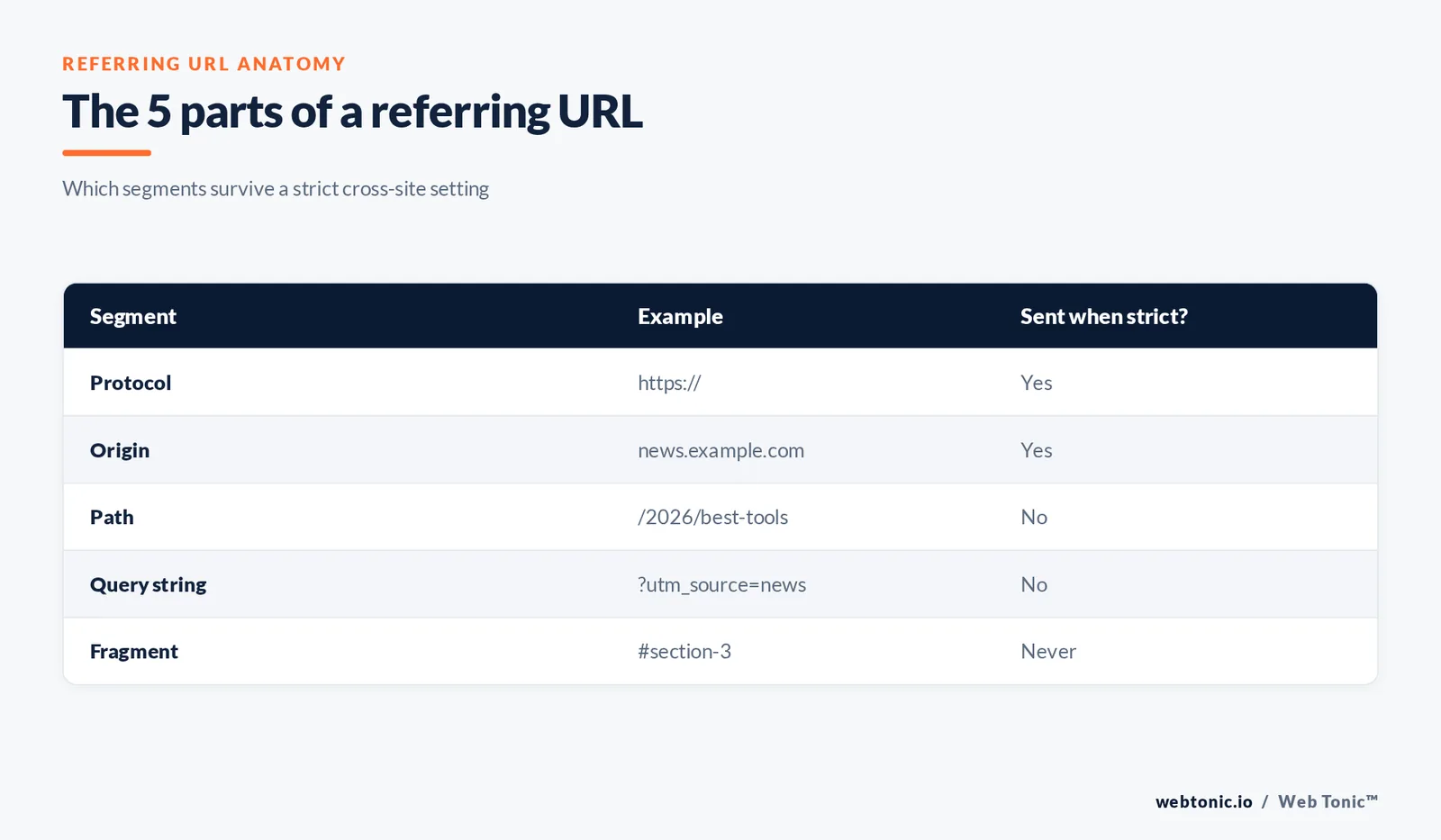
Every such address breaks into the same parts, and privacy rules cut it at different points:
| Segment | Example fragment | Sent when strict? | Why it matters |
|---|---|---|---|
| Protocol | https:// | Yes | A downgrade from HTTPS to HTTP suppresses the referrer entirely |
| Origin (host) | news.example.com | Yes | This is the inbound source your analytics groups by |
| Path | /2026/best-tools | No | Names the exact source page, not just the host |
| Query string | ?utm_source=news | No | Carries campaign tagging and, too often, private data |
| Fragment | #section-3 | Never | Fragments are never sent in any HTTP request |
Rule 1 — the value is generated by the browser, never by your site. You can influence other sites' behaviour only by asking them to change their setting, while you control only how much your own pages leak outward. The mechanics are documented in the MDN entry for the Referer request header.
Referring URL vs referrer vs Referer header vs referral source
4 terms describe the same journey at different layers. Mixing them up is how reporting arguments start.
| Term | Layer | Definition | Visible in |
|---|---|---|---|
| Referring URL | Concept | The address of the previous page | Analytics reports, access logs |
Referer field | HTTP protocol | The request header carrying that address | Raw request inspection, access logs |
document.referrer | Browser (DOM) | A JavaScript property holding the same string | Client-side scripts and tag managers |
| Referral source | Analytics model | A grouped channel built from inbound sources | GA4 Traffic acquisition report |
| Referring domain | SEO | The unique host linking to you | Link and backlink tooling |
Fact 2 — the protocol spells it with 1 r, not 2. The field is Referer; the settings header, the DOM property and the concept all use the correct double-r spelling. The current definition lives in RFC 9110, and the misspelling has survived every revision since. The client-side equivalent is documented under Document.referrer.
How the browser decides how much to send
6 steps sit between the click and the row in your report. Only step 4 is under the destination site's control.
| Step | Event | Who controls it | Failure mode |
|---|---|---|---|
| 1. Click | A user clicks a link from site A to site B | The user | No click, no referrer |
| 2. Policy lookup | The browser reads the source page's Referrer-Policy, or its own baseline | The source | no-referrer blanks the value |
| 3. Trim | The browser trims the address to the permitted level | The browser | Path and query are dropped cross-site |
| 4. Request | The trimmed value travels in the Referer field | The protocol | HTTPS to HTTP downgrades send nothing |
| 5. Log | The destination writes the value to its access log | The destination | Log rotation loses history |
| 6. Attribute | The analytics tag maps the value to a channel | The destination | Unmapped hosts fall into direct traffic |
Engineering guidance on the trade-offs is collected in Referrer best practices on web.dev, which notes that analytics services use these values to establish claims such as 50% of one site's visitors arriving from a single social network.
The 8 Referrer-Policy values, decoded
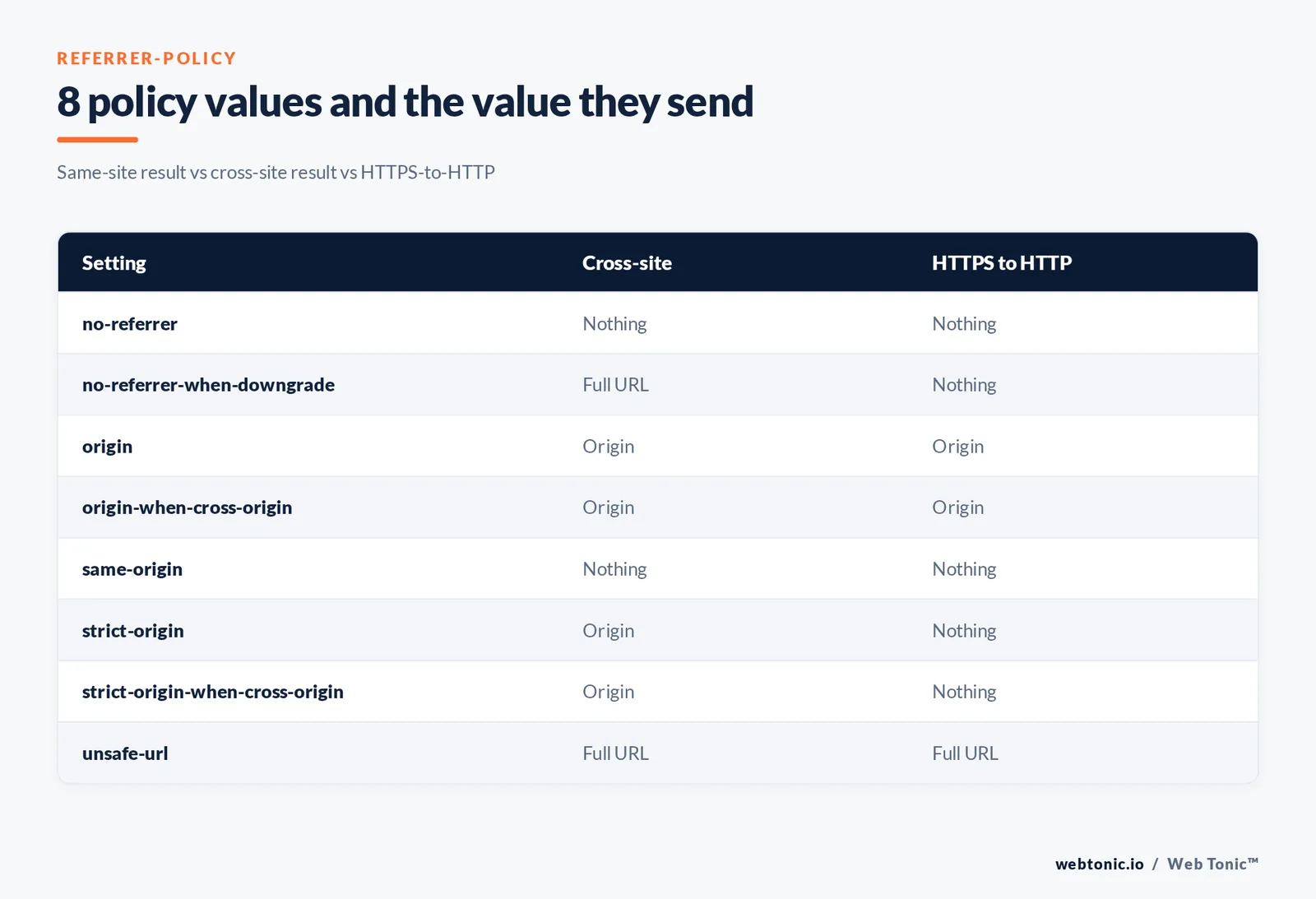
This field turns a full address into a domain, or into nothing at all.
| Setting | Same-site result | Cross-site result | HTTPS to HTTP |
|---|---|---|---|
no-referrer | Nothing | Nothing | Nothing |
no-referrer-when-downgrade | Full URL | Full URL | Nothing |
origin | Origin | Origin | Origin |
origin-when-cross-origin | Full URL | Origin | Origin |
same-origin | Full URL | Nothing | Nothing |
strict-origin | Origin | Origin | Nothing |
strict-origin-when-cross-origin | Full URL | Origin | Nothing |
unsafe-url | Full URL | Full URL | Full URL |
Limit 3: just 1 of the 8 values hands over your full address, and its name is a warning. The complete reference sits in MDN's reference for the header, which records availability across browsers since January 2020; the normative rules are in the W3C Referrer Policy spec. A single link can opt out with rel="noreferrer".
What changed in Chrome 85, and why your referral report shrank
If your reports stopped showing inbound paths, this is why.
| Period | Browser baseline | Value received |
|---|---|---|
| Before Chrome 85 | no-referrer-when-downgrade | https://news.example.com/2026/best-tools?utm_source=news |
| Chrome 84 | Experiment running | Mixed, depending on flag state |
| Chrome 85 beta, July 2020 | strict-origin-when-cross-origin | https://news.example.com/ |
| Chrome 85 stable, August 2020 | strict-origin-when-cross-origin | https://news.example.com/ |
| Chrome 88 onward | Same default, test flag removed | https://news.example.com/ |
Trap 4 — the change was announced as low-impact, and it still broke dashboards. Chrome's own new default referrer setting announcement says user-visible breakage was expected to be limited based on the Chrome 84 experiment — true for users, painful for anyone whose reports keyed on the referring page path rather than the inbound source.
Where these values surface in analytics, and how far to trust it
Not 1 analytics platform shows you the raw header. They show a derived model of it.
| Report | Built from | Trust level | Best use |
|---|---|---|---|
| Session source | Campaign tags first, referring URL second | High | Channel-level reporting |
| Referral channel | Inbound hosts not matched to another channel | High | Finding partner and press traffic |
| Page referrer | The raw referring URL for the event | Medium | Debugging one journey |
| Direct traffic | Requests with no referring URL at all | Low | Treat as an unknown bucket |
| Landing page + source | Referring URL joined to the entry page | High | Judging which content earns links |
The dimension definitions are listed in the reference for Analytics dimensions and metrics, and the grouping logic that turns an inbound source into a channel is documented in the guide to channel definitions. Turning that into decisions is the job of a measurement and data intelligence setup rather than a single report.
Why paid clicks almost never show the source you expect
Ad platforms route clicks through their own redirect infrastructure, so the value you receive describes the redirect, not the placement.
| Traffic type | Typical value received | Real identifier |
|---|---|---|
| Search ad | A click-redirect origin | The gclid parameter from auto-tagging |
| Display or video ad | An ad-serving origin | Campaign parameters in the landing URL |
| Email click | Often blank, or a mail-provider origin | UTM tags on the link |
| Social app click | The app's own origin, or blank in-app | UTM tags plus platform reporting |
| QR or offline scan | No referring URL exists | A dedicated tagged landing URL |
Rule 5 — never audit paid performance from referral data. The documentation for auto-tagging explains that the click identifier, not the referrer, links a session back to a campaign, and our breakdown of current Google Ads benchmarks shows how far off channel reporting drifts when the two are confused. For campaign structure questions, that belongs with paid growth strategy.
The 6 situations where the value simply is not there
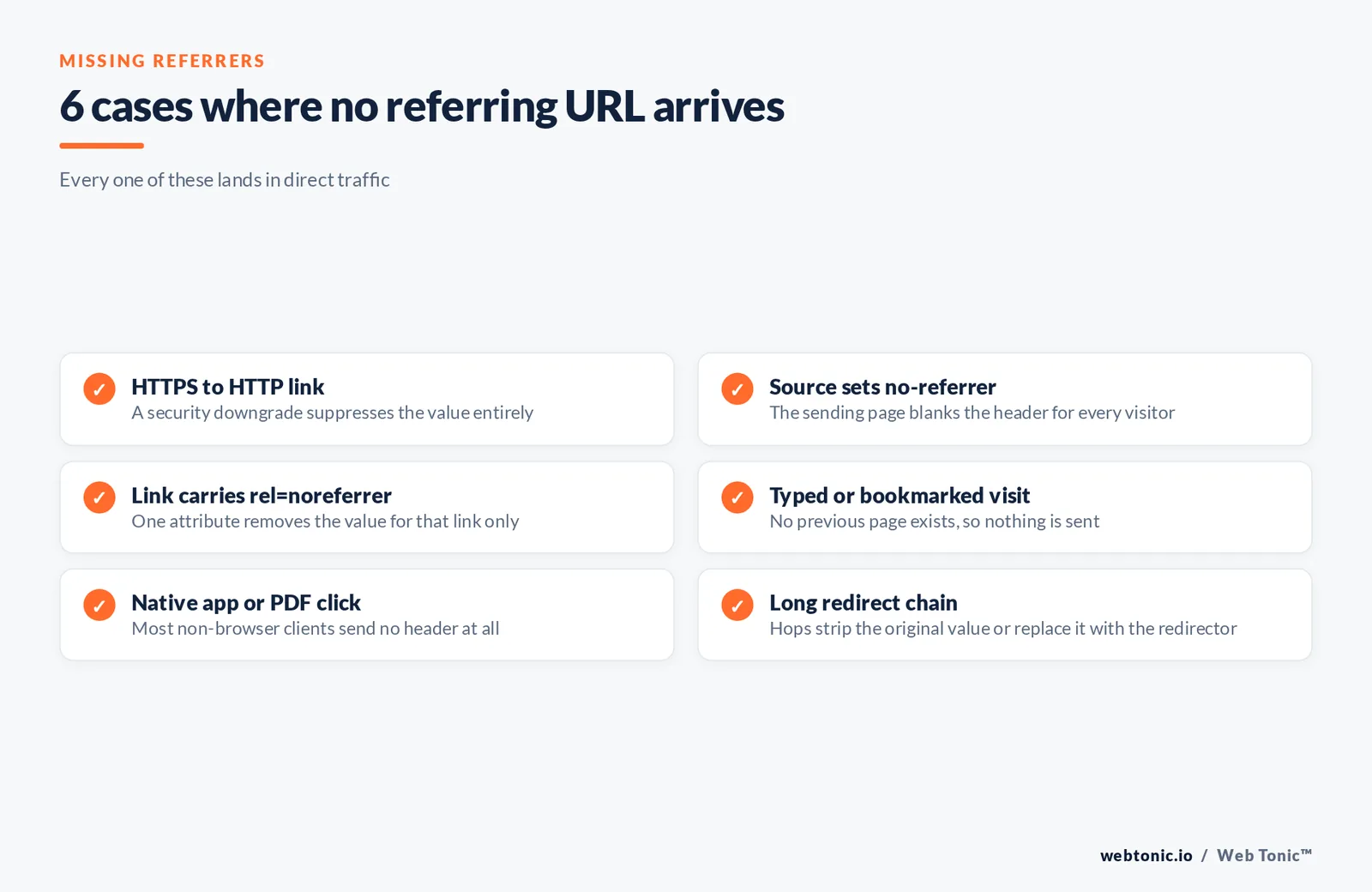
Blank values are the default in 6 common places, more than most reports admit, and each one lands in direct traffic.
| Situation | Value sent | Fix or workaround |
|---|---|---|
| HTTPS page linking to an HTTP page | None | Serve the destination over HTTPS |
Source sets no-referrer | None | Ask for a tagged link instead |
Link carries rel=noreferrer | None | Use campaign parameters |
| Typed or bookmarked visit | None | Accept it as true direct traffic |
| Native app or PDF click | Usually none | Tag the destination URL |
| Redirect chain that strips the field | None or the redirector | Shorten the chain to one hop |
Fact 6 — a request that arrives with no referrer is indistinguishable from a bookmark. That is why a growing direct-traffic line is usually a tagging problem, not a brand-strength story. Canonical and redirect handling interacts with this, covered in the guidance on consolidating duplicate URLs. To reconstruct how a page looked at the time of a link, the techniques in our guide to checking Google's cache help.
Referrer authentication, and why it fails as a security control
Some systems still grant access based on this header. The web.dev guidance is blunt about the limits.
| Intended use | Works? | Reason | Better mechanism |
|---|---|---|---|
| Allow-listing partners | Weak | The sender can suppress the field | Signed tokens |
| CSRF protection | No | Absent referrers cannot be distinguished | SameSite cookies |
| Blocking hotlinked images | Partial | Strict settings still send the origin | Signed asset URLs |
| Logging and debugging | Yes | Origin-level data is enough | Keep only the origin |
| Checking a payment callback | First pass only | Header can be spoofed or blank | Server-to-server verification |
Limit 7: if a check breaks when the field is missing, the check is broken. web.dev's advice is to expect either no Referer at all or an origin-only value, then verify properly. Anything stricter belongs in your web development layer, not in a marketing report.

How to read referral data without fooling yourself
5 checks, in order, resolve almost every referral reporting dispute.
| Check | Question | Time needed |
|---|---|---|
| 1. Raw log spot check | Does the field arrive at all for this source? | 15 minutes |
| 2. Source page setting | Origin-only, or blanked? | 10 minutes |
| 3. Tagging coverage | Do partner links carry campaign parameters? | 1 hour |
| 4. Redirect audit | How many hops sit between click and landing? | 1 hour |
| 5. Channel mapping | Are new inbound sources grouped correctly? | 30 minutes |
Trap 8 — comparing referral numbers across a defaults change is comparing two different metrics. Annotate the switch date, then compare tagged traffic instead. If link acquisition is the reason you care, pair this with our work on anchor text and link profiles, and browse the rest of the Web Tonic blog for the wider measurement series.
FAQ
What is a referring URL in simple terms?
It is the address of the page a user was on before they clicked through to yours. The user's browser sends it to your web server automatically, and analytics tools group those addresses into referral traffic.
What is the difference between a referring URL and the HTTP referrer?
The first is the value; the HTTP Referer field is the container that carries it. The field is spelled with one r because of a 1996 misspelling that RFC 9110 still preserves.
Why do so many inbound sources only show a domain?
Because Chrome and other browsers now baseline to strict-origin-when-cross-origin, which trims the path and query string on cross-site requests. Chrome made that switch in version 85.
Can this header be faked or blocked?
Yes to both. Any client can set no-referrer or send an arbitrary value, which is why such checks are unreliable as access control and should never be a lone defence.
Why does paid traffic show up as a strange source?
Ad clicks pass through platform redirects, so you receive the redirector's origin rather than the placement. Use the click identifier added by auto-tagging or your own campaign parameters instead.
Sources
MDN Web Docs — Referer header, Referrer-Policy reference, Document.referrer, rel=noreferrer · W3C Referrer Policy spec · RFC 9110 (HTTP Semantics) · web.dev Referrer best practices · Chrome Developers blog, new cross-site default · Google Analytics Help, dimensions and metrics and default channel definitions · Google Ads Help, auto-tagging · Google Search Central, consolidate duplicate URLs · Wikipedia, HTTP referer. All sources verified live 2026-08-06.


