



Table of contents
Google retired its public page store on 2 February 2024, so a "google cache checker" no longer returns a engine-hosted snapshot. This guide shows what still works in its place, and how to verify what the search engine actually holds for a page.
Key Takeaways
- The
cache:search operator was switched off in early 2024, and Google confirmed the cached-page links were removed from search results the same year. - Most free cache checker tools now proxy the Wayback Machine, which has archived more than 1 trillion pages and over 99 petabytes of data as of October 2025.
- The only authoritative check is the URL Inspection tool in Search Console, which reports the crawl date, the indexed HTML and the rendered page for a property you own.
- 3 free public archives cover URLs you do not own: the Wayback Machine, archive.today and Common Crawl.
- Removing a snapshot takes 2 different requests — one to the search engine and one to the archive that holds it.

What a Google Cache Checker Was, and What Changed
A Google cache checker was a tool that queried the search engine's stored copy of a page — the version Googlebot downloaded on its last visit — and displayed it to you. You could reach that snapshot with the cache: operator or with the "Cached" link in the search result dropdown, and the underlying URL lived on webcache.googleusercontent.com.
The service was retired in February 2024. Its search liaison explained the feature had been built for a slower web, when pages frequently failed to load, and pointed users to the Internet Archive instead. By September 2024 the search engine and the Internet Archive had announced a collaboration that surfaces Wayback links inside results, per the search engine cache entry on Wikipedia. The practical consequence: any tool still promising "the cached version" is either showing you a third-party archive or showing you nothing.
| Method | Status in 2026 | What it actually returns | Works for sites you don't own |
|---|---|---|---|
cache: search operator | Removed | Nothing — falls back to a normal search | No |
| "Cached" link in results | Removed | Replaced by a Wayback Machine link on many results | Partly |
| webcache.googleusercontent.com URL | Dead | Error page | No |
| Search Console URL Inspection | Live and authoritative | Crawl date, indexed HTML, rendered screenshot | No |
| Wayback Machine | Live | Dated archive snapshots, not Google's copy | Yes |
| archive.today | Live | On-demand snapshots saved by users | Yes |
| Common Crawl | Live | Bulk raw crawl data by index month | Yes |
| Bing / other engines | Varies | That engine's own index view | Partly |
Why You Would Check a Cached Version At All
The job behind the query has not disappeared, even though the tool has. There are five recurring reasons an SEO or marketer wants a cached page, and each has a different modern answer.
| Your goal | What to use in 2026 | Typical time to answer |
|---|---|---|
| Confirm a new page is indexed | Search Console URL Inspection, plus a site: query | Under 1 minute |
| See what the crawler read | URL Inspection → "View crawled page" HTML tab | 1–2 minutes |
| Read a page that is temporarily down | Wayback Machine or archive.today | Under 1 minute |
| Prove a competitor changed their copy | Wayback snapshot history | 2–5 minutes |
| Get sensitive content out of public view | Removals request plus an archive exclusion request | Hours to days |
Rule 1 — the feature was never an archive. the engine stored one recent copy per page and overwrote it on the next crawl, so it could never answer "what did this page say 8 months ago". That was always the Wayback Machine's job, and it is why the retirement changed less for competitive research than people assume.
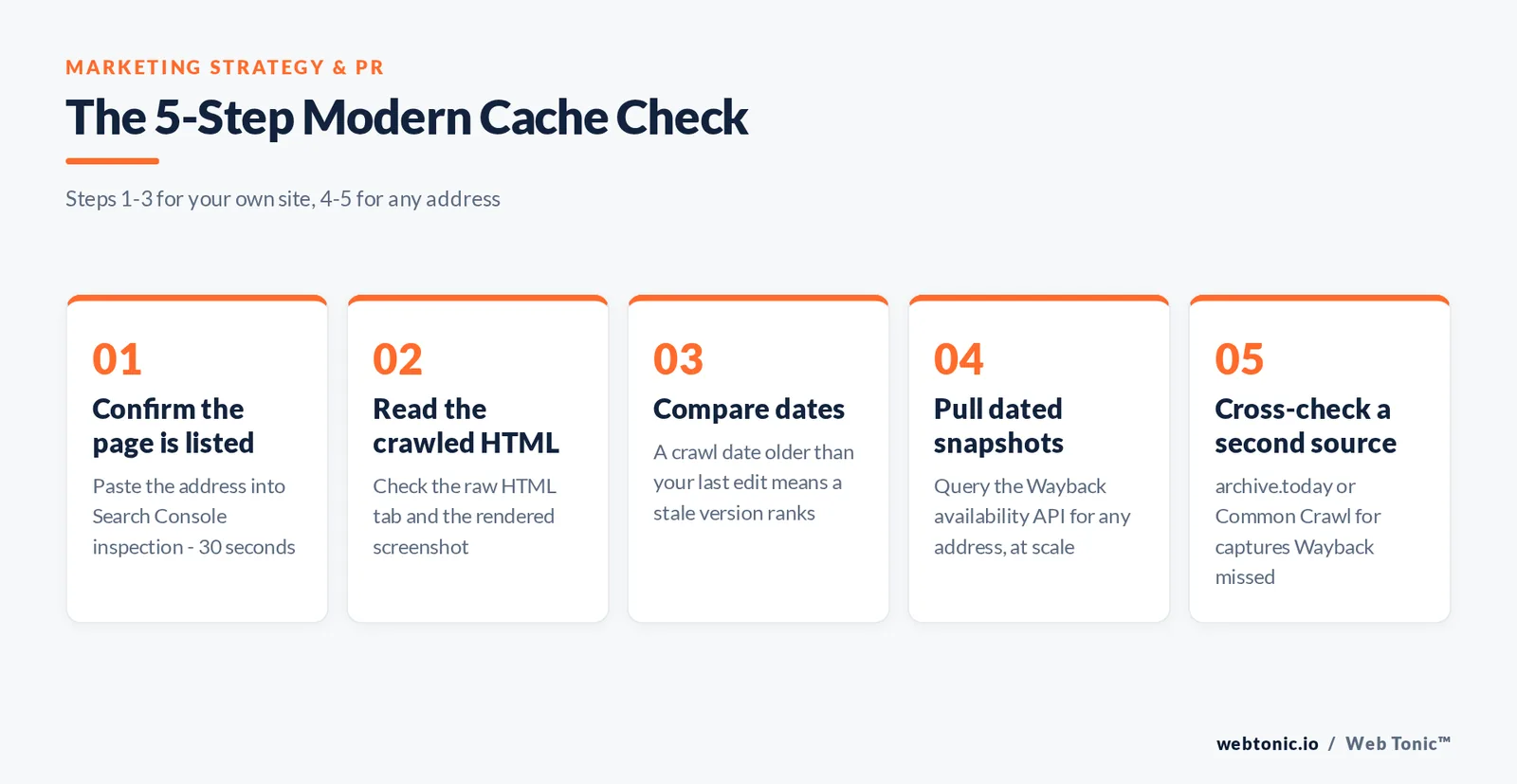
The 5-Step Modern Cache Check
Run these in order. Steps 1 to 3 apply to properties you control; steps 4 and 5 cover URLs you do not own.
Step 1 — Confirm the page is listed (30 seconds). Open Search Console, paste the address into the inspection bar and read the verdict. "URL is on Google" plus a crawl date is the replacement for a cache hit. Google's URL Inspection documentation lists every field it returns.
Step 2 — Read the crawled HTML. The "View crawled page" panel shows the raw HTML Googlebot received and a screenshot of the rendered result. If your content only appears in the rendered tab, it is arriving via JavaScript, and Google's JavaScript SEO basics explain how rendering is queued separately from crawling.
Step 3 — Check the crawl date against your publish date. A visit date older than your last edit means Google is still ranking the previous copy. Request indexing, and if the gap is chronic, review the crawl-budget factors in Google's large-site crawl guidance.
Step 4 — Pull snapshots for any address. Enter the address at Wayback, or call the Wayback availability API if you need this at scale. One call returns the closest capture to a timestamp, which is enough to script a 500-page check.
Step 5 — Cross-check a second source. If Wayback has no capture, try archive.today, which saves on demand, or query the monthly datasets at Common Crawl for pages that were crawled but never captured visually.
Crawler Copy vs Archive Copy: What Each One Proves
These references are not interchangeable, and treating them as one is the most common analysis mistake we see in audits.
| Property | Search Console crawl view | Wayback Machine | archive.today |
|---|---|---|---|
| Who captured it | Googlebot | Internet Archive crawlers | A human clicking "save" |
| Number of versions kept | 1 (latest crawl) | Many, dated | One per manual save |
| Proves indexation | Yes | No | No |
| Proves historical wording | No | Yes | Yes |
| Covers third-party sites | No | Yes | Yes |
| Honours robots directives | Yes | Partly, on request | Largely no |
Fact 2 — the public record is far bigger than the cache ever was. The Internet Archive has been saving pages since 1995, had stored 38.2 billion pages by the end of 2009, and crossed 1 trillion archived pages in October 2025, according to the Wayback Machine's documented history. the retired feature held exactly one version per page.
Reading the Signals: 6 Cache and Index Diagnoses
Whatever tool you use, the value is in the interpretation. Here is how to read the six results you will actually see.
| What you observe | Most likely cause | Fix |
|---|---|---|
| Indexed, but crawl date is 3+ months old | Low crawl demand or thin internal linking | Add internal links, refresh content, request indexing |
| Crawled, currently not indexed | Quality or duplication signals | Consolidate near-duplicates and strengthen the page |
| Discovered, currently not indexed | Crawl capacity or server response times | Improve response time, prune low-value URLs |
| Crawled HTML missing your main copy | Client-side rendering | Server-render or pre-render the critical content |
| Wrong address ranked for the copy | Conflicting canonical signals | Align canonicals, sitemaps and internal links |
| Stale title still shown | Stale visit, not a caching bug | Wait for recrawl after requesting indexing |
Google's duplicate-page consolidation guide is the reference for the canonical cases, and its how-search-works overview covers the crawl-index-serve sequence the table maps to.
Cache Freshness: What Controls How Often Your Copy Updates
There was never a fixed refresh interval, and there still is not. Revisit frequency is demand-driven, so these are the levers that move it.
| Lever | Effect on revisit rate | Effort |
|---|---|---|
| Publishing cadence on the URL's section | High | Ongoing |
| Internal links pointing at the page | High | Low |
Accurate lastmod in the XML sitemap | Medium | Low |
| Server response time under 200 ms | Medium | Engineering |
| External links and mentions | Medium | Ongoing |
| Manual "request indexing" in Search Console | One-off | Minutes |
| Cutting duplicate and parameter addresses | Medium on large sites | Medium |
Limit 3 — lastmod only helps if it is honest. Google's sitemap documentation states the date must reflect a real content change; sites that stamp every page with today's date get the signal discounted. And note the difference between an index and HTTP storage: browser and CDN behaviour is governed by Cache-Control headers under RFC 9111, described plainly in the MDN HTTP caching reference. Those headers do not control what an engine keeps.

Removing a Cached or Archived Page: The 2-Track Process
Because the copy you want gone may sit in an index, a public capture, or both, removal needs two parallel tracks.
| Where the copy lives | Request to make | Typical outcome |
|---|---|---|
| Index, page still live | Add noindex, then use Removals in Search Console | Temporary block, permanent after recrawl |
| Index, page already deleted | Return 404 or 410 and wait for recrawl | Drops out within days to weeks |
| Third-party page | Outdated content removal form | Snippet refreshed once the page is recrawled |
| Wayback Machine | Email the Internet Archive exclusion request | Case-by-case |
| archive.today | Use the site's own removal form | Case-by-case, often refused |
| A rival engine's index | That engine's own console | Similar to Google's flow |
Trap 4 — blocking crawlers with robots.txt does not remove a page. A blocked page can still rank from links alone; Google's block-indexing guidance is explicit that noindex requires the crawler to be able to fetch the page. Combining a robots.txt disallow with a noindex tag guarantees the tag is never seen. For non-Google engines, Bing Webmaster Tools runs an equivalent inspection and removal flow — worth using, since StatCounter's market-share data shows a meaningful minority of queries happen elsewhere.
Choosing a Third-Party Cache Checker Tool
Dozens of free cache checker pages still rank for this query. Score them on five criteria before trusting the output.
| Criterion | Good sign | Red flag |
|---|---|---|
| Source transparency | Names the source it queries | Still claims a live engine copy |
| Dates on results | Shows the snapshot timestamp | Undated screenshot |
| Bulk support | Handles 50+ addresses or offers an API | One URL per captcha |
| Handling of misses | Says "nothing found" | Renders the live page as if captured |
| Privacy | No login, no data retention | Asks for Search Console access |
Trap 5 — a tool that silently loads the live page is worse than no tool. If a checker shows current copy and calls it a stored version, every conclusion you draw about "what changed" is wrong. The cheapest test: point it at a URL you edited 10 minutes ago. If the result contains today's edit, it is a live proxy.
Where This Fits in an SEO Workflow
Cache checks are a diagnostic, not a metric. In practice they earn their place in three routine workflows: post-migration verification, where you sample 50 redirected URLs and confirm the new address is the one indexed; content-refresh QA, where you confirm the visit date moved after a rewrite; and competitive monitoring, where old captures show when a rival rewrote a page that then gained rankings. Google's snippet documentation is the reference for controlling what shows in results once it is re-crawled.
Our data intelligence team automates all three checks against the Search Console API rather than clicking through tools, and pairs them with the technical work in our web development practice. More technical SEO explainers sit on the Web Tonic blog, and you can ask us to audit your indexation if the diagnoses above point at something structural.

FAQ
Does Google cache still exist in 2026?
No. The public page store was retired on 2 February 2024, removing both the cached links in search results and the cache: operator. Any snapshot you see today comes from a third-party capture such as Wayback, not from the engine itself.
How do I see the cached version of a website now?
Use Wayback or archive.today for any address, and the URL Inspection tool for a property you own. URL Inspection is the only source that shows what Googlebot actually crawled, including the raw HTML and a rendered screenshot.
Is there a free Google cache checker tool that works?
Free checkers still exist, but they query public captures instead. That is fine for reading an offline page or comparing old wording; it cannot confirm indexation. For that, use URL Inspection or a site: query on the exact URL.
How often did Google update its cache?
There was never a fixed interval. The engine stored the copy from its most recent visit and overwrote it at the next one, so high-demand pages refreshed within hours while low-demand pages could sit unchanged for months. Recrawl frequency still works this way.
Can I remove my website from the index and from web archives?
Those are two separate requests, to two owners. Add a noindex tag or return a 404/410 and use the Removals tool in Search Console. For Wayback or archive.today, contact each archive directly — neither is obliged to comply, and robots.txt alone will not delete existing captures.
Sources
Wikipedia, Search engine cache (Google retired web caching on 2 February 2024; September 2024 Internet Archive collaboration) · Wikipedia, Wayback Machine (archiving since 1995, 38.2 billion pages by end of 2009, over 1 trillion pages and 99+ petabytes as of October 2025) · Google Search Console URL Inspection tool documentation · Google Search Central documentation on how Search works, JavaScript SEO basics, crawl budget for large sites, duplicate URL consolidation, sitemap lastmod, block indexing and snippet control · Internet Archive Wayback availability API documentation · archive.today · Common Crawl · MDN Web Docs HTTP caching · RFC 9111, HTTP Caching · Bing Webmaster Tools · StatCounter GlobalStats search engine market share. All sources retrieved August 2026.


