



Table of contents
Creating a Google Business Profile takes about 15 minutes; getting it verified and ranking takes longer. This walkthrough covers the account setup, the claim path when a listing already exists, every verification method, and the fields that actually move local search.
Key Takeaways
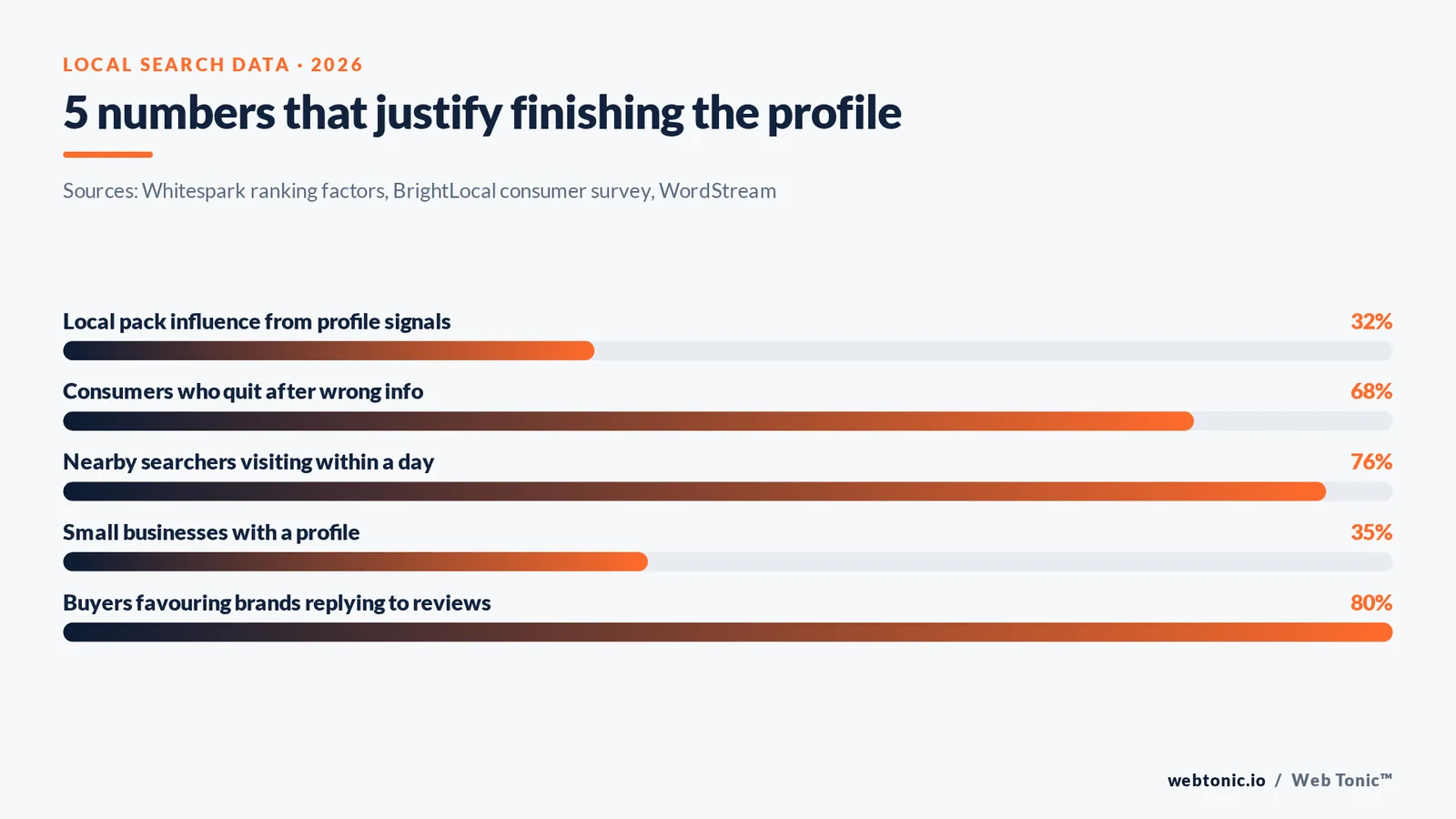
- A Business Profile is free, but only 35% of small businesses have one, so the setup itself is still an edge.
- Profile signals account for roughly 32% of local pack ranking influence in Whitespark's factor survey.
- 68% of consumers would stop using a local business after finding incorrect information online, so accuracy beats volume.
- Verification runs through 5 possible methods; video verification is now the default for many categories and takes up to 5 business days to review.
- A complete profile is judged 2.7x more reputable than a thin one, and 76% of people who run a nearby search visit a business within a day.
Account, profile or listing: what you are actually creating
Three names cause most of the confusion. The Google account is the login. The Business Profile is the public record that appears in Google Search and Google Maps. The old GMB dashboard (Google My Business) was retired as a separate app in 2022 and its management tools now sit directly in Search and Maps. You need all three pieces to line up before you can edit anything.
| Term | What it is | Who can see it | Where you manage it |
|---|---|---|---|
| Google account | The email login that owns the record | Only you | accounts.google.com |
| Business Profile | The public business listing on Google Search and Maps | Everyone searching | Search box, or the Maps app |
| Business Profile Manager | The multi-location dashboard for 2+ records | Only your team | business.google.com |
| Local listing on other sites | Yelp, Bing Places, Apple Maps, directories | Everyone | Each platform separately |
| GMB app | Retired standalone app, folded into Search in 2022 | N/A | No longer exists |
One rule saves a lot of pain later: never set the record up on a personal Gmail address. Use a dedicated Google account on your own domain (Google Workspace) so ownership survives staff changes. Our data intelligence team untangles inherited profiles on personal logins several times a month.
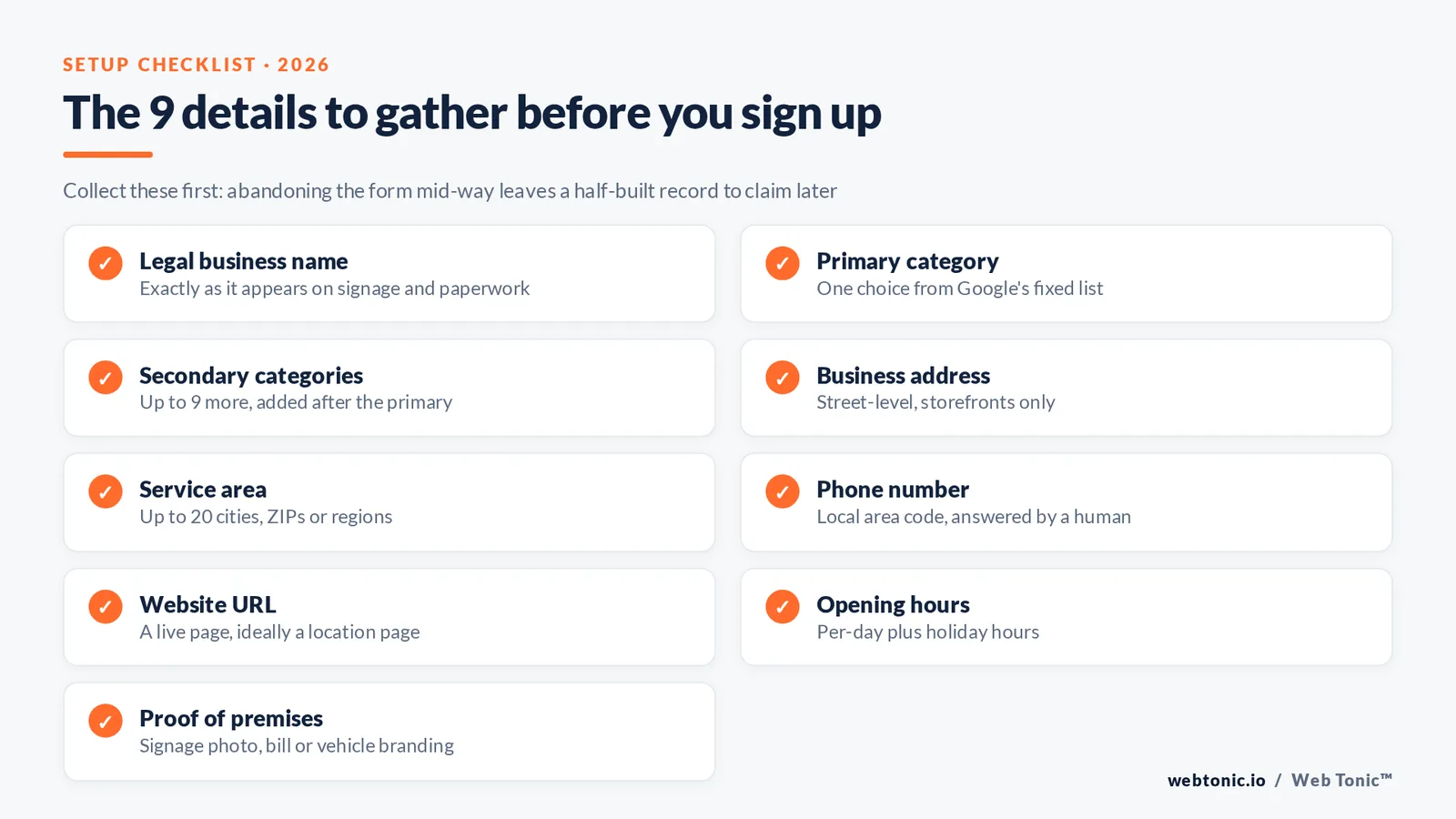
The 9 details to have ready before you sign up
Google asks for these in sequence, and abandoning halfway leaves a half-built record that you then have to claim. Collect everything first. Every field here maps to something a customer or the ranking system reads.
| Detail | Format Google expects | Why it matters |
|---|---|---|
| Legal business name | Exactly as it appears on signage and paperwork | Keyword stuffing here triggers suspension under the representation guidelines |
| Primary category | One choice from Google's fixed list | Drives which local search queries you are eligible for |
| Secondary categories | Up to 9 more | Adds eligibility without diluting the primary |
| Business address | Street-level, matching your utility bill | Storefronts only; hidden for service-area operations |
| Service area | Up to 20 cities, ZIPs or regions | Replaces the address for mobile trades |
| Phone number | Local area code, answered by a human | A shared or forwarded number weakens the verification case |
| Website URL | A live page, ideally a location page | The single biggest referral path off the record |
| Opening hours | Per-day, plus holiday hours | Wrong hours are the most reported inaccuracy |
| Proof of premises | Signage photo, utility bill, or vehicle branding | Needed for the video verification walk-through |
Two of those nine are conditional: address and service area are mutually exclusive presentations. A plumber operating from home hides the address and lists the towns served; a bakery shows the street. Choosing wrong is the single most common reason a first submission bounces.
How to create the account, step by step
Start at business.google.com/create or simply search your own business name while signed in. Google's own sign-up documentation mirrors these screens, and all 8 steps below run inside one session.
| Step | What you do | What you see next | Typical time |
|---|---|---|---|
| Step 1 | Sign in with the business Google account | The business name entry screen | 1 minute |
| Step 2 | Type the business name | Either a match to claim, or 'add a missing place' | 1 minute |
| Step 3 | Pick the primary category | Category-specific extra questions | 2 minutes |
| Step 4 | Declare storefront or service area | Address form, or the service-area picker | 3 minutes |
| Step 5 | Add the phone number and website | The verification options screen | 2 minutes |
| Step 6 | Choose a verification method | A pending status with a review timer | 5 minutes |
| Step 7 | Fill description, hours, services, photos | A live but unverified record | 20 minutes |
| Step 8 | Wait for approval, then publish edits | Full editing rights in Search and Maps | 1 to 5 days |
You can keep editing while verification is pending, but nothing you add goes public until approval lands. Step 7 is where 80% of the ranking value sits, so do not treat it as optional cleanup.
When the listing already exists: claiming and ownership disputes
Google generates unverified records from user submissions, aggregated data and Street View passes, so a business that has never signed up often already appears. In that case you claim rather than create, following the add or claim process.
| Situation | What to do | Realistic wait | Risk if ignored |
|---|---|---|---|
| Record exists, unclaimed | Click 'Claim this business' and verify | 1 to 5 days | Anyone can suggest edits |
| Claimed by a former agency | File a request for ownership | 7 days to respond, then transfer | You cannot reply to reviews |
| Duplicate records | Report the weaker one as duplicate | 3 to 14 days | Split reviews and diluted rankings |
| Wrongly marked permanently closed | Suggest an edit, then appeal | 2 to 10 days | Total loss of map visibility |
| Address changed | Update via manage your business address | Instant to 5 days | Mismatched citations across the web |
| Business renamed | Edit the name, keep the same record | 1 to 5 days | Creating a new record resets review history |
An ownership request that goes unanswered for 7 days usually resolves in the claimant's favour. Keep the receipts: a utility bill and a photo of exterior signage settle almost every dispute.
Verification methods and what each one requires
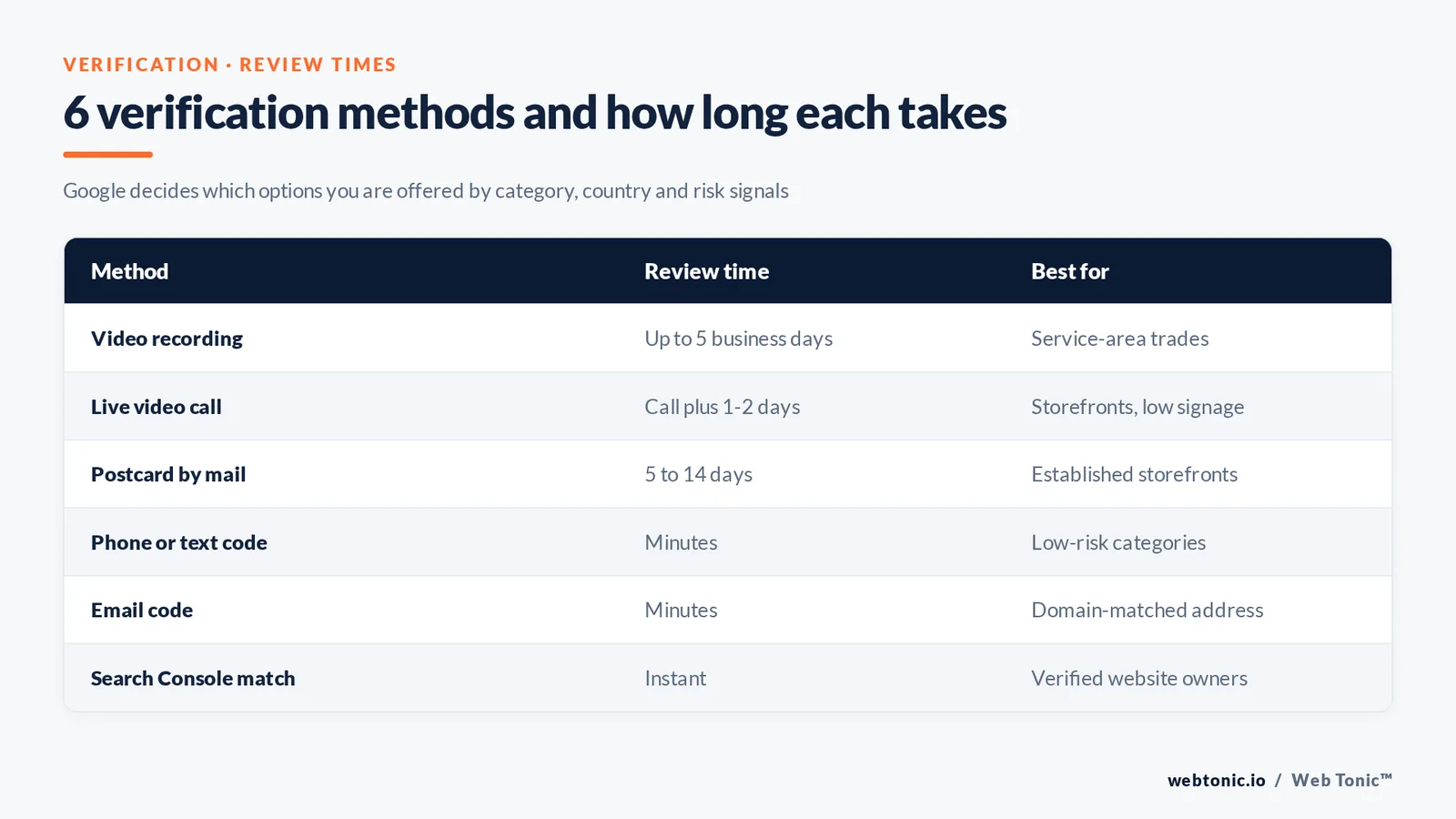
Verification is the gate. Google decides which methods you are offered based on category, country and risk signals, and the options in the verification documentation shift regularly.
| Method | How it works | Review time | Best for |
|---|---|---|---|
| Video recording | One unbroken walk-through showing signage, equipment and management access | Up to 5 business days | Service-area trades, new records |
| Live video call | A reviewer joins and asks you to pan the premises | Same call, plus 1 to 2 days | Storefronts with limited signage |
| Postcard | A code arrives by mail at the street address | 5 to 14 days | Long-established storefronts |
| Phone or text | A code is read out or sent to the listed number | Minutes | Low-risk categories only |
| A code to a domain-matched address | Minutes | Businesses with matching website domain | |
| Search Console | Instant match if the domain is already verified | Instant | Anyone with a verified site |
Film the video in one take. The three things a reviewer must see are the location in context (street sign to door), proof of equipment or stock, and you accessing something only a manager could, such as a till or locked room. Roughly half of failed attempts are stopped by cuts, edits or missing signage rather than legitimacy problems.
Field-by-field reference: what to fill and the rule behind it
Once verified, completeness is the lever. Google's guidelines for representing your business govern what is allowed, and its local ranking guidance names relevance, distance and prominence as the three inputs.
| Field | Fill it with | Common mistake | Ranking effect |
|---|---|---|---|
| Business name | The real trading name only | Adding a city or service keyword | Suspension risk, no gain |
| Primary category | The closest single match | Picking a broad parent category | High |
| Description | 750 characters, benefit-led, no links | Copying the homepage boilerplate | Low direct, high conversion |
| Services or products | Every line item with a short description | Leaving it empty | Medium, feeds long-tail queries |
| Attributes | Every applicable one, updated seasonally | Ignoring accessibility attributes | Medium, powers filtered results |
| Photos | Exterior, interior, team, product, at 720px or larger | Stock imagery | Medium, drives clicks |
| Opening hours | Regular plus holiday hours | Forgetting public holidays | Medium, affects trust |
| Q&A | Seed 5 to 10 real questions yourself | Letting strangers answer | Low ranking, high conversion |
| Products | Price, photo, description | Skipping prices | Medium for retail |
| Booking or menu links | A direct, live URL | Broken links after a site rebuild | Medium |
A useful discipline: nothing goes in a field unless a customer would benefit from reading it. That test alone removes the keyword stuffing that gets records suspended. If you want the ranking mechanics in depth, our Google Maps SEO guide goes further than this setup piece.
Rejections, suspensions and how to recover
Suspensions arrive without warning and take the record offline for 3 to 21 days. The cause is almost always a guideline breach rather than a mistake in intent.
| Trigger | What Google sees | Fix | Typical resolution |
|---|---|---|---|
| Keyword in the name | Name mismatch with website and signage | Revert to the legal name, then appeal | 3 to 14 days |
| Virtual office address | Address shared with dozens of records | Switch to service area, remove address | 7 to 21 days |
| Multiple records, one address | Perceived duplication | Merge, keep the strongest record | 3 to 14 days |
| Category mismatch | Category not supported at that address type | Change the primary category | 1 to 7 days |
| Ownership churn | Several transfer requests in weeks | Consolidate to one owner account | 7 days |
| Prohibited content in photos | Watermarks, phone numbers, promotional text | Re-upload clean images | 1 to 3 days |
Appeal once, with evidence, and wait. Filing 3 or 4 parallel appeals slows the queue rather than speeding it. Keep a dated folder of signage photos, a utility bill and a business registration certificate; that trio resolves most cases.
The first 30 days: an optimisation sequence that compounds
New records rank poorly for a few weeks regardless of quality. Use that window to build the assets that will carry the profile once it is trusted. BrightLocal's consumer survey found generative AI tools jumped to 45% as a source people use to find local businesses, which raises the value of a structured, factual record.
| Week | Focus | Concrete output | Signal it builds |
|---|---|---|---|
| Week 1 | Completeness | Every field filled, 20+ photos | Prominence |
| Week 2 | Reviews | 10 requests sent to recent customers | Prominence and conversion |
| Week 3 | Website alignment | A location page matching name, address, phone | Relevance |
| Week 4 | Citations | Top 10 directories matched exactly | Trust and consistency |
| Ongoing | Posts and Q&A | Weekly update, 5 seeded questions | Freshness and engagement |
Review velocity matters more than raw count. Google's tips for getting more reviews forbid incentives, so build the ask into your handover process instead. 80% of consumers favour businesses that reply to every review, and replies are free.
Website, citations and the rest of your local footprint
The record does not work alone. Consistency across the web is what convinces Google the entity is real, a principle explained well in Moz's local citations primer. Add LocalBusiness structured data to your site so the same facts are machine-readable.
| Asset | What must match the profile | How often to audit |
|---|---|---|
| Location page on your site | Name, address, phone, hours | Quarterly |
| LocalBusiness schema | Same NAP, same categories | After every site change |
| Top directories | NAP and category | Twice a year |
| Social profiles | Name, address, link | Twice a year |
| Invoices and email signature | Phone and address | Annually |
| Google Search Console | Domain verified under the same account | Once, then on domain changes |
Our directory listings guide covers which platforms repay the effort, and hyperlocal marketing covers the paid and content layers that sit on top. If you would rather hand it over, Web Tonic's services include local search management.
Multi-location and service-area structures
Past two locations, structure decisions start to matter more than field-level polish. Search Engine Land's ongoing coverage tracks how the bulk tools change.
| Setup | How to model it | Trap to avoid | Tooling |
|---|---|---|---|
| 1 storefront | Single record, street address | Hiding the address unnecessarily | Search or Maps editing |
| 1 home-based trade | Single record, service area, no address | Listing a residential address publicly | Service-area picker |
| 2 to 9 locations | One record each, one owner account | Sharing a phone number across records | Profile Manager |
| 10+ locations | Bulk upload spreadsheet plus chain verification | Inconsistent naming across records | Bulk verification |
| Departments in one building | Separate records only if separately staffed | Splitting one team into fake departments | Manual review |
| Franchise network | Corporate owner, local manager access | Franchisees creating rogue duplicates | Organisation groups |
Cap service areas at a radius you can actually serve. Listing 20 towns when you cover 4 spreads relevance thin and rarely wins any of them.
Measuring whether the profile is working
The performance tab reports calls, direction requests, website clicks, bookings and search queries. Send the website clicks into analytics with tagged links so the record does not disappear into direct or organic traffic. HubSpot's profile guide and Search Engine Journal's local coverage both track reporting changes.
| Metric | Where to find it | Healthy direction | What to change if flat |
|---|---|---|---|
| Calls | Performance tab, monthly | Rising with review count | Phone prominence, hours accuracy |
| Direction requests | Performance tab | Rising in target areas | Service area or category |
| Website clicks | Performance tab plus tagged URL | Rising share of local sessions | Landing page relevance |
| Search queries | Performance tab, by term | Broadening beyond brand | Services list and description |
| Photo views | Performance tab | Rising after uploads | Upload cadence |
| Review count and rating | Reviews tab | Steady weekly additions | The request process, not the wording |
| Bookings | Performance tab, if enabled | Rising conversion rate | Booking link and pricing clarity |
A record that generates zero direction requests after a full month of activity almost always has a category or service-area problem, not a content problem. Fix the structural field before writing more posts.

Related reading
- How to Claim a Google Business Profile Someone Else Already Verified
- Franchise Google Business Profile Management Statistics, 2026
- What Accountants Should Budget for Google Business Profile Management
- GEO & AEO services at Web Tonic
FAQ
Is a Google Business Profile free?
Yes. Creating, verifying and managing the record costs nothing, and there are no paid ranking tiers. Anyone charging a monthly fee is charging for management work, not for access to Google.
Do I need a physical address to sign up?
No. Service-area businesses hide the address and list up to 20 areas they serve instead. You still enter an address privately during setup so Google can confirm the region, but it is not published.
How long does verification take?
Phone, email and Search Console matches are near-instant. Video and live-call reviews usually take up to 5 business days, and postcards take 5 to 14 days. A rejected attempt can be resubmitted with better evidence.
Can I manage the record without the old GMB app?
Yes. The standalone app was retired in 2022. Search your business name while signed in, or open the listing in Google Maps, and the management panel appears inline. Multi-location owners use Business Profile Manager.
What happens if two records exist for one location?
Reviews and ranking signals split between them. Report the weaker record as a duplicate from within the stronger one, keep the record with the review history, and update every citation to point at the survivor.
Sources
Google Business Profile Help (sign-up, claiming, verification, ownership requests, address management, review tips, local ranking and representation guidelines) · Whitespark Local Search Ranking Factors · BrightLocal Local Consumer Review Survey · Moz local citations · Google Search Central structured data documentation · Search Engine Land Google Business Profile library · HubSpot · Search Engine Journal · WordStream. All sources checked August 2026.


