



Table of contents
SEO basics are the small number of things that decide whether search engines can find your pages, understand them, and rank them: crawlable pages, clear keyword targeting, useful content, sound technical health, and links. Everything else is refinement.
Key Takeaways
- Google handles 91.31% of worldwide search, per Statcounter's July 2026 data, so search engine optimization in practice means optimizing for one dominant engine and checking the rest.
- The first organic result earns roughly 39.8% of clicks and the top three take about 68.7% — SEO basics only pay when they move a page into that band.
- 94.74% of keywords get 10 or fewer searches a month, which is why beginners should build around clusters of long tail keywords rather than one head term.
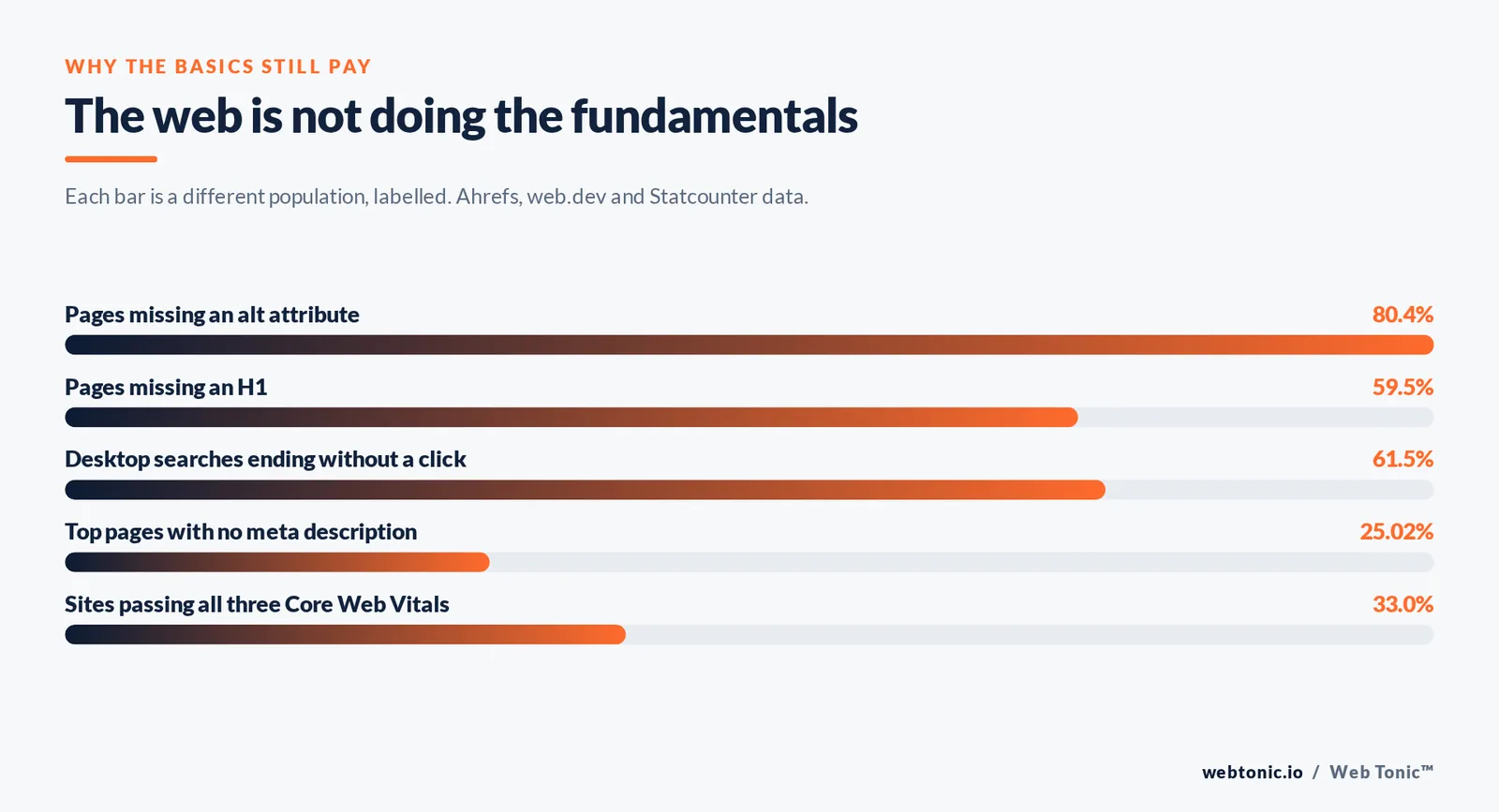
- Only about 33% of sites pass all three Core Web Vitals, so basic technical work is still a competitive edge, not table stakes.
- 59.5% of pages are missing an H1 and 80.4% have no alt attributes — the cheapest wins in SEO are usually the ones nobody bothered to do.
What SEO actually is
Search engine optimization (SEO) is the practice of making a website easier for search engines to crawl, index and rank, and more useful for the people who arrive from those results. It is not a setting you switch on. It is a compound of content quality, site structure, technical health and off-site reputation, measured in organic traffic and the revenue that traffic produces.
Google's own SEO starter guide is blunt about the scope: most sites need a handful of fundamentals done consistently, not an exotic tactic. The company's Search Essentials reduce eligibility to three conditions — Googlebot can reach the page, the page returns useful content, and the site does not violate spam policies. Almost every ranking problem a beginner has traces back to one of those three.
Two useful reference points for calibrating expectations: only 5.7% of new pages reach the top 10 within a year, and 72.9% of pages currently in the top 10 are more than three years old. SEO is a compounding asset, so the correct planning horizon is quarters.
How search engines work in three stages
Every SEO decision maps to one of three stages. Google's documentation on how Search works describes them as crawling, indexing and serving. Knowing which stage a problem sits in tells you which fix to reach for.
| Stage | What happens | What breaks it | How you check it |
|---|---|---|---|
| Crawling | Googlebot discovers URLs through links and sitemaps and requests them | Blocked robots.txt rules, orphan pages, JavaScript-only navigation, server errors | Search Console Pages report and the URL Inspection tool |
| Indexing | The page is rendered, understood and stored with its topic signals | Noindex tags, thin or duplicate content, canonical pointing elsewhere | "Why pages aren't indexed" breakdown in Search Console |
| Serving | Candidate pages are ranked for a specific query and shown as results | Weak relevance to the query, thin coverage, no links, poor user experience | Search Console performance report by query and page |
If a page is not indexed, no amount of keyword work will help it; fix the crawl first. Google's guidance on making links crawlable and on consolidating duplicate URLs covers the two failure modes that cause most missing-page complaints.
The SEO basics in priority order
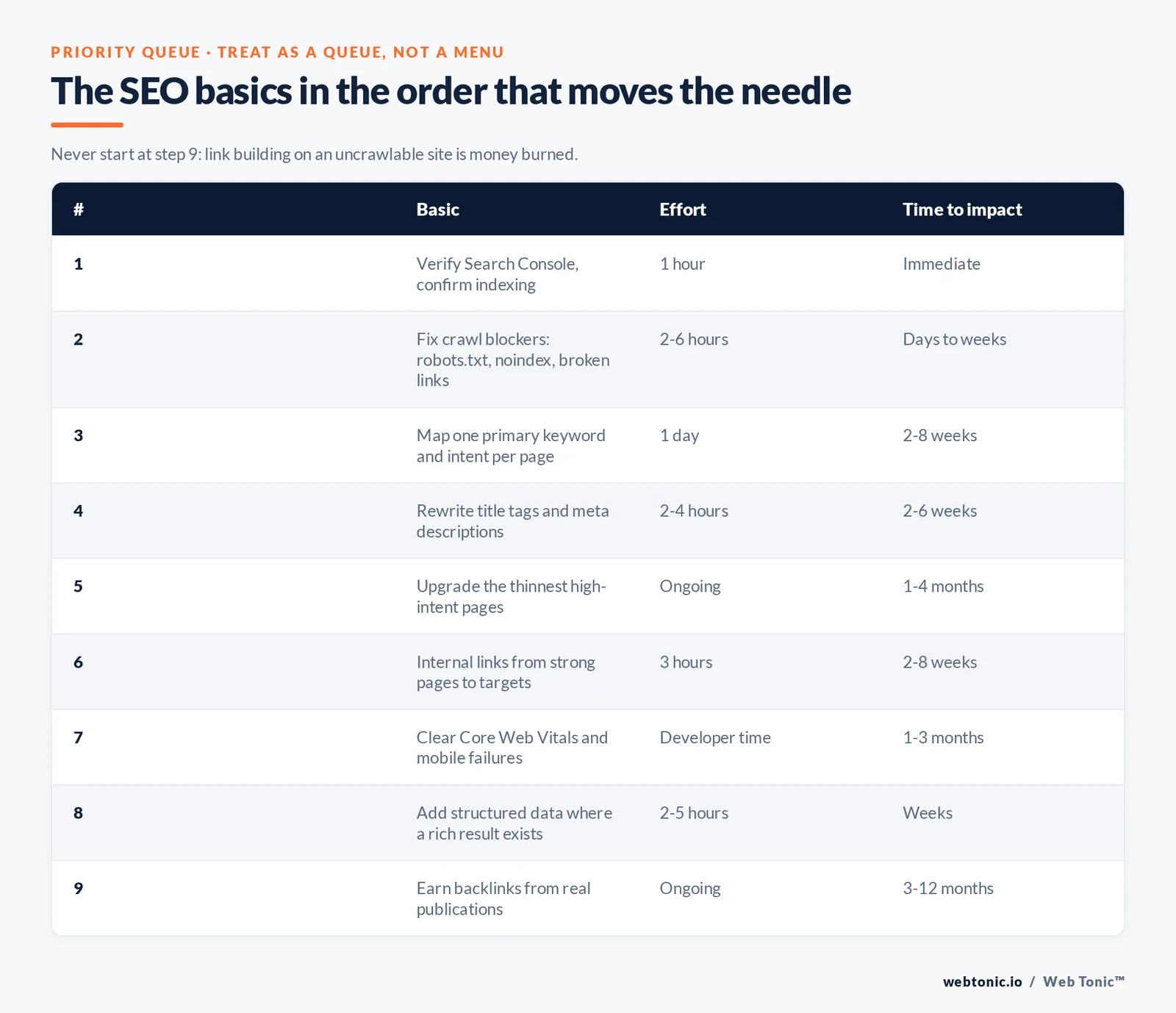
Beginners usually fail on sequence rather than knowledge. Below is the order that produces the fastest measurable movement for a small or mid-sized site. Treat it as a queue, not a menu.
| Order | Basic | Effort | Typical time to impact |
|---|---|---|---|
| 1 | Verify Search Console and confirm the site is indexed | 1 hour | Immediate visibility of problems |
| 2 | Fix crawl blockers: robots.txt, noindex, broken internal links | 2–6 hours | Days to weeks |
| 3 | Map one primary keyword and intent to every important page | 1 day | 2–8 weeks |
| 4 | Rewrite title tags and meta descriptions for the mapped terms | 2–4 hours | 2–6 weeks |
| 5 | Upgrade the thinnest high-intent pages into genuinely useful content | Ongoing | 1–4 months |
| 6 | Build internal links from strong pages to the ones you want ranked | 3 hours | 2–8 weeks |
| 7 | Clear Core Web Vitals and mobile usability failures | Developer time | 1–3 months |
| 8 | Add structured data where an eligible rich result exists | 2–5 hours | Weeks |
| 9 | Earn backlinks from relevant, real publications | Ongoing | 3–12 months |
Rule 1 — never start at step 9. Link building on a site that Google cannot crawl is money burned. Rule 2 — expect steps 1 to 4 to be finishable inside one week for a site under 200 pages, which is why they belong first.
Keyword basics: match the phrasing people use
A keyword is the phrase a person types or speaks into a search engine, and keyword research is the process of finding which of those phrases you can realistically win. The number that reframes the exercise: 94.74% of keywords receive 10 or fewer searches per month, and only 0.0008% break 100,000. The traffic lives in the tail.
Step 1 — list the problems you solve in your customers' words, not your internal vocabulary. Step 2 — expand each one in Google Keyword Planner and Google Trends, then sanity-check the volume: research from Ahrefs found Keyword Planner overestimates search volume 54.28% of the time. Step 3 — classify search intent before writing anything, because intent decides the page format. Step 4 — assign one primary keyword per URL so two of your own pages never compete for the same query.
Ahrefs' primers on keyword research and long tail keywords are the clearest free walkthroughs of the mechanics; Semrush's guide to search intent covers the classification step. If you want the deeper treatment, we break the same process down in our guides to choosing SEO keywords and long tail keywords.
On-page SEO basics
On-page work is where a beginner has total control and the fastest feedback loop. The four elements below carry most of the weight.
| Element | Practical rule | Common mistake |
|---|---|---|
| Title tag | 50–60 characters, primary keyword early, one clear promise | Boilerplate brand-first titles repeated site-wide |
| Meta description | 120–158 characters written as ad copy for the click | Leaving it blank — 25.02% of top pages have none |
| H1 and heading order | One H1 stating the topic, H2s that stand alone as answers | Styling text as a heading with CSS instead of markup |
| Body content | Answer in the first two sentences, then evidence and specifics | Repeating the keyword instead of covering the question |
| Internal links | Descriptive anchor text from related pages to the target page | "Click here" anchors and orphaned money pages |
| Image alt text | Describe the image in a short factual phrase | Skipping it entirely, as 80.4% of pages do |
Note that Google rewrites title links 33.4% of the time and meta descriptions 62.78% of the time, which is an argument for accuracy over cleverness — see Google's documentation on title links and snippets. And because roughly 79% of users scan rather than read, per Nielsen Norman Group's long-running reading behaviour research, formatting is not decoration; it is comprehension.
Technical SEO basics
Technical SEO is the layer that decides whether the rest of your work is visible at all. You do not need a full audit to start — five checks cover the common failures.
Check 1 — robots.txt. Confirm it does not block CSS, JavaScript or whole directories you want indexed; Google's robots.txt introduction explains the syntax traps. Check 2 — the XML sitemap. One sitemap listing canonical, indexable URLs only, submitted in Search Console; see the guide to building a sitemap and our own explainer on what a sitemap does. Check 3 — HTTPS and one canonical hostname, with every variant redirecting to it. Check 4 — mobile rendering, since mobile devices account for 51.47% of worldwide platform share. Check 5 — Core Web Vitals, using the thresholds below.
| Metric | What it measures | Good threshold |
|---|---|---|
| LCP | Time until the largest visible element renders | 2.5 seconds or less |
| CLS | Unexpected layout movement during load | 0.1 or less |
| INP | Responsiveness to user interaction | 200 milliseconds or less |
Google's Web Vitals reference and its LCP optimization guide give the fix lists. Structured data is the optional extra: mark up what genuinely exists on the page using Google's structured data documentation, and expect eligibility for a rich result rather than a ranking boost.
Content and link basics
Content quality is the part beginners overthink and under-execute. Google's guidance on creating helpful, reliable content asks a simple question: would someone leave satisfied without needing another search? Practically, that means specifics — prices, thresholds, screenshots, named examples, dated data — rather than a longer version of what already ranks.
Links remain the reputation layer. 96.55% of pages get zero Google traffic, and the single most common differentiator among the rest is relevant external links. Two honest tactics for a beginner: be the source of one piece of original data in your niche, and get listed by the organisations you already have real relationships with. Our primer on how backlinks work covers the evaluation criteria, and Google's spam policies define the line you must not cross. Anything sold as guaranteed rankings through purchased links is black hat SEO with a delayed invoice.
SEO basics by business type
The fundamentals are constant; the order of attack is not. Use whichever row describes you.
| Business type | Highest-leverage basic | What to skip early | Primary metric |
|---|---|---|---|
| Local service business | Google Business Profile completeness plus one page per service and city | National blog content | Calls and form fills by city |
| Ecommerce store | Indexable, unique category and product pages with clean faceted URLs | Broad top-of-funnel guides | Organic revenue per category |
| B2B or SaaS | Problem-led comparison and use-case pages mapped to buying intent | High-volume definition terms | Qualified demo requests |
| Publisher or blog | Topic clusters with disciplined internal linking and refresh cycles | Complex schema work | Sessions and returning readers |
| Marketplace | Crawl budget control and thin-page consolidation at scale | Manual page-by-page copy edits | Indexed-to-useful page ratio |
| New site, no authority | A narrow cluster of 10–20 long tail keywords you can genuinely win | Head terms above KD 40 | First-page keyword count |
Free tools that cover the basics
You can execute every fundamental above without paid software for the first few months.
| Tool | Free tier | Strength | Limitation |
|---|---|---|---|
| Google Search Console | Free, unlimited for verified sites | Real query, click and indexing data straight from Google | 16 months of history; hides low-volume terms |
| Google Analytics | Free | Connects organic sessions to conversions | No ranking or keyword-level view |
| Keyword Planner | Free with an Ads account | Volume ranges and commercial CPC signals | Grouped, often inflated volumes |
| PageSpeed Insights | Free | Field Core Web Vitals plus prioritised fixes | Lab scores mislead on low-traffic pages |
| Bing Webmaster Tools | Free | Second opinion on crawling and 4.47% of search share | Smaller data set |
| Rich Results Test | Free | Validates structured data before you ship it | Tests eligibility, not whether it will show |
Start with Search Console and Bing's webmaster guidelines. Free learning that holds up: Moz's beginner's guide, Yoast's SEO explainer and the reference library at Search Engine Land.
Measuring whether the basics are working
Rankings alone are a vanity view; measure the chain. Month 1 — indexation: the share of important URLs reported as indexed should climb toward 100%. Month 2 — impressions: rising impressions in Search Console mean you are entering more auctions even before clicks follow. Month 3 — average position and CTR on your mapped keywords, which is where title and meta rewrites show up. Month 4 onward — organic conversions, segmented by landing page.
Two adjustments for 2026. AI Overviews reduce click-through on affected queries — one study measured 58% lower CTR for the top organic result when an AI Overview appears — so judge those queries on assisted conversions rather than raw sessions. And zero-click behaviour is now normal: roughly 61.5% of desktop searches end without a click. Both realities argue for owning intent-heavy queries where the answer requires your page, a theme we cover in our note on how AI Overviews change search. If you would rather have this executed than managed, our growth marketing team runs the sequence above as a standing engagement, with reporting handled by our data intelligence practice.
Building a first SEO strategy: a 90-day plan
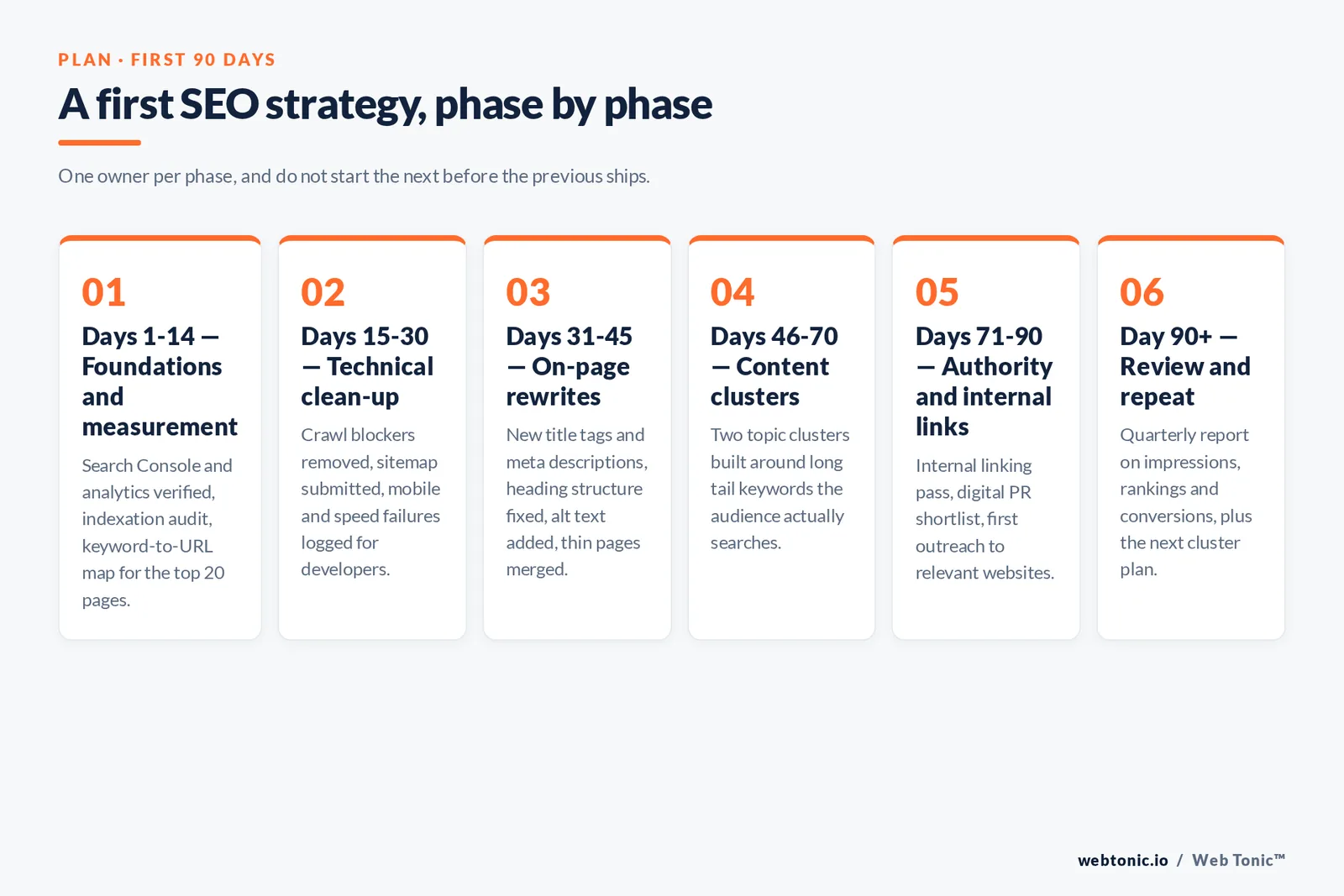
The basics only compound when they are sequenced into an SEO strategy with owners and dates. This is the plan we hand new clients whose websites have never had deliberate search engine optimization work, and it deliberately front-loads the tasks that help search engines understand the site before any link building starts.
| Phase | Focus | Deliverables | What improves |
|---|---|---|---|
| Days 1–14 | Foundations and measurement | Search Console and analytics verified, indexation audit, keyword-to-URL map for the top 20 pages | Visibility of the real problem list |
| Days 15–30 | Technical SEO clean-up | Crawl blockers removed, sitemap submitted, mobile and speed failures logged for developers | Share of pages Google can index |
| Days 31–45 | On-page rewrites | New title tags and meta descriptions, heading structure fixed, alt text added, thin pages merged | Click-through rate and topical relevance |
| Days 46–70 | Content strategy and quality content | Two topic clusters built around long tail keywords your audience actually searches for | Keyword coverage and organic traffic |
| Days 71–90 | Authority and internal links | Internal linking pass, digital PR shortlist, first outreach to relevant websites | Domain authority and ranking ceiling |
| Day 90+ | Review and repeat | Quarterly report on impressions, rankings and conversions, plus the next cluster plan | Compounding growth rather than one-off gains |
Rule 3 — one owner per phase. SEO strategies stall when technical fixes sit in a developer backlog with no date. Rule 4 — do not start the next phase before the previous one ships; overlapping work is the most common reason a 90-day plan takes nine months.
How the basics differ by goal
Beginners often ask which SEO strategies matter most. The honest answer is that the fundamentals are fixed but their weighting shifts with what you are trying to improve.
| Goal | Where to spend first | Second priority | Metric that proves it |
|---|---|---|---|
| More organic traffic | Content clusters targeting long tail keywords with clear search volume | Internal links from your strongest pages | Impressions and clicks in Search Console |
| Better rankings on existing pages | Rewriting page-two pages to fully answer the query | Title tag and meta description tests | Average position for mapped keywords |
| More leads, not just visits | Commercial-intent service pages and local pages | Conversion-focused user experience work | Organic conversions per landing page |
| Recovering lost visibility | Indexation and technical diagnosis before rewriting anything | Content quality review against the helpful-content standard | Recovered impressions on affected URLs |
| Competing with bigger websites | Narrow niches where relevant depth beats authority | Original data that earns backlinks | First-page keyword count in the niche |
| Being cited by AI answers | Clear question-and-answer structure and factual precision | Structured data and consistent entity information | Branded search volume and assisted conversions |
Whatever the goal, the same discipline applies: pick the small number of things that help search engines and real users at once, and finish them. Beginners who complete steps 1 to 6 typically see movement inside 60 days; those who jump between tactics rarely see any. Our team runs this exact review inside our marketing services engagements, and the site-health portion sits with our web development practice. If you want a second opinion on your own priority order, get in touch — and more explainers on individual fundamentals live in the Web Tonic blog.
SEO best practices checklist
Print this and work down it. Each item is a best practice that helps search engines understand your website and helps people decide to click, and none of them require paid tools to create.
| Check | Best practice | How it helps |
|---|---|---|
| Check 1 | Every important page on the website is indexed and reachable in three clicks | Search engines cannot rank a page they never fetch |
| Check 2 | One primary keyword mapped to each URL, with no duplicates across the site | Helps Google pick the best page instead of splitting relevance |
| Check 3 | Create quality content that answers the query fully in its first screen | Improves engagement and the odds of earning links |
| Check 4 | Title tags and meta descriptions written per page, never templated | Helps click-through rate on rankings you already hold |
| Check 5 | Internal links added whenever you create a new page | Distributes authority to the pages you most want to rank |
| Check 6 | Images compressed, sized and given descriptive alt text | Improves user experience and image search visibility |
| Check 7 | A single canonical version of the website on HTTPS | Prevents duplicate versions competing with each other |
| Check 8 | Content reviewed on a schedule and updated where facts have moved | Helps sustain rankings as competitors publish newer pages |
Check 9 — write for the best possible reader, not the algorithm. The best-performing pages we create for clients are the ones a specialist would send to a colleague. Check 10 — review the list quarterly, because a website changes faster than anyone's memory of it.
What beginners get wrong most often
Six failure patterns account for most wasted effort on a new website.
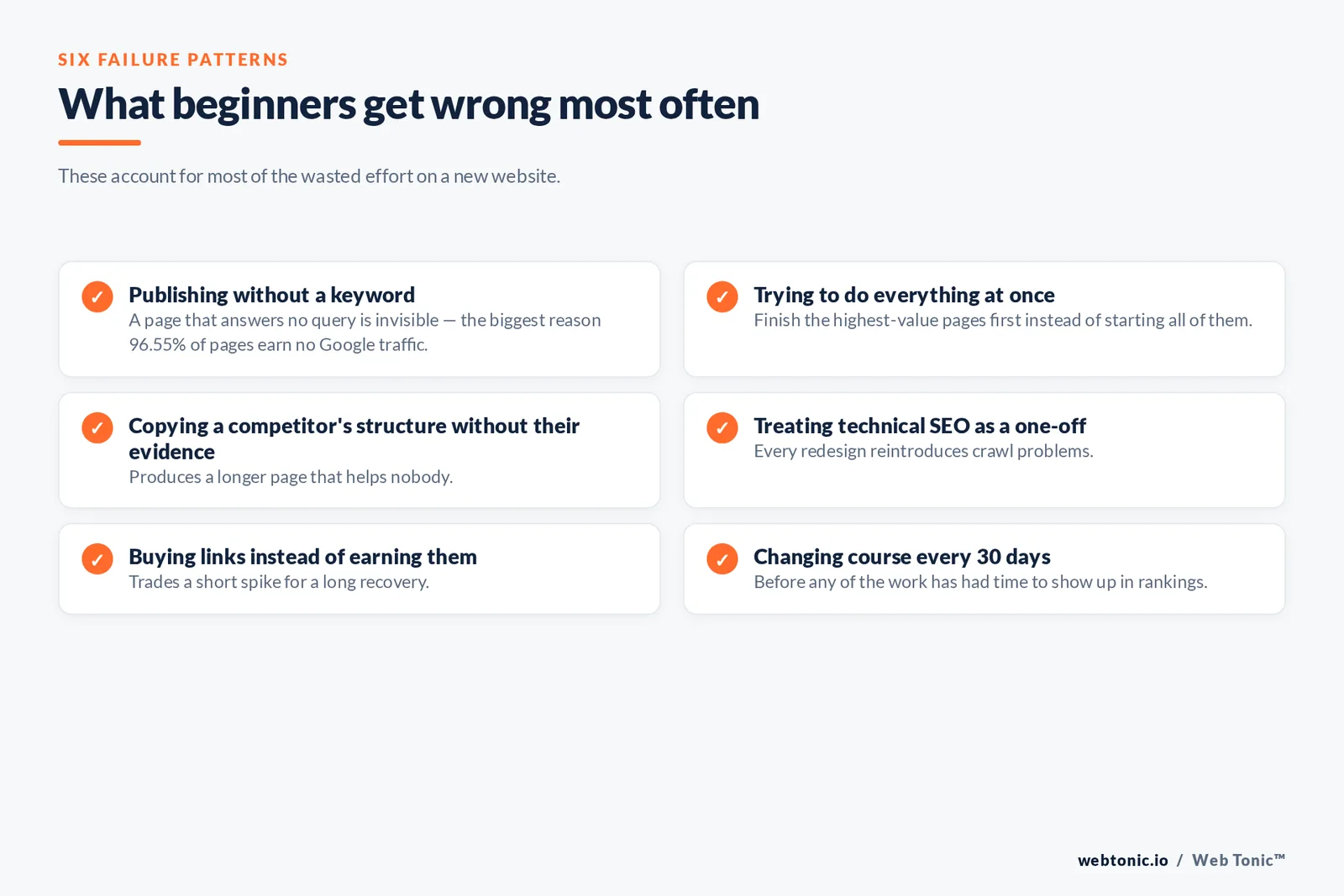
Mistake 1 — publishing without a keyword. A page that answers no query is invisible; this is the single biggest reason 96.55% of pages earn no Google traffic. Mistake 2 — trying to create everything at once instead of finishing the highest-value pages first. Mistake 3 — copying the best competitor's structure without their evidence, which produces a longer page that helps nobody. Mistake 4 — treating technical SEO as a one-off project when every redesign reintroduces crawl problems. Mistake 5 — buying links rather than earning them, which trades a short spike for a long recovery. Mistake 6 — changing course every 30 days, before any of the work has had time to show up in rankings.
The counter-discipline is boring and it works: pick the best available opportunity, create the page properly, link to it internally, measure it for a quarter, then repeat. That is what separates websites that grow from websites that publish.
FAQ
How long do SEO basics take to show results?
Technical fixes can register in days, on-page changes in two to six weeks, and content plus links in three to twelve months. Only 5.7% of new pages reach the top 10 within a year, so a quarterly review cadence is realistic; a weekly one is not.
Can I do SEO myself without an agency?
Yes, for the first nine fundamentals. Search Console, Keyword Planner and PageSpeed Insights are free, and steps 1 to 6 in the priority table are process work rather than specialist work. Outside help pays off at scale, on complex migrations and in competitive link markets.
How many keywords should one page target?
One primary keyword per URL plus the close variants and questions that share the same search intent. A page that ranks well typically also ranks in the top 10 for around 1,000 related terms, but that happens by covering a topic properly, not by stuffing extra head terms.
Is technical SEO or content more important for a beginner?
Technical comes first only until pages are crawlable and indexable; after that content decides outcomes. Since about 33% of sites pass all three Core Web Vitals, a passing site has an edge, but speed never rescues a page that fails to answer the query.
What SEO practices should I avoid?
Purchased link schemes, scaled AI content published without review, doorway pages, hidden text and cloaking — all named in Google's spam policies. The penalty risk is asymmetric: months of recovery for a short-lived gain.
Sources: Google Search Central (SEO starter guide, Search Essentials, how Search works, spam policies, helpful content, title links, snippets, robots.txt, sitemaps, structured data); web.dev Core Web Vitals and LCP guidance; Google Search Console; Bing Webmaster Guidelines; Statcounter Global Stats, July 2026; First Page Sage Google CTR by ranking position, 2026; Ahrefs SEO statistics and keyword research research; Semrush search intent guide; Moz beginner's guide to SEO; Yoast; Search Engine Land SEO library; Nielsen Norman Group reading behaviour research; Google Keyword Planner and Google Trends.


