



Table of contents

A sitemap is a file that lists the important URLs on a website so search engines can discover and crawl them efficiently. The standard format is XML, published at a stable address such as /sitemap.xml, and it tells engines like Google which pages exist, when each one last changed, and how the site is organised.
Key Takeaways
- A single sitemap file is capped at 50,000 URLs or 50MB uncompressed (52,428,800 bytes). Beyond that you split the file and group the parts with a sitemap index.
- A sitemap index can itself reference up to 50,000 child sitemaps, so the protocol scales to 2.5 billion URLs in theory.
- Google ignores 2 of the 4 optional URL tags:
<priority>and<changefreq>are not used.<lastmod>is used only when it is consistently and verifiably accurate. - News sitemaps are limited to 1,000
news:newsentries per file — the tightest limit in the spec. - A sitemap is a discovery aid, not an indexing guarantee. It helps most on sites over roughly 500 pages, on new sites with few backlinks, and on sites with weak internal linking.
- You only need 2 submission steps: add a
Sitemap:line to robots.txt and submit the URL once in Google Search Console.
How a sitemap works
Search engines find pages in two ways: by following links, and by reading files you hand them. A sitemap is the second route. When a crawler fetches your sitemap file it gets a clean, machine-readable inventory of URLs without having to traverse your navigation, which means orphan pages, deep pagination and recently published content all become discoverable in a single request. Google's own documentation on what sitemaps do is explicit that a sitemap improves discovery, not ranking.
The minimum viable XML sitemap is short. Every file opens with an XML declaration, wraps everything in a urlset element bound to the sitemaps.org 0.9 namespace, and lists one url block per page:
<?xml version="1.0" encoding="UTF-8"?>
<urlset xmlns="http://www.sitemaps.org/schemas/sitemap/0.9">
  <url>
    <loc>https://example.com/services/</loc>
    <lastmod>2026-07-28</lastmod>
  </url>
</urlset>
All tag values must be entity-escaped, which is the single most common cause of an invalid sitemap file: an unescaped ampersand in a query-string URL breaks the whole document. The full schema, including entity-escaping rules and the alternative plain-text and RSS formats, lives in the sitemaps.org protocol specification, which Google, Bing, Yahoo and other engines all implement.
The 7 types of sitemap
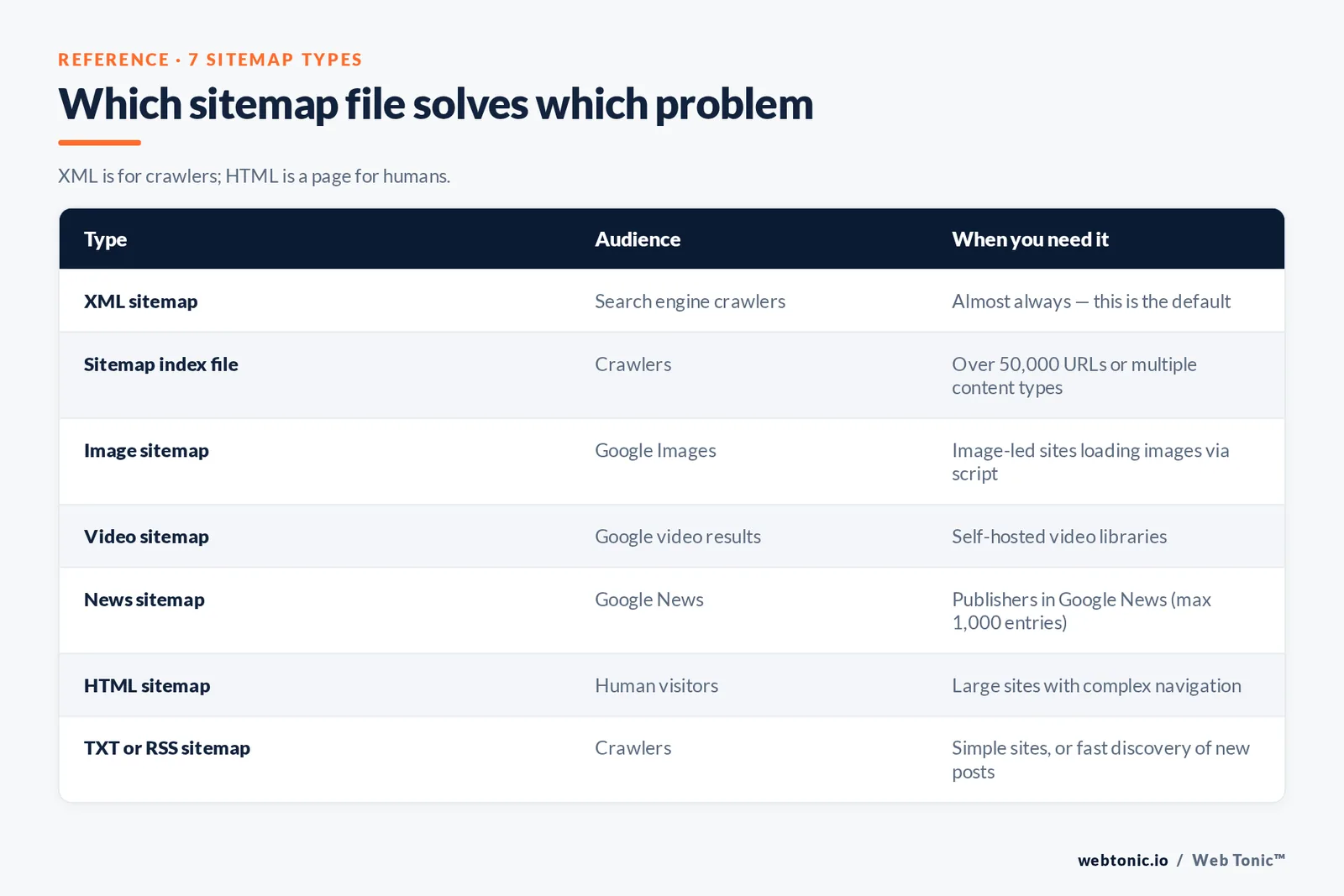
"Sitemap" covers several different files that solve different problems. The distinction that trips people up most is XML versus HTML: an XML sitemap is for crawlers, an HTML sitemap is a page for humans.
| Type | Audience | What it contains | When you need it |
|---|---|---|---|
| XML sitemap | Search engine crawlers | Page URLs plus optional lastmod | Almost always — this is the default |
| Sitemap index file | Crawlers | A list of other sitemap files | Over 50,000 URLs or multiple content types |
| Image sitemap | Google Images | image:loc entries per page | Image-led sites where images load via script |
| Video sitemap | Google video results | Thumbnail, duration, description | Self-hosted video libraries |
| News sitemap | Google News | Publication name and date, max 1,000 entries | Publishers accepted into Google News |
| HTML sitemap | Human visitors | A linked directory page of key URLs | Large sites with complex navigation |
| TXT or RSS sitemap | Crawlers | One URL per line, or a feed of recent items | Simple sites, or fast discovery of new posts |
Extensions are additive rather than exclusive. You can declare image and video namespaces inside a normal URL sitemap instead of maintaining separate files, which is what most content management systems do. Google documents the specific tag sets for image sitemaps, video sitemaps and news sitemaps separately, and each has its own required child elements.
Which sitemap.xml tags Google actually uses
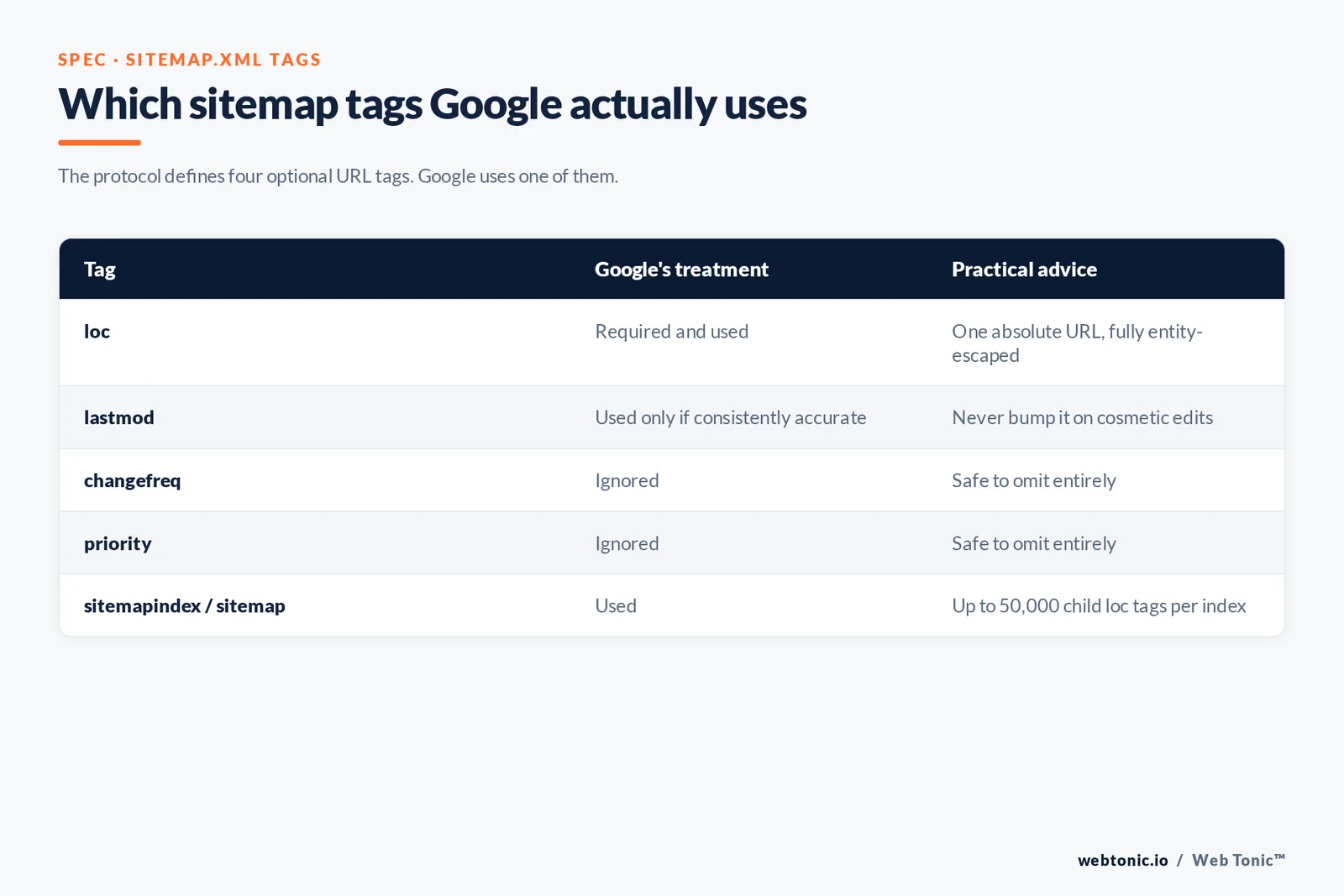
The protocol defines four optional tags per URL. Google uses one of them. Cleaning the other three out of a generated sitemap will not help your rankings, but understanding the asymmetry stops teams wasting sprints tuning values that are discarded on arrival.
| Tag | Purpose in the spec | Google's treatment | Practical advice |
|---|---|---|---|
| loc | The canonical URL of the page | Required and used | One absolute URL, fully entity-escaped |
| lastmod | Date the page last meaningfully changed | Used if consistently and verifiably accurate | Never bump it on cosmetic edits |
| changefreq | Expected update cadence | Ignored | Safe to omit entirely |
| priority | Relative importance from 0.0 to 1.0 | Ignored | Safe to omit entirely |
| sitemapindex / sitemap | Groups multiple sitemap files | Used | Up to 50,000 child loc tags per index |
A trustworthy lastmod is the highest-leverage field in the file. Google cross-checks the value against what it sees when it crawls, so a site that stamps every URL with today's date teaches the crawler to ignore the signal on every URL. Google's guidance on building and submitting a sitemap spells out both the size limits and the escaping requirements, and the sitemap index reference covers the grouping syntax for large sites.
Do you actually need a sitemap? By site type
A sitemap has the most impact where link-based discovery is weakest. If your site is small and every page is one or two clicks from the homepage, Google will find everything anyway — but publishing the file costs nothing and gives you an indexing report you would not otherwise have.
| Site type | Typical URL count | Sitemap value | Recommended setup |
|---|---|---|---|
| Brochure site | 5-20 | Low but worth it | Single auto-generated XML file |
| Local service business | 20-150 | Medium | One file, location pages listed explicitly |
| Content blog | 150-2,000 | High | Index file split by post type |
| Ecommerce store | 1,000-500,000 | Critical | Index plus product, category and image children |
| Marketplace | 100,000+ | Critical | Sharded index, hourly regeneration |
| News publisher | Continuous | Critical | News sitemap capped at 1,000 items plus main XML |
| SaaS product site | 50-500 | High | Separate docs and marketing sitemaps |
| Single-page app | 10-200 | Critical | Server-rendered routes listed manually |
| Video library | 100-10,000 | High | Video sitemap with thumbnails and duration |
| Photography or portfolio | 50-2,000 | High | Image sitemap or image namespace |
| Job board or listings | 5,000-100,000 | Critical | Frequent regeneration, accurate lastmod |
| Multilingual site | Any | High | One sitemap per language, hreflang in the file |
How to create a sitemap in 5 steps
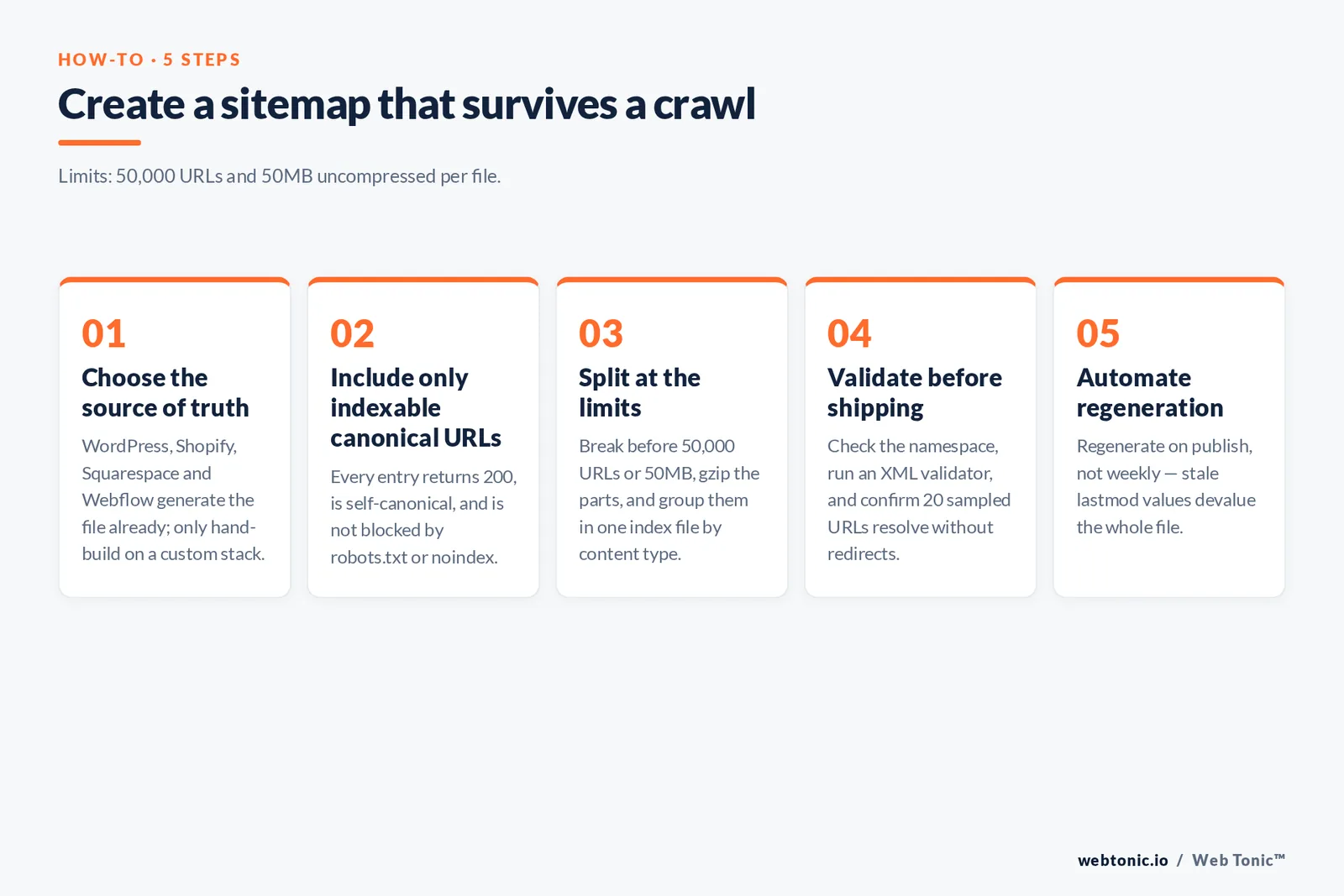
- Step 1 — Choose the source of truth. Most platforms generate the file automatically: WordPress ships core sitemaps and the Yoast SEO plugin's XML sitemap module replaces them with a configurable index; Shopify, Squarespace and Webflow publish one at
/sitemap.xmlwith no setup. Only hand-build a file if you have a custom stack. - Step 2 — Include only indexable, canonical URLs. Every entry should return a 200 status, be self-canonical, and not be blocked by robots.txt or a noindex tag. Mixed signals are the number one reason Search Console reports a URL as excluded.
- Step 3 — Split at the limits. Break the file before it reaches 50,000 URLs or 50MB, gzip the parts if bandwidth matters, and reference them from a single index file. Splitting by content type rather than arbitrarily makes the coverage report far easier to read.
- Step 4 — Validate before shipping. Run the file through an XML sitemap validator, confirm the namespace is correct, and check that a random sample of 20 URLs resolves without redirects.
- Step 5 — Automate regeneration. A sitemap that goes stale is worse than none, because inaccurate lastmod values devalue the whole file. Regenerate on publish, not on a weekly schedule.
How to submit a sitemap to search engines
Two mechanisms cover every major engine. The first is the Sitemap directive in robots.txt, which is read by every crawler that respects the exclusion protocol standardised in RFC 9309. Add one line per sitemap or index file, using an absolute URL — Google's robots.txt reference documents the syntax:
User-agent: *
Allow: /
Sitemap: https://example.com/sitemap_index.xml
The second is direct submission. In Google Search Console, open the Sitemaps report, paste the path and submit; the report then shows discovered URL counts and parse errors per file, which is the fastest diagnostic you have. Google's Sitemaps report help page explains each status. For Microsoft properties, Bing accepts the same file through Bing Webmaster Tools and additionally supports IndexNow, a push protocol that notifies engines the moment a URL changes rather than waiting for the next crawl. Running both is standard practice for our web development builds.
8 sitemap mistakes that quietly cost indexing
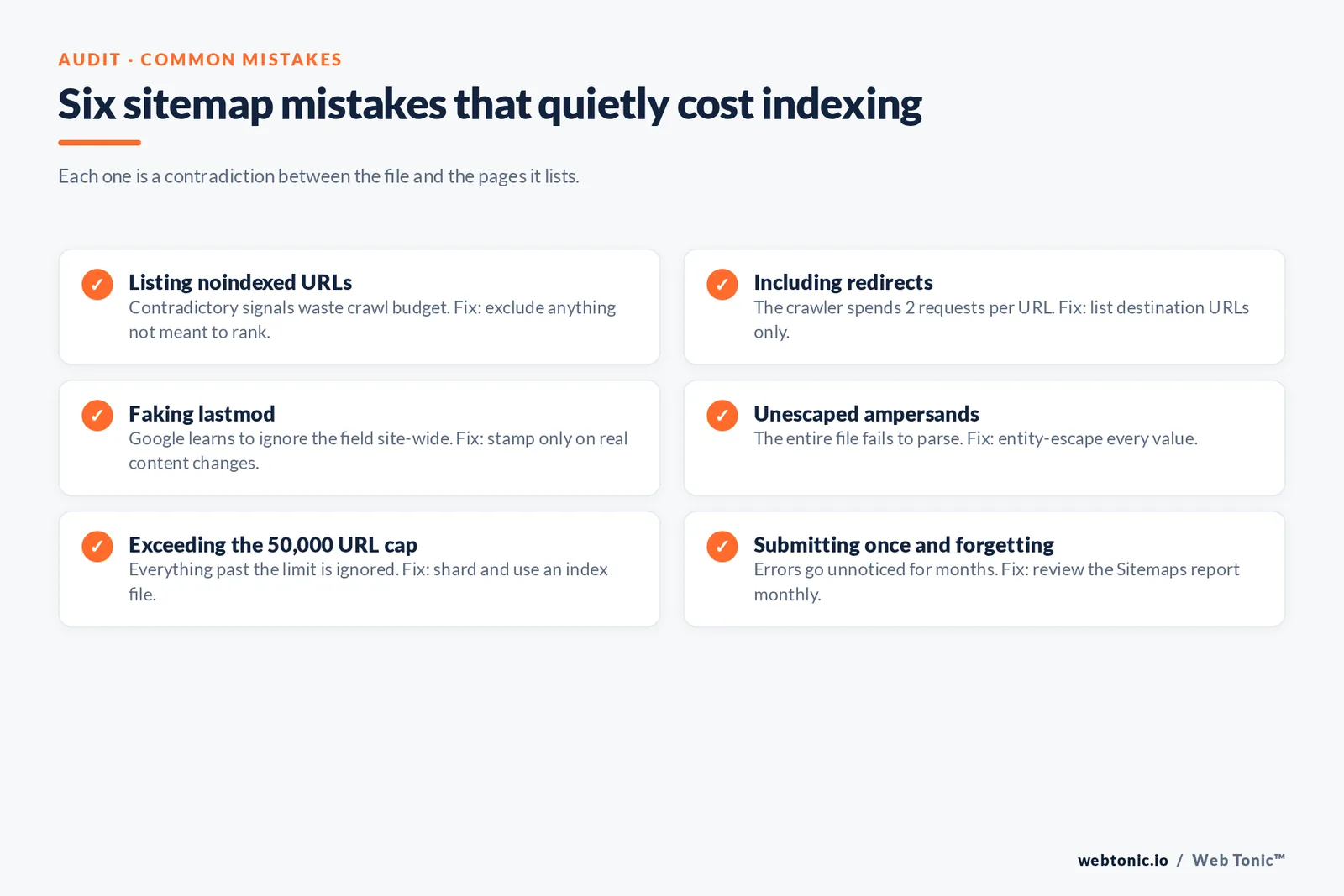
| Mistake | Why it hurts | Fix |
|---|---|---|
| Listing noindexed URLs | Contradictory signals waste crawl budget | Exclude anything not meant to rank |
| Including redirects | Crawler spends 2 requests per URL | List destination URLs only |
| Faking lastmod | Google learns to ignore the field site-wide | Stamp only on real content changes |
| Unescaped ampersands | The entire file fails to parse | Entity-escape every value |
| Mixing protocols or hosts | Cross-domain URLs are dropped | One host per file, matching the sitemap's own host |
| Blocking the sitemap in robots.txt | The file can never be fetched | Allow the path explicitly |
| Exceeding the 50,000 URL cap | Everything past the limit is ignored | Shard and use an index file |
| Submitting once and forgetting | Errors go unnoticed for months | Review the Sitemaps report monthly |
The pattern behind all eight is the same: a sitemap is a statement about which URLs you consider canonical and current. When that statement disagrees with your robots.txt, canonical tags or HTTP responses, the engine trusts the page over the file — and you lose the discovery benefit you built it for. Auditing that agreement across a large site is exactly the kind of work our data intelligence team automates, and we cover related technical fixes across the Web Tonic blog.
Related terms
| Term | Definition | Relationship to sitemaps |
|---|---|---|
| Crawling | Search engines fetching pages to read their content | Sitemaps feed the crawl queue |
| Indexing | Storing a crawled page as a ranking candidate | Never guaranteed by a sitemap |
| robots.txt | A file that permits or blocks crawler access | Hosts the Sitemap directive |
| Canonical URL | The preferred version of duplicate pages | Only canonicals belong in a sitemap |
| Crawl budget | Requests an engine will spend on your site | Clean sitemaps reduce wasted requests |
| Orphan page | A page with no internal links pointing to it | The main discovery gap a sitemap closes |
| Google Search Console | Google's site owner reporting tool | Where you submit and monitor sitemaps |
| Sitemap validator | A tool that checks XML against the schema | Run before every submission |
FAQ
What is a sitemap in simple terms?
It is a list of your website's important pages, written in a format search engines can read. The standard XML version sits at a fixed URL such as /sitemap.xml and tells Google which pages exist and when they last changed, so those pages get crawled sooner than they would through link discovery alone.
Do sitemaps improve SEO rankings?
Not directly. A sitemap affects discovery and crawl efficiency, not ranking position. The indirect benefit is real though: pages that get crawled and indexed faster start earning impressions sooner, and the Search Console Sitemaps report surfaces indexing problems you would otherwise miss.
What is the difference between an XML sitemap and an HTML sitemap?
An XML sitemap is a machine-readable file for search engine crawlers, written to the sitemaps.org schema. An HTML sitemap is a normal web page listing links for human visitors. Large sites sometimes publish both; only the XML version is submitted to Google.
How many URLs can one sitemap contain?
Up to 50,000 URLs, and no more than 50MB uncompressed per file. Files may be gzipped for transfer but must stay under 50MB once expanded. If you need more, create multiple sitemaps and list them in a sitemap index, which itself accepts up to 50,000 entries.
Where should a sitemap file be located?
At the root of the host it covers, most commonly /sitemap.xml or /sitemap_index.xml. A sitemap can only list URLs on the same host unless you prove ownership of the other host through its robots.txt, which is why cross-domain entries are usually dropped.
How do I know my sitemap is working?
Check the Sitemaps report in Google Search Console: it shows the last read date, the number of discovered URLs and any parse errors. Compare discovered URLs against indexed pages in the Pages report — a large gap points to quality or canonicalisation issues rather than a sitemap problem. Ask our team for a technical crawl audit if the gap will not close.
Sources: Google Search Central documentation — sitemaps overview, build and submit a sitemap, sitemap index files, image sitemaps, video sitemaps, news sitemaps and the robots.txt reference; sitemaps.org XML protocol 0.9; Google Search Console Sitemaps report help; RFC 9309 (Robots Exclusion Protocol); Yoast SEO XML sitemap documentation; Bing IndexNow. Last reviewed August 2026.


