



Table of contents
A video with zero views isn't a bad video by default; sometimes it's simply an invisible one. Google can't watch your video the way a person can; it needs structured signals to know what's in it, where it starts and ends, and which moments matter. Video SEO best practices are exactly that: the technical and on-page work that turns a video file into something Google and YouTube can actually find, understand, and rank. This guide covers what that work looks like in 2026.
Key Takeaways
- Video SEO best practices split into two systems: YouTube SEO, driven by watch time, retention, and engagement, and on-site video SEO, driven by structured data, video sitemaps, and page content.
- VideoObject schema markup is the baseline requirement for Google to understand an embedded video at all; without it, Google has to guess from surrounding text.
- Key Moments, the clickable timestamps shown in Google Search results, are enabled through either Clip structured data (manually defined) or SeekToAction structured data (Google identifies them automatically from your URL structure).
- A video must be at least 30 seconds long and deep-linkable to a specific timestamp to qualify for Key Moments at all.
- Video sitemaps use specific XML tags, including thumbnail_loc, content_loc, and player_loc, to tell Google where each video's assets actually live, and each sitemap file is capped at 50,000 videos.
- Popular SEO plugins (Yoast, RankMath, AIOSEO) can auto-generate VideoObject schema, with premium tiers typically running $70 to $200 per year depending on the plugin and features.
What is Video SEO?
Video SEO is the practice of optimizing video content and the pages that host it so search engines like Google, and platforms like YouTube, can crawl, index, and rank that content for relevant queries. It covers technical requirements (structured data, sitemaps, file accessibility), on-page elements (titles, descriptions, transcripts), and platform-specific factors (watch time and engagement on YouTube, page experience and Core Web Vitals on your own site).
A quick example to make this concrete: a how-to video with a clear title, a written description, and a transcript on the page gives Google far more to work with than the same video dropped in with no context at all, and that difference shows up directly in visibility. Optimizing for viewers and for search engines turns out to be mostly the same task, since the structure that helps Google understand a video (clear titles, chaptered sections, accessible captions) is the same structure that helps a real person decide whether to keep watching. A solid video seo strategy treats these as a single job that happens to help with rankings, rather than two separate checklists.
The distinction that matters most for anyone running video on their own website: YouTube SEO and on-site video SEO are related but separate systems, and they reward different things. On YouTube, watch time, click-through rate, and viewer retention are the dominant signals search engines use to rank a video within YouTube's own ecosystem. On your own site, Google relies on structured data, sitemaps, and how well the video is embedded and supported by surrounding content, since Google can't watch the video itself the way a viewer can.
How Google Indexes and Ranks Video
Google's own video SEO documentation lays out the indexing requirements clearly: the watch page must be indexed and performing well in search before its video can even be considered, the video must be embedded directly on that page rather than hidden behind other elements, and it needs a valid thumbnail available at a stable URL. None of these are optional extras; missing any one of them can keep a video out of video features entirely.

VideoObject Schema Markup
VideoObject schema is structured data, written in JSON-LD, that tells Google exactly what a video is, its title, description, thumbnail, upload date, and duration, instead of leaving Google to infer that information from the surrounding page. Without it, Google has to guess what an embedded video is about using page title, meta tags, and nearby text, a much less reliable path to a video rich snippet.
The schema decision depends on one question: is the video the main content of the page, or supporting content alongside text? If the video is the primary reason someone visits the page, use VideoObject schema to have Google index it as a standalone entity; if it's supporting a longer article, the schema still helps, but the page's text content carries more of the ranking weight.
Key Moments: Clip vs. SeekToAction
Key Moments are the clickable, timestamped links Google shows beneath a video result in search, letting a user jump straight to the specific part of a video that answers their query. There are two ways to enable this, and they work differently.
Clip structured data lets you manually define the exact start and end time for each segment of a video, along with a label for what that segment covers. SeekToAction structured data works the opposite way: it tells Google how your URL structure handles timestamp jumps, so Google can automatically identify key moments without you manually labeling each one. Both require the video to be at least 30 seconds long and support deep linking to a specific point in the video, not just the start.
Video Sitemaps
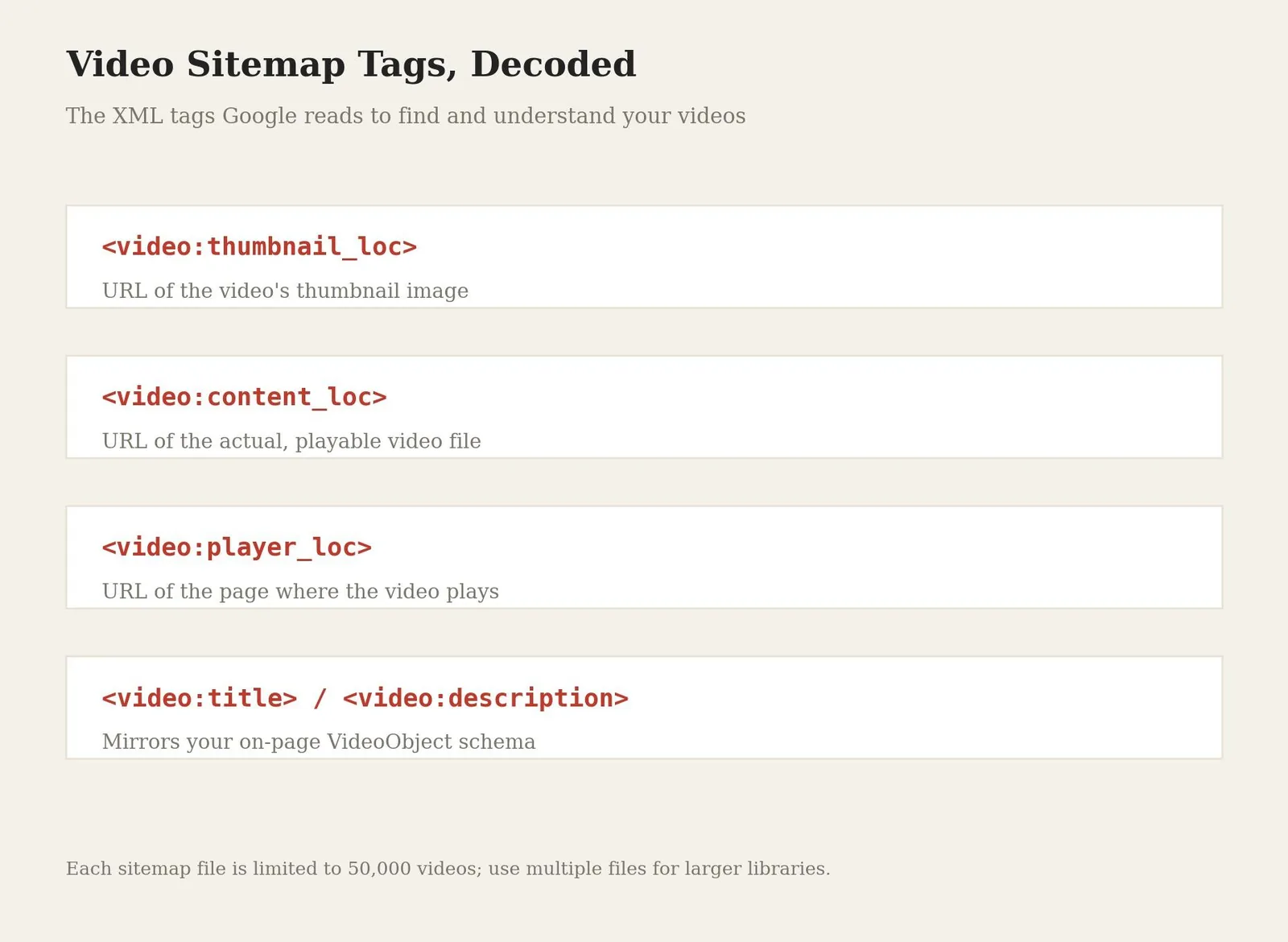
A video sitemap is a supplementary signal that tells Google exactly where a video's assets live, separate from the on-page schema. Google's documentation specifies the video:thumbnail_loc tag for the thumbnail URL, alongside content_loc for the actual video file and player_loc for the page where it plays; the shorthand "loc" simply stands for location in each of these tags. For most business sites with a handful of embedded videos, on-page VideoObject schema is the primary mechanism and the sitemap is secondary; for a large video library, the sitemap becomes considerably more important for comprehensive indexing, since it gives Google a single place to check the loc video assets across the whole site at once. Each sitemap file is capped at 50,000 videos, so larger libraries need multiple sitemap files.
On-Page Video SEO Elements
Titles remain the primary ranking factor for video content, and every video title should include the target keyword early while staying natural and specific rather than generic. Video description text matters more than most site owners assume: a well-written video description in the first 150 to 300 words is indexed by Google and increasingly read by AI Overviews when generating an answer, so titles descriptions and tags together deserve the same keyword care as body copy on the rest of the page. High quality titles and descriptions, paired together, do more for visibility than either one alone.
Transcripts and closed captions do double duty, they improve accessibility and give Google far more text to understand what the video actually covers, since a full transcript exposes every word spoken in a way that titles and tags alone can't. Self-hosting through a dedicated video hosting platform like Wistia or Vimeo Pro gives more control over branding and analytics than relying on a third-party video player alone, though it shifts the SEO setup, schema, sitemaps, page speed, onto the site owner rather than YouTube. Social media is a distribution channel for wherever the video ends up, not a substitute for the schema and sitemap work described above. This same groundwork is what helps a video surface whether someone runs a YouTube search or a plain Google search, since a video optimized well for one increasingly shows up in the other; strong YouTube Google visibility and video Google rankings tend to move together.
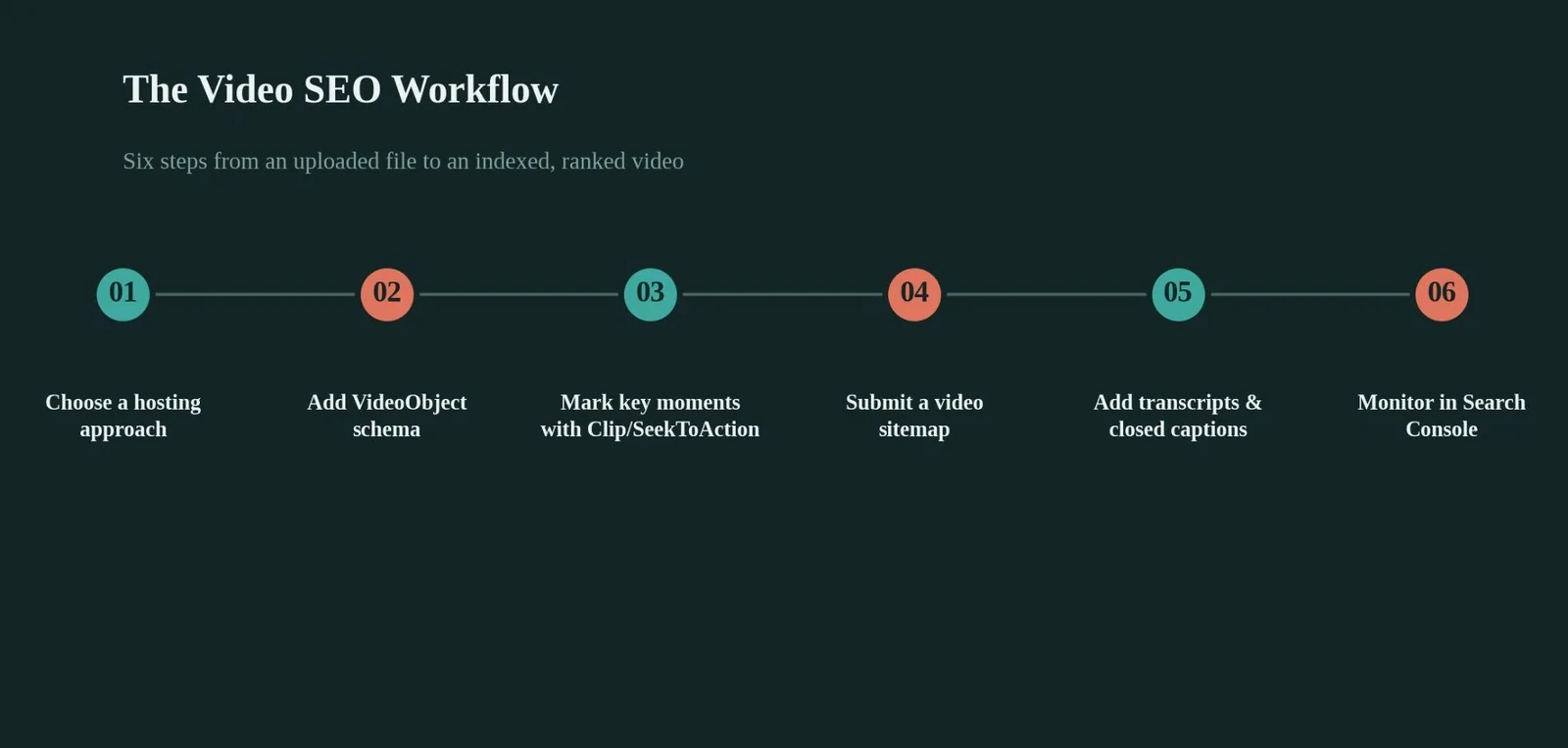
Publishing the video on a relevant page, adding a visible title and transcript, validating the schema, and monitoring indexing status is the core repeatable loop for every video published.
Video Schema Plugin Costs Compared
Table 1: Video Schema Plugin Pricing
Yoast, RankMath, and AIOSEO all generate VideoObject schema automatically when they detect an embedded video, at the following typical costs:
| Plugin | Video schema support | Typical cost (USD) |
|---|---|---|
| Yoast SEO | Auto-generates VideoObject for detected embeds (Premium only) | $118.80/year for Premium |
| RankMath | Basic VideoObject free; Pro adds thumbnail/timestamp auto-detection | Free, or roughly $72-$108/year for Pro |
| AIOSEO | VideoObject plus a companion video sitemap via its Video Sitemap addon | $199/year for Pro |
Clip vs. SeekToAction at a Glance
Table 2: Clip vs. SeekToAction Structured Data
| Factor | Clip structured data | SeekToAction structured data |
|---|---|---|
| How timestamps are set | Manually defined by you | Automatically identified by Google |
| Best for | A small number of precisely labeled moments | Sites with a consistent, timestamp-friendly URL pattern |
| Minimum video length | 30 seconds | 30 seconds |
| Google must fetch video file | Not required | Required |
Common Mistakes That Keep Videos Out of Search Results
A video embedded with no VideoObject schema at all, leaving Google to guess at the content from surrounding text alone.
A thumbnail that isn't available at a stable, valid URL, which alone can disqualify a video from rich results regardless of everything else being correct.
Timestamps listed only in a YouTube description with no matching Clip or SeekToAction structured data on the actual website page.
A video sitemap that's created once and never resubmitted or updated as new videos get added to the site.
No transcript or captions anywhere on the page, leaving Google with only a title and a short description to understand what the video actually covers.
Video SEO tool
Is your video page search-ready?
Answer five quick questions about a video page on your site. We'll score how ready it is for Google's video features.
Answer the questions above
Your video SEO readiness score will appear here once all five are answered.
Related reading
- Image SEO Best Practices: What It Is & How to Use It
- Mobile SEO Best Practices: What It Is & How to Use It
- 2026 Technical SEO Stats for Manufacturing: Benchmarks That Matter
- GEO & AEO services at Web Tonic
Frequently Asked Questions
What Is the Single Most Important Video SEO Best Practice?
Adding complete VideoObject schema markup, since it's the baseline signal Google uses to understand what a video contains at all. Everything else, Key Moments, rich snippets, sitemap indexing, builds on top of that foundation.
Do I Need Both a Video Sitemap and VideoObject Schema?
Yes, ideally both. Schema tells Google what the video is; the sitemap tells Google where it and its assets live. They serve different purposes and Google recommends using structured data, sitemaps, or Open Graph together rather than relying on just one.
What's the Difference Between YouTube SEO and Video SEO for My Own Website?
YouTube SEO ranks a video within YouTube's own search and recommendation system, driven mainly by watch time and engagement. On-site video SEO ranks your own domain in Google Search, driven mainly by structured data, sitemaps, and page content quality.
Can I Get Key Moments for a YouTube Video Embedded on My Site?
You can specify timestamps in the YouTube description itself, but Google may then show the YouTube URL with the key moment rather than your own domain, since YouTube has its own VideoObject markup for that video already.
How Long Should a Video Be to Qualify for Key Moments?
At least 30 seconds, and it must support deep linking to a specific timestamp within the video, not just play from the beginning every time.
The Bottom Line on Video SEO Best Practices
Video SEO best practices come down to giving Google structured, explicit signals instead of asking it to guess. VideoObject schema, video sitemaps, Key Moments markup, and a real transcript together tell Google exactly what a video contains and where every part of it lives, and that clarity is what earns rich results.
Pick one video page on your site, check whether it has a complete VideoObject schema, and run it through Google's Rich Results Test. That single check will tell you more about your video SEO gaps than auditing your entire library at once.
Ready to Get Your Videos Actually Found?
Video SEO touches schema, sitemaps, page speed, and content structure all at once, which is exactly where a video that took real effort to produce ends up invisible in search anyway. Web Tonic's growth marketing team builds video SEO into the technical foundation of a site from the start, so the content already gets found by the people searching for it.
More from Web Tonic: growth marketing services, data & analytics.
Sources: developers.google.com · humbleandbrag.com · evelize.com · vdocipher.com · w3era.com · swarmify.com


