



Table of contents

Most image SEO advice stops at compressing files and writing alt text. That's necessary, but it's only half the picture. An image on a modern website has to do several jobs at once: load fast on every device, describe itself accurately to Google Image Search, present a clean preview when someone shares the blog post on social media, and qualify for the large-image treatment in Google Discover. Each of those jobs is controlled by a different piece of markup, and treating them as one undifferentiated task is why so many otherwise well-optimized sites still show a broken social preview or a blurry Discover thumbnail during a site audit.
This guide covers the image SEO best practices that go beyond basic compression: responsive image scaling, the difference between your content image and your Open Graph image, structured data for image rich results, and what Google Discover specifically requires. Supported formats worth knowing across these systems include JPEG, PNG, WebP, and SVG, though CSS background images are invisible to Google Image Search regardless of format, since Google can only associate an image with a page through an actual img element, not a decorative background layer. Popular SEO plugins like Yoast SEO can help generate a lot of this markup automatically, though it's still worth understanding what each tag actually does.
Key Takeaways
- Responsive images, served via the srcset and sizes attributes or the picture element, let the browser choose the right file size for each device instead of forcing every visitor to download the desktop version.
- The image users see in your content and the image shown when your page is shared on social media are not the same job. Open Graph tags don't directly affect search rankings, even though the img src on the page does.
- Google Discover requires images at least 1200 pixels wide plus the max-image-preview:large robots meta tag to show a large image preview; missing either one limits eligibility.
- Structured data, using the schema.org ImageObject type or the primaryImageOfPage property, helps Google select the right image for rich results and can unlock a badge in Google Images.
- A content delivery network (CDN) can host images referenced in your image sitemap, as long as you verify the CDN's domain in Search Console so Google can report crawl errors back to you.
- The universal Open Graph image size is 1200x630 pixels, a 1.91:1 aspect ratio that renders correctly across Facebook, LinkedIn, Slack, and Discord without cropping.
Responsive images: serving the right file to the right device
A single fixed-size image forces every visitor, whether on a phone or a widescreen monitor, to download the same file. Responsive image techniques fix this by giving the browser several versions of the same image and letting it choose. That's one of the simplest ways to optimize images for both speed and user experience. The srcset attribute on an img element lists multiple high quality image files at different widths, and the sizes attribute tells the browser how much space the image will occupy at different viewport widths. The browser then picks the smallest file that will still look sharp, rather than downloading the largest version by default. Sites that skip this step often show up fine in images search results but load noticeably slower than competitors who scale properly.
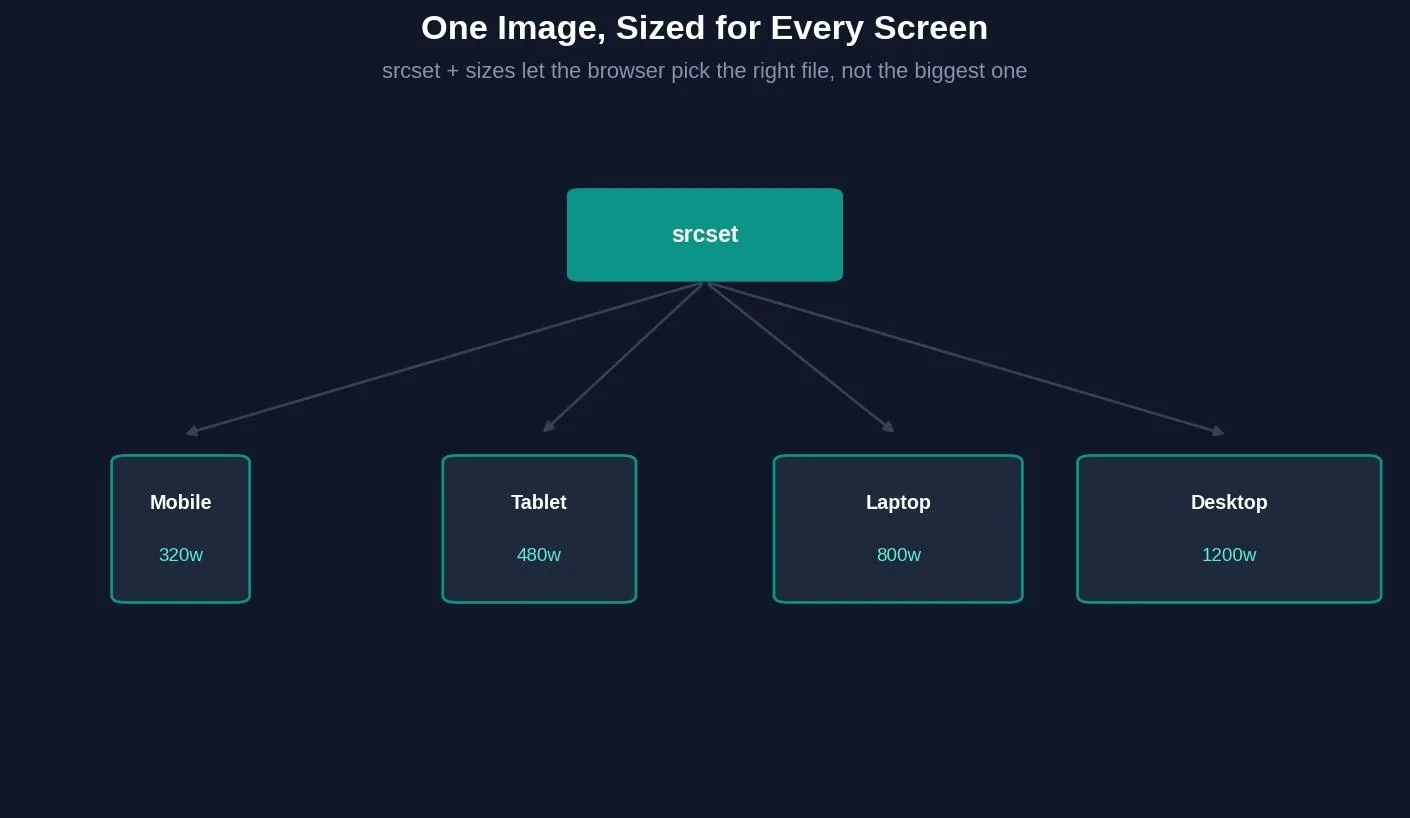
The picture element extends this further, letting a site serve entirely different image formats or crops depending on screen size or format support, with a fallback img tag for browsers or crawlers that don't understand the newer syntax. Google's own developer documentation on image SEO explicitly recommends using picture or srcset for responsive images rather than relying on a single static file.
Your img src image and your og:image are not the same job
It's easy to assume the image on the page is the only image that matters for SEO. It isn't. Open Graph tags don't directly affect search rankings, a point multiple SEO sources make independently, while the actual img element with its alt text is what search engines read and index as part of the page content.

That distinction matters because the two images can, and often should, be different files entirely. The content image needs to be relevant, well-compressed, and described with accurate alt text so Google Images and screen readers can both use it. The Open Graph image exists purely for social platforms and messaging apps: Facebook, LinkedIn, Slack, Discord, and others read the og:image tag to build a link preview card, and none of them care about alt text, file size optimization for page speed, or keyword relevance the way Google Images does. A logo-heavy banner image makes a fine og:image and a poor hero image; the reverse is just as common.
img src content image vs. og:image social image
| img src content image | og:image social image | |
|---|---|---|
| Purpose | Represents the content on the page | Represents the page in a social share card |
| Read by | Google Images, screen readers, Googlebot | Facebook, LinkedIn, Slack, Discord, iMessage |
| Format requirement | Any supported format (JPEG, PNG, WebP, SVG for non-photos) | 1200x630px (1.91:1), JPEG or PNG, absolute HTTPS URL |
| SEO impact | Direct — indexed, can rank in Google Images | Indirect — affects CTR and social traffic, not rankings directly |
The universal size for an Open Graph image is 1200 by 630 pixels, a 1.91:1 aspect ratio that displays correctly without cropping across Facebook, LinkedIn, Slack, and Discord. Going below roughly 200 by 200 pixels risks platforms ignoring the image outright. File size matters too: platforms officially accept anywhere from about 650KB up to 8MB, though keeping the file well under that ceiling — some practitioners suggest closer to 100KB — avoids adding load time on top of whatever the page's other images already cost.
Try it: Open Graph image checker
Paste in your og:image dimensions to check them against the platform-wide standard.
Social & SEO tool
Open Graph image checker
Enter your og:image dimensions to check them against the platform-wide 1200x630 standard.
Structured data and image rich results
Adding structured data to an image, using the schema.org ImageObject type, gives Google an explicit signal about which image belongs to which page, separate from whatever Google's automated selection process might otherwise guess. For sites willing to add structured data at scale, the payoff compounds across every eligible page rather than just one. Google's documentation notes that when a page includes structured data with an eligible image property, that image becomes a candidate for a badge and rich result display directly in Google Images. That's a better user experience for anyone browsing visual search results.
A related but distinct mechanism is the primaryImageOfPage property. It lets a site specify its preferred image for Google's search result and Discover previews without necessarily marking up full licensing or creator metadata. Both approaches solve the same underlying problem: with automated image selection, Google is making a guess based on content and metadata, and structured data replaces that guess with an explicit instruction.
Google Discover: what images actually need

Google Discover has its own image requirements, separate from ordinary search results. An image needs to be at least 1200 pixels wide to be eligible for a large preview in the Discover feed, and the page needs the max-image-preview:large robots meta tag set. Skip that tag and Discover previews stay small no matter how large or sharp the underlying file is. Google also factors in where the image sits relative to the surrounding text, since its automated selection process draws on captions, titles, and nearby content to judge relevance, not just the image file in isolation.
CDNs and image sitemaps
Hosting images on a content delivery network is fully compatible with image SEO, including on a different domain than the main site. Google's own documentation confirms that image sitemap entries can reference URLs on other domains. That's exactly what CDN-hosted images require. The one extra step: verify the CDN's domain in Search Console so that Google can report crawl errors back to the right property, rather than errors on CDN-hosted images going unnoticed.
Common image SEO mistakes beyond compression
Treating the og:image and the content image as interchangeable is one of the most common gaps, usually resulting in an image that looks fine in an article but crops awkwardly or looks generic in a social preview card.
Skipping the max-image-preview:large tag while still hoping for large Discover previews is a quiet, easy-to-miss mistake, since the symptom (small or missing previews) doesn't point back to the actual cause.
Relying entirely on Google's automated image selection instead of using structured data or the primaryImageOfPage property leaves the choice of preview image up to a guess, even on pages where one image is clearly more important than the others.
Serving a single fixed-size image to every device wastes bandwidth for mobile users and can quietly drag down Core Web Vitals, particularly Largest Contentful Paint, on image-heavy pages.
Tools for auditing image SEO beyond basic checks
Google Search Console's URL Inspection tool shows exactly which image Google selected for a given page. That's useful for confirming whether structured data or primaryImageOfPage is actually being respected. The Rich Results Test validates ImageObject and other structured data before it goes live. For Open Graph specifically, the Facebook Sharing Debugger and LinkedIn Post Inspector both force a fresh crawl of a page's OG tags, necessary since social platforms otherwise cache a preview for a day or more after any change.
Related reading
- Mobile SEO Best Practices: What It Is & How to Use It
- Video SEO Best Practices: What It Is & How to Use It
- Locksmith Technical SEO Statistics: 2026 Speed, Schema & Crawl Data
- GEO & AEO services at Web Tonic
Frequently asked questions
Do Open Graph tags affect Google search rankings?
Not directly. Several independent SEO sources confirm Open Graph tags don't influence how Google ranks a page, though it isn't something Google's own documentation states explicitly. Their value is indirect: better social previews drive more clicks and referral traffic, and that can support rankings over time through normal engagement signals.
What image width does Google Discover require?
At least 1200 pixels wide, combined with the max-image-preview:large robots meta tag. Missing either requirement limits eligibility for large image previews in the Discover feed.
Can I use a CDN for images and still rank in Google Images?
Yes. Google's documentation explicitly supports image sitemap entries that point to a different domain. That's how CDN-hosted images get discovered and indexed. Verifying the CDN domain in Search Console lets Google report any crawl errors back to you.
What is the difference between srcset and the picture element?
The srcset attribute on a single img tag offers the browser several sizes of the same image to choose from. The picture element goes further, allowing entirely different image files, formats, or crops depending on screen size or format support, with a fallback img tag for compatibility.
Does structured data guarantee my image will appear in Google Images?
No. Structured data, such as the ImageObject type, makes an image eligible for a badge and rich result display and gives Google a clear signal about which image belongs to a page. Eligibility still depends on meeting the broader structured data and content guidelines for the result type in question.
Building image SEO that covers every surface
Compression, file naming, and alt text are still the foundation, but they only cover how an image performs inside Google Images and on the page itself. Responsive delivery, Open Graph metadata, structured data, and Discover-specific requirements are separate systems with separate rules, and optimizing only one of them leaves real visibility on the table on every other surface. Treating image SEO as one job instead of four is the mistake worth fixing first.
Ready to get more visibility out of your visual content?
Auditing responsive image delivery, Open Graph tags, structured data, and Discover eligibility across a site is exactly the kind of technical detail that quietly caps organic and social traffic until someone checks it. Web Tonic's growth marketing team folds this kind of technical SEO into a broader strategy that also covers content and paid acquisition, so image visibility becomes part of an ongoing system rather than a one-time fix.
More from Web Tonic: growth marketing services, data & analytics.
Sources: developers.google.com · toolk.site · ogfixer.com · doinwp.com · digitalapplied.com · imarkinfotech.com


