



Table of contents

A URL slug is one of the smallest pieces of a page, and one of the most consistently mishandled. Most CMS platforms auto-generate one from the page title and nobody touches it again, which means a lot of website pages are running on slugs nobody actually chose. A friendly url slug is a small detail with an outsized effect over time. This guide covers the specific rules that separate a clean, effective URL slug from one quietly working against the page it belongs to.
Key Takeaways
- A URL slug is the human-readable part of a web address that identifies a specific page, the url-slug-best-practices portion of example.com/blog/url-slug-best-practices.
- The sweet spot for slug length is 3 to 5 words; Google's own John Mueller has said words in a URL function as a "very, very lightweight" ranking factor, but a clean slug still helps users and search engines both.
- Use hyphens, never underscores; Google reads keyword-research as two separate words but keyword_research as a single joined token.
- An analysis of roughly 11.8 million Google search results found position-1 pages average 9.2 characters shorter than position-10 pages, a real but modest effect, largely because longer URLs tend to carry more stop words and unnecessary parameters.
- Google's John Mueller has directly stated: "URL length doesn't matter. We use URLs as identifiers," which means clarity and consistency matter more than hitting an exact character count.
- Once a page is indexed, treat its slug as effectively permanent; changing it requires a 301 redirect, and skipping that step discards accumulated ranking signal.
What Is a URL Slug?
A URL slug is the human-readable segment at the end of a URL path that identifies a specific page or resource. In https://example.com/blog/url-slug-best-practices, the slug is url-slug-best-practices: short, descriptive, lowercase, and separated by hyphens rather than any other character.
A quick note on scope: this applies to the slug specifically, not the entire URL. The domain, subfolder structure, and query parameters are separate concerns; the slug is just the final, page-specific piece that a content editor or developer actually controls day to day, whether that's in a custom CMS or a WordPress SEO plugin like Yoast SEO.
The same fundamentals hold regardless of scale. Whether the slug url sits on a small blog or a massive website like Amazon's or Microsoft's own documentation pages, a user friendly, seo friendly path reads clearly to both search engine crawlers and the people clicking the link. Users search engines the way they do for exactly this reason: typing a rough version of what they want and trusting that a clear, readable URL will actually lead somewhere relevant. A local business slug, something like site.com/sydney-plumbers, works on the same principle as a content marketing article's slug: it tells both the search engine and the person what's on the other side of the click, shaping user experience before the page even loads. Slugs SEO done well is really just applying that clarity consistently, page after page, across the whole site.
The Core Rules for a Clean URL Slug

Research suggests that URLs with 3 to 5 words in the slug perform best in search, striking the right balance between being descriptive and staying concise. Below three words a slug often feels too generic; well beyond five, the words that matter most start slipping toward the end, where search engines weight them less.
Include the primary target keyword the page is actually built around, since that's the strongest single signal a slug can carry. Strip stop words like "a," "the," "is," "in," and "and," which add length without adding meaning; "how-to-calculate-vat" becomes the tighter "vat-calculator" without losing anything a user actually needs. Keep everything lowercase, since Linux-based servers treat /Blog and /blog as two different paths, and mixed casing creates duplicate-content problems that are entirely avoidable.
Hyphens vs. Underscores: Why It Actually Matters
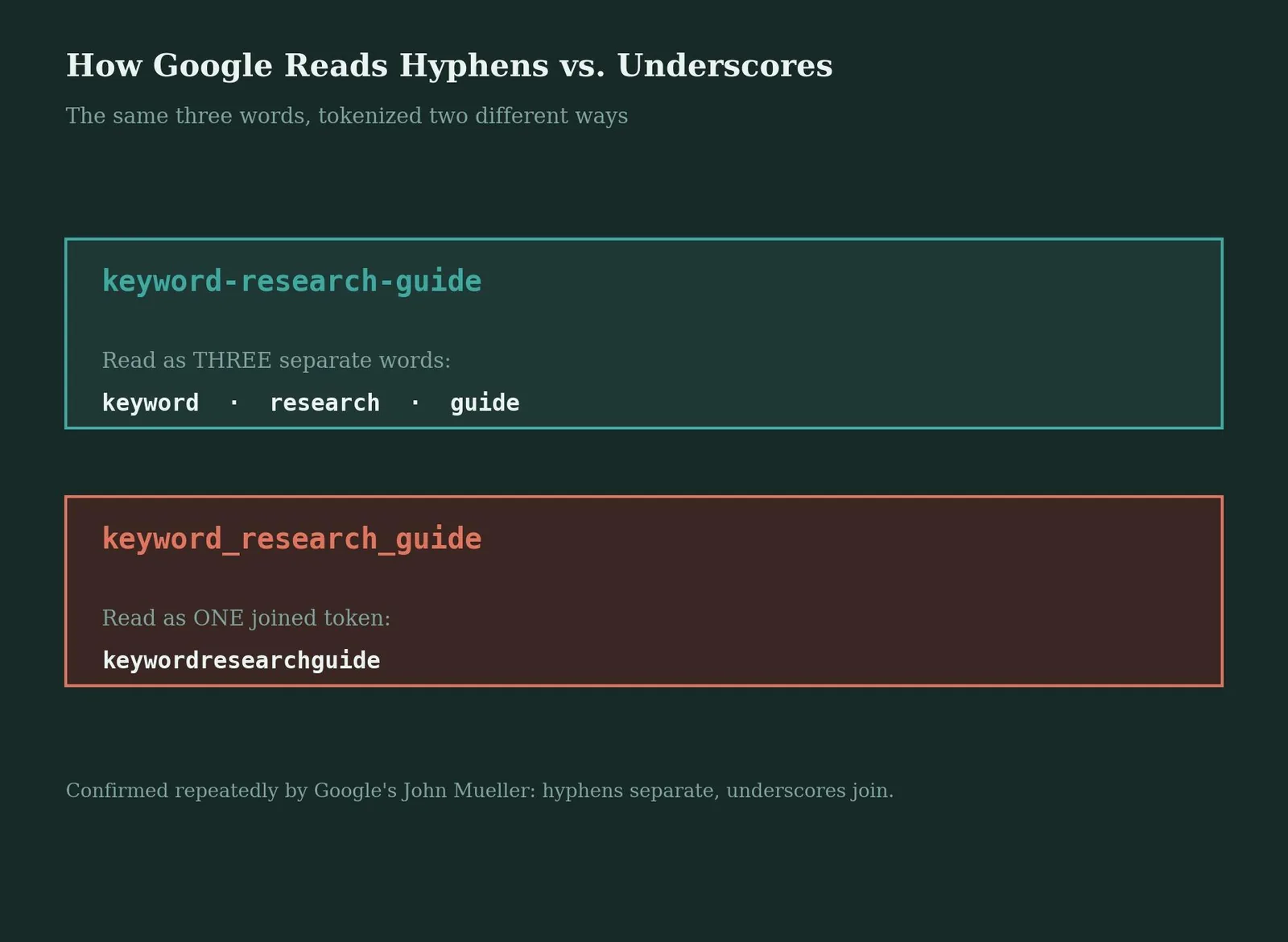
Google's crawlers treat a hyphen as a word separator, so keyword-research is indexed as two distinct words, while an underscore is read as a word joiner, so keyword_research becomes a single token. This is confirmed repeatedly by Google's John Mueller and has been Google's documented guidance for years; it isn't a minor stylistic preference, it changes what the URL is actually understood to say. Mueller reaffirmed as recently as June 2026 that hyphens carry no penalty anywhere in a URL, slug included, so there's no ambiguity left to resolve here: hyphens for slugs, always.
Does URL Length Actually Affect Rankings?
An analysis of roughly 11.8 million Google search results found position-1 pages average 9.2 characters shorter than position-10 pages, a real but modest effect. The mechanism isn't a direct length penalty. Longer URLs simply tend to carry more stop words, dates, tracking parameters, and general clutter, and those things correlate with weaker pages more broadly. Google's own John Mueller has been direct about this: "URL length doesn't matter. We use URLs as identifiers." The practical takeaway is to aim for a clean, descriptive slug rather than chasing a specific character count for its own sake.
Should You Include a Date in the Slug?
For evergreen content, no. A slug like /url-slug-best-practices works for years without needing an update, while /url-slug-best-practices-2026 forces a redirect or a new page every single year as the date ages out of relevance. Dated slugs make sense only for genuinely time-bound content: live event coverage, daily news, or annual data reports where the date is itself part of what the content is about.
Table 1: When to Include a Date in a Slug
| Content type | Include a date? | Why |
|---|---|---|
| Evergreen guide or explainer | No | Ages the URL visibly; forces yearly redirects |
| Live event or daily news | Yes | The date is part of the content's actual meaning |
| Annual report or study | Yes, if versioned | Distinguishes this year's data from prior years |
| Product or service page | No | Products and services rarely have a natural date attached |
Changing a Slug Safely
Once a page is indexed and has accumulated backlinks, its slug has effectively become part of its identity; changing it creates a new URL and abandons whatever ranking signal the old one built up unless a proper redirect is in place. In WordPress, editing the slug is done directly in the Yoast SEO meta box beneath the post editor, and plugins like Yoast or Rank Math will typically prompt for a redirect the moment they detect the change. Set up a 301 redirect from the old slug to the new one immediately; Google will eventually transfer ranking signal to the new URL, but expect a temporary dip in the meantime, not an instant, lossless swap.
Table 2: Slug Tools and Platforms
| Tool or platform | What it does | Cost (USD) |
|---|---|---|
| Yoast SEO (WordPress) | Slug editing, redirect prompts, readability checks | Free, Premium $118.80/year (per site) |
| Rank Math (WordPress) | Slug editing, automatic redirect suggestions | Free, Pro from ~$59/year |
| Google Search Console | Confirms indexing status after a slug change | Free |
| Redirection (WordPress plugin) | Manages 301 redirects when slugs change | Free |
Common Mistakes With URL Slugs
An auto-generated slug left untouched, often stuffed with stop words or a date that will look stale within a year.
Underscores in place of hyphens, quietly merging separate keywords into a single unreadable token for search engines.
No 301 redirect set up when changing a slug on a live, indexed, backlinked page, discarding accumulated ranking signal.
Special characters, spaces, or unencoded symbols left in the slug, which can break links or render as ugly percent-encoded strings.
The same keyword repeated multiple times in the slug, which looks spammy to both users and search engines.
Slug tool
Turn any title into a clean slug
Type a page title or working headline below. This applies the standard rules: lowercase, hyphens, stop words removed.
Suggested slug
/type-a-title-above
Related reading
- Referring URL: How the Value Is Built, Trimmed and Reported
- 404 Page Best Practices: What It Is & How to Use It
- Video SEO Best Practices: What It Is & How to Use It
- GEO & AEO services at Web Tonic
Frequently Asked Questions
Does the URL Slug Really Affect SEO Rankings?
Yes, but as a very light signal. Google's John Mueller has described words in a URL as a "very, very lightweight" ranking factor, most useful before a page is fully crawled and indexed. Once indexed, the actual content carries far more weight than the slug does.
Should I Use Hyphens or Underscores in a URL Slug?
Always hyphens. Google reads a hyphen as a word separator, so keyword-research indexes as two distinct words. An underscore is read as a word joiner, merging keyword_research into a single token that search engines can't decompose into its parts.
How Long Should a URL Slug Be?
Aim for 3 to 5 words. Google doesn't enforce a strict length limit, but shorter slugs are easier to read, share, and remember, and they avoid the stop words and clutter that correlate with weaker-ranking pages in longer URLs.
Should I Include the Year in a Blog Post's URL Slug?
Only for genuinely time-bound content like live coverage or annual reports. For evergreen content, a dated slug ages visibly and forces a redirect or a new page every year as the date becomes outdated.
What Happens If I Change a Slug on a Page That's Already Ranking?
The old URL stops resolving unless you set up a 301 redirect to the new one. With a redirect in place, Google eventually transfers ranking signal to the new URL, though expect a temporary dip rather than an instant transfer.
The Bottom Line on URL Slug Best Practices
URL slug best practices come down to a short list that rarely changes: keep it short, lowercase, hyphenated, keyword-relevant, and free of stop words and special characters. None of these rules move the needle dramatically on their own, but together they remove friction for users, search engines, and anyone sharing the link, and they cost almost nothing to get right the first time.
Audit five URLs on your own site right now. If more than one has underscores, a stray date, or an auto-generated string of numbers, that's a quick, low-effort fix worth making this week.
Ready to Clean Up Your Site's URL Structure?
URL slugs are a small technical detail with an outsized cumulative effect across a large site, and they're exactly the kind of fix that gets deprioritized until someone actually audits for it. Web Tonic's growth marketing team includes URL structure in every technical SEO audit, so small architectural details like this don't get left on the table.
More from Web Tonic: growth marketing services, data & analytics.
Sources: devtoolhub.net · calcsi.com · richdevtools.com · sagarsahoo.com · seo-kreativ.de · replug.io


