



Table of contents

Every website has broken links somewhere, a deleted product, a renamed page, a typo in someone's bookmark. Visitors will hit a 404 page eventually; what actually matters is what happens the moment they do. A good 404 page best practices approach turns that dead end into a reason to stay on the site; a bad one turns it into the reason someone leaves for good. This guide covers what actually makes a 404 page work, for users and for search engines.
Key Takeaways
- A 404 page must return an actual HTTP 404 status code, not a 200 (OK); returning 200 creates a "soft 404" that confuses search engines about whether the page really exists.
- Google has stated that normal 404 errors don't directly hurt rankings, but they carry real indirect costs: lost user experience, lost link equity when a high-authority page disappears, and wasted crawl budget from unmanaged soft 404s.
- Jakob Nielsen's original usability guidance for error messages still applies directly: error text should be in plain language, precise about what went wrong, and constructive about what to do next.
- The best 404 pages share five core elements: the correct status code, plain-language messaging, persistent site navigation, a working search bar, and optional on-brand personality layered on top.
- Real examples from Google, GitHub, Dribbble, Amazon, and Adobe show that a 404 page can be both functional and memorable, functionality always coming first.
- Don't blindly redirect every broken URL to the homepage; this creates a soft 404 for every single missing page and can make navigation more confusing, not less.
What Are 404 Page Best Practices?
A 404 page is what a browser shows when a requested URL doesn't lead to a live page on a website. 404 page best practices are the specific design, content, and technical choices that turn that error into something users can recover from instead of a genuine dead end, while keeping the page's actual server response honest with search engines about the fact that the content is really gone.
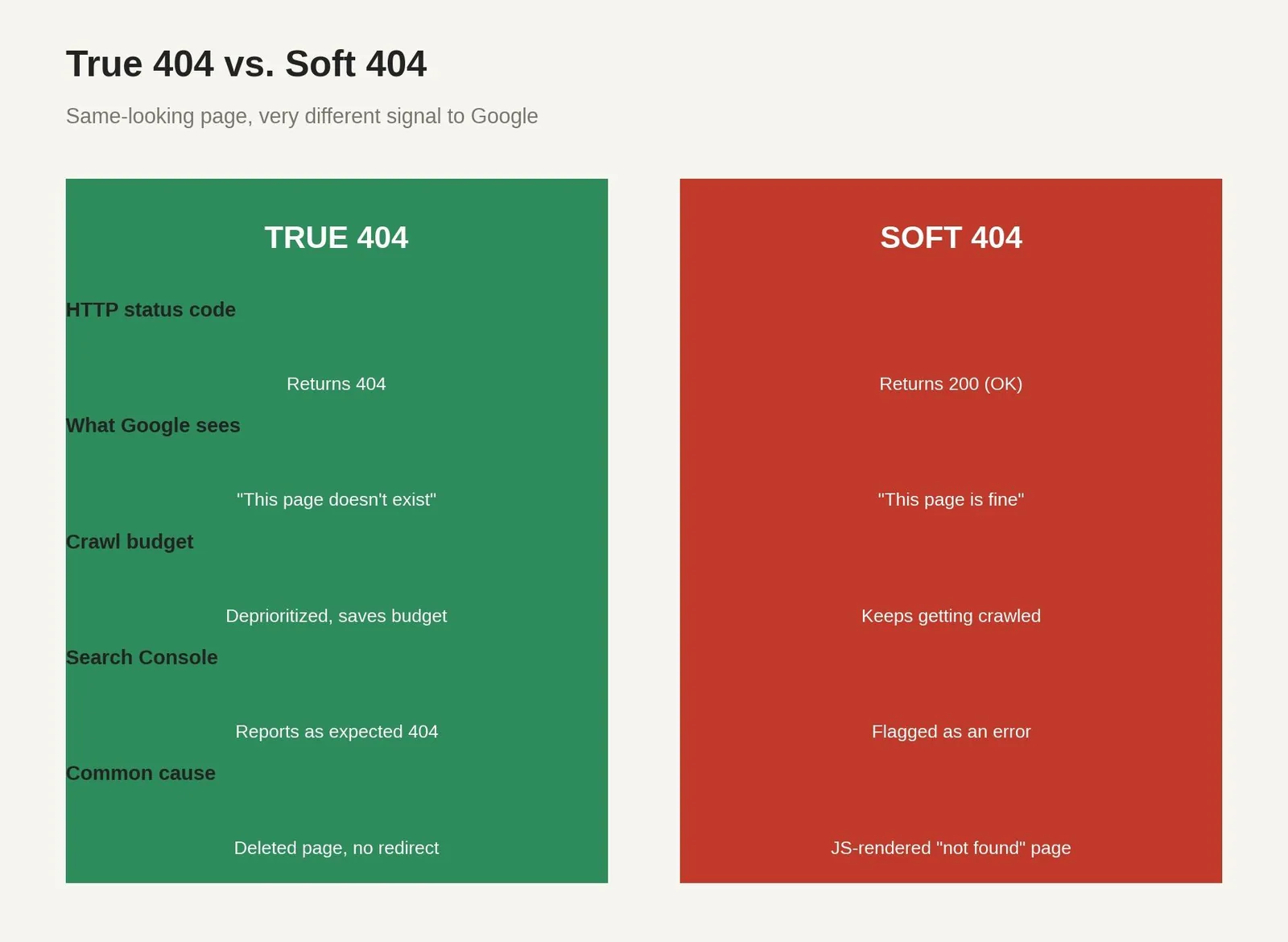
The distinction that matters most technically: a true 404 returns an HTTP 404 status code, telling both browsers and search engines the page genuinely doesn't exist. A soft 404 looks identical to a visitor but returns a 200 (OK) status code behind the scenes, which tells search engines the page is fine while the content on it says otherwise. This mismatch is common on JavaScript-heavy sites, where the browser visually swaps in error content but the server already sent a 200 before that swap happened.
Do 404 Errors Actually Hurt SEO?
Not directly, according to Google's own current guidance: normal 404 errors are treated as an expected part of how the web works, and a site doesn't need to worry about them if the missing URLs genuinely shouldn't exist anymore. The real risk is indirect: user experience suffers when visitors hit dead ends, link equity disappears if a high-authority page suddenly 404s, and a large volume of errors can signal poor site maintenance. Crawl budget is where soft 404s specifically cause damage, since Google's crawlers keep revisiting pages that look broken but technically report themselves as valid, wasting resources that should go toward pages actually worth indexing.
What Jakob Nielsen Actually Said About Error Pages
Long before 404 pages became a design trend, usability researcher Jakob Nielsen laid out the core principles that still hold. Nielsen's guidance is that error messages must be written in plain language that doesn't imply the mistake is the user's fault, precise about specifying exactly what went wrong rather than vague or generic, and constructive in suggesting concrete next steps the visitor can take. A default server-generated "404 Not Found" message violates all three principles at once, which is exactly why a custom page matters.
Nielsen's broader usability heuristics apply here too, particularly the principle that irrelevant information reduces visibility of what actually matters; a 404 page overloaded with links, promotions, and unrelated content buries the one thing a lost visitor actually needs: a clear way back on track.
The Five Elements of a Great 404 Page

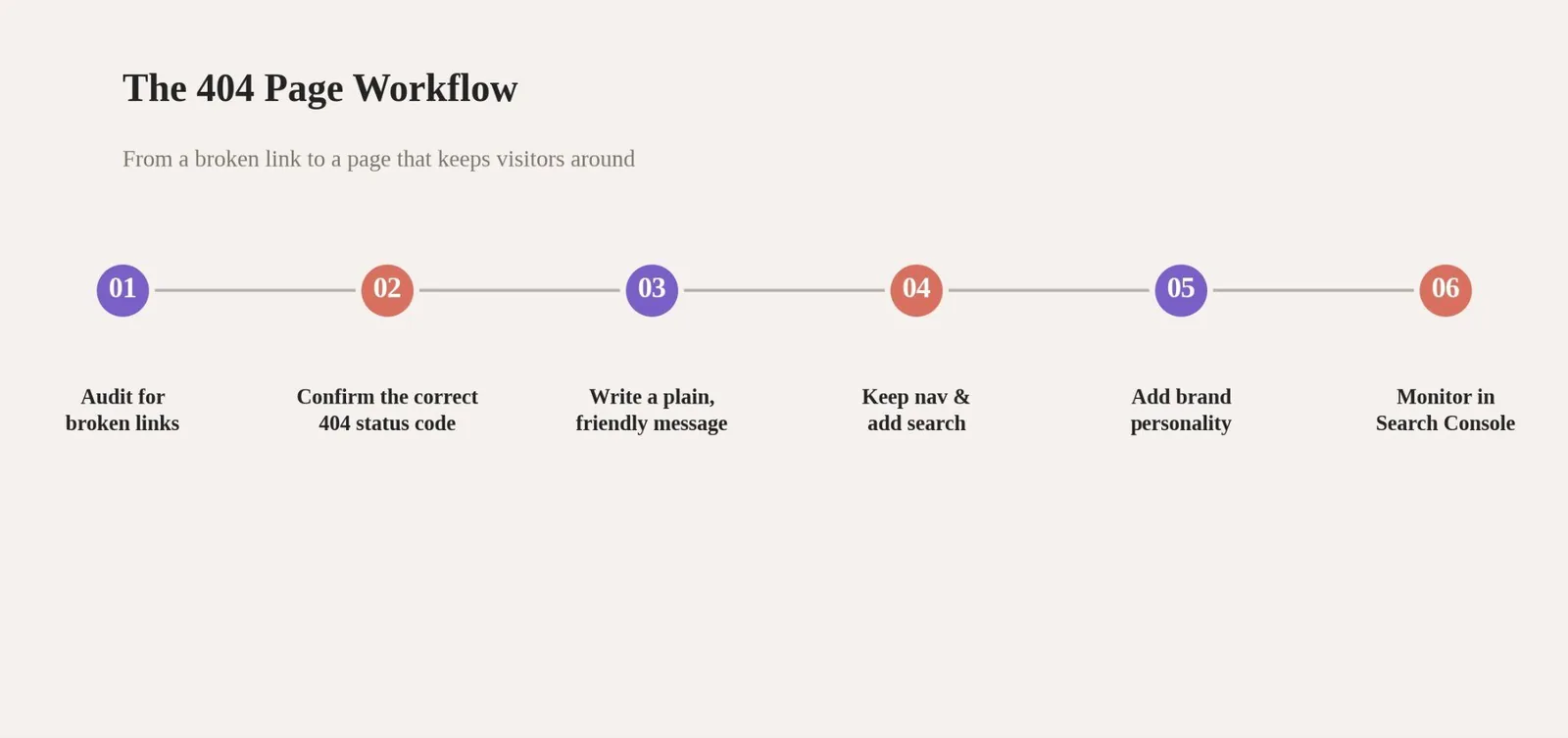
A 404 page isn't the place for complex layouts or heavy design; users arrived by accident and want to get back on track quickly. The correct status code comes first, since none of the rest matters if search engines are getting the wrong signal. A plain-language message, persistent navigation, and a working search bar cover the functional requirements. Brand personality, humor, or a custom illustration is the layer that makes the page memorable, but it should never replace the functional basics underneath it.
Real 404 Pages Worth Studying
A quick note on scope before the examples: page design here is about clarity and function first, not elaborate web design or clever CSS animation for its own sake. A well designed, user friendly 404 page and a genuinely useful landing page share the same goal: helping users find their way back with minimal friction. Sites like Starbucks and countless others treat their 404 page the same way they'd treat any other landing page, on-brand and functional, built around navigation options that actually go somewhere, even when the underlying page runs on something as unglamorous as a legacy Java backend. A broken link doesn't have to feel broken if the page behind it is designed well, and a clear call to action (CTA) helps just as much here as it does on any other page.
Google keeps its own 404 page minimal: a simple broken robot illustration, a brief explanation, and the same persistent navigation and search bar found on the rest of its site. GitHub takes a different approach with an interactive, parallax illustration that responds to mouse movement, still paired with clear messaging and a path back to the working parts of the site.
Dribbble's 404 page randomly displays a different color and showcases design artwork that might interest the visitor, turning a dead end into a small moment of discovery relevant to what the site is actually for. Amazon pairs a sincere apology with Rocky, one of the company's real office dogs, alongside a simple option to search again or return to the homepage. Adobe uses its 404 page as a light product promotion opportunity, featuring short descriptions of tools like Photoshop with a Learn More link rather than leaving the page as a dead end with nothing to do. Large brands across entertainment, retail, and technology, from Marvel and Pixar to Nike and the New York Times, all face the same underlying design problem regardless of industry: what does a visitor do next. Airbnb's approach leans calm and polished, while 9GAG and HubSpot each lean into humor or practical recovery options that fit their own brand tone, which is the real lesson: the right tone depends entirely on what a brand already sounds like everywhere else on the site.
Technical Setup and Common Mistakes
Preventing 404s in the first place beats designing a great page for them. Set up 301 redirects whenever a page moves, gets renamed, or is deleted, which preserves link equity and sends visitors to the right destination automatically. Audit internal links regularly with a crawler and monitor Google Search Console's coverage report for pages search engines are reporting as errors. If your site is built on a JavaScript framework like React or Vue, or a headless CMS, double-check that the server actually sends a 404 status code once the error content renders, since a 200 response hiding behind error-looking content is exactly what creates a soft 404.
Table 1: True 404 vs. Soft 404 Fixes
| Problem | Cause | Fix |
|---|---|---|
| Server returns 200 with error content | Misconfigured server or framework routing | Configure the server to return an actual 404 status code |
| All broken URLs redirect to homepage | Blanket redirect rule applied site-wide | Use specific 301s where a real destination exists, true 404 otherwise |
| JS framework swaps content after page load | Client-side rendering without server-side status | Ensure the server sends 404 before the JavaScript swap happens |
| Category or search page with no results | Thin or empty content treated as a valid page | Add a clear explanation and alternative paths, or return 404/410 |
404 Monitoring Tools Compared
Table 2: Tools for Finding and Fixing 404s
| Tool | What it does | Cost (USD) |
|---|---|---|
| Google Search Console | Reports crawl errors and soft 404s directly from Google's index | Free |
| Screaming Frog | Crawls a site to find broken internal and external links | Free up to 500 URLs, ~$279/year for a single unlimited license |
| Ahrefs or Semrush | Monitors lost backlinks and broken pages losing traffic | From $129/month (Ahrefs Lite) or ~$140/month (Semrush Pro) |
| Google Analytics | Shows real visitor traffic hitting 404 pages, not just crawler data | Free |
Common Mistakes on 404 Pages
A default, unstyled server error page with no branding, no navigation, and no explanation of what happened.
Every broken URL redirects to the homepage, which creates a soft 404 for every single missing page and confuses users about where they actually landed.
A message using technical jargon or blaming the visitor, instead of plain language that explains what happened and what to do next.
A page cluttered with dozens of links and promotions, burying the one clear path back that a lost visitor actually needs.
JavaScript-rendered error content that looks correct in the browser while the server quietly returns a 200 status code underneath.
Interactive checklist
404 page best practices checklist
0 of 10 checked
Related reading
- URL Slug Best Practices: What It Is & How to Use It
- Pillar Page Template: What It Is & How to Use It
- Pillar Page Examples: What It Is & How to Use It
- GEO & AEO services at Web Tonic
Frequently Asked Questions
Do 404 Errors Hurt My Website's SEO Rankings?
Not directly. Google treats normal 404s as an expected, healthy part of the web. The real risk is indirect: poor user experience, lost link equity if an authoritative page disappears, and wasted crawl budget if the 404s are actually soft 404s rather than true ones.
What's the Difference Between a 404 and a Soft 404?
A true 404 returns an HTTP 404 status code, correctly telling search engines the page is gone. A soft 404 returns a 200 (OK) status code while showing content that looks like an error page, which confuses search engines about the page's actual status.
Should I Redirect All My 404 Pages to the Homepage?
No. Blanket redirects to the homepage create a soft 404 for every missing URL, and Google explicitly warns against this pattern. Use specific 301 redirects where a real replacement page exists, and let a true 404 stand where it doesn't.
What Should a 404 Page's Error Message Actually Say?
Plain language, not technical jargon. Explain briefly what happened without implying it's the visitor's fault, and give a specific, constructive next step, like a link to the homepage or a search bar, rather than a vague apology alone.
Does a 404 Page Need to Be Creative or Funny?
No, but it can help. Function always comes first: correct status code, clear message, working navigation, and search. Humor or brand personality is a layer added on top of that foundation, not a replacement for it.
The Bottom Line on 404 Page Best Practices
404 page best practices come down to two things working together: a technically correct status code that keeps search engines informed, and a genuinely useful page that keeps visitors from bouncing. Neither one compensates for a failure in the other; a beautifully designed page that returns a 200 status code is still a soft 404, and a technically correct 404 with no useful content still loses the visitor.
Check your own 404 page right now: does it return the correct status code, and does it actually help a lost visitor find their way? If either answer is no, that's the fix worth making first.
Ready to Turn Dead Ends Into Opportunities?
A 404 page sits at the intersection of technical SEO and user experience, which is exactly why it often falls through the cracks between teams. Web Tonic's growth marketing team builds error page strategy into every technical SEO engagement, so broken links become a recovery opportunity instead of a quiet source of lost traffic.
More from Web Tonic: growth marketing services, data & analytics.
Sources: designrush.com · urllo.com · nngroup.com · uxcel.com · uxpin.com · justinmind.com · digitalsilk.com · networksolutions.com


