



Table of contents

Most content teams write one article at a time, chasing one keyword at a time, and wonder why a competitor with fewer posts consistently outranks them on the topics that actually matter. The difference is usually structure, not volume. A pillar page organizes an entire topic into one comprehensive hub page that links out to a cluster of supporting content, and that internal linking structure is what signals topical authority to search engines in a way a pile of disconnected blog posts never can.
This guide covers what a pillar page actually is, how it differs from a single blog post or cornerstone content, the pillar page template structure you can reuse across topics, and a practical framework for building the cluster of content around it.
Key Takeaways
- A pillar page is a comprehensive hub page covering a broad topic, linking out to a cluster of more specific supporting content, sometimes called cluster content.
- The term "pillar page" traces back to Rand Fishkin of Moz around 2013. HubSpot popularized topic clusters as a scalable framework starting at INBOUND 2016, then proved the model with its own blog.
- Recommended pillar page word counts vary significantly by source, from roughly 1,500 to 5,000 words. There is no single correct length; it depends on how many subtopics the cluster actually needs to cover.
- Semrush identifies three common pillar page types: the Guide, the What-Is, and the How-To, though most real pillar pages blend elements of more than one.
- Internal linking between the pillar and its cluster pages should run in both directions: the pillar links out to every cluster page, and every cluster page links back to the pillar.
- A pillar page is not the same as cornerstone content, a related but distinct concept popularized by Yoast that describes a site's most important pages rather than a hub-and-spoke linking structure specifically.
What is a pillar page, and how is it different from a blog post?
A pillar page is a single page built to cover a broad topic comprehensively, while linking out to a cluster of more specific content pieces that each go deeper into one subtopic. HubSpot's own definition frames it the same way: a pillar page covers every aspect of a topic on one page, leaving the deeper reporting to cluster content that hyperlinks back to it. Some practitioners call this hub page pillar content instead, though the underlying idea is the same either way. Where a typical blog post targets one specific, often long tail keyword, a pillar page targets the broader head term for an entire subject area and acts as a hub page that readers, users, and search engines can all navigate outward from.
The distinction matters structurally, not just in scope. A blog post stands alone. A pillar page is designed from the start to be the center of a topic cluster, with internal links flowing out to supporting content and back again. That bidirectional linking is what turns a collection of individually useful pages into a structure that search engines can read as comprehensive coverage of a subject.
Where the pillar and cluster model came from
The term "pillar page" is usually traced back further than HubSpot. Rand Fishkin, then of Moz, is widely credited with introducing the concept around 2013, describing it as a single page acting as a hub for a cluster of related content. HubSpot's role came a few years later: HubSpot's Matthew Barby presented topic clusters and pillar pages as a scalable content-strategy framework at INBOUND 2016, then restructured HubSpot's own blog around the model as a public case study. That combination — an existing concept plus a well-documented internal case study — is what turned the idea into the standard vocabulary most content teams use today. Hub-and-spoke information architecture itself predates both moments by decades; the link-based authority reasoning behind it echoes concepts from earlier search engine research, including Hilltop and Topic-Sensitive PageRank. What Fishkin and later HubSpot contributed was less a new invention than a teachable vocabulary that made the structure accessible to content marketing teams without a dedicated technical SEO background.
It's worth distinguishing a pillar page from cornerstone content, a related but different term that comes from Yoast rather than HubSpot. Cornerstone content is really a prioritization idea: flag the handful of pages on a site that matter most and deserve the bulk of your SEO attention, regardless of how those pages link to anything else. A pillar page is a narrower, more mechanical idea. It only counts as a pillar if it actually sits at the center of a two-way linking structure, pointing out to a cluster and being linked back from every page in it. A page can be cornerstone content without being a pillar, and vice versa, even though the two labels get used interchangeably in casual conversation.
The pillar page template: section by section
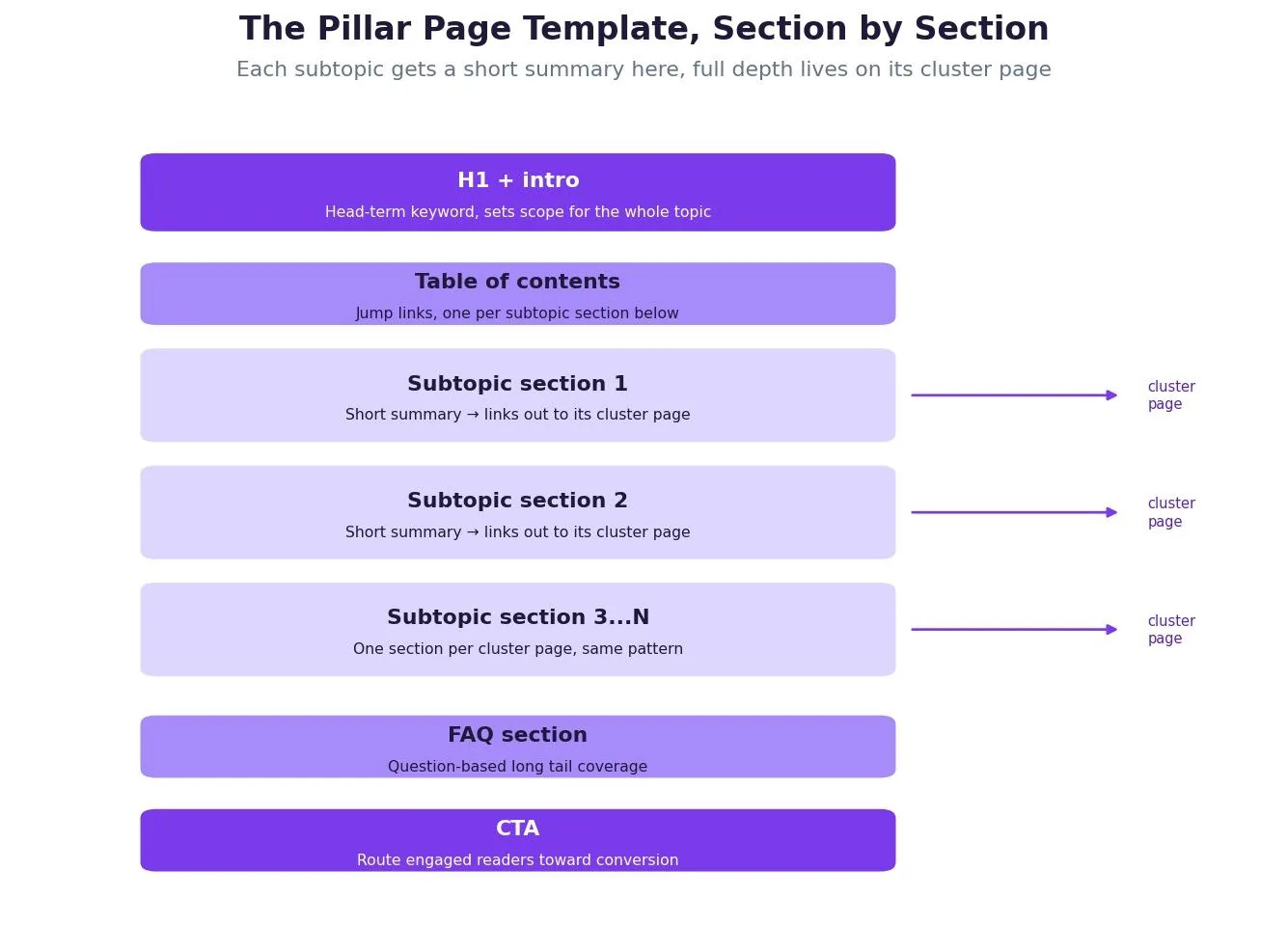
A reusable pillar page template generally follows the same skeleton regardless of topic. An H1 and introduction establish the head-term keyword and set the scope for what the page covers. A table of contents with jump links follows immediately, giving both readers and search engines a clear map of every subtopic section below. Each subtopic section then gets a short summary, typically just a couple of paragraphs, that answers the basic question and links out to the full cluster page covering that subtopic in depth. After all subtopic sections, an FAQ section addresses common question-based searches that did not fit neatly into a subtopic. A closing CTA route engages readers toward a conversion action relevant to the topic, whether that's a demo request, a newsletter signup, or simply more brand awareness for a topic the company wants to own in search.
The template holds together whether the topic is B2B software, ecommerce products, or local services. What changes from page to page is the number of subtopic sections and how deep each individual cluster page needs to go, not the underlying skeleton itself. Creating a pillar page this way, section by section against a real cluster map, is what keeps the process repeatable across dozens of topics rather than reinventing the structure every time.
How long should a pillar page be?
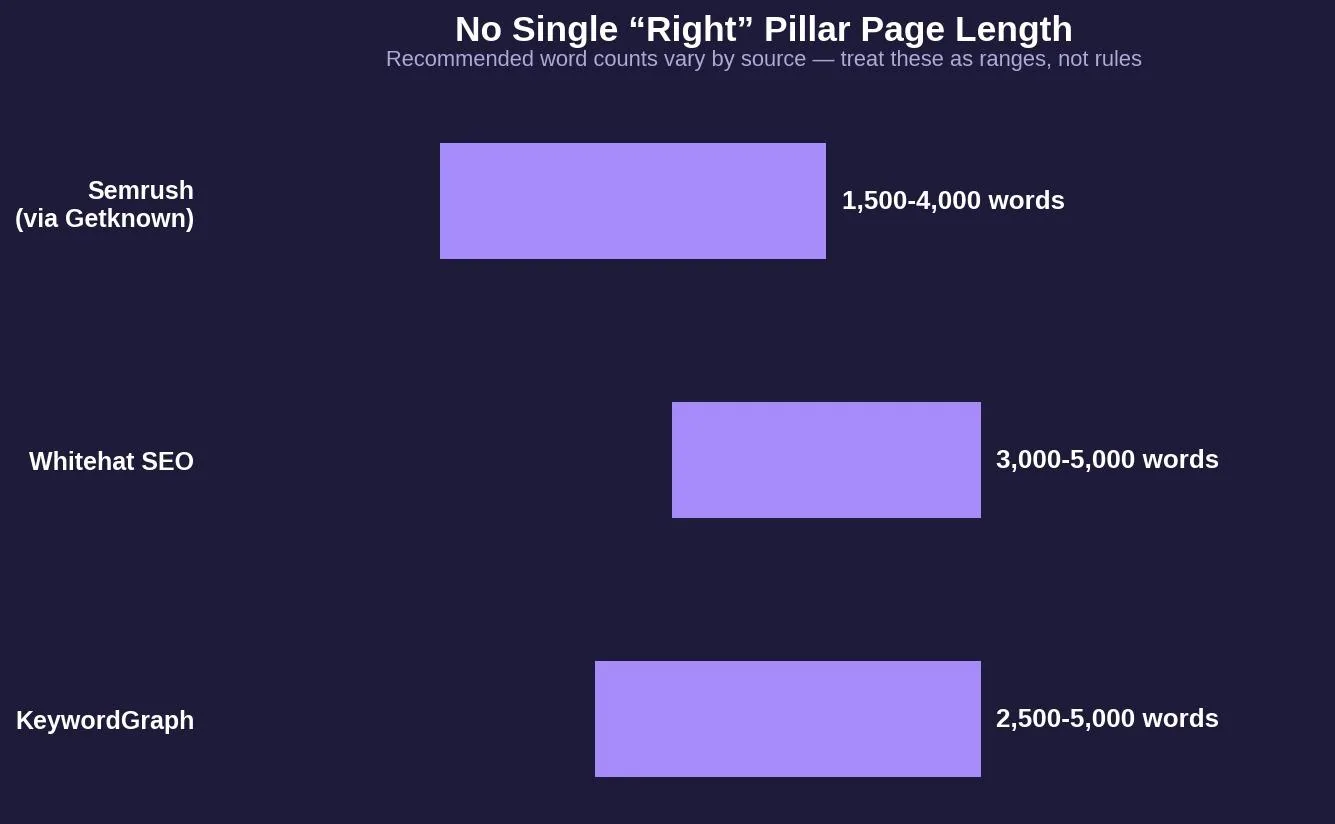
Recommended pillar page word counts vary considerably depending on the source you read. Some guides suggest roughly 3,000 to 5,000 words, while others put the range closer to 2,500 to 5,000, and still others suggest 1,500 to 4,000. There is no single correct number, and treating any of these ranges as a hard rule misses the actual logic behind pillar page length: the page needs enough sections to summarize every subtopic in its cluster, and no more. A pillar covering 8 cluster pages will naturally run shorter than one covering 30, and forcing either one to hit an arbitrary word count target usually produces padding on the short end or an overwhelming wall of text on the long end.
Three pillar page types
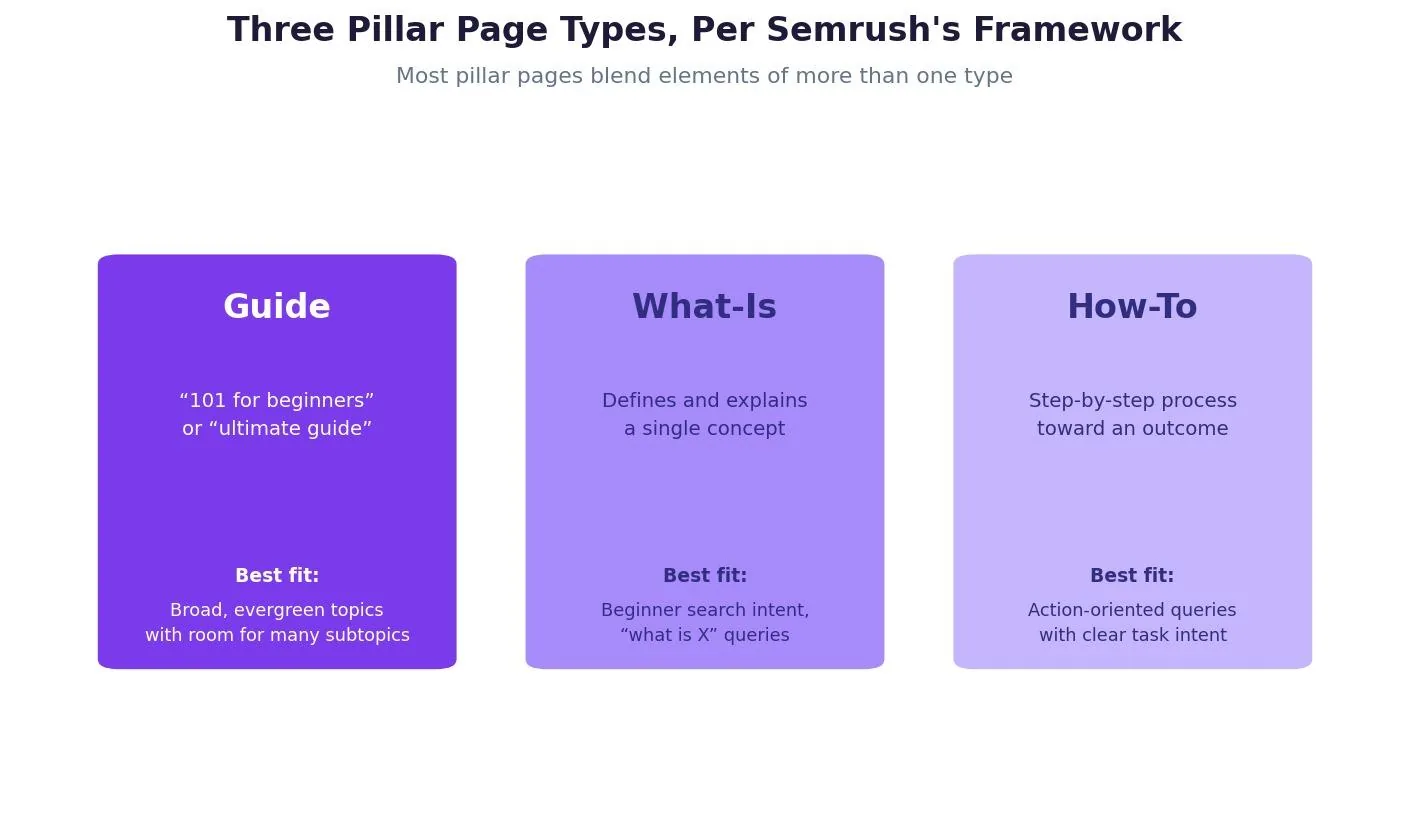
Semrush's framework identifies three common pillar page types. A Guide pillar page gives a broad, often evergreen overview of a topic, frequently framed as a "101 for beginners" or an "ultimate guide." A What-Is pillar page defines and explains a single concept in depth, matching the search intent behind "what is X" queries. A How-To pillar page walks through a process step by step toward a specific outcome. In practice, the boundaries blur constantly, and a strong pillar page often borrows structural elements from more than one type depending on what the topic actually needs.
Real pillar page examples make the type distinctions easier to see. Moz's beginner's guide to SEO is a widely cited example pillar page in the guide category, and Shopify has published an effective pillar page on dropshipping that leans toward the what-is category while still covering practical how-to ground. What separates a good pillar page from a mediocre one usually isn't the topic or the word count: it's whether the page genuinely improves user experience for readers comparing options, and whether the resulting organic traffic actually converts once people arrive from search.
Pillar page vs. blog post vs. cornerstone content
| Pillar page | Blog post | Cornerstone content | |
|---|---|---|---|
| Scope | Broad head term | Narrow, long tail | Varies — defined by importance, not scope |
| Internal links | Bidirectional hub for a cluster | Usually stands alone | Not link-structure specific |
| Typical length | ~1,500-5,000 words | Varies widely, often shorter | Varies |
| Origin | Fishkin (Moz), popularized by HubSpot | N/A | Popularized by Yoast |
| Update cadence | Ongoing, as cluster grows | Often static after publish | Ongoing, based on priority |
Try it: pillar page structure planner
The tool below estimates a starting structure and word count range based on how many cluster pages you're planning.
Content strategy tool
Pillar page structure planner
Set how many cluster pages you're planning, and get a starting structure recommendation.
Suggested pillar sections
Rough pillar word count
Structural note
Internal linking: the mechanism that makes the model work
The internal linking pattern is what actually does the SEO work, more than the page's length or format. Every cluster page should link back to its pillar page using consistent, descriptive anchor text built around the target keyword. The pillar page, in turn, should link out to every cluster page it summarizes. This bidirectional structure means that when the pillar page earns an external backlink, some of that authority flows through the internal links into every cluster page it points to, even cluster pages that have never earned an external link of their own.
Beyond the cluster itself, linking the pillar page from other high-authority pages on the site, such as relevant service pages or the main navigation, reinforces the same signal from a different direction.
Common pillar page mistakes to avoid
Building the pillar page before mapping out the cluster is one of the most common mistakes. Without knowing how many subtopics the cluster actually needs, it's easy to end up with a pillar page that either duplicates what its own cluster pages already cover in depth, or leaves out subtopics entirely because nobody planned for them.
Writing the pillar page as deep as its cluster pages is a closely related mistake. A pillar page that fully exhausts every subtopic in detail stops functioning as a hub and starts competing with its own cluster content for the same search intent.
Skipping the table of contents removes one of the clearest signals of structure available to both readers and search engines, especially on a longer page.
One-directional linking, where cluster pages link to the pillar but the pillar never links back to all of them, breaks the bidirectional structure that makes the whole model work.
Tools for planning and auditing a pillar page
Keyword research tools such as Semrush's Keyword Magic Tool or Google's own Keyword Planner help identify a head term with enough search volume to justify a pillar page, along with the long tail variations that become cluster page topics. Once a cluster is live, a site crawler can confirm that every cluster page actually links back to its pillar and that the pillar links out to every cluster page in turn.
Related reading
- Pillar Page Examples: What It Is & How to Use It
- On-Page SEO: The 12-Point Checklist That Moves Rankings
- 404 Page Best Practices: What It Is & How to Use It
- GEO & AEO services at Web Tonic
Frequently asked questions
What is the difference between a pillar page and cornerstone content?
Cornerstone content, a term that comes from Yoast, is about priority: which pages on a site matter most and deserve the most SEO attention. A pillar page is about structure: a page only qualifies if it sits at the center of two-way internal links, pointing out to a cluster of pages that link back to it. The two labels overlap often but describe different things.
How many cluster pages does a pillar page need?
There is no fixed number, but most working topic clusters land somewhere between a dozen and several dozen cluster pages. Too few and the coverage signal is weak; too many and the cluster may actually span more than one topic.
Does a pillar page need to rank for one specific keyword?
It should target one head term, the broadest and highest-volume keyword phrase for the topic, while its cluster pages target more specific long tail keywords that support the same overall subject.
Can a pillar page be updated after it's published?
Yes, and it typically should be. As new cluster pages are added to a topic, the pillar page's table of contents and subtopic sections need updating to link to them, keeping the structure current rather than letting it fall out of sync.
What is the ideal length for a pillar page?
There is no single ideal length. Estimates across sources range roughly from 1,500 to 5,000 words. The right length depends on how many subtopics the cluster covers, not a fixed target.
Building a pillar page that actually earns its authority
A pillar page only works if the structure behind it is real: a genuine cluster of supporting content, bidirectional internal links connecting all of it, and a hub page that summarizes rather than exhausts each subtopic. Getting the template right is the easy part. The discipline is in mapping the cluster honestly before writing the pillar, and keeping the links current as the cluster grows.
Ready to build a pillar page strategy that actually ranks?
Planning a topic cluster, mapping cluster pages to a pillar, and keeping the internal linking structure current as content grows is exactly the kind of strategic content work that compounds over time. Web Tonic's growth marketing team folds pillar and cluster planning into a broader content strategy that also covers technical SEO and paid acquisition, so topical authority becomes part of an ongoing system rather than a one-time content project.
More from Web Tonic: growth marketing services, data & analytics.
Sources: blog.hubspot.com · instrumental.net · keywordgraph.com · whitehat-seo.co.uk · semrush.com · storychief.io · tamrank.com


