



Table of contents
On-page SEO is everything you optimise on the page itself — content, title tag, meta description, headings, URL, internal links, images, schema markup and page speed — so that both search engines and readers understand what the page is for.
Below: the elements that actually move rankings, in priority order, with a checklist, real limits and how to measure the result.
Key Takeaways
- On-page SEO splits into 3 layers: content relevance, HTML signals, and page experience. Only the first can carry a page on its own.
- Search intent match beats every technical tweak. A page that answers the wrong question cannot be rescued by title tags or schema markup.
- Google says it rewrites titles when they are unhelpful, so treat the title tag as a promise to a searcher, not a keyword container.
- Meta descriptions are not a ranking factor, but they influence CTR, which is why we hold them to 120–158 characters.
- Use one H1 per page and let H2/H3 describe the actual structure — headings are how both readers and LLMs skim.
- Core Web Vitals — LCP, INP and CLS — are the measurable part of page experience; targets are LCP under 2.5s, INP under 200ms, CLS under 0.1.
- Internal linking is the most underused on-page lever: it distributes authority and tells search engines which page owns which topic.
- Users scan rather than read — roughly 79% scan a new page and only 16% read word by word — so formatting is an SEO decision.
- Measure on-page SEO in Google Search Console by impressions, average position and CTR per URL, not by rank-tracking a single keyword.
What on-page SEO is (and what it is not)
On-page SEO covers the signals you control inside a single page's HTML and content. Off-page SEO covers signals earned elsewhere, mostly backlinks and brand mentions. Technical SEO covers site-wide crawling and indexing infrastructure. The three overlap — page speed sits on the border of on-page and technical — but the distinction is useful because on-page work is the only category you can complete without anyone else's cooperation.
Google's own framing in the SEO Starter Guide is deliberately unglamorous: help search engines find your content, make it clear what each page is about, and make it genuinely useful for the people who arrive. Its guidance on creating helpful, people-first content is the substance behind that — usefulness first, mechanics second.
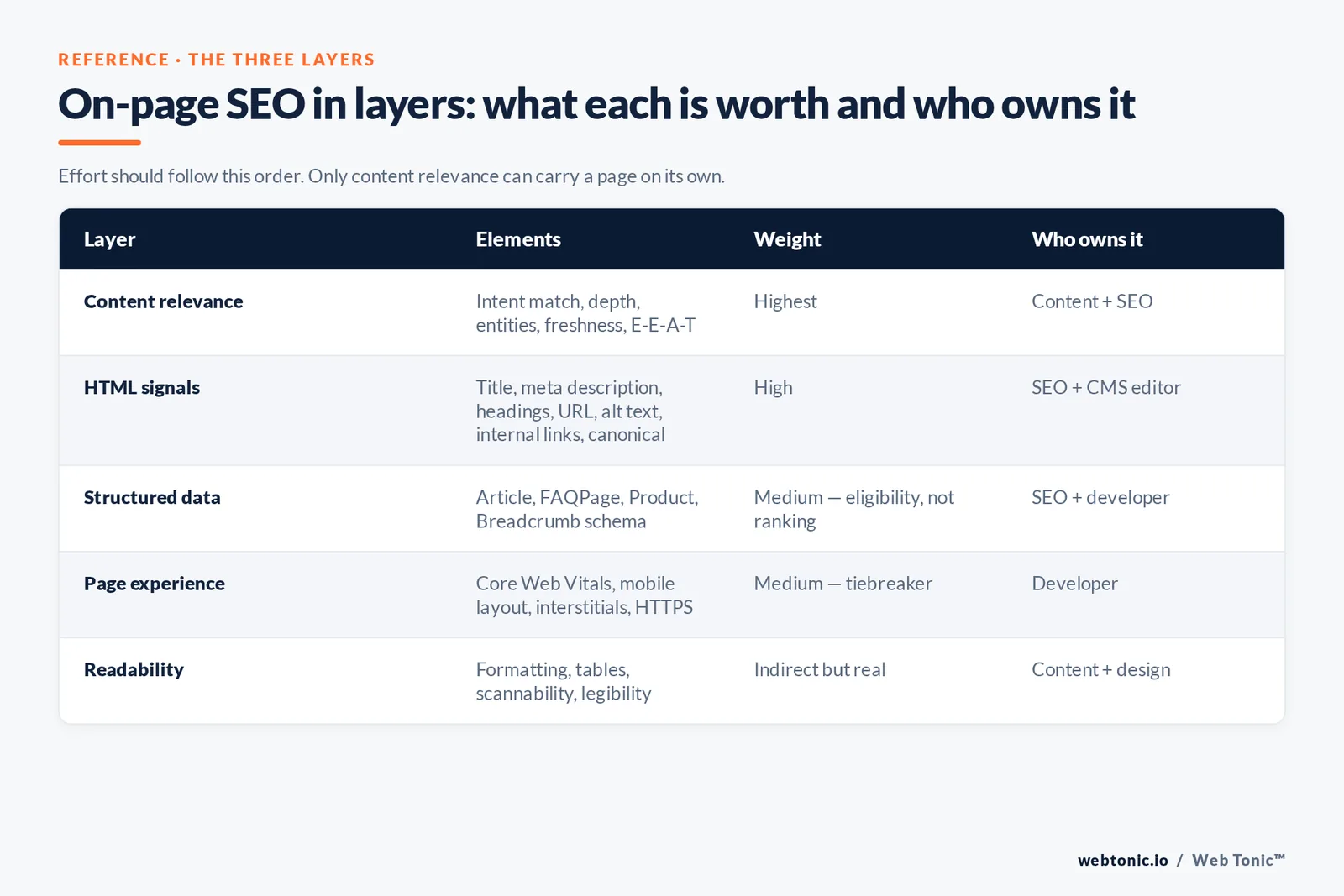
| Layer | Elements | Weight | Who owns it |
|---|---|---|---|
| Content relevance | Search intent match, depth, entities, freshness, E-E-A-T signals | Highest | Content + SEO |
| HTML signals | Title tag, meta description, headings, URL, alt text, internal links, canonical | High | SEO + CMS editor |
| Structured data | Article, FAQPage, Product, Breadcrumb schema | Medium — eligibility, not ranking | SEO + developer |
| Page experience | Core Web Vitals, mobile layout, intrusive interstitials, HTTPS | Medium — tiebreaker | Developer |
| Readability | Formatting, tables, scannability, CSS legibility | Indirect but real | Content + design |
The order matters because effort follows it. Teams routinely spend a quarter shaving 300ms off load time on pages that never matched the query in the first place. Fix relevance, then HTML, then experience.
The on-page SEO elements, in priority order
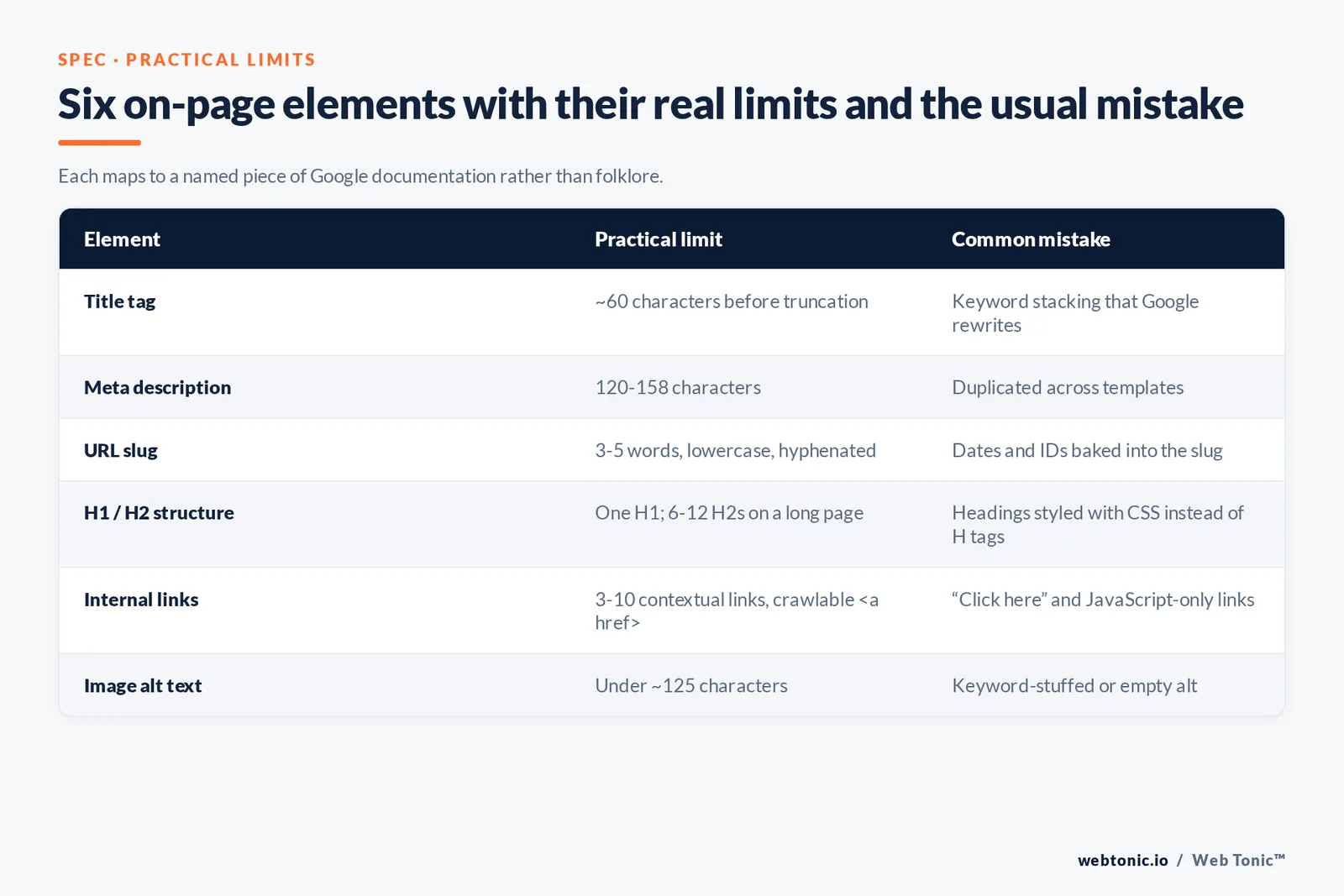
Every element below is on our standard page audit, and each one maps to a specific piece of Google documentation rather than folklore.
| Element | Best practice | Practical limit | Common mistake |
|---|---|---|---|
| Search intent | Match the dominant format ranking for the target keyword | One primary intent per URL | Writing a guide for a transactional query |
| Title tag | Target keyword early, unique, descriptive, brand at the end | ~60 characters before truncation | Keyword stacking that Google rewrites |
| Meta description | Benefit + keyword, written to earn the click | 120–158 characters | Duplicated across templates |
| URL | Short, lowercase, hyphenated, readable words | 3–5 words | Dates and IDs baked into the slug |
| H1 | One per page, matches the page's promise | 1 | Styling headings with CSS instead of using H tags |
| H2/H3 structure | Describe real sections, include question phrasings | 6–12 H2s on a long page | Heading soup with no hierarchy |
| Body content | Answer first, then depth, with tables and examples | Length set by intent, not a word target | Padding for word count |
| Keyword usage | Natural coverage of the topic's entities and variants | No target density | Repeating the exact-match phrase mechanically |
| Internal links | Descriptive anchors to related pages, crawlable <a href> | 3–10 contextual links | "Click here" and JavaScript-only links |
| Image alt text | Describe the image for a person who cannot see it | Under ~125 characters | Keyword-stuffed or empty alt |
| Schema markup | Match the page type; validate before shipping | JSON-LD preferred | Marking up content not visible on the page |
| Canonical | Self-referencing unless consolidating duplicates | One per URL | Canonicals pointing to the homepage |
Two of those deserve extra emphasis. Google explains in its documentation on title links that it may generate its own title when yours is vague, stuffed or boilerplate — which makes an over-optimised title actively self-defeating. And its snippet guidance confirms the meta description's job is influencing the click, not the ranking.
Content and keywords: how to do the relevance layer
Keyword research for on-page SEO is not a list of phrases to insert. It is a map of what a page must cover to be a complete answer. The workflow we use: pick one primary keyword per URL, gather the variants and questions that share the same intent, read the top results for the format they use, then build the outline from the gaps rather than from the competitors' headings.
Coverage beats repetition. Google's systems evaluate whether a page addresses the topic and its related entities, so a page about on-page SEO that never mentions canonical tags, alt text or Core Web Vitals reads as incomplete regardless of how often the head term appears. Practical tests of this are well documented in Ahrefs' on-page SEO guide and Semrush's version; both land on the same conclusion — depth and structure, not density.
Formatting is part of relevance because it decides whether anyone gets to the depth. Nielsen Norman Group's classic research on how users read on the web found that about 79% of users scan pages, only 16% read word by word, and that concise, scannable, objective writing improved measured usability by 124% combined. Tables, short paragraphs and bolded specifics are conversion and SEO features, not decoration.
| Intent type | Query pattern | Page format that ranks | Primary on-page focus |
|---|---|---|---|
| Informational | "what is", "how does" | Definition-first guide with tables | Answer in the first 50 words, FAQ schema |
| Commercial | "best", "vs", "review" | Comparison table plus criteria sections | Decision table above the fold |
| Transactional | "buy", "pricing", "near me" | Service or product page | Clear offer, proof, fast LCP |
| Navigational | Brand + feature | Branded landing or docs page | Exact title match, breadcrumbs |
Technical on-page: speed, structure and markup
Page experience is a smaller factor than content, but it is the one that quietly caps everything else on mobile. The measurable core is Core Web Vitals: Largest Contentful Paint under 2.5 seconds, Interaction to Next Paint under 200 milliseconds, Cumulative Layout Shift under 0.1, each measured at the 75th percentile of real visits. Test a URL in PageSpeed Insights and fix the field data, not the lab score.
Markup is the other half. Adding structured data does not raise rankings by itself; it makes a page eligible for rich results, which raises CTR at the same position. For most content pages, Article plus Breadcrumb is enough; FAQPage is worth adding where the page genuinely contains a Q&A block. Keep images optimised per Google's image SEO guidance — descriptive filenames, real alt text, explicit dimensions, lazy loading below the fold.
| Check | Target | Tool |
|---|---|---|
| LCP | Under 2.5s | PageSpeed Insights (field data) |
| INP | Under 200ms | PageSpeed Insights, Search Console |
| CLS | Under 0.1 | PageSpeed Insights |
| Indexability | Indexed, no noindex, canonical self-referencing | Search Console URL Inspection |
| Crawlable links | Every internal link is an <a href> | Crawler or view-source |
| Structured data | Valid, matches visible content | Rich Results Test |
| Mobile layout | Readable without zoom, no interstitials | Device testing |
| Image weight | WebP/AVIF, correctly sized | Browser devtools |
The on-page SEO checklist
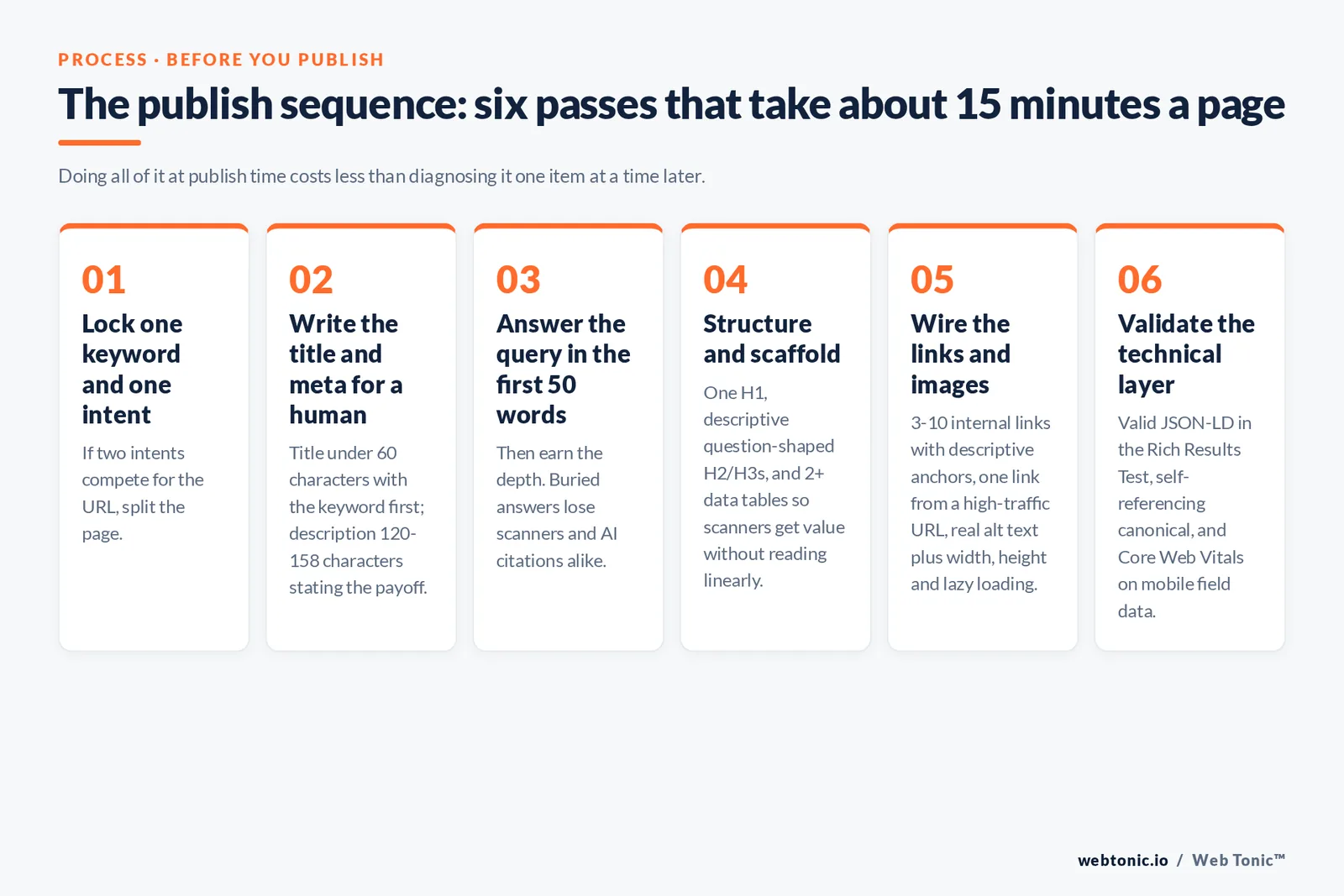
Run this on any page before publishing, and on your top 20 URLs quarterly. It takes about 15 minutes per page once the habit is built.
- Confirm one primary keyword and one intent for the URL; if two intents compete, split the page.
- Write the title tag under 60 characters, keyword first, no duplicated boilerplate across templates.
- Write a 120–158 character meta description that states the payoff, not the topic.
- Set a clean URL slug of 3–5 words following Google's URL structure guidance.
- Answer the query in the first 50 words, then earn the depth.
- Structure with 1 H1 and descriptive H2/H3s, including question phrasings people actually search.
- Add 2+ data tables or comparison blocks so scanners get value without reading linearly.
- Add 3–10 internal links with descriptive anchors, and link to the page from at least one high-traffic URL.
- Give every image real alt text plus width, height and lazy loading.
- Ship valid JSON-LD matching the page type; verify it renders in the Rich Results Test.
- Check the canonical is self-referencing and the page is indexable.
- Validate Core Web Vitals on mobile field data, then re-test after any template change.
What is deliberately absent: keyword density targets, exact-match anchor quotas, LSI keyword lists and meta keywords. None of those survive contact with Google's spam policies, and the last one has been ignored for well over a decade.
Common on-page SEO mistakes we find in audits
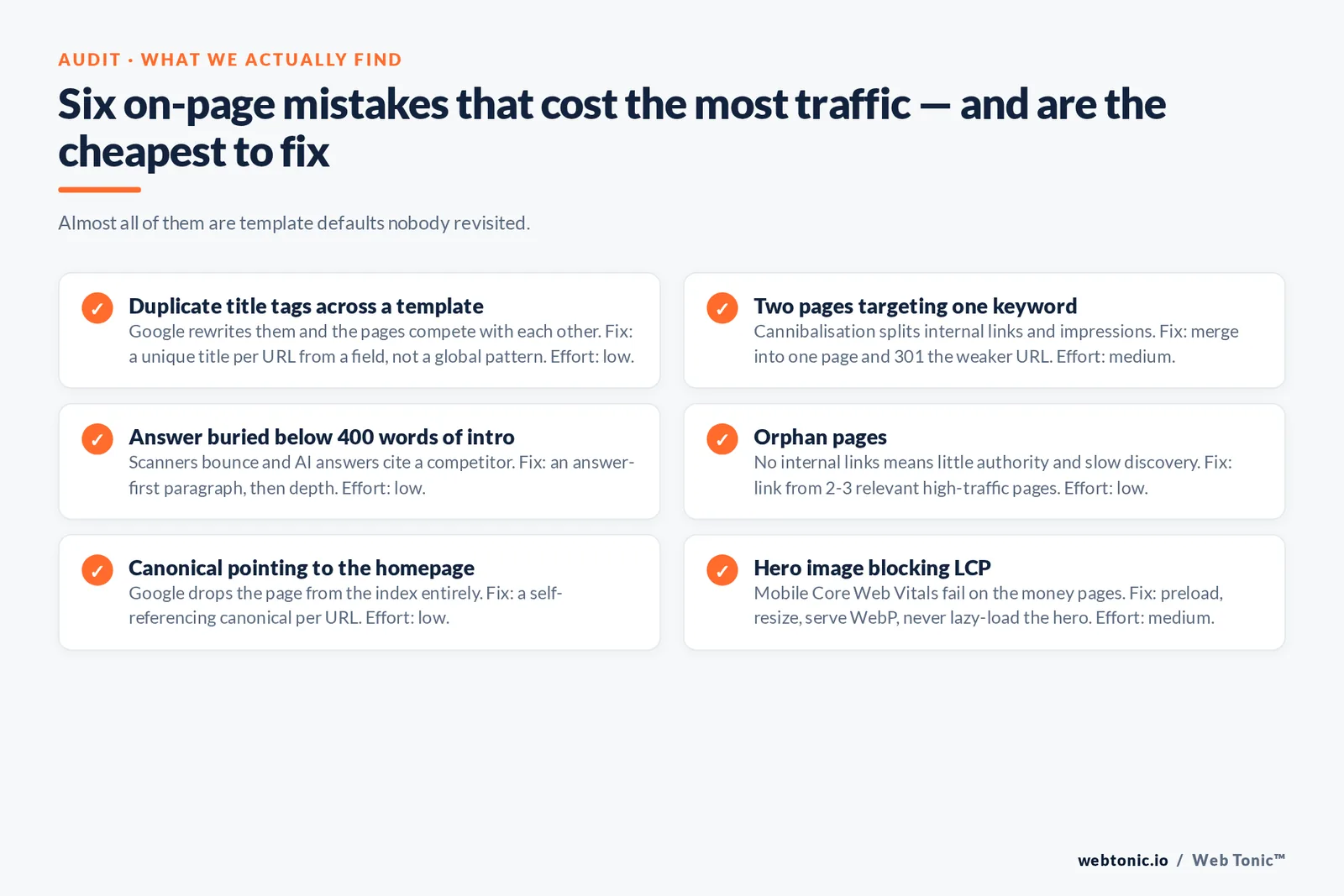
Across client audits the same handful of on-page problems account for most of the lost traffic, and almost none of them are exotic. They are template defaults nobody revisited.
| Mistake | Why it costs traffic | Fix | Effort |
|---|---|---|---|
| Duplicate title tags across a template | Google rewrites them; pages compete with each other | Unique title per URL from a field, not a global pattern | Low |
| Two pages targeting one keyword | Keyword cannibalisation splits internal links and impressions | Merge into one page, 301 the weaker URL | Medium |
| Answer buried below 400 words of intro | Scanners bounce; AI answers cite a competitor | Answer-first paragraph, then depth | Low |
| Headings styled with CSS, not H tags | Search engines see one undifferentiated block of content | Real H1/H2/H3 hierarchy in the CMS | Low |
| Orphan pages | No internal links means little authority and slow discovery | Link from 2–3 relevant high-traffic pages | Low |
| Empty or keyword-stuffed alt text | Loses image search and accessibility value | Describe the image in plain language | Low |
| Canonical pointing to the homepage | Google drops the page from the index entirely | Self-referencing canonical per URL | Low |
| Hero image blocking LCP | Mobile Core Web Vitals fail on the money pages | Preload, resize, serve WebP, never lazy-load the hero | Medium |
Notice the effort column: 6 of these 8 fixes are low-effort CMS edits. On most sites, a single afternoon spent on unique title tags, internal links to orphan pages and answer-first intros produces more measurable improvement than a quarter of new content, because it makes existing pages that already have impressions convert those impressions into clicks. That is the whole argument for on-page SEO as the first workstream rather than the last one: the demand is already there, and the page is simply failing to claim it.
How to measure on-page SEO success
The measurement mistake is tracking one keyword's rank. Rankings are personalised and volatile; page-level demand is not. Use Google Search Console and compare each URL against itself over a rolling 28-day window.
| What changed | Metric to watch | What it tells you |
|---|---|---|
| New title/meta | CTR at stable average position | Whether the snippet is more persuasive |
| Content expansion | Total queries and impressions per URL | Whether topical coverage widened |
| Internal links added | Average position of the target URL | Whether authority is reaching the page |
| Speed work | Core Web Vitals report + mobile conversions | Whether experience was a real constraint |
| Schema added | Rich result appearance in Search Console | Eligibility gained, then CTR effect |
Give changes time. Aggregated case data collected by Ahrefs on how long SEO takes puts meaningful movement in months rather than days, so judge an on-page change at 4 weeks for CTR and 8–12 weeks for position. That patience is exactly why the checklist matters: doing all twelve items at publish time costs less than diagnosing them one at a time later.
On-page SEO in an AI-search world
AI Overviews, chat assistants and LLM answers consume the same pages, but they reward slightly different structure: explicit definitions, clean headings, tables of facts, and claims attached to citable sources. Everything on the checklist above helps, and three items help disproportionately — an answer in the first 50 words, question-shaped H2s, and structured data that mirrors visible content.
The strategic implication is that on-page work is no longer only about a blue link. A page that is quotable becomes a source in an AI answer, and a page that buries its answer under 500 words of preamble does not. We build pages for both outcomes in our SEO and content programmes, wire measurement through data intelligence, and fix the template-level constraints with our web development team. More teardowns live on the Web Tonic blog, or book a page audit if you want a specific URL reviewed.
FAQ
What is on-page SEO in simple terms?
On-page SEO is the work you do on a page itself so search engines and readers can tell what it is about and why it deserves to rank: matching search intent, writing a clear title tag and meta description, structuring content with headings, using descriptive URLs and alt text, linking internally, adding schema markup and keeping the page fast on mobile.
Which on-page SEO factors matter most?
Search intent match and content quality come first — no other element compensates for answering the wrong question. Then the title tag, heading structure and internal linking, because they tell search engines which page owns which topic. Page speed and Core Web Vitals act as tiebreakers between comparable pages, most visibly on mobile.
How long should a title tag and meta description be?
Keep titles to roughly 60 characters so they are not truncated in Google search results, with the target keyword early and the brand at the end. Meta descriptions work best at 120–158 characters. Google may rewrite either if it judges them unhelpful or duplicated, which is another argument for writing them for humans.
Is keyword density still an on-page SEO factor?
No. There is no target density, and repeating a phrase to hit a percentage is keyword stuffing under Google's spam policies. Aim instead for complete topical coverage: the related subtopics, entities and questions a knowledgeable page would naturally include. Mention the primary keyword in the title, H1 and opening paragraph, then write normally.
How do I audit on-page SEO on an existing page?
Pull the URL's Search Console data for queries, impressions, CTR and average position, then compare the page against the twelve-item checklist above. Look first for intent mismatch, a weak or rewritten title, missing internal links from strong pages, and failing mobile Core Web Vitals. Fix the highest-impact item, then re-measure after four weeks.
Sources: Google Search Central — SEO Starter Guide, Creating helpful content, Title links, Snippets, URL structure, Structured data intro, Google Images SEO, Spam policies · web.dev — Core Web Vitals · PageSpeed Insights · Google Search Console · Nielsen Norman Group — How Users Read on the Web · Ahrefs — On-page SEO, How long does SEO take · Semrush — On-page SEO. All sources accessed August 2026.


