



Table of contents
The AdWords keyword tool is now called Google Keyword Planner, it is still free, and it is still the only keyword tool that reports data straight from Google Ads auctions. This is how to access it and read every column it returns.
Key Takeaways
- Google Keyword Planner is free with any Google Ads account — you never have to run a live campaign to use it.
- Search volume arrives in ranges, not exact numbers, until the account spends; that single limitation shapes how you should use the tool.
- The 2 core workflows are Discover new keywords and Get search volume and forecasts.
- Forecasts model clicks, impressions, cost and average CPC for the next 30 days at a bid you set.
- Pair the keyword planner with Google Trends and 1 third-party keyword tool to cover the long tail it hides.
What the AdWords keyword tool is today
Definition: Google Keyword Planner is the keyword research tool built into Google Ads. It generates keyword ideas from a seed keyword or a website, reports average monthly search volume, competition and bid ranges for each keyword, and forecasts campaign performance for a keyword plan you assemble. Google renamed AdWords to Google Ads in July 2018, so "AdWords keyword tool" and "Google keyword planner" describe the same product.
Two things make the keyword tool different from every SEO keyword tool: the data comes from Google's own search and auction systems, and the output is expressed in advertising terms — a bid, a cost, a forecast — rather than in ranking difficulty. The official Keyword Planner page is the entry point, and Google's "Use Keyword Planner" documentation is the reference for every screen described below.
How to access the keyword planner without spending a cent
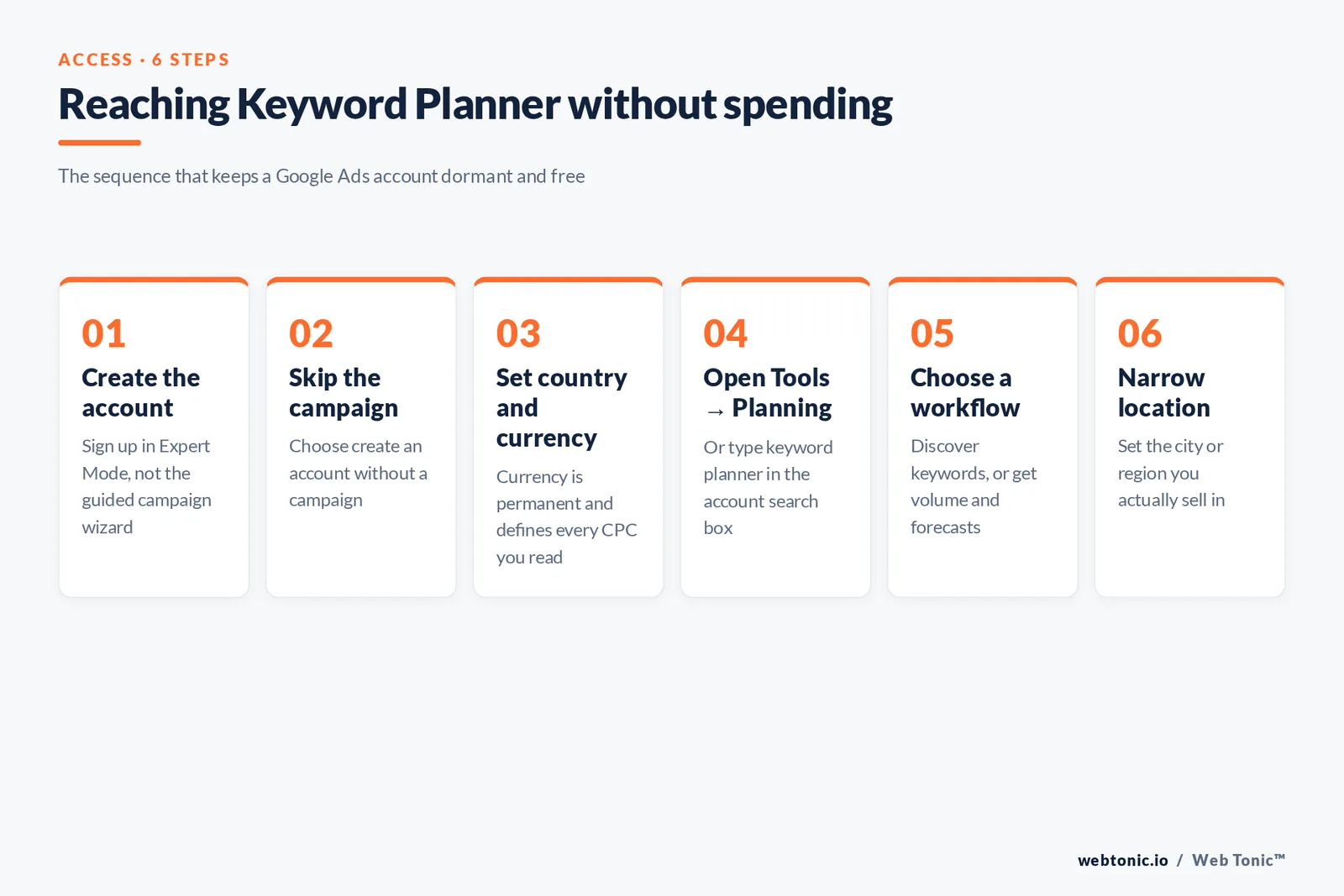
The tool sits behind a Google Ads account, which is where most people give up. This sequence gets you in and keeps the account dormant.
| Step | What you do | What to watch |
|---|---|---|
| 1. Create the account | Sign up at Google Ads with a Google account | Choose "Switch to Expert Mode" before any campaign wizard |
| 2. Skip the campaign | Select "Create an account without a campaign" | This is the link most users miss |
| 3. Confirm billing country | Set country, time zone and currency | Currency is permanent — it defines every CPC you will read |
| 4. Open the tools menu | Tools → Planning → Keyword Planner | Menu labels move; search "keyword planner" in the top search box |
| 5. Pick a workflow | Discover new keywords, or get search volume and forecasts | Both accept up to 10 seed terms |
| 6. Set location and language | Narrow to the market you actually sell in | Defaults are often the whole country |
Limit 1: a dormant account with 0 spend returns search volume as a range such as 1K-10K. Accounts with active spend see a single averaged number. If you need precise volumes, either run a small campaign or read ranges as bands and rank keywords relatively.
The 2 workflows, and which one to use
Fact 2 — both workflows accept up to 10 seed keywords at once, and 3 unrelated seeds usually return more usable ideas than 10 variations of the same phrase.
| Workflow | Input | Output | Use it when |
|---|---|---|---|
| Discover new keywords | Up to 10 seed keywords, or a site URL | Hundreds of keyword ideas with volume and bids | Building a keyword list from scratch |
| Get search volume and forecasts | A pasted list of keywords you already have | Volume history plus a 30-day performance forecast | Validating or budgeting an existing list |
| Start with a website | Your own or a competitor's domain or page | Ideas Google associates with that page's content | Auditing coverage gaps fast |
Google's guidance on refining new keywords covers the filters that turn hundreds of raw ideas into a shippable list, and the "Start with a website" input is the fastest competitive read the free tool offers.
Every column the keyword tool returns, and what it means
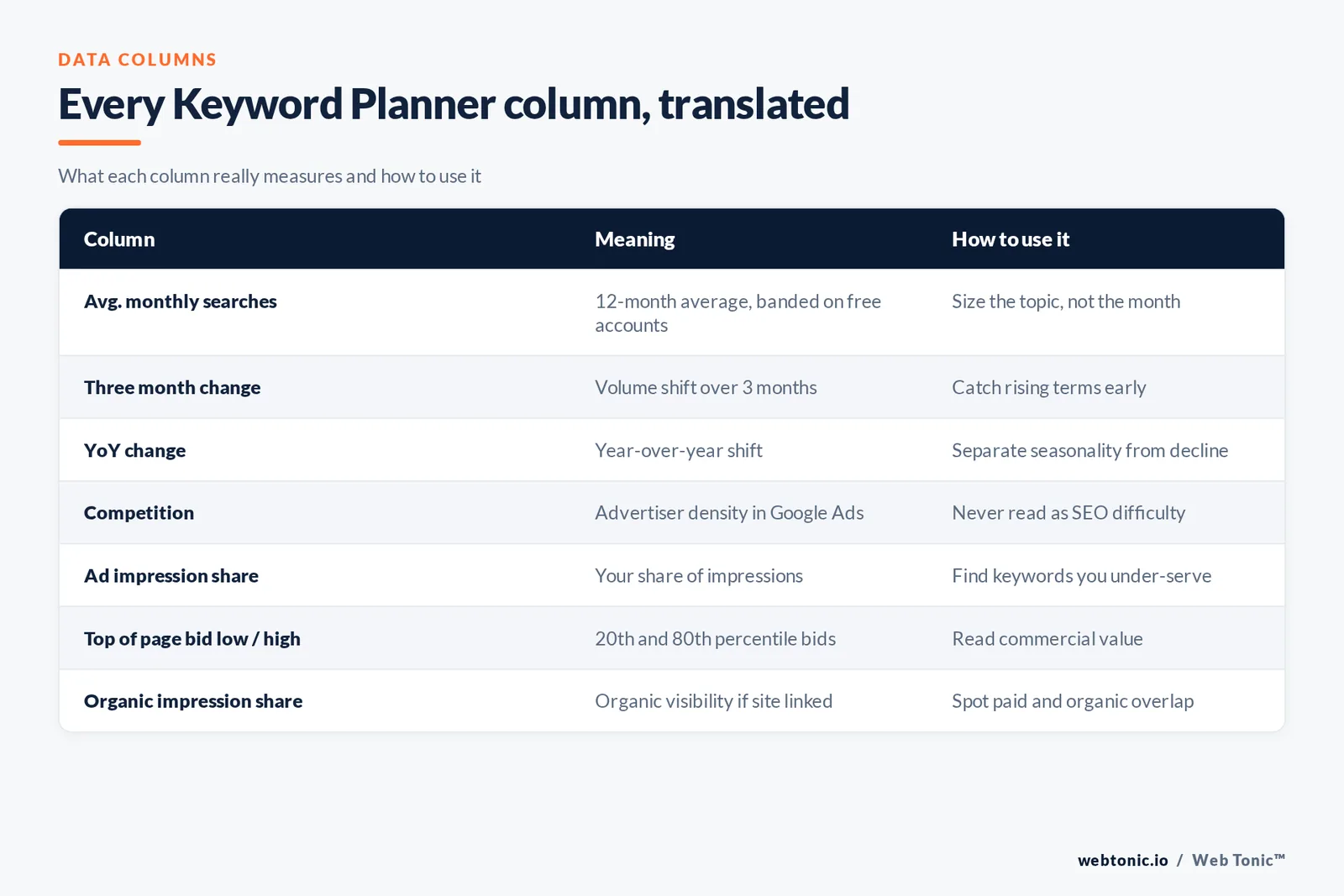
Limit 3: 8 columns matter and only 2 of them — the low and high top-of-page bids — are hard auction numbers rather than modelled estimates.
| Data column | Meaning | How to use it |
|---|---|---|
| Avg. monthly searches | 12-month average, rounded or banded | Size the opportunity, not the month |
| Three month change | Volume shift over the last 3 months | Catch fast-rising terms early |
| YoY change | Year-over-year volume shift | Separate seasonality from decline |
| Competition | Low, Medium or High — advertiser density, not SEO difficulty | Never read it as SEO keyword difficulty |
| Ad impression share | Your account's share of impressions for that keyword | Find keywords you already under-serve |
| Top of page bid (low) | The 20th percentile of top-of-page bids | Floor for a cheap entry bid |
| Top of page bid (high) | The 80th percentile of top-of-page bids | Ceiling for commercial value |
| Organic impression share | Organic visibility if the site is linked | Spot paid-and-organic overlap |
Fact 1 — the bid range is the single most useful SEO number in the whole tool: a keyword where advertisers pay $12 or more per click is a keyword with proven commercial intent, whatever its search volume says.
Reading a keyword forecast without fooling yourself
Fact 3 — the forecast window is fixed at the next 30 days, so a plan built for a 90-day quarter needs its cost figure multiplied by 3 before it reaches a budget meeting.
Once you add keywords to a plan, the forecast tab models the next 30 days at a bid and budget you choose. Google's documentation on Keyword Planner forecasts is explicit that these are estimates built on recent auction data.
| Forecast metric | What it estimates | Sanity check |
|---|---|---|
| Clicks | Clicks in the next 30 days at your bid | Compare against a 1-2% CTR reality check |
| Impressions | Times your ad could show | Should track total keyword volume |
| Cost | Spend needed to buy those clicks | Divide by clicks for effective CPC |
| CTR | Modelled click-through rate | Above 15% on a broad term is a red flag |
| Average CPC | Blended cost per click | Compare against the top-of-page bid range |
| Conversions | Only if you enter a conversion rate | Use your own data, never a default |
Limit 2: forecasts assume a fully-built campaign with 1 relevant landing page and no learning period. Treat the numbers as an upper bound and plan on 60-70% of forecast clicks in month one.
Choosing keywords from the list: a 7-filter shortlist
Rule 1 — cut 90% of the export. A discovery run returns hundreds of keyword ideas; a shippable first campaign needs 20-60 of them across 3-6 ad groups.
| Filter | Threshold | Reason |
|---|---|---|
| Filter 1 — intent match | Keeps only terms a buyer would type | Volume without intent burns budget |
| Filter 2 — minimum volume | 10+ average monthly searches | Below that, data is too thin to optimise |
| Filter 3 — bid ceiling | Top-of-page high under 3x your target CPA logic | Keeps unaffordable auctions out |
| Filter 4 — exclude brands | Remove competitor brand terms at first | Low conversion rate, high friction |
| Filter 5 — group by theme | 5-20 keywords per ad group | Tight groups lift relevance |
| Filter 6 — long tail quota | At least 40% 3-word-plus terms | Cheaper clicks, clearer intent |
| Filter 7 — negative candidates | Tag every "free", "jobs", "DIY" idea | Your first negative keyword list writes itself |
Google's basic tips for building a keyword list make the same point about tight thematic grouping. If you want the on-page side of the same list, our guide to keyword phrases covers how those terms behave in content.

Using the AdWords keyword tool for SEO
Rule 2 — translate 6 columns, ignore 1. Every keyword planner column has an SEO use except Competition, which describes advertiser density in Google Ads and nothing about organic difficulty.
The keyword tool was built for ads, but it remains a legitimate SEO data source — as long as you translate the columns.
| SEO job | What to pull | What to ignore |
|---|---|---|
| Topic sizing | Avg. monthly searches by cluster | Exact single-keyword numbers |
| Commercial value | Top-of-page bid ranges | The Competition column |
| Seasonality | The monthly volume graph | A single 3-month change figure |
| Content gaps | Ideas from a competitor URL | Branded suggestions |
| Query phrasing | The exact wording of grouped ideas | Your internal jargon |
| Difficulty | Nothing — the tool has no SEO difficulty score | Competition as a proxy |
For the full organic workflow, read our guide to choosing SEO keywords; the academic background on keyword research as a discipline explains why volume alone was never the metric.
Where the keyword tool is blind — and what to add
Limit 4: Google groups close variants, so a term with 2,400 monthly searches may in reality be 30 long-tail phrasings the tool will never list separately.
| Blind spot | Consequence | Complementary tool |
|---|---|---|
| Banded volume on dormant accounts | Cannot rank close keywords | Any paid index, or spend $50 |
| Grouped near-duplicates | Long tail variants disappear | Autocomplete-based tools |
| No question data | Misses informational content angles | Question research tools |
| No SERP view | You cannot see who ranks | Manual SERP checks or an SEO suite |
| No competitor spend | No read on rival ad strategy | Competitive intelligence tools |
| Slow on emerging trends | 12-month averages lag spikes | Google Trends |
Google Trends is the free companion for anything time-sensitive: it shows relative interest over time rather than absolute volume, which is exactly the gap in a 12-month average.
Free and paid alternatives to the Google keyword tool
Fact 4 — 4 of the 7 keyword tools below cost $0, which is enough coverage for most small accounts spending under $2,000 a month.
| Tool | Best for | Data source | Cost tier |
|---|---|---|---|
| Google Keyword Planner | Bid data and forecasts | Google Ads auctions | Free with an account |
| Keyword Tool | Autocomplete long tail across 8+ platforms | Search suggestions | Freemium |
| AnswerThePublic | Question and preposition clusters | Search suggestions | Freemium |
| SpyFu | Competitor paid keyword history | Crawled SERPs | Paid |
| WordStream keyword tool | Quick free idea lists | Third-party index | Free |
| Google Trends | Seasonality and momentum | Google Search sample | Free |
| Full SEO suites | Difficulty scores and backlink context | Own crawl and clickstream | Paid |
Worth testing in this order: Keyword Tool for autocomplete depth, AnswerThePublic for question mapping, SpyFu for competitor keyword history, and the free WordStream keyword tool when you need ideas without logging in anywhere.
7 mistakes that waste a keyword research session
| Mistake | What happens | Fix |
|---|---|---|
| Trap 1 — country-wide targeting | Volumes 10x your real market | Set the city or region first |
| Trap 2 — reading Competition as SEO difficulty | Easy organic wins skipped | Use bid ranges plus a SERP look |
| Trap 3 — 1 seed keyword | Narrow, repetitive ideas | Enter 5-10 seeds from different angles |
| Trap 4 — ignoring the CSV export | Hours lost to screenshots | Export and filter in a spreadsheet |
| Trap 5 — no negative list | Budget on "free" and "jobs" queries | Tag negatives during research |
| Trap 6 — trusting forecast conversions | Business case built on a guess | Enter your own conversion rate |
| Trap 7 — one-off research | Lists rot in about 2 quarters | Re-run every 90 days |
Fact 2 — the CSV export is the tool's most underused feature: 1 download gives you every column above for up to hundreds of keyword ideas, ready for filtering, deduplication and sharing.
A 90-day keyword research cadence
Rule 3 — re-run every 90 days. Search volume in the keyword planner is a 12-month average, so a list left untouched for 2 quarters is describing last year's demand.
| When | Action | Deliverable |
|---|---|---|
| Week 1 | Discover keywords from 10 seeds and 3 competitor URLs | Raw idea export |
| Week 2 | Apply the 7 filters, group into ad groups | Shortlist plus negative list |
| Week 3 | Build a plan and read the 30-day forecast | Budget and bid proposal |
| Week 6 | Compare live search terms against the plan | First optimisation round |
| Week 12 | Re-pull volume, check YoY change | Refreshed keyword list |
Product changes land often, so keep an eye on the Google Ads product blog for tool updates. Our growth marketing team runs this cadence for paid and organic in a single pass, and more playbooks live on the Web Tonic blog.

FAQ
Is the AdWords keyword tool still available?
Yes. It was renamed Google Keyword Planner when AdWords became Google Ads in 2018. The tool lives inside Google Ads under Tools, and every feature of the old keyword tool is still there.
Can I use Google Keyword Planner for free?
Yes. You need a Google Ads account, but you can create one without a campaign and never spend anything. The trade-off is that dormant accounts see search volume as ranges instead of exact numbers.
What does the Competition column actually measure?
Advertiser competition for that keyword in Google Ads — how many advertisers bid on it relative to all keywords. It is not an SEO difficulty score, so never use it to judge how hard a term is to rank organically.
How accurate are Keyword Planner forecasts?
They are directionally useful and consistently optimistic. Forecasts assume a well-built campaign with no learning period, so plan for roughly 60-70% of forecast clicks in the first month and refine from live data.
What is the best free alternative to the Google keyword tool?
Google Trends for momentum and seasonality, plus an autocomplete-based tool such as Keyword Tool or AnswerThePublic for long-tail phrasing the planner groups away. Use them alongside the planner, not instead of it.
Sources
Google Ads Help — Use Keyword Planner, basic tips for building a keyword list, About Keyword Planner forecasts, refine your new keywords · Google Ads — official Keyword Planner product page · Google Trends · Google Ads & Commerce blog · Wikipedia — Google Ads, keyword research · Keyword Tool, AnswerThePublic, SpyFu and WordStream keyword tools. All sources verified live at publication.


