



Table of contents
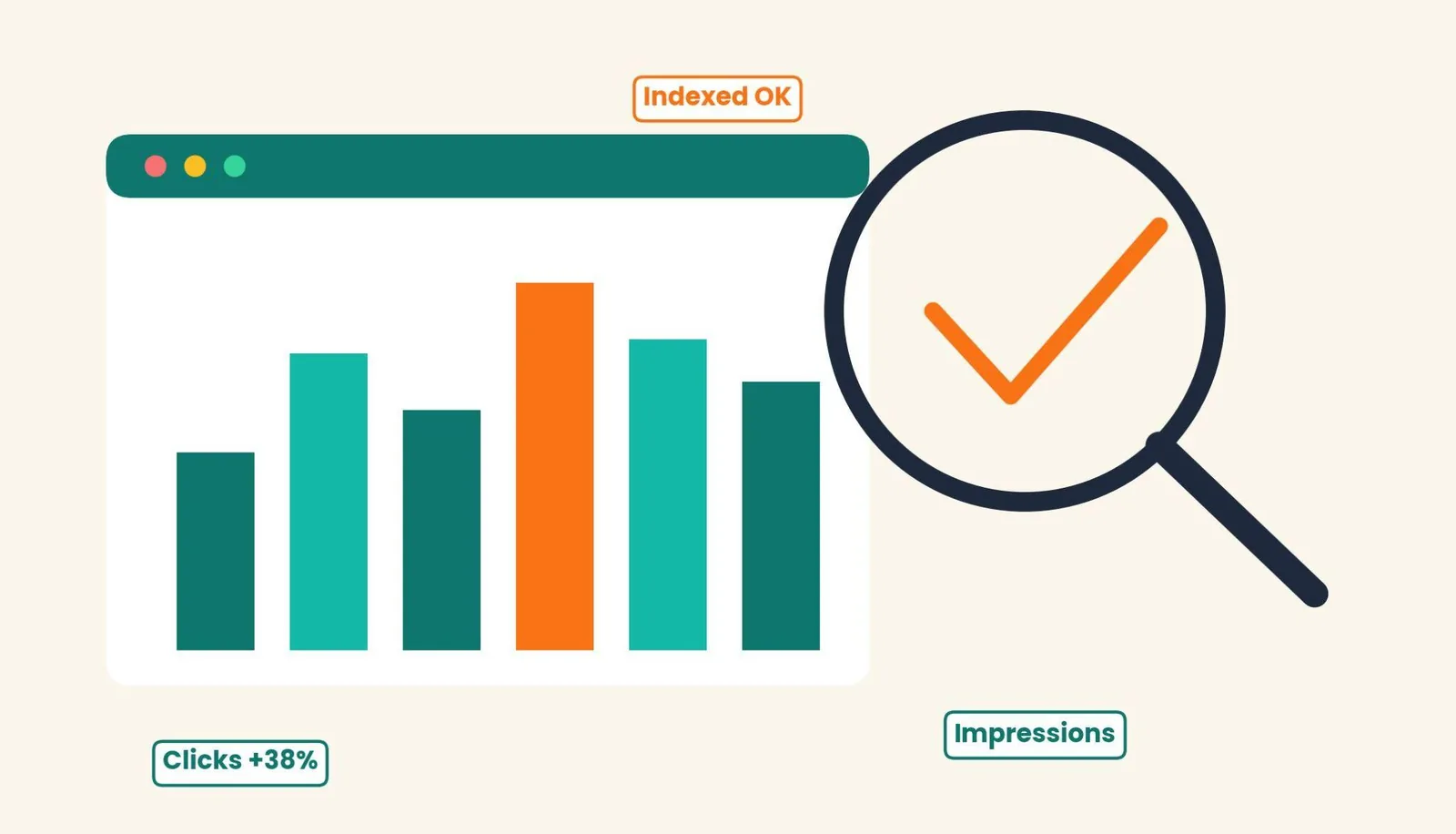
Most site owners open Google Search Console once, feel a little overwhelmed by the reports, and never come back. That's a mistake. GSC is the tool that shows you exactly what Google sees when it crawls your site: which pages are indexed, which URL paths are throwing errors, and which queries are actually sending you clicks.
Google Search Console is a free webmaster tools platform that reports on your website's search performance, indexing status, and technical health, straight from Google's own data. Whether you're running SEO for a five-page brochure site or a thousand-page e-commerce property, this guide walks through setup, the core reports, and the fixes that actually move the needle. It should also save you from chasing problems a search engine has already told you about.
Key Takeaways
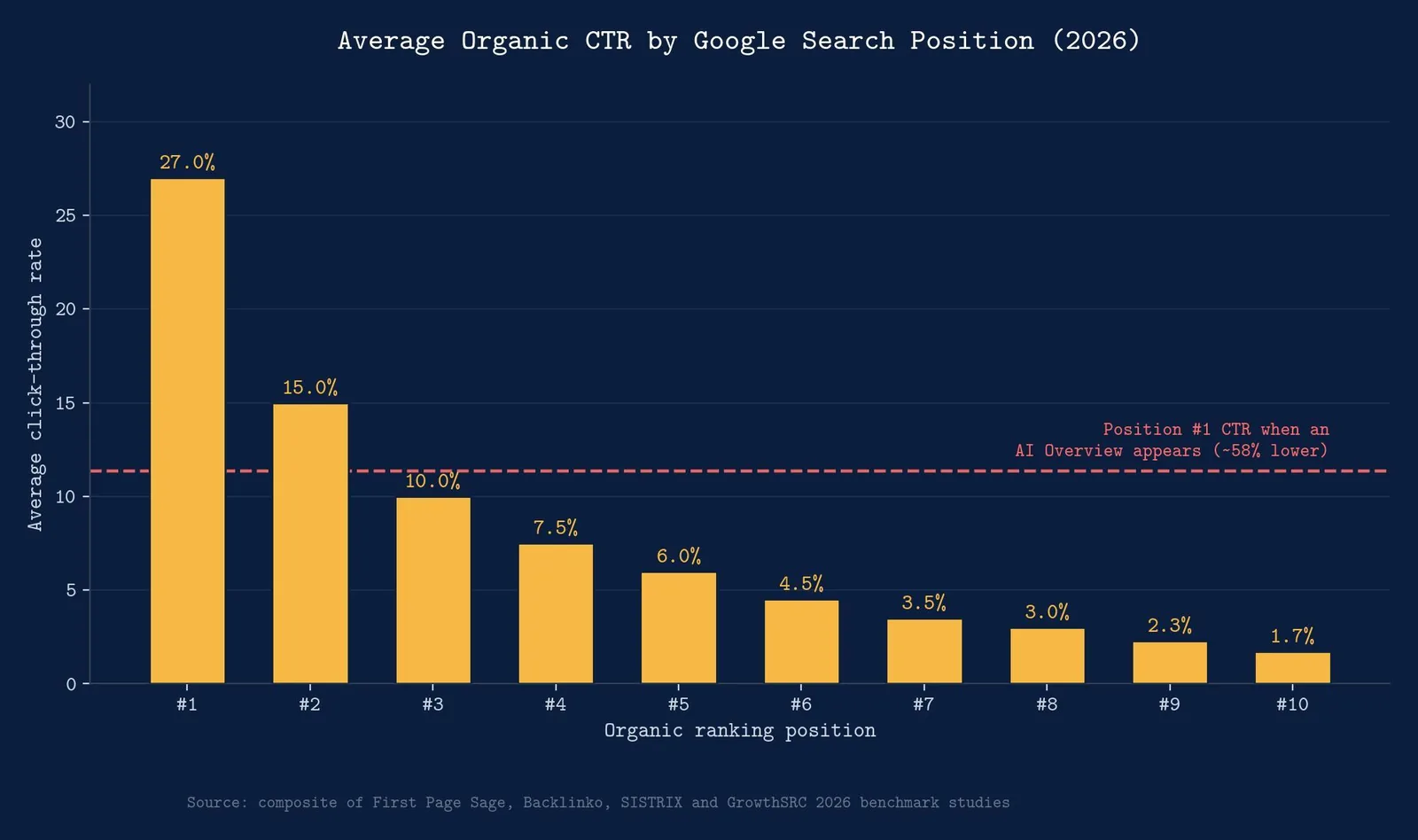
- The #1 organic result gets roughly 27% average CTR versus under 2% by position #10, so even small average position gains near the top of page one translate into disproportionate click volume.
- AI Overviews can cut top-position CTR by as much as 58%, which means your Performance report numbers may look worse even while your actual search visibility holds steady.
- Verifying your property with a DNS TXT record covers your entire domain, while URL prefix verification only covers one protocol and subdomain. Pick the method that matches how much of your site you need visibility into.
- The Core Web Vitals report needs 28 days of real user data before it shows meaningful status, so don't expect same-day feedback after a speed fix.
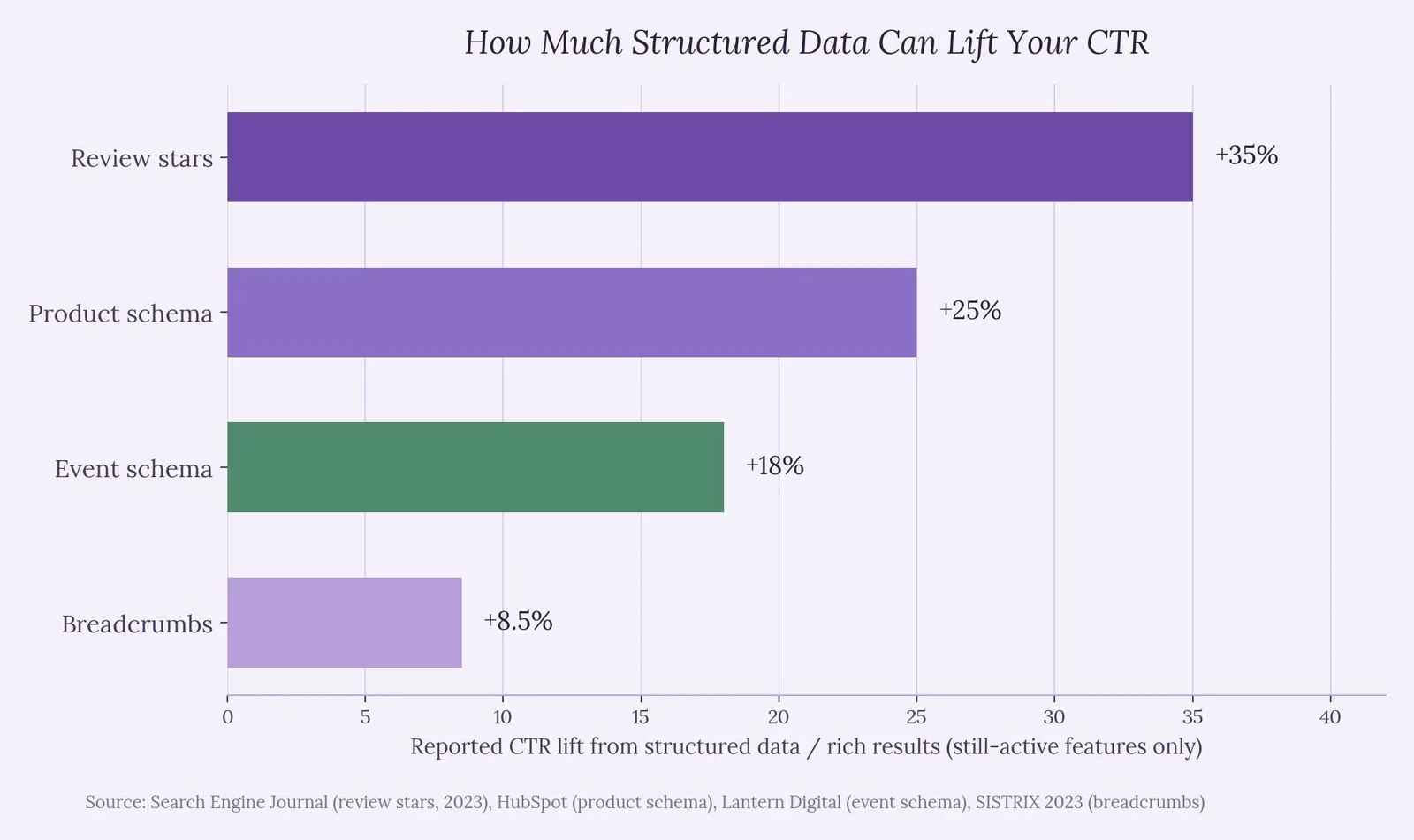
- Structured data alone doesn't move rankings, but rich results built from it have been shown to lift CTR by roughly 8% to 35% depending on the schema type — though Google fully retired FAQ rich results in May 2026, so that's no longer one of the levers.
- Linking Google Search Console to Google Analytics gives you the full picture: GSC shows what people searched before they clicked, Analytics shows what they did after.
What Is Google Search Console?
Google Search Console (GSC), formerly known as Google Webmaster Tools, is a free service that lets site owners monitor, maintain, and troubleshoot how their site appears in Google Search. It doesn't touch your rankings directly. Think of it as a diagnostic layer sitting on top of Google's index. Once verified, a Google Search Console account tells you which queries bring people to your website, which pages Google has indexed, whether structured data is valid, and where security issues or manual actions might be dragging down visibility.
Google Analytics tracks behavior after someone lands on your site. GSC shows what happens before the click — impressions, average position, and search performance by query. Together they cover the full funnel, from search intent to conversion.
Setting Up Your Google Search Console Property
Before any report means anything, you need to verify ownership. GSC offers two property types:
- Domain property — covers all subdomains and protocols (http, https, www, m). Requires adding a DNS TXT record through your domain registrar, which can take a few hours to propagate.
- URL-prefix property — covers one specific URL path and protocol only. Offers more verification options: HTML file upload, meta tag, Google Tag Manager, or Google Analytics.
For most businesses, a domain property is the better long-term choice, since it captures every subdomain automatically. URL-prefix is faster if you just need to verify ownership of a single staging environment or subdomain quickly.
Once verified, submit your XML sitemap under the Sitemaps section so Google knows exactly which URLs you want crawled and indexed, rather than relying entirely on discovery through internal links.
How to Read the Performance Report
The Performance report is where most people spend the bulk of their time in GSC — and for good reason. It's the closest thing to a live feed of your search visibility. Four metrics drive everything here:
- Total clicks — how many times someone clicked through to your site from a Google search result
- Total impressions — how many times your URL appeared in results, clicked or not
- Average CTR — clicks divided by impressions, your click rate
- Average position — your average ranking spot for a given query
Position 1 organic results average around 27% CTR across major 2026 studies, while position 10 drops under 2%. That's why even a jump from position 6 to position 3 can meaningfully change your organic traffic without any change in impressions. But context matters: a February 2026 Ahrefs analysis of 300,000 keywords found that AI Overviews correlate with a roughly 58% reduction in click-through rate for top-ranking pages. If your average position looks great but clicks are flat, an AI Overview sitting above your result is a common culprit, not a GSC bug.theStaccOuterBox
Filter this report by query, page, country, and device to spot patterns. A page with high impressions and low CTR usually has a title tag or meta description problem, not a ranking problem.
Using the URL Inspection Tool
The URL inspection tool, accessible from the search bar at the top of any GSC property, tells you exactly how Google sees one specific page: whether it's indexed, when it was last crawled, and whether any structured data was detected, including legacy AMP markup if your site still runs it. (Google retired the standalone Mobile Usability report and Mobile-Friendly Test tool back in December 2023; Lighthouse is the current substitute for that check.)
Use it whenever you publish or significantly update a page. Paste the URL, check the indexed status, and if it shows "not indexed," request indexing directly from the same panel. That doesn't guarantee immediate indexing, but it puts the page in a priority crawl queue rather than waiting for Google to discover it organically through internal links or the sitemap.
Structured data matters here because rich results are the reward for implementing it correctly. Rich snippets with review stars have been shown to lift CTR by roughly 35% over plain listings, product schema by around 25%, and breadcrumb markup by a more modest 8.5%. One caution: don't build a content strategy around FAQ schema for the SERP dropdown. Google restricted FAQ rich results to government and health sites back in 2023, then removed the feature entirely on May 7, 2026. The markup itself is still valid and worth keeping if it accurately describes real Q&A content, but it no longer earns any visible search-results real estate.
Fixing Indexing and Coverage Issues
Under the Pages report (what used to be called the Coverage report), GSC groups every URL it knows about into "Indexed" or "Not indexed," with specific reasons for each excluded page: duplicate content, crawl anomalies, blocked by robots.txt, or a noindex tag. This is the fastest way to find why a page you expect to rank simply isn't showing up in search at all.
Check this report monthly, not just when something breaks. A sudden spike in "Not indexed" pages after a site migration or CMS update is one of the most common causes of an unexplained organic traffic drop, and it's almost always caught here before it shows up anywhere else.
The Security & Manual Actions section, tucked lower in the sidebar, deserves a periodic check too. This is where Google flags hacked content, spammy structured data, or link scheme penalties as security issues. A manual action notice here can tank rankings site-wide until it's resolved and a reconsideration request is filed.
Google Search Console vs. Google Analytics
| Factor | Google Search Console | Google Analytics |
|---|---|---|
| What it tracks | Pre-click search behavior: queries, impressions, ranking position | Post-click behavior: sessions, conversions, time on site |
| Primary use case | Diagnosing indexing, ranking, and technical SEO issues | Measuring engagement and business outcomes |
| Cost | Free | Free (GA4); paid tiers exist for enterprise volume |
| Data source | Google's own search index and crawl data | Your site's tracking code and user sessions |
| Core Web Vitals | Native report using real-user CrUX data | Not available natively; requires GA4 event setup |
| Best paired with | Google Analytics, for the full funnel | Google Search Console, Google Tag Manager |
Neither tool replaces the other. GSC tells you whether people can find you; Google Analytics tells you what they do once they arrive. Link the two accounts through the Google Analytics admin panel and GSC query data flows directly into Analytics reports, which saves you from cross-referencing two dashboards for every content decision.
Understanding the Core Web Vitals Report
Google's Search Central documentation recommends site owners achieve good Core Web Vitals for success with Search, since this aligns with what its core ranking systems seek to reward. Three metrics get tracked:Google
- Largest Contentful Paint (LCP) — loading performance; good is under 2.5 seconds
- Interaction to Next Paint (INP) — responsiveness; good is under 200 milliseconds
- Cumulative Layout Shift (CLS) — visual stability; good is under 0.1
The Core Web Vitals report groups URLs by status (Poor, Need improvement, Good), by metric, and by URL group, and is based on real user data for LCP, INP, and CLS rather than lab simulations. That real-user requirement is exactly why the report can take up to 28 days to reflect a fix — it's averaging a rolling window of actual visitor sessions, not testing your page on demand. Want same-day feedback while you're actively fixing something? Pair this report with PageSpeed Insights for lab data, then confirm the improvement in GSC once the field data catches up.Google Support
Common Mistakes When Using Google Search Console
Checking the Performance report without segmenting by device hides real problems. A page that ranks well on desktop but poorly on mobile (where Google does mobile-first indexing) needs a completely different fix than a page with a genuine content gap.
Ignoring the Pages report until traffic already dropped turns a five-minute fix into a multi-week recovery. Indexing issues are almost always visible in GSC before they show up meaningfully in Google Analytics.
Submitting a sitemap once and never updating it leaves new content undiscovered longer than necessary. Your sitemap should regenerate automatically whenever you publish, ideally through your CMS rather than a manual process.
Treating average position as the only metric that matters overlooks CTR entirely. A page at position 4 with a compelling title and rich result can out-click a page at position 2 with a generic one.
Try It Yourself: Search Console Health Check
Check off what's already true for your site and get an instant readiness score.
Search Console Tool
Is your Google Search Console setup actually complete?
Check off what's already true for your site. Your readiness score updates as you go.
0 of 6
Check off items above to see how search-ready your site really is.
Related reading
- How to Remove Google Search Results: Every Removal Route
- How to Use Google Keyword Planner: A Step-by-Step Walkthrough
- What Is Google Trends? How the Data Works and How to Use It
- GEO & AEO services at Web Tonic
Frequently Asked Questions
How long does it take for changes to show up in Google Search Console? Most reports update within 2 to 3 days for crawl and indexing data, but the Core Web Vitals report specifically needs a full 28-day window of real user traffic before status changes reflect there.
Do I need both Google Search Console and Google Analytics? Yes. They measure different halves of the same journey. GSC covers what happens before someone clicks; Google Analytics covers what happens after.
Why does my average position look good but my clicks are flat? This is often an AI Overview or another SERP feature sitting above your result, absorbing clicks that would otherwise go to your listing, rather than a problem with your actual ranking.
Is Google Search Console free for large websites? Yes, GSC is free regardless of site size, though very large properties may need to work with sampled data in some reports due to volume.
Can Google Search Console show data for other search engines like Bing? No. GSC is exclusively Google's own data. Bing Webmaster Tools is the equivalent for Bing and Yahoo search results.
Turning Search Console Data Into Actual Growth
Google Search Console rewards the site owners who check it like a dashboard, not a mailbox. The businesses that catch indexing drops in week one instead of month three are the ones whose organic traffic actually compounds instead of quietly leaking. Start with verification and a clean sitemap. Build the habit of a monthly Pages and Performance review. Let the Core Web Vitals and URL inspection tools handle the technical heavy lifting once that rhythm is in place.
More from Web Tonic: growth marketing services, data & analytics.
Sources: thestacc.com · outerboxdesign.com · developers.google.com · support.google.com


