



Table of contents

Google can remove a search result in three situations: the content breaks its removal policies, a law requires it, or the page itself has changed or gone. This guide walks through every removal request route, what qualifies, and what to do when Google says no.
Key Takeaways
- There are 4 distinct removal paths — personal info requests, legal removal requests, the outdated content tool, and Search Console removals for sites you own.
- Removing a result from Google search results does not delete the page: the source website still hosts it, so contacting the website owner is step 1 whenever it is realistic.
- Google's "Results about you" tool covers personal info such as a home address, phone number and email, and can send alerts when new results appear.
- The Search Console removal tool hides a URL you control for roughly 6 months only — a
noindextag or deletion is the permanent fix. - Legal removals cover 3 main categories: copyright (DMCA), court orders, and national-law claims such as the EU right to be forgotten.
- Google reports the outcome of every request by email; expect 2 possible answers — removed, or denied with a stated reason you can appeal.
- Where removal fails, online reputation management works by displacing the result: build 5–10 strong owned and earned assets that outrank it.
What "remove from Google search results" actually means
Removing a result from Google search results means Google stops showing that URL for some or all queries. It does not delete the page, the data, or the copies held by other search engines, archives and scrapers. Removal from the index and removal from the internet are two different jobs, and most successful cases need both.
That distinction decides your strategy. If you own the website, you control the source and can remove the content permanently. If a third party owns it, you have two levers: persuade or compel the website owner to take the page down, and separately ask Google to delist the URL. Google's own remove information documentation is explicit that the source is the durable fix and its tools are the fallback.
The second thing to understand is scope. Some removals apply globally, some only to searches in one country, and some only to searches for your name. A right-to-be-forgotten delisting in Europe, for example, removes the result for name searches in the applicable countries but leaves the page reachable by other queries. Google's EU privacy transparency report publishes what it delists and what it refuses.
Which route fits your situation
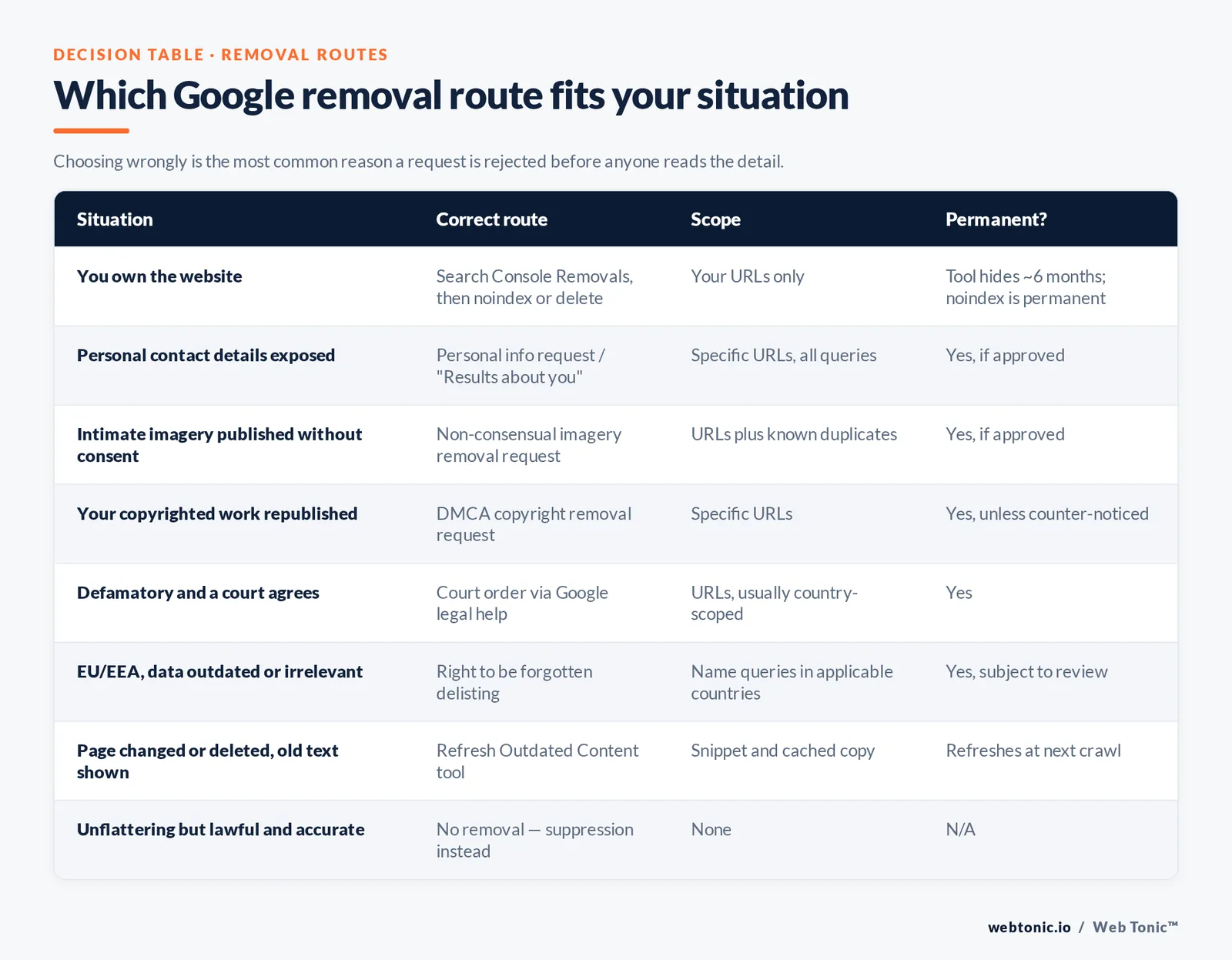
Pick the route from who owns the page and why you want it gone. Choosing wrongly is the most common reason a removal request is rejected before anyone reads the detail.
| Situation | Correct route | Scope of removal | Permanent? |
|---|---|---|---|
| You own the website | Search Console Removals tool, then noindex or delete | Your URLs only | Tool hides ~6 months; noindex is permanent |
| Your personal contact details are exposed | Personal info removal request / "Results about you" | Specific URLs, all queries | Yes, if approved |
| Explicit or intimate imagery published without consent | Dedicated non-consensual imagery removal request | Specific URLs plus known duplicates | Yes, if approved |
| Your copyrighted work was republished | DMCA copyright removal request | Specific URLs | Yes, unless counter-noticed |
| Content is defamatory and a court agrees | Court order submission via legal help | Specific URLs, usually country-scoped | Yes |
| You are in the EU/EEA and the data is outdated or irrelevant | Right to be forgotten delisting request | Name queries in applicable countries | Yes, subject to review |
| The page changed or was deleted but Google still shows the old text | Refresh Outdated Content tool | Snippet and cached copy | Refreshes at next crawl |
| Content is unflattering but lawful and accurate | No removal available — suppression instead | None | N/A |
Step 1 — Find every result before you file anything
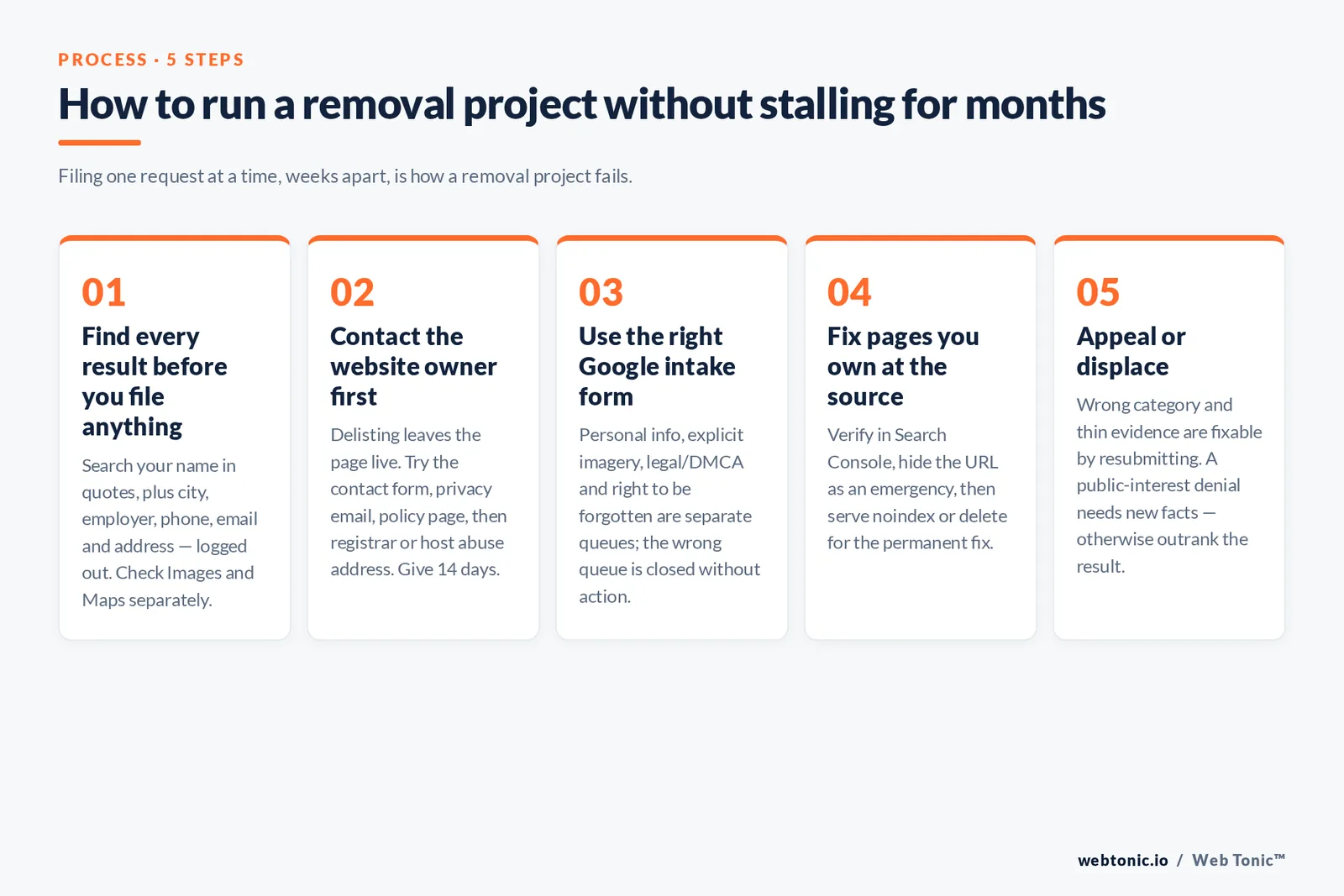
Do a full inventory first. Filing one request at a time, weeks apart, is how a removal project stalls for months. Search your full name in quotes, your name plus your city, your name plus your employer, your phone number, your email address and your home address. Repeat in a logged-out private window, because personalised results hide the picture.
Then widen the net. Check Google Images and Google Maps separately, run the same queries on other engines, and search the specific data-broker sites that dominate people-search results. The US FTC's identity theft and online security guidance is the practical reference for judging which exposures are genuinely risky, and IdentityTheft.gov is the place to start if your personal data is already being misused.
Record each result in a simple sheet: URL, what it exposes, who owns the site, whether a contact form or WHOIS email exists, and the removal route from the table above. That sheet is your project plan.
Step 2 — Contact the website owner first
Delisting a URL still leaves it live for anyone with the link, on other search engines, and inside archives. So start at the source. Find a contact route in this order: an on-page contact form, a listed editorial or privacy email, the site's privacy policy, then the registrar or host abuse address.
Keep the message short, factual and unemotional. State exactly which URL and which sentence or data point you want removed, state why — inaccurate, out of date, or personal contact information published without consent — and give a deadline of 14 days before you escalate. Attach evidence if the claim is factual. Threatening litigation in a first email typically slows things down; publishers route legal threats to counsel and stop replying.
If the site removes the page, you are not finished. Google will keep showing the old result until it recrawls, so submit the URL through the outdated content tool to force a refresh, and check again in a week.
Step 3 — Use the right Google removal request form
Google runs separate intake forms per category, and each one asks for different evidence. Use the specific form; a generic complaint sent to the wrong queue is closed without action.
Option 1 — Personal information. Google's personal information removal policies set out what qualifies: government ID numbers, bank and card numbers, handwritten signatures, confidential login credentials, medical records, and personal contact details such as a home address, phone number or email. The "Results about you" tool lets you request those contact-detail removals from the search results page itself and monitor for new ones.
Option 2 — Explicit imagery. Non-consensual intimate imagery, imagery of minors, and fake explicit content have their own priority workflow, with wider removal that can cover duplicates. This request does not require you to identify the uploader.
Option 3 — Legal removals. Copyright claims go through the DMCA notice process; Google's legal help centre is the single entry point for copyright, trademark, court orders, and country-specific law. Volumes and outcomes are published in the copyright transparency report.
Option 4 — Right to be forgotten. Residents of the EU and EEA can ask Google to delist results for searches of their name where the information is inadequate, irrelevant or excessive. The legal background matters here: Google weighs your privacy interest against public interest, so public figures and recent, newsworthy matters are frequently refused.
Step 4 — Removing pages from a site you own
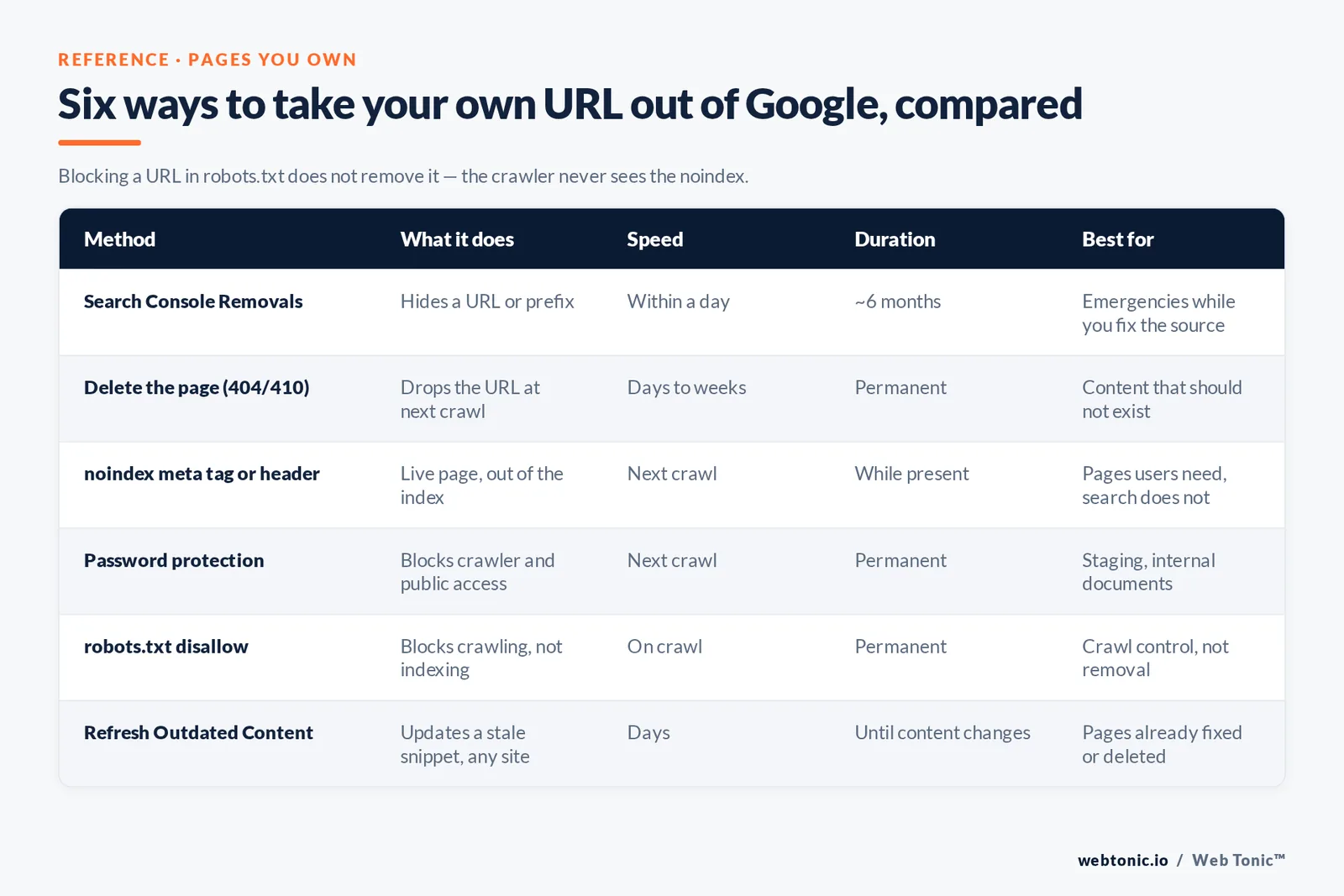
Site owners get faster, stronger tools. Verify the property in Google Search Console, then work in two layers: an emergency hide, followed by a permanent instruction to the crawler.
| Method | What it does | Speed | Duration | Best for |
|---|---|---|---|---|
| Search Console Removals tool | Hides a URL or prefix from results | Usually within a day | About 6 months | Emergencies while you fix the source |
| Delete the page (404 or 410) | Drops the URL at the next crawl | Days to weeks | Permanent | Content that should not exist |
| noindex meta tag or header | Keeps the page live but out of the index | Next crawl | Permanent while present | Pages users need, search does not |
| Password protection | Blocks crawler and public access | Next crawl | Permanent | Staging, internal documents |
| robots.txt disallow | Blocks crawling, not indexing | Immediate on crawl | Permanent | Crawl control, not removal |
| Refresh Outdated Content | Updates a stale snippet for any site | Days | Until content changes again | Pages already fixed or deleted |
The classic mistake is 1 line long: blocking a URL in robots.txt and expecting it to vanish. Google's block indexing documentation explains why that backfires — a disallowed URL can still be indexed from external links, and because the crawler is not allowed to fetch it, it never sees the noindex that would remove it. Allow the crawl, serve the noindex, then block later if you want.
For a marketing site, treat removals as part of technical hygiene rather than a one-off panic. Our data intelligence team audits index bloat, stale URLs and orphaned pages as standard, and the fix is usually a policy — a defined lifecycle for expired campaign pages — rather than a queue of manual requests.
What Google will and will not remove
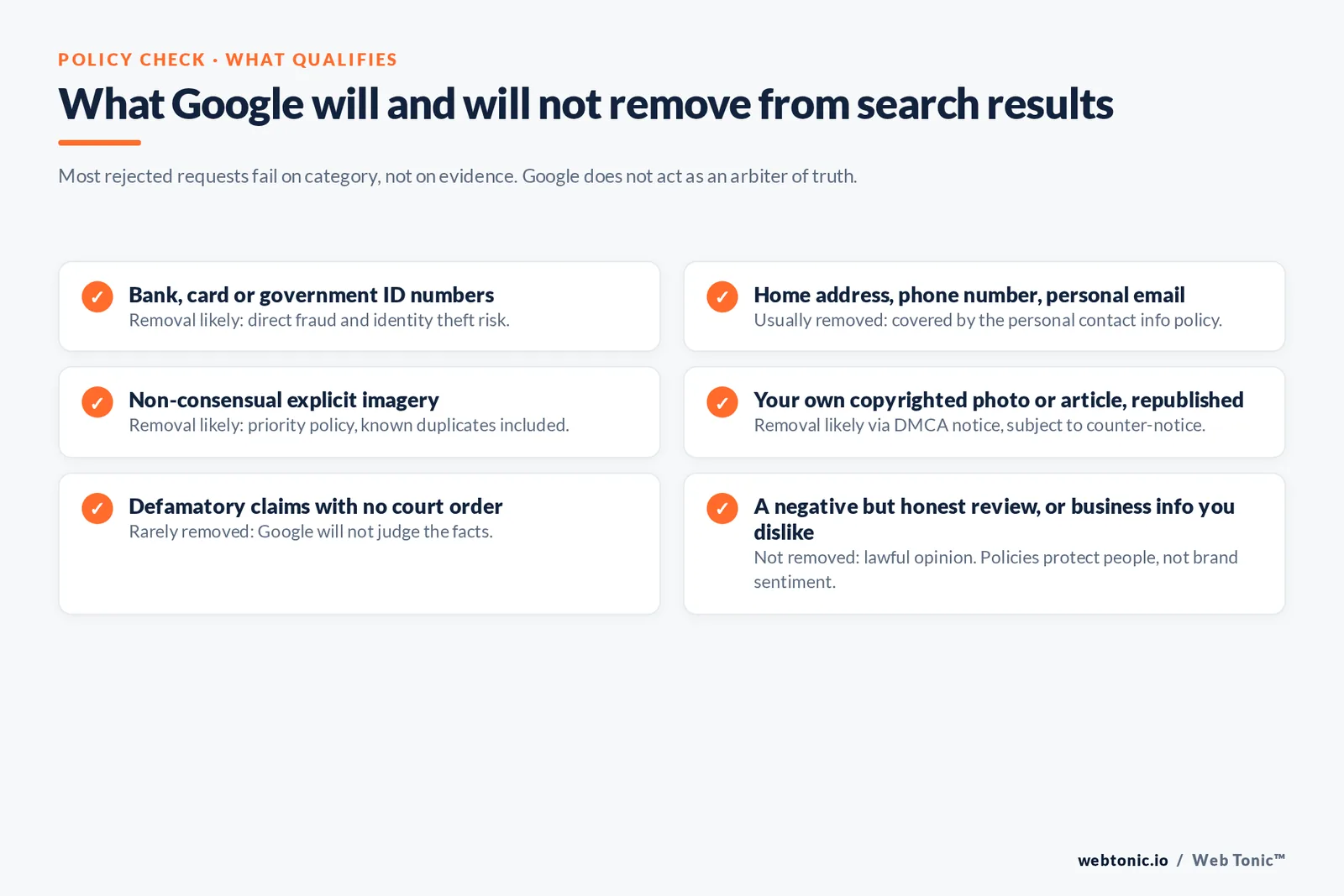
Google removes narrow, well-defined categories. It does not act as an arbiter of truth or fairness, which is why most rejected requests fail on category rather than on evidence.
| Content type | Removal likely? | Why |
|---|---|---|
| Bank, card or government ID numbers | Yes | Direct fraud and identity theft risk |
| Home address, phone number, personal email | Usually | Covered by personal contact info policy |
| Non-consensual explicit imagery | Yes | Priority policy, duplicates included |
| Your own copyrighted photo or article, republished | Yes | DMCA notice, subject to counter-notice |
| Defamatory claims, no court order | Rarely | Google will not judge the facts |
| A negative but honest customer review | No | Lawful opinion |
| Old news coverage about you (outside the EU/EEA) | No | No general right to be forgotten in most countries |
| Mugshot or arrest record on an extortion-style site | Sometimes | Exploitative-removal-practices policy may apply |
| Business information you dislike | No | Policies protect people, not brand sentiment |
Business owners in particular should reset expectations here. Removal policy is written around personal harm; commercial reputation is handled by outranking, not delisting. If the underlying problem is customer sentiment, the durable answer is a better content and review programme, which is where a growth marketing approach beats a legal one.
Step 5 — When Google refuses, appeal or displace
Every decision arrives by email with a reason. Read it literally. Most denials fall into 3 buckets: wrong category, insufficient evidence of identity or ownership, or a public-interest judgement that outweighs your privacy claim. The first two are fixable — resubmit with the correct form and clearer documentation, including a screenshot of the exact data on the page.
A public-interest denial normally needs new facts: a court order, a correction published by the source, or a change in your circumstances. In the US, the practical escalation path for unlawful data exposure runs through state law such as the CCPA, and the FTC's enforcement record shows which data-broker practices regulators are actively pursuing. In Europe, the GDPR erasure right gives you a route to complain to a supervisory authority when Google declines.
If none of that lands, switch objective. You are no longer removing a result, you are moving it. Displacement works because attention collapses fast down the result page, and it is the same discipline as ranking any other page: publish assets you control, earn coverage on domains stronger than the offending one, and make sure each asset is genuinely useful rather than a thin name-repeating profile.
| Suppression asset | Typical effort | Ranking power for a name query |
|---|---|---|
| Personal site on an exact-match name domain | 1–2 weeks | Very high |
| Fully completed LinkedIn profile | 2 hours | Very high |
| Author bio pages on reputable publications | Ongoing | High |
| Conference or podcast appearance pages | Per event | High |
| Company team page with a named bio | 1 day | Medium |
| Active profiles on 3–4 major platforms | 1 day | Medium |
| Guest articles under your byline | Weeks | Medium to high |
| Thin auto-generated profile spam | Minutes | Near zero — avoid |
Target the first 10 results for your name, not just position one, because a single unwanted result at position 4 is still doing damage. Publishing quality matters more than volume: Google's helpful content guidance and its spam policies both penalise the mass-produced profile pages some reputation vendors still sell.
Timelines, costs and what good looks like
Google does not publish a service-level agreement for removal requests, so plan in ranges rather than dates. Search Console removals for your own URLs are typically the fastest, often visible within a day. Personal information requests and legal removals take longer because a human reviews them. Recrawl-dependent changes — a deleted page, a refreshed snippet — depend on how often Google crawls that site, which for a low-traffic third-party page can mean weeks.
Costs split the same way. Doing it yourself is free apart from time; the realistic budget is 4–8 hours for the inventory and first wave of requests. Paid reputation management is priced against the suppression work, not the request forms, and any vendor quoting a guaranteed removal of lawful third-party content is selling something they cannot deliver. Ask instead for a plan with named assets, a publishing schedule and reporting on the first page of results for your target queries — the same accountability you would expect from any performance marketing engagement, and the model our editorial team writes about across search projects.
Related reading
- How to Remove a Google Review: A Step-by-Step Walkthrough
- How to Use Google Search Console: A Step-by-Step Walkthrough
- Is Med Spa Google Business Profile Management Worth It?
- GEO & AEO services at Web Tonic
FAQ
How long does it take Google to remove a search result?
Google publishes no guaranteed timeline. Removals you request through Search Console for your own verified site usually take effect within a day. Personal information and legal requests are reviewed by a person and can take from several days to several weeks depending on evidence and volume. Changes that depend on recrawling a third-party page — a deleted URL or a stale snippet — take as long as Google's next visit to that site, which can be weeks for a rarely updated page.
Can I remove outdated or cached content from Google Search?
Yes, if the live page has already changed or been deleted. The Refresh Outdated Content tool works on any site, not just your own: submit the URL and Google recrawls it, then either drops the result or updates the snippet to match the current page. It cannot remove content that is still live on the page, so fix or delete at the source first, then submit.
What should I do if Google denies my removal request?
Read the stated reason. If it was a category or evidence problem, resubmit through the correct form with clearer documentation — a screenshot showing the exact data, proof of identity, or proof you own the copyright. If it was a public-interest judgement, you generally need new facts such as a court order or a correction from the publisher. In parallel, start suppression work so the result loses visibility even if it stays indexed.
Does removing a result delete the page from the internet?
No. Delisting only stops Google from showing that URL. The page stays live on its own server, remains reachable by direct link, can still appear in other search engines, and may already exist in web archives. That is why contacting the website owner is the first step in any serious removal project, and why archive copies should be handled separately.
Is online reputation management worth paying for?
It depends on what you are buying. Paying for removal requests you could file yourself in an afternoon is poor value. Paying for a sustained publishing and earned-coverage programme that pushes an unwanted result off page one is a normal marketing investment, measured like any other: rankings for your target queries, the share of the first ten results you control, and branded search behaviour over time. Avoid any vendor promising guaranteed removal of lawful third-party content.
Sources
Google Search Help, remove personal information from Google and Results about you · Google Search Central, remove information from Google and block search indexing documentation · Google Search Console Help and product overview · Google Legal Help, removal request policies · Google Transparency Report, EU privacy and copyright removals · US Copyright Office, DMCA · FTC, identity theft and online security guidance and press releases · IdentityTheft.gov · California Attorney General, CCPA · GDPR.eu, right to be forgotten · Wikipedia, right to be forgotten. All sources accessed August 2026.


