



Table of contents
Images are usually the heaviest files on any web page, and they're also one of the most overlooked parts of search engine optimization. A blog post can have perfect content and a clean title tag, and still load slowly and rank poorly in Google Images simply because nobody compressed the hero image or wrote real alt text. Learning how to optimize images for SEO means treating every image as three jobs done at once: helping search engines understand what it shows, helping the page load fast, and helping actual users, including people using screen readers. Image alt text, correct compression, and sensible file sizes all feed into the same outcome: a better user experience and faster load times, which is exactly what helps search engines rank a page well in the first place.
Key Takeaways
- Alt text length recommendations vary by source, but most land in the 80 to 140 character range. Clarity matters more than hitting an exact number.
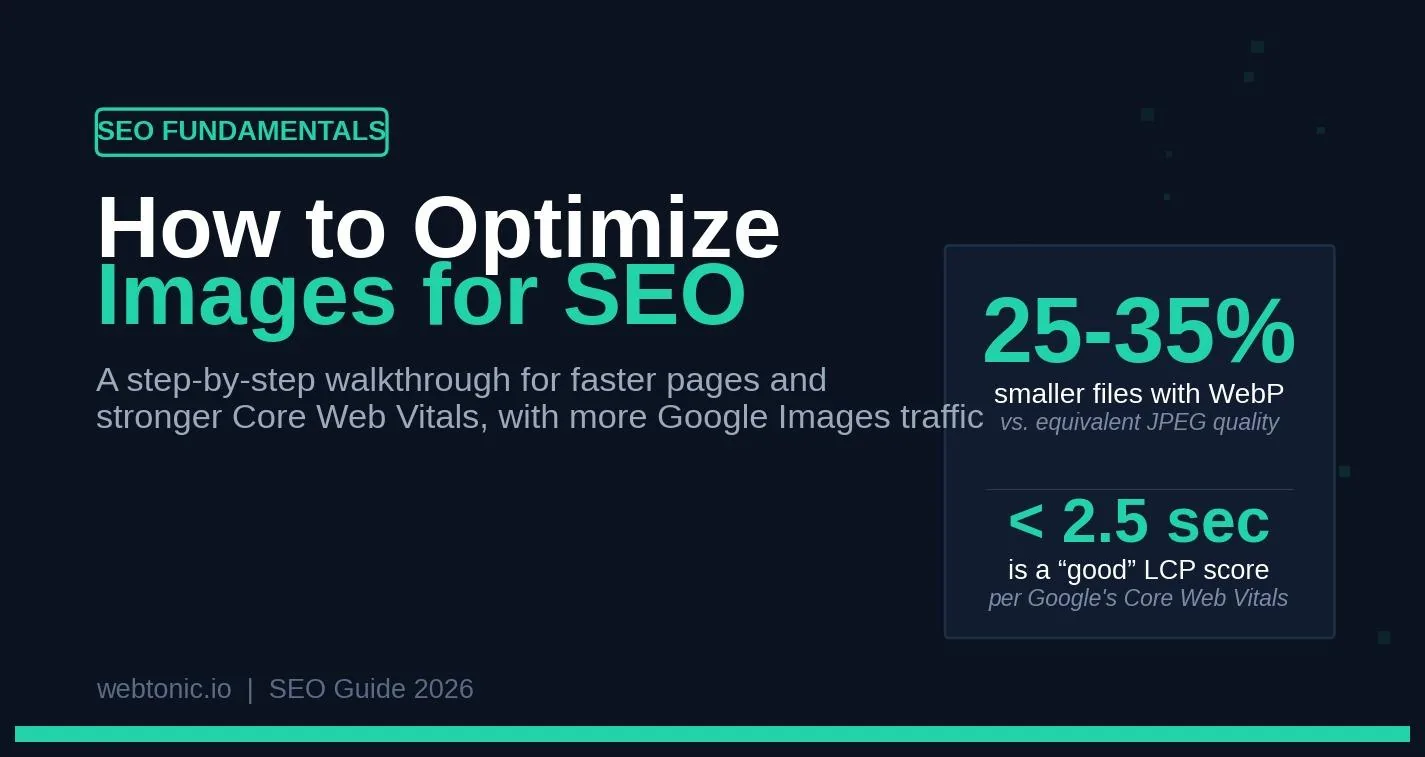
- WebP files are typically 25 to 35 percent smaller than JPEG at equivalent visual quality. AVIF goes further, often around 50 percent smaller than JPEG.
- Unoptimized images are one of the most common causes of a poor Largest Contentful Paint score, and LCP is part of Google's Core Web Vitals — a confirmed, if modest, ranking signal that mainly acts as a tie-breaker between otherwise similar pages.
- Google's good threshold for LCP is under 2.5 seconds, measured at the 75th percentile of real Chrome users, not a lab test on your own machine.
- Descriptive file names and alt text both help Google understand image content. A file named IMG_4521.jpg tells search engines nothing.
- Never lazy-load the image that is your page's Largest Contentful Paint element. Lazy-loading it delays the exact thing Google is measuring.
What is image SEO, and why does it matter?
Image SEO is the practice of optimizing images so search engines can find, understand, and rank them, while making sure real users get a fast, accessible page. That covers technical work like file format and compression, descriptive work like alt text and file names, and structural work like image sitemaps and structured data.
It matters for more than one traffic channel. Google Images and Google Image Search are their own discovery surfaces with dedicated ranking behavior. Google Discover surfaces images prominently in its feed-style results, and for retailers, Google Shopping listings live or die on image quality and correct product metadata. On top of all that, unoptimized images are one of the most common causes of a poor Core Web Vitals score. That's a confirmed, if modest, ranking signal on the main results page too.
"SEO image optimization" vs. "alt text" vs. "image compression" People use these terms almost interchangeably, but they cover different work. Image optimization SEO, sometimes just called SEO image optimization, is the umbrella term for the whole process: format, compression, alt text, file names, and technical delivery together. Image compression specifically means reducing file sizes through lossy or lossless compression without visibly hurting quality. Alt text is just one piece of that umbrella — the descriptive text attached to the img element. Following SEO best practices means treating all of these as one connected workflow rather than fixing alt text on a few pages and calling the job done.
How to optimize images for SEO: the step-by-step process
Step 1: Choose the right file format Not every image belongs in the same format. JPEG remains the default for photographs. PNG is lossless and handles transparency and sharp-edged graphics well, but produces larger files for photographic content. WebP has become the practical baseline for the web: it supports both lossy and lossless compression, handles transparency the way PNG does, and is smaller than JPEG at equivalent quality. AVIF pushes compression further still, though encoding takes more processing time. SVG is a vector format best suited to logos, icons, and illustrations that need to scale without losing quality, since it's described with markup rather than pixels. GIF should generally be reserved for simple animations; static images saved as GIF are almost always larger than they need to be.
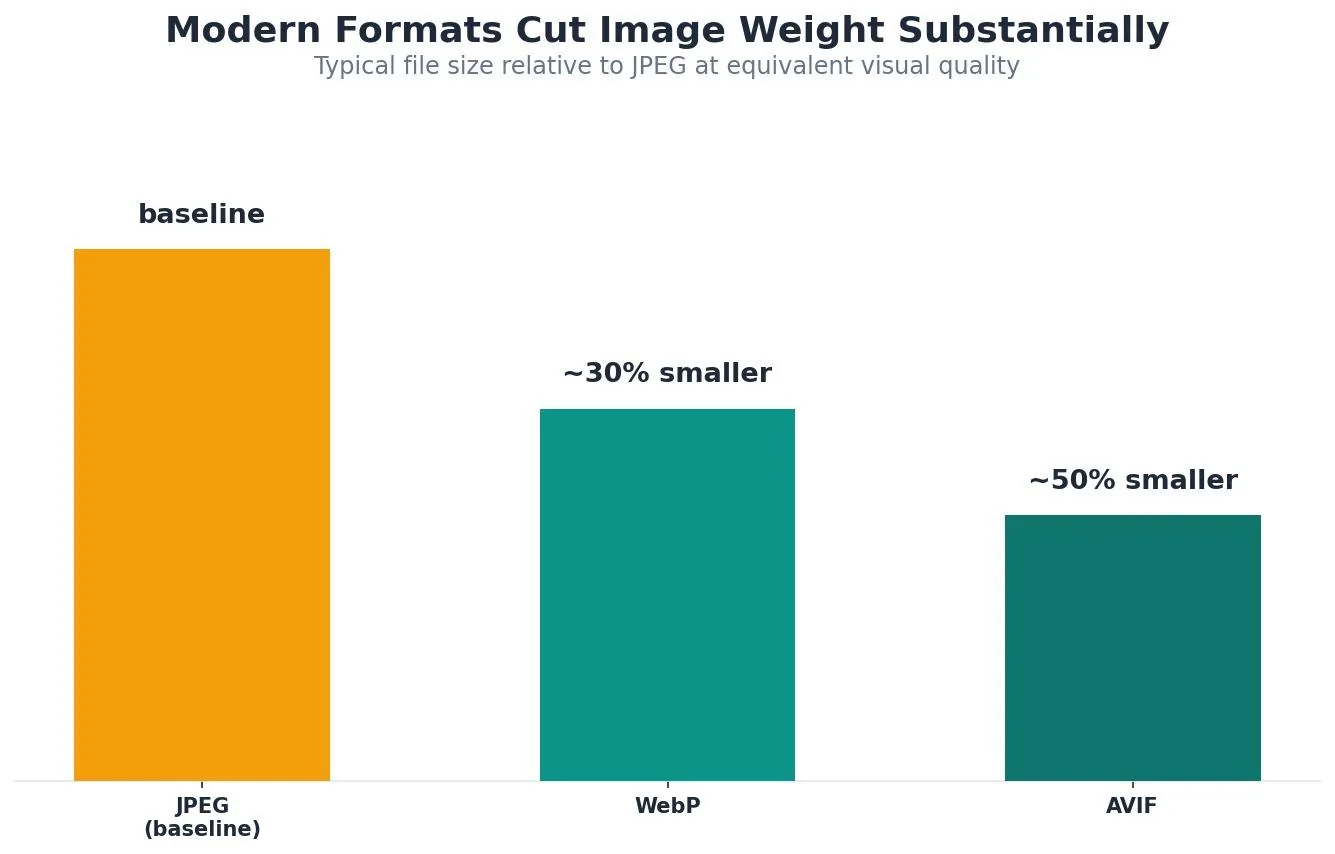
According to Squoosh's format comparison, WebP is typically 25-35% smaller than JPEG at equivalent quality, while AVIF runs roughly 50% smaller than JPEG and about 20% smaller than WebP for photographic content.
Step 2: Compress before you upload Format choice only gets you halfway there. Every image should be run through a compression pass before it goes live. Squoosh, a free browser-based tool built by Google's Chrome team, lets you compare formats and compression levels side by side without uploading anything to a server. ShortPixel takes a different approach, plugging directly into a CMS like WordPress to compress images automatically on upload, with lossy, glossy, and lossless modes depending on how much quality tradeoff is acceptable. For larger websites, pairing compression with a CDN matters just as much: a CDN serves images from a server physically closer to the visitor, and most CDNs can also auto-convert formats on the fly.
Step 3: Write descriptive alt text, not keyword-stuffed filler MetadataReactor calls alt text the single highest-impact image SEO signal, and also the most commonly done badly. The alt attribute on an img element exists to describe what an image shows, for both screen readers and search engines that cannot interpret pixels directly. Good alt text describes the image accurately, works the target keyword in only if it fits naturally, and skips filler openers like "image of" or "photo of" since screen readers already announce that context.
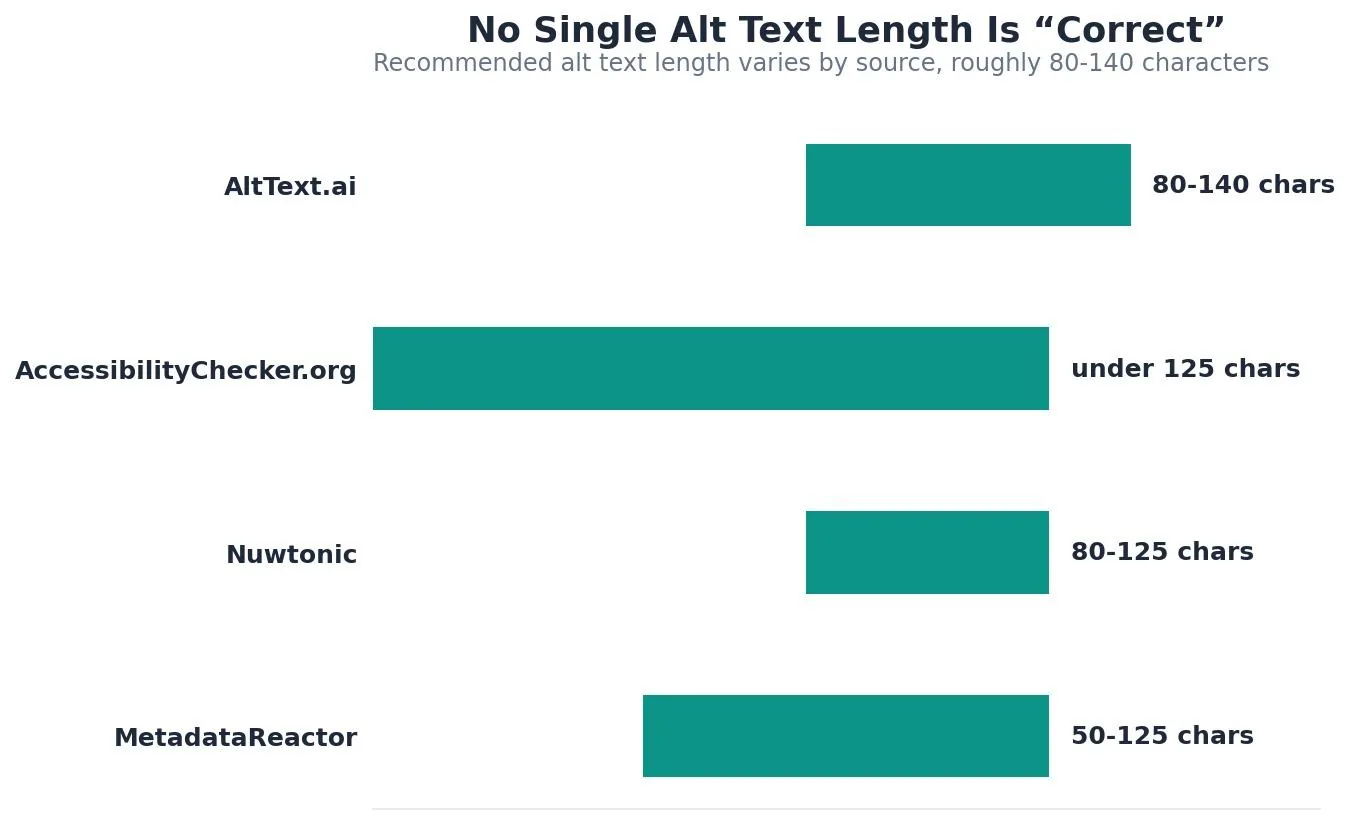
AltText.ai recommends keeping alt text to roughly 80-140 characters, since listener attention on screen readers tends to fade beyond that range — though as the chart above shows, other sources land anywhere from 50 to 125 characters. Decorative images that carry no informational value should use an empty alt attribute rather than a forced description.
Step 4: Use descriptive, hyphenated file names Google's own documentation on image best practices recommends short, descriptive file names over generic ones like IMG00023.JPG, and Bullseye Strategy notes that Google uses file names, alongside surrounding page content, to understand what an image shows. A file called blue-leather-crossbody-bag.webp gives Google more to work with than IMG_4521.jpg.
Step 5: Implement lazy loading, except on your LCP image Lazy loading defers offscreen images until a user scrolls near them, which helps initial page load. The one image that should never be lazy-loaded is whichever one is your Largest Contentful Paint element, typically a hero image. Lazy-loading that specific image delays the exact metric Google is measuring for Core Web Vitals.
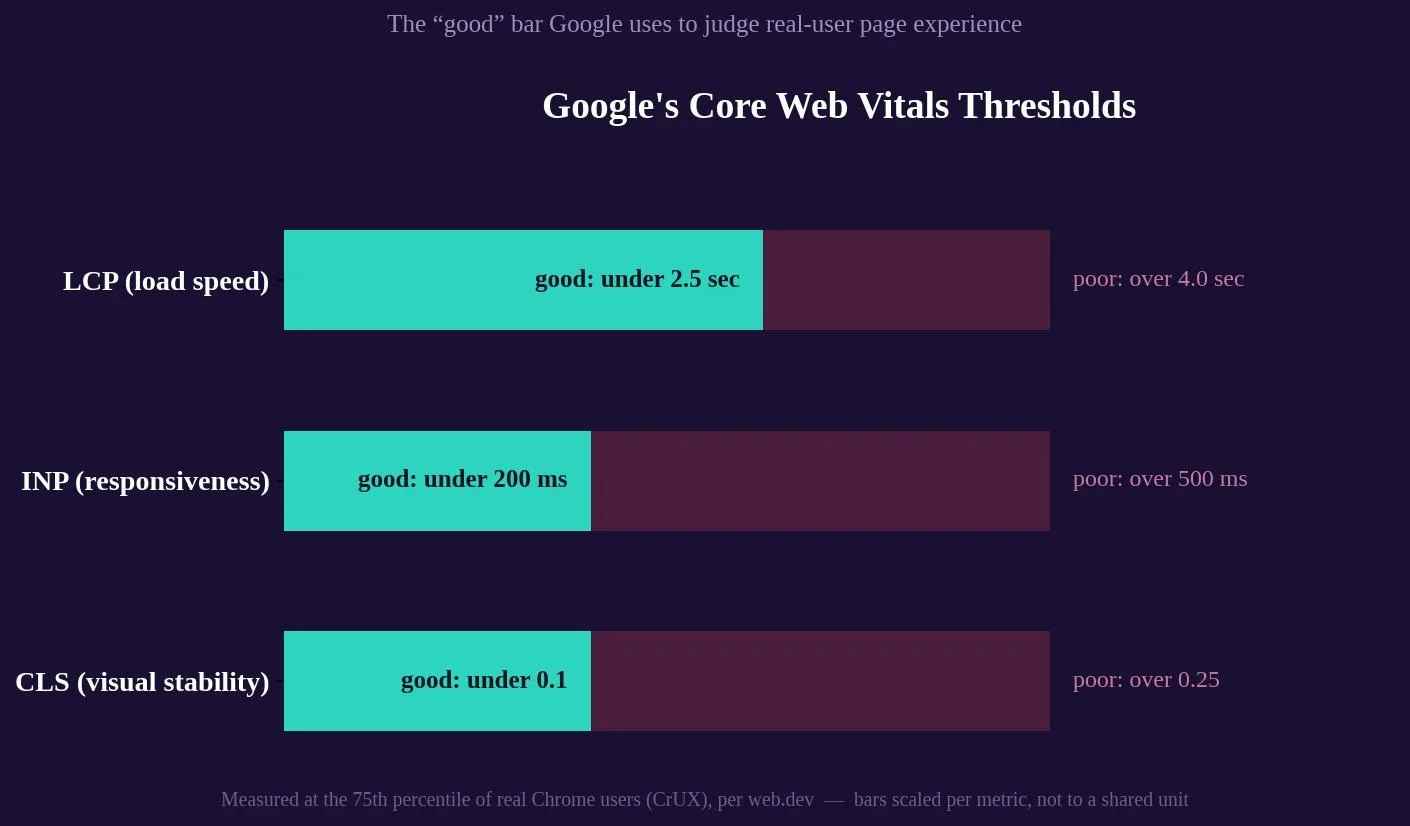
Google's web.dev documentation on Core Web Vitals thresholds confirms the "good" bar for LCP sits under 2.5 seconds, evaluated at the 75th percentile of real Chrome user sessions over a rolling 28-day window, not a one-off lab test.
Step 6: Reserve layout space to prevent visual jumps Every image should have explicit width and height attributes, or a CSS aspect-ratio box, so the browser can reserve the right amount of space before the image loads. Images without dimensions are one of the most common causes of Cumulative Layout Shift, the visual stability metric in Core Web Vitals.
Step 7: Add structured data and an image sitemap where it counts For images that carry real topical weight — product photos, recipe images, original photography — ImageObject structured data gives search engines explicit metadata rather than relying purely on inference. An image sitemap helps Google discover images that might otherwise be missed, particularly ones loaded dynamically through JavaScript.
Image format comparison
| Format | Compression type | Transparency | Best for |
|---|---|---|---|
| JPEG | Lossy | No | Photographs, general use |
| PNG | Lossless | Yes | Screenshots, graphics with sharp edges or text |
| WebP | Lossy or lossless | Yes | Default modern format for most web images |
| AVIF | Lossy | Yes | Maximum compression where encoding time isn't a constraint |
| SVG | Vector, not pixel-based | Yes | Logos, icons, and illustrations that need to scale |
| GIF | Lossless, limited colors | Yes | Simple animations only, not static photos |
Try it: alt text quality checker
The tool below checks a draft alt text against common patterns that separate useful descriptions from filler.
Image SEO tool
Alt text quality checker
Paste a draft alt text below. This checks it against the patterns that tend to separate useful alt text from filler.
Common image SEO mistakes to avoid
Uploading images straight from a phone or camera without renaming or compressing them first is the most common mistake, and it compounds across every page that reuses the same habit.
Treating alt text as an SEO field to stuff with keywords rather than a real description is a close second. It reads as spam to search engines and as noise to anyone using a screen reader.
Lazy-loading the hero image is a subtler mistake that directly hurts Largest Contentful Paint, since it delays the one image Google is timing.
Using background images in CSS for content that actually matters is another common issue, since Google explicitly advises against relying on CSS images for content it should index. CSS background images cannot carry alt text at all and are effectively invisible to image search.
Tools to optimize and audit your images
Squoosh, built by Google's Chrome team, is a free way to compress and convert images between JPEG, PNG, WebP, and AVIF entirely in the browser. ShortPixel focuses on CMS integration, particularly WordPress, and handles bulk compression automatically on upload. For auditing what's already live, Google Search Console's Core Web Vitals report shows real user LCP, INP, and CLS data by URL group, and Lighthouse in Chrome DevTools flags missing alt text and oversized images directly. Yoast SEO is one of the most widely used WordPress SEO plugins overall, and it includes basic image and alt-text management alongside its other features.
Related reading
- How to Optimize a Blog Post for SEO: A Step-by-Step Walkthrough
- Veterinary Local SEO Statistics: 2026 Data & Trends
- Veterinary SEO Statistics: 2026 Benchmarks & Insights
- GEO & AEO services at Web Tonic
Frequently asked questions
How long should alt text be?
Recommendations vary by source — roughly 80 to 140 characters depending on who you ask. The more useful rule is to describe what the image actually shows and stop, rather than padding to hit a number.
Does image file size actually affect SEO rankings?
Indirectly, yes. File size is a major driver of Largest Contentful Paint, part of Google's Core Web Vitals, a real but modest ranking signal that functions more as a tie-breaker than a primary ranking factor. Heavier images mean slower LCP, and that can weaken an otherwise strong page against close competitors.
Should every image have alt text?
Every image that conveys real information should. Purely decorative images, like background flourishes or dividers, should use an empty alt attribute so screen readers skip them rather than reading a meaningless description aloud.
What's the difference between WebP and AVIF?
Both are modern formats that compress more efficiently than JPEG or PNG. WebP is more universally supported and is a safe default. AVIF compresses further but takes more processing time to encode and has a few more compatibility gaps.
Do image file names really matter for SEO?
Yes, though modestly. Google's own documentation recommends descriptive, hyphenated file names over generic ones, and file names are one of the signals Google uses to understand image content, especially for Google Image Search.
Getting image SEO right across an entire site
Image SEO rewards consistency more than any single clever trick. Pick the right format, compress before uploading, write real alt text, name files descriptively, and protect your Largest Contentful Paint image from lazy loading. None of these steps are individually complicated. The difficulty is applying all of them, consistently, across every image on every template, rather than getting the hero image right on one page and forgetting the other four hundred.
Ready to fix your site's image SEO at scale?
Auditing image formats, compression, alt text, and Core Web Vitals across an entire site is exactly the kind of detail-heavy work that pays off slowly and compounds. Web Tonic's growth marketing team folds this kind of on-page and technical SEO work into a broader strategy that also covers content and paid acquisition, so image optimization stops being a one-off cleanup and starts working as part of a system that keeps improving as the site grows.
More from Web Tonic: growth marketing services, data & analytics.
Sources: squoosh.online · squoosh.app · shortpixel.com · metadatareactor.com · alttext.ai · developers.google.com · bullseyestrategy.com · web.dev


