



Table of contents
A blog post can be well-written and still rank nowhere, because writing well and optimizing for search are two different skills. Optimizing a blog post for SEO means deliberately placing the right signals, in the right spots, so Google and readers both immediately understand what the page is about and decide it's worth their time. This guide walks through exactly how to do that, step by step.
Key Takeaways
- Your focus keyword needs to appear in six specific places: the SEO title, meta description, H1, at least one H2, the first paragraph, and one image alt attribute.
- Keep keyword density between 0.5% and 1.5%; going higher reads as keyword stuffing to both Yoast-style plugins and to Google itself.
- An SEO-friendly blog post in 2026 is written with search intent first, answering the reader's core question clearly before anything else.
- Structure content with a direct answer near the top, clear H2/H3 sections, and internal links to 3 to 5 related posts.
- Meta titles should stay near 55-60 characters and meta descriptions around 120-160 characters to avoid truncation in search results.
- Schema markup (Article, FAQ, HowTo) and clean alt text on images both help search engines and AI systems understand a post beyond its plain text.
What Does It Mean to Optimize a Blog Post for SEO?
Optimizing a blog post for SEO means structuring its title, content, images, and links so that search engines can easily understand the topic and readers get a clear, useful answer to what they searched for. This is writing well with a specific, deliberate structure layered on top, not a separate task from it.
The definition has shifted somewhat in the AI era. An SEO-friendly blog post used to mean writing around a target keyword, keeping it readable, and providing value. That's still true, but it's no longer the whole picture: a well-optimized post now needs to answer the reader's question clearly and efficiently enough that both traditional search rankings and AI-generated answers can use it as a source.
A quick terminology note before the walkthrough. The labels vary: optimize blog content, write blog posts with SEO content in mind, or simply follow SEO best practices. The underlying work stays the same regardless of which phrase gets used. Users search a search engine looking to have something explained clearly, and the goal is always to help search engines understand content quickly and accurately. A well-optimized post will typically add images with proper alt text, include a clear call to action (CTA) where it makes sense, and get drafted in a shared workspace like Google Docs before it ever touches a website's CMS. None of this is exotic; it's high quality execution of fundamentals most sites apply inconsistently at best.
The 6 Places Your Focus Keyword Belongs

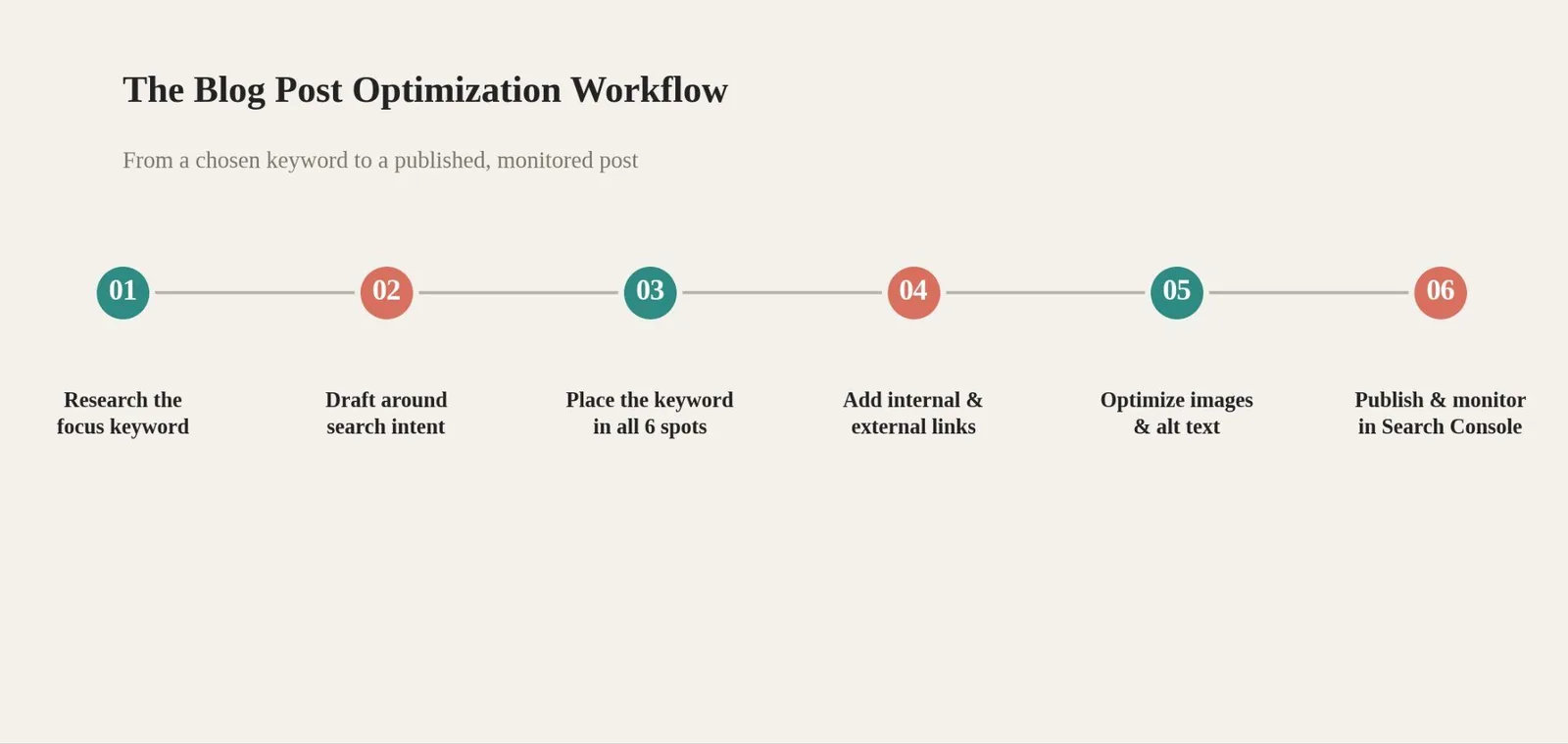
Every focus keyword (or, more precisely, focus keyphrase, since most real targeting works better as a 2-5 word phrase than a single word) needs to show up in six specific spots for search engines to fully register what a post is about, the foundation of any genuinely seo friendly page. That's the SEO title, the meta description, the H1, at least one H2, the first paragraph, and one image alt attribute. Missing any single one of these costs part of the ranking signal, even if the content itself is genuinely strong.
Keyword density matters here too: a target of 0.5% to 1.5% is the generally accepted range; for a 1,000-word post, that works out to roughly six to fifteen natural appearances of the keyword or its close variants. Google is smart enough to recognize variations and synonyms, so there's no need to repeat the exact same phrase word-for-word every time.
Writing With Search Intent First
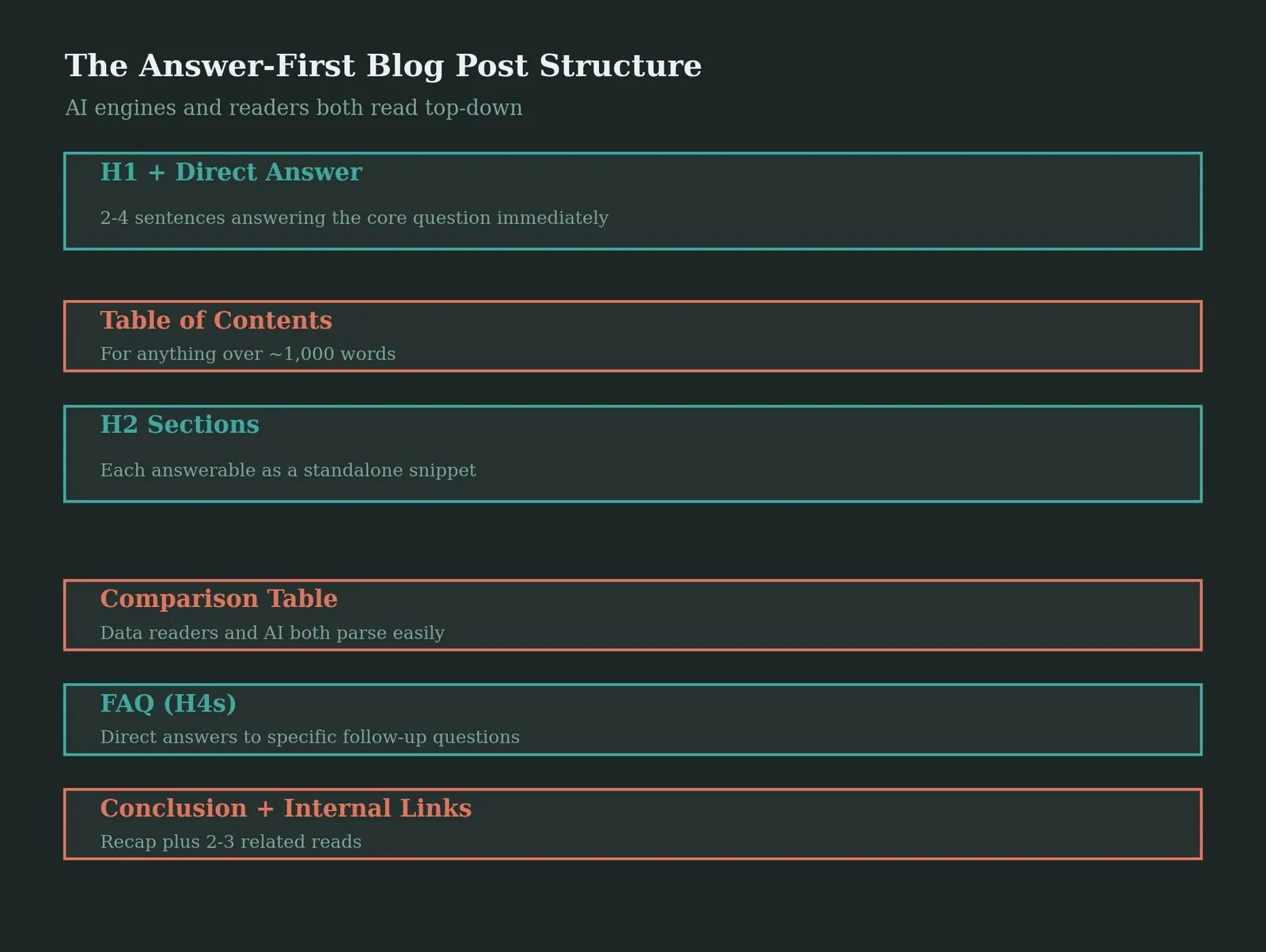
An SEO-friendly blog post in 2026 is written with search intent first: understanding what the reader actually wants and answering it clearly, rather than writing around a keyword and hoping the intent lines up. Conduct real keyword research to understand the questions behind a query, then open with a direct, 2 to 4 sentence answer to that core question before expanding into detail. This serves double duty: it's what featured snippets pull from, and it's what AI-generated answers cite when summarizing a topic.
Structuring the Post for Readers and Search Engines
Use clear H2 and H3 headings to break the post into scannable sections, each one substantial enough to stand on its own if Google's passage ranking system decides to surface just that section rather than the whole page. For anything over roughly 1,000 words, add a table of contents near the top so readers can jump straight to the part they need. Close with a titled conclusion and a short FAQ section using H4 subheadings, since FAQ content answers the exact follow-up questions readers and AI systems both look for.
Meta Titles, Descriptions, and URLs
Table 1: On-Page Element Length Guidelines
| Element | Recommended length | Why it matters |
|---|---|---|
| SEO title | ~55-60 characters | Longer titles get truncated in search results |
| Meta description | ~120-160 characters | Longer descriptions get cut off with an ellipsis |
| URL slug | 3-5 words | Shorter, keyword-focused slugs are easier to share and read |
| Image alt text | A few descriptive words | Helps search engines and screen readers understand the image |
Write the SEO title with the focus keyword placed early, not buried after unrelated words, and make it distinct from the H1 if there's a good reason to (otherwise, keeping them identical is perfectly fine). The meta description should be 120 to 156 characters, contain the keyphrase naturally, and end with a soft call to action. It doesn't directly influence rankings the way the title does, but it strongly shapes click-through rate, so treat it like ad copy: state clearly what the reader gets from clicking, in plain, natural language rather than a stuffed keyword list.
Internal Links, External Links, and Images
Link internally to 3 to 5 related posts using descriptive anchor text, not generic phrases like "click here." This helps readers navigate to more of the site's content and helps search engines understand how pages relate to each other topically. Add outbound links to credible external sources where relevant; both search engines and AI systems use these to verify claims, and a page with zero outbound links can look isolated and unverified by comparison.
Compress every image before uploading and write descriptive alt text that reflects what the image actually shows, working the focus keyword in only where it's genuinely relevant rather than forcing it. Alt text serves double duty: it helps search engines index the image, and it makes the page accessible to screen reader users, which is a real audience, not just an SEO checkbox.
Schema Markup and Technical Basics
Consider implementing FAQ, How-To, and Speakable schema to increase rich result eligibility, alongside Article or BlogPosting schema, which is close to table stakes on every post at this point. None of this replaces good writing, but it gives search engines and AI parsers an explicit, structured description of what the page contains, rather than forcing them to infer it purely from the prose.
Table 2: Tools for Optimizing a Blog Post
| Tool | What it helps with | Cost (USD) |
|---|---|---|
| Yoast SEO (WordPress) | Focus keyphrase scoring, readability, internal link suggestions | Free, Premium $118.80/year |
| Ahrefs | Keyword research, content gap analysis, rank tracking | From $129/month (Lite) |
| Google Keyword Planner | Search volume and keyword ideas for the focus keyword | Free with a Google Ads account |
| Google Search Console | Confirms indexing and tracks real search performance post-publish | Free |
Common Mistakes When Optimizing a Blog Post
Keyword stuffing the exact same phrase repeatedly instead of writing naturally with variations, which reads as spammy to both readers and Google.
A meta description left blank, letting Google auto-generate a snippet from page content instead of a deliberately written one.
No internal links at all, leaving a genuinely good post isolated from the rest of the site with no path for readers or link equity to flow through it.
Alt text skipped entirely or stuffed with the keyword regardless of what the image actually shows.
Publishing without checking Google Search Console afterward, missing indexing errors or performance data that would guide the next round of edits.
[Insert Interactive Widget: title_meta_checker.html]
Frequently Asked Questions
What Is a Focus Keyword, and How Is It Different From a Focus Keyphrase?
A focus keyword is typically a single word; a focus keyphrase is a 2 to 5 word phrase capturing more specific intent. In practice, most real optimization targets a keyphrase, since long-tail phrases convert better and face less competition than single broad words.
How Many Times Should I Use My Keyword in a Blog Post?
Aim for a density of roughly 0.5% to 1.5%, which works out to about six to fifteen appearances in a 1,000-word post. Google recognizes synonyms and variations, so exact repetition isn't necessary or even desirable past that range.
Do I Need a Meta Description for Every Blog Post?
Yes. Meta descriptions aren't a direct ranking factor, but they strongly influence click-through rate from the search results page. Leaving it blank means Google auto-generates a snippet, which is rarely as compelling as one written deliberately.
How Many Internal Links Should a Blog Post Have?
A reasonable target is 3 to 5 links to related posts, using descriptive anchor text rather than generic phrases. This helps both readers navigate the site and search engines understand how your content connects topically.
Does Adding Schema Markup Actually Help SEO?
Yes, indirectly. Schema like Article, FAQ, or HowTo doesn't guarantee higher rankings on its own, but it gives search engines and AI systems an explicit, structured description of the content, which improves eligibility for rich results and AI citations.
The Bottom Line on Optimizing a Blog Post for SEO
Optimizing a blog post for SEO comes down to a specific, repeatable structure: the right keyword in the right six places, a clear answer-first structure, internal and external links that add real context, and clean technical basics like schema and alt text. None of it replaces genuinely useful writing, but skipping it means good writing does less work than it should.
Pick one published post that hasn't performed the way you expected, and check it against the six keyword placements above. That single audit usually reveals exactly which piece was missing.
Ready to Turn Content Into Rankings?
Every blog post is an opportunity that either compounds or gets wasted, depending on whether the on-page fundamentals are actually in place. Web Tonic's growth marketing team builds this exact optimization process into every piece of content it touches, so writing effort turns into real search visibility instead of getting lost in a search results page nobody scrolls to.
More from Web Tonic: growth marketing services, data & analytics, performance creative.
Sources: aeoengine.ai · yoast.com · rebeccavandenberg.com · gigapress.net · typeflo.io · pieheartstudio.co.uk · vazoola.com


