



Table of contents
Every query typed into Google carries a hidden job to be done. Search intent (also called user intent or keyword intent) is the real reason behind a search, and it's the biggest factor separating content that ranks from content that quietly sits on page four. Two pages can target the exact same keyword, use the same keywords naturally throughout, and still get completely different results. One matches what the user actually wants. The other doesn't, no matter how well it's written.
This guide walks through how to identify search intent for any query, the four core intent types Google itself uses internally, and the practical steps for turning that analysis into content that performs. Whether you're building a content marketing calendar or briefing a single blog post, getting this right before you write a word saves far more time than fixing it afterward.
Key Takeaways
- Search intent falls into four core types: informational, commercial, transactional, and navigational — and Google's own Search Quality Rater Guidelines use nearly identical categories internally ("Know," "Do," "Website," and "Visit-in-person" queries).
- SERP analysis beats keyword tool labels. Automated intent tags in Ahrefs or Semrush are a useful starting point, but they're generated from query patterns rather than the results Google is actually ranking right now, and they can be wrong for mixed-intent or low-volume terms.
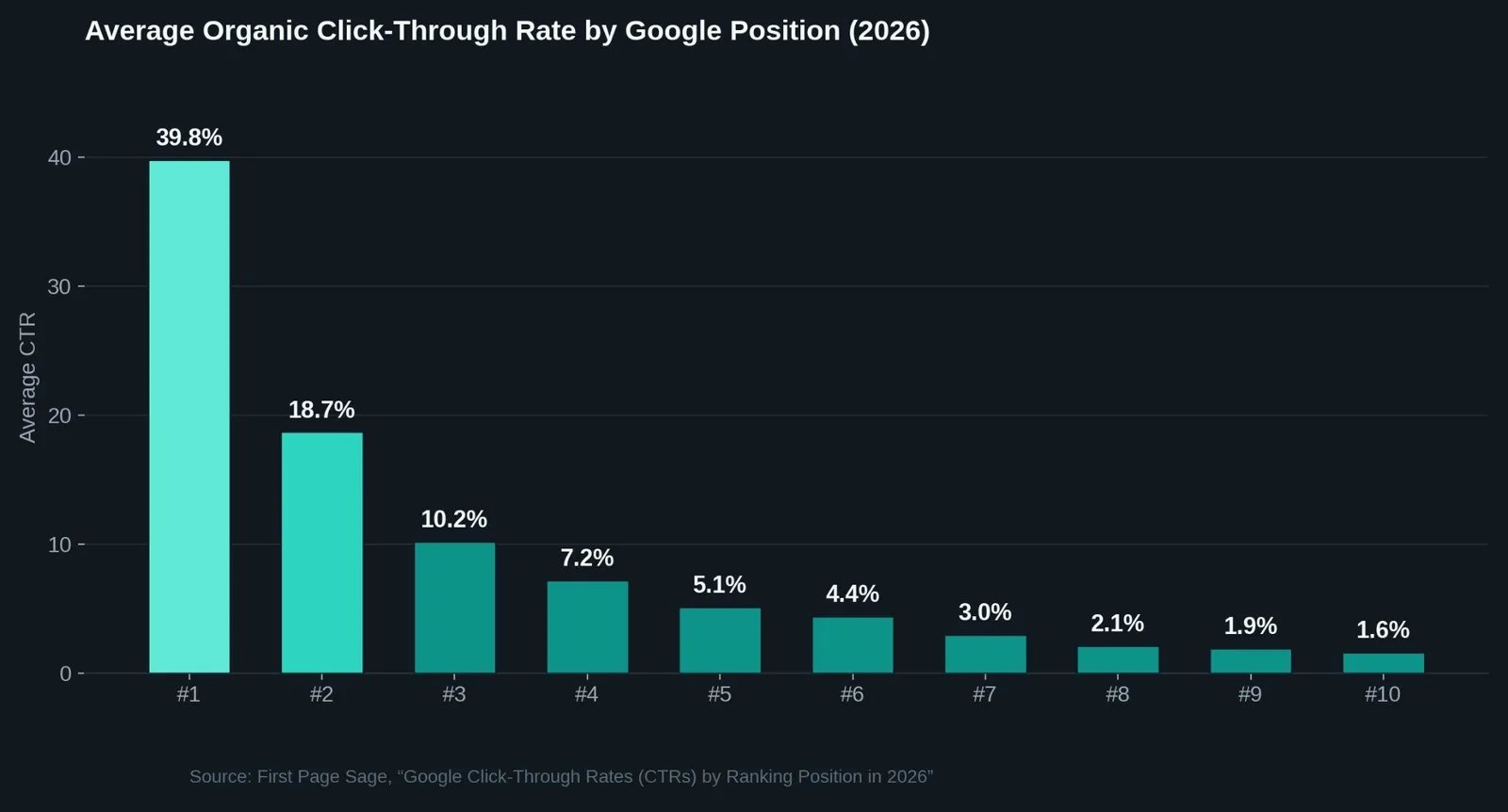
- The #1 organic position earns roughly 39.8% of clicks on average in 2026, more than double position #2's 18.7% — which is exactly why matching intent (and therefore actually ranking) carries so much weight.
- Roughly 60% of Google searches now end without a click to any external site, driven by AI Overviews, featured snippets, and People Also Ask boxes. That shift makes precise intent-matching more important for the traffic that's left, not less.
- Content that mismatches intent tends to underperform even when it ranks. High bounce rates and short engagement times are common signals that a page's format doesn't fit what the searcher actually wanted.
- A quick reformulation exercise, plus an honest look at the top-ranking pages, resolves most queries without needing paid tools at all.
What Is Search Intent and Why It Matters
Search intent is the goal a user is trying to accomplish when they type a query into a search engine: to learn something, compare options, complete a transaction, or reach a specific site. User intent and keyword intent describe the same idea.
Google has invested heavily in getting this right. Its Search Quality Rater Guidelines instruct the roughly 16,000 external raters who benchmark search quality to determine the likely intent behind a query before judging whether a result satisfies it. Google's own guidance on creating helpful content frames the entire ranking exercise around whether a page leaves a visitor feeling they've had a satisfying experience relative to what they came looking for.
That's the practical reason intent matters more than keyword matching alone. A page can be well-written and technically solid and still fail to rank simply because it answers the wrong question. A product page targeting "best running shoes" will struggle against review articles if Google has already determined that query's dominant intent is comparison research rather than a direct purchase.
The 4 Types of Search Intent
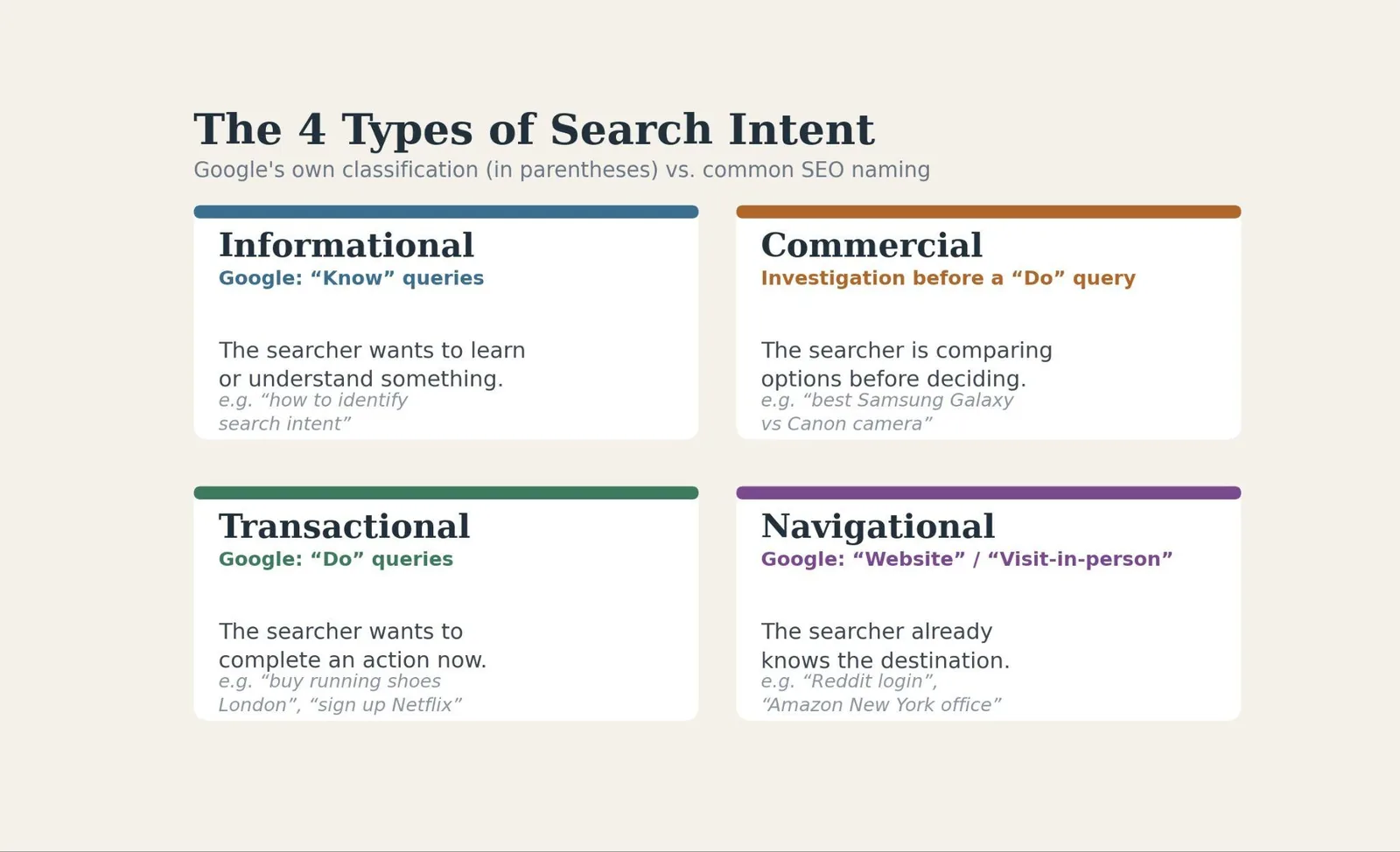
Most SEOs classify search intent into four broad buckets. Google's Quality Rater Guidelines use slightly different labels for the same concepts: "Know" and "Know Simple" for informational, "Do" for transactional, "Website" for navigational, and "Visit-in-person" for local searches.
Informational intent covers queries where the searcher wants to learn or understand something, often phrased with how, what, why, or who. "How to identify search intent" is itself a content search intent example.
Commercial intent, sometimes called commercial investigation, sits between informational and transactional. The searcher is evaluating options before deciding: comparing products, reading reviews, checking specs.
Transactional intent signals the searcher wants to complete an action right now, whether that's a purchase, a download, or a signup.
Navigational intent means the searcher already has a specific destination in mind and is using the search box as a shortcut rather than typing the full URL.
Some queries carry more than one intent at once. "Buy running shoes" for a specific retailer blends navigational and transactional signals, and Google frequently handles that ambiguity by showing a mixed set of result types instead of committing to one interpretation. The guidelines also carve out a narrower "Know Simple" category for queries seeking one specific, definitive fact rather than a broader exploration of a topic, which is why a short, direct answer often outperforms a long article for those queries. In practice, a query like "Reddit login" or "Amazon New York office hours" is unambiguously navigational, while "Samsung Galaxy vs Canon camera" or a "Netflix" signup search leans commercial or transactional depending on the exact phrasing.
Step-by-Step: How to Identify Search Intent
Step 1: Read the query's language literally
Before opening any tool, look at the words themselves. Question words and phrases like "how," "what," or "guide" point toward informational intent. Words like "best," "vs," or "review" suggest commercial investigation, while "buy," "download," or "sign up" signal transactional intent. Brand names or "login" style phrasing point to navigational intent. This first pass alone resolves most straightforward queries in seconds.
Step 2: Run an actual SERP analysis
This is the step most content briefs skip, and it's the one that matters most. Google's ranking systems have effectively already done the intent research for you. The pages ranking on page one today reflect what Google has determined best satisfies that specific query, so looking at what's actually there tells you more than any label ever will.
Open the top ranking results and note the content type. Are they product pages, comparison articles, how-to guides, or tool landing pages? What structure do they share? A query dominated by long-form guides is telling you something very different than one dominated by product category pages.
Getting this step right carries real financial weight, too. The average organic click-through rate at position #1 sits around 39.8% in 2026, more than double position #2's 18.7%, according to First Page Sage's 2026 ranking-position report. By position #5, that figure has already dropped to roughly 5%. Rank for the wrong intent, and you're competing for a position you're unlikely to hold, no matter how well-optimized the page is otherwise.
Step 3: Check SERP features, not just blue links
Featured snippets tend to appear when Google wants a direct, concise answer to a specific question, usually a strong informational signal. Shopping carousels and product grids point toward transactional intent. People Also Ask boxes reveal adjacent sub-questions worth covering in the same piece, and their presence or absence is itself a clue about how broad or narrow the dominant intent really is. Google's guidelines dedicate a full section, 12.7, specifically to intent identification, and Semrush's breakdown of the topic makes the same point: ranking systems determine intent before they can return relevant results at all, which is why this step outranks any tool label in importance.
Step 4: Use keyword tools as a starting point, not a verdict
Semrush's Keyword Magic Tool and Ahrefs' Keyword Explorer both auto-label queries as informational, commercial, navigational, or transactional. These labels are useful for triaging a long keyword list quickly. But they're generated from patterns in the query text and historical data rather than a live read of the current SERP, and they're most likely to be wrong on ambiguous, low-volume, or mixed-intent terms. Treat the label as a hypothesis to confirm with Step 2, not a final answer.
Step 5: Validate against your own engagement data
Once content is published, Google Analytics and Search Console tell you whether the intent match actually held up. High bounce rates and short engagement times on a page that ranks reasonably well often signal an intent mismatch: the page is showing up for the right query but isn't giving searchers what they expected once they arrive.
Search Intent vs. Keyword Research Tools: A Comparison
| Method | Best for | Limitation |
|---|---|---|
| Manual SERP analysis | Confirming true intent for any single, important query | Time-consuming at scale; can't be automated across hundreds of keywords |
| Query language / wording review | Quick first-pass triage of large keyword lists | Misses nuance on ambiguous or mixed-intent queries |
| Semrush Keyword Magic Tool | Bulk classification during initial keyword research | Automated labels can misclassify low-volume or dual-intent terms |
| Ahrefs Keyword Explorer / Identify Intents | Quantifying mixed-intent SERPs at scale | Still requires a manual sanity check on high-priority pages |
| Post-publication analytics (GSC, GA) | Validating whether the intent match actually worked | Only available after content is live; not useful for planning |
Why Getting This Wrong Costs More Than It Used To
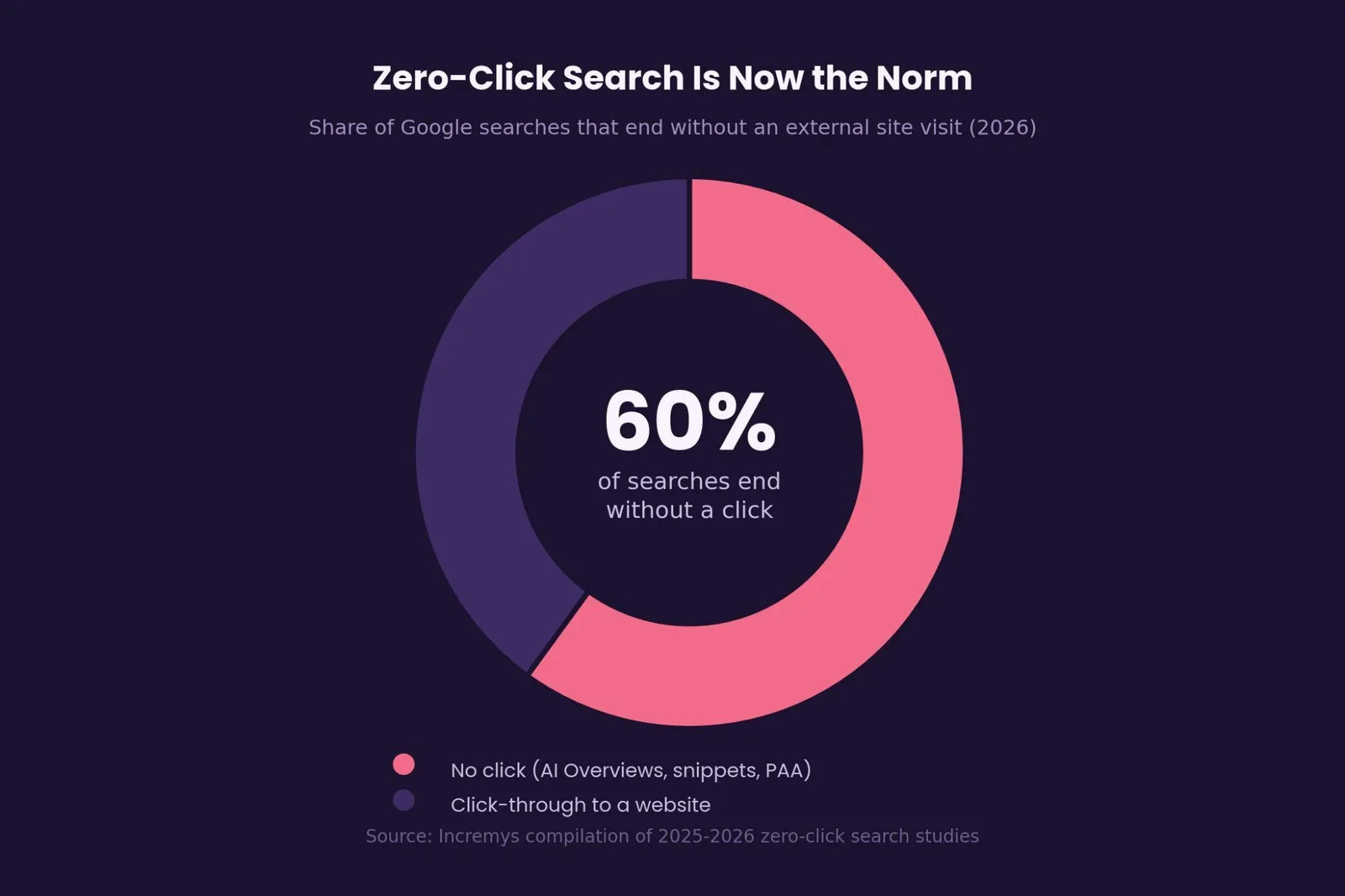
The margin for error has narrowed. Roughly 60% of Google searches now end without an external click at all, according to a compilation of 2025–2026 zero-click search studies, as AI Overviews, featured snippets, and other on-SERP answers absorb a growing share of informational demand. When a click does happen, it increasingly goes to a page that matched intent precisely enough to stand out from an AI-generated summary sitting directly above it.
That changes the cost-benefit of getting search intent wrong. A page that used to earn a modest trickle of traffic even with a middling intent match now competes for a shrinking pool of actual clicks. Precise intent identification has gone from a nice-to-have to a prerequisite for the content being worth producing at all.
Common Mistakes When Identifying Search Intent
The most frequent briefing mistake is relying only on the keyword's broad category rather than the specific query. A "informational" label can mean a two-sentence definition or a 3,000-word guide, and guessing wrong on depth wastes real production time.
Ignoring mixed intent is another common trap. Plenty of queries carry a secondary intent alongside the primary one. A "how to choose" query is informational on its surface but often benefits from specific product mentions too, since that's part of what the searcher actually needs to make a decision.
Skipping the SERP check because a keyword tool already supplied a label causes more misses than it should. Automated labels are a starting point, not a substitute for looking at what's actually ranking today.
And treating old SERP research as permanent trips up even experienced teams. Intent for a given query can shift as user behavior and Google's own systems evolve. A query that was mostly informational a year ago can tilt commercial as the market around it matures.
Quick tool to try: the widget below gives a fast first read on any query's likely intent based on its wording, useful for triaging a keyword list before doing the full SERP check described in Step 2.
Search intent tool
What's the intent behind this query?
Type any search query to get a quick first read on its likely intent. Always confirm with a real SERP analysis before finalizing a content brief.
Likely intent
—
Related reading
- Search Intent Types: What It Is & How to Use It
- What Is Search Volume? A Clear, Practical Explanation
- Commercial Intent Keywords: What It Is & How to Use It
- GEO & AEO services at Web Tonic
Getting search intent right across dozens or hundreds of pages is easy to describe and genuinely time-consuming to execute well at scale. Web Tonic's growth marketing team builds intent research directly into every content brief, pairing SERP analysis with the technical and link-building work needed to convert that alignment into rankings.
The Bottom Line on Identifying Search Intent
Search intent shapes a page's format, depth, and structure from the first outline, not just a box to check during keyword research. The fastest, most reliable path is still the simplest one: read the query literally, look at what's actually ranking, note the SERP features Google is choosing to show, and treat keyword tool labels as a hypothesis rather than a verdict. Add a genuine post-publication check against engagement data, and this five-step process resolves the overwhelming majority of intent questions without anything more sophisticated than a browser tab.
Start with your highest-priority pages first. A quick SERP analysis on the ten keywords driving the most potential traffic usually turns up more intent-mismatch opportunities than an entire quarter of new content production would.
Frequently Asked Questions
How many types of search intent are there?
Most SEOs use four categories: informational, commercial, transactional, and navigational. Google's own Search Quality Rater Guidelines use a parallel set of labels, "Know" (and "Know Simple"), "Do," "Website," and "Visit-in-person," that map directly onto the same four concepts.
Can a single keyword have more than one search intent?
Yes. Mixed-intent queries are common, especially for branded or category terms where searchers might want to research or transact depending on where they are in their decision. When this happens, Google often shows a blended mix of result types rather than committing to one interpretation, which is itself a useful signal during SERP analysis.
Are Ahrefs and Semrush intent labels reliable?
They're a reasonable starting point for triaging large keyword lists quickly, but the labels come from query patterns and historical data rather than a live read of the current SERP, so they can misclassify ambiguous, low-volume, or dual-intent terms. A manual SERP check is still worth doing before finalizing a content brief for any keyword that matters.
Does search intent change over time for the same query?
It can. As user behavior shifts and Google's ranking systems evolve, a query that was once dominantly informational can tilt toward commercial or transactional intent, particularly as a product category matures or new buying options emerge. Periodically re-checking the SERP for top-priority keywords helps catch this drift.
What's the fastest way to check search intent without paid tools?
Read the query's wording for intent signals, then search it yourself and look at the actual top-ranking pages and any SERP features present, like featured snippets or People Also Ask boxes. This manual, no-cost process resolves the vast majority of queries and is the same underlying method the paid tools are trying to approximate.
More from Web Tonic: growth marketing services, data & analytics.
Sources: services.google.com · developers.google.com · inlinks.com · clarigital.com · growandconvert.com · firstpagesage.com · semrush.com


