



Table of contents
A domain migration is one of the few SEO events that can undo years of accumulated rankings in a single afternoon, and almost always for reasons that have nothing to do with the new site's content or design. The redirects work. The new pages look great. And traffic still falls off a cliff, because a robots txt file quietly blocked crawling, or a noindex tag from the staging site made it into production. Domain migration SEO is the discipline of making sure none of that happens: preserving search visibility while a website migration — whether a full domain change or a major site migration on the same domain — moves content from one place to another without breaking the signals search engines rely on.
This guide covers what actually needs to happen before, during, and after a domain migration: building a pre-migration baseline, the DNS and redirect mechanics of cutover day, the post launch monitoring window, and the failure modes that quietly wreck an otherwise clean move. Along the way it covers common issues that show up across website migrations regardless of whether the site runs on a custom build or an off-the-shelf content management system (CMS), since most seo migrations run into the same structural problems, not platform-specific ones.
Key Takeaways
- Lowering DNS TTL to around 300 seconds, 24 to 48 hours before cutover, shortens how long the old record stays cached and speeds up propagation once you actually make the switch.
- Google's own Change of Address tool in Search Console tells Google to prioritize crawling the new domain and forward ranking signals from the old one; it applies to domain-level moves, not simple URL restructuring on the same domain.
- The most damaging migration failures are silent: a staging noindex tag or a leftover robots.txt Disallow rule can deindex a new site with no error message at all.
- Google's own guidance recommends keeping redirects active for at least 180 days, and longer if the old URLs are still receiving any traffic or search signals.
- Canonical tags on every new template need to point to the live domain, never to staging or the old domain; a canonical pointing the wrong way sends a directly contradictory signal to search engines.
- Post-migration monitoring works best on a structured cadence: check in frequently right after launch, ease back to daily over the first week, then settle into a weekly rhythm through at least the first three months.
What is domain migration SEO, and why does it matter?
Domain migration SEO is the set of technical practices that protect a website's search visibility while it moves from one domain to another, or undergoes a comparable structural change like a full URL restructuring. It differs from a simple redesign in one critical way: search engines have to recrawl and reassess the entire site as if encountering it for the first time. That means every signal search engines rely on — content, internal links, canonical tags, redirects, and server responses — all needs to point in the same direction at once.
The stakes are real because so many of the failure modes are invisible until traffic has already dropped. A site can look completely normal to a human visitor while robots.txt quietly blocks Googlebot, or a canonical tag still points at the staging environment. None of that throws an error a developer would notice during a routine QA pass. It shows up only as a traffic graph that falls off a cliff sometime after launch.
Pre-migration: build the baseline and map every URL
Before touching DNS or redirects, capture a performance baseline: organic traffic, keyword rankings, and the full list of indexed pages, ideally pulled directly from Google Search Console and Google Analytics. Without this baseline, there is no way to tell whether a post-migration dip is expected fluctuation or an actual problem that needs fixing.
Every important URL on the old domain then needs a mapped destination on the new one, forming the basis for the redirect rules that will go live at cutover. This mapping should be tested on a staging environment before launch, not assembled and trusted on faith. The staging site itself needs both password protection and a noindex tag on every page, so Google never indexes work in progress; both need to come off cleanly at cutover. That's exactly the step that gets forgotten under launch-day time pressure.
DNS TTL: the setting almost nobody thinks about until it matters
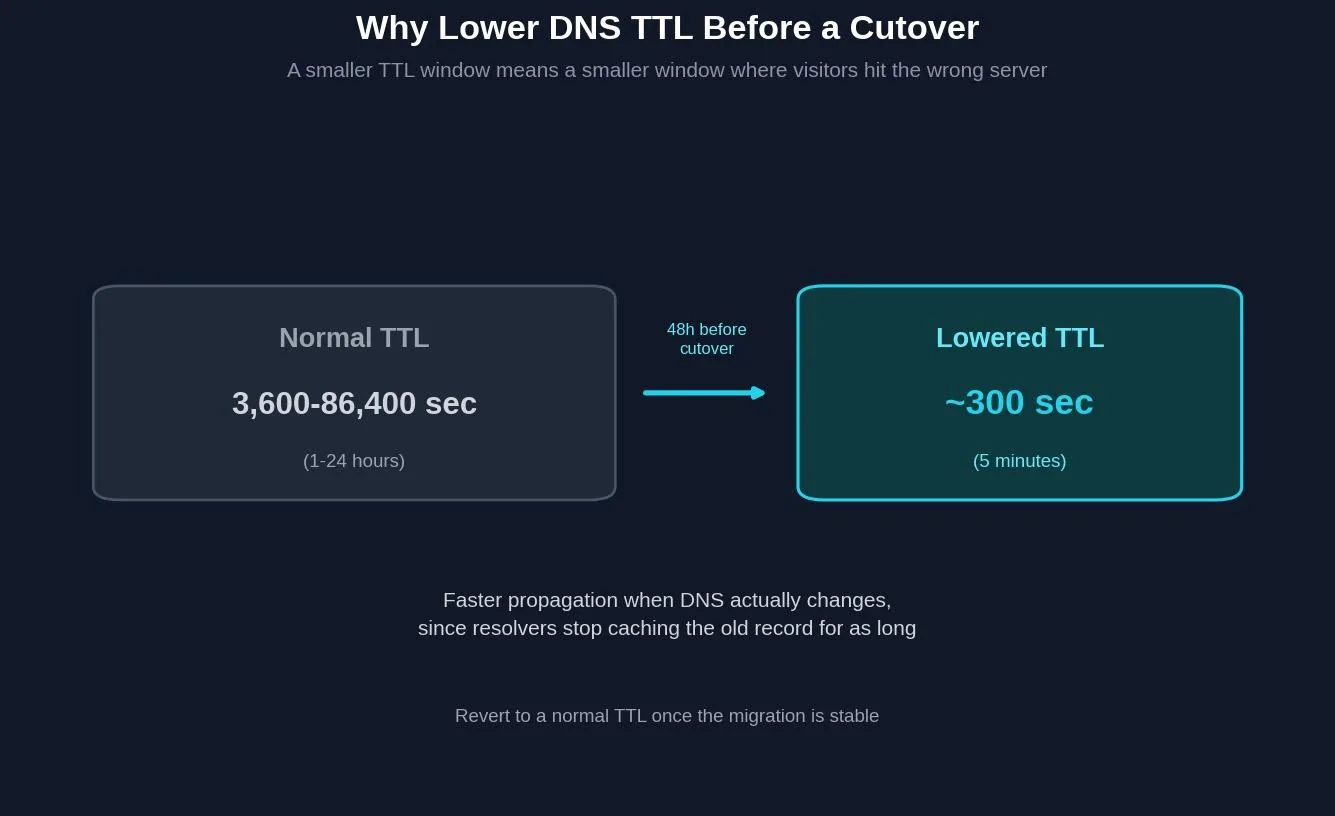
DNS Time To Live, TTL, controls how long a DNS resolver caches a domain's record before checking for updates. A normal TTL can run anywhere from one hour to a full day. Lowering it to roughly 300 seconds, 24 to 48 hours before the planned cutover, shortens that caching window dramatically, so when the actual DNS change goes live, it propagates across the internet in minutes rather than hours. Once the migration has stabilized, the TTL should be raised back to a normal value; leaving it artificially low longer than necessary adds unnecessary load to DNS infrastructure for no ongoing benefit.
Launch day: the cutover sequence
Cutover itself should happen during a low-traffic window, with a documented rollback plan in case something goes wrong. The sequence that matters: push the redirect rules live first, confirmed to return 301 status codes rather than 302s, since a 301 signals a permanent move while a 302 tells search engines the old URL is still the authoritative one. Update DNS. Remove the staging site's password protection and noindex tags. Confirm the new site's robots.txt allows crawling, since a leftover Disallow rule from staging is one of the most common and most damaging mistakes in the entire process. Rewrite every canonical tag to point at the new live URLs, never at staging or the old domain. Verify SSL is valid on the new domain and every subdomain that moved with it before calling the cutover finished, since a certificate warning undermines trust just as effectively as a broken redirect.
If the move involves an actual domain change rather than just a URL restructuring, this is also when to file a Change of Address request in Google Search Console. Google's own documentation describes this tool as a way to tell Google to prioritize crawling the new domain over the old one and to forward ranking signals accordingly, alongside the redirects themselves doing the underlying work.
Pre-migration vs. launch day vs. post-launch
| Phase | Key actions | Primary risk if skipped |
|---|---|---|
| Pre-migration | Baseline metrics, URL map, staging setup, lower DNS TTL | No way to measure whether post-launch changes are real problems |
| Launch day | Redirects live (301), DNS cutover, remove staging blocks, fix canonicals, verify SSL | Silent deindexing via leftover noindex or robots.txt block |
| Post-launch | Frequent early checks tapering to a weekly rhythm | Problems go undetected until they've already cost rankings |
| Stabilization | Keep redirects live 180+ days, revert DNS TTL | Backlink equity lost if redirects are cut too early |
Try it: cutover readiness checklist
Check off the launch-day essentials below before scheduling your DNS cutover.
Technical SEO tool
Cutover readiness checklist
Check off each item before you flip DNS. This covers the launch-day non-negotiables, not the full pre-migration plan.
Post-migration: the monitoring window that actually catches problems

The failure modes that do the most damage share one trait: they are silent. A staging noindex tag that survives cutover doesn't throw an error, it just means the new site quietly never gets indexed. A robots.txt Disallow rule left over from staging works the same way. A canonical tag still pointing at the old domain or staging hostname tells search engines the live page isn't actually the authoritative version, even though everything else about the migration went perfectly.
Catching these requires a structured monitoring cadence rather than a single check the morning after launch. Check in frequently right after launch, back off to once a day over the following week, then settle into a weekly rhythm that continues against the pre-migration baseline for at least three months. Watch the Coverage report in Search Console specifically for spikes in excluded-by-noindex, soft 404, or crawled-but-not-indexed statuses, since each one points to a different specific failure in the migration itself.
Google's own guidance recommends keeping redirects active for at least 180 days after a domain change, longer if the old URLs are still receiving meaningful traffic or backlinks pointing at them. Cutting redirects too early is a common mistake precisely because the damage doesn't show up immediately; it shows up weeks or months later when a backlink-heavy old URL finally gets recrawled and finds nothing waiting for it.
Common domain migration mistakes to avoid
Using 302 redirects instead of 301s is one of the most common technical mistakes, since a 302 signals to search engines that the old URL is still the authoritative version, working directly against the goal of consolidating signals onto the new domain.
Redirecting everything to the new homepage, instead of mapping each old URL to its true equivalent, throws away URL-level relevance and gives search engines little reason to treat the new page as equivalent to what ranked before.
Leaving internal links pointed at the old URLs instead of updating them at the source forces every internal click through an unnecessary redirect hop, adding latency and wasting crawl budget that compounds across a large site. Redirect chains, where an old URL bounces through more than one hop before reaching its final destination, cause the same problem at a bigger scale and should be flattened to a single redirect wherever possible.
Making major content changes at the same time as the technical migration makes it far harder to isolate the cause of any post-launch traffic changes, since a ranking drop could trace back to either change.
Tools for managing a domain migration
Google Search Console, GSC for short, is essential both before and after migration: the Coverage report tracks indexing status, the Performance report tracks rankings and clicks against the baseline, and the Change of Address tool handles the domain-level signal for search engines. A crawler such as Screaming Frog validates the redirect map on staging before launch and can re-crawl the live site afterward to compare against the pre-migration baseline. Google Analytics fills in the behavioral side, confirming that real visitors are actually reaching the new domain and converting once they arrive. Post migration reporting, pulled from these same tools, is what turns a gut feeling about how the move went into an actual answer.
Related reading
- Website Migration Checklist SEO: What It Is & How to Use It
- Painting Technical SEO Statistics: Key Data Points for 2026
- SEO Prices: What SEO Actually Costs in 2026
- GEO & AEO services at Web Tonic
Frequently asked questions
How long does it take to recover rankings after a domain migration?
There is no fixed timeline; recovery depends on site size, backlink profile, and how cleanly the migration was executed. Search engines typically need several weeks to fully reprocess a site, with the Search Console Coverage and Performance reports being the most reliable way to track progress against the pre-migration baseline.
Should I use a 301 or 302 redirect during a domain migration?
Use a 301 for anything permanent, which a domain migration almost always is. A 302 signals a temporary move and tells search engines to keep treating the old URL as authoritative. That works against the entire goal of a migration.
What is the Change of Address tool in Google Search Console, and when do I need it?
It is a feature that tells Google a site has moved from one domain to another, so Google prioritizes crawling the new domain and forwards ranking signals accordingly. It applies specifically to domain-level moves, not to URL restructuring within the same domain.
How long should I keep old domain redirects active?
Google's own guidance recommends at least 180 days, and longer if the old URLs are still receiving meaningful traffic, backlinks, or search signals. Cutting redirects early risks losing value from backlinks that haven't been recrawled yet.
What is the single most common cause of traffic loss after a domain migration?
A leftover noindex tag or robots.txt Disallow rule carried over from the staging environment. Both are silent failures with no error message. That's exactly why they need to be explicitly checked and removed as a named step at cutover, not assumed to be handled automatically.
Getting a domain migration right the first time
A domain migration is not primarily a design project or a technical project; it is a signal-consolidation project, making sure every piece of information search engines rely on — redirects, canonical tags, robots.txt, DNS, and internal links — tells the same consistent story about where content now lives. None of the individual steps are complicated on their own. What actually protects rankings is doing all of them, in the right order, and verifying each one instead of assuming it worked.
Ready to move your domain without losing your rankings?
Planning a domain migration, mapping redirects, and managing the post-launch monitoring window is exactly the kind of technical work that determines whether a site move protects its rankings or quietly loses them. Web Tonic's growth marketing team folds domain migration planning into a broader technical SEO practice that also covers content strategy and paid acquisition, so a site move becomes a managed project rather than a one-time risk.
More from Web Tonic: growth marketing services, data & analytics.
Sources: dynadot.com · semrush.com · greengeeks.com · o8.agency · joost.blog · support.google.com · focusreactive.com · developers.google.com


