



Table of contents

A website migration is any major change to a site's domain, URL structure, CMS, content, or design. It's also one of the few SEO events that can undo years of ranking work in a single afternoon. Search engines spend years building a picture of your site: which pages exist, how they're structured, how fast they load. A migration asks every search engine to rebuild that picture from scratch, and unresolved critical errors stretch that rebuild out far longer than it needs to take.
This migration SEO checklist walks through what to do before, during, and after launch, so your rankings transfer instead of resetting.
Key Takeaways
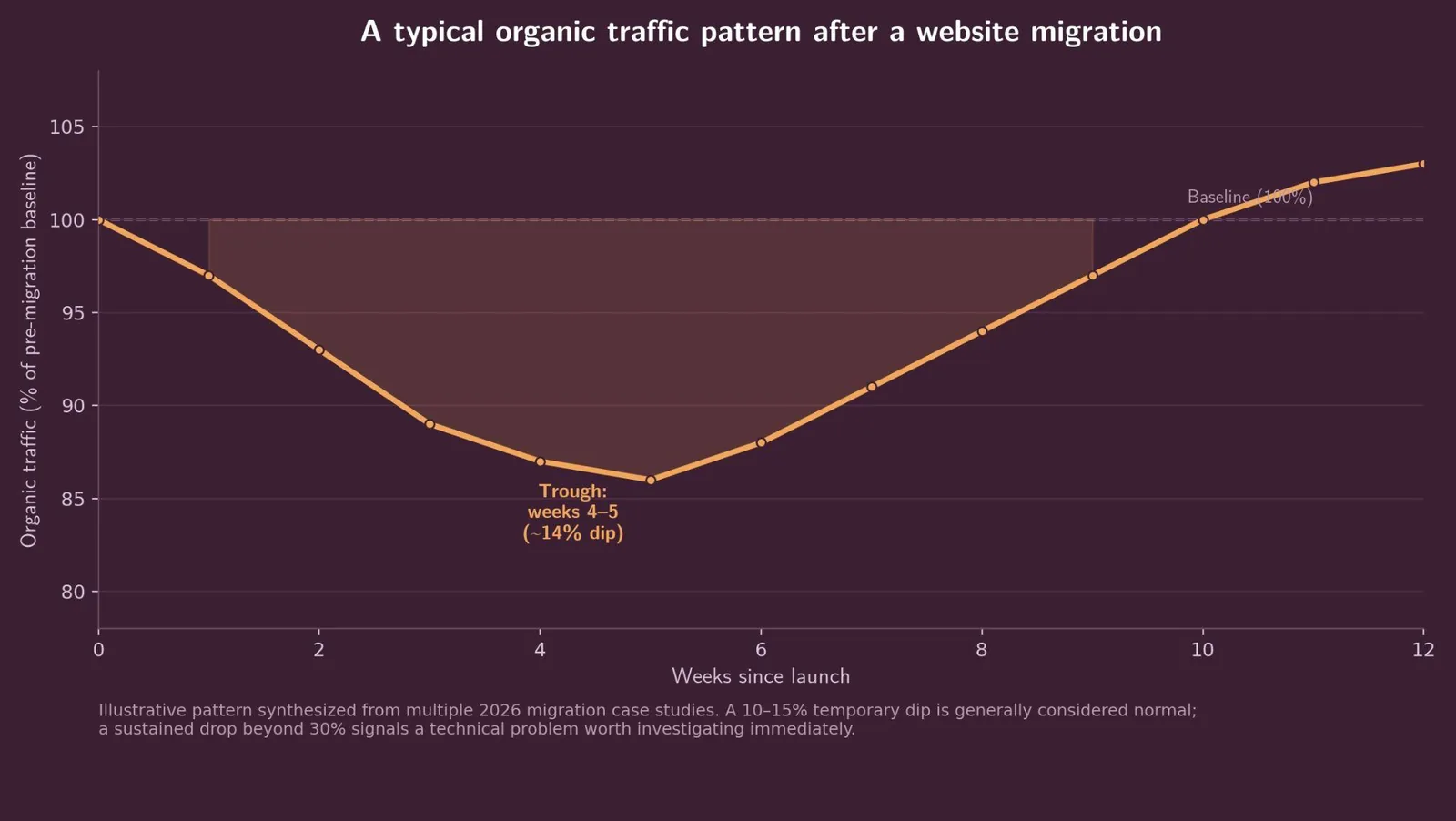
- A temporary 10–15% traffic dip is normal after migration; a sustained drop beyond 30% signals a real technical problem.
- Every old URL needs a direct 301 redirect to its closest new equivalent. Redirect chains and 302s both leak link equity and slow crawling.
- Most sites stabilize within 4–8 weeks, though larger or more complex sites can take longer.
- Google's Change of Address tool (in Google Search Console, or GSC) flags a domain change directly to Google and speeds up recrawling for domain moves specifically.
- Core Web Vitals thresholds to hit post-launch: LCP under 2.5 seconds, INP under 200 milliseconds, CLS under 0.1.
- Monitor daily for the first 30 days. Most migration failures are caught late, not because they were unpreventable, but because nobody was watching closely enough early on.
What counts as a website migration?
Migration is a broad umbrella in SEO. Whether you call it a website migration or a site migration, it covers domain changes, HTTP-to-HTTPS moves, CMS replatforming (Magento to Shopify, WordPress to Webflow), hosting moves (to Amazon Web Services, Google Cloud, or elsewhere), URL structure overhauls, and full redesigns. The common thread: something a search engine relies on to understand your site is about to change, and it needs to be told clearly how, or your site's SEO performance takes the hit.
The scale of the risk tracks the scale of the change. Poorly handled migrations can drop organic traffic 20–60% within days, with recovery stretching to months when critical issues go unresolved. Well-planned ones rarely come close to that.
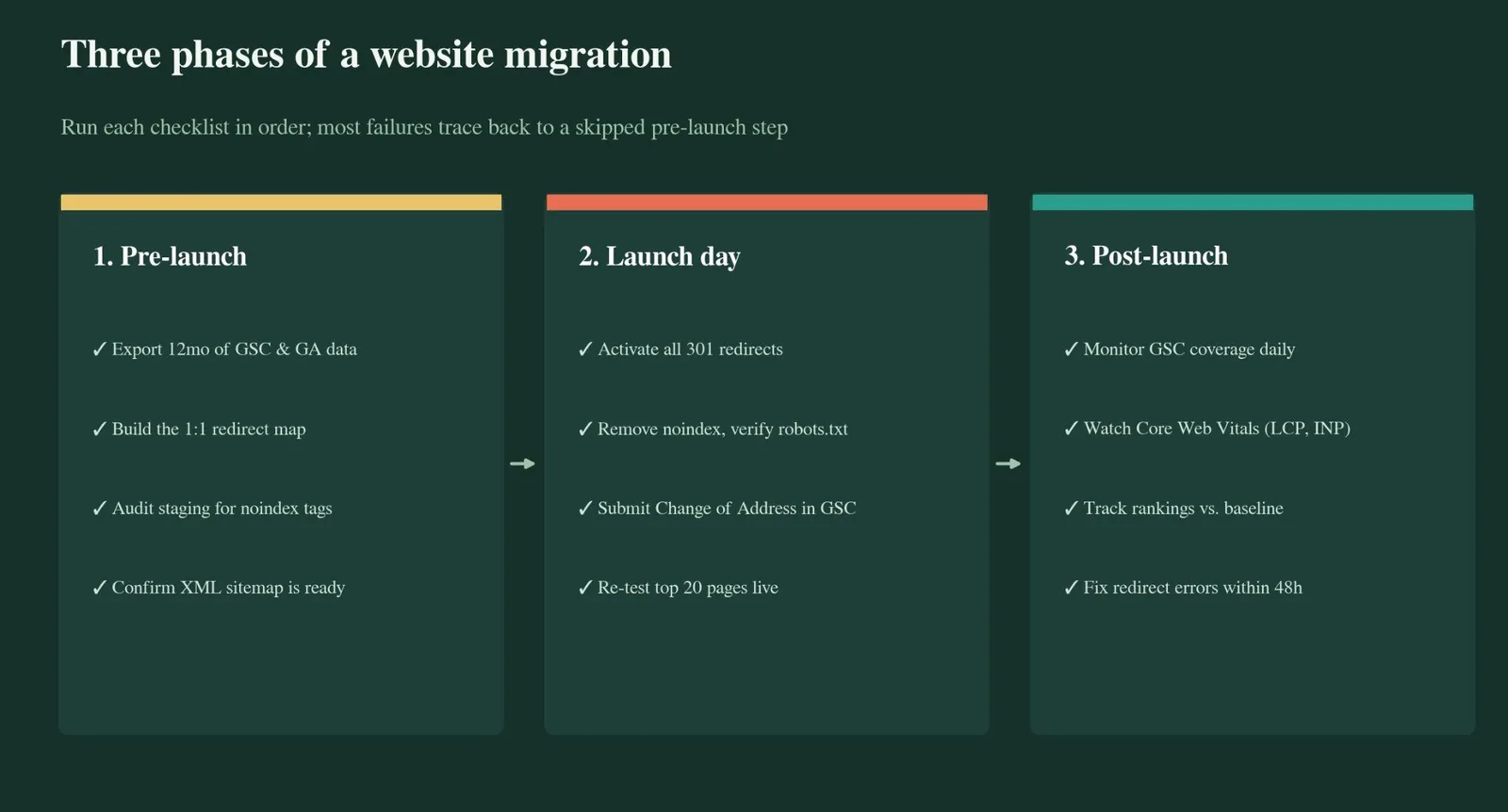
Phase 1: pre-launch checklist
Pre-migration work determines most of the outcome, before a single page goes live. Clear communication with your developers throughout the migration process prevents most disasters.
Export your baseline. Pull at least 12 months of data from Google Search Console, Bing Webmaster Tools, and Google Analytics: top pages by clicks and impressions, top queries, average rankings, and organic sessions. Without this baseline, you have no way to tell whether the migration helped, hurt, or changed nothing.
Inventory every indexed URL. Get a complete list of what Google currently has indexed, blog posts, product pages, category pages, everything, and cross-reference it with server logs to catch pages a simple crawl misses.
Build the 1:1 redirect map. Every old URL needs a documented destination on the new site, even if that destination is just the closest relevant page. This map becomes your source of truth for every 301 you implement at launch.
Migrate metadata, content, and structured data. Title tags, meta descriptions, body content, and schema markup don't move automatically between platforms. A lot of SEO value sits in content your team has built up over years, and it needs a clear fallback plan for any page that can't be transferred directly. Rebuild and verify each one on the new site before launch, not after.
Lock down the staging site. Use HTTP authentication, IP restriction, or noindex directives to keep it out of Google's index. This step causes one of the most common migration failures: a noindex tag from staging that quietly ships to production, deindexing the entire site within days.
Phase 2: launch-day checklist
Run this list twice, 24 hours before launch and again at the moment of launch, to catch issues before they compound.
Activate every 301 redirect from the map, and confirm none of your developers substituted 302s or JavaScript-based redirects, which a search engine and a human visitor treat very differently.
Remove the noindex tag carried over from staging, and re-verify robots.txt on the live production site. If traffic drops immediately and completely after launch, this file is the first place to check.
Check for redirect chains. A URL that hops through two or three intermediate redirects before reaching its final destination slows crawling and dilutes the link equity passed along the way. Flatten every chain to a single direct hop.
Confirm CSS and JavaScript assets load correctly from the new domain or CDN. A page that returns the right HTML but fails to load its stylesheet still reads as broken to both users and crawlers.
Submit the change in Search Console, where Google's Change of Address feature flags the domain switch directly to Google and helps your 301s get recrawled faster. In parallel, add and verify your new domain in Bing Webmaster Tools, a free service for submitting URLs and sitemaps directly to Bing's index, and resubmit your sitemap there. Bing has previously offered a dedicated site-move notification feature, but its current availability is inconsistent, so 301 redirects and a fresh sitemap submission are the reliable path either way.
Update internal links so navigation menus, footers, and in-content links point directly to new URLs instead of relying on redirects to catch them. Redirected internal links waste crawl budget and add unnecessary hops.
Phase 3: post-launch monitoring
The first 30 days decide most of the long-term outcome.
Watch GSC daily, not weekly. Coverage reports, indexing status, and crawl errors all need eyes on them every day for at least the first two weeks. Once the dust settles, there's cleanup work too: point outside links to the new URLs where you can, shut down the old hosting account, and write down what changed while it's still fresh.
Rankings don't drop all at once. They typically erode over three to four weeks as Google finishes reprocessing everything that changed, so don't mistake a quiet first week for a clean migration.
Compare traffic against your baseline weekly. A 10–15% temporary dip is considered normal; a sustained 30% drop means something is genuinely wrong and needs immediate investigation, not patience.
Check Core Web Vitals against your pre-migration numbers. A well-optimized page should keep LCP below 2.5 seconds, INP below 200 milliseconds, and CLS below 0.1. A new CMS or new hosting environment can quietly regress all three.
Watch AI visibility too. Answer Engine Optimization (AEO) depends on the same clean redirects and structured data as traditional SEO. Citations in AI Overviews and chat-based answers can be lost in a migration just as rankings can.
Update PPC destination URLs. If any paid campaigns point to URLs that no longer exist, fix them immediately; broken redirects add latency to a landing page experience that's already being measured for Quality Score.
Resolve redirect errors within 48 hours. The gap between a fixable problem and a permanent one is almost always response time.
Tools for monitoring a migration
| Tool | Cost (USD) | Best for | Free tier |
|---|---|---|---|
| Google Search Console | Free | Coverage, indexing, and the Change of Address tool | Full access, free |
| Bing Webmaster Tools | Free | Bing/Copilot visibility, URL and sitemap submission | Full access, free |
| Screaming Frog SEO Spider | £199/year per user (~$270–280 USD, varies with exchange rate) | Deep redirect-chain and crawl audits | Up to 500 URLs |
| Semrush (Semrush Inc.) Site Audit | From $139.95/month (bundled into the Pro plan, not sold standalone) | All-in-one technical and AI-search health audits | 100 pages free |
Google Search Console is free but doesn't crawl your site with the same control as a dedicated crawler, which is why most migration teams pair it with either Screaming Frog or a cloud platform like Semrush for the deeper technical pass.
Common mistakes to avoid
- Skipping the pre-migration baseline. Without 12 months of Search Console and Analytics data, you can't tell whether a dip after launch is normal or a real problem.
- Assuming redirects are "good enough" without testing them. A redirect map on paper isn't the same as verifying every URL actually resolves correctly in production.
- Carrying over a noindex tag from staging. This single oversight causes some of the fastest, most severe traffic collapses in migration work.
- Rushing the launch to hit a business deadline. Migrating during a low-traffic period, with a rollback plan ready, prevents most launch-day disasters.
- Treating internal links as the redirect map's problem. Redirects preserve most link equity, but internal links still need manual or crawler-assisted updates to point directly at new URLs.
Try it yourself: migration readiness checklist
Use the interactive checklist below to track pre-launch, launch-day, and post-launch tasks with a live completion score.
Migration Readiness Checklist
Check off items as you complete them. The progress bar updates live so you always know how launch-ready you are.
1. Pre-launch
0 / 52. Launch day
0 / 53. Post-launch
0 / 5Related reading
- Domain Migration SEO: What It Is & How to Use It
- The Website Audit Checklist: 7 Passes, 12 Tables and a Priority Score
- Blog Post SEO Checklist: What It Is & How to Use It
- GEO & AEO services at Web Tonic
FAQ
How long does it take to recover rankings after a migration? Most well-executed migrations stabilize within 4–8 weeks. Larger or more complex sites, or migrations with unresolved technical issues, can take considerably longer.
Do I need to use Google's Change of Address tool? Only for full domain changes. If you're restructuring URLs within the same domain, correct 301 redirects and an updated XML sitemap do the job. For Bing, resubmitting your sitemap and verifying the new domain in Bing Webmaster Tools is the more reliable path: a dedicated Bing site-move feature has existed in the past, but recent reports suggest it's unreliable or hard to locate in the current interface.
What's the single most common migration mistake? A noindex tag or crawl block carried over from the staging site into production. It's invisible until traffic disappears, and by then it's already cost days of indexing.
Treat monitoring as part of the migration, not an afterthought
A migration's real test starts after launch, not on it. Rankings settle over the following weeks, and the sites that come through with those rankings intact are the ones with someone watching GSC daily three weeks in.
Technical SEO work like this, crawlability, Core Web Vitals, and indexation, is exactly the infrastructure our SEO team at Web Tonic builds and monitors for clients going through a migration.
More from Web Tonic: growth marketing services, data & analytics, performance creative.
Sources: hostragons.com · hbfreelance.com · thedigitalmaze.com · en.wikipedia.org · focusreactive.com · zoomyourtraffic.com


