



Table of contents
A competitive analysis template is a pre-built grid that forces you to collect the same facts about every competitor, so comparisons are honest instead of anecdotal. Below are 12 free templates, the 9 template types worth knowing, and a filled-in matrix you can copy today.
Key Takeaways
- 9 distinct template types cover almost every competitive question, from a one-page SWOT to a full pricing matrix.
- 12 free templates in this guide come from Miro, Asana, Airtable, Notion, Microsoft Create, Lucidchart, Confluence, ClickUp, Figma Community, HubSpot, Semrush and the U.S. Small Business Administration.
- Fill 11 core columns per competitor — anything beyond that tends to go stale before it gets used.
- Analyse 3 direct and 2 indirect competitors rather than ten of everything; depth beats coverage.
- The U.S. Census Bureau counted 531,423 business applications in June 2026 alone, so your competitive set changes faster than an annual refresh can track.
- Re-run the template on a 90-day cadence, with a lightweight pricing check every 30 days.

What a competitive analysis template actually is
A competitive analysis template is a structured document — spreadsheet, whiteboard board, or database — with fixed rows for competitors and fixed columns for the attributes you compare: positioning, pricing, features, channels, content, reviews and estimated share. The template's real job is not presentation. It is 1 enforced standard: the same evidence, gathered the same way, for every company in the set.
That distinction matters because most competitive work fails on consistency, not effort. Teams research one rival deeply, skim two, and guess at the rest. A template makes the gaps visible: an empty cell is an unanswered question, not an oversight you can argue away. If you want the underlying process rather than the artifact, our guide to competitive analysis walks through research method, source hierarchy and how to size a market; this page focuses on the formats and the columns.
Templates also protect you legally and ethically. Competitive intelligence is built from public and lawfully obtained information — pricing pages, filings, job posts, review sites, ad libraries. IBM's primer on competitive intelligence draws the same line, and the FTC's competition guidance is explicit that gathering competitor data must never slide into coordinating on price or dividing markets.
The 9 competitive analysis template types
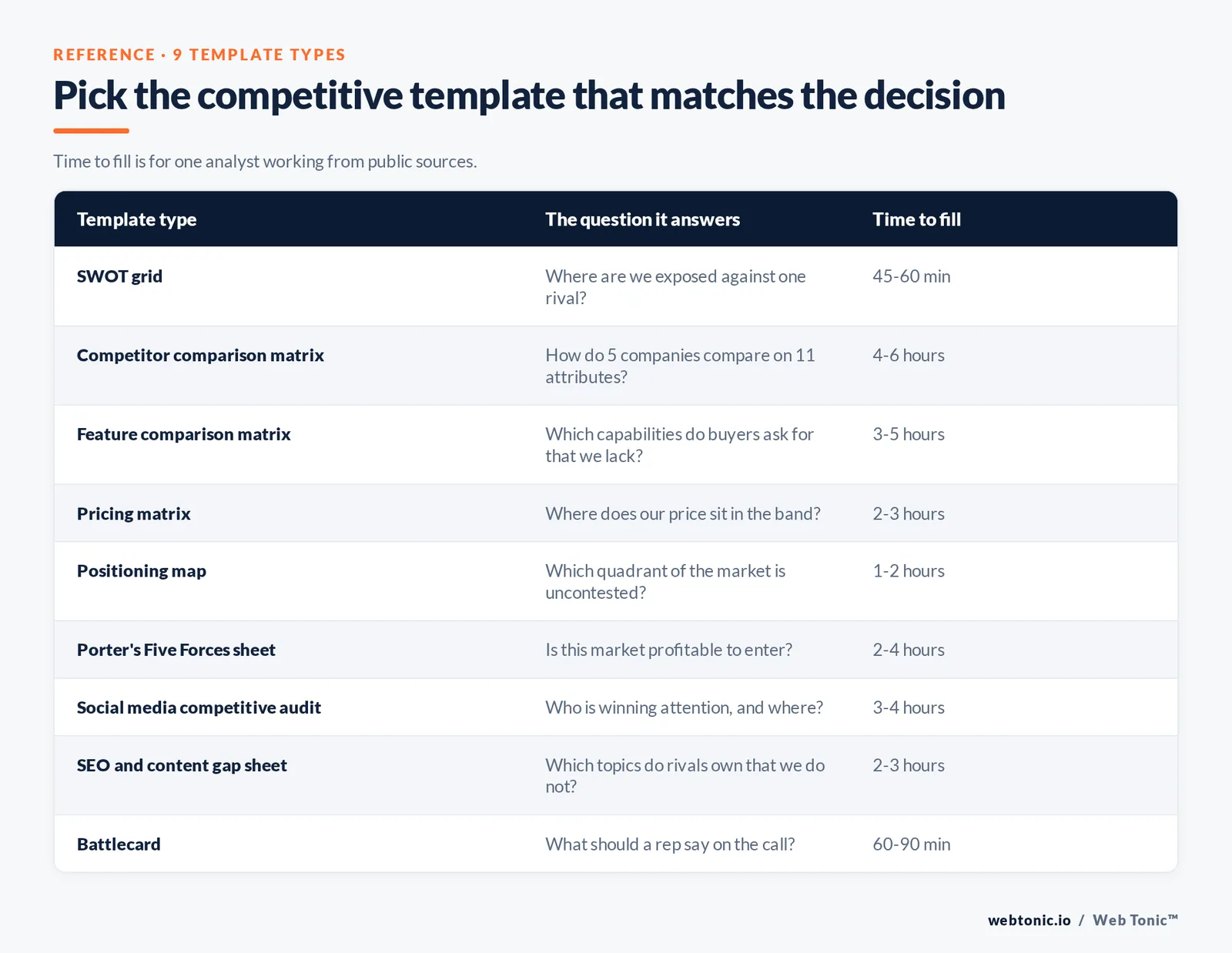
Pick the template that matches the decision in front of you. A pricing negotiation and a product roadmap need different grids, and using one template for both is why so many competitive decks get skimmed and shelved.
| Template type | The question it answers | Best format | Time to fill |
|---|---|---|---|
| SWOT grid | Where are we strong or exposed against one named rival? | 4-quadrant doc or whiteboard | 45–60 min |
| Competitor comparison matrix | How do 5 companies stack up on the same 11 attributes? | Spreadsheet | 4–6 hours |
| Feature comparison matrix | Which capabilities do we lack that buyers ask for? | Spreadsheet or database | 3–5 hours |
| Pricing matrix | Where does our price sit in the band, and what is bundled? | Spreadsheet | 2–3 hours |
| Positioning map | Which quadrant of the market is uncontested? | 2-axis chart | 1–2 hours |
| Porter's Five Forces sheet | Is this market structurally profitable to enter? | 5-section doc | 2–4 hours |
| Social media competitive audit | Who is winning attention, on which platform, with what format? | Spreadsheet + charts | 3–4 hours |
| SEO and content gap sheet | Which keywords and topics do rivals own that we do not? | Exported spreadsheet | 2–3 hours |
| Battlecard | What should a rep say when this competitor comes up on a call? | 1-page doc per rival | 60–90 min |
Two of these deserve a note. Type 6: Porter's Five Forces is a market-structure tool, not a competitor tool — it assesses buyer power, supplier power, substitutes, new entrants and rivalry. The framework comes from Michael Porter at Harvard Business School, and Mind Tools' walkthrough is the cleanest short version. Type 1: the SWOT grid is the fastest of the nine and the easiest to do badly — Corporate Finance Institute's SWOT explainer is a good sanity check on which items are genuinely internal versus external.
12 free competitive analysis templates
Everything below is free to access at the time of writing, and each is genuinely a template rather than a blog post with a screenshot. Formats matter more than most people expect: a whiteboard template is right for a workshop, a database is right for something you will maintain for a year.
| Template | Format | Best for | Watch out for |
|---|---|---|---|
| Miro competitive analysis | Collaborative whiteboard | Live workshops with 4–8 people | Hard to version or export cleanly |
| Asana competitive analysis example | Project template + doc | Turning findings into owned tasks | Thin on data columns |
| Airtable templates | Relational database | A living competitor register | Setup takes 2–3 hours the first time |
| Notion competitive analysis gallery | Database + wiki pages | Teams already documenting in Notion | Community templates vary in quality |
| Microsoft Create templates | Excel and PowerPoint | Board-ready output | Design-led, light on method |
| Lucidchart template gallery | Diagram | Positioning maps and value chains | Not built for numeric comparison |
| Confluence templates | Wiki page | Product teams keeping context near specs | Weak charting |
| ClickUp competitive analysis | List and doc views | Recurring quarterly refresh | Field sprawl if unmanaged |
| Figma Community files | Design canvas | UX and onboarding teardowns | Quality depends on the author |
| HubSpot competitive analysis kit | Spreadsheet + slides | Marketing-led first pass | Email gate |
| Semrush competitor analysis workflow | Guide + tool exports | Traffic, keyword and ad data | Best features are paid |
| SBA market research guidance | Government worksheet-style guide | Business plans and lenders | Generic across industries |
If you want to start with one link rather than twelve: Miro's competitive analysis template for a workshop, Airtable's template library for something you will maintain, Microsoft Create for an Excel or slide deliverable, and Notion's competitive analysis category if your documentation already lives there. Task-oriented teams tend to prefer Asana's worked example, and if the outcome you need is a lender-ready plan, start from the SBA's market research and competitive analysis guide.
The 11 columns that belong in every competitor row
Template bloat is the most common failure mode. Sixty columns look thorough in week one and are abandoned by week three. These eleven are the set that consistently gets used, with the source you should pull each from.
| Column | What goes in it | Where to source it |
|---|---|---|
| 1. Competitor type | Direct, indirect, or substitute | Your own sales-loss notes |
| 2. Positioning line | Their homepage claim in their words | Homepage hero, ads |
| 3. Target segment | Who they explicitly say they serve | Case studies, pricing tiers |
| 4. Pricing and model | Entry price, model, what is bundled | Pricing page, quotes, review sites |
| 5. Core features or services | Only the 5–8 that drive selection | Product pages, docs |
| 6. Proof and credibility | Named clients, awards, certifications | Site, directories |
| 7. Channels | Where they spend attention and money | Ad libraries, organic data |
| 8. Content strategy | Topics, formats, publishing cadence | Blog, YouTube, newsletters |
| 9. Review sentiment | Recurring complaints in their own reviews | Review platforms, forums |
| 10. Hiring signals | Roles open now and what they imply | Careers page, job boards |
| 11. Our counter-move | One sentence, one owner, one date | Your team |
Column 11 is the only one that changes anything. A competitive analysis without a decision column is a research artifact. Note that hiring signals — column 10 — are the most underused input on the list: three open enterprise account-executive roles tell you more about a rival's next twelve months than their homepage rewrite does.
A filled-in comparison matrix you can copy
Here is the same structure applied to a fictional set of five mid-market SaaS competitors, so you can see what a usable cell actually looks like. Notice that every cell is short, specific, and sourced from something a buyer could see.
| Attribute | Us | Rival A | Rival B | Rival C |
|---|---|---|---|---|
| Positioning line | Fastest onboarding in category | Enterprise-grade governance | Cheapest per seat | All-in-one suite |
| Entry price | $49/seat/mo | $120/seat/mo | $19/seat/mo | $79/seat/mo |
| Free trial | 14 days, no card | Demo only | 7 days | 30 days |
| Named clients on site | 12 | 40+ | 3 | 25 |
| Paid search presence | Brand + 20 terms | Heavy, 200+ terms | None | Moderate |
| Top review complaint | Limited reporting | Slow support | Frequent outages | Bloated UI |
| Our counter-move | — | Publish a 30-day time-to-value proof | Lead with uptime SLA | Sell depth, not breadth |
How to fill the template in 7 steps
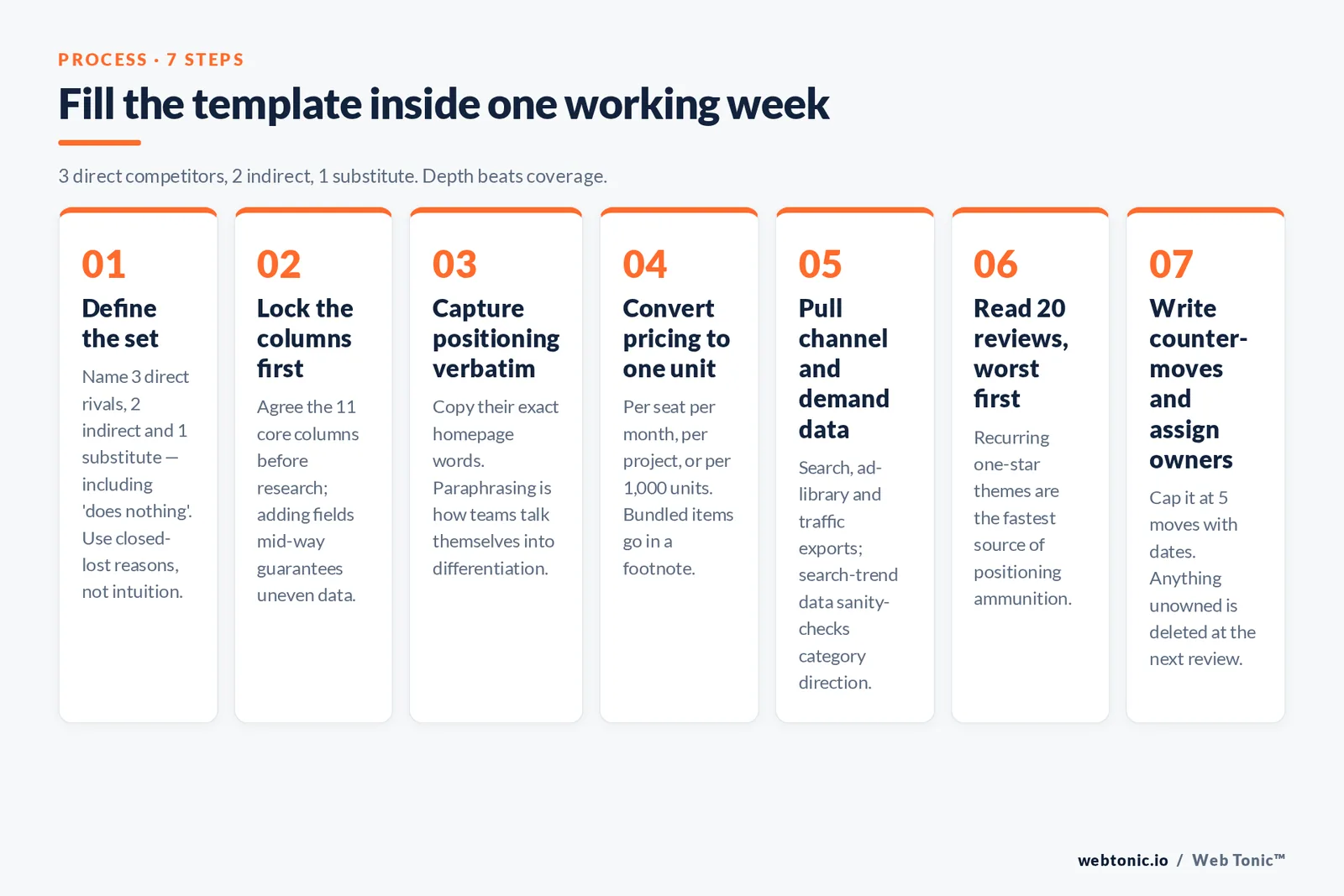
The template is the easy part. This sequence is what keeps the exercise inside a single working week instead of drifting for a month.
- Step 1 — Define the set. Name 3 direct competitors, 2 indirect ones, and one substitute (including "does nothing"). Use closed-lost reasons, not intuition.
- Step 2 — Lock the columns before you research. Agree the 11 columns above; adding fields mid-research guarantees uneven data.
- Step 3 — Capture positioning verbatim. Copy their exact words. Paraphrasing here is how teams talk themselves into believing they are differentiated.
- Step 4 — Get pricing to a comparable unit. Convert everything to one basis — per seat per month, per project, or per 1,000 units. Bundled items go in a footnote.
- Step 5 — Pull channel and demand data. Use search, ad-library and traffic sources; Semrush's competitor analysis workflow covers the export order; free search-trend data is the sanity check on category direction.
- Step 6 — Read 20 of their reviews, worst first. Recurring one-star themes are your fastest source of positioning ammunition.
- Step 7 — Write the counter-moves and assign owners. Cap it at 5 moves with dates. Anything unowned is deleted at the next review.
Which template each team should use
The same research feeds different artifacts. Handing a 40-column spreadsheet to a sales team is a reliable way to have it ignored, and handing a battlecard to a product manager answers none of their questions.
| Team or business type | Primary template | Refresh cadence | Deliverable |
|---|---|---|---|
| Marketing | Comparison matrix + content gap sheet | Quarterly | Positioning and content plan |
| Sales | Battlecards, 1 per rival | Monthly | Objection responses |
| Product | Feature comparison matrix | Each planning cycle | Roadmap trade-offs |
| Founders and strategy | Five Forces + positioning map | Annually | Market entry or exit call |
| Ecommerce | Pricing matrix + promo calendar | Weekly on price | Price and promo response |
| Local services | Review and map-pack audit | Monthly | Review and listing plan |
| B2B services | Proof and pricing matrix | Quarterly | Proposal differentiation |
| Agencies | Social audit + content gap sheet | Per client quarter | Client strategy deck |
| Marketplaces | Supply-side comparison matrix | Monthly | Category expansion plan |
| Startups pre-launch | SWOT + Five Forces | Before each raise | Investor narrative |
| Franchises | Per-market comparison matrix | Twice yearly | Territory plan |
| Nonprofits | Funder and program overlap grid | Annually | Grant positioning |
Cadence is the part teams get wrong. Because the competitive set itself keeps growing — U.S. business applications ran at 531,423 in June 2026 according to the Census Bureau's Business Formation Statistics — an annual refresh means you are always working from a market that no longer exists. A 90-day cycle on the matrix and a 30-day check on pricing is the pragmatic compromise for most teams. If you would rather have this maintained for you, that is exactly what our data intelligence and growth marketing teams build into a reporting rhythm — talk to us or browse more playbooks on the Web Tonic blog.
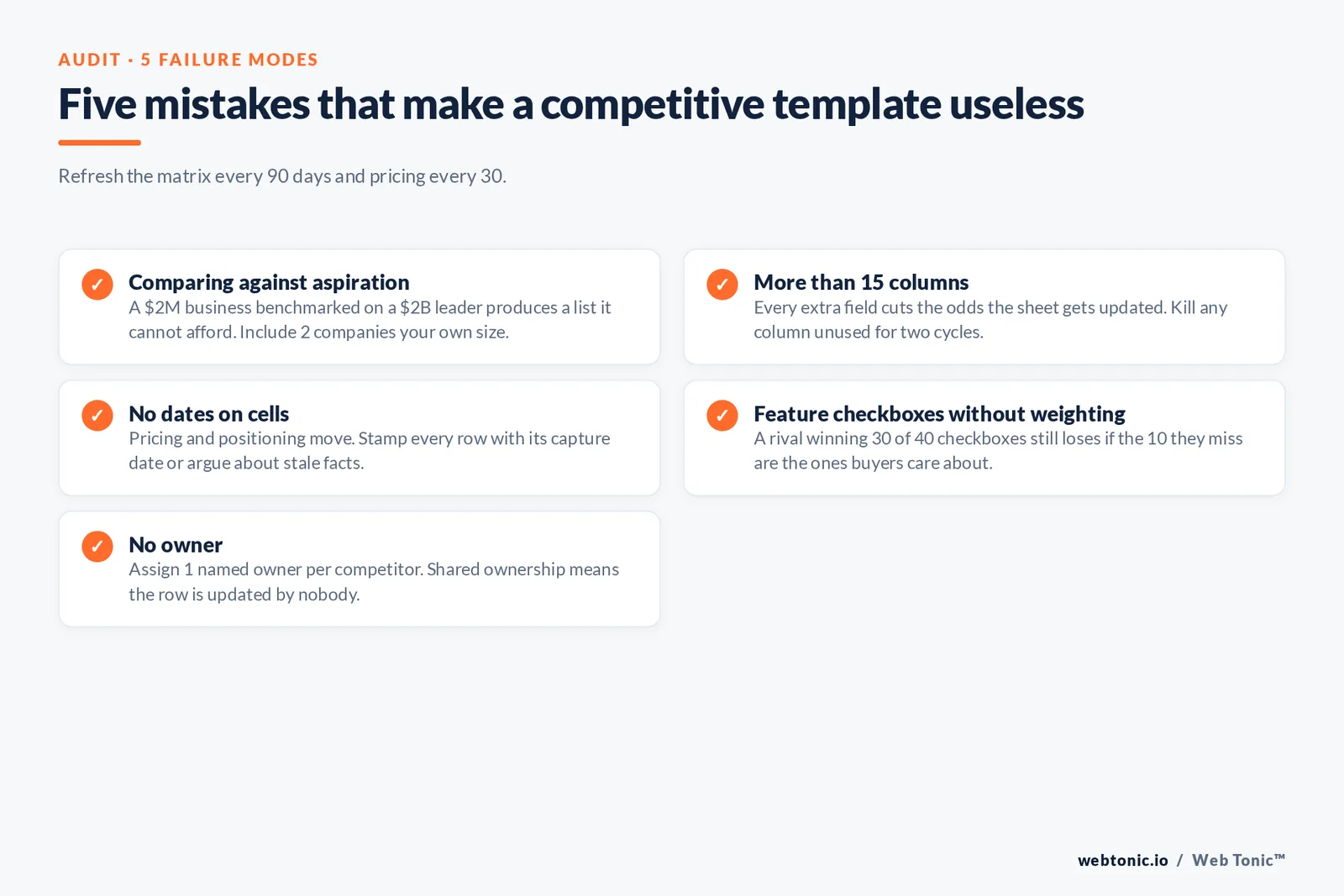
5 mistakes that make a template useless
- Mistake 1: comparing against aspiration. Benchmarking a $2M business against a $2B category leader produces a list of things you cannot afford. Include at least 2 companies your own size.
- Mistake 2: more than 15 columns. Every extra field cuts the odds the sheet gets updated. Kill any column nobody has used in two cycles.
- Mistake 3: no dates on cells. Pricing and positioning move. Stamp every row with the date it was captured, or you will argue about stale facts.
- Mistake 4: feature checkboxes without weighting. A rival "winning" 30 of 40 checkboxes can still lose every deal if the 10 they miss are the ones buyers care about.
- Mistake 5: no owner. Assign 1 named owner per competitor. Shared ownership means the row is updated by nobody.
Related reading
- 18 Free SWOT Analysis Templates (Plus 3 Completed Examples)
- Competitive Analysis: The Process, Template and Traps
- SWOT Analysis: Templates, Examples, and How to Use It
- Marketing Strategy Consulting services at Web Tonic
FAQ
What is the best free competitive analysis template?
For most teams it is a spreadsheet-based comparison matrix with the 11 columns listed above, because it is the only format that supports sorting, filtering and version history at once. Miro is better for a live workshop, Airtable or Notion for something maintained over a year, and Microsoft Create for a board-ready deliverable. The format matters less than agreeing the columns before research starts.
How many competitors should a template include?
Six rows: 3 direct competitors, 2 indirect, and 1 substitute — where the substitute is often "the customer keeps doing it manually" or "does nothing". Beyond about eight rows, the quality of every cell drops because nobody has time to verify them, and unverified cells are worse than blank ones.
What is the difference between a SWOT template and a competitive analysis template?
A SWOT is internally focused: your strengths and weaknesses set against external opportunities and threats, usually for one company at a time. A competitive analysis template is comparative: the same attributes captured across several competitors so differences are measurable. Most teams use a SWOT as a summary layer after the matrix is filled, not as a replacement for it.
How often should a competitive analysis be updated?
Refresh the full matrix every 90 days and pricing every 30 days. Ecommerce and marketplace businesses should check price weekly, since competitor promotions can move a category in days. Also trigger an out-of-cycle refresh on any funding announcement, acquisition, major pricing change or new market entry among the companies you track.
Is competitive analysis legal?
Yes, when it uses public or lawfully obtained information: websites, pricing pages, public filings, job listings, ad libraries, review platforms and customer conversations. What is not acceptable is misrepresenting who you are to obtain confidential information, inducing someone to breach an NDA, or using competitor contact to coordinate pricing or divide markets. Review the FTC's competition guidance before any structured programme.
Sources
U.S. Small Business Administration, market research and competitive analysis guide · U.S. Census Bureau, Business Formation Statistics (June 2026) · Institute for Strategy and Competitiveness, Harvard Business School · Mind Tools, Porter's Five Forces · Corporate Finance Institute, SWOT analysis · IBM, competitive intelligence · Federal Trade Commission, competition guidance · Miro, Airtable, Notion, Microsoft Create, Asana template libraries · Semrush, competitor analysis. All sources accessed August 2026.


