



Table of contents

Publishing a blog post without running it through an SEO checklist is like shipping code without tests. It might work. You won't know why it didn't until traffic never shows up. This guide walks through the exact checks worth running on every post before it goes live, from keyword research through post-publish tracking, so nothing gets skipped because the deadline was tight.
Key Takeaways
- A blog post SEO checklist should be short enough to actually use every time, not a 50-item wishlist that gets skipped under deadline pressure.
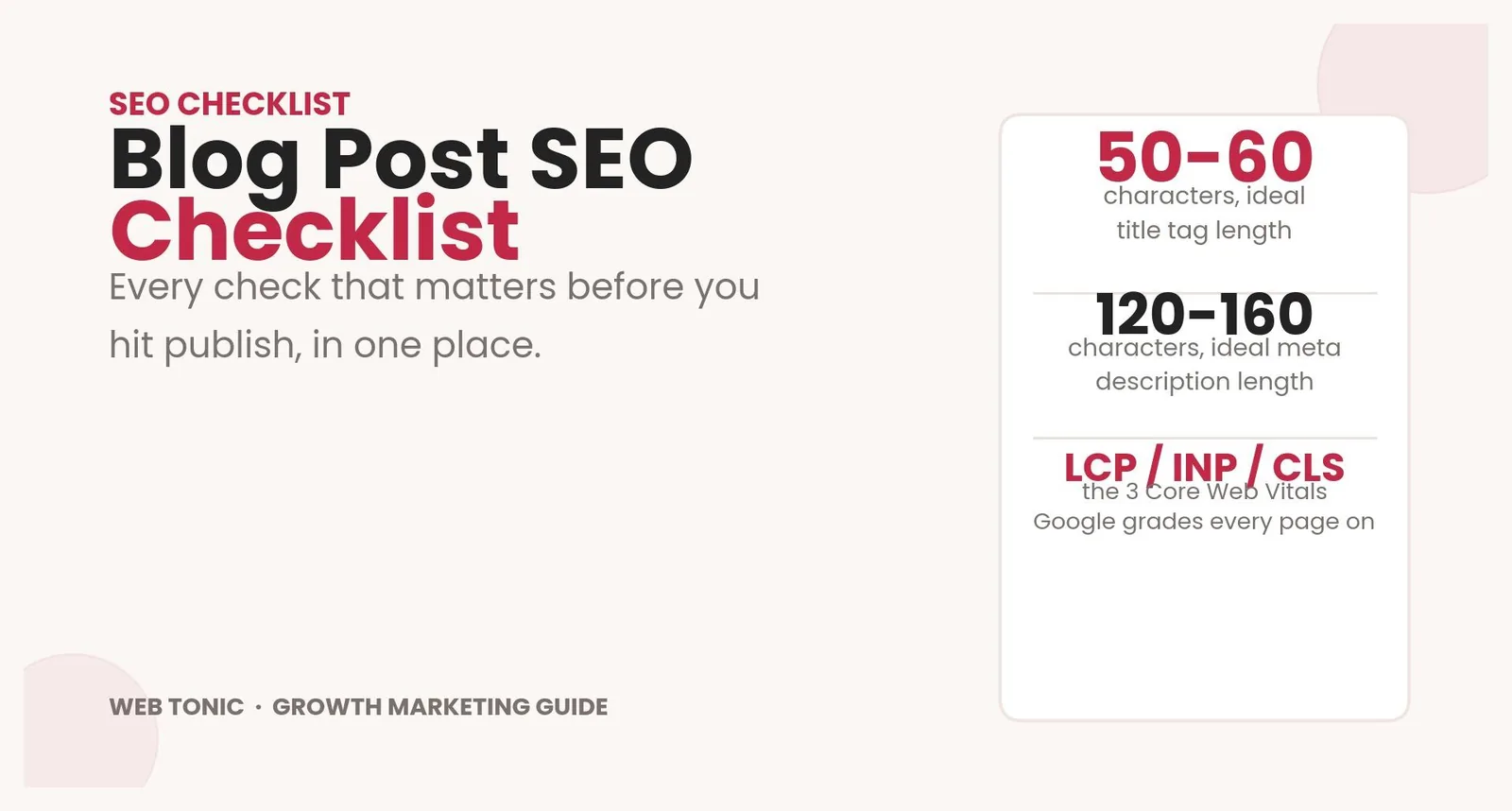
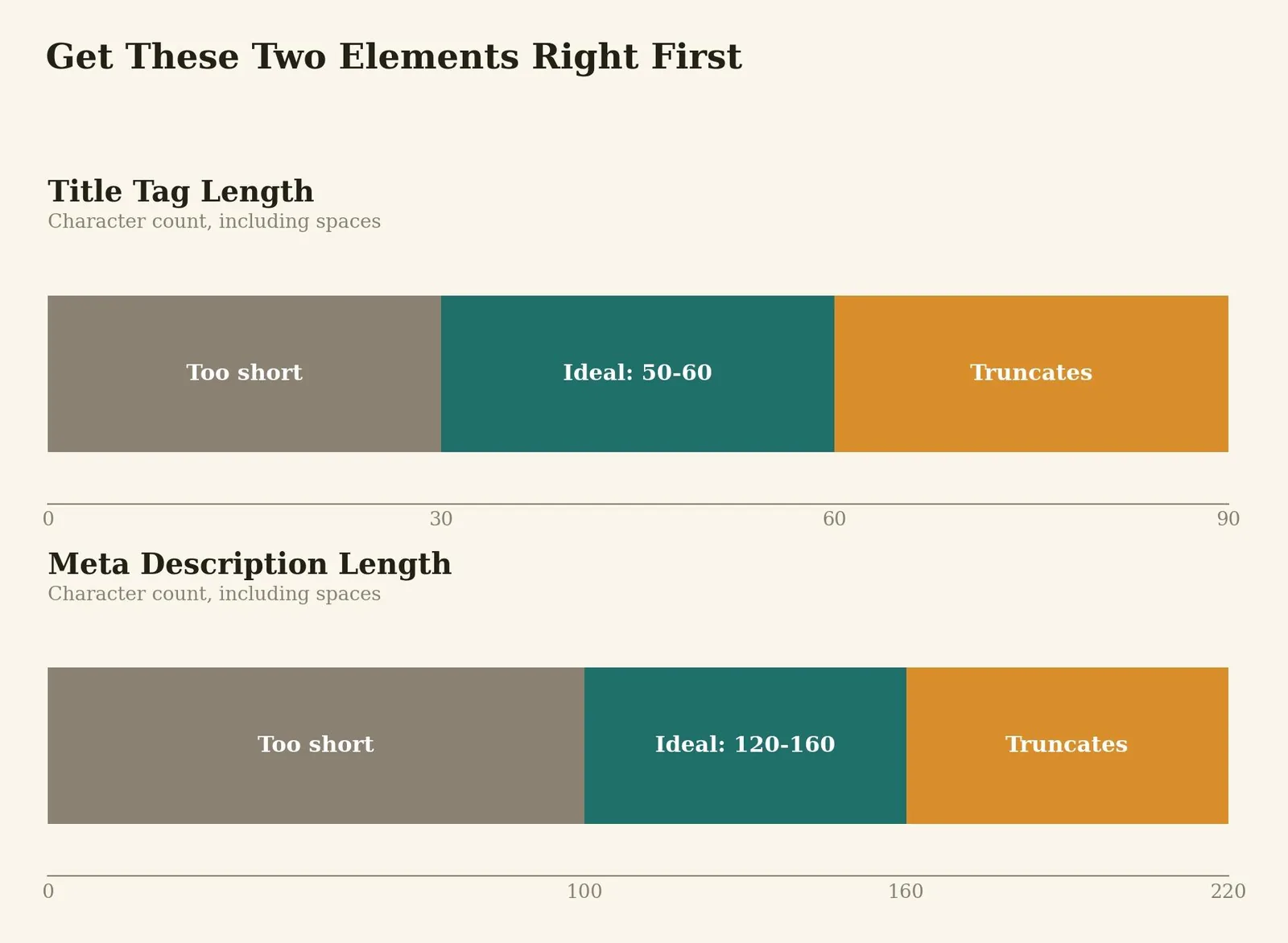
- Title tags perform best around 50-60 characters, and meta descriptions around 120-160 characters, both measured including spaces.
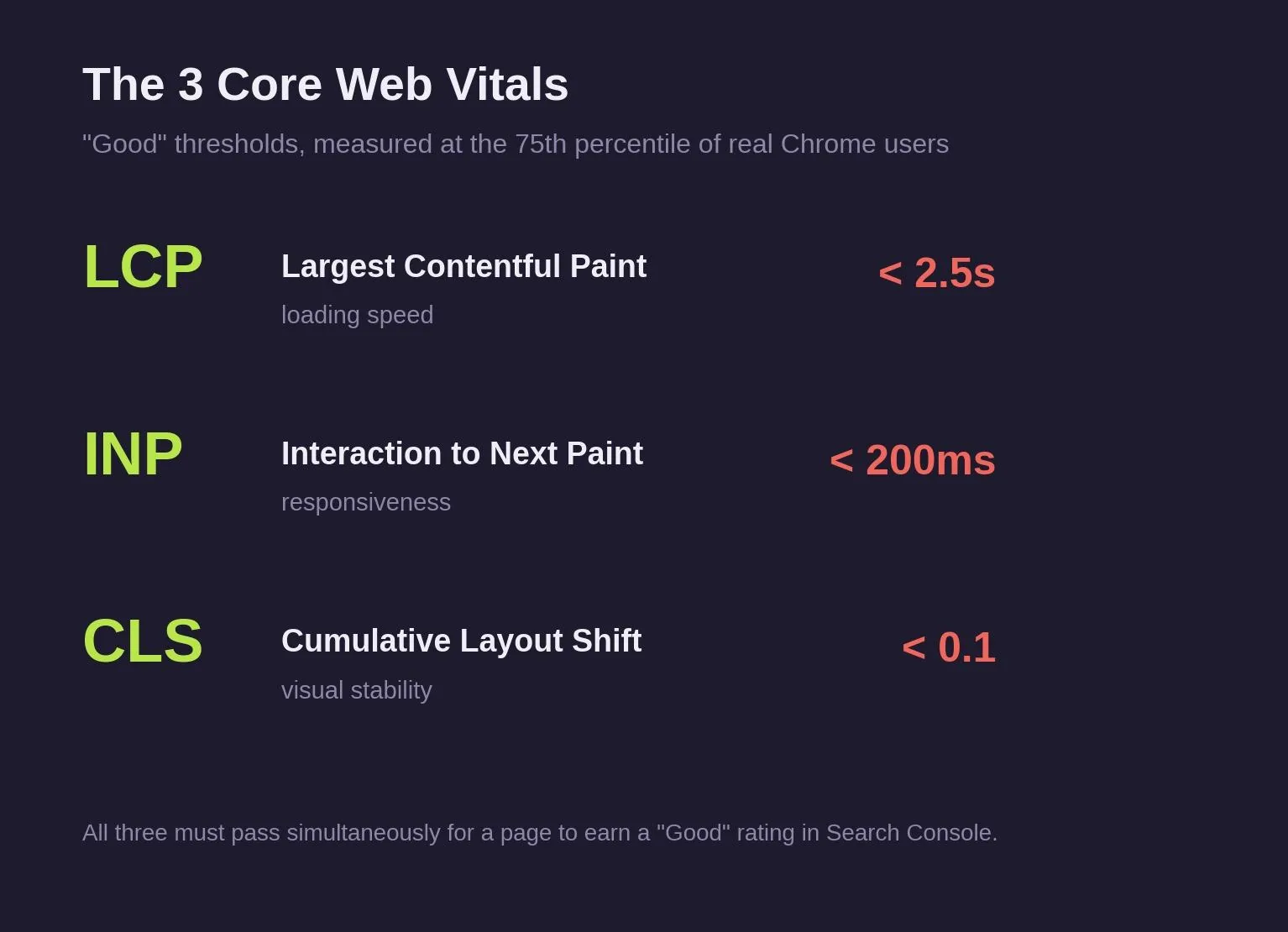
- Core Web Vitals (LCP, INP, and CLS) are a confirmed Google ranking signal, and all three must pass at the 75th percentile of real Chrome users for a page to earn a "Good" rating.
- Internal links, external links to authoritative sources, and descriptive image alt text are small individual checks that compound across a whole site.
- Free tools (Google Search Console, Bing Webmaster Tools) cover most of what a single blog post needs; paid tools like Ahrefs (from $29 USD/month) and Semrush (from roughly $140 USD/month) add competitive and keyword-gap data most teams don't need on every single post.
- Publishing is not the finish line. Tracking CTR and impressions for the first 30 days tells you whether the checklist actually worked.
What Is a Blog Post SEO Checklist?
A blog post SEO checklist is a repeatable list of on-page checks you run against an article before it goes live, covering keyword targeting, title and meta elements, content structure, links, images, and technical basics. It catches the handful of mistakes that quietly cap a post's traffic potential: a missing meta description, a title that gets cut off, an image with no alt text, a page that never gets submitted to Google Search Console (GSC).
The checklist works because it's measurable. "Write a good title" isn't a check anyone can pass or fail at a glance. "Title tag is 50 to 60 characters with the keyword near the front" is. The internal links and external links checks below matter for the same reason link building matters more broadly: search engines trust pages that connect to other trustworthy pages. Genuinely high quality writing still has to come first; the checklist assumes the writing is good and checks everything around it. Treat these as best practices refined across thousands of blog posts on your website, adjusted as needed rather than followed identically on every single post.
Why a Checklist Beats Winging It
Search engines reward pages that are easy to understand and easy to trust, and most of that comes down to consistency across every post you publish, not brilliance on any single one. A checklist turns "did I remember everything" into a five-minute pass instead of a guess.
It also protects against the parts of SEO that are invisible day to day. A blog post can read well and still underperform if the meta description gets auto-rewritten by Google, if Core Web Vitals fail on mobile, or if internal links never connect it to the rest of the site. None of those problems show up while you're writing. They show up three months later as a post that never ranked.
The Blog Post SEO Checklist
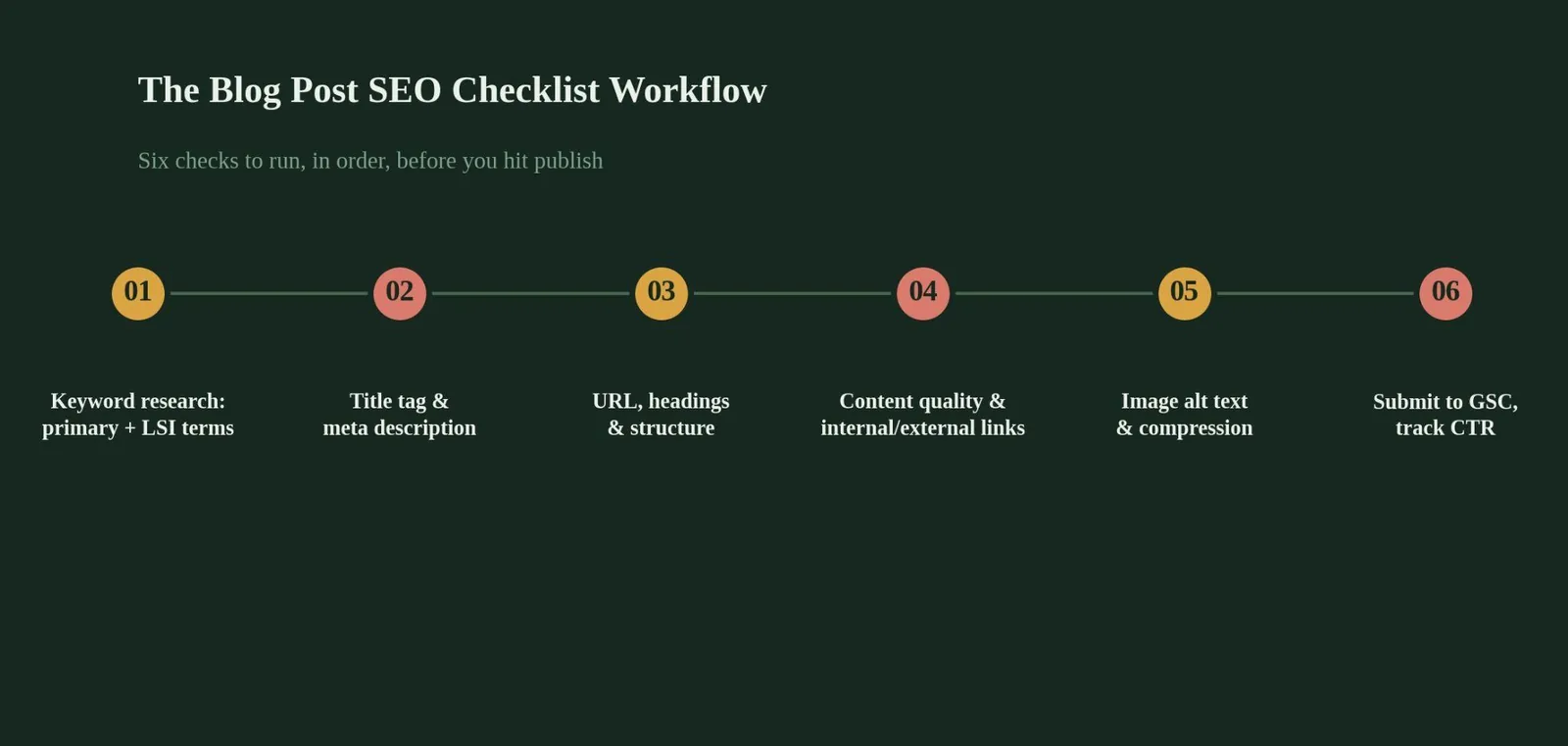
Use the sections below as your working checklist, template style. Each section covers one stage of the process, in the order you'd actually work through it.
Keyword and Intent Checks
Confirm the primary keyword and make sure the content actually matches the search intent behind that term: informational, commercial, or transactional intent all call for different content shapes. Weave in LSI (Latent Semantic Indexing) keywords, the related terms and phrases search engines expect to see alongside your main keyword, naturally through the body rather than stuffed into a single section. This applies to every one of your blog posts, not just the ones targeting competitive terms.
Title, Meta Description, and URL Checks
Write a title tag in the 50-60 character range with the primary keyword placed early. Write a meta description between 120 and 160 characters that gives someone a real reason to click, not just a restatement of the title. Keep the URL short, readable, and close to the target keyword, avoiding random strings or unnecessary dates.
Structure and Content Checks
Use exactly one H1 per post, with a logical H2-to-H4 hierarchy underneath it: multiple H1 tags can dilute keyword relevance. Cover the topic thoroughly rather than padding for a word count target: Google doesn't treat word count as a ranking factor directly, but it does reward thorough topical coverage, which usually requires more words. Place at least one clear CTA (call to action) at a natural point in the post, ideally somewhere the reader has already gotten value, not just at the very end.
Link and Image Checks
Add internal links to relevant existing pages so search engines can crawl the connection and readers can go deeper on related topics. Add external links to authoritative, non-competing sources to back up specific claims. Every image needs descriptive alt text, both for accessibility and because search engines can't "see" an image otherwise, and every image should be compressed and kept small. Google's own compression testing found WebP delivers meaningfully smaller files than JPEG at equal quality, which is why WebP or optimized JPEG typically outperforms PNG for photographic content, though PNG still has its place for graphics with transparency or sharp edges.
Technical and Distribution Checks
Technical SEO and good user experience overlap most directly with rankings right here.
Confirm the page passes Core Web Vitals on mobile, since Google grades the mobile experience as the primary signal even for desktop rankings. Submit the URL to Google Search Console, and don't skip Bing Webmaster Tools since it costs nothing and covers a search engine that some of your audience still uses. If the post has social value, share it to channels like Facebook where your audience is actually active, since initial traffic and engagement can help a new post get discovered faster.
Tracking and Iteration Checks
Set up CTR (click-through rate) and impressions tracking for the post's first 30 days in Google Search Console. A post with strong impressions but weak CTR usually has a title or meta description problem, not a content problem, and that's a five-minute fix once you know where to look.
Blog Post SEO Checklist Tools Compared
Table 1: SEO Tools for Blog Post Optimization Compared
| Tool | Best for | Cost (USD) | Free tier |
|---|---|---|---|
| Google Search Console | Indexing status, CTR, impressions, Core Web Vitals | Free | Yes, full access |
| Bing Webmaster Tools | Indexing and search performance on Bing | Free | Yes, full access |
| Google Analytics | Traffic, engagement, and conversion tracking | Free | Yes, full access |
| Ahrefs | Keyword research, competitor gaps, backlink data | From $29/month (Starter) | No |
| Semrush | Keyword research, on-page content grading, PPC data | From approximately $140/month (Pro) | Limited trial only |
On-Page Elements Checklist Summary
Table 2: On-Page Elements at a Glance
| Element | Target | Why it matters |
|---|---|---|
| Title tag | 50-60 characters | Longer titles truncate in the SERP and lose clarity |
| Meta description | 120-160 characters | Not a direct ranking factor, but a major CTR lever |
| H1 | One per page | Multiple H1 tags dilute topical focus for search engines |
| Image alt text | Present on every image | Accessibility plus a signal search engines can actually read |
| Core Web Vitals | LCP < 2.5s, INP < 200ms, CLS < 0.1 | Confirmed ranking signal, graded on real user data |
Common Mistakes That Sink an Otherwise Good Blog Post
A meta description left blank, which Google will often rewrite from the page content, sometimes awkwardly and rarely to your advantage.
A title tag stuffed with keywords instead of written for a human reader, which reads as spammy and depresses click-through rate even at a decent ranking position.
Zero internal links out to the rest of the site, leaving a genuinely good post isolated instead of feeding authority to and from related content.
Images uploaded straight from a phone or camera with no compression and no alt text, which slows the page down and gives search engines nothing to understand about the visual content.
A post published and never checked again, when a quick look at Search Console 30 days later would show exactly which title or meta description needs a rewrite.
Interactive checklist
Blog post SEO checklist
0 of 14 checked
Related reading
- How to Optimize a Blog Post for SEO: A Step-by-Step Walkthrough
- YouTube SEO Checklist: What It Is & How to Use It
- Website Migration Checklist SEO: What It Is & How to Use It
- GEO & AEO services at Web Tonic
Frequently Asked Questions
How Long Should a Blog Post Be for SEO?
There's no fixed word count that guarantees rankings. Google rewards content that covers a topic thoroughly, and thorough coverage of most topics tends to land in the 1,500+ word range, but a shorter post that fully answers the query can outperform a padded longer one.
Do I Need to Use Every Item on an SEO Checklist for Every Post?
Most of it, yes, since the highest-impact items (title tag, meta description, one H1, internal links) take minutes and apply to every post regardless of topic. Some items, like local business schema or Google Business Profile updates, only apply to certain content types.
What CMS-Specific Tools Help With This Checklist?
Most CMS platforms (WordPress, Webflow, and others) have plugins or built-in fields for title tags, meta descriptions, and alt text, which removes the need to edit raw HTML for most of this checklist.
Is a Paid Tool Like Ahrefs or Semrush Required to Follow This Checklist?
No. Google Search Console, Bing Webmaster Tools, and Google Analytics cover the technical and tracking checks at no cost. Paid tools add competitor and keyword-gap research that helps you decide what to write about, not whether a specific post is optimized correctly.
How Is a Meta Description Different From a Title Tag for SEO Purposes?
The title tag is generally treated as a ranking factor and appears as the clickable blue link in the SERP. The meta description is not a direct ranking factor, but it's one of the biggest levers on click-through rate, which is itself a signal Google uses to judge relevance.
The Bottom Line on Your Blog Post SEO Checklist
Keep a blog post SEO checklist short enough to run on every post, every time. Get the keyword, title, meta description, structure, links, images, and technical basics right consistently, and most of what actually moves rankings is covered. The rest is measurement: track CTR and impressions after publishing, and let that data tell you what to fix on the next post.
Pick your last three published posts, run them through this checklist, and fix whatever fails. That's a better use of an afternoon than researching a 50-item checklist you'll never fully use.
Ready to Make Every Blog Post SEO-Ready?
Running this checklist consistently across dozens of posts a month is where most in-house teams run out of time, even when they know exactly what needs to happen. Web Tonic's growth marketing team builds this level of on-page discipline into every piece of content from the first draft, so nothing gets skipped because a deadline was tight.
More from Web Tonic: growth marketing services, data & analytics.
Sources: corewebvitals.io · scalenut.com · seeklab.io · affrisemedia.com · autokeyworder.com · w3era.com · transfunnel.com · developers.google.com · thatmarketingbuddy.com · smartguidehubs.com


