



Table of contents
YouTube for mobile is the official YouTube app for Android and iOS, plus the web player at m.youtube.com. It is now the primary way people watch: handheld screens drive roughly 69% of the platform's total viewership.
That single number reframes the app from a consumer convenience into a distribution channel. If you publish video, your work is judged on a 6-inch screen first.
Key Takeaways
- The app has passed 10 billion installs on Google Play and is free on both Android and iOS.
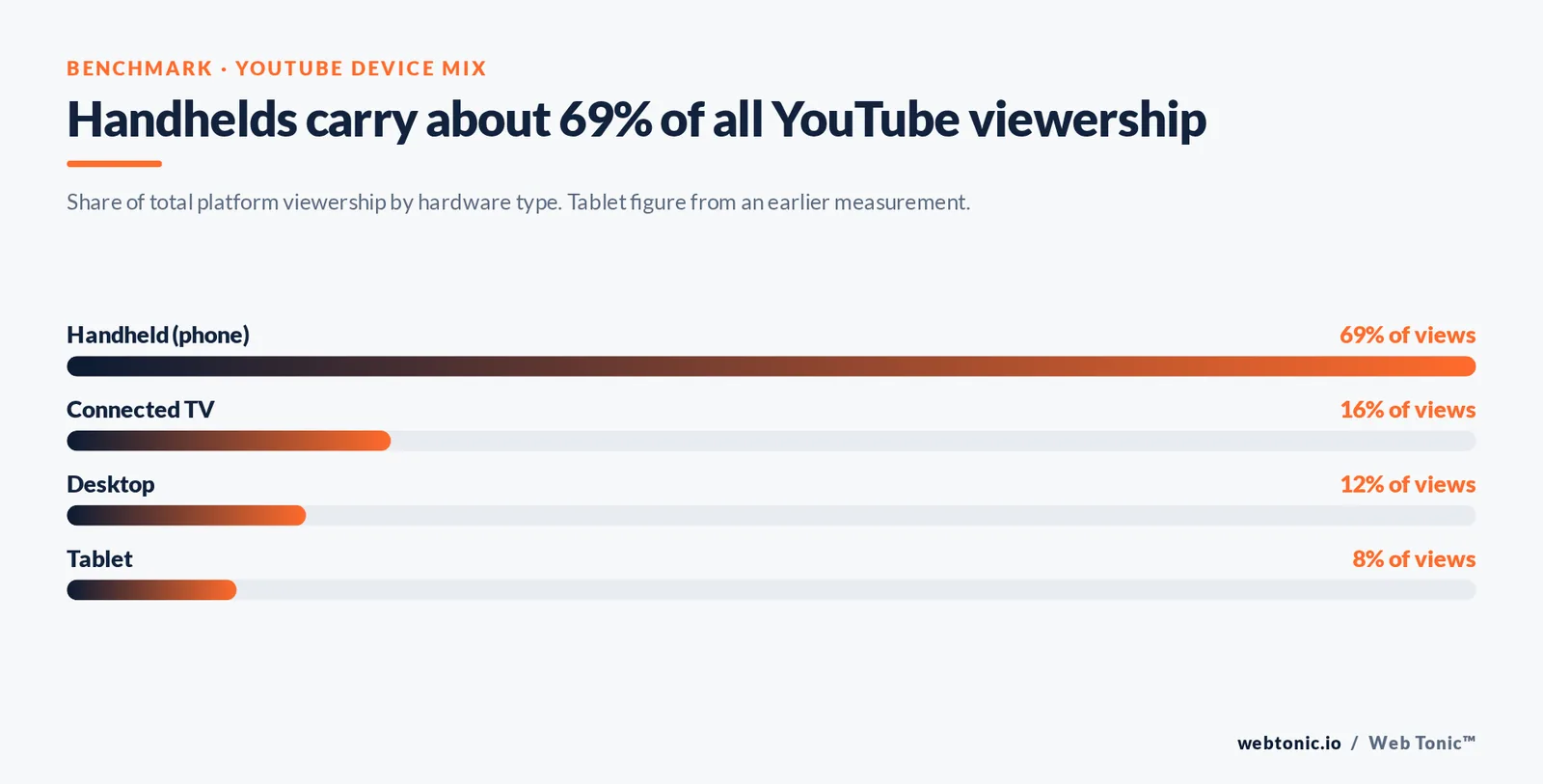
- Handhelds account for about 69% of all views; desktop is down at roughly 12% and connected TV around 16%.
- The platform reaches 2.58 billion monthly users — 42.8% of everyone online — with more than 125 million paid Premium and Music subscribers.
- Handheld browsing passed desktop worldwide: 51.47% versus 47.17% in June 2026.
- Data usage is controllable: capping playback quality at 480p instead of 1080p cuts consumption dramatically on the same clip.
- Two families dominate the install decision — Android handsets running the Play Store build, and iPhones or iPads running the App Store build. Older hardware falls back to the web player.
- For marketers, the practical rules are large legible text, sound-off comprehension, vertical Shorts alongside horizontal long-form, and thumbnails that survive being 320 pixels wide.
How to download the YouTube app
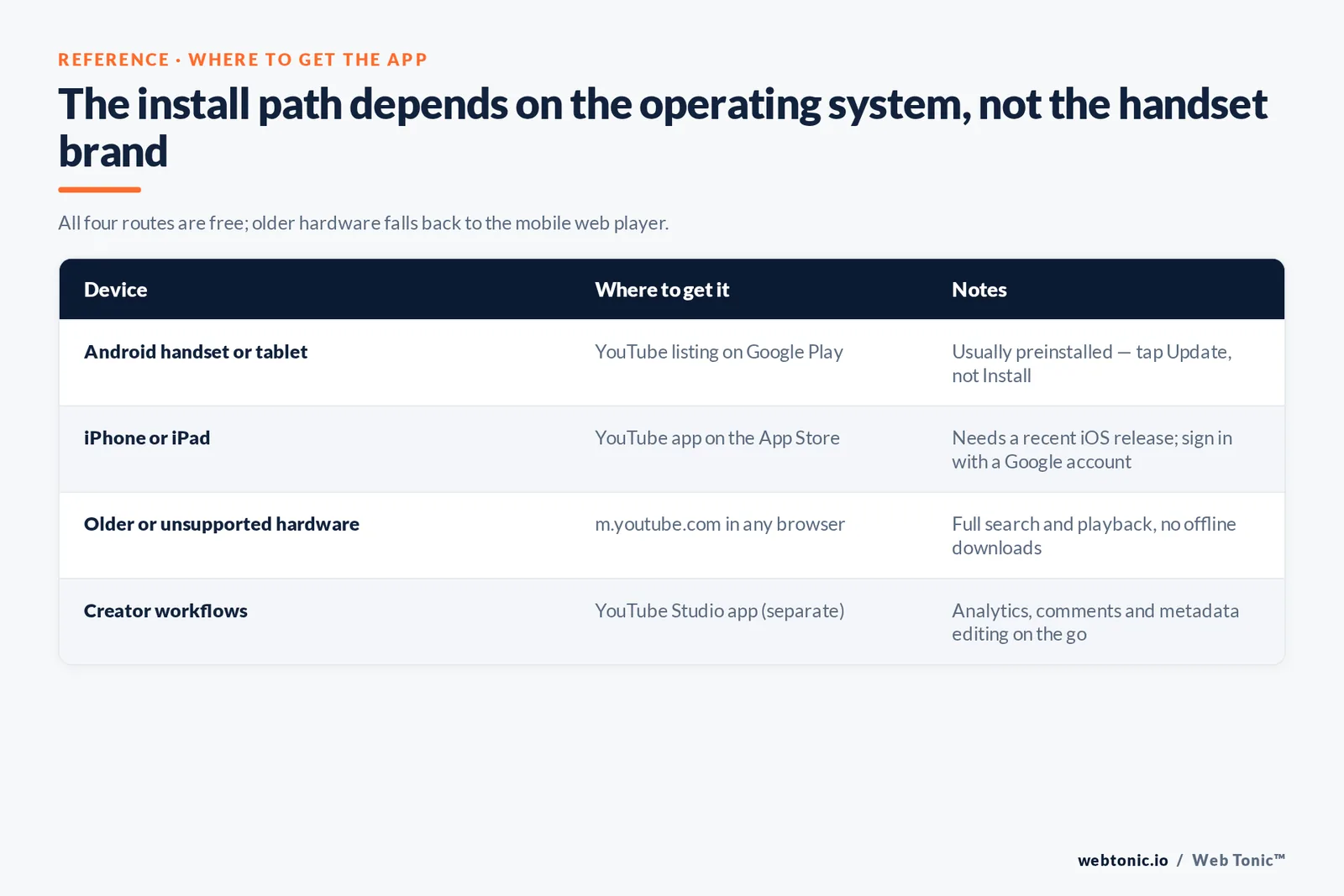
The install path depends on the operating system, not the handset brand. On almost every Android unit it is preinstalled and only needs an update; on Apple hardware it is a one-tap download.
| Device | Where to get it | Cost | Notes |
|---|---|---|---|
| Android handset or tablet | The YouTube listing on Google Play | Free | Usually preinstalled; tap Update rather than Install |
| iPhone or iPad | The YouTube app on the App Store | Free | Requires a recent iOS release; sign in with a Google account |
| Older or unsupported hardware | m.youtube.com in any browser | Free | No offline downloads, but full search and playback |
| Creator workflows | YouTube Studio app (separate download) | Free | Analytics, comments and metadata editing on the go |
Three details trip people up. First, the client and the account are separate: installing gives you search and playback, but subscriptions, history and playlists only sync once you sign in. Second, the two official store listings are the only safe sources — sideloaded builds break sign-in and monetisation. Third, creators need the companion Studio release, because the main viewer deliberately stays clean.
What the app actually does
It is not a smaller desktop site. Several of its most-used features exist only on handhelds, and a few desktop features are missing.
| Feature | What it does | Handheld only? |
|---|---|---|
| Shorts feed | Vertical short-form videos in an endless swipe feed | Designed for small screens first |
| Camera capture and upload | Record, trim, add music and publish without a computer | Yes |
| Picture-in-picture | Keeps a video playing in a floating window while you use other apps | Yes |
| Offline downloads | Saves clips locally for playback without a connection | Yes (Premium) |
| Background play | Audio continues with the screen locked — the music use case | Yes (Premium) |
| Cast to TV | Turns the handset into a remote for a smart TV or streaming stick | Yes |
| Autoplay | Queues a related clip when the current one ends | No, but on by default |
| Incognito mode | Watches without writing to history or influencing recommendations | Yes |
| 360-degree playback | Pan around immersive footage by physically moving the handset | Best on mobile |
The gyroscope point in that last row matters more than it looks. A handset can do something a desktop cannot — it knows how it is being held — and that is why 360-degree and vertical formats feel native here and awkward everywhere else.
Managing data usage and picture quality
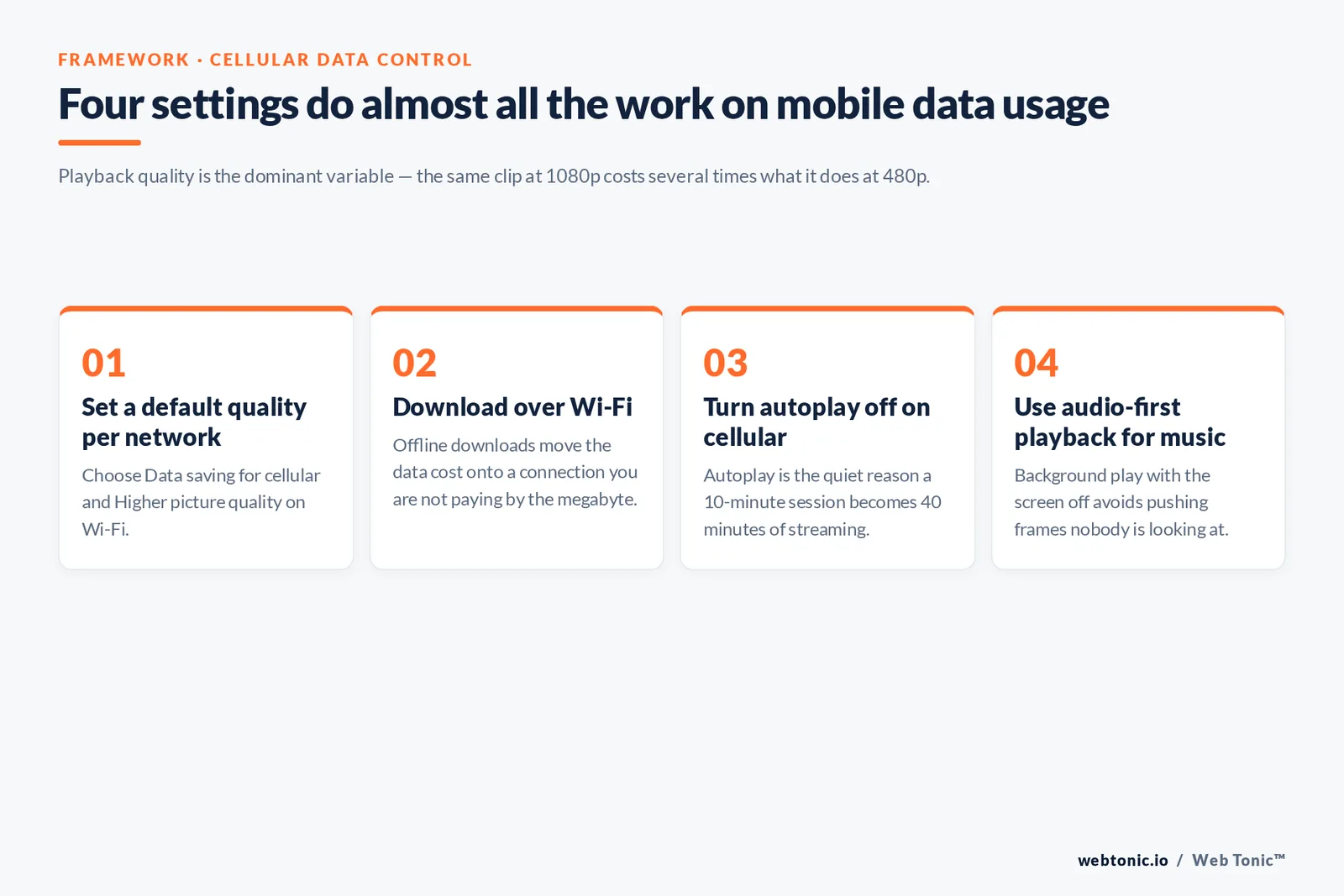
Data is the number one complaint about watching on a cellular connection, and it is almost entirely a settings problem. Playback quality is the dominant variable: the same clip streamed at 1080p can consume several times the data it would at 480p.
Four controls do most of the work:
- Select a default quality per network. In Settings, choose Data saving for cellular networks and Higher picture quality on Wi-Fi.
- Download over Wi-Fi. Offline downloads move the data cost to a connection you are not paying by the megabyte for.
- Turn off autoplay on cellular data. Autoplay is the quiet reason a 10-minute session becomes 40 minutes of streaming.
- Use audio-first playback for music. Background play with the screen off avoids pushing full frames you are not looking at.
When playback still stutters, the cause is usually the network rather than the software. Google's own YouTube performance troubleshooting guide works through connection speed, cache and app version in order, which is the right sequence — reinstalling first almost never helps.
Why the handheld share keeps growing
The platform's hardware mix follows the wider web. Statcounter put mobile at 51.47% of global platform share in June 2026 against 47.17% for desktop and 1.36% for tablets. Connectivity, not preference, drove that: for hundreds of millions of people a handset was the first internet-capable thing they owned.
The scale behind it is worth stating plainly. Backlinko's YouTube statistics roundup records 2.58 billion active users, 42.8% of the global online population, with India the largest of all countries at roughly 500 million users and the United States second at about 254 million. Across those countries the audience is overwhelmingly handheld, which is precisely why small-screen design is not a Western-market nicety.
| Hardware | Share of views | What it implies for creative |
|---|---|---|
| Handheld | ~69% of total viewership | Legible text, tight framing, sound-off clarity |
| Connected TV | ~16% | Longer watch sessions, higher production tolerance |
| Desktop | ~12% | Research and how-to intent, description links matter |
| Tablet | ~8% (earlier measurement) | Behaves like a small TV rather than a phone |
Playlists, music and the listening habit
A large slice of use here is not watching at all — it is listening. Playlists are the mechanism: a saved playlist plus background play turns the client into a music service, which is why more than 125 million people pay for Premium or Music.
Practically, that means three things for anyone publishing here. Sequence your catalogue into playlists so one view becomes a session. Front-load spoken value in the first 15 seconds, because part of your audience is listening with the handset in a pocket. And keep audio levels consistent across uploads, since a listener cannot reach for a volume slider mid-commute.
What small-screen video means for marketers
This is where a platform detail becomes a media decision. Global video ad spend keeps climbing — Statista's video advertising outlook tracks the market's trajectory, and eMarketer's YouTube advertising analysis shows the spend concentrating where the views are. If 69% of views happen on a handset, then 69% of your creative review should happen on one.
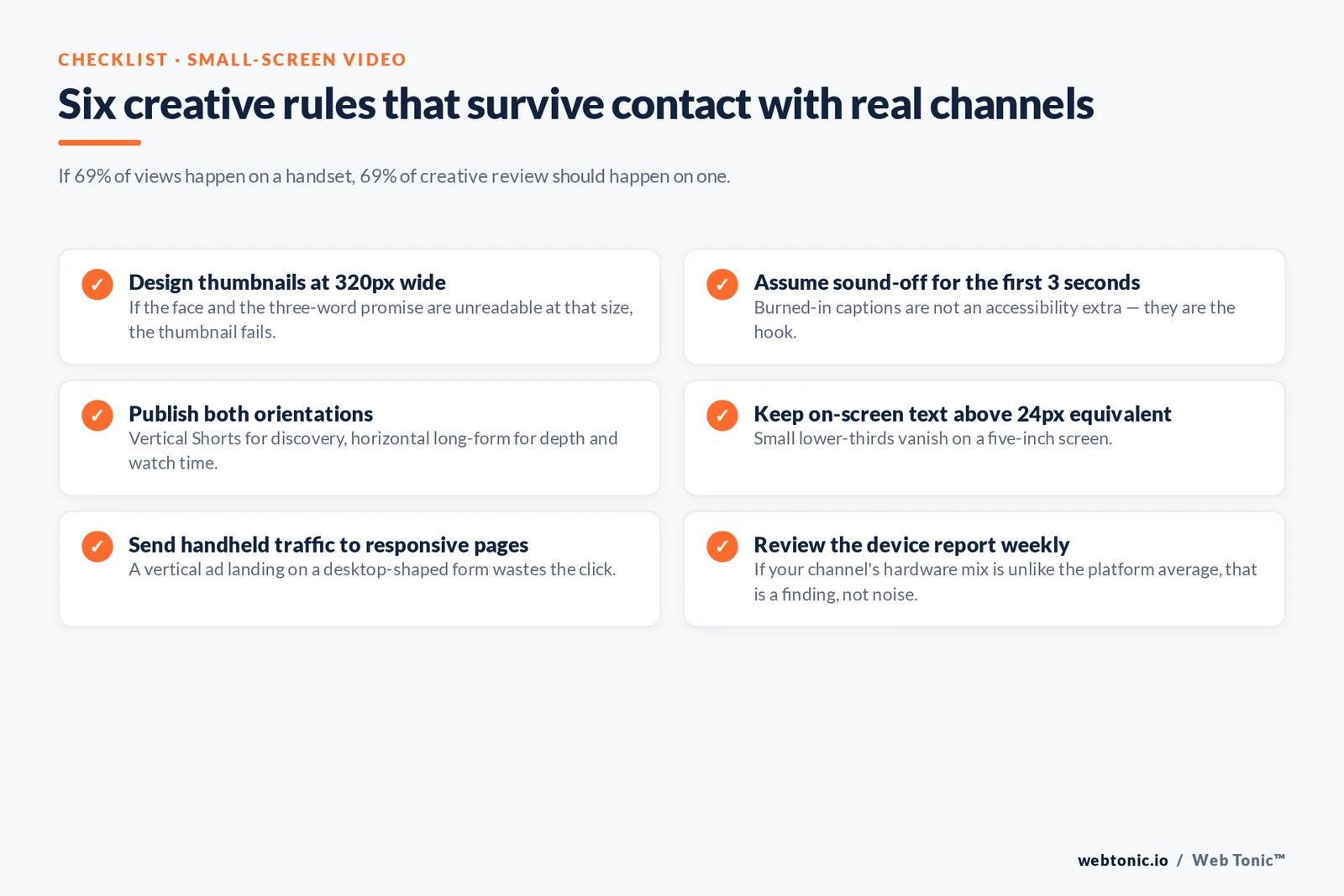
Six rules survive contact with real accounts:
- Design thumbnails at 320px wide. If the face and the three-word promise are unreadable at that size, the thumbnail fails, whatever it looks like in Photoshop.
- Assume sound-off for the first 3 seconds. Burned-in captions are not an accessibility extra; they are the hook.
- Publish both orientations. Vertical Shorts for discovery, horizontal long-form for depth and watch time — and go live for launches, because live sessions pull notifications. Think with Google's consumer trends research keeps landing on the same conclusion: format follows context.
- Keep on-screen text above 24px equivalent. Small lower-thirds vanish on a five-inch screen.
- Send handheld traffic to responsive pages. A vertical ad that lands on a desktop-shaped form wastes the click.
- Review the device report weekly. YouTube Analytics splits watch time by hardware type; if your channel mix is unlike the platform average, that is a finding, not noise.
Wider context helps here too: DataReportal's Digital 2026 report puts global social and video consumption at around 2 hours 40 minutes per day, most of it handheld. That is the attention pool every upload competes in.
What has improved, and how people actually use it
Ask a hundred people what they do in the app and the answers cluster into four jobs: watch something specific they searched for, browse whatever the feed serves, listen to music, and check news or creator updates from channels they follow. Each of those jobs has been improved separately over the last few release cycles, which is why the experience feels busier than it did.
The most visible improvements are worth naming:
- Search that mixes formats. A single search now returns long-form videos, Shorts, live streams, playlists and channel results in one list, so users stop switching tabs to learn what exists on a topic.
- A dedicated music surface. Music got its own client and its own catalogue, and the two apps hand off to each other rather than competing.
- Feed personalisation you can steer. "Not interested" and "Don't recommend this channel" are real inputs; a few taps visibly changes what the feed serves next.
- Availability across more countries. Local catalogues, local content ratings and local payment methods now cover well over a hundred countries, which is what made the growth in India and Brazil possible.
- Creator tooling on the go. Studio lets a channel owner read comments, check a view spike and fix a title from a bus stop.
Two signals tell you how well that lands with real users. The first is store feedback: the Play listing carries a star rating built from tens of millions of individual reviews, and it is one of the few genuinely public quality gauges for an app at this scale. The second is paid conversion — purchases. People do not buy things they merely tolerate, and 125 million Premium and Music purchases is a strong signal that the listening and offline jobs are being done well.
There is a practical lesson for marketers in that list. The features that improved fastest are the ones that reduce friction between wanting something and watching it: better search, better recommendations, faster access to a saved playlist. If your channel is hard to search, hard to browse and hard to follow, no amount of production budget compensates. Give every video a plain-language title people would actually type, group your catalogue into playlists a new viewer can learn from in order, and keep your channel page readable at a glance. Those three things are free, and they are what the popular channels in every category have in common.
If something breaks, the reporting path is worth knowing. Each store listing carries the developer info, the release notes and a support link, and the in-app Help and feedback option is where a bug report actually reaches Google — email is not a route for consumer support. Include your location and OS release in the report; a playback bug that is true in one country is often fine in another because the content catalogue and delivery network differ by location. Users who learn that habit get fixes faster than those who leave a one-star review and move on, and a low star rating with no reproducible detail helps nobody.
Content availability is the other regional variable. Rights deals mean a popular music video, a news clip or a sports highlight can be watchable in one location and blocked in the next, and family-oriented content ratings vary by country too. For anyone planning a launch across several countries, check availability before you promise a global premiere — and remember that in-app purchases, memberships and Premium pricing are set per market, not globally.
Compatibility and common problems
Current Android and iOS releases are supported, and Google drops support for older operating systems over time rather than for specific models. When an install or update will not complete, the cause is nearly always the OS release, storage, or a stale store cache.
| Symptom | Most likely cause | Fix in order |
|---|---|---|
| Install fails | Unsupported OS release or full storage | Update the OS, clear storage, retry |
| Playback buffers constantly | Connection speed, not the software | Test the network, lower quality, then clear cache |
| No sound in the background | Background play is a Premium feature | Check subscription status or use picture-in-picture |
| Downloads disappear | Offline files expire and need a periodic refresh | Reconnect and let the library revalidate |
| Recommendations feel wrong | History and watch signals | Use Incognito, or clear and pause watch history |
One creator-side note: if you publish for a family audience, the made-for-kids setting you select in Studio changes which features appear on your uploads, including comments and personalised ads. It is a compliance setting with real distribution consequences.
Recent direction of travel
It has moved steadily from a simple player toward a full media hub: Shorts sitting beside long-form, shopping and membership surfaces, and search results that mix formats. The official product blog on blog.google is the reliable record of what actually shipped, and the Creators hub documents the publishing side of each change.
The strategic reading is simple. Handhelds are where discovery happens, connected TV is where long watch sessions happen, and desktop is where research and conversion often finish. A channel built for only one of the three leaves the other two on the table.
If you want help turning short-form video into measurable pipeline, see our performance creative services, our wider service range, or browse more platform guides on the Web Tonic blog. You can also get in touch for a channel review.
Related reading
- What Mobile Marketers Should Budget for Campaigns This Year
- How the YouTube Algorithm Works: Signals, Surfaces and Shorts
- YouTube Statistics 2026: Users, Demographics, Shorts and Revenue
- Paid Social services at Web Tonic
FAQ: using YouTube on a handset
How do I download the YouTube app?
On Android, open Google Play, search for it and tap Install or Update — it ships preinstalled on most hardware. On iPhone or iPad, download it free from the App Store. Sign in with a Google account afterwards so subscriptions, history and playlists sync.
Is it free?
Yes, free on both Android and iOS. Premium is a paid layer that adds ad-free playback, offline downloads and background play; more than 125 million people subscribe to Premium or Music.
How is cellular data managed?
Through playback quality settings. Choosing Data saving on cellular networks and reserving high quality for Wi-Fi is the biggest lever — 480p uses a fraction of the data 1080p does. Downloading over Wi-Fi and disabling autoplay help further.
What share of viewing happens on handhelds?
Roughly 69% of total viewership, against about 16% on connected TV and 12% on desktop. Mobile also passed desktop in overall web platform share, at 51.47% versus 47.17% in June 2026.
Is it compatible with every handset?
Not quite. Current Android and iOS releases are supported, so very old operating systems lose access over time. Those units can still use the web player at m.youtube.com, which handles search and playback but not offline downloads.
What should marketers change for small screens?
Review every asset on a handset before approving it: thumbnails legible at 320 pixels wide, captions for sound-off viewing, a hook inside 3 seconds, vertical Shorts for discovery plus horizontal long-form for depth, and mobile landing pages behind every mobile click.
Sources
Google Play, YouTube app listing · Apple App Store, YouTube listing · YouTube Help: performance troubleshooting, autoplay, 360-degree video, made-for-kids audience settings, YouTube Analytics · Backlinko, YouTube user statistics (2.58bn users, device mix, 10bn+ installs) · Statcounter Global Stats, desktop vs mobile vs tablet platform share, June 2026 · DataReportal, Digital 2026 Global Overview Report · eMarketer, YouTube advertising insights · Statista, video advertising outlook worldwide · Think with Google consumer trends · blog.google YouTube product blog · YouTube Creators. Figures cited as published at the time of writing.


