



Table of contents
There is no single YouTube algorithm. There are several recommendation systems — home feed, suggested videos, Shorts feed, search, notifications — and each one is trying to answer the same question: which video will this specific viewer actually watch and be glad they watched?
Below: how each surface picks videos, which signals matter, how Shorts differs from long form, and what creators can control.
Key Takeaways
- YouTube's recommendation system is personalised, not ranked. There is no global list of "best" videos — each viewer's home feed is assembled from their own watch history and context.
- The two signals that drive almost everything are click-through rate (CTR) and watch time, held together by a third: viewer satisfaction, measured partly through surveys, likes, dislikes and "not interested" feedback.
- Discovery happens on 5 main surfaces — home, suggested, Shorts feed, search and subscriptions/notifications — and a video can succeed on one while failing on the others.
- Tags are, in YouTube's own words, of minimal help for discovery; titles, thumbnails and the first lines of the description do far more work.
- Use at most 15 hashtags — past that YouTube ignores all of them on the video.
- Chapters need at least 3 timestamps, the first at 00:00, each section 10 seconds or longer, or they will not render.
- The Shorts feed is engagement-per-second driven and largely decoupled from the long-form feed, which is why Shorts views rarely convert to long-form watch time automatically.
- Short-form video is reported as the highest-ROI social format by 41% of marketers, so the Shorts surface is a paid-and-organic decision, not just a creator one.
- You cannot optimise the algorithm; you optimise the two decisions a human makes — whether to click, and whether to keep watching.
How the YouTube algorithm actually works
YouTube describes its recommendation system as a set of models that match videos to viewers using signals about what people watch, what they skip, and what they say they valued afterwards. In its own explainer on how the recommendation system works, YouTube is explicit that clicks alone proved to be a poor target: optimising for clicks rewarded misleading thumbnails, so watch time and then satisfaction were layered on top.
That history matters because it explains the current behaviour. The system is trying to predict two things at once: the probability a given viewer clicks a given video, and how long — and how happily — they will stay if they do. A video with a spectacular CTR and a 10%-of-length average view duration gets throttled quickly. A video with a modest CTR that holds people to the end keeps getting new impressions.
| Signal | What YouTube reads it as | Creator lever |
|---|---|---|
| Click-through rate | Is this promise relevant to this viewer? | Title + thumbnail pairing |
| Average view duration | Did the video deliver on the promise? | Opening 30 seconds, pacing, payoff order |
| Average percentage viewed | Is the length justified? | Cutting filler, not adding minutes |
| Session behaviour | Did the viewer keep watching YouTube after? | End screens, playlists, series structure |
| Explicit feedback | Likes, dislikes, "not interested", surveys | Honest framing, no bait |
| Context | Time of day, device, watch history, location | Publishing rhythm, localisation, captions |
Two things follow from that table. First, every lever a creator controls is a human-behaviour lever — there is no metadata trick that substitutes for a video people finish. Second, the signals are relative to the audience being tested, not to YouTube as a whole. A video shown to a tight, well-matched slice of viewers can outperform a video pushed to a broad, cold slice even with worse raw numbers.
The 5 surfaces, and why one video behaves differently on each
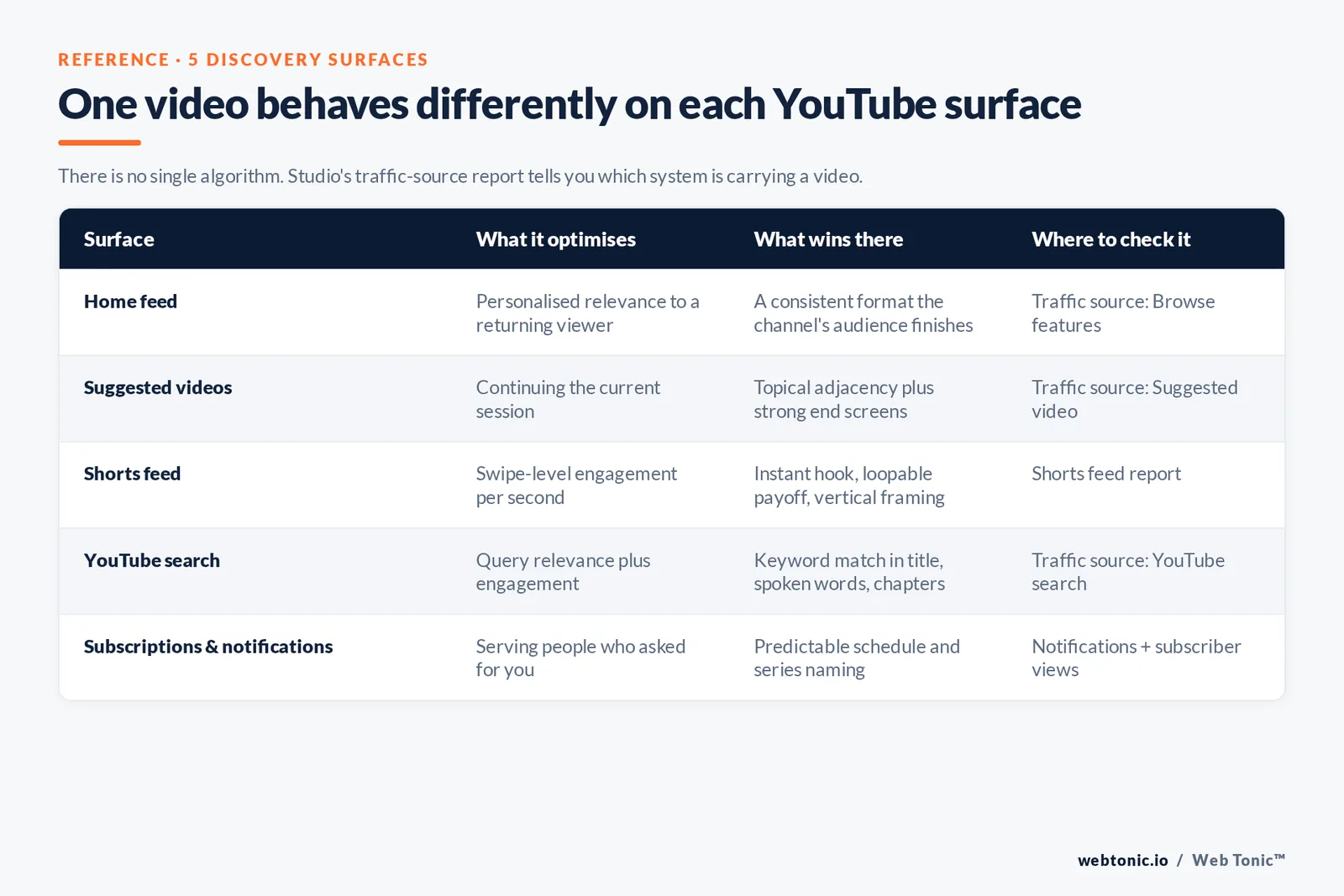
Talking about "the algorithm" as one thing hides the most useful distinction. YouTube's How YouTube Works pages describe distinct discovery systems, and Studio's traffic-source report lets you see which one is carrying a video.
| Surface | What it optimises | What wins there | Where to check it |
|---|---|---|---|
| Home feed | Personalised relevance to a returning viewer | Consistent format the channel's audience already finishes | Traffic source: Browse features |
| Suggested videos | Continuing the current session | Topical adjacency to popular videos, strong end screens | Traffic source: Suggested video |
| Shorts feed | Swipe-level engagement per second | Instant hook, loopable payoff, vertical framing | Shorts feed report |
| YouTube search | Query relevance plus engagement | Clear keyword match in title, spoken words, chapters | Traffic source: YouTube search |
| Subscriptions & notifications | Serving people who asked for you | Predictable schedule, series naming | Notifications + subscriber views |
Search is the surface most marketers underuse. It behaves closest to web SEO: YouTube matches the query against titles, descriptions, spoken content and metadata, then sorts by engagement signals. YouTube's guidance on getting discovered and on titles, thumbnails and descriptions is the practical checklist for it — and Google's video best practices cover the separate question of ranking that video in Google Search results too.
Metadata: what helps, what does nothing
Metadata is where most "algorithm hacks" live, and where the least leverage actually is. YouTube's own tags documentation states that tags play only a minimal role in discovery, useful mainly when a topic is commonly misspelled. Hashtags are capped: use more than 15 and YouTube ignores every hashtag on the upload, per its hashtag policy.
| Element | Limit / rule | Real impact on discovery |
|---|---|---|
| Title | 100 characters max | High — sets the click promise and the search match |
| Thumbnail | Custom image, under 2 MB | High — the other half of CTR |
| Description | 5,000 characters | Medium — first 2 lines shown; context for search |
| Chapters | 3+ timestamps, first at 00:00, 10s minimum | Medium — improves retention and key-moment surfacing |
| Subtitles | Uploaded or auto-generated | Medium — accessibility plus indexable text |
| Tags | 500 characters total | Minimal, per YouTube |
| Hashtags | Max 15 or all are ignored | Low |
| Playlists | Unlimited, orderable | Medium — drives session watch time |
Two structural items are worth the effort because they change viewer behaviour rather than metadata matching. Chapters let people jump to what they came for instead of bouncing, and end screens give the session-continuation signal a place to land. Adding structured data via VideoObject markup on your own embed pages extends the same video into Google's video results.
The Shorts algorithm is a different machine
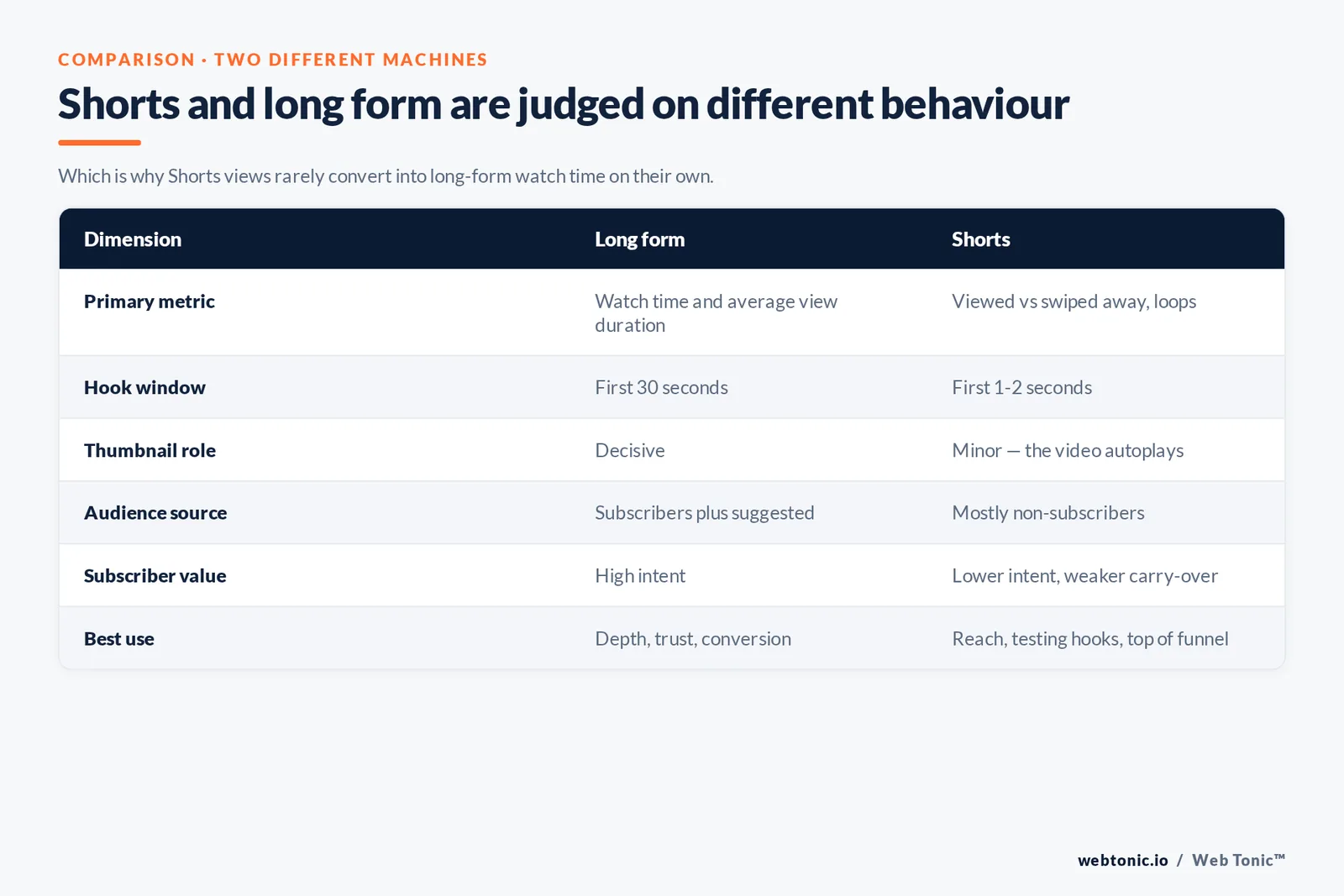
Shorts are recommended in an infinite swipe feed, so the unit of judgement is not "did they watch 8 minutes" but "did they stay past the first second, and did they loop". Because the feed is fed largely by non-subscribers, Shorts can post enormous view counts that do almost nothing for a channel's long-form performance — the two systems learn from different behaviour.
| Dimension | Long form | Shorts |
|---|---|---|
| Primary metric | Watch time and average view duration | Viewed vs swiped away, loops |
| Hook window | First 30 seconds | First 1–2 seconds |
| Thumbnail role | Decisive | Minor — the video autoplays |
| Audience source | Subscribers plus suggested | Mostly non-subscribers |
| Subscriber value | High intent | Lower intent, weaker carry-over |
| Best use | Depth, trust, conversion | Reach, testing hooks, top of funnel |
Treat Shorts as a hook laboratory. If a 30-second version of an idea holds attention, the long-form version of the same idea has a much better chance — and you learned that for the cost of one edit. For brands, that matters commercially: short-form video is now reported as the highest-ROI format by 41% of marketers in Sprout Social's social media statistics, and roughly 40% of companies spend under $5,000 per video according to Wistia's video marketing data. Cheap tests, real signal.
What changed recently — and what did not
YouTube ships changes constantly, and announcements land on the official YouTube blog rather than in a numbered "update" like Google's core updates. The pattern of the last few years is consistent: more weight on satisfaction and originality, more personalisation of the home feed, tighter treatment of repetitive mass-produced content, and clearer disclosure rules for synthetic media.
| Shift | What it means in practice |
|---|---|
| Satisfaction over clicks | Overpromising thumbnails cost more than they earn |
| Heavier personalisation | "Small niche, deeply served" beats broad and generic |
| Inauthentic/repetitive content rules | Templated mass uploads risk monetisation, not just reach |
| Synthetic media disclosure | Altered or AI content must be labelled at upload |
| Shorts maturity | Shorts is a destination, not a growth cheat code |
What has not changed: the system still cannot see production value, only behaviour. Reach still comes from the same loop — a promise people believe, a video that keeps them, and a next video worth starting. If reach falls, check the loop before you blame an update, and confirm the video is not restricted by advertiser-friendly guidelines or a copyright claim, both of which suppress distribution independently of quality.
A 7-step optimisation workflow
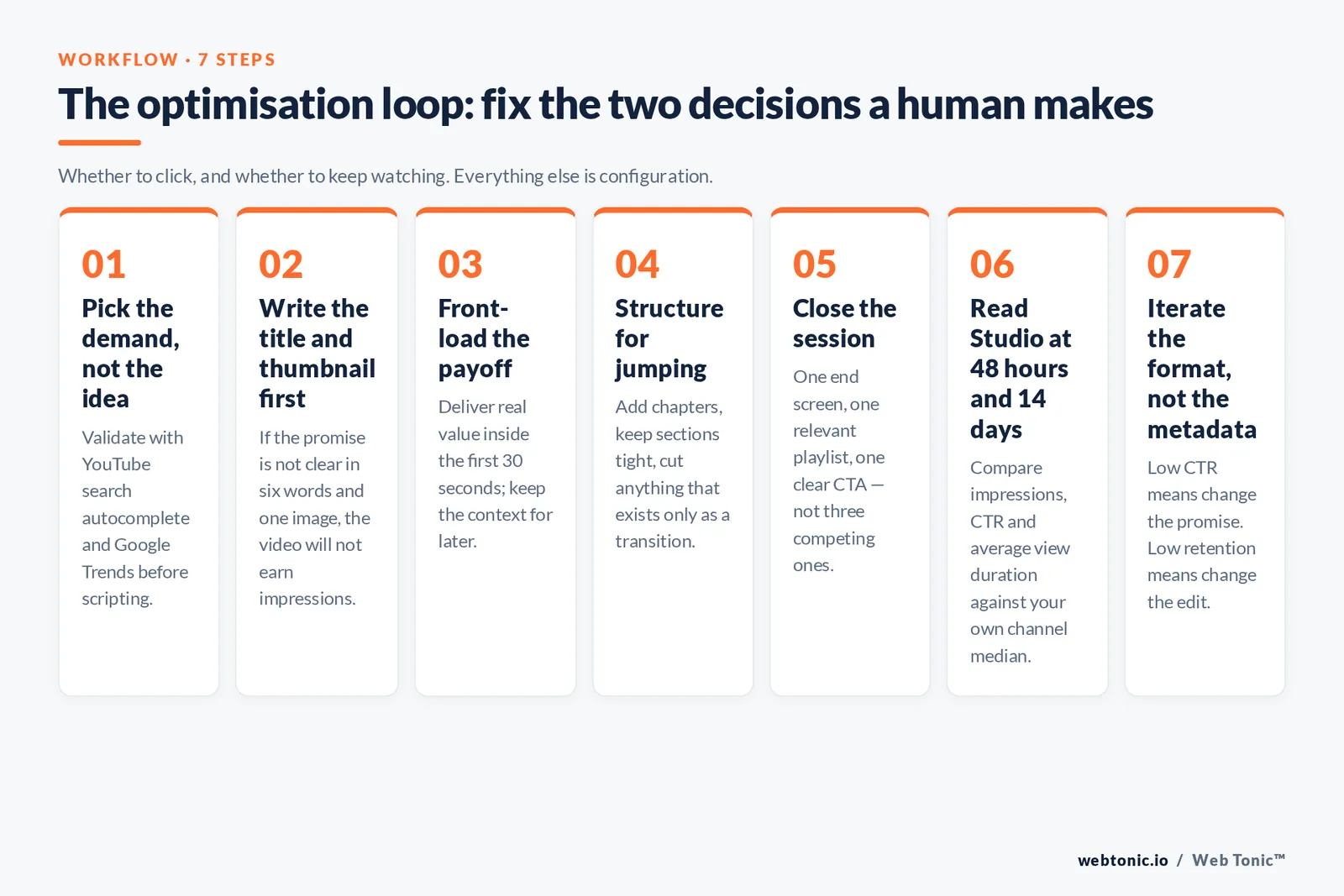
This is the loop we run for clients on performance creative programmes, and it works for solo creators too.
- Pick the demand, not the idea. Validate with YouTube search autocomplete and Google Trends before scripting.
- Write the title and thumbnail first. If the promise is not clear in 6 words and one image, the video will not earn impressions.
- Front-load the payoff. Deliver something of value inside the first 30 seconds; keep the context for later.
- Structure for jumping. Add chapters, keep sections tight, cut anything that exists only as transition.
- Close the session. One end screen, one relevant playlist, one clear CTA — not three competing ones.
- Read Studio at 48 hours and 14 days. Compare impressions, CTR and average view duration against your own channel median, never against public benchmarks.
- Iterate the format, not the metadata. If CTR is low, change the promise. If retention is low, change the edit.
That last distinction is the whole discipline. Low CTR with healthy retention is a packaging problem. Healthy CTR with a retention cliff is a content problem. Chasing tags when the retention graph falls off at 0:20 wastes weeks.
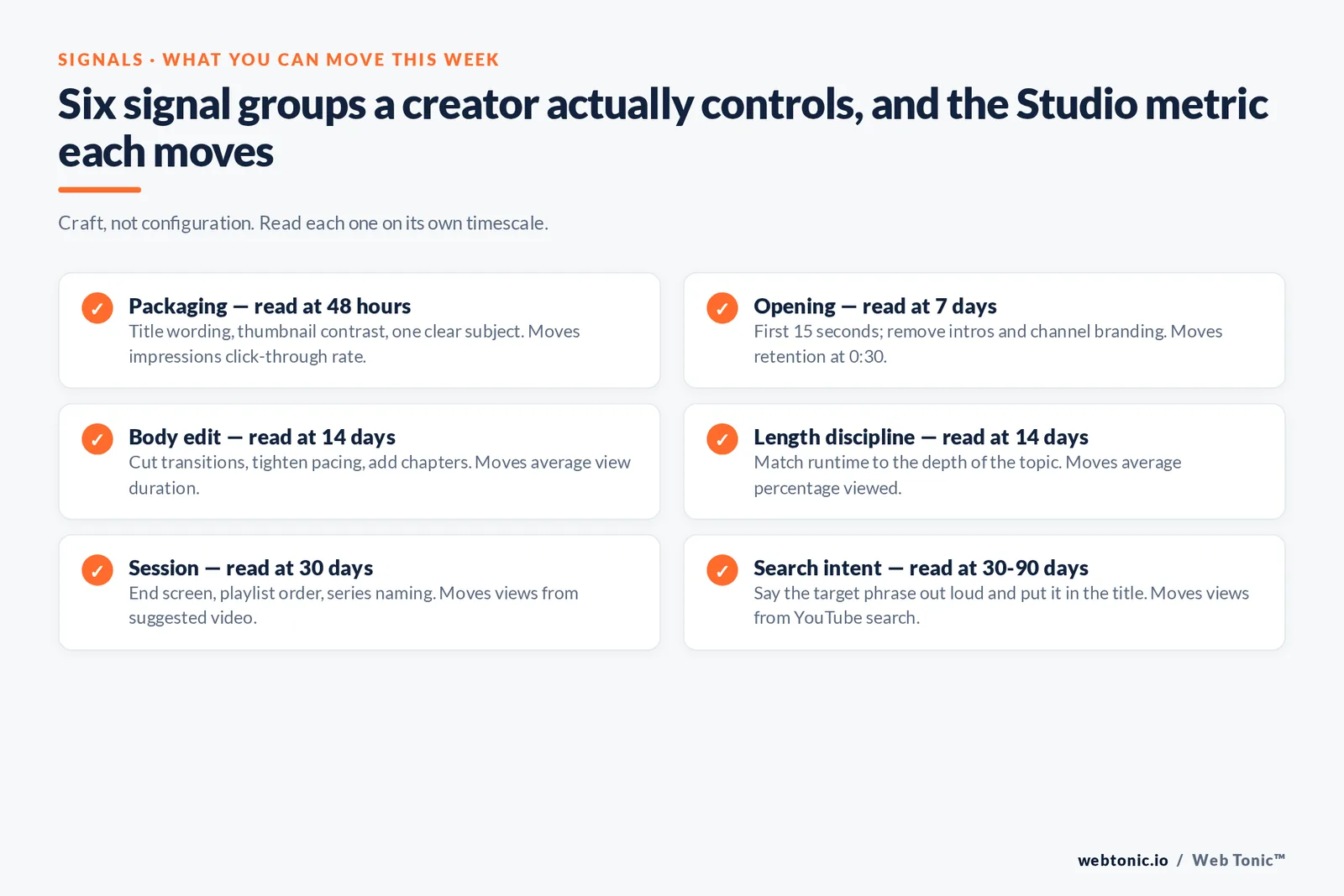
The signal checklist creators can actually control
Because the YouTube algorithm is a prediction engine rather than a rulebook, the useful question is which inputs you can move this week. The list is shorter than most channel audits suggest, and it splits cleanly into packaging signals, retention signals and session signals.
| Signal group | What to change | Metric it moves in YouTube Studio | Typical time to read |
|---|---|---|---|
| Packaging | Title wording, thumbnail contrast, one clear subject | Impressions click-through rate | 48 hours |
| Opening | First 15 seconds, remove intros and channel branding | Retention at 0:30 | 7 days |
| Body edit | Cut transitions, tighten pacing, add chapters | Average view duration | 14 days |
| Length discipline | Match runtime to the depth of the topic | Average percentage viewed | 14 days |
| Session | End screen, playlist order, series naming | Views from suggested video | 30 days |
| Search intent | Say the target phrase out loud, use it in the title | Views from YouTube search | 30–90 days |
| Trust | Honest claims, disclosed sponsorships, labelled synthetic media | Likes, dislikes, "not interested" rate | Ongoing |
Note how much of that list is craft rather than configuration. A creator who moves retention at 0:30 by 10 percentage points has done more for their reach than any amount of keyword work in the tags field. The recommendation system reads people watching videos; every optimisation is really an attempt to make more people watch more of the video.
The one search-flavoured item worth genuine effort is saying your target phrase in the video and putting it in the title. YouTube search and Google Search both index spoken content through captions, so a video that literally answers "how the YouTube algorithm works" in the first minute becomes eligible for both surfaces. That is the closest thing to a durable ranking advantage on the platform: an explicit answer, delivered fast, in a video people finish.
Where paid distribution changes the maths
Organic recommendations reward audience fit; paid placements buy reach the recommendation system has not yet decided to give you. Used together they compound — a video that performs well organically is usually a cheap ad, because the same retention that satisfies viewers reduces cost per view. Used badly, paid spend hides a weak format: the views arrive, the retention curve stays broken, and the organic feed never picks the video up.
The practical rule we use: never promote a video whose average percentage viewed sits below the channel median. Fix the edit, then buy reach. Social ad spend is heading toward $317.33B globally in 2026 per Sprout Social, and video is absorbing a large share of that — which means the cost of amplifying mediocre creative keeps rising while the cost of amplifying good creative keeps falling.
How to measure it properly
YouTube Studio is the only source of truth for a channel, and its numbers should be read as relative, not absolute. Build the habit of comparing each new upload against your own trailing median for impressions, CTR, average view duration and average percentage viewed. Public "good CTR" benchmarks are close to meaningless because CTR depends on which surface the impressions came from.
Where video sits inside a wider funnel, connect it to site behaviour rather than platform vanity metrics. Around 76% of companies that use video publish at least monthly, per Wistia, so the differentiator is rarely volume — it is whether video views produce qualified visits. That is a data intelligence question, and it usually ends with a simple model: cost per qualified visit by video, not views per video. If you want that wired into a broader plan, our growth marketing team builds it alongside search and paid; the Web Tonic blog covers the search side in depth, and you can always talk to us about a specific channel.
Related reading
- How the TikTok Algorithm Works in 2026 (Signals, Weights, Data)
- YouTube Statistics 2026: Users, Demographics, Shorts and Revenue
- How to Advertise on YouTube: An 8-Step Campaign Guide
- Paid Social services at Web Tonic
FAQ
How does the YouTube algorithm decide which videos to recommend?
It predicts, per viewer, how likely they are to click a video and how satisfied they will be if they do. Those predictions are built from that viewer's watch and search history, the video's performance with similar viewers, and explicit feedback such as likes, dislikes, survey responses and "not interested" signals. There is no single ranked list of videos.
Do tags still matter for YouTube SEO?
Barely. YouTube states that tags play a minimal role in discovery and are most useful when your topic is commonly misspelled. Titles, thumbnails, spoken content, chapters and the first two lines of the description carry the real weight. Spending time on tag research is one of the lowest-return activities in video optimisation.
Why did my views suddenly drop?
Check impressions first in Studio. If impressions fell but CTR held, the recommendation system stopped testing the video — usually because retention or satisfaction underperformed. If impressions held but CTR fell, the packaging is competing badly. Also rule out limited monetisation, an age restriction or a copyright claim, all of which reduce distribution.
Do Shorts help or hurt long-form performance?
Neither, mostly. The Shorts feed and the long-form recommendation systems learn from different behaviour, so Shorts views rarely convert into long-form watch time on their own. They are excellent for reach and hook testing; they are not a shortcut to a bigger long-form audience. Publish both, measure them separately.
How long should a video be to satisfy the algorithm?
As long as it stays interesting. YouTube optimises for watch time and satisfaction together, so padding a 6-minute idea into 15 minutes reduces average percentage viewed and hurts distribution. Let the topic set the length, then cut every section you would skip yourself.
Sources: YouTube Official Blog — On YouTube's recommendation system · How YouTube Works · YouTube Help — Get discovered, Titles & thumbnails, Tags, Hashtags, Chapters, End screens, Advertiser-friendly guidelines, Copyright claims · Google Search Central — Video best practices, VideoObject structured data · Sprout Social — Social Media Statistics · Wistia — Video Marketing Statistics. All sources accessed August 2026.


