



Table of contents

Advertising on YouTube means running video campaigns through Google Ads: you pick a format, a targeting mix and a bid model, then point the campaign at a video hosted on your YouTube channel. The setup takes under an hour; the difference between a wasted budget and a profitable one is in the format choice, the first 5 seconds and the conversion tracking.
Key Takeaways
- 83% of US adults report ever using YouTube, the most-used platform in Pew Research Center's 2024 survey of 5,733 adults.
- 6 ad formats matter in practice: skippable in-stream, non-skippable in-stream, in-feed, bumper, Shorts and masthead.
- 5 seconds is your real ad length on skippable in-stream — that is when the Skip button appears and most viewers decide.
- 2 bid models cover most accounts: CPV for views and reach, conversion bidding for demand capture.
- 1 prerequisite is non-negotiable: conversion tracking live before launch, or the algorithm has nothing to optimise toward.
- Step 1 to Step 8 below is the exact campaign build order inside Google Ads.
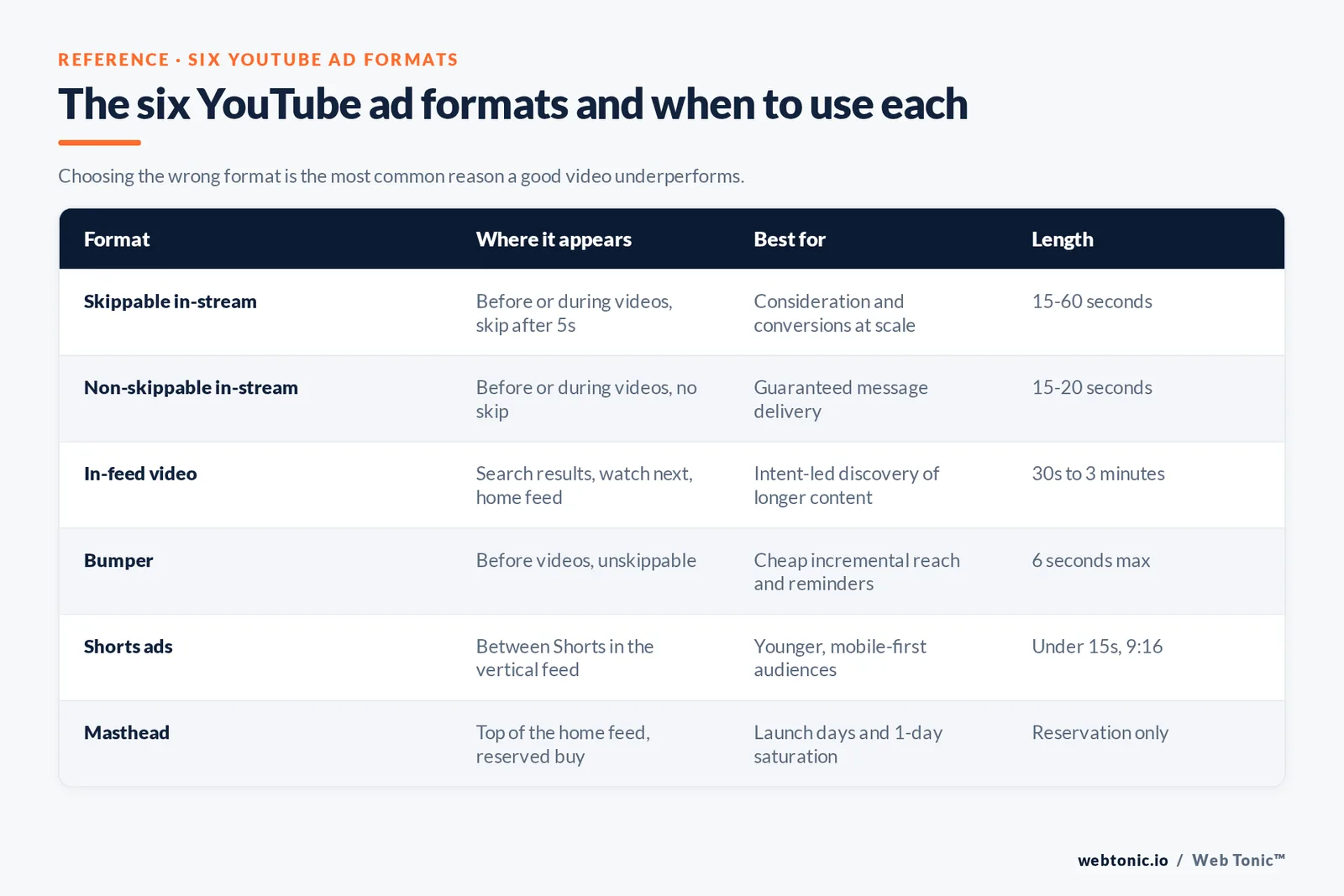
The 6 YouTube ad formats and when to use each
Every YouTube campaign is built from a small set of ad formats, documented in YouTube's advertising formats guide and in the Google Ads video ad formats reference. Choosing the wrong one is the most common reason a good video underperforms: an awareness format cannot be judged on last-click sales, and a conversion format starved of reach will never build a brand.
| Format | Where it appears | Best for | Practical length |
|---|---|---|---|
| Format 1 — Skippable in-stream | Before or during other videos, skip after 5 seconds | Consideration and conversions at scale | 15 to 60 seconds |
| Format 2 — Non-skippable in-stream | Before or during videos, no skip | Guaranteed message delivery | 15 to 20 seconds |
| Format 3 — In-feed video | Search results, watch next, home feed | Intent-led discovery of longer content | 30 seconds to 3 minutes |
| Format 4 — Bumper | Before videos, unskippable | Cheap incremental reach and reminders | 6 seconds maximum |
| Format 5 — Shorts ads | Between Shorts in the vertical feed | Younger, mobile-first audiences | Under 15 seconds, vertical 9:16 |
| Format 6 — Masthead | Top of the YouTube home feed, reserved buy | Launch days and 1-day saturation | Reservation only, via sales rep |
Reserved and partner inventory is documented separately in the YouTube & partners format reference, which matters if you also buy through a DSP.
What you need before you open Google Ads
Half of all failed YouTube launches are missing something on this list. Fix all 6 items first; each one takes minutes and saves weeks of unattributable spend.
| Prerequisite | Why it matters | Time to set up |
|---|---|---|
| Item 1 — Google Ads account | All YouTube buying except masthead runs here | 15 minutes |
| Item 2 — YouTube channel | Ads must point at a video hosted on a channel | 10 minutes |
| Item 3 — Linked accounts | Unlocks earned views, remarketing and engagement data | 5 minutes |
| Item 4 — Conversion tracking | Required for any conversion bid strategy | 30 to 60 minutes |
| Item 5 — Audience lists | Your data segments are the cheapest audience you own | 1 day to populate |
| Item 6 — 2 to 3 creative variants | One video cannot be tested against itself | Production dependent |
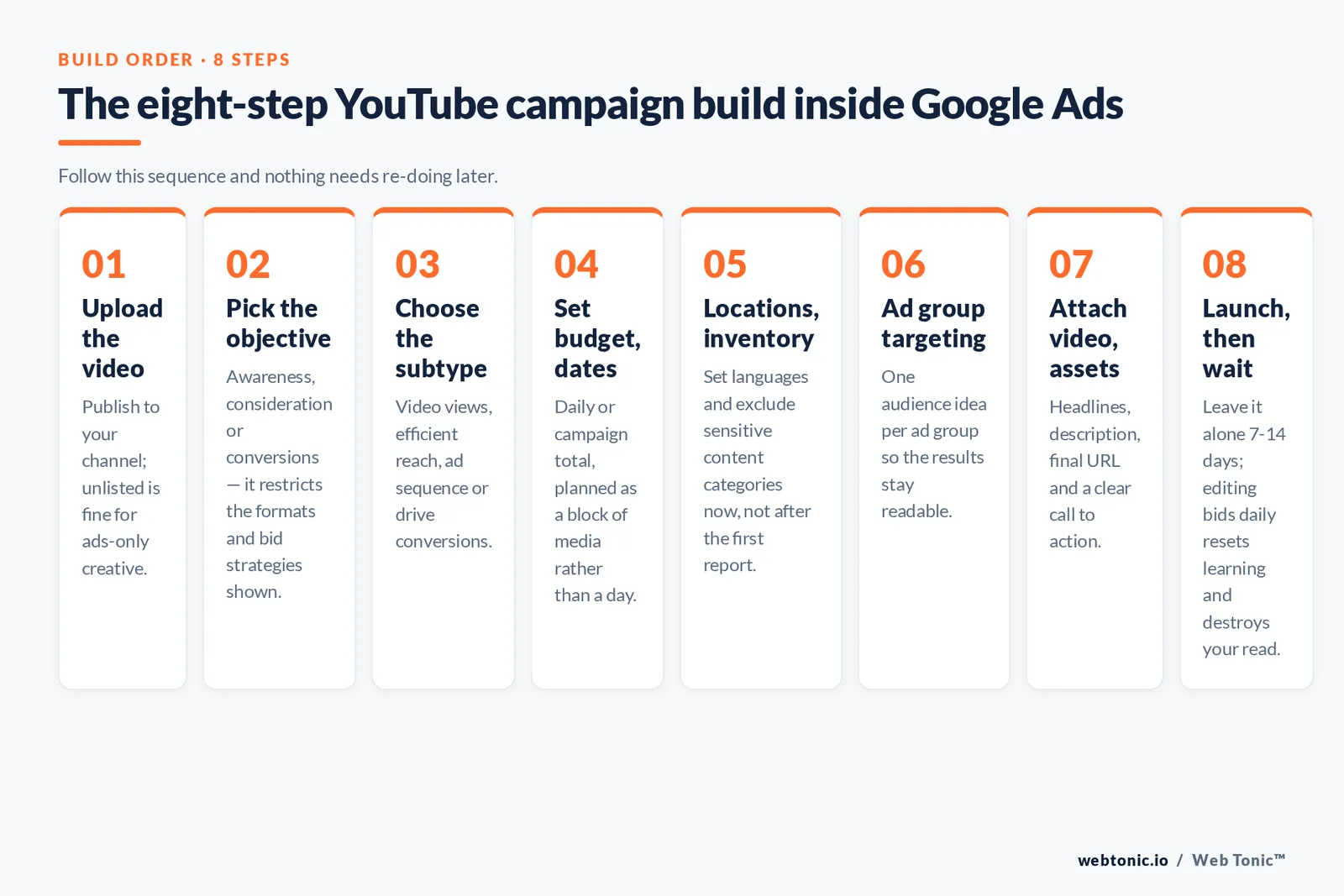
How to advertise on YouTube: the 8-step build
This is the order Google Ads walks you through when you follow its create a Video campaign flow. Do it in this sequence and nothing needs re-doing later.
Step 1 — Upload the video. Publish it to your channel; unlisted is fine for ads-only creative. Step 2 — Pick the objective. Awareness, consideration or conversions; the objective restricts which formats and bid strategies appear. Step 3 — Choose the campaign subtype. Video views, efficient reach, ad sequence or drive conversions. Step 4 — Set budget and dates. Daily or campaign total; see the Google Ads guidance on managing your spend. Step 5 — Set locations, languages and inventory. Exclude sensitive content categories at this stage, not after the first report. Step 6 — Build the ad group targeting. One audience idea per ad group so results stay readable. Step 7 — Attach the video and assets. Add headlines, description, final URL and a clear call to action. Step 8 — Launch and leave it alone for 7 to 14 days. Editing bids or audiences daily resets learning and destroys your read.
Targeting: audiences beat placements
YouTube inventory is enormous, so targeting decides efficiency. The full option set is listed in the Google Ads Video campaign targeting documentation. In most accounts the winning stack is your own data segments, then custom segments built from search behaviour, then broad demographics last.
| Targeting layer | What it does | Typical use |
|---|---|---|
| Layer 1 — Your data segments | Site visitors, customers, channel engagers | Highest-converting retargeting pool |
| Layer 2 — Custom segments | Built from search terms, URLs and apps | Closest thing to search intent on video |
| Layer 3 — In-market and life events | Active purchase signals from Google data | Mid-funnel prospecting |
| Layer 4 — Affinity | Long-term interest groups | Broad awareness at low CPM |
| Layer 5 — Placements and channels | Specific videos, channels or topics | Sponsor-style precision buys |
| Layer 6 — Demographics only | Age, gender, parental status, income | Last resort, or to cap waste |
Costs and bidding: what you actually pay for
On skippable in-stream you are billed on a view, not an impression: cost-per-view bidding charges when someone watches 30 seconds, the full ad if shorter, or interacts with it. That single mechanic is why YouTube can be cheaper per engaged second than almost any other channel — and why raw impression counts flatter bad creative.
| Bid model | You pay for | Use with | Watch out for |
|---|---|---|---|
| Model 1 — CPV | A view of 30 seconds or an interaction | Skippable in-stream, in-feed | Cheap views from disengaged inventory |
| Model 2 — Target CPM | 1,000 impressions | Bumper, non-skippable, reach goals | Frequency spiralling on small audiences |
| Model 3 — Target CPA | Conversions at a target cost | Drive-conversions subtype | Needs steady conversion volume to learn |
| Model 4 — Maximise conversions | Whatever the auction charges | New conversion campaigns | Volatile CPA in the first 2 weeks |
| Model 5 — Reservation | Fixed placement for a fixed period | Masthead and takeovers | Minimum spends set by the sales team |
There is no fixed entry price: you can start a video campaign on a small daily budget, but budgets under roughly 10 times your target action cost per day rarely gather enough data to optimise. Plan media in blocks, not in days.
| Goal | Format mix | Bid model | Minimum useful test window |
|---|---|---|---|
| Goal 1 — Brand awareness | Bumper plus skippable in-stream | Target CPM | 4 weeks |
| Goal 2 — Product launch | Masthead or non-skippable plus Shorts | CPM plus reservation | 1 to 2 weeks |
| Goal 3 — Consideration | Skippable in-stream plus in-feed | CPV | 3 weeks |
| Goal 4 — Lead generation | Skippable in-stream with lead form | Target CPA | 4 weeks |
| Goal 5 — Ecommerce sales | Skippable in-stream plus Shorts | Maximise conversions | 4 to 6 weeks |
| Goal 6 — Retargeting | Short skippable plus bumper reminders | Target CPA | 2 weeks |
Creative: the first 5 seconds carry the campaign
Video is now near-universal in marketing plans — Wyzowl's annual survey puts the share of marketers using video at 91% — so the differentiator is craft, not presence. Google's own creative research, collected on Think with Google, consistently points the same way: brand early, frame for mobile, and design for sound-on but survive sound-off.
| Creative rule | What to do | Why |
|---|---|---|
| Rule 1 — Hook in 2 seconds | Open on motion, face or problem, never a logo card | Skip decisions start immediately |
| Rule 2 — Brand before 5 seconds | Show product or name inside the unskippable window | Skipped views still deliver recall |
| Rule 3 — 1 message per ad | Split multi-benefit scripts into separate videos | Cleaner tests and clearer recall |
| Rule 4 — Caption everything | Burn in key lines for muted autoplay | Large share of mobile views start silent |
| Rule 5 — Cut 2 aspect ratios | 16:9 for in-stream, 9:16 for Shorts | Cropped creative loses attention |
| Rule 6 — Refresh every 4 to 6 weeks | Rotate hooks before view rate decays | Frequency fatigue hits video fastest |
Asset requirements for headlines, descriptions and calls to action are set out in the Google Ads assets documentation. If you need the production side handled, that is what our performance creative service exists for.
Measuring and optimising after launch
YouTube reporting punishes anyone reading only clicks. Judge awareness campaigns on reach and completion, consideration on view rate and cost per engaged view, and conversion campaigns on modelled conversions across a realistic window. Independent measurement standards from the IAB are useful when you have to reconcile platform numbers with a media plan.
| Metric | What good looks like | Action if weak |
|---|---|---|
| Metric 1 — View rate | Stable or rising week over week | Rewrite the first 5 seconds |
| Metric 2 — Cost per view | Flat at constant audience quality | Tighten inventory, exclude weak placements |
| Metric 3 — Video played to 100% | Healthy relative to ad length | Shorten the edit or move the payoff earlier |
| Metric 4 — Conversions and CPA | Within 20% of target after learning | Check tracking before touching bids |
| Metric 5 — Frequency | Under 3 to 4 per week per user | Widen the audience or add creative |
| Metric 6 — Earned actions | Rising subscribers, views and shares | Improve the video, not the media plan |
| Mistake | What happens | Fix |
|---|---|---|
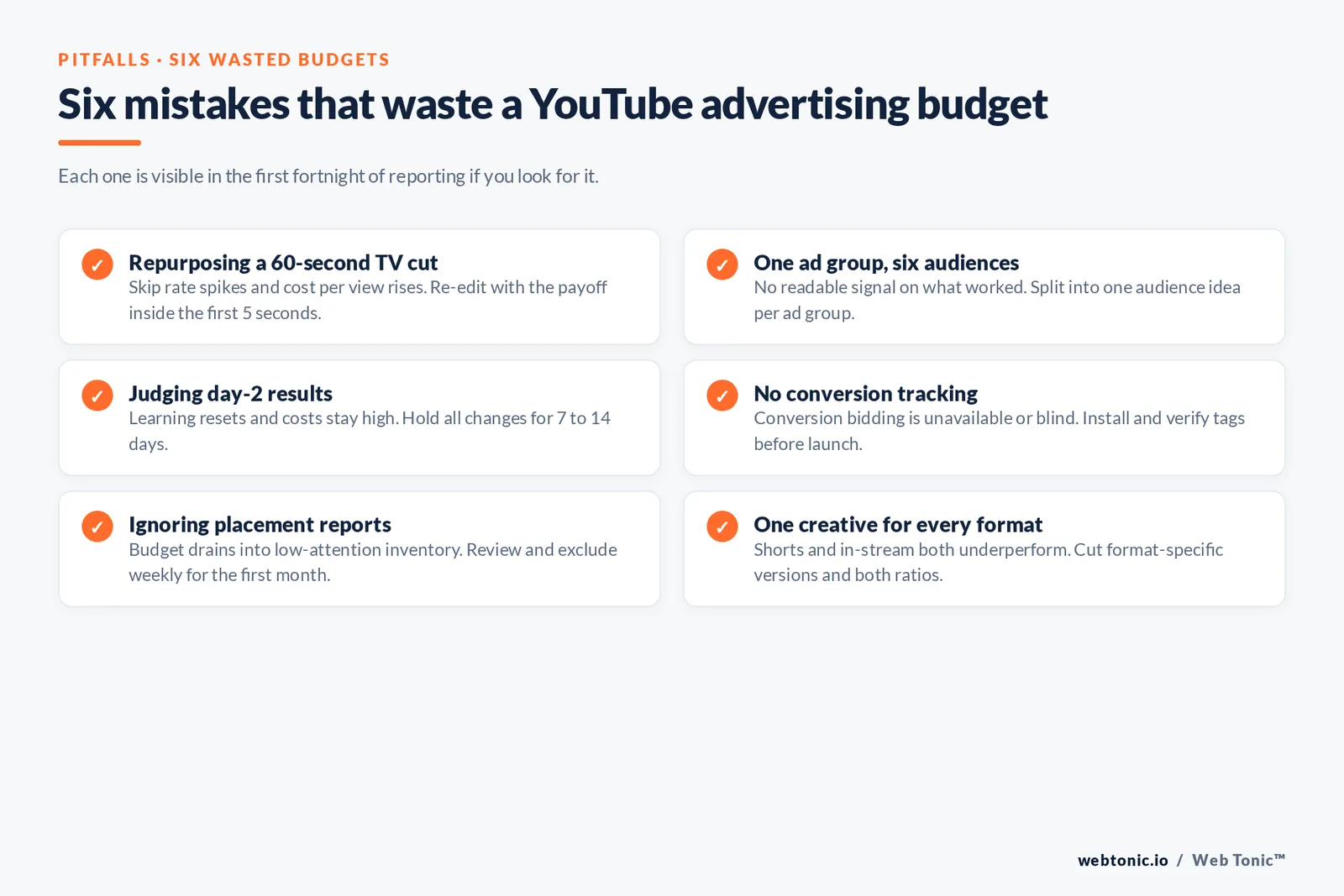
| Mistake 1 — Repurposing a 60-second TV cut | Skip rate spikes, cost per view rises | Re-edit with the payoff in the first 5 seconds |
| Mistake 2 — 1 ad group, 6 audiences | No readable signal on what worked | Split into 1 audience idea per ad group |
| Mistake 3 — Judging day 2 results | Learning resets, costs stay high | Hold changes for 7 to 14 days |
| Mistake 4 — No conversion tracking | Conversion bidding is unavailable or blind | Install and verify tags before launch |
| Mistake 5 — Ignoring placement reports | Budget drains into low-attention inventory | Review and exclude weekly for the first month |
| Mistake 6 — 1 creative for every format | Shorts and in-stream both underperform | Cut format-specific versions and ratios |
Platform product changes are announced on the official YouTube blog, and audience trend context is regularly summarised in Hootsuite's YouTube statistics roundup. If you would rather have the campaign built, measured and iterated for you, see our growth marketing service, the wider service overview, or browse more playbooks on the Web Tonic blog.

Where YouTube ads appear, and how viewers meet them
People reach your video ads in very different states of attention: mid-watch on a laptop, scrolling Shorts on a phone, or on a living-room TV screen with no clickable surface at all. Choosing formats without matching that context is how good videos waste budget. Use this table to select the placement and creative shape for the moment your target audience is actually in.
| Surface | How ads appear | Viewer state | Best format choice |
|---|---|---|---|
| Surface 1 — Mobile watch page | Skippable and non-skippable in-stream before the video | Committed to specific content | 15 to 30 second in-stream |
| Surface 2 — Shorts feed | Vertical ads between Shorts as users scroll | Fast browsing, low patience | Under 15 seconds, 9:16 |
| Surface 3 — Home and search results | In-feed video ads beside organic videos | Actively choosing what to watch | In-feed with a strong thumbnail |
| Surface 4 — Connected TV | In-stream ads on the big screen, no click | Lean-back, often co-viewing | Brand-led, QR or search prompt |
| Surface 5 — Desktop watch page | In-stream plus companion assets | Longer sessions, research mode | Longer in-stream with clear CTA |
| Surface 6 — Google video partners | Video ads on partner sites and apps | Incidental, lowest attention | Bumper or excluded entirely |
Choose your campaign by budget level
Budget decides how many things a YouTube advertising programme can learn at once. A small monthly budget should buy 1 audience, 1 format and 2 creative variants; large budgets can run awareness, consideration and conversion campaigns in parallel and still give each enough views to optimise on.
| Monthly budget | Campaign count | Targeting to select | Creative volume |
|---|---|---|---|
| Tier 1 — Under $1,000 | 1 campaign, 1 ad group | Your own data segments only | 2 videos |
| Tier 2 — $1,000 to $5,000 | 2 campaigns: retargeting plus prospecting | Data segments plus custom segments | 3 to 4 videos |
| Tier 3 — $5,000 to $20,000 | 3 campaigns across the funnel | Add in-market and life events | 6 or more videos, 2 ratios |
| Tier 4 — Over $20,000 | Full-funnel plus always-on testing | Layered audiences plus placements | Monthly creative refresh |
| Tier 5 — Launch burst | Reservation plus support campaigns | Broad reach with demographic caps | Hero video plus 3 cutdowns |
A 10-point pre-launch checklist
Run this list the day before your video campaign goes live. Each step takes minutes; skipping any of them is the difference between a campaign you can read and one you cannot.
| Check | What to confirm | Where in Google Ads |
|---|---|---|
| Check 1 — Video live | The video is public or unlisted on your channel | YouTube Studio |
| Check 2 — Accounts linked | Channel linked to the ads account | Linked accounts |
| Check 3 — Conversions firing | A test conversion recorded in the last 7 days | Goals and conversions |
| Check 4 — Budget set correctly | Daily budget matches the planned monthly cost | Campaign settings |
| Check 5 — Bid strategy chosen | Bidding matches the objective, not habit | Bidding section |
| Check 6 — Exclusions applied | Content types and sensitive categories excluded | Inventory and content settings |
| Check 7 — 1 audience per ad group | No stacked audiences inside 1 ad group | Ad group targeting |
| Check 8 — Assets complete | Headline, description, final URL and CTA present | Ad creation |
| Check 9 — Frequency capped | A weekly cap on reach and awareness campaigns | Additional settings |
| Check 10 — Reporting columns saved | View rate, CPV, conversions and frequency visible | Campaign columns |
Related reading
- How the YouTube Algorithm Works: Signals, Surfaces and Shorts
- YouTube Statistics 2026: Users, Demographics, Shorts and Revenue
- How to Get on the TikTok FYP: Eligibility, Signals and Fixes
- Paid Social services at Web Tonic
FAQ
How much does it cost to advertise on YouTube?
There is no fixed minimum. You set a daily or campaign budget in Google Ads and pay per view on CPV formats or per 1,000 impressions on CPM formats. What matters more than the entry price is having enough daily budget to gather data: as a planning rule, budget at least 10 times your target cost per action per day, and run for a minimum of 2 to 4 weeks.
Do I need a YouTube channel to run YouTube ads?
Yes. Video ads reference a video hosted on a YouTube channel, so you need a channel and an uploaded video, which can be unlisted if you do not want it public. Linking the channel to your Google Ads account also unlocks earned views, engagement data and remarketing to people who interacted with your videos.
Which YouTube ad format converts best?
For direct response, skippable in-stream with a conversion bid strategy is the workhorse, because you only pay for engaged views and the algorithm optimises toward your tracked action. Bumper and non-skippable formats are reach tools; in-feed suits longer content that people choose to watch. Most accounts run 2 formats together rather than one.
How long should a YouTube ad be?
Match the format. Bumpers are 6 seconds, non-skippable in-stream is typically 15 to 20 seconds, and skippable in-stream works between 15 and 60 seconds when the hook lands in the first 2 seconds. Longer edits can work for in-feed placements where the viewer opted in.
How do I stop my ads showing on irrelevant videos?
Use inventory and content exclusions when you build the campaign, then review the placement report weekly for the first month and exclude channels and videos that consume budget without engagement. Combining audience targeting with topic or placement exclusions gives more control than either layer alone.
Sources: YouTube Help (advertising formats); Google Ads Help (video ad formats, create a Video campaign, targeting for Video campaigns, cost-per-view bidding, assets, data segments, manage your spend); Display & Video 360 Help (YouTube and partners ad formats); Pew Research Center, Americans' Social Media Use, January 2024; Wyzowl video marketing statistics; Think with Google video strategies; IAB insights; YouTube official blog; Hootsuite YouTube statistics. All sources accessed August 2026.


