



Table of contents

A website audit is a structured review of the technical health, search engine visibility, content quality, speed and user experience of a site. Work through the checklist below in seven passes, log every issue with a severity score, and fix the crawl and indexing blockers before anything else.
Key Takeaways
- 7 audit passes cover a full site: crawl and indexing, technical SEO, performance speed, content, links and navigation, accessibility and UX, and conversion.
- The Core Web Vitals pass thresholds are LCP under 2.5 seconds, INP under 200 milliseconds and CLS under 0.1 at the 75th percentile.
- 95.9% of the top 1,000,000 home pages had detectable WCAG 2 failures in 2026, at an average of 56.1 errors per page — accessibility is the most neglected section of the list.
- A free website audit gets you far: 4 free tools (Search Console, PageSpeed Insights, WAVE, a 500-URL crawl) surface most of the issues in this checklist.
- Score every finding P1 to P3 by traffic-at-risk, then fix in that order — a prioritised list of 15 items beats an unranked list of 300.
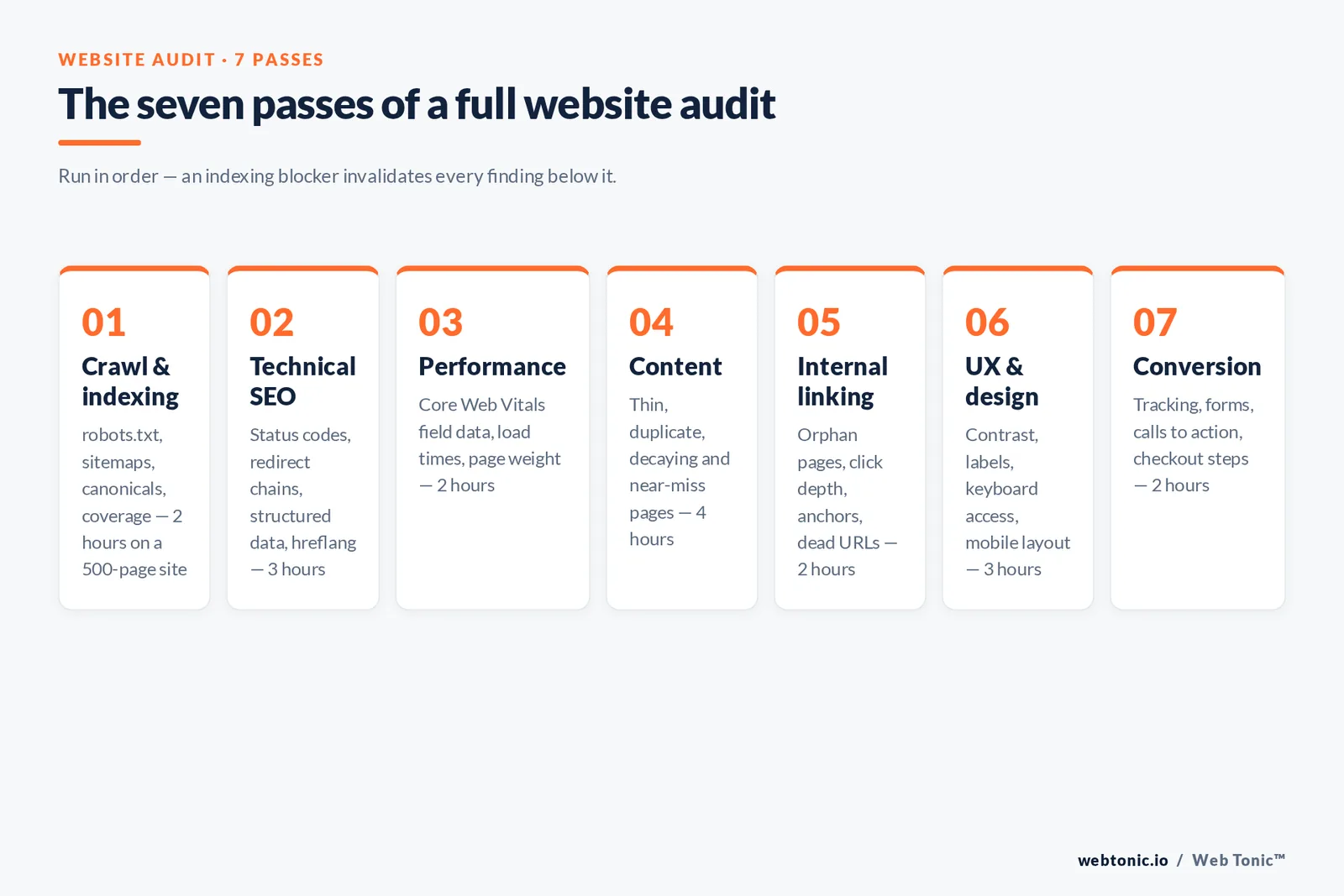
The website audit checklist at a glance
Each pass has its own tools, its own pass or fail thresholds, and its own owner. Run them in this order: an indexing problem makes every content finding below it irrelevant, because a page search engines cannot reach cannot rank however good the copy is.
| Pass | What it checks | Primary tools | Time on a 500-page site |
|---|---|---|---|
| 1. Crawl & indexing | robots.txt, sitemaps, canonicals, noindex, coverage | Search Console, crawler | 2 hours |
| 2. Technical SEO | status codes, redirects, structured data, hreflang | Crawler, Rich Results Test | 3 hours |
| 3. Performance speed | Core Web Vitals, load times, image weight | PageSpeed Insights, CrUX | 2 hours |
| 4. Content audit | thin, duplicate and stale pages, intent match | Analytics + Search Console export | 4 hours |
| 5. Internal linking | internal linking, orphan pages, dead URLs, anchors | Crawler, off-site tool | 2 hours |
| 6. UX & design | mobile layout, contrast, labels, keyboard access | WAVE, axe, manual pass | 3 hours |
| 7. Conversion | forms, funnels, tracking, calls to action | Analytics, session recordings | 2 hours |
Types of website audits and when to run each
The term covers at least six distinct jobs. Pick the type that matches the decision you need to make; a full review every quarter plus a targeted pass after every release is a realistic cadence for most teams.
| Review type | Question it answers | Scope | Frequency |
|---|---|---|---|
| Full site review | What is holding the whole site back? | All 7 passes, every template | Quarterly |
| Technical SEO audit | Can search engines crawl, render and index us? | Passes 1–3 | Monthly |
| Content audit | Which pages to keep, merge, rewrite or delete? | Every indexable URL | Twice a year |
| Migration review | Did we lose URLs, redirects or traffic in the launch? | Redirect map, top 200 URLs | Before and 14 days after launch |
| Accessibility review | Does the site meet WCAG 2.2 AA? | Templates plus 20 sample pages | Twice a year |
| Conversion rate optimization pass | Where does revenue leak in the funnel? | Top 10 landing pages, checkout | Quarterly |
Pass 1: crawling, indexing and robots.txt
Start where search engine visibility is won or lost. Google's robots.txt introduction and the sitemap build guide define the pass conditions; the Page indexing report in Google Search Console tells you what Google actually did with each URL.
| Item | How to verify | Pass condition | Severity if failed |
|---|---|---|---|
| robots txt rules | Open /robots.txt, test key paths | No Disallow on money or template assets | P1 |
| XML sitemap | Search Console Sitemaps report | Only 200-status indexable URLs, submitted | P2 |
| Indexed vs submitted | Page indexing report | Over 90% of intended pages indexed | P1 |
| Stray noindex | Crawl the site, filter meta robots | 0 noindex tags on commercial pages | P1 |
| Canonical consistency | Compare declared and selected canonicals | Self-referencing canonicals on all originals | P2 |
| Parameter duplicates | Crawl with parameters enabled | Duplicate URLs consolidated | P2 |
| Rendered HTML | URL Inspection, rendered DOM | Main content present without JavaScript | P1 |
The published guidance on consolidating duplicate URLs is the reference for the last three rows. Rule 1 — 1 canonical per content set, and never mix a canonical with a conflicting noindex.
Pass 2: technical SEO checks
Pass 2 is a crawl plus a diff against best practices. Crawl with a desktop site crawler (500 URLs free), then compare titles, snippets and markup with the Google SEO starter guide.
| Item | Threshold | Common issues found |
|---|---|---|
| HTTP status codes | 0 internal 4xx, under 5% redirects | Dead menu items after a redesign |
| Redirect chains | Max 1 hop | http → https → www → trailing slash chains |
| HTTPS & mixed content | 100% of assets on HTTPS | Legacy images served over http |
| Title tags | Unique, 40–60 characters | Duplicate titles across paginated sets |
| Meta descriptions | Unique, 120–158 characters | Missing on 30–60% of blog URLs |
| Heading structure | 1 H1 per page, ordered H2s | H1 used as a styling class |
| Structured data | 0 errors in Rich Results Test | Missing required Product fields |
| Hreflang | Return tags on every alternate | One-way tags between language folders |
| Pagination | Crawlable anchor links, not JS only | Infinite scroll with no paginated URLs |
Use the official structured data documentation as the pass condition, not a plugin's own report. Limit 2: 2 clicks from the home page to any revenue page keeps both crawlers and users out of dead ends.

Pass 3: performance and Core Web Vitals
Field data beats lab data. Check the Core Web Vitals report in Search Console first, then diagnose individual templates in PageSpeed Insights. Current thresholds are published in the web.dev Vitals reference; Interaction to Next Paint replaced First Input Delay as the responsiveness metric in 2023.
| Metric | Good | Needs improvement | Poor | Usual cause on a failing site |
|---|---|---|---|---|
| LCP (load times) | ≤ 2.5 s | 2.5–4.0 s | > 4.0 s | Uncompressed hero image, slow server |
| INP (responsiveness) | ≤ 200 ms | 200–500 ms | > 500 ms | Third-party tag scripts on the main thread |
| CLS (visual stability) | ≤ 0.1 | 0.1–0.25 | > 0.25 | Images and ads without width and height |
| TTFB | ≤ 0.8 s | 0.8–1.8 s | > 1.8 s | No caching layer or CDN |
| Total page weight | ≤ 1.5 MB | 1.5–3 MB | > 3 MB | PNG hero images, unused font weights |
Mobile benchmarks show that 53% of mobile visits are abandoned when a page takes longer than 3 seconds to load, and Nielsen Norman Group's work on website response times puts the limit for uninterrupted flow at 1 second. Both are documented in the mobile page speed benchmarks. Fact 3 — a 1-second delay is enough to change the perception of a site from responsive to sluggish.
Pass 4: the content checklist
Export every indexable URL with its clicks, impressions, entrances and conversions, then assign one of five actions. Nothing is deleted without a redirect target.
| Content signal | Threshold | Action | Why it matters |
|---|---|---|---|
| Zero clicks in 12 months | 0 clicks, 0 conversions | Delete and redirect | Cuts crawl waste and index bloat |
| Thin pages | Under 300 words, no unique value | Merge into a parent page | Consolidates relevance signals |
| Overlapping intent | 2+ URLs ranking for the same query | Consolidate, keep the stronger URL | Ends self-competition in the SERP |
| Decaying pages | Clicks down 30% year on year | Refresh data, examples, screenshots | Recovers rankings cheaply |
| Near-miss pages | Average position 8–20 | Expand coverage, add internal links | Highest return per hour of work |
| Intent mismatch | Query type ≠ page format | Change format (list, comparison, guide) | Format mismatch caps the ceiling |
Reference walkthroughs from Ahrefs SEO audit walkthrough and Backlinko's site audit process both start from this same export. If you are segmenting the audit by audience rather than by template, our guide to market segmentation pairs well with the content pass.
Pass 5: internal linking, navigation and anchors
Internal linking tells search engines what a site considers important, and carries users from research to purchase. Moz's reference on internal linking covers the mechanics; this pass is about distribution.
| Item | Pass condition | How to fix a failure |
|---|---|---|
| Orphan pages | 0 indexable pages with no inbound path | Add hub and sibling links |
| Click depth | Money pages within 3 clicks | Promote into navigation or hub pages |
| Dead internal URLs | 0 internal 404s | Repoint the anchor, not the redirect |
| Anchor text | Descriptive, no "click here" | Rewrite to the target's topic |
| Navigation labels | Match the words users search | Rename from search term data |
| Dead outbound citations | Under 1% of outbound citations dead | Swap or remove the citation |
| Off-site profile | Top 20 linked pages still resolve 200 | Redirect lost URLs to the closest match |
Pass 6: user experience, design and accessibility
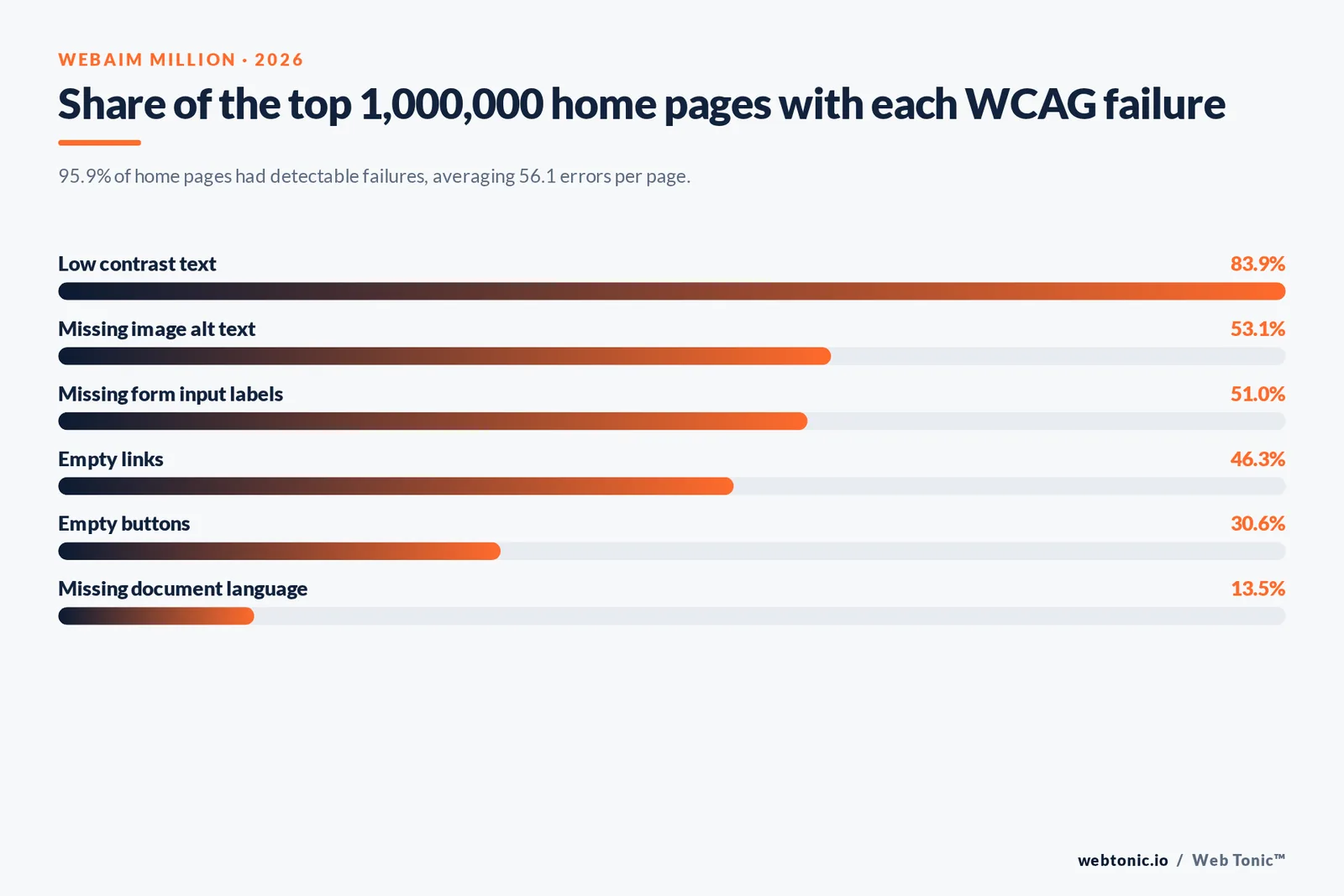
Automated tools catch only a slice of this area, and that slice is already alarming. The 2026 WebAIM Million analysis of one million home pages found 95.9% with detected WCAG 2 failures, up from 94.8% a year earlier, and an average of 56.1 errors per page across 1,437 page elements. Six failure types account for 96% of all errors.
| WCAG failure type | Share of home pages (2026) | How to test |
|---|---|---|
| Low contrast text | 83.9% | Contrast ratio ≥ 4.5:1 for body text |
| Missing image alt text | 53.1% | Descriptive alt on every content image |
| Missing form input labels | 51.0% | Programmatic label on every field |
| Empty links | 46.3% | Icon links carry accessible names |
| Empty buttons | 30.6% | Buttons expose text or aria-label |
| Missing document language | 13.5% | lang attribute set on the html element |
Run WAVE on key templates, then do a manual keyboard-only pass — tab order, focus rings, skip links, modal traps. The W3C WCAG overview defines the conformance levels; the WebAIM Million report supplies the benchmarks above. Trap 4 — an automated score of 0 errors is not conformance, because roughly a third of criteria can only be checked by a human.
Pass 7: conversion rate optimization and ecommerce checks
The last pass ties the audit to revenue. Ecommerce sites add feed, faceted navigation and checkout checks on top of the standard set.
| Area | Check | Pass condition |
|---|---|---|
| Tracking | Key events fire once, deduplicated | 0 duplicate conversions in a test session |
| Forms | Field count and error handling | Under 7 fields, inline validation |
| Calls to action | 1 primary action above the fold | Visible without scrolling on mobile |
| Ecommerce facets | Filter URLs crawlable or blocked by design | No infinite parameter combinations indexed |
| Product pages | Unique copy, stock status, review markup | 0 structured data errors |
| Checkout | Steps, guest checkout, payment options | Under 4 steps to purchase |
| Trust signals | Contact details, policies, reviews | Present on every template |
Shopify's ecommerce SEO checklist is a good cross-reference for the product and facet rows. For the analytics side, our data intelligence team treats broken tracking as a P1: a review built on wrong numbers produces wrong priorities.
Tooling: the free stack and what it misses
| Tool | Cost | Covers | Blind spot |
|---|---|---|---|
| Search Console | Free | Indexing, queries, Core Web Vitals field data | Only your own verified site |
| PageSpeed Insights | Free | Lab and field performance speed per URL | One URL at a time |
| Desktop site crawler | Free to 500 URLs | Status codes, titles, canonicals, depth | No historical trend |
| WAVE / axe | Free | Automated accessibility errors | Roughly a third of WCAG needs humans |
| Analytics platform | Free tier | Behaviour, funnels, conversion | Consent gaps skew totals |
| Paid SEO suite | $99–$499 / month | Off-site data, competitor gaps, scheduled crawls | Third-party metrics are estimates |
A free stack built on the first five rows is enough for most sites under 1,000 URLs. Limit 5 — 500 URLs is the usual free crawl cap, so audit templates and samples rather than everything.
Scoring and prioritising the findings
Findings without a rank become a backlog nobody clears. Score each issue on traffic at risk, effort and confidence, then ship in P1 → P3 order.
| Severity | Definition | Examples | Fix window |
|---|---|---|---|
| P1 | Blocks indexing, revenue or access | Site-wide noindex, failed checkout, 404 on a top page | 48 hours |
| P2 | Suppresses performance measurably | Poor LCP on templates, duplicate titles, orphan pages | 30 days |
| P3 | Best-practice cleanup | Missing image alt text on old posts, minor chains | Next quarter |

Common mistakes to avoid
| Mistake | What it costs | Do this instead |
|---|---|---|
| Exporting 3,000 crawler "issues" raw | The team ignores the report | Ship a 15-item prioritised list |
| Reviewing only the home page | Template-level problems stay hidden | Sample every template type |
| Trusting lab speed scores only | Real users still wait | Use field Core Web Vitals data |
| Skipping the content pass | Index bloat and self-competition | Classify every URL into 1 of 5 actions |
| No re-run | Fixes regress within 2 releases | Re-run passes 1–3 monthly |
| No owner per finding | Nothing ships | Name 1 owner and 1 date per row |
If the output is a rebuild rather than a fix list, our web development team scopes the work from the same severity table, and the Web Tonic blog has deeper guides on each pass. Talk to us through contact if you would rather we ran it for you.
Related reading
- Website Migration Checklist SEO: What It Is & How to Use It
- How to Increase Website Visibility: The 8 Surfaces That Matter
- SEO Audit: What It Is and How to Do It (Step-by-Step Guide)
- GEO & AEO services at Web Tonic
FAQ: website audit questions
How long does a website audit take?
Budget 16 to 18 hours of analyst time for a 500-page site across all seven passes, plus the crawl runtime. Passes 1 to 3 alone take 5 to 7 hours. Large ecommerce catalogues are reviewed by template and sample, not URL by URL, so the time does not scale linearly with page count.
Can I do a free website audit myself?
Yes. Search Console, PageSpeed Insights, a 500-URL desktop crawl and WAVE cover crawling, indexing, performance speed and automated WCAG errors at no cost. Paid suites mainly add historical trends, competitor data and scheduled reports.
What should I fix first?
Anything that blocks search engines or revenue: stray noindex tags, disallow rules on important paths, internal 404s on pages that earn traffic, and broken conversion tracking. Only then move to page performance, content consolidation and design cleanup.
How often should a website be audited?
Run passes 1 to 3 monthly, a full site review quarterly, and content plus accessibility passes twice a year. Always re-run immediately before and 14 days after a migration or redesign, because that is when redirects, canonicals and tracking break most often.
Is a website audit the same as an SEO audit?
No. An SEO-only review focuses on search engine visibility: crawling, indexing, technical SEO, content and off-site signals. A website audit is broader and also covers user experience, design, website accessibility and conversion rate optimization, which decide whether the traffic those rankings unlock turns into revenue.
Sources
Google Search Central — SEO starter guide, robots.txt introduction, sitemap guide, duplicate URL consolidation, structured data documentation, Introducing INP (2023) · Google Search Console Help — Page indexing report · web.dev — Core Web Vitals thresholds · Google PageSpeed Insights · Think with Google — Mobile page speed benchmarks · Nielsen Norman Group — Website response times · WebAIM Million, 2026 report · W3C Web Accessibility Initiative — WCAG overview · WAVE web accessibility evaluation tool · Moz — Internal links · Ahrefs — SEO audit · Backlinko — SEO site audit · Shopify — Ecommerce SEO checklist. All figures retrieved August 2026.


