Table of contents
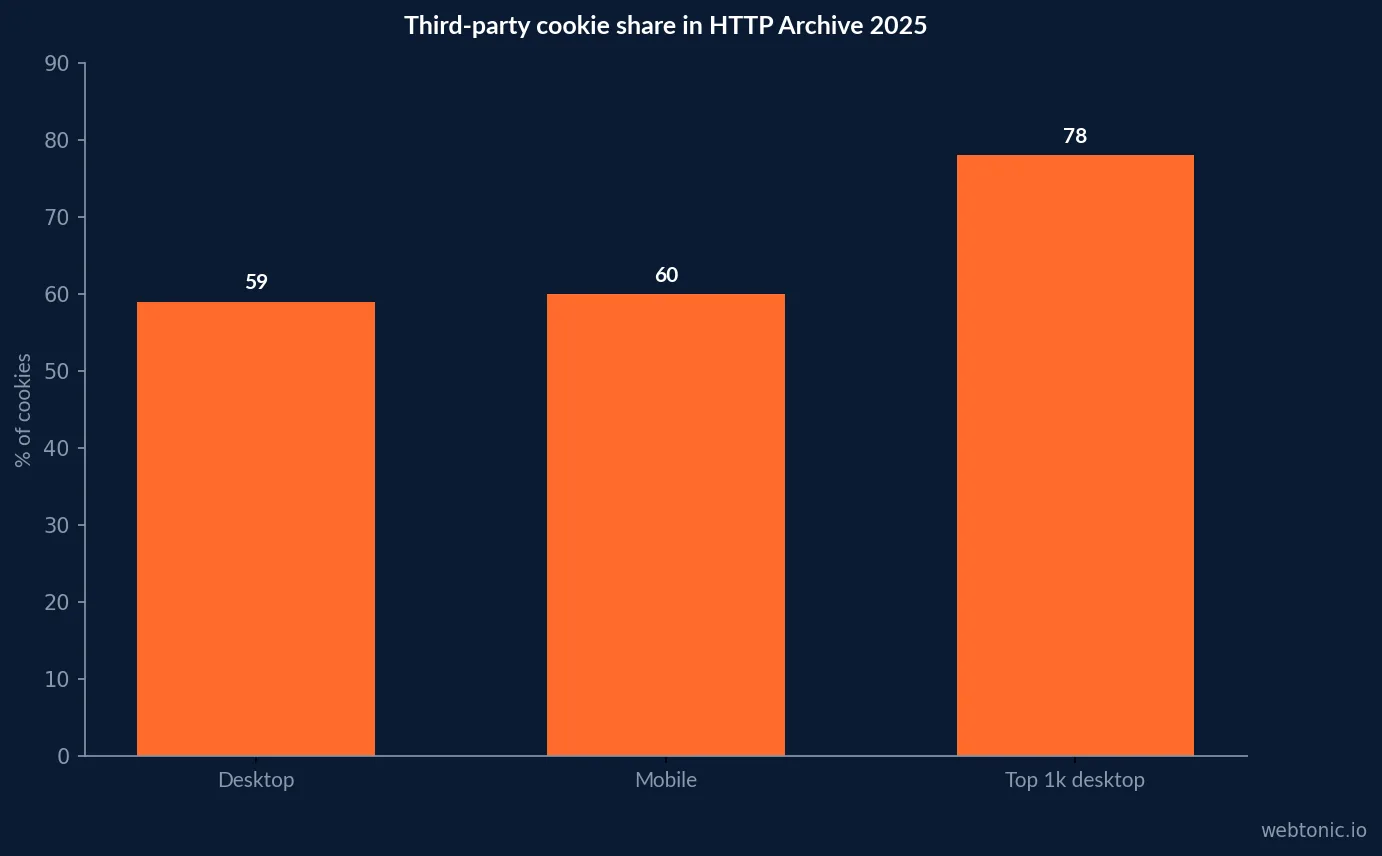
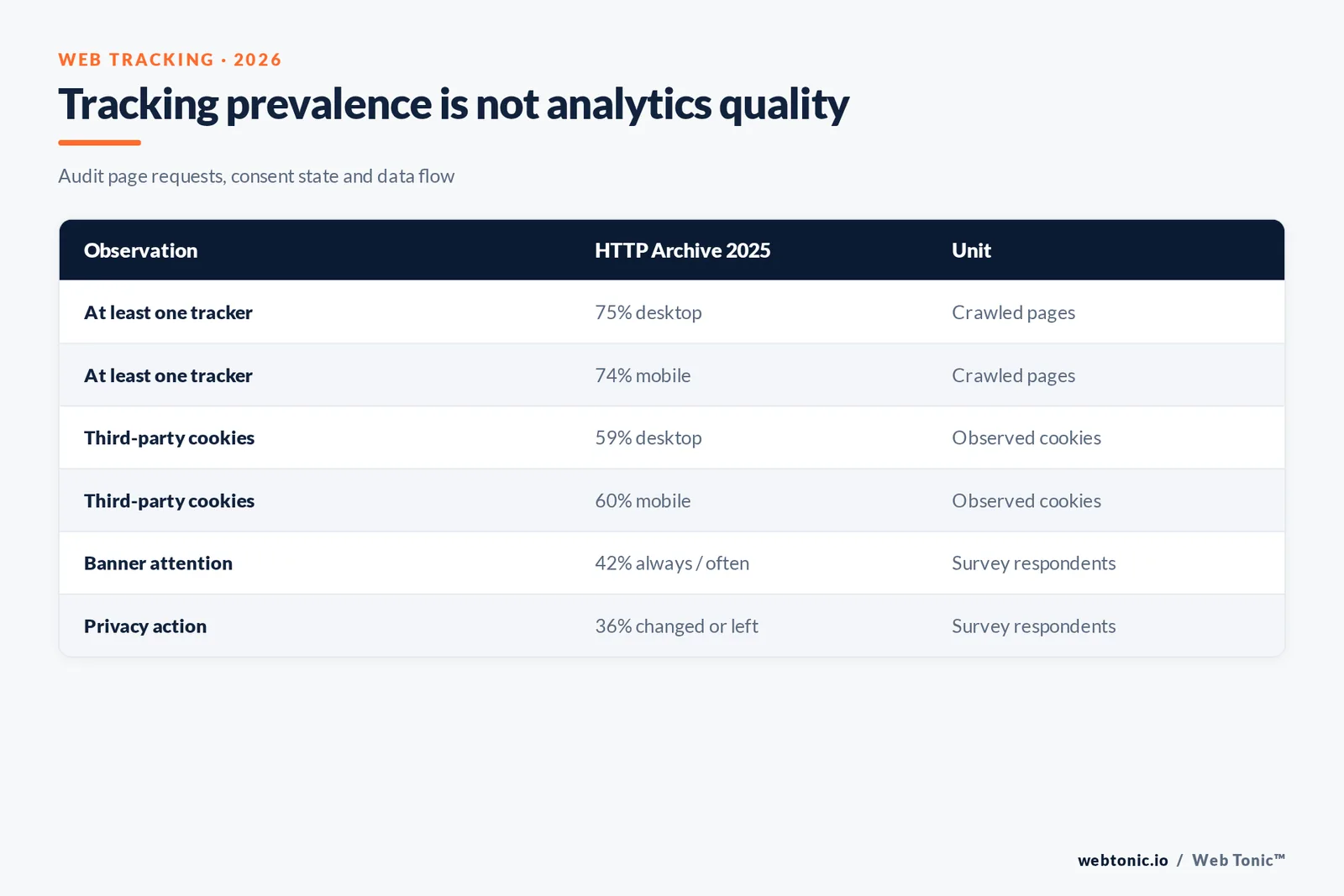
Web tracking benchmarks describe what code and identifiers pages use, not how visitors engage with a site. HTTP Archive’s 2025 Web Almanac found at least one third-party tracker on 75% of desktop pages and 74% of mobile pages in its crawl. The unit is crawled pages, so the figure is a technical prevalence signal—not a user-level probability.
Key Takeaways
- 75% of desktop pages and 74% of mobile pages had at least one tracker in HTTP Archive’s 2025 crawl.
- 55% of desktop pages had two trackers, and 39% had three, under the report’s tracker classification.
- Advertising trackers appeared on 59% of pages and site analytics on 52% in the 2025 Privacy chapter.
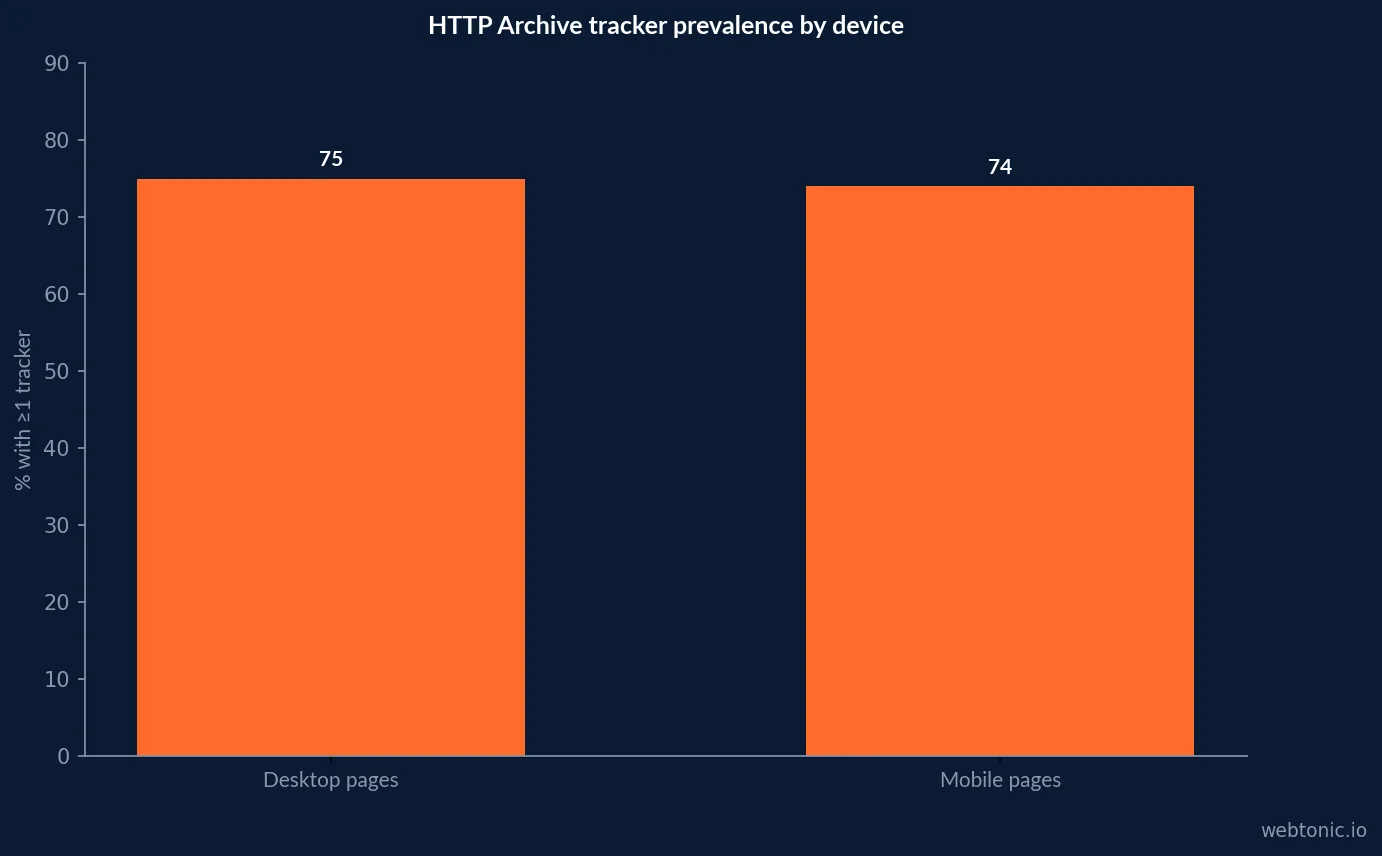
- About 59% of desktop cookies and 60% of mobile cookies were third-party in the top-million-site crawl.
- 78% of cookies on the top 1,000 desktop sites were third-party, versus just under 50% among the top 10,000.
- 90% or more of crawled pages used at least one third party in HTTP Archive’s 2025 Third Parties chapter.
- 42% of surveyed consumers said they read cookie banners always or often in Usercentrics’ 2025 survey.
- 36% of consumers reported changing privacy settings or leaving a site/app due to privacy concerns in that survey.
This page tracks the tracking layer
Web analytics asks what visitors did and what outcomes followed. Web tracking asks how measurement and third-party technologies are deployed: cookies, scripts, pixels, tags, referrers and consent signals. The distinction matters because a tracking audit can improve data integrity without changing the site’s conversion rate.
This article treats page crawl prevalence, cookie composition and consent behavior as the core units. Bounce rate, CPC and channel-source reporting are downstream analytics outputs; they are included only as examples of what a tracking implementation can support, not as performance benchmarks.
Third-party tracker prevalence in the 2025 web crawl
HTTP Archive’s 2025 Web Almanac Privacy chapter found at least one third-party tracker on 75% of desktop pages and 74% of mobile pages. The chapter identified trackers using the WhoTracks.Me catalog and included categories such as advertising, site analytics and social media. It reports unique tracker domains at the page level, rather than total HTTP requests.
The same analysis found 55% of desktop pages contained two trackers and 39% contained three. These are observations from a crawl and a chosen classifier. First-party server-side tracking and tools not represented in the catalog can make the real implementation more complex.
| Consent state | What to test | Expected evidence | Benchmark caveat |
|---|---|---|---|
| No choice yet | Initial page load | Essential request inventory | Jurisdiction and banner differ |
| Reject optional cookies | Reject all / manage options | No non-essential tag request | Record any exceptions |
| Accept analytics | Explicit analytics choice | Analytics requests only | Purpose and scope need clarity |
| Withdraw consent | Change preferences later | Tags stop / identifiers cleared as designed | Retest stored state |
| GPC enabled | Privacy signal sent | Observed signal handling | Not a substitute for all obligations |
Cookie composition shifts by popularity
The Web Almanac Cookies chapter, based on the July 2025 HTTP Archive crawl of the top million sites, found roughly 41% first-party and 59% third-party cookies on desktop; on mobile, the split was about 40% and 60%. Cookie shares are not the same as the percentage of sites using cookies; the unit here is cookie prevalence.
Popularity mattered: the chapter reports that 78% of cookies on the top 1,000 desktop sites were third-party, while the share was just below 50% for the top 10,000. A portfolio-wide average therefore hides notable variation in the sites and services that attract dense third-party integrations.
Third-party infrastructure is broader than ad tags
HTTP Archive’s 2025 Third Parties chapter found 90% or more of pages used at least one third party across popularity groups. CDNs, analytics, advertising, payment, video embeds and tag managers serve different technical purposes. The Web Almanac notes its crawl cannot see server-to-server activity and therefore treats some server-side or CNAME-routed tracking as first-party; its prevalence measures are a lower bound for some third-party interactions.
Inventory by purpose and data flow, not by the number of scripts alone. A video player and an advertising tracker have different risk profiles even if each creates a network request.
Benchmark table: tracker and cookie observations
These figures describe different layers: page-level tracker domains, cookie shares, third-party service adoption and consumer survey responses. Keep each denominator and collection method next to the stat before using it in a policy or architecture discussion.
| Measurement | 2025 observation | Unit / method | Interpretation |
|---|---|---|---|
| Third-party trackers | 75% desktop; 74% mobile | Pages with ≥1 tracker; HTTP Archive | Crawl page prevalence |
| Tracker count | 55% of desktop pages had 2; 39% had 3 | Unique tracker domains | Selected WhoTracks.Me categories |
| Cookie composition | 41% first-party / 59% third-party desktop | Cookies on top-million-site crawl | Cookie share, not site share |
| Popular-site cookie mix | 78% third-party in top 1,000 | Desktop cookies by site-rank group | Site popularity changes mix |
| Third-party adoption | 90%+ pages used ≥1 third party | Third Parties chapter crawl | Includes non-tracking services |
Consent expectations are part of tracking quality
Usercentrics’ 2025 State of Digital Trust report surveyed 10,000 consumers in the UK, Germany, Italy, Spain, the Netherlands and the United States. It reports 42% read cookie banners always or often, 46% click “accept all” less often than three years earlier, and 36% have changed privacy settings or stopped using a website or app because of privacy concerns.
These are survey responses, not a measured consent rate for your banner. They indicate that clarity and control matter to users; validate your own experience using consent-state tests and compliant implementation, not assumed acceptance.
| Survey response | Usercentrics 2025 figure | Survey population | Do not mistake for |
|---|---|---|---|
| Read banner always/often | 42% | 10,000 consumers in 6 markets | Your site consent rate |
| Accept all less often than 3 years ago | 46% | Consumer self-report | Observed rejection rate |
| Changed settings or stopped use due privacy | 36% | Consumer self-report | Causal effect on all visitors |
| Still comfortable with brand collection | 65% | Consumer self-report | Blanket consent |
Traffic source data is an instrumentation output
Source attribution is only as reliable as the path from link to session. Campaign tags can be stripped by redirects; email security tools can rewrite links; browsers and privacy controls may suppress referrer detail; mobile apps can open web pages without carrying a useful source. A large “direct” bucket may therefore include unknown or lost-source visits.
Use stable UTM conventions, preserve parameters through redirects, exclude known internal traffic, and reconcile source sessions with advertising platforms and CRM outcomes. Do not claim a channel caused a conversion solely because its last recorded click was available.
HTTP Archive’s 2025 crawl also found 90% to 92% of pages used at least one third party across rank groups, according to the Third Parties chapter. That includes infrastructure and embedded services, not all trackers. Its authors note that server-side and CNAME-routed activity can be classified as first party in the crawl, making some counts a lower bound. Read the chapter’s method.
CPC needs a paid-media denominator
Cost per click is spend divided by paid clicks for a defined account, platform, campaign and period. It is not a web tracking benchmark, but accurate tagging helps connect those clicks to post-click behavior. Compare CPC by network, objective, geography and intent; do not treat a blended account average as a target for every campaign.
Separate click cost from cost per qualified session and cost per conversion. Tracking can reveal that a seemingly inexpensive click arrives with low intent, but that conclusion requires consistent campaign parameters and conversion events.
Bounce rate depends on the analytics event model
Tracking determines whether page views, engagement events and conversions are recorded; the analytics product then applies its own definitions. A consent change, tag firing condition or single-page-app route implementation may shift bounce rates without any change in visitor behavior. Document the measurement version and date whenever the rate changes materially.
For GA4, bounce rate is the share of sessions that are not engaged under its engagement rules. That is separate from the HTTP Archive’s count of third-party tracker domains and from a simple one-page exit. Do not map one number onto another.
| Tracking layer | Test | Evidence to retain | Common failure |
|---|---|---|---|
| Consent | Accept / reject / change settings | Network log and consent state | Tags fire before choice |
| Cookies | Domain, expiry, SameSite, Secure | Browser storage snapshot | Unowned persistent identifiers |
| Campaign source | Tagged link through redirect | Landing URL and analytics session | UTM stripped or overwritten |
| Events | Known user journey and conversion | Debug view plus backend record | Duplicate or missing conversions |
| Third parties | Script owner and data purpose | Vendor inventory and request map | Legacy or undocumented tags |
A tracking audit that produces usable evidence
Inventory browser-side tags and server-side endpoints; record owner, purpose, vendor, data categories and consent requirement. Test first visit, accepted consent, rejected consent and preference changes across mobile and desktop browsers. Validate network requests, cookie attributes, event deduplication and the destination of consent signals.
Then compare expected and observed events against a known test journey. A tracker count is a starting point, not an implementation quality score. Remove redundant tags, fix stale ownership and keep evidence of each retest.
Mozilla’s privacy guidance describes browser privacy controls as one part of the broader user-protection landscape. A crawl can show requests and cookies, but user settings, browser version and consent state alter what is transmitted. Retest with current browser versions and record the exact test states. Mozilla privacy information.
| Tracking result | Numerator | Denominator | Useful operating benchmark |
|---|---|---|---|
| Recognized-source coverage | Sessions with a usable source | Eligible sessions | Compare by device/channel |
| Campaign parameter integrity | Tagged visits retaining expected values | Tagged landing sessions | Test redirects and apps |
| Event delivery coverage | Expected events received | Known test journeys | Reconcile with backend |
| Consent-state accuracy | Tests passing declared state | All consent-state tests | Retest after releases |
| Third-party inventory | Owned and classified domains | Domains observed in crawl | Purpose matters more than count |
Traffic-source benchmark design
Use a source-quality scorecard that tracks the proportion of sessions with a recognized source, campaign-parameter completeness, cross-domain continuity, conversion-event coverage and CRM reconciliation. Segment by channel and device. The goal is not to force every visit into a source category but to reduce avoidable unknowns.
Track consented and non-consented populations according to applicable rules, and never fill gaps by fingerprinting or another method that violates policy. Analytics precision is not a reason to collect more than necessary.
Also record the browser, region, consent configuration and crawl date. A cookie observed in one test profile does not establish that the same identifier is present for every visitor, and absence in one crawl does not prove that a server-side data flow is absent.
For post-click measurement, pair the tracking audit with data intelligence, growth marketing and performance creative. These verified internal pathways connect instrumentation to channel and outcome reporting without treating CPC or bounce rate as tracker-prevalence measures.
Frequently Asked Questions
How common are third-party trackers on websites?
HTTP Archive’s 2025 Web Almanac Privacy chapter found at least one third-party tracker on 75% of desktop pages and 74% of mobile pages in its crawl, using selected WhoTracks.Me tracker categories. These are page-level crawl observations, not user-level exposure rates.
Are most cookies third-party?
The 2025 Web Almanac Cookies chapter reported roughly 59% of desktop cookies and 60% of mobile cookies as third-party across its top-million-site crawl. The proportions differ by site popularity and cookie purpose; first-party cookies can also support cross-site tracking via techniques such as syncing.
What is a good tracking coverage rate?
There is no safe universal target. Define the events that must be collected, then test what is actually sent under consent states, browsers and devices. Report tag coverage against eligible sessions and expected event volume, not simply the count of installed tags.
How do browser privacy changes affect web tracking?
Browser restrictions and consent choices can limit client-side identifiers and requests. HTTP Archive’s web crawl measures page behavior at crawl time, while real user measurement depends on the actual audience, browser mix and consent configuration. Treat those data sources as complementary, not interchangeable.
How should traffic sources be attributed?
Use campaign parameters, referrer data and platform integrations consistently, and document known gaps from redirects, apps, privacy settings and untagged links. Reconcile source sessions against downstream outcomes; do not interpret unattributed direct traffic as proof of a direct visit.
Sources
HTTP Archive — Web Almanac 2025 Privacy chapter
HTTP Archive — Web Almanac 2025 Cookies chapter
HTTP Archive — Web Almanac 2025 Third Parties chapter
Usercentrics / Sapio Research — State of Digital Trust (2025)
Google Analytics — engagement and bounce rate definitions
Google — Privacy Sandbox cookie documentation
WebKit — privacy and cookie protections
UK Information Commissioner’s Office — cookies and similar technologies
Research paper — Intractable Cookie Crumbs (2025)
Mozilla — privacy resources
WebKit — cookie protections