Table of contents

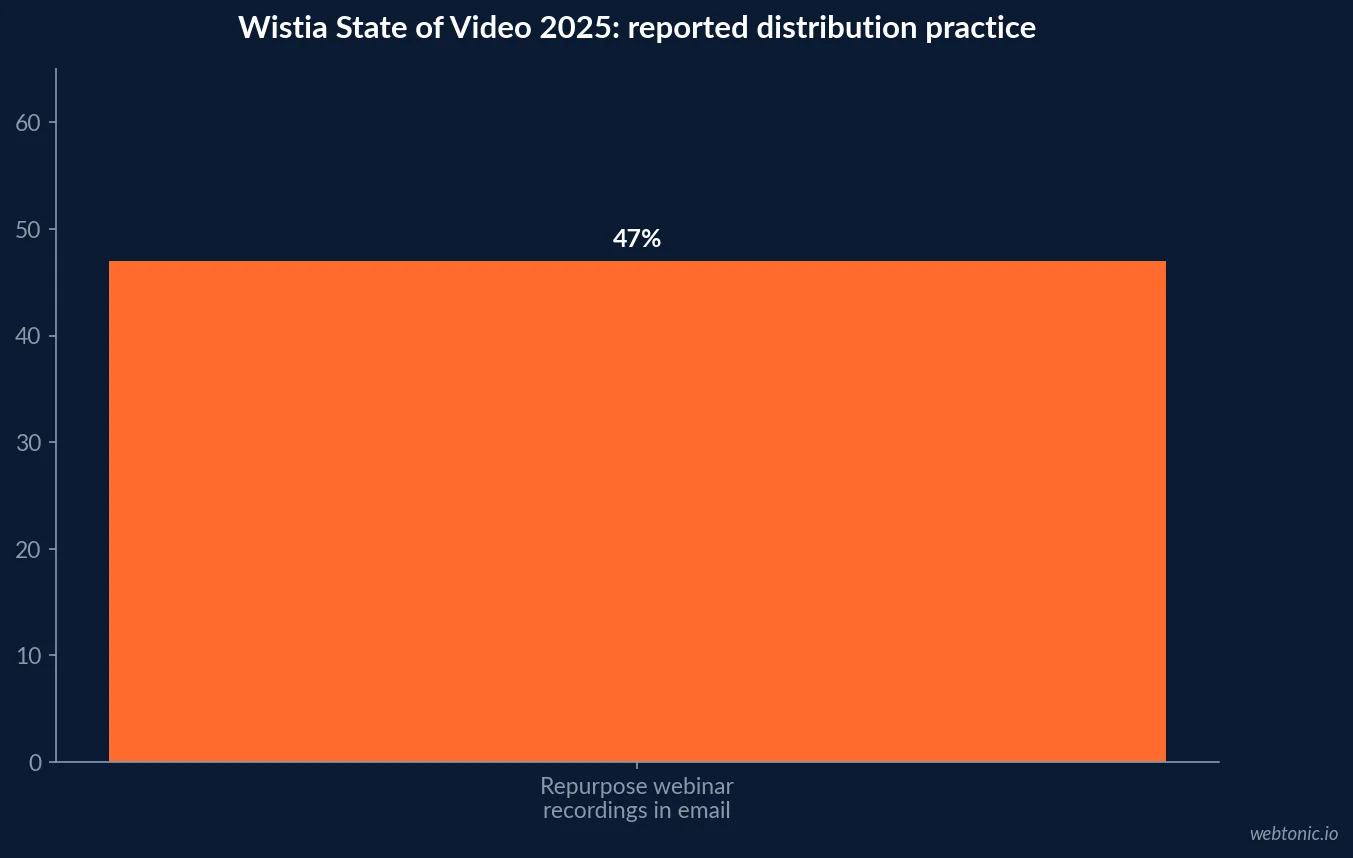
Video email is a distribution and creative decision, not a guaranteed click-through multiplier. Wistia’s State of Video 2025 reports that 47% of respondents repurpose webinar recordings in email campaigns. This describes a content practice, not the lift from embedding video or a recommended budget. A sound plan funds the asset, inbox-compatible preview, destination experience, and measurement together.
Key Takeaways
- Wistia’s 2025 report says 47% repurpose webinar recordings in email campaigns.
- The figure describes marketers’ repurposing behavior; it does not measure email CTR lift.
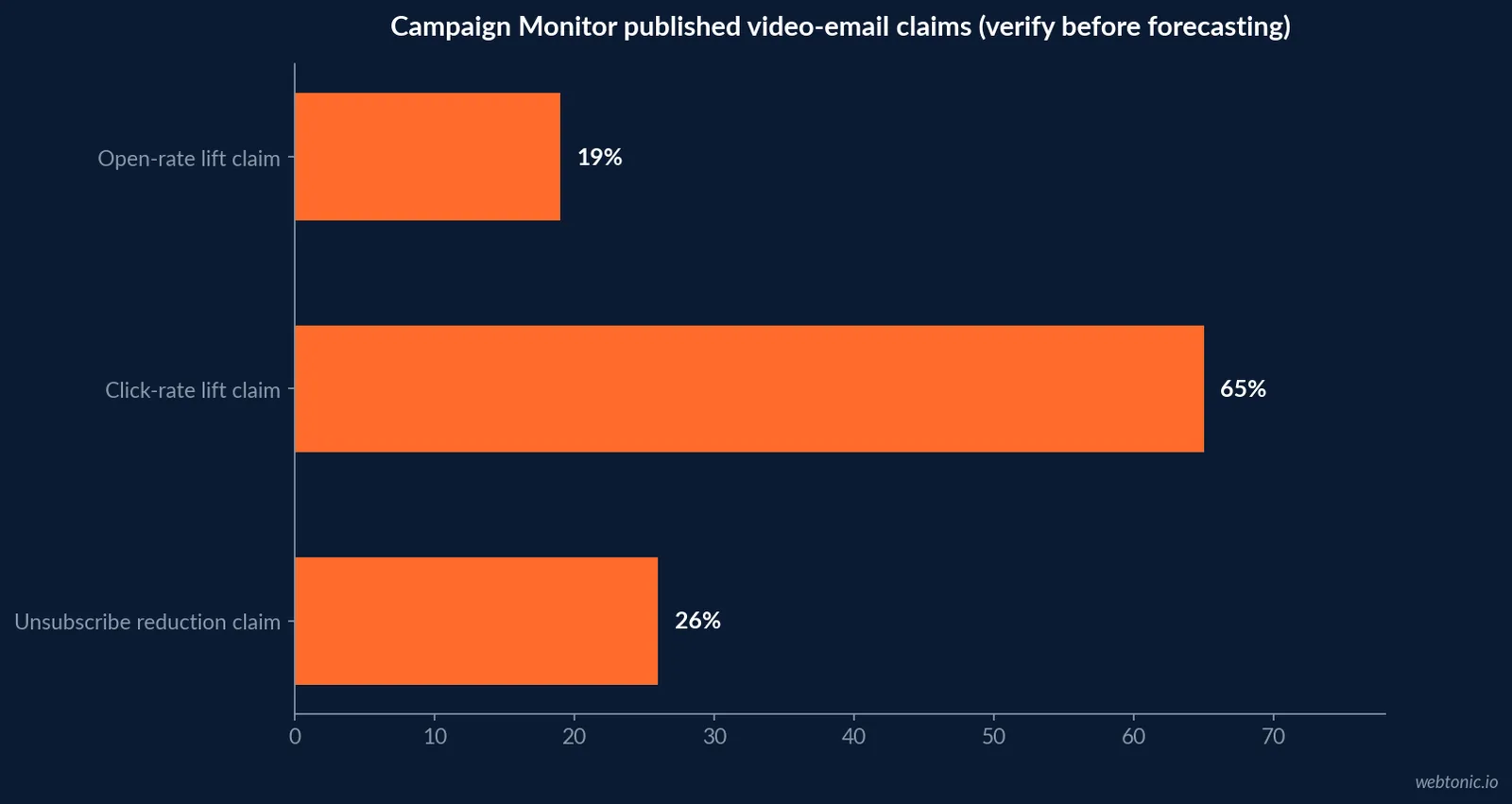
- Campaign Monitor currently repeats historic figures of 19% open-rate and 65% click-rate lift; check underlying source and date before using as a forecast.
- Most email clients do not support consistent inline video playback; test fallback presentation.
- Budget for the video asset, thumbnail/GIF or play-button treatment, landing page, and testing.
- Track delivered, unique clicks, destination engagement, conversion, unsubscribe, and revenue.
- Separate an email’s click outcome from video starts and completion on the destination page.
- A/B tests should control subject line, list segment, offer, and send timing where possible.
- Segment audience by lifecycle or stated interest rather than sending video indiscriminately.
- Plan accessibility: captions, descriptive preview text, and a clear text link.
- Keep file weight and rendering behavior in mind; often a click-through preview is safer than embedding.
- A single vendor statistic does not establish the outcome for a particular list or audience.
- Wistia reports 47% of respondents use email as a destination for repurposed webinar recordings.
- Budget a pilot that can answer a specific question, not a broad “video works” claim.
- Evaluate downstream value and deliverability guardrails before expanding sends.
Evidence references: Wistia — State of Video 2025 (PDF) · Campaign Monitor — Video in Email guide · Campaign Monitor — Video email CTR guidance.
Related: data intelligence · email marketing resources · contact Web Tonic.
Benchmarks at a glance
The table labels what each number actually describes. In particular, the Wistia statistic is a content repurposing behavior; it is not a CTR benchmark. Historic Campaign Monitor figures should be treated as vendor-published directional claims rather than universal expected lifts. Budget assumptions should distinguish email platform charges, production, creative adaptation, landing page, and analysis.
| Claim / evidence | Reported number | What it measures | Budget interpretation |
|---|---|---|---|
| Webinar reuse in email | 47% | Wistia 2025 respondent practice | Distribution behavior, not performance lift |
| Video open-rate lift | 19% | Campaign Monitor page claim | Verify underlying source before forecasting |
| Video click-rate lift | 65% | Campaign Monitor page claim | Vendor editorial claim, not universal norm |
| Video unsubscribe reduction | 26% | Campaign Monitor page claim | Treat as directional and source-check |
| Video email marketers | 34% using video | Litmus 2024 guidance page | Adoption claim, not a result benchmark |
Reading the evidence boundary: Keep population, period, unit, and decision owner visible when comparing internal results with published evidence.
| Line item | Why it is needed | What to validate |
|---|---|---|
| Source video / edit | Message tailored to audience and email context | Rights, duration, and accurate claims |
| Preview asset | Linked image or lightweight animated preview | Fallback and alt text |
| Destination page | Playback, transcript, and next action | Mobile load and tracking events |
| Measurement | Clicks through downstream outcome | Attribution window and control design |
Operating workflow: Separate the recurring work from the decision it supports.
| Asset type | Use in email | Primary cost driver |
|---|---|---|
| Webinar excerpt | Education or event follow-up | Editing and contextual framing |
| Product walkthrough | Consideration or onboarding | Capture, captions, and revisions |
| Customer story | Proof or sales enablement | Rights and claims approval |
| Personalized clip | One-to-one outreach | Recording and individual review |
What the video-email evidence can support
The accessible evidence on video in email mixes three things: surveys about marketer behavior, platform or vendor claims about performance, and technical guidance on what inboxes can render. Keep those categories apart. Wistia’s 2025 State of Video says 47% of respondents repurpose webinar recordings in email campaigns. That is a usage statistic from a video-platform report. It indicates that email is one distribution destination for longer-form content; it does not show that an email with a video thumbnail outperforms a plain email by a fixed percentage. Some widely repeated click-through lifts are decades-old or are attributed through vendor editorial pages to third parties without a current, publicly documented test design. A marketer can cite those claims only with their original date and caveat. A 2026 budget should be based primarily on the organization’s own controlled test, with public numbers used to explain why the channel merits a pilot rather than to promise a return.
The right unit of analysis is the message and its destination
A video email often contains a static preview image, an animated GIF, or a play button that links to a hosted player, not a full video stream rendered inside the message. The email drives a click; the destination records playback and engagement. These steps require distinct events. A high click rate can coexist with a poor play rate if the landing page is slow or the thumbnail overpromises. Likewise, a video start does not equal a qualified outcome. Map the path from recipient eligibility through delivery, preview exposure, unique click, landing-page arrival, video start, meaningful watch time, and conversion. Use consistent campaign IDs across email service provider and analytics. Decide what qualifies as a view or a lead before the campaign goes out. If clicks are used as the primary outcome, do not call them video completions. That simple measurement discipline keeps the planning budget anchored to a real customer action.
Budget the full production chain
A video-email budget includes the concept and source footage, edit for the audience, thumbnail or GIF creation, message design, hosted destination, accessibility, rendering tests, and analytics QA. The source video might already exist; even then, confirm usage rights, length, captions, and whether the landing page is suitable for the email’s intent. A short, personalized clip may require more production effort per send than repurposing a webinar, but it can address a different stage of the customer relationship. Separate fixed setup effort from recurring campaign labor. A pilot may require rendering across major clients and devices, a destination page, tracking parameters, and a holdout design. Estimate those before committing to repeated sends. The goal is not to turn every newsletter into a video project; fund the smallest test that can determine whether this audience and message justify the additional asset and operational work.
Why playback compatibility changes the plan
Email client support for embedded video varies, so a robust campaign should provide a useful fallback: a linked image with an accessible play cue and descriptive alt text. The preview should not imply that playback will begin inside every inbox. Test rendering in the audience’s major clients and devices, ensure the destination works on mobile, and check that the page gives viewers a clear next step. This is a production and QA cost as much as a design detail. Do not send an oversized animated preview that slows the email or creates a poor experience. Use compression and a static fallback, and keep essential information in text for recipients who cannot view images. Captions and a transcript support accessibility and can make the content useful without sound. A clear subject line and preheader should explain the value, rather than relying on “video” as a curiosity trick.
Set up a controlled test
Choose one business question, such as whether an existing segment clicks more often on a short product walkthrough than on a static product image. Randomly split eligible recipients where practical. Hold the subject line, offer, send time, and targeting constant. Define the primary outcome and the guardrails—deliverability, unsubscribes, conversion quality, and revenue per delivered email. Make sure the audience size is sufficient for the effect the team hopes to detect; otherwise treat the result as exploratory. If the video asset itself differs in message and offer, the test cannot isolate the role of video. Record the variants and interpretation in a test log. Compare unique clicks and downstream activity, not only opens, because privacy features and mailbox behavior can distort open measurements. If no difference appears, that is useful evidence against investing in more production for that segment, even if the video itself receives positive qualitative feedback.
Fund a measurable decision: Specify what will be learned, who will review it, and what changes the allocation. This prevents a market reference becoming an unsupported target.
| Journey event | Record | Do not confuse with |
|---|---|---|
| Email delivery | Delivered volume and deliverability | An open or a video view |
| Unique click | Recipient click to the destination | Video start or completion |
| Playback | Start and meaningful watch time | Qualified lead or purchase |
| Business outcome | Conversion and revenue by cohort | Causality without a comparison |
Keep the source qualifier attached: The same number can mean very different things across populations and instruments.
| Evidence type | Question answered | Budget use |
|---|---|---|
| Usage survey | Do teams repurpose video in email? | Distribution and editing capacity |
| Vendor claim | What performance lift is claimed? | Hypothesis only until replicated |
| Controlled test | What changed for this audience? | Scaling or stopping decision |
How to interpret commonly repeated uplift claims
Campaign Monitor’s guide repeats claims that video can boost open rates by 19%, click-through rates by 65%, and reduce unsubscribes by 26%. Its web page is useful as a source for what the email platform currently publishes, but the claims should not be treated as a current controlled benchmark for every list. A marketer should trace the underlying research, sample, date, and definition before using those numbers in a forecast. The same caution applies to claims of 96% higher CTR or 200–300% lifts repeated across vendor blogs. If the source trail is not accessible or the study is not recent, label the number historical and directional, or omit it. Do not combine several uplift claims to calculate a projected campaign return. Use your own holdout test and report both percentage change and absolute clicks or conversions. A seemingly large relative lift can correspond to a tiny number of additional qualified actions.
Use existing video as a distribution asset
Wistia’s report also shows how teams distribute webinar material beyond the live event, including email, landing pages, blogs, and social. This can reduce the marginal cost of creating an email-specific asset if the original recording is relevant and a usable excerpt already exists. The repurposing decision still has a real editing cost: identify a segment, supply context, create a short description, and make the link destination match the promise. Build a small library with source recording, rights, topic, audience, and the best next action. The email should offer one coherent reason to click—watch a product walkthrough, learn a technique, or hear a customer story. Avoid recycling a long recording as an unframed link. Measure whether the asset serves its distribution role through relevant visits and downstream outcomes, not simply the number of times it was inserted into a send.
Budget by campaign purpose and lifecycle
A welcome sequence, customer education email, product launch, event follow-up, and sales outreach have different goals. An existing webinar clip may be economical in an education sequence, whereas a high-value product launch may justify a dedicated edit and landing page. Segment budgets by purpose and expected audience size. Do not compare a personalized one-to-one sales video with a broad newsletter as if the cost and outcome were equivalent. For each campaign, document audience, send volume, intended action, asset production type, destination, and measurement plan. Include the staff time for customer support or sales follow-up if clicks create demand. Establish a frequency policy so that video experiments do not increase total email pressure without review. Treat unsubscribe and complaint rates as guardrails. This gives finance and marketing a clear basis for deciding which video formats earn a recurring production budget.
Reporting that links the inbox to revenue
A useful report connects the email platform’s delivery and click data with destination analytics and CRM or commerce outcomes. Report delivered volume, unique clickers, landing-page sessions, video starts, meaningful watch time where available, conversion, revenue, and unsubscribe or complaint signals. Keep attribution rules visible. If the message is part of a multi-touch journey, avoid assigning all revenue to the last video email without a clear model. Use tracking parameters and campaign naming consistently, and test them before send. Reconcile click counts when security scanners or automated link previews create activity. Compare cohorts over a suitable window and use a holdout when the incremental effect matters. The reporting setup should be funded before production begins; otherwise the team may pay for an asset but lack evidence to decide whether to make another.
A practical 2026 pilot and decision rule
A responsible pilot can begin with one audience segment, one existing or modestly adapted asset, a static fallback, a matching landing page, and a pre-defined test. Budget creative adaptation, rendering QA, accessibility, tracking, and analysis. Set a threshold for incremental qualified actions or revenue that is high enough to justify the marginal costs. If the campaign misses, inspect each stage—delivery, click, play, watch, conversion—before deciding whether the issue is the asset or the destination. If a test wins, repeat it with a second message or segment before scaling the production process. One positive send does not establish a stable effect. Publish the final finding with the source population and date, and separate measured results from external claims. That approach turns “video email statistics” into a practical learning agenda and avoids budgeting against unverified uplift numbers.
Frequently Asked Questions
Does video in email increase click-through rates by 65%?
Campaign Monitor publishes a 65% click-rate lift claim, but it is not a universal 2026 benchmark. Trace its underlying source and test with a controlled audience split before forecasting.
Can I embed a video that plays inside every email client?
No. Client support varies. A linked thumbnail or play-button preview with a tested landing page and accessible fallback is generally more robust.
How should video email performance be measured?
Connect delivered email and unique clicks with landing-page sessions, video starts or watch time, conversions, revenue, and unsubscribe or complaint guardrails.
What video email statistic is most useful for budgeting?
Wistia’s 2025 report found 47% of respondents repurpose webinar recordings in email. It informs production and distribution planning, not expected lift.
Sources
Wistia — State of Video 2025 (PDF)
Campaign Monitor — Video in Email guide
Campaign Monitor — Video email CTR guidance
Litmus — Video in Email (2024)
HubSpot — Video Marketing Statistics 2025 (includes Wistia 2024 source)
Video Email — State of Video Email Survey 2025
Web Tonic — email marketing resources
Web Tonic — data intelligence
Web Tonic — contact
Google — Gmail supported browser and media guidance
Google — Gmail supported browser and media guidance
Mailchimp — email marketing benchmarks
Twilio — video in email guidance
Campaign Monitor — Video email marketing