



Table of contents

TikTok trend discovery is the practice of spotting a rising sound, format or topic early enough to publish while it still earns outsized reach. The tools are mostly free; the timing is what separates a hit from a late copy.
Key Takeaways
- TikTok Creative Center exposes trending hashtags, songs, creators and top ads for free, filtered by country, industry and a 7, 30 or 120-day window — no ad account required.
- Most usable trends have a 5 to 14-day window between visible acceleration and saturation, so a publishing lag over 72 hours usually costs the upside.
- Brand engagement on TikTok runs at 2.60% versus 0.48% on Instagram and 0.15% on Facebook (Socialinsider, 70M posts), and shares rose 45% year over year — trend-led formats travel further than static posts.
- Use 4 discovery layers: the app feed, Creative Center, an ads library scan, and social listening tools outside the platform. One source alone always lags.
- Score every candidate trend on 5 criteria before you film: growth slope, format fit, brand safety, production cost and shelf life.

What counts as a TikTok trend
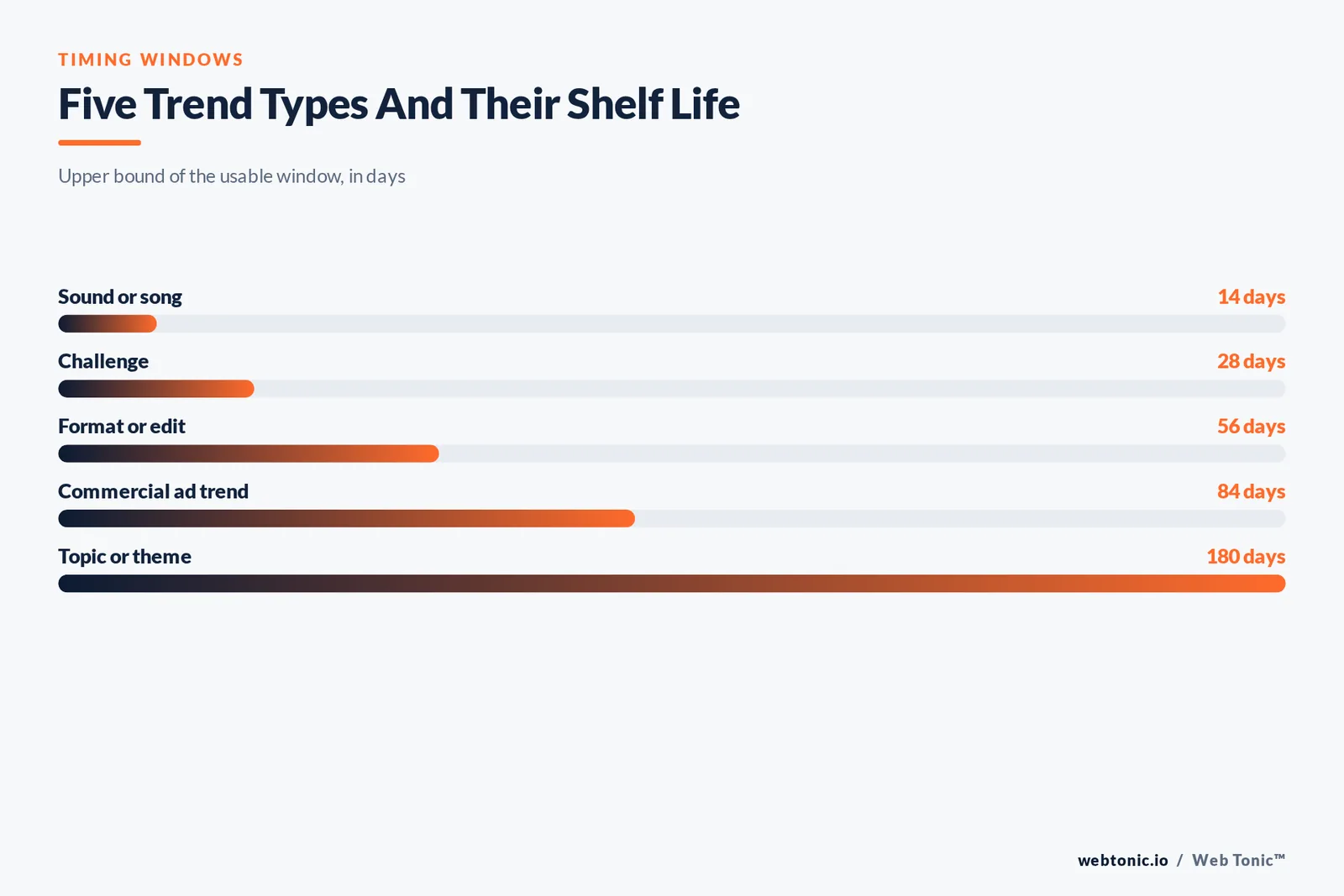
Four different things get called trends, and they behave differently. A sound spreads fastest and dies fastest. A format — a specific edit, transition or shot structure — lasts longer. A topic can run for months. A challenge sits in between and carries the most brand-safety risk.
| Trend type | Typical lifespan | Where it surfaces first | Best use for a brand |
|---|---|---|---|
| Sound or song | 5–14 days | For You feed, commercial music library | Fast reach on existing footage |
| Format or edit | 3–8 weeks | Top creators, saved videos | Repeatable series |
| Topic or theme | 1–6 months | Search suggestions, hashtags | Content pillars and SEO-style coverage |
| Challenge | 2–4 weeks | Hashtag pages, ads library | Community participation, with vetting |
| Commercial trend | 4–12 weeks | Creative Center top ads | Paid creative templates |
Rule 1 — if a sound already has more than roughly 500,000 videos, you are late unless your angle is genuinely differentiated. Look for the slope, not the size.
The four discovery layers
Coverage note 7 — running all 4 layers takes about 30 minutes a week, and in practice layer 1 finds sounds 2 to 5 days before they appear in any ranked list.
Treat discovery as a stack. Each layer catches things the others miss, and running all four takes about 30 minutes a week once it is a habit.
| Layer | Tool | What it is good at | Lag |
|---|---|---|---|
| 1. In-app signals | For You feed, search, sound pages | Earliest weak signals | Near zero |
| 2. Official data | TikTok Creative Center | Ranked hashtags, songs, creators by country | 2–5 days |
| 3. Paid creative scan | Top Ads library | Formats other advertisers are scaling | 1–3 weeks |
| 4. Off-platform | Social listening tools, Google trending searches, Reddit | Cross-platform spread and news context | Varies |
Fact 2: TikTok's own recommendation documentation names three signal families — user interactions, video information such as sounds and hashtags, and device or account settings — which is why a trending sound acts as a distribution shortcut rather than a gimmick. TikTok explains the mechanics in its newsroom post on how videos are recommended.
How to use TikTok Creative Center for trend discovery
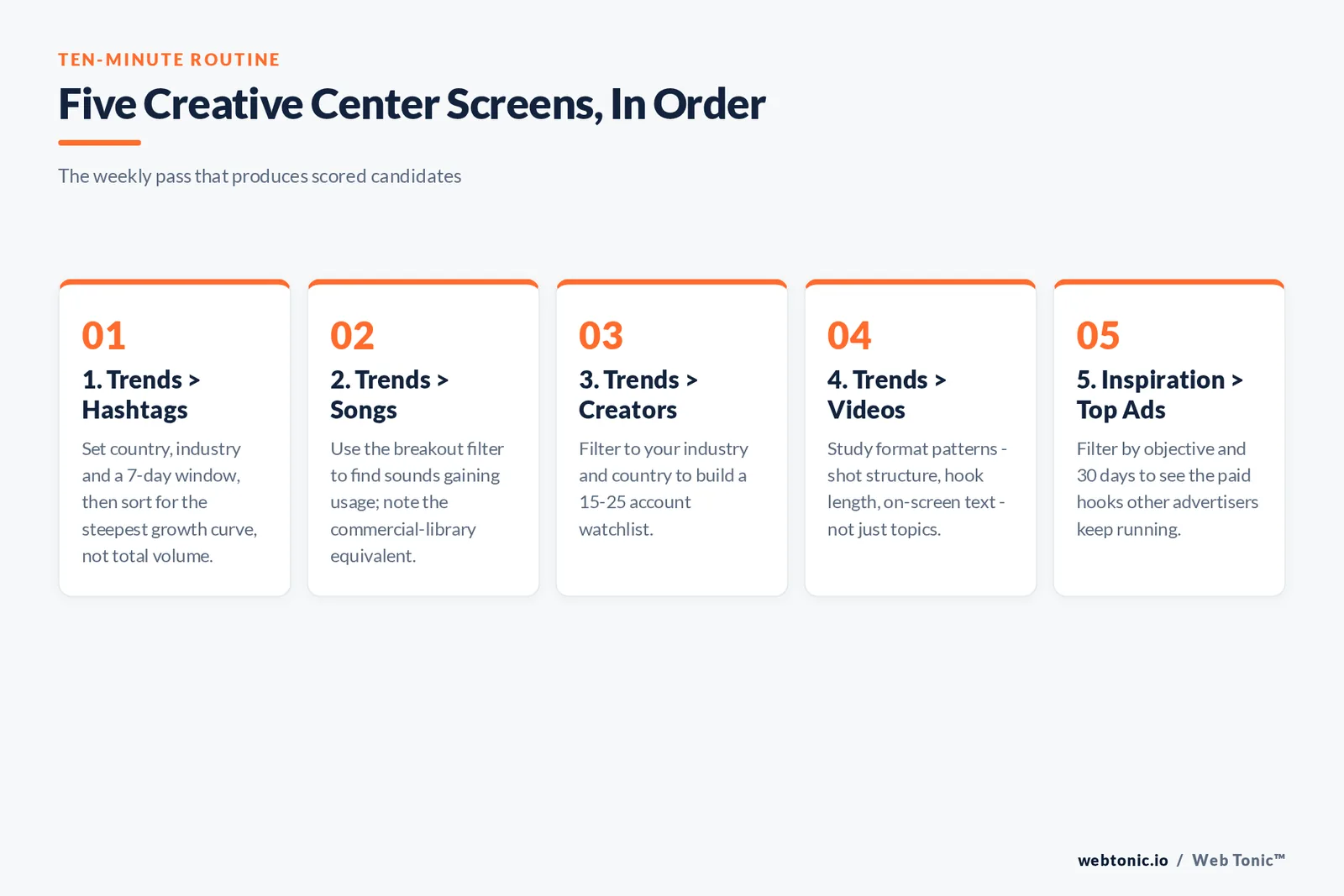
Creative Center is the closest thing to an official trends dashboard, and it is open to anyone with a browser. Work these five screens in order; the whole pass takes under ten minutes.
| Step | Screen | What to set | What to take away |
|---|---|---|---|
| 1 | Trends → Hashtags | Country, industry, last 7 days | Rising tags with steep growth curves |
| 2 | Trends → Songs | Breakout filter, last 7 days | Sounds with usage growth, not just volume |
| 3 | Trends → Creators | Your industry and country | Top creators to study or brief |
| 4 | Trends → Videos | Region plus period | Format patterns worth copying |
| 5 | Inspiration → Top Ads | Objective, industry, 30 days | Proven hooks and paid structures |
Two details matter. First, the hashtag view separates absolute popularity from growth — always sort for the climb. Second, the commercial music library is the only safe source of sounds for a business account; a viral track in the consumer library can be pulled from your video later for licensing reasons.
Limit 3 — never build a paid campaign on a consumer-library sound. Muted ads lose the trend entirely, and the swap usually restarts learning.
In-app techniques that beat any dashboard
Setup rule 8: a research account needs 20 to 30 minutes of deliberate watching before its feed is useful — watch niche videos to completion, skip everything else fast.
Dashboards report; the app predicts. These habits surface trends days before they rank anywhere.
| Technique | How to run it | Signal to watch |
|---|---|---|
| Train a research account | Fresh profile, follow only your niche, watch to completion | Repeats of one sound or edit inside 20 videos |
| Sound page depth check | Tap the sound, sort the top videos | Recent posts outperforming older ones |
| Search suggestion mining | Type a seed term, read autocomplete | New phrasings appearing week over week |
| Comment demand reading | Sort comments on niche videos | Repeated questions you can answer on camera |
| Creator watchlist | Save 15–25 accounts, check twice weekly | Two or more adopting the same format |
| Saves and shares audit | Study what your own audience saves | Format preferences, not topics |
Threshold 4: three independent creators using the same format inside 48 hours is the most reliable early confirmation that something is spreading rather than a single account getting lucky.
Tools beyond the platform
Spend guard 9 — do not pay for a listening suite until you publish 3+ videos a week; below that the free surfaces already cover every decision you can act on.
Third-party tools add history, alerts and cross-platform views that the native surfaces do not keep. They are optional — none replaces layer one.
| Tool category | Example resources | Adds | When it is worth it |
|---|---|---|---|
| Analytics blogs and benchmarks | Socialinsider benchmarks | Context for what "good" reach is | Quarterly planning |
| Scheduling suites | Buffer, Metricool | Publishing speed, saved sounds | More than 3 posts a week |
| Social listening tools | Sprout Social, listening dashboards | Keyword alerts across networks | Multi-brand or agency scale |
| Cross-platform trend feeds | Hootsuite trend roundups | Editorial curation, weekly digest | Small teams without research time |
| Community sources | Creator subreddits, creator-industry trade press | Creator-side chatter and news | Always, it is free |
| Search demand tools | Google Trends and video search | Whether interest exists off-platform | Before committing to a topic pillar |
Our note on reading Google Trends properly covers the pitfalls of relative indexes, which matter here because a short-form spike often shows up in web search two to three days later.
Scoring a trend before you film
Gate 13 — shoot only candidates scoring above 17 of 25; in a typical week that means 2 of 6 logged candidates make it to a shot list.
Most wasted production comes from chasing trends that were never a fit. Score candidates out of 25 and only shoot the ones above 17.
| Criterion | Score 1 | Score 5 | Weight |
|---|---|---|---|
| Growth slope | Flat or already peaked | Steep 7-day climb | Critical |
| Format fit | Needs skills you lack | Matches assets you already have | High |
| Brand safety | Risky audio, claims or stunts | Neutral and reviewable | Critical |
| Production cost | Multi-day shoot | Under 2 hours end to end | Medium |
| Shelf life | Dies in days | Repeatable as a series | Medium |
Benchmark 5 — teams that keep a scoring habit typically publish 2 to 3 trend-led videos a week instead of ten reactive ones, and see steadier completion rates because the fit test filters the noise.
From discovery to published video in 48 hours
Speed is the whole point. This is the loop that fits inside a normal week without a dedicated studio.
| Hour | Action | Owner | Output |
|---|---|---|---|
| 0–2 | Run the four discovery layers, log candidates | Social lead | 5–8 scored candidates |
| 2–4 | Pick two, write hooks and a shot list | Social lead | Two one-page briefs |
| 4–8 | Shoot vertical, 15–34 seconds, natural light | Anyone on camera | Raw footage |
| 8–20 | Edit, add captions, select a library sound | Editor | Two cuts plus alternate hooks |
| 20–24 | Approval check on claims and audio rights | Marketing owner | Cleared for publish |
| 24–48 | Publish, monitor first 60 minutes, reply to comments | Social lead | Live videos plus early read |
Keyword-based discovery: treat the app as a search engine
A growing share of users now start with search rather than the feed, so keyword research inside the app is a discovery tool in its own right. Type a seed keyword, then browse the suggestions, the top tab and the video tab — each surfaces different popular content for the same query.
| Tab to browse | What to learn there | Keyword tip |
|---|---|---|
| Top | Which videos the platform treats as the best answer | Note the exact phrasing in the captions |
| Videos | Recency: are new posts ranking for this keyword | Filter to the last week |
| Users | Accounts users associate with the topic | Add the strong ones to your watchlist |
| Sounds | Audio attached to the keyword cluster | Check the commercial library for an equivalent |
| Hashtags | How the community labels the theme | Use 3–5 tags, not 20 |
| Search suggestions | Real-time demand phrasing before it trends | Log new suggestions weekly |
Discovery tip 14: keywords surface intent, sounds surface momentum — you need both, and a topic that shows up in search suggestions two weeks running is worth a content pillar rather than a single post.
How the FYP decides what you get to discover
Your For You feed is a research instrument, and it is shaped by your own behaviour. If your fyp is full of unrelated viral content, your discovery insights will be unrelated too. These habits keep the signal clean.
| Habit | Why it helps | Effect on your fyp |
|---|---|---|
| Watch niche videos to the end | Completion is the clearest interest signal | More of your category, faster |
| Skip off-topic content in under a second | Teaches the system what to stop showing | Less generic viral noise |
| Follow 15–25 category creators | Anchors the feed to your industry | Earlier sight of emerging formats |
| Save what you might remake | Builds a searchable inspiration bank | Reinforces the useful cluster |
| Keep research and personal accounts apart | Stops entertainment habits polluting the data | Cleaner weekly read |
What to look for by goal and audience
Trend discovery should start from the outcome you need. The tips below map goals to the media you should study and the kind of trend worth your time.
| Goal | Where to find inspiration | Trend type to prioritise | Cross-post to |
|---|---|---|---|
| Reach a new audience | Trending songs and popular formats | Sound-led, fast | Instagram reels |
| Build authority | Search suggestions and comment questions | Topic-led, durable | YouTube Shorts and long form |
| Sell a product | Top ads and creator reviews | Format-led demos | Paid social |
| Recruit or employer-brand | Day-in-the-life formats | Format-led, repeatable | |
| Community and loyalty | Challenges and local media moments | Challenge-led, vetted | Stories and email |
| Learn a new niche fast | Creator watchlist plus benchmark reports | Any, study only | Internal briefing |
Priority note 15 — one goal per video. Clips built to do 2 or 3 jobs at once underperform on all of them, and they make the discovery data harder to learn from.
Adapting one trend across formats
Reuse target 10: one discovery should yield 3 assets — the native short video, a re-export for other short-form feeds, and one paid cut with a commercial sound.
A single discovery should produce more than one asset. The same insight usually maps onto short form videos elsewhere and into paid creative with light edits.
| Destination | Change required | Keep | Drop |
|---|---|---|---|
| Original short video | None | Sound, native captions | Nothing |
| Trending Instagram reels | Re-export clean, no watermark | Hook and pacing | Platform-specific slang |
| YouTube Shorts | Add a spoken first line | Structure | On-screen-only setup |
| Paid creative | Commercial sound plus a clear offer | First 2 seconds | Insider references |
| Email or site embed | Captions burned in, muted autoplay | Demonstration | Trend audio |
For accessibility, burn in captions rather than relying on auto-generated text — the W3C guidance on audio and video is the practical reference, and Google's video best practices apply once the clip is embedded on your own site.
A discovery calendar that survives a busy month
Turn discovery into a marketing planning calendar item instead of a mood. This is the cadence that holds up across a quarter.
| Cadence | Task | Time |
|---|---|---|
| Daily | 15 minutes in the feed on the research account | 15 min |
| Twice weekly | Creative Center hashtags, songs and creators pass | 20 min |
| Weekly | Score candidates, brief two videos, check the ads library | 60 min |
| Monthly | Review completion, saves and shares by format | 45 min |
| Quarterly | Refresh pillars against benchmarks and search demand | 2 hours |
Volume context 6: DataReportal's Digital 2026 report counts 5.66 billion social identities and about 2 hours 40 minutes of daily social use, so the constraint is never audience size — it is whether your clip earns the first two seconds.
Measuring whether trend-led content worked
Read window 11 — the first 60 minutes and the first 24 hours tell you almost everything; a clip that has not moved by hour 24 rarely recovers, and 6 metrics beat a dashboard of 30.
Views are the worst metric here because a trending sound inflates them. Judge the video on retention and downstream behaviour instead.
| Metric | Why it matters | Healthy read |
|---|---|---|
| Completion rate | Strongest quality signal | Rising against your own last 10 posts |
| Watch time per view | Detects a good hook with a weak middle | Above your 30-day median |
| Shares and saves | Shares grew 45% year over year across brands | Shares outpacing comments |
| Follower conversion | Shows the trend attracted the right people | Positive on niche, not novelty, posts |
| Profile and link clicks | Ties reach to business outcomes | Any lift on a trend-led post is a win |
| Search appearances | Topic trends compound through search | Growing month over month |
If you want this instrumented properly across paid and organic, our performance creative and data intelligence teams run exactly this loop for clients.
Five mistakes that waste trend work
Failure pattern 12: 4 of these 5 mistakes are process problems, not creative ones — they are fixed by pre-approval rules and a scoring habit rather than better ideas.
| Mistake | What happens | Fix |
|---|---|---|
| Joining at peak | Average reach, wasted shoot | Filter for growth slope, not volume |
| Copying without a niche twist | Views without followers | Tie every trend to your subject matter |
| Consumer sounds on business posts | Audio removed later | Use the commercial music library |
| Approval chains longer than a day | Publishing after the window closes | Pre-approve claim and audio rules |
| Judging on views alone | Wrong lessons, repeated | Score on completion, saves and shares |
For the distribution mechanics behind all of this, read our breakdown of the TikTok algorithm and the practical guide to earning more engagement. More field notes live on the Web Tonic blog, and you can always ask us directly.
FAQ
What is the fastest way to find TikTok trends?
Open Creative Center, set your country and industry, and sort trending hashtags and songs by 7-day growth rather than total volume. Then confirm what you find in the app by checking whether recent videos using that sound are outperforming older ones.
Is TikTok Creative Center free to use?
Yes. The trends, songs, creators and top ads sections are open in a browser without an ad account, and the data is filterable by country, industry and time window.
How early is early enough to join a trend?
Aim to publish within 48 to 72 hours of confirming a trend is accelerating. Sounds usually run 5 to 14 days, so anything slower than three days lands in the crowded middle of the curve.
Can I use any trending song in a business video?
No. Business accounts and paid campaigns should only use tracks from the commercial music library. A consumer-library song can be muted or removed later, which destroys the video's reason for working.
Do TikTok trends transfer to Instagram reels and Shorts?
Formats and topics transfer well; sounds transfer inconsistently because each platform has its own library and its own timing. Re-export without a watermark and re-select audio natively on each platform.
Sources
TikTok Creative Center (trends, songs, creators, top ads) · TikTok Newsroom, how videos are recommended · TikTok for Business commercial music library · Socialinsider TikTok and social benchmarks 2026 · DataReportal Digital 2026 · Buffer and Metricool platform guides · Sprout Social and Hootsuite trend research · Google Trends and Search Central video documentation · W3C WAI audio and video guidance. Figures verified August 2026.


