



Table of contents

Your title tag is the single most visible SEO element in Google search results — it determines whether users click your listing or scroll past it. The right SEO title tag formula balances keyword placement, click appeal, and character limits to maximize both rankings and click-through rate. With Google rewriting 76% of title tags in Q1 2025 (Search Engine Land), writing titles that Google keeps unchanged is now a strategic skill.
Key Takeaways
- Google rewrites 76% of title tags — a 25% increase from two years prior. Titles averaging 44 characters are most likely to be kept unchanged (Search Engine Land, Capconvert).
- Pages with numbers in titles see 14% higher average CTR and correlate with better rankings over 6-month periods (Social Animal, 5,000-site audit).
- Emotional power words in title tags can improve CTR by up to 27% (Lav1 analysis of engagement metrics).
- The optimal title tag length is 40–60 characters (approximately 580px), delivering 8.9% better CTR than titles outside that range (Blck Alpaca, 4M results study).
- Pages with fully optimized on-page elements including title tags are 3.1× more likely to rank in the top 3 (Ahrefs, 3M-page study).
- Google retains only 35% of the original title content on average when it rewrites, removing approximately 2.71 words per title (Capconvert).
What Is a Title Tag and Why Does It Matter for SEO?
A title tag is the HTML element (<title>) that defines the title of a web page. It appears in three critical locations: the Google search results page (as the clickable headline), the browser tab, and social media previews when the page is shared. For search engine optimization, the title tag serves two purposes — it signals to search engines what the page is about (helping with keyword relevance), and it persuades human users to click.
The title tag HTML sits in the <head> section of every page. Unlike meta descriptions, which Google rewrites freely, title tags carry direct ranking weight. Google uses your title tag to understand topical relevance, which is why placing your primary keyword near the front of the title consistently correlates with higher rankings. Combined with the right formula, a well-crafted SEO title tag becomes your most efficient on-page optimization lever.
Title Tag Best Practices: The Data Behind What Works
Before diving into formulas, understanding the data behind title tag optimization prevents common mistakes that trigger Google rewrites or suppress click-through rates.
Optimal Length: Characters vs. Pixels
The real constraint for title tags is pixel width, not character count. Google displays approximately 580 pixels of title text on desktop SERPs. With a typical mix of upper and lowercase letters averaging about 8.6px per character, this yields a practical range of 55–65 characters for most titles. However, studies show nuance:
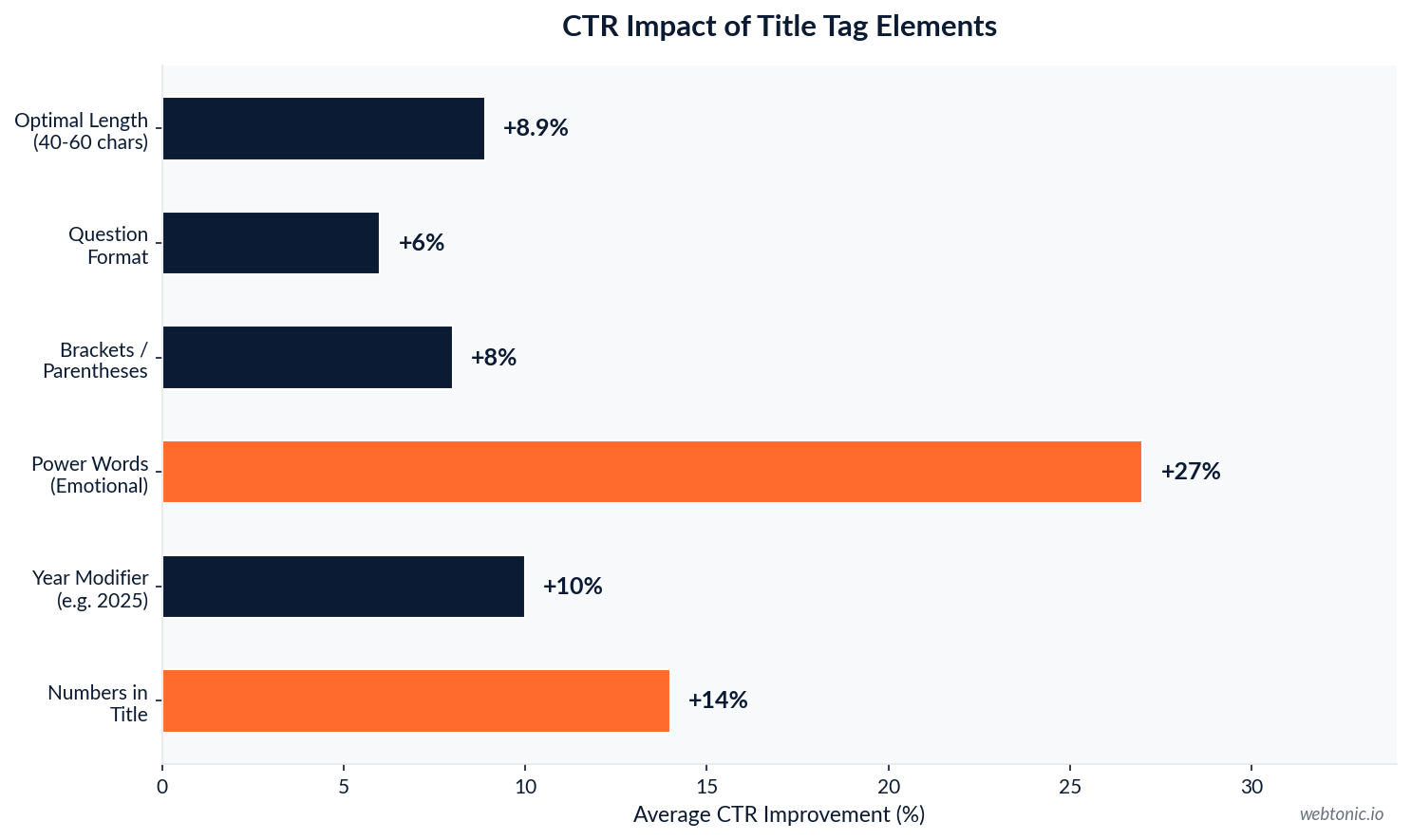
- Titles between 40 and 60 characters achieve 8.9% better average CTR than titles outside this range (Blck Alpaca analysis of 4 million Google results).
- Titles that Google kept unchanged averaged 44.47 characters, while rewritten titles averaged 62.58 characters (Capconvert analysis). This suggests shorter, more precise titles resist rewrites better.
- Search Engine Land recommends targeting 46 characters as the ideal length for title tag optimization to minimize truncation and maximize clarity.
| Title Length | Google Behavior | CTR Impact |
|---|---|---|
| Under 40 characters | Rarely rewritten, but may lack detail | Lower CTR if too vague |
| 40–60 characters | Sweet spot — lowest rewrite rate | +8.9% avg. CTR vs. outside range |
| 60–70 characters | Frequently truncated in SERPs | Moderate — depends on truncation point |
| Over 70 characters | Almost always rewritten or truncated | Negative — Google removes ~2.71 words |
Keyword Placement and Primary Keyword Position
Placing your target keyword at or near the beginning of the title tag remains a strong SEO best practice. Search engines give more weight to words appearing earlier in the title, and users scanning results process the first few words fastest. The pattern is clear: front-load the keyword, follow with a modifier or benefit, and append the brand if space allows. This approach also reduces the risk of truncation cutting off your keyword when Google shortens the display.

Elements That Boost Click-Through Rates
Multiple studies confirm that specific title tag elements consistently improve CTR from search results:
- Numbers in titles increase CTR by 14% on average and correlate with improved positions over 6-month observation periods (Social Animal audit of 5,000 sites).
- Year modifiers (e.g., "2025") signal freshness, boosting CTR by approximately 10% — particularly effective for topics with rapidly changing information.
- Power words with emotional triggers improve CTR by up to 27% (Lav1 analysis). Words like "proven," "ultimate," "essential," and "complete" create urgency without being clickbait.
- Brackets and parentheses add context at a glance — "[Guide]," "(Free Template)," "[Case Study]" — and boost CTR by approximately 8%.
- Outcome-focused power words like "boost," "save," and "scale" lifted SaaS demo signups by 33% in A/B title testing (Webselect Agency).
Proven SEO Title Tag Formulas by Page Type
The best title tag formulas are not one-size-fits-all. Each page type has a different user intent, and your title must match that intent precisely. Here are proven formulas organized by page type, with real examples you can adapt for your own marketing strategy.
Blog Post Title Tag Formulas
| Formula | Template | Example |
|---|---|---|
| List / Number | [Number] [Adjective] [Things] for [Audience] in [Year] | 9 Proven Link Building Tactics for SaaS in 2025 |
| How-To | How to [Task with Keyword] in [Timeframe] | How to Write Title Tags That Rank in 30 Minutes |
| Keyword-Colon | [Primary Keyword]: [Expanded Benefit or Scope] | SEO Title Tags: The Complete Optimization Guide |
| Question | [Keyword Question]? [Promise] | What Are Title Tags? A Practical SEO Walkthrough |
| Guide / Resource | [Keyword] Guide: [Year] [Modifier] | Title Tag SEO Guide: 2025 Best Practices |
Product Page Title Tag Formulas (Ecommerce)
Product pages target transactional search intent. The title tag must include the product name, a key differentiator, and the brand. Effective SEO title tags for ecommerce pages follow these patterns:
- Feature-first: [Product Name] — [Key Feature or Material] | [Brand]
- Benefit-first: [Primary Benefit] [Product Name] | [Brand] — Shop Now
- Category + product: [Category Keyword] — Shop [Adjective] [Product Type] | [Brand]
For example: "Ergonomic Standing Desk — Bamboo Top, Dual Motor | StandUp" places the target keyword first, highlights the differentiator, and includes the brand within a concise character count.
Landing Page and Service Page Formulas
Service and landing pages need to match high-intent commercial queries. The title tag should include the service keyword, a geographic modifier if relevant, and a trust or action signal:
- Local service: [Service Keyword] in [City] — [Trust Signal] | [Brand]
- Benefit-driven: [Primary Keyword]: [Outcome Benefit] | [Brand]
- Comparison: Best [Service] [Year]: [Number] [Descriptor] Compared
These formulas work because they align with the specific search intent — users searching for "growth marketing agency" want to know capability and location, not general information.
How to Prevent Google From Rewriting Your Title Tags
Google changed 76% of title tags in Q1 2025 — a significant increase that means your carefully crafted title is rewritten three out of four times. Understanding why Google rewrites titles helps you write ones it keeps:
| Rewrite Trigger | What Google Does | How to Prevent It |
|---|---|---|
| Title too long | Truncates or replaces entirely | Keep titles under 60 characters (target ~46) |
| Title doesn't match content | Replaces with H1 or on-page text | Align title tag closely with H1 and content |
| Keyword stuffing | Rewrites for readability | Use primary keyword once, naturally |
| Missing brand name | Appends brand from site settings | Include brand name with pipe separator |
| Boilerplate titles | Generates unique title from page content | Write unique titles per page, no templates reuse |
The most effective prevention strategy is writing concise, intent-aligned titles that match your page content. About 30% of Google's title changes aim to improve readability or better align with user expectations — so clear, direct titles that serve both search engines and users reduce rewrite probability. Monitor your actual displayed titles in Google Search Console under the Performance report, where you can compare your written title tags against what Google actually displays.
Title Tag Optimization Checklist
Use this checklist every time you write or audit an SEO title tag to ensure it follows best practices for both search engine rankings and user engagement:
- Primary keyword within the first 4 words — front-loading signals relevance to search engines and catches user attention in the browser tab and search results.
- Character count between 40–60 — the sweet spot for avoiding truncation and Google rewrites.
- Unique across all pages — duplicate title tags split ranking signals and confuse search engines about which page to show.
- Matches search intent — a blog post title should not read like a product page, and vice versa.
- Includes a CTR element — number, year, power word, or bracket to differentiate from competing results.
- Title tag aligns with H1 — close alignment reduces Google rewrite probability.
- Brand appended with separator — "| Brand" or "— Brand" at the end, only if space allows after the keyword and modifier.
- Tested in Google Search Console — verify Google displays your title as written, adjust if consistently rewritten.

Common Title Tag Mistakes That Hurt Rankings
Even with the right formula, execution errors undermine title tag optimization. Here are the most frequent mistakes found in data-driven SEO audits:
- Duplicate titles across multiple pages — this is the most common technical SEO title error and causes ranking cannibalization.
- Stuffing multiple keywords into one title — triggers Google rewrites and looks spammy in search results.
- Ignoring brand name — Google will append it anyway, often clumsily truncating your intended message.
- Using the same formula for every page — creates a homogeneous SERP presence that reduces CTR across your site.
- Writing titles for search engines only — a title that ranks but does not compel clicks wastes the ranking position.
- Never auditing displayed titles — without checking Google Search Console, you may not realize Google has rewritten your titles for months.

Title Tag Testing and Iteration
The most effective title tag optimization approach is iterative. A/B testing SEO titles using tools like ClickFlow or manual Google Search Console monitoring reveals which title tag formulas perform best for your specific audience. SaaS companies running title tests found that outcome-focused titles outperformed generic descriptions by 33% in demo signups. The key is systematic testing — change one element at a time (keyword position, power word, number, year modifier) and measure the CTR impact over 2–4 weeks. This data-driven approach to SEO title tags compounds over time as you learn which formulas resonate with your target audience in Google search results.
Related reading
- Title Tag SEO: 7 Best Practices to Rank Higher and Get More Clicks
- Common SEO Issues: A Severity-Ranked Triage List and the Fix for Each
- SEO for Podcasts: A Practical Growth Playbook
- GEO & AEO services at Web Tonic
FAQ
What is the best SEO title tag formula?
There is no single best formula — it depends on your page type and search intent. For blog posts, the List/Number formula ("[Number] [Keyword] [Modifier]") consistently produces the highest CTR. For product pages, leading with the product name and a key differentiator works best. The common thread is placing your primary keyword near the front and keeping the title under 60 characters.
How long should a title tag be for SEO?
The optimal title tag length is 40–60 characters (approximately 580 pixels on desktop). Titles in this range achieve 8.9% higher CTR and are least likely to be rewritten by Google. Titles kept by Google average 44 characters, while rewritten titles average 63 characters. Aim for precision over length.
Why does Google rewrite my title tags?
Google rewrites 76% of title tags as of Q1 2025. The most common reasons are titles that are too long, do not match the page content, contain keyword stuffing, or use boilerplate templates. Writing concise, intent-aligned titles that closely match your H1 heading is the most effective way to prevent rewrites.
Should I include my brand name in the title tag?
Yes, but only at the end with a separator (| or —) and only if it fits within the 60-character limit after your keyword and modifier. If your brand name consumes too many characters, omit it — Google often appends the brand name automatically from your site settings, so the information still appears in search results.
Do power words in title tags actually help SEO?
Power words do not directly affect rankings, but they significantly improve click-through rate — emotional trigger words boost CTR by up to 27%. Since CTR is a user engagement signal that Google monitors, titles with well-chosen power words can indirectly improve rankings through better engagement metrics over time. Use them strategically, not excessively.
Sources
Search Engine Land — Google Changed 76% of Title Tags (2025)
Capconvert — Writing Title Tags for Google & AI
Social Animal — Meta Tags SEO Audit 2026
RankSpark — Title Tags in 2025
Barracuda SEO — Title Tag Optimization 2026
RankNibbler — How to Write Title Tags for SEO
Search Engine Land — Title Tag Length 2025
Lav1 — Power Words for Meta Titles


