



Table of contents

The title tag is a single HTML element that carries outsized influence on your search engine rankings, click-through rate, and first impression with users. Getting it right can mean the difference between page-one visibility and being buried in the SERPs. Here is everything you need to know about writing, optimizing, and auditing title tags for SEO in 2025.
Key Takeaways
- Title tags are the #1 on-page SEO element that search engines use to understand a page's topic.
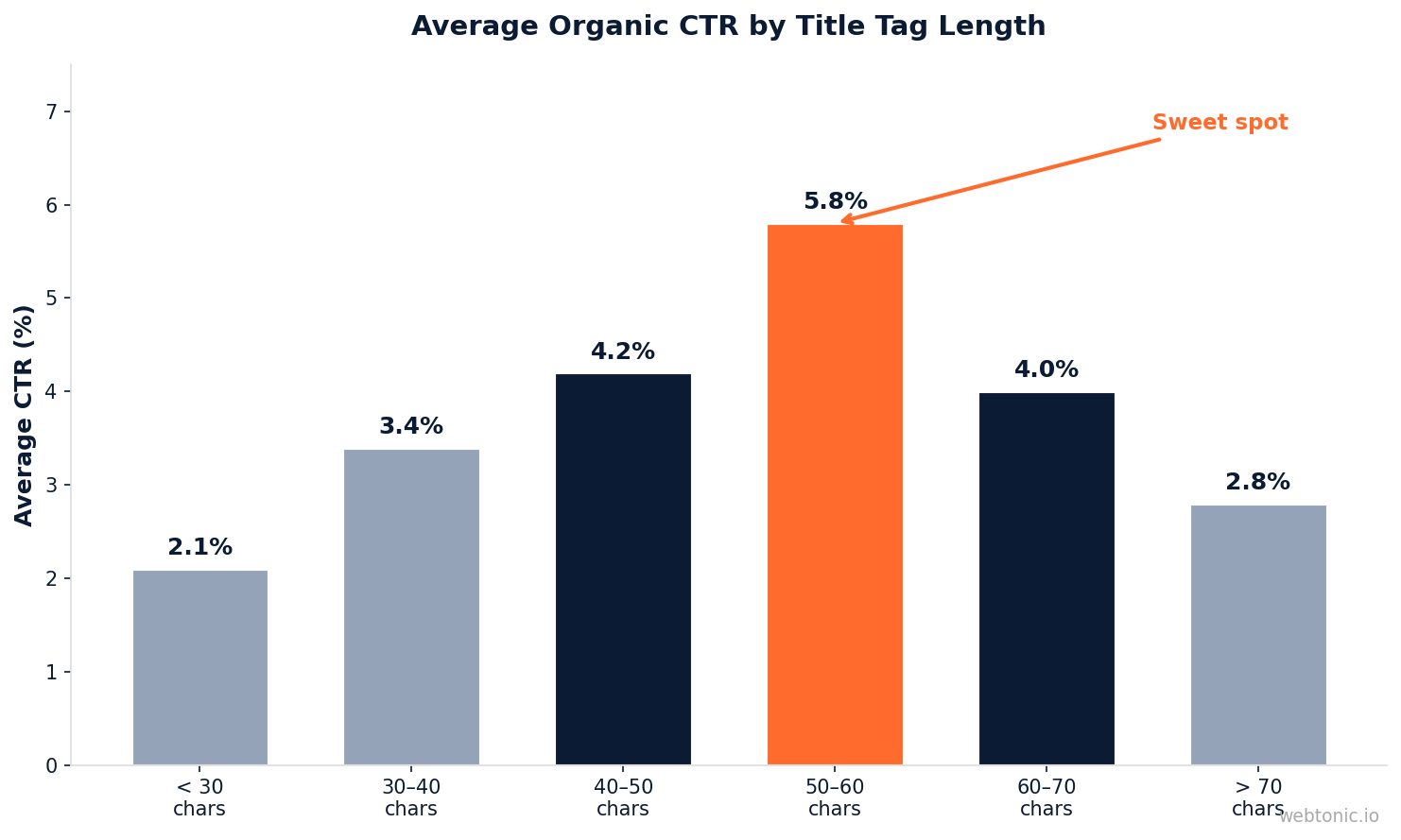
- Google displays roughly 50–60 characters of a title tag before truncating it in the SERP.
- Pages with optimized title tags see up to 37 % higher CTR than those with generic or truncated titles.
- Google rewrites title tags in approximately 61 % of search results when they are too long, stuffed, or misaligned with content.
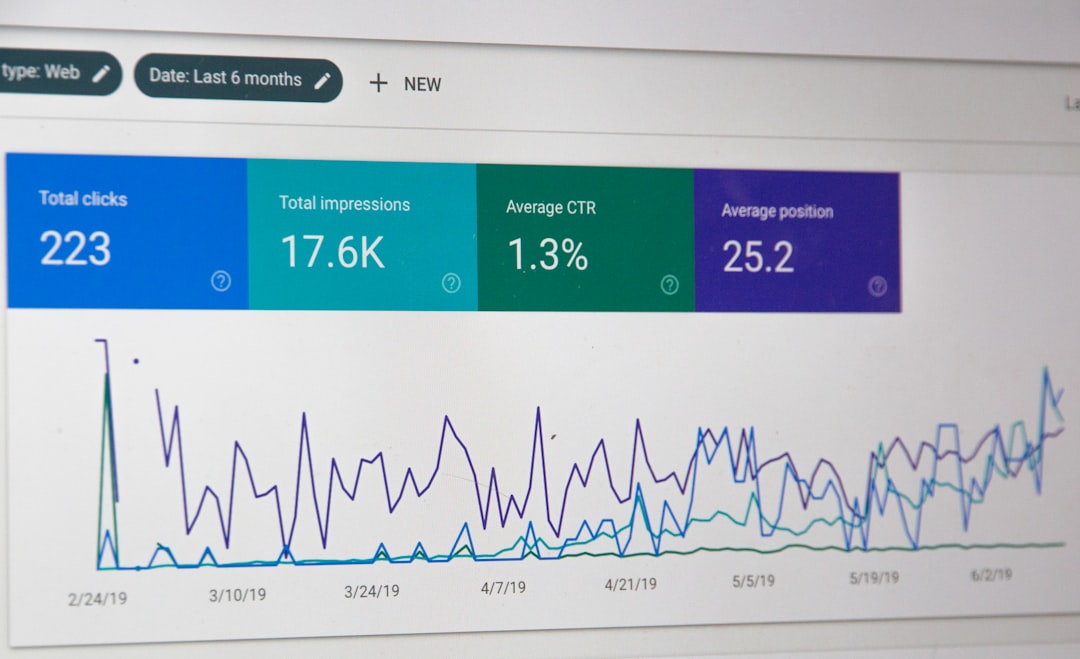
- Using Google Search Console to monitor actual SERP titles helps catch unwanted rewrites early.
What Is a Title Tag?
A title tag is an HTML element specified in the <head> section of a webpage that defines the page's title. It appears in three critical places:
- Search engine results pages (SERPs) — as the clickable blue link.
- Browser tabs — helping users identify open tabs.
- Social media previews — when a page is shared on Facebook, LinkedIn, or X (unless overridden by Open Graph tags).
In HTML, the title tag looks like this: <title>Your Page Title | Brand Name</title>. Despite its simplicity, it is one of the most impactful on-page SEO signals you can control.
Why Title Tags Matter for SEO
Search engines like Google use the title tag to understand what a page is about and determine its relevance to a given query. According to Google's own documentation, the title tag remains a strong ranking signal—second only to actual page content.
Beyond rankings, title tags directly influence user behavior. A compelling title tag boosts click-through rate (CTR) from the SERP, and higher CTR sends positive engagement signals back to Google. Research by Yoast and others found that title tags containing the exact target keyword have a CTR that is 20 % higher than those without it.
| Title Tag Element | SEO Impact | User Impact |
|---|---|---|
| Target keyword placement | Strong ranking signal | Tells searcher the page matches their query |
| Character length | Prevents truncation and rewriting | Full title visible in SERP |
| Unique per page | Avoids duplicate content signals | Differentiates pages in search results |
| Brand name | Builds brand entity recognition | Trust signal for branded searches |
| Emotional or benefit-driven copy | Indirect via higher CTR | Increases likelihood of click |
Title Tag vs. Meta Title vs. H1 Tag
These three elements are often confused, but they serve different purposes:
- Title tag (
<title>) — Lives in the HTML<head>; appears in SERPs, browser tabs, and social shares. This is the primary SEO element. - Meta title — In most CMS platforms (WordPress, Webflow, Shopify), this refers to the title tag field. The terms are interchangeable in practice.
- H1 tag (
<h1>) — The main visible heading on the page itself. Google uses the H1 as a secondary signal and may substitute it for the title tag in SERPs if the title tag is poorly written.
Best practice is to align the title tag and H1 closely—using the same target keyword—but vary the phrasing slightly so each provides unique value. For example, a title tag might read "12 Proven PPC Audit Tactics for 2025" while the H1 says "How to Run a PPC Audit That Saves Budget."
How to Write an Optimized Title Tag
Follow these 7 best practices to create title tags that rank and convert:
1. Front-Load Your Target Keyword
Place your primary keyword as close to the beginning of the title tag as possible. Search engines give more weight to words that appear first, and users scan from left to right. A title like "Title Tag SEO: 9 Best Practices for 2025" is stronger than "9 Best Practices for Title Tag SEO in 2025."
2. Keep It Under 60 Characters
Google displays approximately 580 pixels of title text, which translates to roughly 50–60 characters. Titles exceeding this limit get truncated with an ellipsis, reducing both readability and CTR. Use a SERP preview tool to check pixel width before publishing.
3. Write for Humans First
A title tag stuffed with keywords reads poorly and triggers Google's rewrite algorithm. Write natural, benefit-driven copy that makes users want to click. Example: "How to Fix Crawl Errors in 10 Minutes" beats "Crawl Errors Fix Guide Tutorial SEO."
4. Include Your Brand Name
Append your brand at the end using a pipe (|) or dash (–) separator. For strong brands, this adds a trust signal that lifts CTR by 5–10 %. For new brands, it builds recognition over time.
5. Match Search Intent
Analyze the SERPs for your target keyword. If the top results are "how-to" guides, your title should reflect informational intent. If they are product pages, your title should signal commercial or transactional intent. Misaligned intent means lower rankings regardless of optimization quality.
6. Add a Compelling Modifier
Words like "best," "guide," "2025," "free," "proven," and "step-by-step" increase long-tail keyword coverage and signal freshness. Ahrefs data shows that titles with a year modifier earn 10 % more organic clicks than identical titles without one.
7. Make Every Title Unique
Duplicate title tags across pages confuse search engines and dilute ranking potential. Audit your site using SEO audit tools like Google Search Console, Screaming Frog, or Yoast SEO to identify and fix duplicates.
Optimal Title Tag Length
The ideal title tag length has been debated for years. Here is what the data says:
| Length Range | SERP Display | Rewrite Risk | Recommendation |
|---|---|---|---|
| Under 30 characters | Fully visible | High (Google may expand it) | Too short — add context |
| 30–50 characters | Fully visible | Low | Safe but may underuse space |
| 50–60 characters | Usually fully visible | Very low | Sweet spot |
| 60–70 characters | May truncate | Moderate | Acceptable if high-value words come first |
| Over 70 characters | Truncated | High | Shorten immediately |
Google's John Mueller has stated that there is no hard character limit—Google measures in pixels. However, keeping titles at 50–60 characters remains the safest guideline for consistent SERP display across devices.
When Google Rewrites Your Title Tag
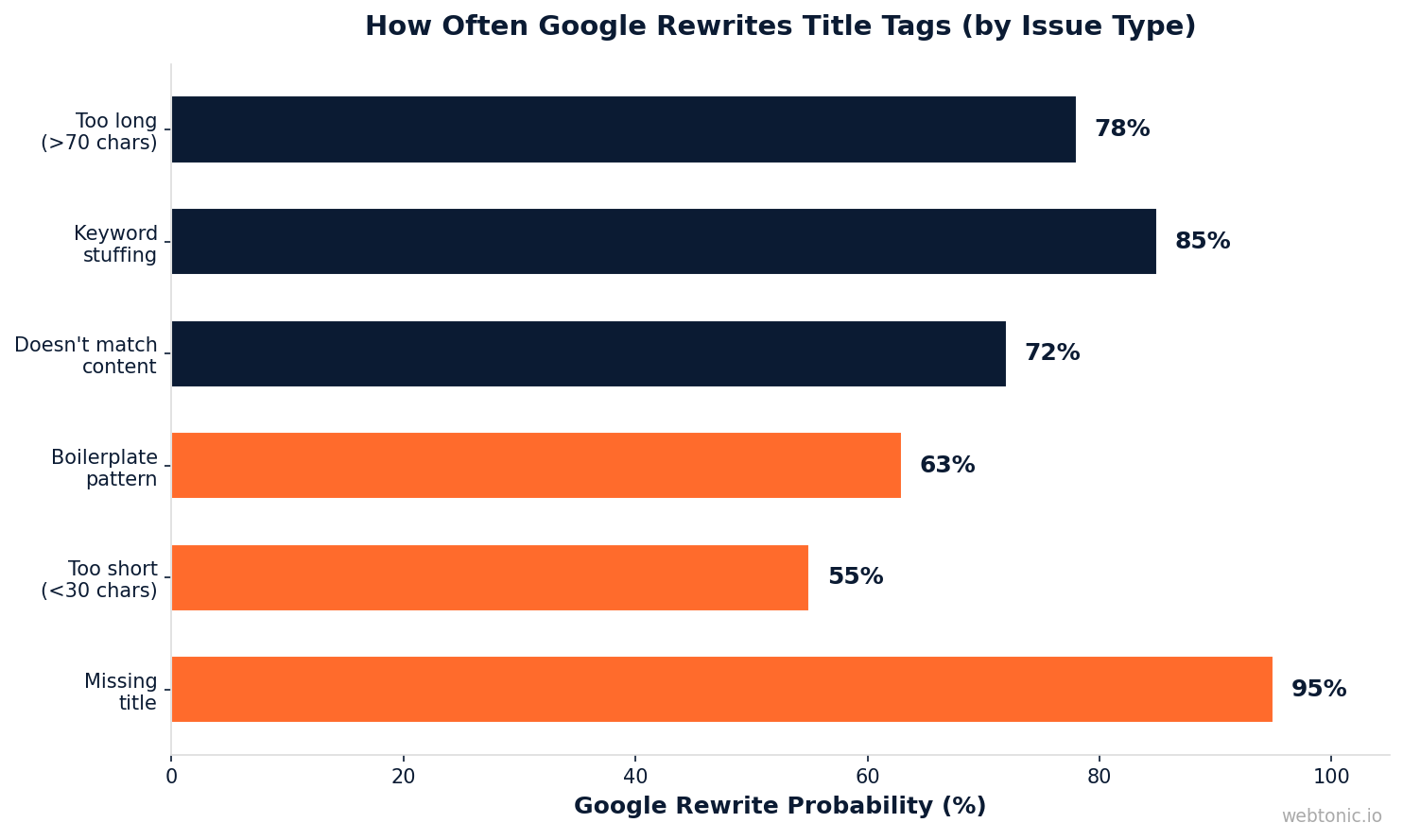
Since August 2021, Google has aggressively rewritten title tags when it determines they do not serve users well. A study by Zyppy found that Google changes title tags in roughly 61 % of all search results. Common triggers include:
- Keyword stuffing — repeating the same keyword multiple times.
- Excessively long titles — over 70+ characters.
- Titles that don't match page content — intent mismatch between title and body.
- Boilerplate patterns — identical brand prefixes or suffixes on every page.
- Missing titles — empty or placeholder
<title>tags.
When Google rewrites your title, it may pull text from the H1, H2 headings, anchor text from inbound links, or even the page's meta description. To reduce rewrite risk, align your title tag closely with the H1 and ensure it accurately describes the page content.
Title Tag SEO Tools
Several tools help you audit, write, and monitor title tags at scale:
| Tool | Primary Function | Best For |
|---|---|---|
| Google Search Console | See actual SERP titles, CTR, and impressions | Detecting rewrites and measuring performance |
| Yoast SEO / Rank Math | Title tag editing within WordPress | Per-page optimization with real-time preview |
| Screaming Frog | Crawl-based audit of all title tags | Finding duplicates, missing titles, and length issues |
| Ahrefs / Semrush | Competitive title tag analysis | Benchmarking against SERP competitors |
| SERP Simulator | Visual pixel-width preview | Checking truncation before publishing |
For enterprise sites managing thousands of pages, programmatic title tag templates (using CMS variables like category, product name, and brand) ensure consistency while still allowing per-page customization for high-priority URLs.
Common Title Tag Mistakes to Avoid
Even experienced digital marketers make title tag errors that silently hurt rankings. Watch out for these:
- Keyword stuffing — "SEO Title Tag SEO Optimization Title Tags SEO" triggers rewrites and looks spammy.
- Duplicate titles — Every page needs a unique title tag, including paginated pages and filtered product listings.
- Ignoring search intent — A transactional title on an informational page confuses both users and Google.
- Forgetting mobile — Mobile SERPs display fewer characters (~40–50). Put the most important words first.
- Using the default CMS title — Many CMS platforms auto-generate titles like "Page 1 | My Website." Always override with a custom title tag.
- Not monitoring rewrites — Check Google Search Console regularly. If Google is rewriting your title, it is a signal that something needs to change.
Title Tag Examples by Industry
Different industries require different title tag approaches. Here are optimized title tag examples across common verticals to help you develop the right format for your pages:
- E-commerce: "Men's Running Shoes – Free Shipping on Orders Over $50 | BrandName"
- SaaS: "Project Management Software for Remote Teams | Start Free | BrandName"
- Local service: "Emergency Plumber in Austin, TX – Available 24/7 | BrandName"
- Blog post: "How to Reduce Bounce Rate: 11 Proven Tactics (2025 Guide)"
- Law firm: "Personal Injury Lawyer in Chicago – Free Consultation | FirmName"
Notice how each example front-loads the primary keyword, stays under 60 characters, and includes a differentiator or benefit that makes the listing stand out in the SERP. For professional title tag audits, consider working with an SEO specialist who can analyze your competitive landscape.
FAQ
What is a title tag in HTML?
A title tag is an HTML element written as <title>Your Title Here</title> inside the <head> section of a webpage. It tells search engines and browsers what the page is about and appears as the clickable headline in search results.
How long should a title tag be?
Keep your title tag between 50 and 60 characters (approximately 580 pixels wide). This range ensures the full title displays in Google's search results without truncation on both desktop and mobile devices.
Is the title tag the same as the meta title?
Yes, in most contexts. CMS platforms like WordPress, Webflow, and Shopify label the title tag field as "meta title" or "SEO title," but they all generate the same <title> element in the HTML source. The H1 tag, however, is a different element that appears on the page itself.
How do I stop Google from rewriting my title tag?
Write concise, accurate title tags under 60 characters that closely match the page's H1 and content. Avoid keyword stuffing, boilerplate patterns, and intent mismatches. Google rewrites titles that it considers unhelpful to searchers.
Should I put my brand name in the title tag?
Yes—append it at the end with a separator (e.g., "Title Tag Best Practices | YourBrand"). For well-known brands, this boosts CTR. For newer brands, it builds recognition over time. Only omit it if the resulting title exceeds 60 characters.
Sources
Google Search Central – Title Links in Search Results
Zyppy – Google Title Tag Rewrite Study
Moz – Title Tag SEO Guide
Ahrefs – Title Tag SEO Best Practices
Yoast – Page Titles and SEO
Search Engine Journal – Title Tag Optimization
Google Search Console – Performance Reports


