



Table of contents

An SEO report template is a pre-built framework that organizes your search engine optimization data into a structured, client-ready format. Instead of scrambling to pull metrics from five different tools each month, a solid template gives you repeatable sections, consistent KPIs, and a narrative structure that translates raw data into business decisions.
Key Takeaways
- 46 % of companies track only 3–5 primary SEO metrics, yet the average agency report contains 30+ data points — most of which no one reads (Databox).
- SEO leads close at a 14.6 % rate versus 1.7 % for outbound leads, making the conversion section the most important part of any SEO report.
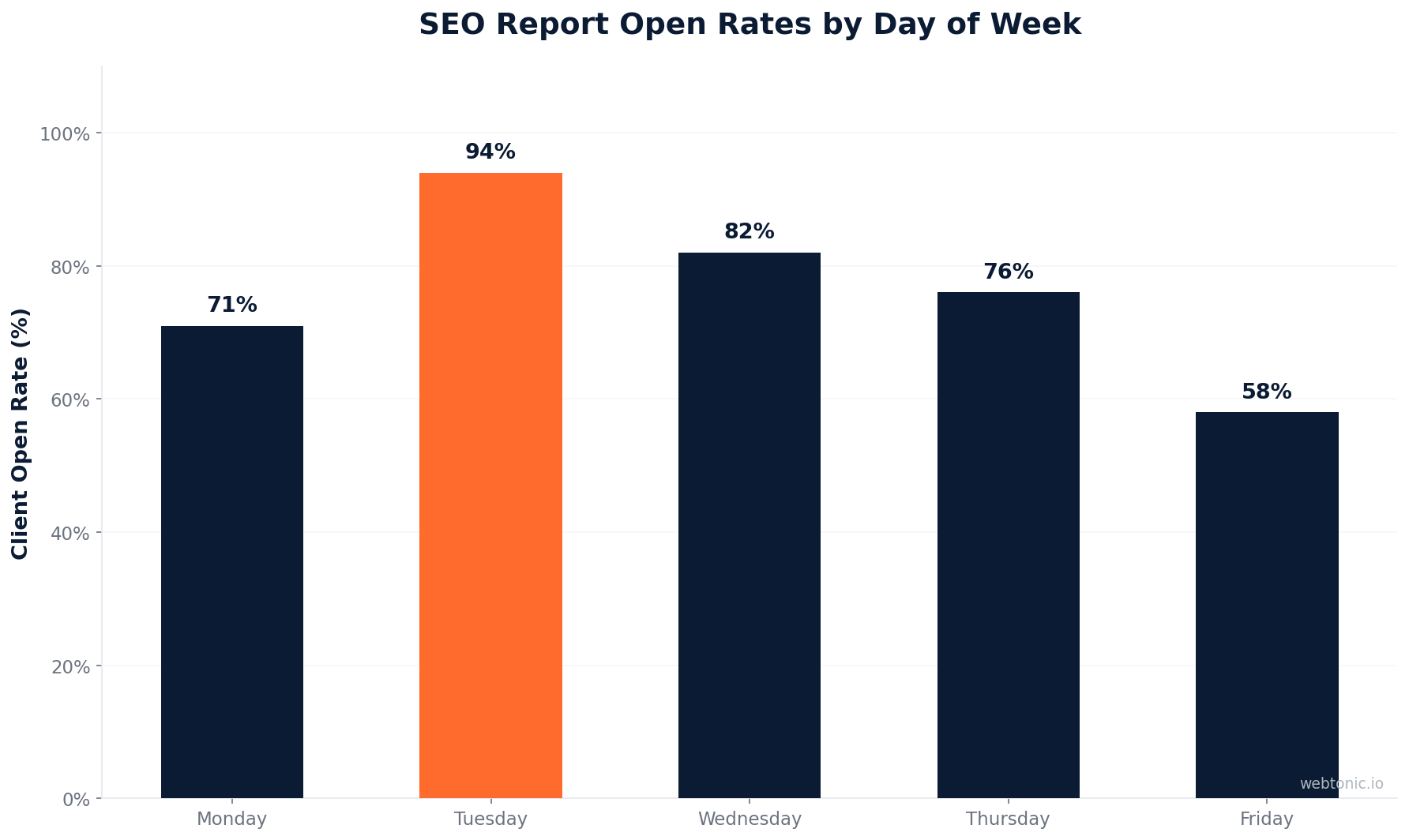
- Agencies that send reports on a consistent schedule (same day, same time each month) see a 94 % client open rate compared to 62 % for inconsistently timed reports.
- The executive summary is the only section most clients actually read — it should answer "what happened, why, and what's next" in under 60 seconds.
- Adding AI search visibility tracking to your report template in 2025 is no longer optional: AI Overviews now appear on 86 % of keyword queries, making citation tracking a core metric.
What Is an SEO Report?
An SEO report is a document that communicates the performance, progress, and impact of search engine optimization work over a specific time period. It connects technical SEO activities (crawl fixes, content published, links built) to business outcomes (traffic growth, leads generated, revenue attributed to organic search).
The purpose varies by audience:
- C-suite stakeholders want a 60-second answer: is SEO working, and what is the ROI?
- Marketing managers need enough detail to understand trends, allocate budget, and coordinate with other channels.
- SEO practitioners require granular data to diagnose problems, spot opportunities, and plan next steps.
A well-built report template serves all three audiences in a single document — typically through a layered approach with an executive summary up front and detailed data in subsequent sections.

10 Sections Every SEO Report Template Needs
We analyzed the top-performing (CrawlRaven, Scale Growth Digital) SEO reporting frameworks from leading agencies and tools to identify the sections that consistently produce actionable reports. Here is the complete breakdown:
1. Executive Summary
This is the section that makes or breaks client trust. It answers three questions in under 60 seconds: What happened? (KPIs vs. targets), Why? (2–3 sentence narrative), and What's next? (top priorities for the coming month). Include a KPI table showing this month, last month, percentage change, target, and status for each core metric.
2. Organic Traffic
Break down organic sessions by source, landing page, device, and geography. Show month-over-month (MoM) and year-over-year (YoY) trends — a single month's dip means nothing without historical context. Flag whether a 15 % seasonal decline is normal for the industry or signals a real problem.
3. Keyword Rankings
Track your top 20–50 target keywords with position changes. Separate money keywords (those that drive conversions) from informational keywords. Highlight new page-one rankings and keywords that dropped from the first page. If your agency cannot connect keyword movements to revenue impact, the tracking is decorative.
4. Technical Health
Report on crawl errors, Core Web Vitals status, indexation coverage, and page speed. This is not a full technical audit — it is a health check that flags what broke, what got fixed, and what is getting worse since the last report.
5. Backlink Profile
Show new referring domains acquired, total backlink trend, and the domain rating distribution of new links. If link building is on the retainer, this section is the proof line — it demonstrates the work being done and its quality.
6. Content Performance
List the top 10 pages by organic traffic, new content published during the period, and content gaps identified. This section should also flag content decay — pages losing traffic that need refreshing.
| Report Section | Primary Metric | Data Source | Audience |
|---|---|---|---|
| Executive Summary | KPIs vs. targets, narrative | All sections below | C-suite, all stakeholders |
| Organic Traffic | Sessions, users, pageviews (MoM/YoY) | GA4, Search Console | Marketing managers |
| Keyword Rankings | Position changes, new page-1 rankings | Ahrefs, Semrush, SE Ranking | SEO practitioners |
| Technical Health | CWV status, crawl errors, index coverage | Search Console, PageSpeed Insights | SEO practitioners |
| Backlink Profile | New referring domains, DR distribution | Ahrefs, Moz, Majestic | SEO practitioners, managers |
| Content Performance | Top pages by traffic, decay flags | GA4, Search Console | Content teams, managers |
| Conversions | Organic leads, revenue, close rate | GA4, CRM | C-suite, sales |
| Competitor Snapshot | Share of voice, ranking overlap | Ahrefs, Semrush | Managers, strategists |
| AI Visibility | Brand citations in AI answers | Manual tracking, GA4 referrals | All stakeholders |
| Action Items | Prioritized next steps with impact | Your analysis | All stakeholders |
7. Conversions and Revenue
Isolate conversions attributed to organic search — form fills, purchases, signups, phone calls. This is the section that justifies the SEO investment. Reports that skip conversions hide the part that matters most. Connect organic traffic to pipeline or revenue using GA4 event tracking or CRM integration.
8. Competitor Snapshot
Show share of voice against your top 3–5 competitors, new keywords they are ranking for that you are not, and any significant ranking movements. This gives context to your own performance — a 5 % traffic decline looks different when your competitors dropped 15 %.
9. AI Search Visibility
Track whether your brand is being cited in AI Overviews, ChatGPT responses, and other AI-generated answers. This is a new section that most report templates still miss, but with AI Overviews appearing on 86 % of queries, it is becoming essential for demonstrating organic visibility beyond traditional rankings.
10. Action Items and Next Steps
The section most reports skip and the one that matters most. List 3–5 prioritized actions for the next period with expected impact. Outcomes without inputs are unexplainable — this section connects past work to future strategy.
Best SEO Reporting Tools (2025)
The right reporting tool depends on your team size, client volume, and how much you want to automate. Here is a comparison of the leading platforms:

| Tool | Starting Price | Best For | Key Feature |
|---|---|---|---|
| Looker Studio (Google) | Free | Teams already in the Google ecosystem | Native GA4 + Search Console connectors, custom dashboards |
| Ahrefs | $129/mo | SEO-focused agencies | Automated weekly/monthly ranking and backlink reports |
| Semrush | $139.95/mo | Agencies running SEO + PPC | White-label PDF reports with competitor data |
| DashThis | $49/mo | Multi-channel marketing agencies | Pre-built templates with 30+ integrations |
| Whatagraph | $199/mo | Agencies needing visual, branded reports | Drag-and-drop designer with cross-channel data blending |
| AgencyAnalytics | $79/mo | Small to mid-size agencies | Client-facing dashboards with white-label branding |

How to Build Your SEO Report Template (Step by Step)
Follow this process to create a report template that you can reuse every month with minimal effort:
- Choose your platform. Looker Studio for interactive dashboards, Google Sheets for spreadsheet-style reports, or PowerPoint/PDF for formal presentations. The format should match your client's preference.
- Define your core KPIs. Start with 5–7 metrics maximum. More is not better — a report tracking 30 KPIs overwhelms stakeholders and buries the signal in noise.
- Build the executive summary first. This forces you to identify the most important data points before you design the rest of the report.
- Connect your data sources. Link GA4, Search Console, Ahrefs/Semrush, and your CRM. Automate data pulls wherever possible to eliminate manual copy-paste errors.
- Add MoM and YoY benchmarks. Raw numbers without context are meaningless. Every metric should show the trend — is it improving, declining, or flat?
- Include a narrative layer. Data tells you what happened; narrative explains why. Add commentary boxes to each section that translate numbers into plain-language insights.
- End with action items. Every report should conclude with 3–5 specific next steps, prioritized by expected impact.
SEO Report Delivery Best Practices
How you deliver the report matters as much as what is in it. Research from agency surveys shows that timing and format consistency are the top factors determining whether clients actually read the reports they are paying for.

- Send on the same day and time each month. First Tuesday at 10:00 AM in the client's local timezone produces the highest open rates across agency benchmarks.
- Use plain text emails over HTML templates. Plain text emails see 23 % higher open rates because they feel personal rather than promotional.
- Follow the 3-email framework. (1) Pre-teaser 2 days before — creates anticipation. (2) Report delivery on schedule — provides context and next steps. (3) Follow-up 2 days after — books the discussion call and surfaces opportunities.
- Offer real-time dashboard access between reports. Clients increasingly expect to monitor progress on demand, not just once a month.
Monthly SEO Report Template: Free Download
If you need a plug-and-play starting point, here is what a solid monthly SEO report template should include at minimum:
- Cover page — Client name, reporting period, agency logo.
- Executive dashboard — Traffic light indicators (green/yellow/red) for each major KPI.
- Organic traffic tab — Sessions, users, pageviews with MoM and YoY deltas.
- Rankings tab — Tracked keywords with position movements and SERP feature presence.
- Backlinks tab — New referring domains, anchor text distribution, lost links.
- Technical tab — CWV status, crawl errors, indexation changes.
- Content tab — Top pages, new content, decay alerts.
- Conversion tab — Organic leads, revenue, cost per lead from organic.
- Recommendations tab — Prioritized action items with expected impact and timeline.
Many digital marketing agencies and platforms like Porter Metrics provide custom templates tailored to industry-specific KPIs. Tools like Looker Studio, DashThis, and Whatagraph offer free starter templates that you can customize with your branding and data sources.
Common SEO Reporting Mistakes
- Reporting vanity metrics. Impressions, total keywords tracked, and domain authority by themselves tell you nothing actionable. Tie every metric to a business outcome.
- Skipping the narrative. A spreadsheet of numbers without context is not a report — it is a data dump. Clients hire agencies for interpretation, not data access.
- Over-reporting frequency. Weekly reports for clients on monthly retainers create noise and dilute trust in data trends. Monthly reporting with real-time dashboard access is the industry standard.
- Ignoring competitor context. Your performance exists in a competitive landscape. A 10 % traffic increase is less impressive if your top competitor grew 40 %.
- No action items. A report without recommendations is a mirror, not a map. Always tell the client what to do next.
Related reading
- SEO for Family Law: A Practical Growth Playbook
- SEO for Agencies: A Practical Growth Playbook
- SEO for Gyms: A Practical Growth Playbook
- GEO & AEO services at Web Tonic
FAQ
What should be included in an SEO report?
A complete SEO report includes an executive summary, organic traffic data, keyword ranking changes, technical health metrics, backlink profile updates, content performance, conversion tracking, competitor analysis, AI search visibility, and prioritized action items. The exact depth depends on the client's sophistication and the scope of the engagement.
How often should SEO reports be generated?
Monthly reporting is the industry standard for most client engagements. It provides enough time for meaningful data to accumulate while maintaining regular communication. Supplement monthly reports with quarterly business reviews for deeper strategic analysis and annual reports for year-over-year trend evaluation.
Which tool is best for creating SEO reports?
Looker Studio is the best free option for teams already using Google tools. For agencies managing multiple clients, AgencyAnalytics or DashThis offer white-label automation at reasonable price points. Ahrefs and Semrush produce excellent SEO-specific reports but work best as data sources feeding into a broader reporting platform.
How do I automate SEO reporting?
Connect your data sources (GA4, Search Console, Ahrefs, CRM) to a dashboard tool like Looker Studio or Whatagraph. Set up automated data refreshes, schedule monthly email deliveries, and use template pages that pull live data without manual updates. The initial setup takes 4–8 hours, but each subsequent report takes under 30 minutes of narrative writing.
What KPIs matter most in an SEO report?
The five KPIs that consistently drive decision-making are: organic sessions (is traffic growing?), conversions from organic (is traffic converting?), keyword rankings for money terms (are we visible for revenue-driving queries?), new referring domains (is authority growing?), and technical health score (is the site foundation stable?). Everything else is supporting detail.
Sources
Whatagraph — SEO Report Templates
CrawlRaven — SEO Client Report Template Guide (2026)
Reportr — Complete SEO Reporting Guide for Agencies (2026)
Scale Growth Digital — Free SEO Report Template (2026)
SEOJuice — SEO Report Template (2026)
Porter Metrics — SEO Report Templates for Looker Studio


