



Table of contents

The Semrush site audit tool crawls your entire website, checks over 140 technical SEO issues, and produces a prioritized list of errors, warnings, and notices that directly affect your search engine rankings and site health score.
Key Takeaways
- Semrush Site Audit runs over 140 on-page and technical SEO checks including broken links, duplicate content, HTTPS implementation, crawlability issues, and core web vitals analysis.
- The site health score is calculated based on the ratio of errors and warnings to total pages crawled, with errors carrying more weight than warnings in the final score.
- Sites with a health score above 80% are generally considered well-optimized, while scores below 60% indicate significant technical issues requiring immediate attention.
- Fixing all issues related to a single check type (e.g., all broken links) has a greater impact on your overall site health score than partially fixing multiple different issue types.
- The tool crawls up to 20,000 pages per audit on standard plans and 100,000 pages on the Business tier, making it suitable for portfolios, SMBs, and enterprise-level domains with thousands of pages, SMB sites, and enterprise-level domains.
Running a comprehensive SEO audit is the first step toward improving your website's organic visibility and technical foundation. Whether you manage a single website or an agency portfolio of dozens, the Semrush site audit tool gives you a systematic way to identify and fix the technical issues that prevent search engines from properly crawling, indexing, and ranking your pages. This guide walks through every step of running a Semrush site audit — from initial setup to interpreting results and fixing the most critical issues.
What Is the Semrush Site Audit Tool
The Semrush Site Audit is a website crawler built into the Semrush SEO toolkit that analyzes the technical health of any domain, subdomain, or subfolder. It performs a deep crawl of your site and generates reports categorized by issue type — crawlability, HTTPS security, site performance, internal linking, markup, and international SEO.
Unlike a manual site audit that requires checking dozens of factors individually across tools like Google Search Console, Screaming Frog, and PageSpeed Insights, the Semrush site audit tool consolidates over 140 technical checks into a single automated workflow, replacing what would otherwise take over 140 checks into a single dashboard with automated prioritization. Each issue includes a severity classification (error, warning, or notice) and a "Why and how to fix it" explanation that walks you through the recommended solution.
The tool also includes an AI Search category focused on Generative Engine Optimization (GEO) — helping your site perform better in AI-driven search tools like SearchGPT, Claude, and Perplexity. This makes it one of the most forward-looking SEO audit tools available in 2026.
How to Set Up and Run a Semrush Site Audit
Setting up your first site audit in Semrush takes less than five minutes. Here is the step-by-step process from project creation to crawl completion.
Step 1 — Create a Project
Navigate to the Site Audit tool from the Semrush left-hand menu. If you are creating a new project, enter your target URL and click "Create Project." You can choose to audit an entire domain, a specific subdomain (e.g., blog.example.com), or a subfolder (e.g., example.com/blog/). Choosing the right scope prevents wasting crawl budget on irrelevant sections of your site.
Step 2 — Configure Crawl Settings
Before launching, configure the audit settings based on your site's characteristics. Key options include the number of pages to crawl (up to 20,000 on standard plans), crawl delay between requests (to avoid overloading your server), JavaScript rendering (essential for single-page applications and JavaScript-heavy frameworks), and whether to crawl the desktop or mobile version of your site. For most websites, starting with default settings and running a first pass is the fastest way to begin.
Step 3 — Launch and Wait
Click "Start Site Audit" to begin the crawl. Processing time depends on the size of your site — larger enterprise sites with 10,000+ pages may take 30 minutes or more and your crawl delay setting. A 500-page website typically completes in under 5 minutes. Once complete, you will see your site health score prominently displayed along with a breakdown of errors, warnings, and notices.
Step 4 — Schedule Recurring Crawls
Set up automated re-crawls on a daily or weekly basis to track your site's health over time. This creates a historical baseline that helps you spot regressions immediately — for example, a developer deployment that accidentally introduced noindex tags on critical pages, which can erase 100% of that page's organic traffic on critical pages, or an SSL certificate renewal that broke HTTPS on specific subdomains.
| Setting | Recommended Value | Why It Matters |
|---|---|---|
| Crawl Scope | Full domain (unless targeting a subfolder) | Ensures all pages are checked including orphaned ones |
| Pages to Crawl | Maximum allowed by your plan | Incomplete crawls miss issues on unchecked pages |
| Crawl Delay | Default (no delay) for most sites | Too high a delay significantly increases crawl time |
| JavaScript Rendering | Enable for JS-heavy sites (React, Vue, Angular) | Content behind JS won't be audited without rendering |
| User Agent | Mobile (matches Google's mobile-first indexing) | Audits what Google actually sees when crawling |
| Re-crawl Schedule | Weekly for active sites, daily during migrations | Catches regressions before they impact rankings |
Understanding the Site Health Score
The site health score is the headline metric in every Semrush site audit report. It is calculated as a percentage based on the ratio of issues found to total pages crawled. Errors carry more weight than warnings, and warnings carry more weight than notices.
According to Semrush's documentation, the score depends on three factors: the type of issue found, the number of unique issue types present, and whether all instances of a given issue have been fixed. Fixing every instance of a single issue type (for example, resolving all broken internal links) has a larger impact on the score than partially fixing several different issue types.
The site health score does not depend on the raw number of pages crawled, which means a 50-page site and a 5,000-page site are evaluated on the same scale. You can also benchmark your score against the industry average and see how the top 10% of websites in your category perform.
As a general guideline, scores above 80% indicate a technically healthy site, scores between 60% and 80% suggest moderate issues that need attention, and scores below 60% signal critical technical problems that are likely suppressing rankings.

The Most Critical Issues Found by Semrush Site Audit
Not all audit issues carry equal weight. Here are the most impactful technical SEO issues that the Semrush site audit tool detects, organized by severity.
Errors — Highest Priority
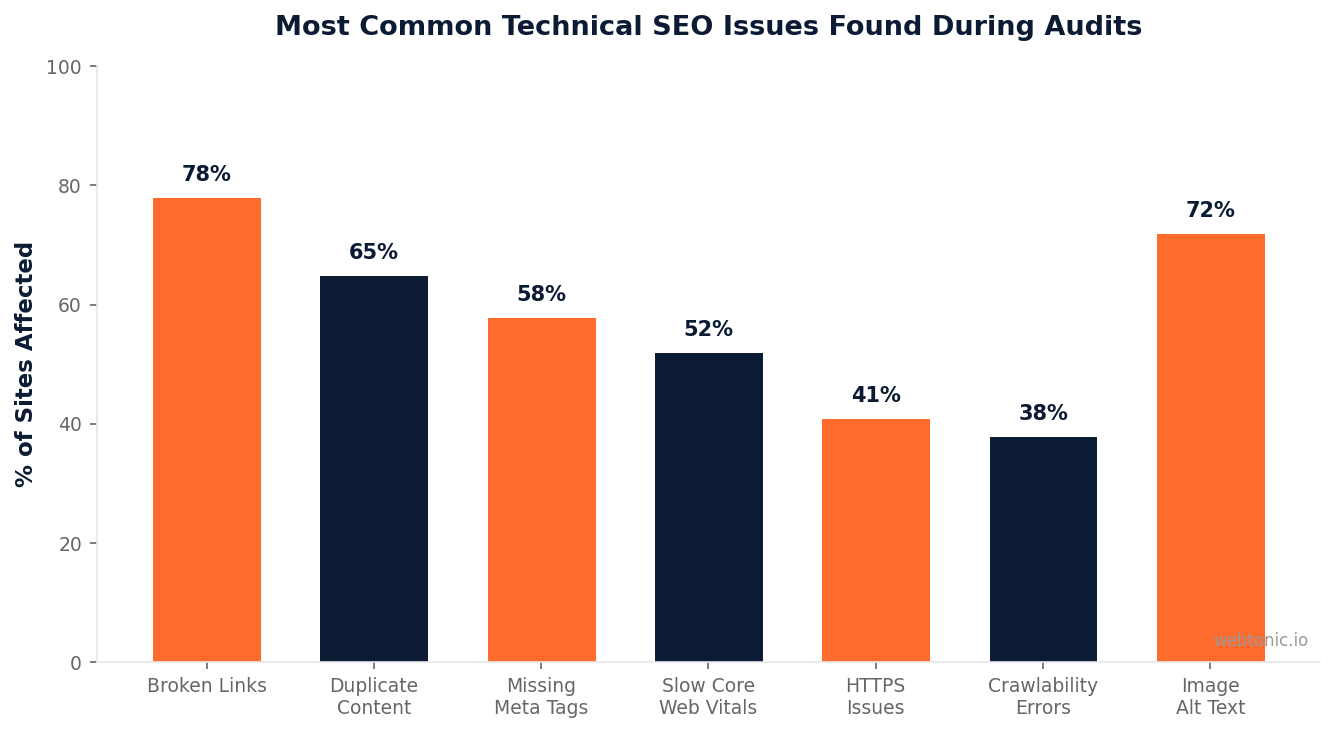
Broken internal links (4xx status codes). Links pointing to non-existent pages create dead ends for both users and search engine crawlers. Every broken link wastes crawl budget and passes zero link equity. Broken internal links are found on 78% of audited websites and passes zero link equity. The site audit identifies every broken link and shows you the source page so you can fix or redirect it.
Pages with noindex tags that should be indexed. An accidental noindex directive removes a page from Google's index entirely. This is one of the most damaging errors because it is invisible to users — the page loads normally, but search engines pretend it does not exist.
Duplicate content without canonical tags. When multiple URLs serve identical or near-identical content without a canonical tag pointing to the preferred version, search engines must guess which page to rank. This dilutes link equity and creates keyword cannibalization.
Warnings — Medium Priority
Missing or duplicate meta descriptions. While meta descriptions are not a direct ranking factor, they influence click-through rates from search results. Pages sharing the same meta description signal low-effort optimization to both search engines and users.
Slow page load speed. The Semrush site audit checks core web vitals — Largest Contentful Paint (LCP), Cumulative Layout Shift (CLS), and Interaction to Next Paint (INP) — and flags pages that fail Google's performance thresholds. Pages with LCP above 2.5 seconds are penalized in Google's ranking algorithm.
Missing alt text on images. Images without descriptive alt attributes hurt accessibility and miss SEO opportunities. The audit identifies every image lacking alt text so you can add descriptive, keyword-relevant alternatives.
Notices — Lower Priority
Pages with excessive outbound links. While not directly harmful, pages linking to hundreds of external sites may dilute their authority. Notices give you visibility into patterns that could become problems at scale.
Orphan pages. Pages with no internal links pointing to them are difficult for crawlers to discover. The site audit identifies orphaned pages so you can integrate them into your site's internal linking structure or remove them if they are no longer relevant.
| Issue Category | Severity | Impact on Rankings | Fix Priority |
|---|---|---|---|
| Broken Internal Links | Error | Wastes crawl budget, breaks link equity flow | Immediate |
| Noindex on Key Pages | Error | Completely removes pages from search index | Immediate |
| Missing Canonicals | Error | Causes keyword cannibalization and diluted authority | High |
| Slow Core Web Vitals | Warning | Direct ranking signal; affects user experience | High |
| Duplicate Meta Descriptions | Warning | Reduces CTR from search results | Medium |
| Missing Image Alt Text | Warning | Missed ranking signals; accessibility violation | Medium |
| Orphan Pages | Notice | Reduces crawl efficiency and discoverability | Low |

Advanced Semrush Site Audit Features
Beyond the standard issue report, the Semrush site audit includes several advanced features that professional SEOs and agencies rely on for deeper analysis.
Thematic Reports. The audit groups issues into focused reports covering crawlability, HTTPS implementation, core web vitals, internal linking, and markup. Each thematic report provides a dedicated score and visualization, making it easier to delegate specific areas to different team members.
Compare Crawls. This feature lets you compare the results of two different crawls side by side. It is invaluable during site migrations, CMS changes, or large-scale development sprints — you can see exactly which issues were introduced or resolved between crawls.
Robots.txt and Sitemap Analysis. The audit checks your robots.txt file for directives that may inadvertently block important pages from being crawled. It also analyzes your XML sitemap to ensure it includes all indexable pages and does not contain URLs that return errors. A properly configured robots.txt file and sitemap are foundational to healthy crawlability.
HTTPS Migration Audit. For sites transitioning from HTTP to HTTPS (or auditing an existing SSL implementation), the tool checks for mixed content warnings, incorrect canonical URLs, broken certificate chains, and redirect loops — all common issues that undermine secure connections and hurt trust signals.
AMP Validation. If your site uses Accelerated Mobile Pages, the audit validates AMP compliance and flags issues that could prevent your AMP pages from appearing in Google's AMP carousel and mobile search results.
How to Fix the Most Common Site Audit Issues
Identifying issues is only half the battle. Here is how to address the most frequently flagged problems from a Semrush site audit efficiently.
Fixing broken links. Export the full list of broken internal links from the audit report. For each, determine whether the target URL should be redirected (301 redirect to the correct page) or the link should be updated to point to the correct destination. Prioritize broken links on high-traffic pages and pages with strong backlink profiles first.
Resolving duplicate content. Add canonical tags to specify the preferred version of each page. For truly duplicate pages (e.g., URL parameter variations), consider implementing 301 redirects to consolidate authority on a single URL. Use the audit's "Pages with duplicate content" report to identify clusters of near-duplicate pages.
Improving core web vitals. Start with Largest Contentful Paint (LCP), as it has the strongest correlation with rankings. Compress and properly size images as part of your data-driven optimization process, enable lazy loading for below-the-fold content, minimize render-blocking CSS and JavaScript, and implement server-side caching. The audit's core web vitals report flags specific pages that fail each metric, so you can target your optimization efforts precisely.
Cleaning up the robots.txt file. Review every Disallow directive in your robots.txt file to ensure you are not accidentally blocking important pages or entire directories. A common mistake is blocking CSS and JavaScript files that Googlebot needs to render your pages properly. The audit flags any crawlability issues caused by robots.txt misconfigurations.
Integrating Site Audit with Other Semrush SEO Tools
The Semrush site audit is most powerful when used alongside the platform's other tools for a complete SEO strategy.
Organic Research. Cross-reference your audit findings with organic traffic data to prioritize fixing issues on pages that drive the most traffic. A broken canonical tag on a page generating 10,000 monthly visits is far more urgent than the same issue on a page with 50 visits.
Google Search Console Integration. Connect your Google Search Console account to Semrush to enrich your audit with real-world crawl data, index coverage reports, and search performance metrics. This integration helps validate whether the issues flagged by Semrush are actually affecting your visibility in Google.
Google Analytics Data. Layer in Google Analytics data to understand the revenue impact of technical issues. If a page with slow core web vitals is also a high-converting landing page, fixing its performance becomes a direct revenue opportunity.
Position Tracking. Monitor how fixing audit issues correlates with ranking improvements over time. This creates a feedback loop that helps you measure the ROI of your technical SEO work and justify continued investment in site health to stakeholders.

Related reading
- How to Use Semrush: A Step-by-Step Walkthrough
- Pages Vanished From Google After a Migration: 48-Hour Triage
- How to Do a Content Audit: A Step-by-Step Walkthrough
- GEO & AEO services at Web Tonic
Frequently Asked Questions
How often should I run a Semrush site audit?
For most websites, running a weekly site audit provides the best balance between catching issues early and avoiding audit fatigue. Set up automated weekly re-crawls in Semrush to maintain a continuous baseline. During major site changes — migrations, redesigns, CMS updates, or large content launches — switch to daily audits until the changes stabilize. Agencies managing multiple client sites often run weekly audits across all accounts and flag any site where the health score drops by more than 5 points.
What is a good site health score in Semrush?
A site health score above 80% is generally considered good for most websites. The top 10% of sites across all industries typically score above 90%. However, the absolute number matters less than the trend — a site that improves from 55% to 75% over three months is making meaningful progress even though it has not hit 80% yet. Focus on fixing all errors first (they carry the most weight), then work through warnings systematically.
Can Semrush Site Audit replace Google Search Console?
No — the two tools serve complementary purposes. Semrush Site Audit is a proactive crawler that simulates how search engines see your site and identifies issues before they affect rankings. Google Search Console shows you how Google actually crawls and indexes your site in real time, including index coverage reports, manual actions, and Core Web Vitals field data. Using both together gives you the most complete picture of your site's technical health.
Does the Semrush site audit check for mobile usability issues?
Yes. When you configure your audit to crawl the mobile version of your site, the tool evaluates the mobile rendering across 40+ mobile-specific checks and flags issues specific to mobile user experience — including viewport configuration, tap target sizing, and font readability. Since Google uses mobile-first indexing, auditing the mobile version of your site ensures you are checking what Google actually sees when it crawls your pages.
How many pages can Semrush audit at once?
The number of pages per audit depends on your Semrush subscription tier. The Pro plan allows up to 20,000 pages per audit, the Guru plan allows 20,000 pages, and the Business plan supports up to 100,000 pages per audit. For sites exceeding these limits, you can audit specific subdomains or subfolders separately to cover the full site across multiple audit campaigns.
Sources
semrush.com/kb/31-site-audit
semrush.com/kb/114-total-score
semrush.com/kb/1184-audit-your-website
semrush.com/kb/541-site-audit-issues-report
arieldigitalmarketing.com/technical-seo-checklist-2026
web.dev/articles/vitals
developers.google.com/robots-intro
support.google.com/search-console


