



Table of contents

Quick answer: Check in this order — robots.txt, noindex, redirects, canonicals, sitemap. A site-wide disappearance is almost always a staging robots rule or a global noindex shipped with the build, and both are one-line fixes once found.
Last verified: 2026-08-21
Triage before diagnosis
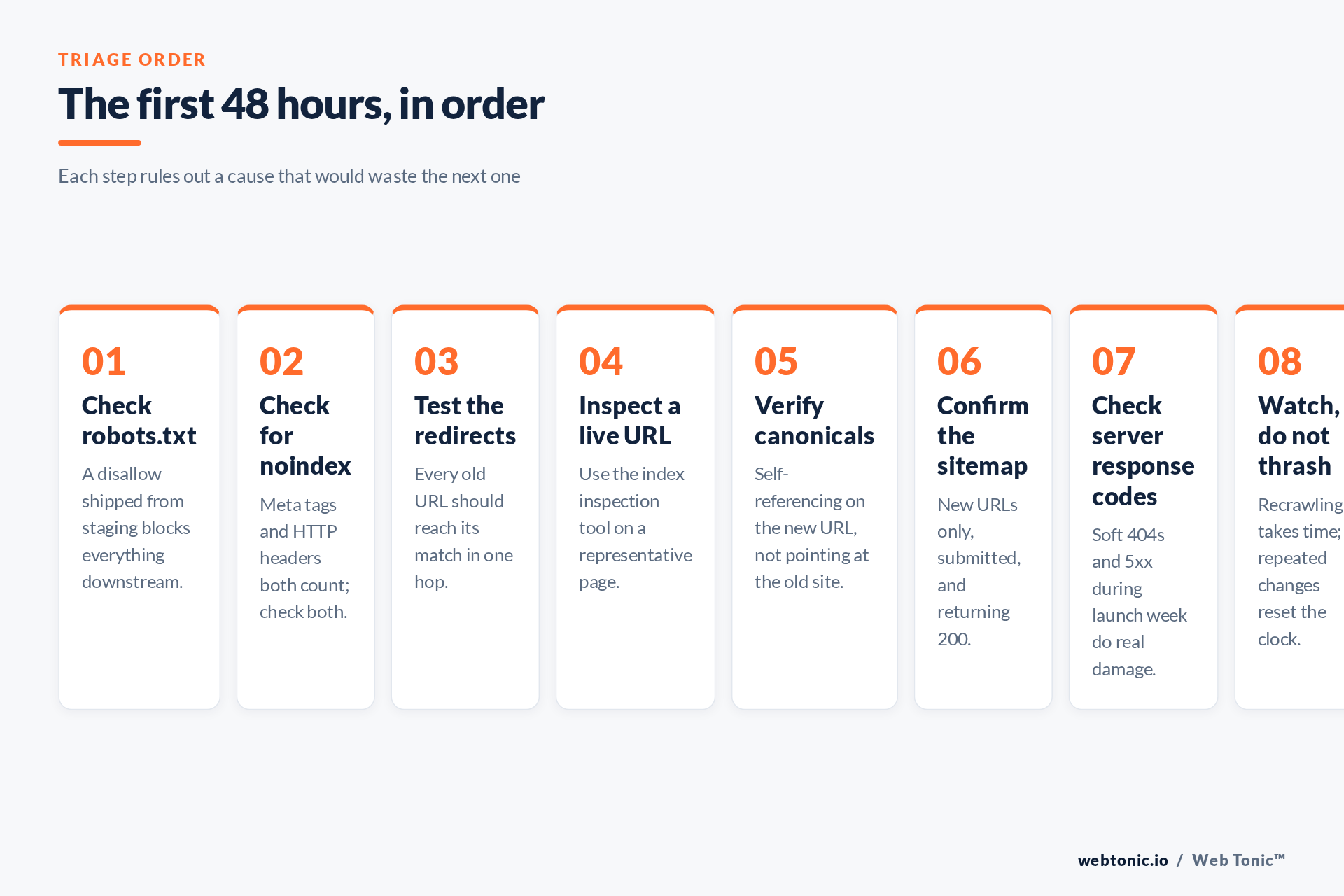
The instinct after a relaunch is to open analytics and stare at the traffic line. Resist it for an hour. Traffic tells you that something is wrong; it does not tell you what, and post-migration panic reliably produces a second round of changes that make the recovery slower. Work through the technical checks in a fixed order, because each one rules out a cause that would otherwise waste your time on the next.
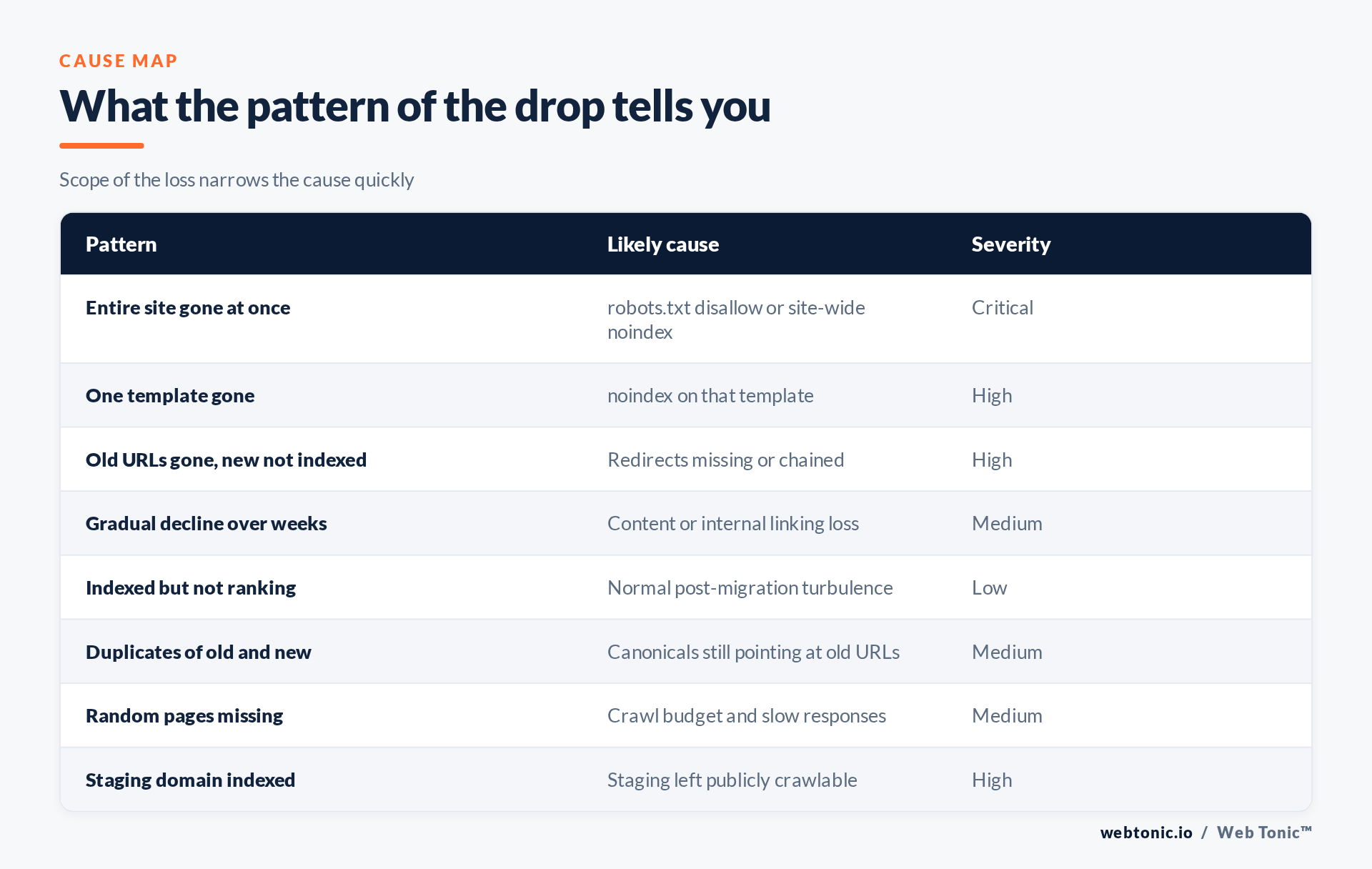
Start with scope. Is the entire site missing, one template, or a scattering of pages? A total disappearance points at a site-wide control — robots.txt or a global noindex. A single template points at that template. A scattering points at redirects or crawl issues. Scope narrows cause faster than any tool.
The four causes that explain almost everything
1. robots.txt shipped from staging
A staging environment blocks crawlers, and every so often that file goes live with the build. It is the single most common catastrophic migration error and takes thirty seconds to check. Google's robots.txt guide covers the syntax; the important point is that blocking crawling is not the same as removing pages, but it prevents Google from seeing anything you subsequently fix.
2. A noindex left in the template
Just as common and harder to spot, because the page looks perfect in a browser. Check both the meta tag and the HTTP response header, since either will suppress the page. Google's documentation on blocking indexing with noindex describes both mechanisms. If robots.txt also blocks the URL, Google may never even read the noindex — an unhelpful combination worth untangling deliberately.
3. Redirects missing, chained or looped
If URLs changed, every old address needs a permanent redirect to its closest equivalent, ideally in a single hop. Google's guidance on redirects and Search and the broader site move with URL changes playbook are the authoritative reference. The semantics of the status codes themselves are defined in RFC 9110, and the background on HTTP 301 is a useful primer for anyone arguing that a 302 is fine. It is not, for a permanent move.
The frequent failure here is a lazy blanket redirect sending every old URL to the homepage. Google treats those as soft 404s, so you lose the equity you were trying to preserve and gain nothing.
4. Canonicals still pointing at the old site
A migration that copies templates wholesale often copies hardcoded canonical tags too, telling Google the authoritative version lives on a domain that now redirects. The rules are set out in consolidating duplicate URLs, and the concept itself in the canonical link element. Every page should self-reference its new URL.
| Check | How | Correct state |
|---|---|---|
| robots.txt | Request the file directly on the live domain | No blanket disallow |
| noindex | View source and inspect response headers | Absent on indexable templates |
| Redirects | Crawl the old URL list | One hop, permanent, relevant target |
| Canonicals | Inspect a page from each template | Self-referencing new URL |
| Sitemap | Fetch it and submit it | New URLs only, all returning 200 |
| Staging domain | Search for it, request it | Authenticated or unreachable |
Using Search Console properly
Two reports do most of the work. The URL Inspection tool tells you what Google currently knows about a specific page — whether it is indexed, which canonical it chose, and what the last crawl saw. That last point matters: it distinguishes "Google has not looked yet" from "Google looked and declined", which are entirely different problems.
The page indexing report then gives you the pattern at scale, grouping excluded URLs by reason. Read the reasons rather than the totals; a spike in "excluded by noindex tag" or "blocked by robots.txt" identifies the cause immediately. Pair it with the performance report to see which lost URLs actually earned clicks, so recovery effort goes where the traffic was.
Also submit a clean sitemap. It is not a magic recovery button, but it is the clearest statement of which URLs you want crawled, and the format guidance in building a sitemap is worth following exactly.
What not to panic about
Some turbulence is normal and unavoidable. Rankings wobble for a few weeks after any substantial move while Google recrawls, reprocesses and re-evaluates the new URLs. Pages that are indexed but temporarily ranking lower are not a bug, and the correct response is patience plus monitoring, not a third round of structural changes.
What is not normal is a step change to zero, a template disappearing entirely, or old URLs returning 404 in volume. Those are faults, and they deserve the triage above immediately.
The larger lesson is that migrations are a pre-launch discipline: crawl the old site, build the redirect map, and test on staging before the switch. That planning is standard in our SEO engagements, sits alongside the build work our web development team runs, and matters most for multi-location businesses where local SEO visibility is the revenue. If the migration was onto Webflow, see moving a Webflow site between workspaces.
Frequently Asked Questions
How long does recovery take after a migration?
Once the fault is fixed, recrawling and reprocessing typically take weeks rather than days, scaling with site size. Repeated changes restart that process.
Should I resubmit every URL for indexing?
No. Manual submission is for spot checks. A correct sitemap plus a crawlable site is what actually drives large-scale reindexing.
Is a 302 acceptable for a migration?
Not for a permanent move. Use a permanent redirect so the change is unambiguous, and avoid chains of more than one hop.
Can I redirect everything to the homepage?
You can, and it wastes the migration. Irrelevant redirects are treated as soft 404s, so map each old URL to its closest equivalent.
Why is the old site still showing in search results?
Old URLs persist in the index until they are recrawled and the redirect is processed. Provided the redirects are correct, this resolves on its own.
Sources: Google — site moves with URL changes; redirects and Search; noindex; robots.txt; canonicalisation; URL Inspection; page indexing report; RFC 9110. Last verified 2026-08-21.


