



Table of contents


A title tag, sometimes called an HTML title tag or a tag title, is the single most negotiated piece of real estate on a results page. It's the first thing a searcher reads, the line that decides whether they click on your site or a competitor's, and one of the oldest SEO signals still standing after two decades of algorithm changes. Yet most titles are still written as an afterthought, dropped in after the content is finished, matching the H1 word for word, or stuffed with every keyword the writer could fit.
Learning how to write title tags properly means treating them as their own piece of copy. That means building for a specific search intent, keeping the length workable, and structuring the tag so it survives Google's habit of rewriting whatever it doesn't like.
Key Takeaways
- Studies from 2022 to 2025 put Google's title tag rewrite rate between 61 and 76 percent, and the rate has been climbing over time. Most rewrites remove brand names or improve clarity, not because the original title was wrong.
- The practical safe zone for a title tag is 50 to 60 characters, or roughly 580 to 600 pixels on Google desktop, since Google measures width in pixels rather than a strict character count.
- Titles between 51 and 60 characters are rewritten far less often than titles over 70 characters, which get rewritten in almost every case.
- Placing the primary keyword near the start of the title, and matching it to the page's H1, meaningfully lowers the odds of a rewrite.
- A title tag's job is to win the click, not just rank well. That takes real search intent alignment and an honest reason to choose your result, not just the right keyword in the right place.
- Tools like Google Search Console show what title Google is actually displaying, which is often different from what's in your CMS.
What is a title tag, and why does it still matter for SEO?
A title tag is the HTML element that names a web page. It shows up as the blue clickable headline on a search results page, as the tab name in a browser, and often as the headline when a page gets shared on social media. Technically it sits in the head of the page's HTML, separate from the visible H1 heading on the page itself, though the two frequently overlap in wording.
Title tags have been declared irrelevant more than once over the years, but Google's own documentation says otherwise. Its Search Central guidance on title links calls them one of the primary things people use to decide which result to click. That's exactly why the words in that tag are worth the extra attention.
What's changed is how much control site owners actually have over the final result. Since 2021, Google's own system update on generating page titles confirmed it now pulls from more than just the raw HTML title tag to build what it calls a "title link," and that shift is why a well-written title tag doesn't always show up on the SERP exactly as written.
Title tag vs. meta title vs. meta description The terms title tag and meta title are often used interchangeably, and for most everyday purposes that's fine. Technically, "meta title" is how a plugin like Yoast SEO labels the field before it gets compiled into the page's actual HTML title tag. The meta description is a different element entirely: a short summary that appears below the title link in search results, not inside the title itself. Mixing up the two is one of the most common mistakes among people learning how to write SEO titles for the first time.
How to write a title tag: the step-by-step process
Step 1: Lead with the primary keyword Search engines still weigh the words at the start of a title tag more heavily than words buried at the end, and users scan the same way.
Step 2: Match the title to search intent, not just the keyword A title that repeats the keyword without addressing what the searcher actually wants rarely earns the click, even from the top position.
Step 3: Keep it inside the practical length window

Google doesn't publish a fixed character limit; it measures title tag length in pixels, not letters. Zyppy's analysis of more than 80,000 title tags found the optimal length sits around 50 to 60 characters, or 580 to 600 pixels, for full display in Google desktop results, with mobile search typically showing more.
Different search engines draw the line in different places. That matters if a meaningful share of your traffic comes from somewhere other than Google. Conductor's title tag reference guide recommends a maximum of around 65 characters for Bing, while Stan Ventures' research on live SERPs found titles on desktop actually start truncating between 525 and 535 pixels, a narrower window than the commonly cited 600-pixel figure.
Step 4: Include your brand name only when it adds value Recent rewrite studies show Google removing brand names constantly when they don't help the searcher understand the page, particularly outside of branded searches.
Step 5: Avoid keyword stuffing and vague boilerplate Titles like "Home | Best Company | SEO Marketing Agency" tell Google and the user almost nothing. Stuffing doesn't improve ranking; it just makes the title an easier target for a rewrite.
Step 6: Match your title tag to your H1 Zyppy's rewrite study found Google preserved a title's number in the displayed result 97.3 percent of the time when the H1 also contained a matching number, compared to 74.2 percent of the time when it didn't. Alignment between the two elements is one of the clearest signals you can send that your title tag is trustworthy.
Why Google rewrites so many title tags anyway
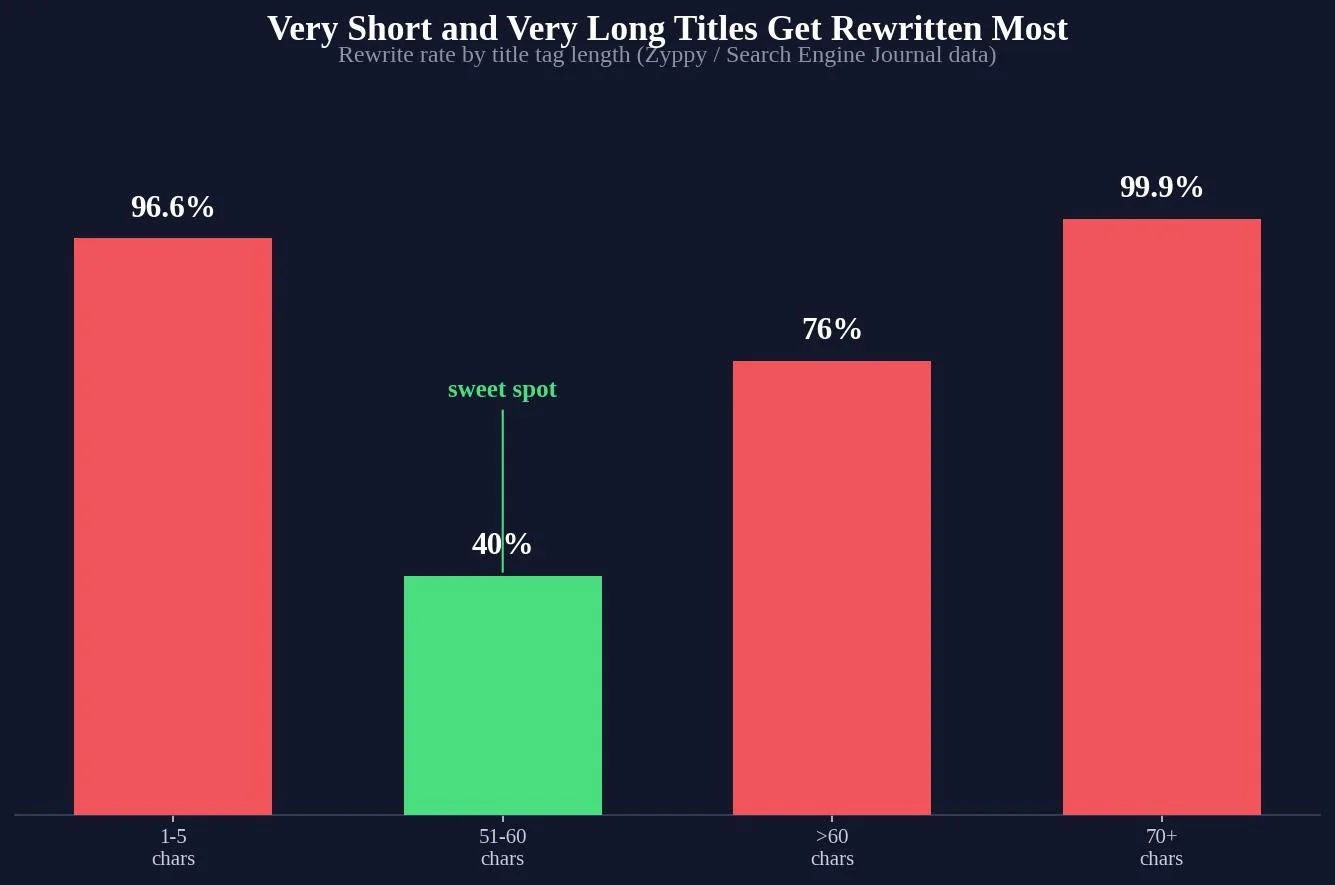
Even a well-built title has a real chance of being swapped out, and the rate has climbed for years. Zyppy's original dataset found Google rewrote 61.6 percent of title tags in its sample. A later Search Engine Land study covering Q1 2025 put the figure at 76 percent, a 25 percent jump from a comparable study two years earlier. A separate Portent analysis of nearly 1.5 million URLs landed at 63 percent, including both simple truncation and more advanced rewriting.

The most common single trigger is brand removal, showing up in roughly 63 percent of modified titles, especially in health and finance content. About 30 percent of rewrites aim to improve readability, and the rest cover a mix of length fixes and other formatting changes not separately broken out in the source data. SerpClix's analysis of Zyppy's data found titles Google left alone averaged 44.47 characters, versus 62.58 characters for titles it rewrote, reinforcing that shorter, more focused titles give the algorithm less reason to intervene.
Title tags in the age of AI Overviews Title tags are also taking on a second job. With AI-generated overviews now answering many queries directly on the results page, a title tag increasingly functions as a source citation anchor rather than only a click driver. Coverage from The Ocean Marketing on 2026 title tag practices frames this as a shift toward a "zero-click reality," where even a searcher who never clicks can register your result as the authoritative source behind an AI-generated answer.
Title tag formulas by page type
| Page type | Recommended title formula | Example |
|---|---|---|
| Blog post / guide | How to [action] + [outcome or year] | How to Write Title Tags: Step-by-Step Guide (2026) |
| Product page | [Product name] + key benefit + brand | Wireless Noise-Cancelling Headphones, 40hr Battery |
| Local service page | [Service] in [City] + core benefit | Roof Repair in Montreal: Same-Day Quotes |
| Comparison / listicle | [Number] + [Topic] + qualifier | 9 SEO Title Tag Mistakes Costing You Clicks |
| Homepage | [Brand] + what you do + differentiator | Web Tonic: SEO and Growth Marketing for Ambitious Brands |
Try it: title tag pixel-width checker
The tool below estimates pixel width the way Google actually measures it, not just a character count.
Title tag tool
Title tag pixel-width checker
Type a title tag below. This estimates its pixel width on Google desktop, the same way Google measures truncation risk, not just character count.
Google desktop preview
Related reading
- Title Tag SEO: 7 Best Practices to Rank Higher and Get More Clicks
- A Beginner's Guide to Properly Using Rel Tags to Improve Your Site's Rankings
- Meta Tags Explained: The Six That Matter and the Ones You Can Delete
- GEO & AEO services at Web Tonic
Common title tag mistakes to avoid
The most frequent mistake is writing the title tag last, as an afterthought once the content and headings are already finished.
Duplicate titles across a site are a close second. If every product page shares the same generic title, Google has no way to tell the pages apart and will often generate its own.
Overloading a title with every possible keyword variant is another common trap. TagGenius's guide to SEO title length points out that titles with many wide characters can get truncated well before the character count alone would suggest. That's one more reason keyword padding tends to backfire rather than help.
Finally, plenty of teams write the perfect title tag once and never revisit it. It's worth updating title tags on your top ranking pages at least once a year, since SEO title tags that worked two years ago may no longer be the strongest option as competitors update their own pages.
Tools to test and track your title tags
Google Search Console is the starting point for any title tag audit. Its performance report shows the actual click and impression data tied to each page. That makes it easy to spot pages ranking well but generating a low click-through rate, often a sign the title itself isn't compelling enough. Google Analytics complements this by showing what happens after the click.
For CMS platforms like WordPress, Yoast SEO remains one of the most widely used plugins for managing title tags directly. Note that in WordPress, the post title field on a page is not automatically the same as the title tag — SEO plugins let you edit that separately. That's exactly why the two can drift apart if nobody checks.
Frequently asked questions
How long should a title tag be?
The practical range is 50 to 60 characters, or roughly 580 to 600 pixels on Google desktop.
Does the title tag need to match the H1?
Not exactly, but they should be closely aligned, particularly around specific details like numbers or dates.
Why does Google keep changing my title tags?
Most commonly to remove brand names that don't add value to the query, to simplify vague phrasing, or to fix titles that are too long or too short.
Should I include my brand name in the title tag?
Only if it genuinely helps the searcher, and typically at the end rather than the start.
What's the difference between a title tag and an H1?
A title tag is the HTML element that shows up in search results and browser tabs. The H1 is the main visible heading on the page itself.
Getting title tags right, one page at a time
A strong title tag does two jobs at once: it gives Google a clear, honest signal about what the page covers, and it gives a human being a real reason to click. None of this guarantees Google will display the title exactly as written, but titles that follow these principles are demonstrably less likely to be rewritten.
Ready to fix your site's title tags at scale?
Auditing and rewriting title tags across an entire site is exactly the kind of detail-heavy work that's easy to deprioritize. Web Tonic's growth marketing team folds this kind of on-page SEO work into a broader strategy that also covers content and paid acquisition, so title tags stop being a one-off fix and start working as part of a system that keeps improving as your site grows.
More from Web Tonic: growth marketing services, data & analytics.
Sources: developers.google.com · zyppy.com · conductor.com · stanventures.com · johnmcalpin.com · portent.com · serpclix.com · theoceanmarketing.com


