



Table of contents

Meta tags are HTML elements placed in the <head> of a page that describe the page to browsers, search engines and social platforms rather than to human visitors. They do not appear in the page body, but they control how your page is titled, described, crawled, indexed and rendered.
Only about six do real work in 2026. Here is each one, with code, limits and setup steps.
Key Takeaways
- 6 meta tags cover almost every practical need: description, robots, viewport, charset, canonical (a
linkelement) and Open Graph. - The meta keywords tag has been ignored by Google since 2009, confirmed in an official Search Central announcement.
- Meta descriptions are not a ranking factor, but they influence click-through rate — Google rewrites them for roughly 2 out of 3 queries when the tag does not match intent.
- Practical writing budgets: 50–60 characters for a title, 120–158 characters for a description.
- Title tags are truncated by pixel width, not character count — desktop cuts around 600 pixels.
- A missing viewport meta tag is one of the fastest ways to fail mobile usability on an otherwise healthy page.
What are meta tags, exactly?
A meta tag is a void HTML element — <meta> — that carries metadata about the document. The HTML Living Standard defines four possible attribute patterns: name + content (document-level metadata), http-equiv + content (a pragma directive), charset (the character encoding declaration), and property + content (used by Open Graph and other RDFa-style vocabularies).
Every meta tag lives inside <head>. Anything you place after the opening <body> tag is either ignored or silently relocated by the browser's parser. MDN's reference on the meta element is the canonical technical source, and its name attribute page lists the full registry of standardised values.
Two clarifications that cause most of the confusion in SEO discussions:
- Point 1 — the title tag is not a meta tag.
<title>is its own element. It is grouped with meta tags because it sits in the head and does the same job, and because most CMS interfaces label it "meta title". - Point 2 — the canonical tag is not a meta tag either.
rel="canonical"is a<link>element. It matters enormously for consolidating duplicate URLs, so we include it below despite the technicality.
The meta tags that actually matter in 2026
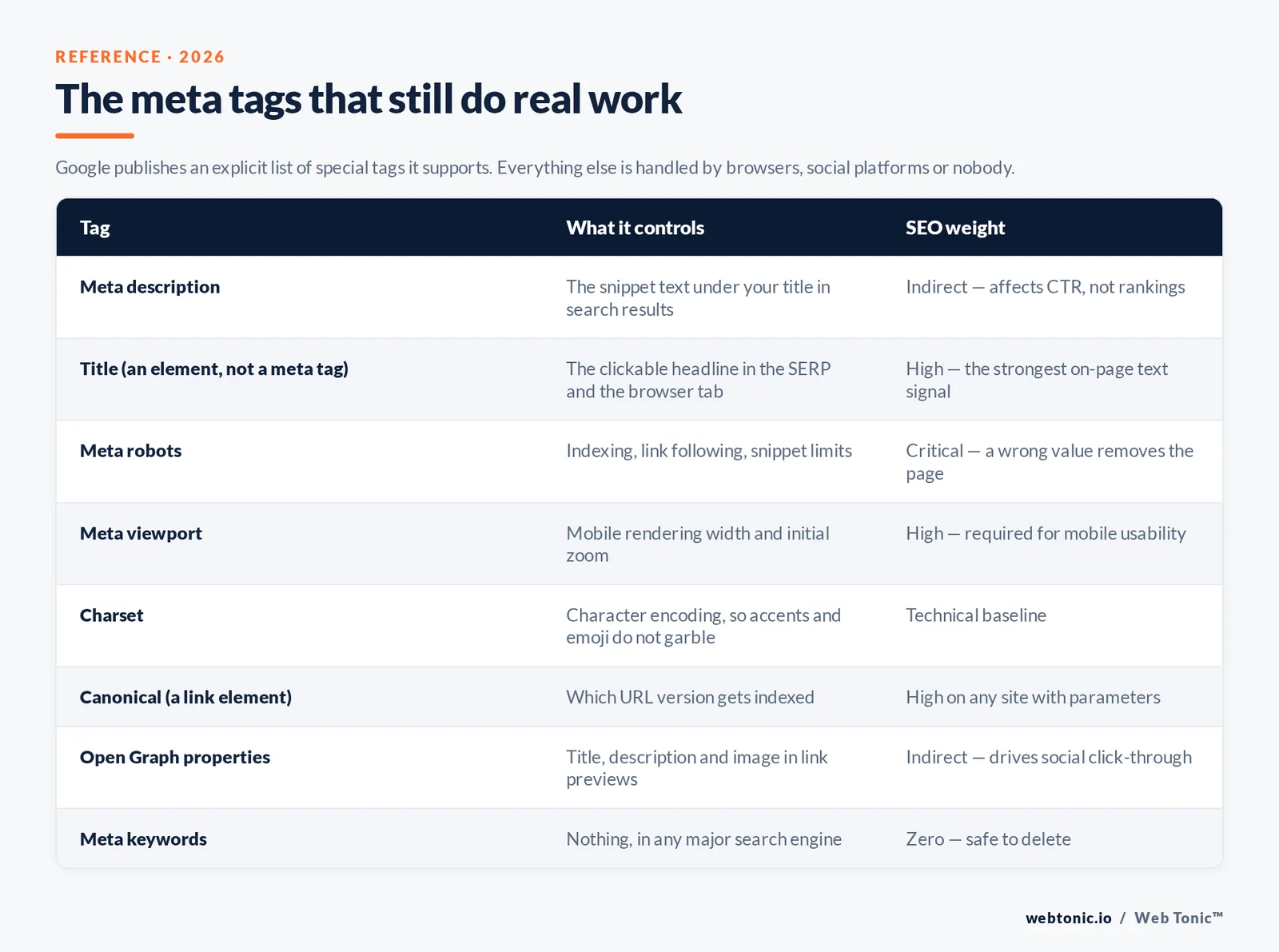
Google publishes a short, explicit list of the special tags it supports. Everything outside that list is either handled by other consumers (browsers, social platforms, other search engines) or handled by nobody.
| Meta tag | Code | What it controls | SEO weight |
|---|---|---|---|
| Meta description | <meta name="description" content="…"> | The snippet text under your title in search results | Indirect — affects CTR, not rankings |
| Title (element, not meta) | <title>Page title</title> | The blue clickable headline in the SERP and the browser tab | High — the single most important on-page text signal |
| Meta robots | <meta name="robots" content="noindex, nofollow"> | Whether the page is indexed, whether links are followed, snippet limits | Critical — a wrong value removes the page from search |
| Meta viewport | <meta name="viewport" content="width=device-width, initial-scale=1"> | Mobile rendering width and initial zoom | High — required for mobile usability |
| Charset | <meta charset="utf-8"> | Character encoding (Unicode support for accents, emoji, symbols) | Technical — prevents garbled text |
| Canonical (link element) | <link rel="canonical" href=…> | Which URL version should be indexed | High on any site with parameters or duplicates |
| Open Graph | <meta property="og:title" content="…"> | The title, description and image in social and chat previews | Indirect — drives social click-through |
| Meta keywords | <meta name="keywords" content="…"> | Nothing, in any major search engine | Zero — safe to delete |
Meta description
The description tag proposes the snippet. Google chooses whether to use it. Google's snippet documentation is explicit that it may generate a snippet from page content when the description is missing, duplicated across templates, or a poor match for the query — which is why the same page can show different descriptions for different searches.
Practical rules that hold up:
- Rule 1 — write 120–158 characters. Below 120 you waste real estate; above 158 desktop truncation starts. Moz's meta description guide puts the mobile cut closer to 120 characters, which is the number to design against if your traffic is majority mobile.
- Rule 2 — include the target query verbatim. Matching terms are bolded in the SERP, which measurably lifts perceived relevance.
- Rule 3 — one unique description per indexable URL. Templated descriptions across 500 product pages are worse than none, because Google will rewrite them anyway.
- Rule 4 — lead with the benefit, not the brand. The brand already appears in the title and the displayed URL.
Title tag
Google's title link documentation explains that the displayed headline is generated from several sources — the <title> element, on-page H1, anchor text pointing at the page, and site-wide text. The <title> is still the dominant input, so treat it as your one guaranteed piece of SERP copywriting.
Budget 50–60 characters. Truncation is actually measured in pixels — roughly 600px on desktop — so a title full of capital letters and Ws truncates earlier than one full of lowercase i's and l's. Put the primary term in the first 30 characters, and keep the brand suffix to a short separator plus name.
Meta robots
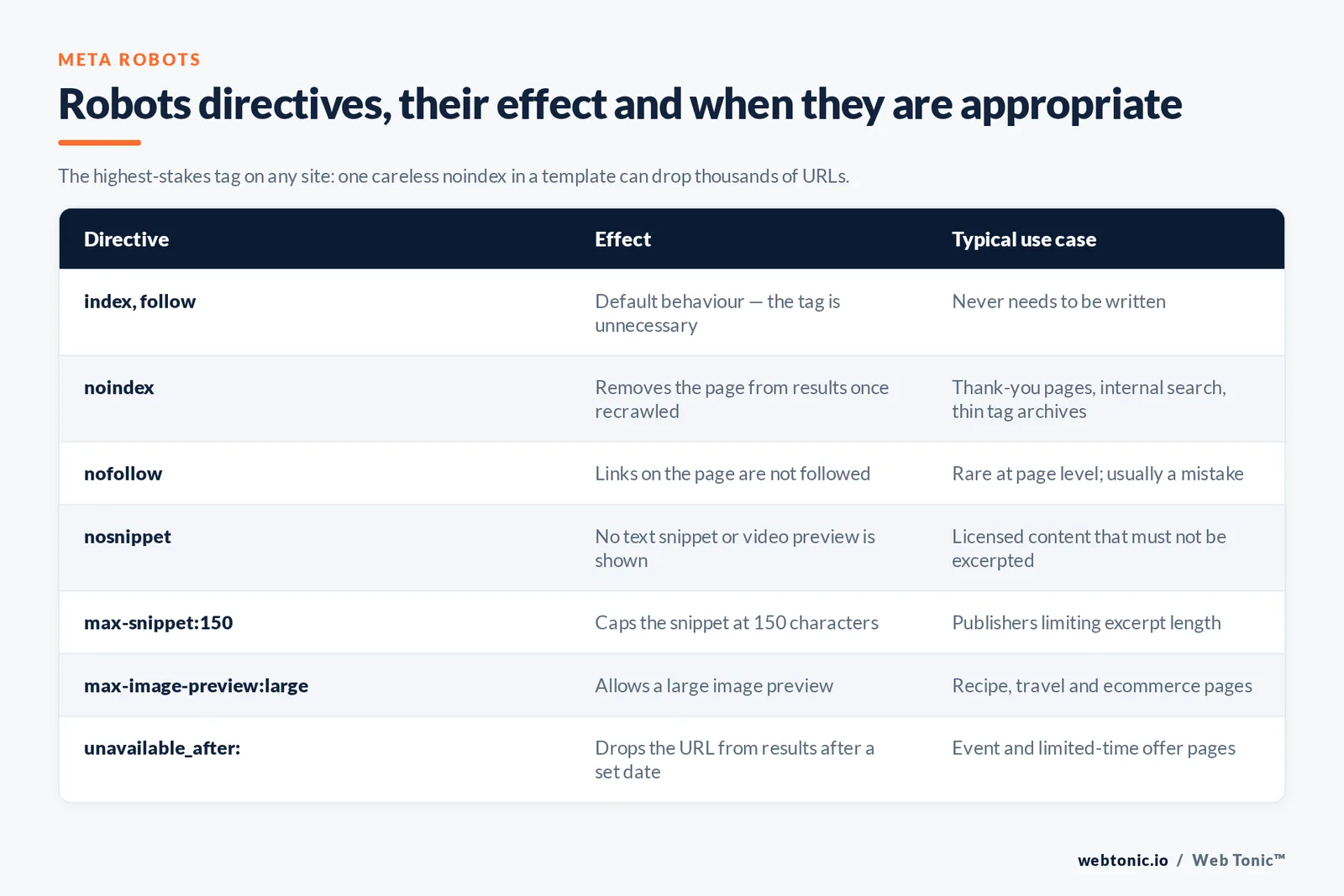
This is the highest-stakes meta tag on any site: one careless noindex in a template can drop thousands of URLs. Google's robots meta tag reference lists every supported directive.
| Directive | Effect | Typical use case |
|---|---|---|
| index, follow | Default behaviour — the tag is unnecessary | Never needs to be written |
| noindex | Removes the page from search results once recrawled | Thank-you pages, internal search results, thin tag archives |
| nofollow | Google will not follow links on the page | Rare at page level; usually a mistake |
| noarchive | Suppresses the cached copy | Paywalled or fast-changing pricing pages |
| nosnippet | No text snippet or video preview is shown | Licensed content that must not be excerpted |
| max-snippet:150 | Caps the snippet at 150 characters | Publishers limiting excerpt length |
| max-image-preview:large | Allows a large image preview | Recipe, travel and ecommerce pages |
| unavailable_after: | Drops the URL from results after a set date | Event and limited-time offer pages |
| noimageindex | Images on the page are not indexed | Stock-licensed galleries |
| notranslate | Suppresses the translation offer in results | Legal text where translation creates risk |
Two failure modes worth memorising. First, a page blocked in robots.txt can still be indexed without a snippet, because Google never crawls it and therefore never sees your noindex — to deindex, allow crawling and use the meta tag. Second, you can target one crawler at a time by replacing robots with a specific user-agent token such as googlebot or googlebot-news.
Meta viewport
The viewport meta tag tells mobile browsers to render the layout at the device width instead of a simulated desktop canvas. Without it, a responsive stylesheet never triggers and the page renders zoomed out. The line is always the same:
<meta name="viewport" content="width=device-width, initial-scale=1">
MDN's viewport documentation also warns against user-scalable=no and low maximum-scale values — they block pinch-zoom and are an accessibility failure. Do not ship them.
Open Graph and social preview tags
Open Graph, defined at ogp.me, uses property instead of name. Four properties do 90% of the work: og:title, og:description, og:image and og:url. Ship an og:image at 1200×630 pixels so previews do not crop awkwardly, and add twitter:card with the value summary_large_image if X previews matter to you.
The meta tags you can safely delete
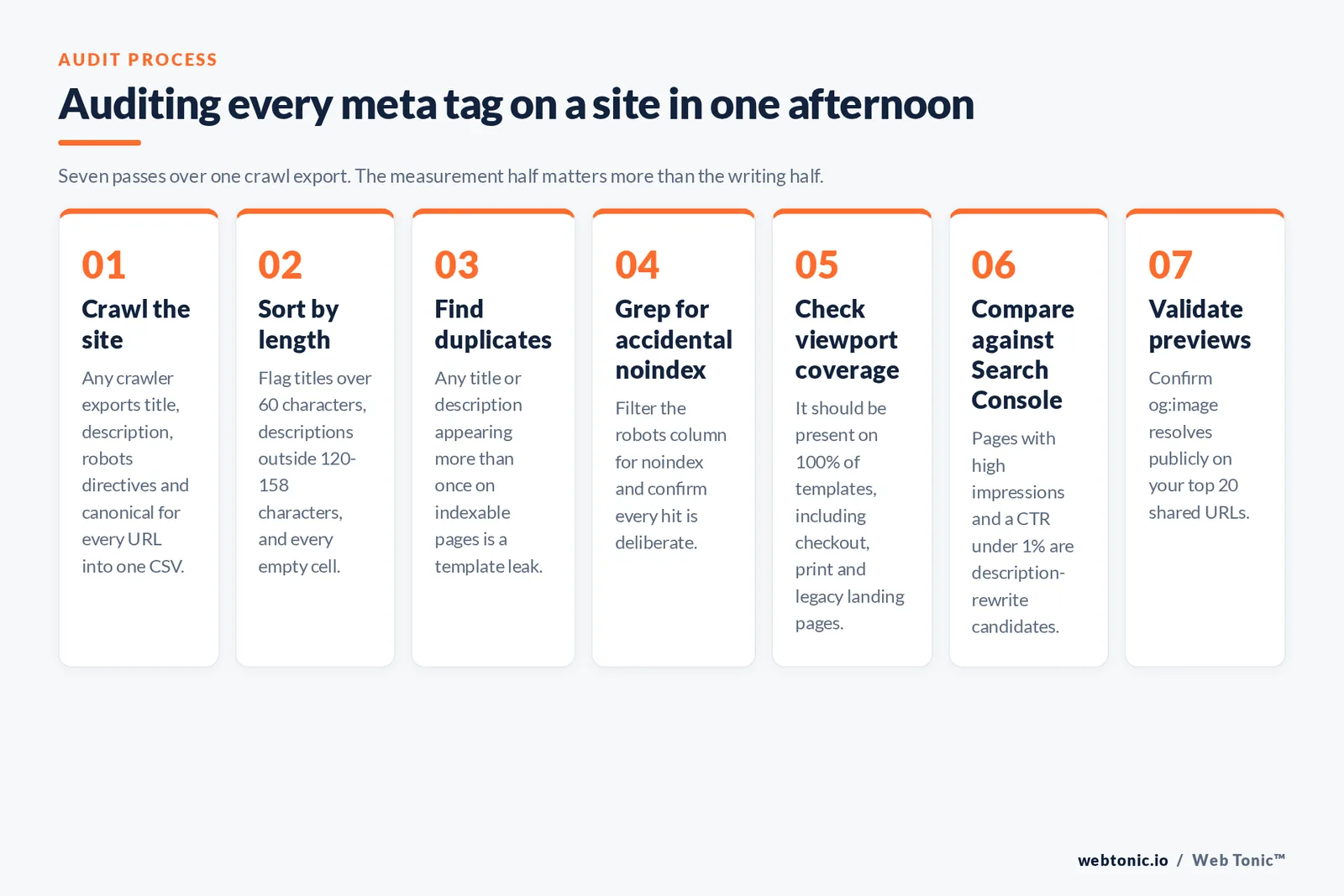
The clearest documented case is meta keywords. Google published "Google does not use the keywords meta tag in web ranking" in September 2009 — over 16 years ago. It remains true, and the tag now mainly serves to publish your keyword strategy to competitors.
| Legacy tag | Status | Do this instead |
|---|---|---|
| meta keywords | Ignored by Google since 2009 | Delete it; put the terms in the body copy where they earn relevance |
| meta refresh redirect | Discouraged — slow, bad for accessibility | Use a server-side 301 or 302 redirect |
| meta revisit-after | Never supported by any major engine | Publish an XML sitemap with lastmod dates |
| meta author / copyright | No search effect | Use Article and Organization structured data |
| meta rating / distribution | Obsolete | Remove entirely |
| meta geo.position | Not used for local ranking | Google Business Profile plus LocalBusiness schema |
| Google verification meta tag | Still valid | Keep one per verified property in Google Search Console |
Deleting dead tags is not a ranking win in itself, but it shrinks your head, reduces template noise, and removes one class of accidental conflict — for example a legacy meta refresh fighting a newer canonical.
How to add meta tags on each platform
The tag syntax is identical everywhere; only the interface changes. Never hand-code a tag that your CMS or plugin also outputs, or you ship duplicates and the engine picks unpredictably.
| Platform | Where to edit | Watch out for |
|---|---|---|
| Raw HTML | Directly inside <head> in each template | Descriptions get copy-pasted across pages — audit for duplicates |
| WordPress | An SEO plugin's title and description templates | Two SEO plugins active at once produces doubled tags |
| Webflow | Page settings, or CMS field bindings for collection templates | Unbound collection templates leave every item with the same description |
| Shopify | Product and page "Search engine listing" editor | Variant and collection filter URLs need canonical handling |
| Next.js / React | The framework metadata API or a head component | Client-side-only tags may not be seen on first render |
| Squarespace / Wix | Per-page SEO panel | Global fallbacks silently overwrite blank fields |
On WordPress specifically, Yoast's WordPress SEO guide walks through the template variables. Set global patterns once, then hand-write descriptions only for the 20–50 pages that actually earn commercial traffic. If you are rebuilding templates rather than editing pages, our web development team handles the head-level implementation as part of a build.
How to audit your meta tags in one afternoon
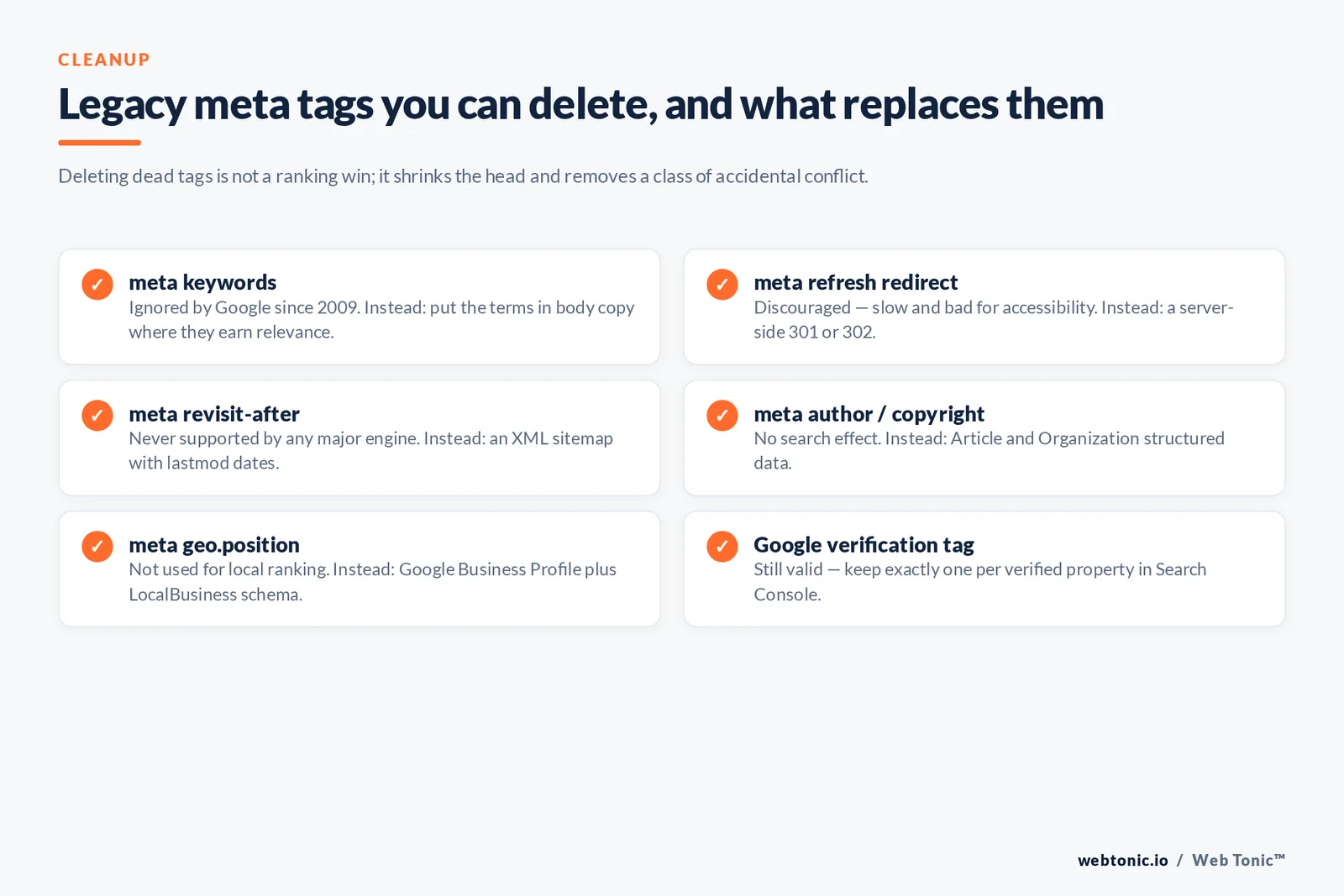
- Step 1 — crawl the site. Any crawler will export title, description, robots directives and canonical for every URL in one CSV.
- Step 2 — sort by length. Flag titles over 60 characters, descriptions outside 120–158, and every empty cell.
- Step 3 — find duplicates. Any title or description appearing more than 1 time on indexable pages is a template leak.
- Step 4 — grep for accidental noindex. Filter the robots column for
noindexand confirm each hit is deliberate. - Step 5 — check viewport coverage. It should be present on 100% of templates, including checkout, print and legacy landing pages.
- Step 6 — compare against Search Console. Pages with high impressions and a click-through rate under 1% are description-rewrite candidates.
- Step 7 — validate previews. Confirm
og:imageresolves publicly on your top 20 shared URLs.
The measurement half of this loop matters more than the writing half. Rewriting 10 titles for pages that already rank on page one usually beats rewriting 200 descriptions for pages nobody sees — which is the prioritisation logic our data intelligence practice applies to on-page work, and part of how we scope growth marketing retainers.
Related terms
| Term | Definition | Relationship to meta tags |
|---|---|---|
| Metadata | Data describing other data | Meta tags are the HTML implementation of page metadata |
| SERP snippet | The title, URL and description block in results | What your title and description tags feed |
| Structured data | Schema.org markup in JSON-LD | Machine-readable facts; complements, never replaces, meta tags |
| Canonicalisation | Choosing one indexable URL among duplicates | Handled by the canonical link element in the same head |
| Crawl directive | An instruction to a crawler | robots.txt controls crawling; meta robots controls indexing |
| Click-through rate | Clicks divided by impressions | The metric your description and title are optimised against |
| Open Graph protocol | A metadata vocabulary for link previews | Delivered through meta tags using the property attribute |
Related reading
- Meta Descriptions: The Complete Guide to Writing Click-Worthy Snippets
- How to Write Title Tags: A Step-by-Step Walkthrough
- A Beginner's Guide to Properly Using Rel Tags to Improve Your Site's Rankings
- GEO & AEO services at Web Tonic
FAQ
Do meta tags still matter for SEO in 2026?
Yes, but selectively. The title tag, meta robots directives, the viewport tag and the canonical link element all have direct, documented effects on how a page is indexed and displayed. The meta description affects click-through rather than ranking. Meta keywords and a handful of other legacy tags have no effect at all.
How many meta tags should a page have?
Most pages need five to seven: charset, viewport, description, canonical, and three or four Open Graph properties. Add meta robots only when you want non-default behaviour. There is no benefit to a longer list, and every extra tag is one more thing a template can get wrong.
Why does Google show a different description than the one I wrote?
Google generates its own snippet when your description does not answer the query, duplicates other pages, or is too short. Rewrite the tag so it contains the query terms and a specific promise that the page delivers. If you need a hard cap on the length of any generated snippet, use the max-snippet robots directive.
Should I still use the meta keywords tag?
No. Google confirmed in 2009 that it does not use the keywords meta tag for web ranking, and no major engine has reinstated it. It costs you nothing to remove and it stops competitors reading your keyword list straight from your source code.
Can meta tags be added with JavaScript?
They can, and Google will usually see them after rendering, but server-rendered tags are safer. Social platforms and chat apps that fetch link previews generally do not execute JavaScript, so Open Graph tags injected client-side often produce blank previews. Render metadata on the server whenever the framework allows it.
Sources
Google Search Central — special tags, robots meta tag, snippet, title link, consolidate duplicate URLs, and the 2009 keywords meta tag announcement · MDN Web Docs — the meta element and the viewport meta tag · WHATWG HTML Living Standard, document metadata · ogp.me — the Open Graph protocol · Moz — meta description guide · Yoast — WordPress SEO guide. All sources accessed 1 August 2026.


