



Table of contents

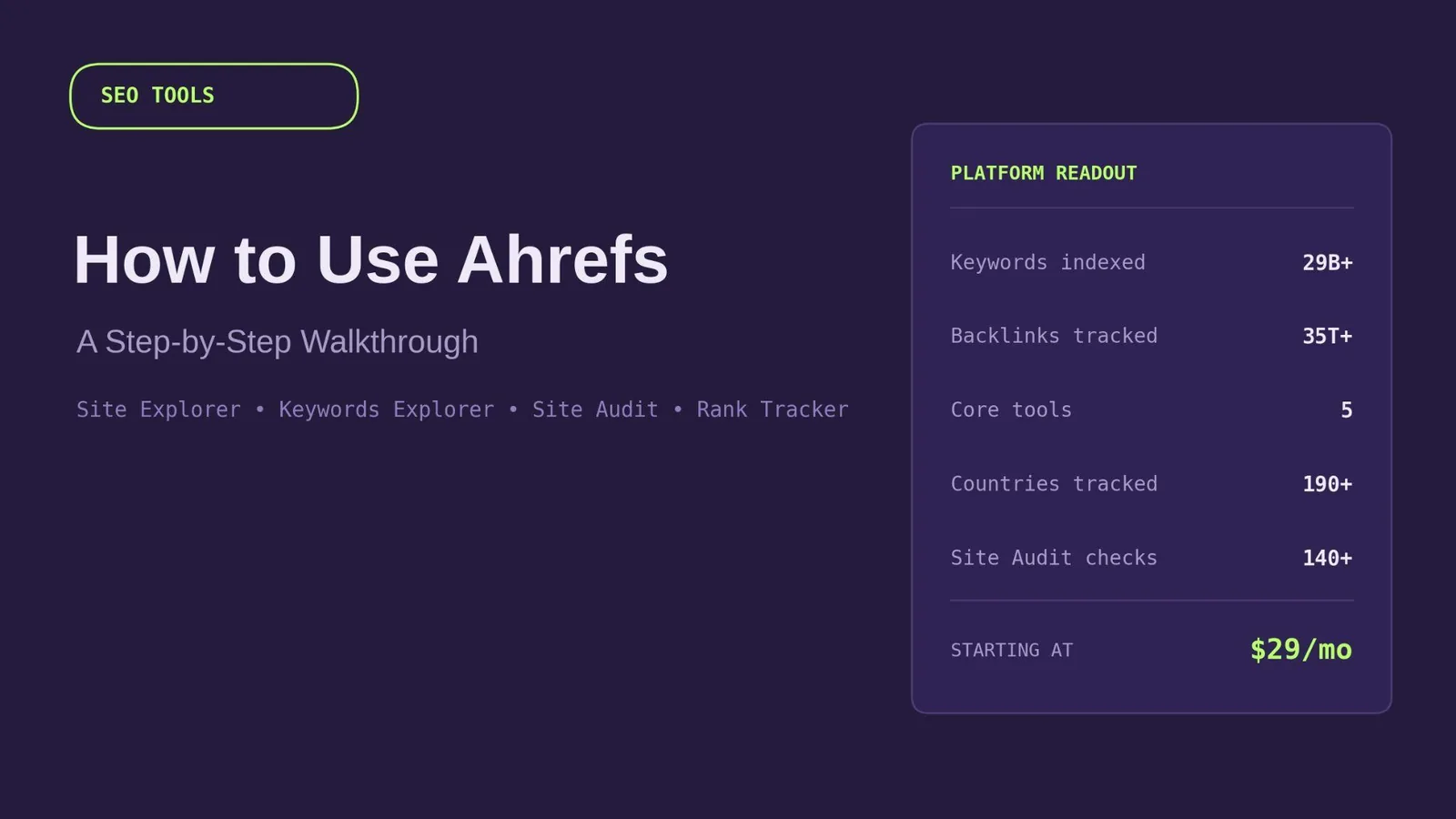
Ahrefs is one of the most widely used SEO tools on the market. It puts keyword research, backlink data, technical audits, and rank tracking inside a single platform. Learning it properly takes some patience, though: the interface is dense, and it's easy to open a report, feel overwhelmed, and close the tab without acting on anything.
This guide walks through how to use Ahrefs, tool by tool, in the order a working SEO strategy actually needs them: research first, technical health second, tracking third. By the end, you'll have a repeatable monthly workflow instead of a list of features you never touch.
Key Takeaways
- Ahrefs centers on five core tools: Site Explorer, Keywords Explorer, Site Audit, Rank Tracker, and Content Explorer, each solving a different part of the SEO process.
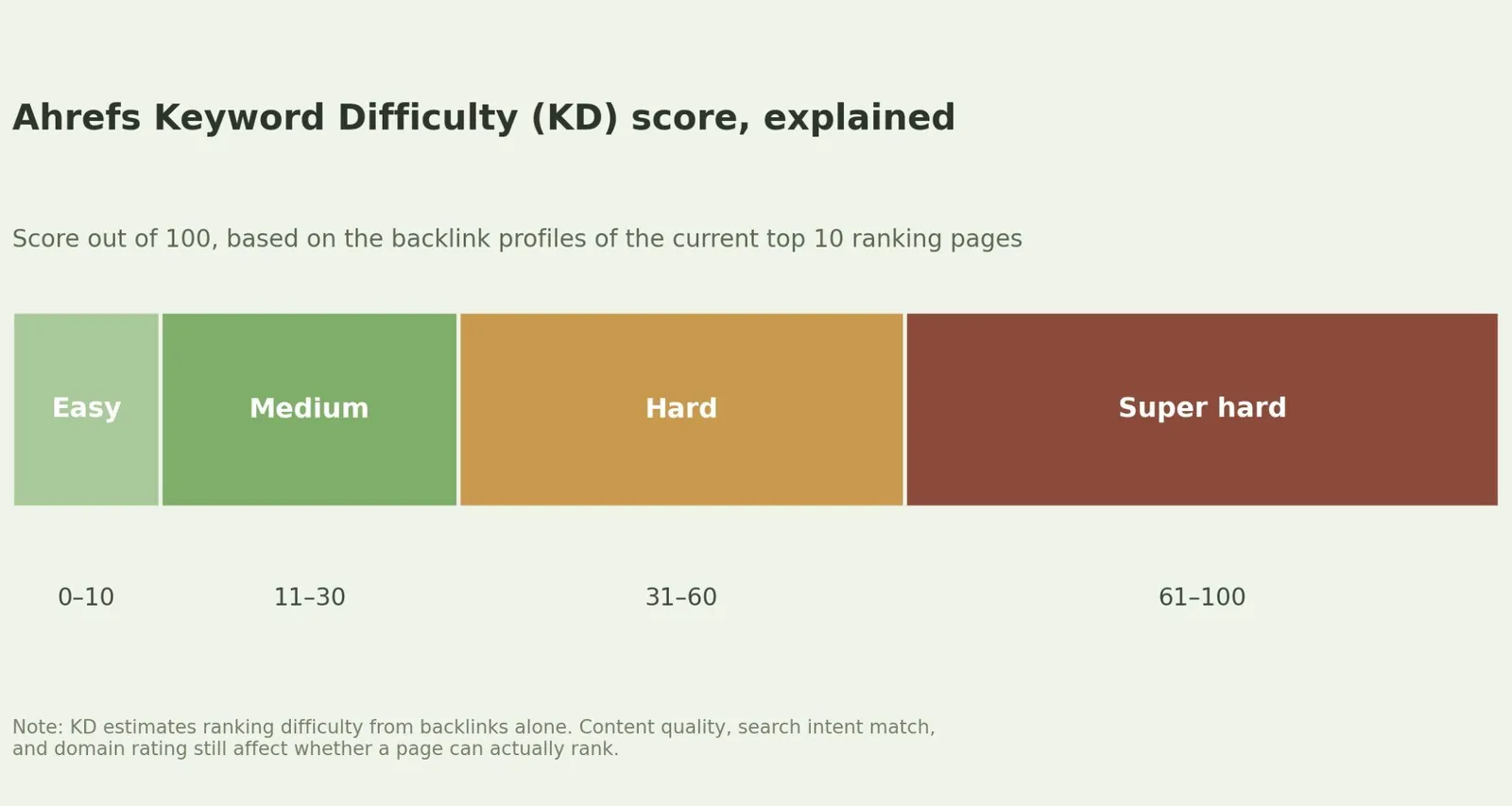
- Keyword Difficulty (KD) is a backlink-only estimate, scored 0–100. It doesn't account for content quality or search intent, so treat it as a starting filter, not a final verdict.
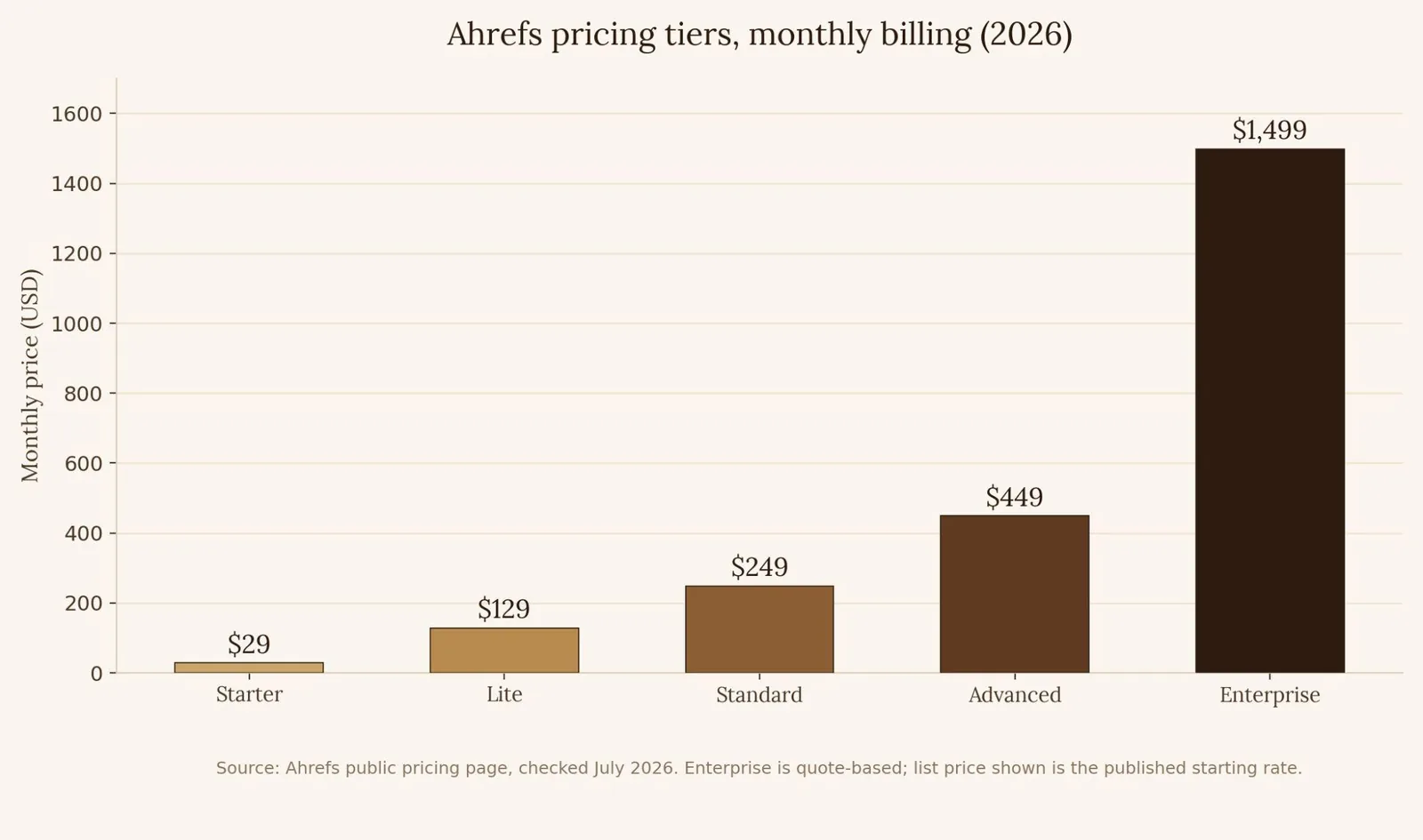
- Paid plans start at $29/month (Starter) and scale to $129, $249, and $449/month for Lite, Standard, and Advanced, with Enterprise priced by custom quote starting near $1,499/month.
- There is no standard free trial. Ahrefs offers a permanently free tier (Ahrefs Free) for verified site owners, plus standalone free tools like a keyword generator and backlink checker.
- Content Gap is the fastest way to find quick-win keywords: it surfaces terms your competitors rank for that your own site doesn't cover yet.
- Site Audit issues are triaged by severity: fix red Errors first, then yellow Warnings, then blue Notices.
What Is Ahrefs, Exactly?
Ahrefs is an SEO platform built around its own web crawler and link index. It powers keyword research, competitor analysis, technical site audits, and rank tracking from one dashboard. The tool started as a backlink checker and has since grown into what most SEO professionals treat as a full command center for organic search work. It sits alongside Google Search Console (GSC) rather than replacing it: Ahrefs estimates traffic and keyword data from crawl and clickstream modeling, while GSC reports what Google itself recorded for your site. Both search engines' worth of signal matter to a complete picture.
Every project in Ahrefs starts the same way. You add a domain, Ahrefs crawls and indexes it, and every other tool in the platform pulls from that same underlying data set.
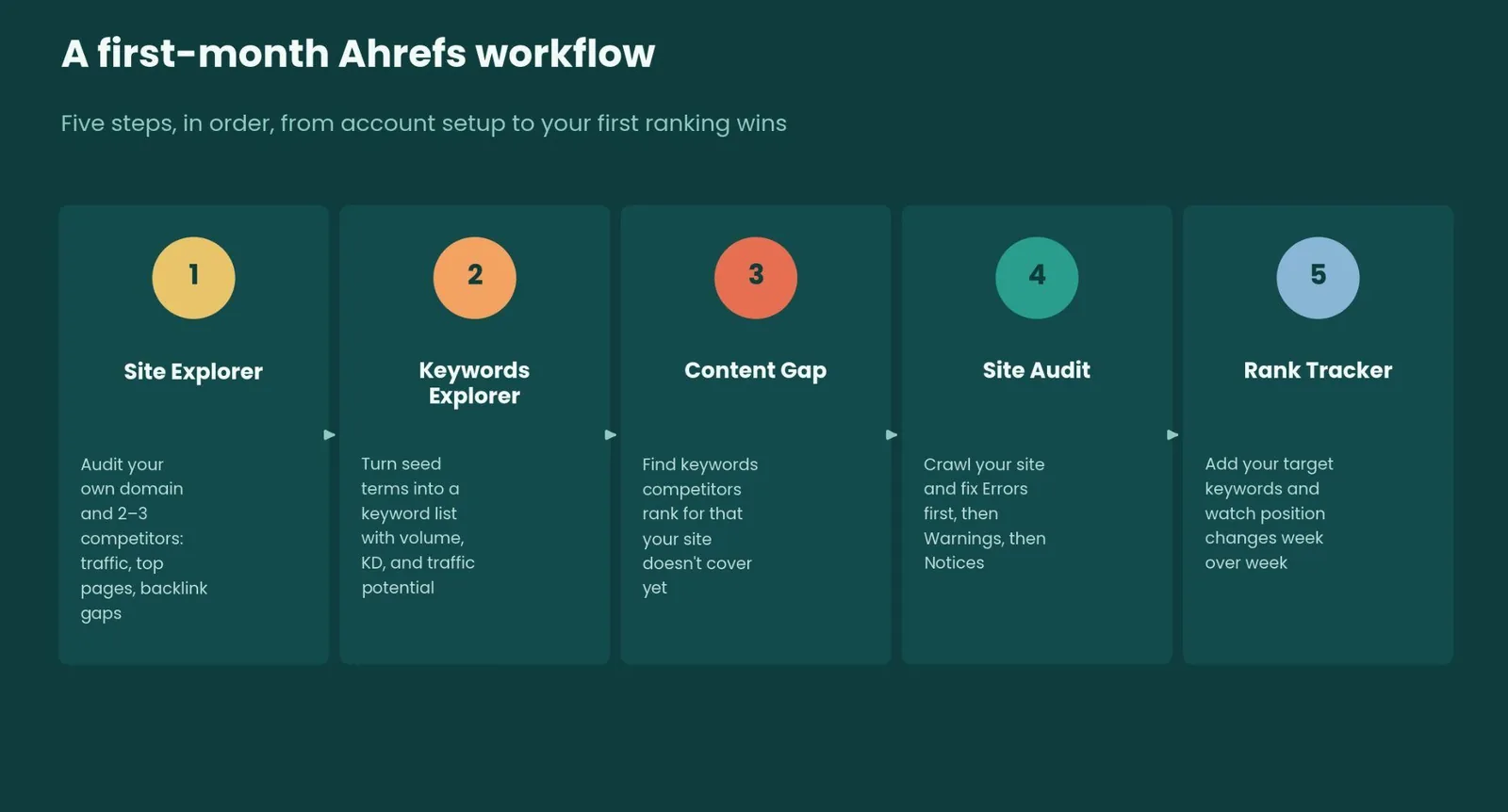
Step 1: Set Up Your First Project
Create a free account, then add your website as a project under your account settings. You can start free with Ahrefs' verified-owner tools before entering a card number at all. Verifying ownership, via DNS record, HTML file, or Google Search Console, unlocks basic Site Explorer and Site Audit access on your own domain.
If you're managing multiple client sites, create a separate project for each one. This keeps Site Audit crawls, Rank Tracker keyword lists, and historical data cleanly separated per domain instead of blended into one dataset. Ahrefs Academy is also worth a look if you want to learn each tool in more depth than a single walkthrough can cover.
Step 2: Reverse-Engineer Competitors With Site Explorer
Site Explorer is Ahrefs' competitive research tool. Type in any domain, subdomain, subfolder, or exact URL, and it returns organic traffic estimates, top-ranking pages, and the site's full backlink profile.
The practical use case is entering a competitor's domain instead of your own. Their Top Pages report shows which content earns them the most organic traffic. Their Backlinks report shows exactly who is linking to them and why, which is the foundation of any link building outreach list.
For your own site, the same report doubles as an internal audit tool. Most sites follow something close to an 80/20 pattern, where a small share of pages drives the majority of organic traffic. Site Explorer's Top Pages report is the fastest way to find that list and double down on it.
Step 3: Find Keywords With Keywords Explorer
Keywords Explorer is where keyword research actually happens, and it's the fastest way to see what real people are searching for around your topic. Type in a seed keyword, and Ahrefs generates related keyword ideas pulled from its keyword database, each with search volume, Keyword Difficulty (KD), and estimated traffic potential.
KD is the metric people misuse most. It's a 0–100 score based entirely on how many referring domains link to the pages currently ranking in the top 10. It says nothing about content quality, search intent match, or how strong your own domain is by comparison. A KD of 20 is easy for a site with a strong backlink profile and hard for a brand-new domain with no links at all. Use KD as a first filter, then check the SERP itself. If every top-ranking result is a listicle, don't publish a single-product review page and expect it to compete.
If you're not sure where to start, Keywords Explorer's AI prompt suggestions can generate subtopic and angle ideas from a single seed term. That's useful for local SEO variations, like city or neighborhood modifiers, as well as broader clusters, since one well-structured page can rank for hundreds of related long-tail terms.
Step 4: Find Quick Wins With Content Gap
Content Gap compares your domain against several competitor domains at once and returns every keyword they rank for that you don't. It's one of the fastest ways to build a realistic SEO content calendar, because every keyword on the list already has proof that ranking for it is achievable. A competitor is already doing it.
Filter the results by search volume and KD together, not volume alone. A term with modest volume but low KD, sitting inside your existing topical authority, is usually a better next article than a high-volume term you have no realistic shot at yet.
Step 5: Fix Technical Issues With Site Audit
Site Audit crawls your site and checks it against more than 170 technical and on-page SEO factors, then groups what it finds into Errors (red, highest priority), Warnings (yellow), and Notices (blue, lowest priority). Broken internal links, missing title tags, duplicate content, and slow-loading pages all surface here.
Work through issues in that severity order. Click into each report to see exactly which URLs are affected and how to fix them. A recurring crawl, weekly for active sites or monthly for smaller ones, catches new technical problems before they quietly erode rankings.
Step 6: Track Progress With Rank Tracker
Once your content and technical fixes are live, Rank Tracker confirms they're working. Add your target keywords to a project, and Ahrefs monitors your ranking position for each one across more than 190 countries and regions, on both desktop and mobile, including local SEO tracking down to the city level rather than just national averages.
If a keyword's position drops, check whether a competitor just published something stronger for that query, or whether the page itself needs a content refresh. Rank data updates roughly daily, so give any change 24–48 hours to fully register before troubleshooting.
How Much Does Ahrefs Cost?
Ahrefs runs on five pricing tiers, all billed in USD, with roughly 17–20% savings available on annual billing.
| Plan | Monthly price (USD) | Best for | Core limits |
|---|---|---|---|
| Starter | $29 | Solo bloggers, single-site basics | Capped Keywords Explorer and Site Audit rows; project count not publicly specified |
| Lite | $129 | Freelance SEOs, small businesses | More projects, Ahrefs MCP access for AI assistant integrations, Competitor Analysis |
| Standard | $249 | Lean in-house marketing teams | 20 projects, 2,000 tracked keywords, 2-year historical data, Portfolios, Batch Analysis |
| Advanced | $449 | Agencies with 5–15 client relationships | 50 projects, full historical data, API access included |
| Enterprise | From ~$1,499 (custom quote) | Large organizations, Fortune 500 teams | Unlimited API rows, SSO, audit logs, dedicated support |
A few pricing details are worth knowing before you commit to a tier. Ahrefs doesn't currently offer a standard free trial of the paid platform; the old $7 trial was discontinued. Verified site owners instead get lifetime free access to a handful of tools on their own domain through Ahrefs Free. Separately, Ahrefs also runs standalone free SEO tools outside the main platform, including a free keyword generator, a backlink checker, and a website authority checker, which work well for quick spot checks without a login.
The feature you actually need may also sit a tier higher than the entry price suggests. Ahrefs MCP, which connects Ahrefs data to AI assistants such as ChatGPT, Claude, and others, only becomes available starting on the Lite plan, not Starter. Add-ons like extra user seats, the Content Kit, and Report Builder sit on top of the base price too, so agencies running a full stack should budget closer to 1.5–2.5 times the sticker price rather than the headline number alone.
Beyond the Core Tools
Two features round out most workflows once the basics are in place. Content Explorer searches a database of nearly 14 billion indexed pages to surface top-performing SEO content in your niche and qualified backlink prospects, useful for both content ideation and outreach. Alerts send email notifications when new backlinks appear, when you rank for new keywords, or when tracked keywords shift position, so you're not manually re-checking reports every day.
For teams managing more than one domain, Standard-tier and higher plans add Portfolios and Batch Analysis, letting you group and monitor large sets of URLs and domains from a single view instead of switching between projects one at a time.
Common Mistakes to Avoid
- Chasing low-KD keywords with no traffic potential. A KD of 5 isn't worth a full article if the search volume is a handful of monthly queries with no clear business value.
- Ignoring search intent in favor of the KD score alone. A low-difficulty keyword still won't rank if your page format doesn't match what the top 10 results are already doing.
- Skipping the SERP overview before writing. Always check what's currently ranking; it tells you the format, length, and angle Google already prefers for that query.
- Treating Ahrefs traffic estimates as exact numbers. They're modeled from clickstream and crawl data, not pulled directly from Google, so expect them to diverge from your actual Google Analytics or GSC figures.
- Letting Site Audit crawls run once and never again. A single audit is a snapshot; ongoing technical health needs a recurring schedule.
Try It Yourself: Keyword Opportunity Interpreter
Use the interactive tool below to see how a keyword's Difficulty score stacks up against your own site's Domain Rating before you commit time to it.
Keyword Opportunity Interpreter
Move both sliders to match Ahrefs' Keyword Difficulty (KD) and your site's Domain Rating (DR), and see whether the keyword is realistically worth targeting right now.
Related reading
- How to Use Semrush: A Step-by-Step Walkthrough
- How to Use Google Keyword Planner: A Step-by-Step Walkthrough
- How to Use Google Search Console: A Step-by-Step Walkthrough
- GEO & AEO services at Web Tonic
FAQ
Is Ahrefs good for beginners? Yes, though the learning curve is real. Start with Keywords Explorer and Site Explorer, since those two tools alone cover most day-to-day SEO decisions. Layer in Site Audit and Rank Tracker once keyword and competitor research feel routine.
Does Ahrefs replace Google Search Console? No. GSC shows exactly what Google recorded for your site: real clicks, real impressions, real indexing status. Ahrefs estimates traffic and keyword data at scale, including for sites you don't own, which GSC can't do. Most SEO workflows use both together.
How often should I run a Site Audit? Weekly for active, frequently updated sites; monthly is usually enough for smaller or largely static sites. Either way, a recurring schedule catches issues before they compound.
Building a Habit, Not Just Running Reports
Ahrefs works best as a rhythm, not a one-off report. Start every month the same way: check Content Gap for new quick-win topics, glance at Site Audit for anything newly broken, and review Rank Tracker for movement on keywords you're already targeting. That three-step loop takes under 30 minutes and turns the platform's depth into something usable instead of overwhelming.
Once the habit sticks, the research, the fixes, and the content all pull from the same data. That's the compounding pattern behind long-term SEO success.
More from Web Tonic: growth marketing services, data & analytics, performance creative.
Sources: ahrefs.com · fahimai.com · thatmarketingbuddy.com · developers.google.com


