



Table of contents

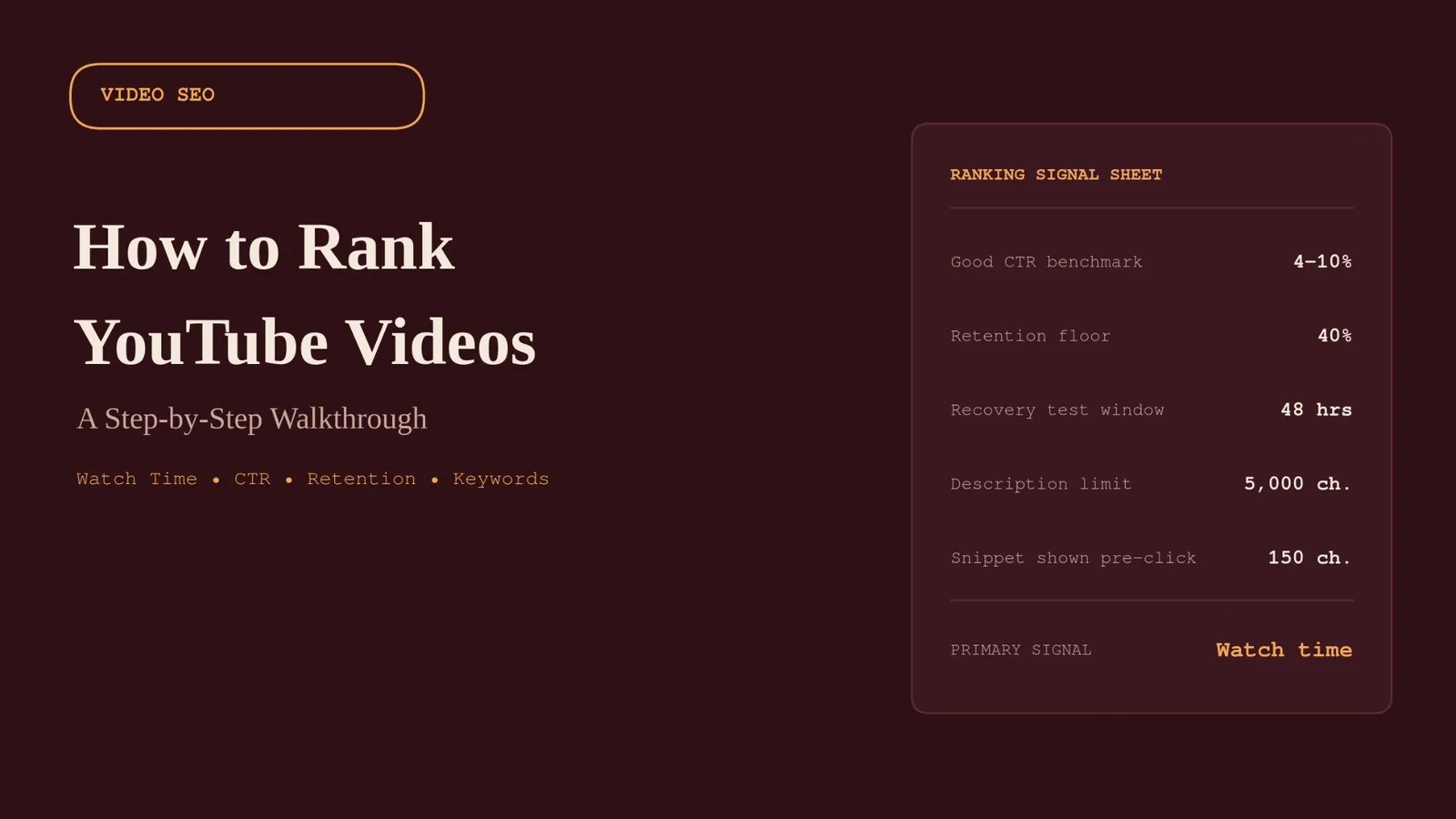
YouTube is the world's second-largest search engine, sitting right behind Google, and most creators still treat it like a video hosting site instead of a search engine with its own ranking logic. YouTube SEO is the practice of closing that gap: optimizing your keywords, title, description, and thumbnail so the algorithm and real viewers both find what you uploaded. The videos that keep gaining views for years, instead of peaking on upload day and disappearing, are almost always built around a deliberate process, not a lucky upload.
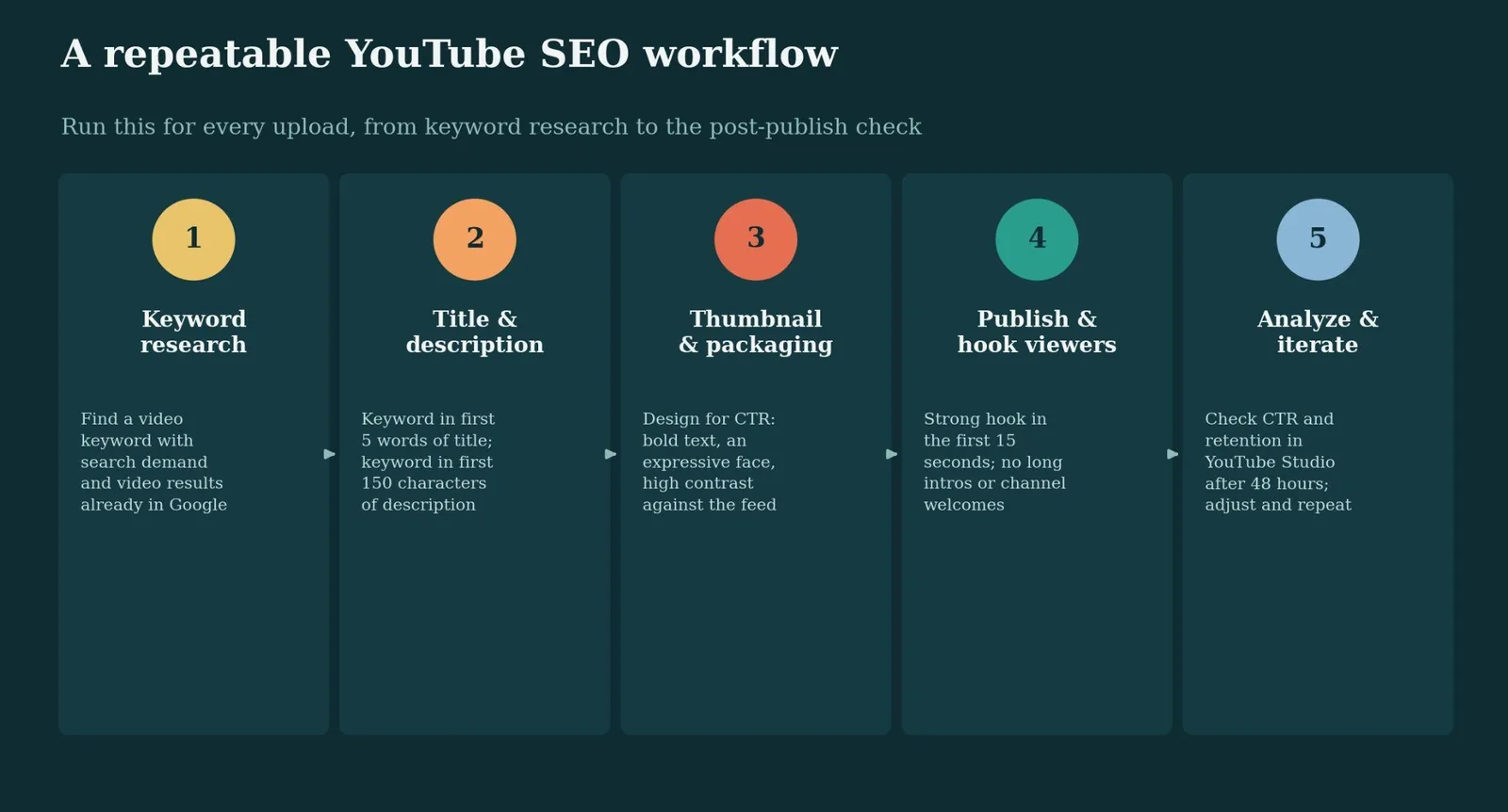
This walkthrough covers how to rank YouTube videos in 2026: what the algorithm actually rewards, the keyword research it starts with, and the five-step workflow to run on every video you publish.
Key Takeaways
- Watch time and audience retention are the two strongest ranking signals, well ahead of raw view count or subscriber totals.
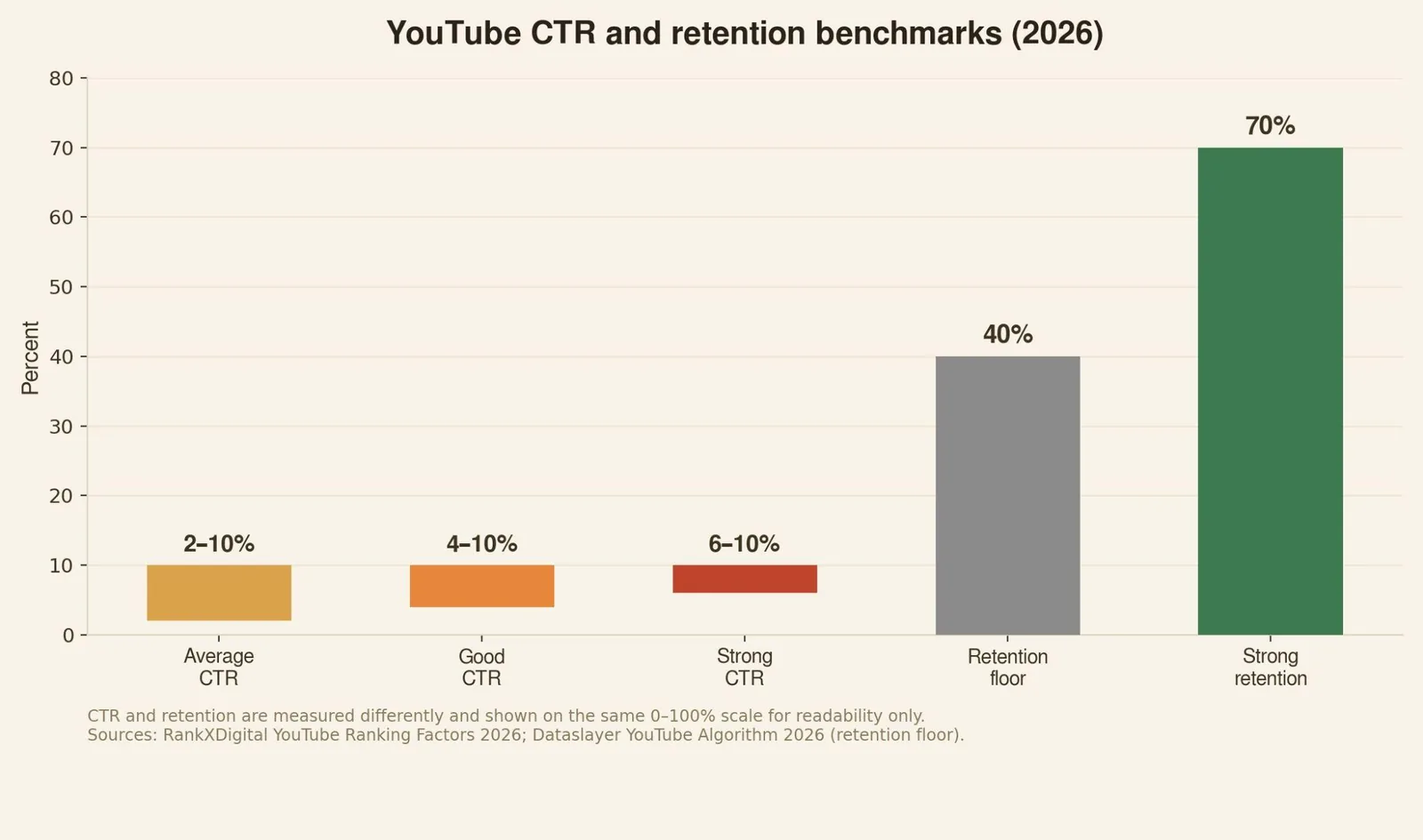
- A good click-through rate (CTR) falls between 4–10%; a sustained CTR above 6% is considered strong, but only when paired with solid retention.
- When retention drops below roughly 40%, YouTube deprioritizes the video regardless of CTR. A great thumbnail can't save a video people click away from immediately.
- Your description's first 150 characters show up as a search snippet before anyone clicks. Most creators waste this space on a channel intro instead of the keyword and value statement that belongs there.
- Tags are supplementary in 2026, not the heavy lift they were in 2020. YouTube's video content analysis and viewer behavior signals now do most of that work.
- Search traffic drives 15–40% of total views on most channels, and it's the most predictable, compounding source available.
What actually moves the YouTube algorithm
YouTube's algorithm has one job above all others: match viewers to videos they'll actually watch, then keep them on the platform. Every YouTube ranking factor ladders back to that goal. In 2026, the platform weighs watch time, audience retention, CTR, satisfaction signals, engagement, and keyword-relevant metadata together as one connected system rather than isolated boxes to check.
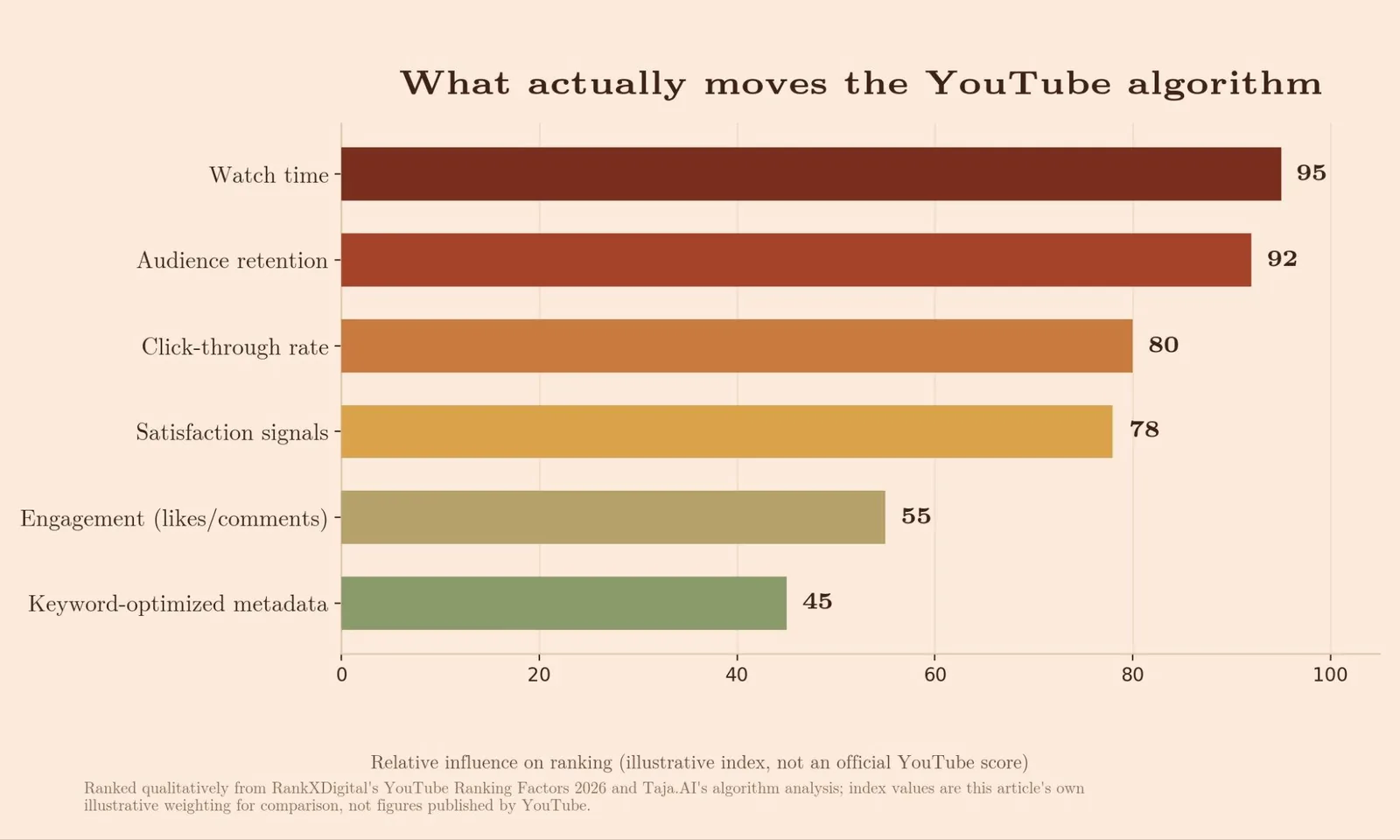
Packaging (your title and thumbnail) earns the first click. What happens after that click decides everything else. A wide-net title can raise curiosity, but if the video only serves a narrower problem, the audience signal gets diluted and retention drops. Strong inputs create a cleaner test, and cleaner tests get wider distribution. Videos rank higher because of that retention signal, not because of tags or keyword density. When retention drops below roughly 40%, YouTube deprioritizes the video regardless of CTR, and a great thumbnail can't rescue a video people click away from immediately.
Step 1: Find a target keyword worth building around
Keyword research on YouTube isn't the same as keyword research for a blog post. YouTube doesn't run its own dedicated keyword-research tool; the closest official options are the Trends tab inside YouTube Studio and Google Trends filtered to "YouTube Search" instead of web search.
Spend real time researching video keywords before you script anything. Build a short list of keywords with genuine search demand on YouTube itself, and check whether the same query also triggers video results directly inside Google. Most of your views will come from YouTube. Google sometimes reserves space on its own results page for video carousels on certain how-to and tutorial queries, and getting into both surfaces multiplies your reach from a single upload.
Step 2: Optimize video titles and descriptions around that keyword
Put your target keyword in the first five words of your title, and again in the first sentence of your description. Avoid keyword stuffing: a title crammed with the same phrase repeated three times gets fewer clicks than a natural one, because to a real viewer it reads as spam even when it technically satisfies an algorithm.
The description deserves more attention than most creators give it. YouTube gives you 5,000 characters, and most creators use about 50. The first 150 characters double as a search-result snippet and the text shown above the "Show more" cutoff on mobile. Your keyword and clearest benefit statement belong there, not a generic channel welcome, since that title description snippet is doing real selling work before the click even happens.
Step 3: Design the thumbnail for clicks, not just clarity
CTR is driven almost entirely by how well your title and thumbnail work together. A thumbnail that's blurry or crammed with tiny, low-contrast text loses the click before anyone even reads the title. High-contrast color, an expressive face, and bold, legible text consistently perform better across niches.
Titles and thumbnails need to point at the same promise. If the title suggests one thing and the thumbnail suggests another, YouTube's initial audience test gets messy: the wrong viewers click, watch briefly, and leave, which drags retention down before the video ever gets a fair shot.
Step 4: Publish, hook viewers fast, and let retention do its job
Once a video is live, the first 15 seconds decide most of its fate. A slow intro or a "welcome to my channel" line costs retention immediately; a value statement in the opening seconds protects it.
Watch time and retention will always outrank raw view count. A video with 50,000 views but only a 2-minute average watch time ranks below a video with 10,000 views and an 8-minute average watch time, because sustained attention signals real value, not just reach. Keep people watching and YouTube keeps sending your video to new viewers; lose them early, and it stops.
Two easy add-ons help this stage: accurate captions or a transcript, useful for accessibility and giving the algorithm more text to match against real searches, and cross-promotion on social media and your blog or website to jump-start watch time in the first hours, when the algorithm is paying closest attention.
Step 5: Check YouTube Studio and iterate
Most videos don't find their full audience in the first 48 hours; YouTube tests new uploads with a small initial audience before deciding how broadly to distribute them. Give a new upload that window before drawing conclusions, then check CTR and average view duration for your YouTube channel in YouTube Studio. A CTR under 4% usually points to the thumbnail or title; retention collapsing in the first 15–30 seconds points to the hook, not the topic.
Likes, comments, and shares are real ranking signals, just consistently weighted below watch time and retention. Treat them as a secondary confirmation, not the main thing you're optimizing for.
Tools for YouTube keyword research and optimization
| Tool | Cost (USD) | Best for | Free tier |
|---|---|---|---|
| YouTube Studio (Trends & Analytics) | Free | Native CTR, retention, and audience-specific trend data | Full access, free |
| Google Trends (YouTube Search filter) | Free | Broad, seasonal demand comparison across topics | Full access, free |
| TubeBuddy | Reported from ~$3–5/month (entry) up to ~$23–27/month (top tier, annual billing) | Bulk editing and A/B testing of titles/thumbnails | Yes, limited |
| VidIQ | Reported from ~$7.50–17/month (entry) up to ~$29–39/month (top tier, annual billing) | AI-assisted ideation and competitor tracking | Yes, limited |
TubeBuddy and VidIQ pricing is worth flagging directly: sources disagree substantially on both tools' current rates, likely due to promo codes, monthly-vs-annual confusion, and how recently each source last checked. Both tools' free tiers cover basic keyword lookups, with full research and competitor features gated behind paid plans. Verify current pricing directly on each vendor's site before publishing a specific number under your byline.
Common mistakes to avoid
- Chasing keywords with no real search demand. A perfectly optimized title for a term nobody searches for still won't get views.
- Optimizing the title while ignoring whether anyone actually watches. A keyword-heavy title people abandon in 30 seconds ranks lower than a plainer title with an 8-minute watch time.
- Publishing a clickbait thumbnail that doesn't deliver. High CTR paired with low satisfaction is the worst combination; YouTube's systems read it as a mismatch and throttle distribution.
- Wasting the first 150 characters of the description on a channel intro. That space shows up before the click and should carry your keyword and value statement instead.
- Treating tags as a primary ranking lever. They're supplementary in 2026; video content analysis and viewer behavior do most of the categorization work now.
Try it yourself: video title CTR score checker
Type a working title and target keyword below to run a quick heuristic check against common high-CTR title patterns.
Video Title CTR Score Checker
Type a working title below. This runs a quick heuristic check against common YouTube title patterns, not YouTube's actual algorithm.
Related reading
- YouTube SEO: How Ranking Actually Works in 2026
- How to Rank in People Also Ask: A Step-by-Step Walkthrough
- YouTube SEO Checklist: What It Is & How to Use It
- GEO & AEO services at Web Tonic
FAQ
Does video length affect YouTube ranking? Not directly. What matters is whether viewers stay engaged throughout. Many top-ranking videos happen to run long simply because the creator had enough substance to sustain retention, not because length itself is a ranking factor.
How long should I wait before judging a new video's performance? Give it about 48 hours. YouTube tests new uploads with a small audience first, measures CTR and retention, then decides how broadly to distribute it from there.
Do YouTube tags still matter for SEO? They're a minor, supplementary signal in 2026, not the driver they were in 2020. A relevant tag list doesn't hurt, but it won't rescue a video with weak retention.
Build the habit that actually moves rankings
Ranking on YouTube takes more than a one-time checklist. Watch time and retention compound across every upload, fed by a keyword worth targeting, a title and thumbnail that agree with each other, and a first 15 seconds that doesn't waste the click you worked to earn.
Run the five-step workflow on every video, check YouTube Studio 48 hours later without exception, and let each upload teach you something the next one can use.
More from Web Tonic: growth marketing services, data & analytics, performance creative.
Sources: rankxdigital.com · taja.ai · dataslayer.ai · keywordtool.io · backlinko.com · editvideo.io · brimcove.com · semrush.com


