



Table of contents
YouTube SEO is the practice of shaping a video's metadata, packaging and content so the platform's search and recommendation systems can match it to the right query and the right viewer. It is closer to demand-matching than to classic on-page optimisation: the ranking signal is not a backlink, it is whether people who see the clip choose it and stay.
This guide separates what the platform itself confirms about ranking from what the industry repeats, then walks the full workflow — keyword research, title and description craft, thumbnails, chapters, captions, Shorts, channel-level optimisation, and the metrics that tell you whether any of it worked.
Key Takeaways
- The platform states that videos are ranked on how well the title, description and video content match the query, plus which videos drive the most engagement for that query — search results are explicitly not a list of the most-viewed videos.
- Tags are "not important." The official help documentation says they exist mainly to correct common misspellings, which makes the tag-stuffing habit one of the least productive tasks in the workflow.
- Recommendations run on 5 behavioural inputs: what viewers watch, what they don't watch, what they search for, likes and dislikes, and "not interested" feedback. None of them are metadata.
- The platform reached roughly 2.58 billion users in 2026 — about 42.8% of everyone online — with 125 million+ Premium and Music subscribers.
- Consumption is mobile-first: roughly 69% of watch time comes from phones, 16% from connected TV, 12% desktop and 8% tablet, which sets the minimum legibility bar for every thumbnail and title.
- Changing a title or thumbnail can lift a video, but the documentation is clear on the mechanism: the system responds to changed viewer behaviour, not to the edit itself.
- Two-thirds of the ranking work happens before upload. Spoken and on-screen content is a signal, so a target term said aloud in the first 30 seconds and reflected in the on-screen text is doing real work.
- Descriptions get 5,000 characters; only the first 2 to 3 lines (~157 characters) show above the "more" fold, so the searchable summary and the click-driving hook compete for the same space.
- Chapters need at least 3 timestamps, the first starting at 00:00, each segment 10 seconds or longer — a hard requirement, not a guideline.
- Hashtags are capped at 15 per video and YouTube ignores all of them if you exceed that, so 3 to 5 is the practical setting.
- Only 5.7% of new pages reach a Google top-10 position within a year, and 96.55% of pages get zero Google traffic — which is precisely why video results, where competition per query is thinner, remain underpriced.
How the ranking systems actually work
The platform runs two distinct distribution systems and most optimisation advice conflates them. On-platform search answers a typed query. Recommendation — Home, Suggested and Shorts feed — answers a personalised guess about what a specific viewer wants next. The same video can dominate one and be invisible in the other.
The published guidance on ranking is short and useful: videos are ranked on how well the title, description and content match the viewer's query, and on which videos drive the most engagement for that search. That second half is the part people skip. Relevance gets you into the candidate set; engagement decides the order. One caveat belongs taped to your monitor: results are not a ranking of the most-viewed uploads, so raw view count is not the lever.
For recommendations, YouTube's own search and discovery FAQ lists exactly what the recommendation system pays attention to — what the audience watches, what they don't watch, what they search for, likes and dislikes, and "not interested" signals. Notice the absence of anything you type into a form. On Home specifically, the inputs are the clip's performance with similar people plus each person's watch and query history, including how many times it has already been shown to them.
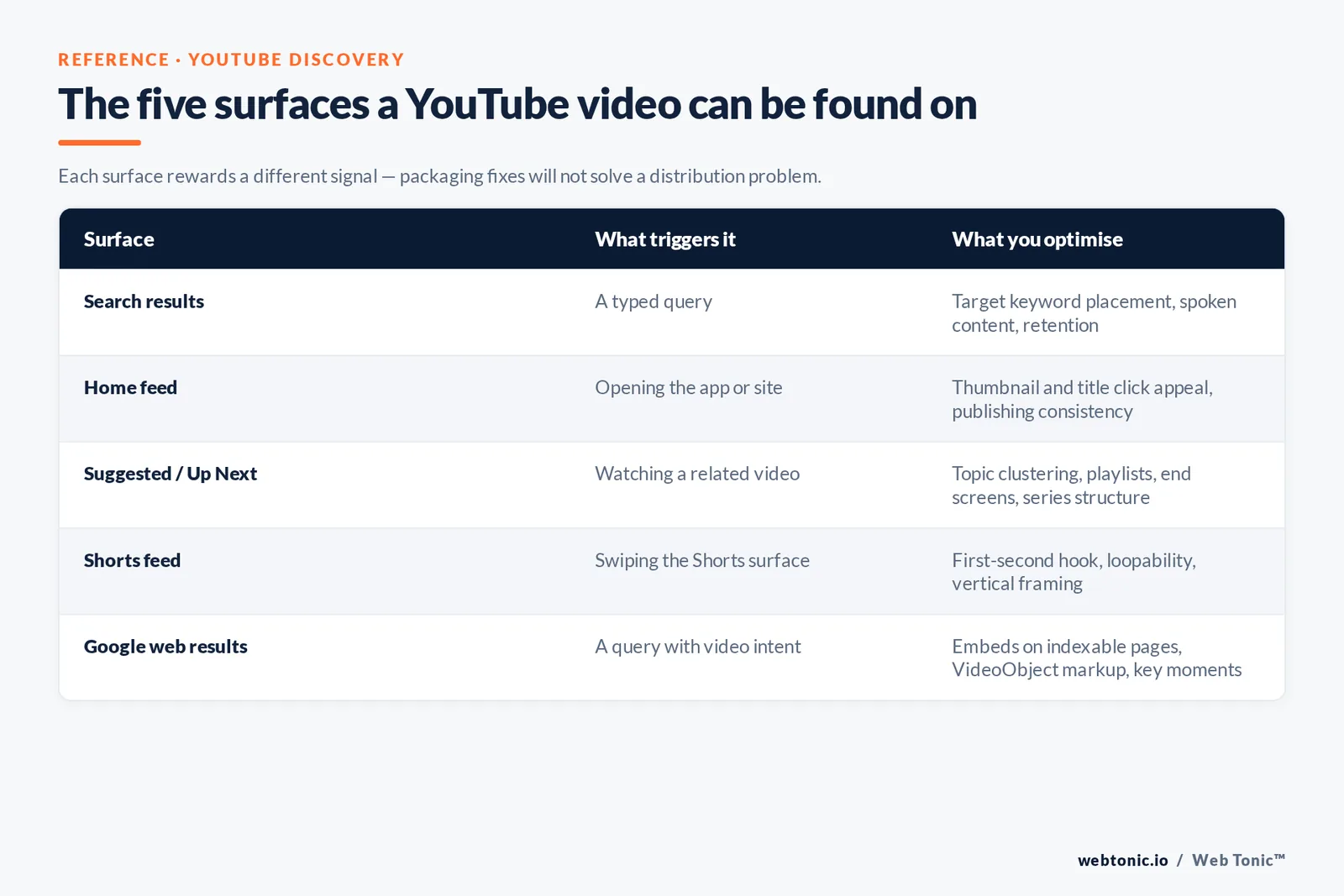
| Surface | What triggers it | Primary signals | What you optimise |
|---|---|---|---|
| Search results | A typed query | Title, description and video content match; engagement for that query | Target keyword placement, spoken content, retention |
| Home feed | Opening the app or site | Performance with similar viewers, watch and search history, impression frequency | Thumbnail and title click appeal, publishing consistency |
| Suggested / Up Next | Watching a related video | Topical relatedness plus personalised watch history | Topic clustering, playlists, end screens, series structure |
| Shorts feed | Swiping the Shorts surface | Swipe-through and rewatch behaviour on short-form | First-second hook, loopability, vertical framing |
| Google web results | A query with video intent | Page indexability, structured data, thumbnail eligibility | Embeds on indexable pages, VideoObject markup, key moments |
The strategic consequence: a piece built to be found should target a phrase with real query volume and answer it fast. One built for recommendation should be interesting to a defined audience and packaged for a cold click. Trying to make one asset do both is why so many channels post decent metadata and see flat impressions.
Keyword research: finding queries that exist on the platform
Search volume here does not mirror Google. People go to Google for definitions and comparisons; they come here for demonstrations, walkthroughs, reviews, unboxings, tutorials and reaction. A term that earns 40,000 monthly Google searches can be commercially dead on YouTube, and a phrase with no Google volume at all can carry a large video audience.
Four sources give you a defensible target list without paying for anything:
- The native search bar. Autocomplete is generated from real query behaviour on the platform. Type your seed term, then cycle the alphabet after it — "youtube seo a", "youtube seo b" — to surface long-tail variants the platform knows people ask for.
- Your existing Analytics traffic sources. The "YouTube search" report lists literal terms that already brought viewers to your channel. These are proven, not projected.
- Competitor titles ranked for your term. Run the query and read the top 10 headlines as a group. Repeated modifiers — "for beginners", "step by step", "2026", "explained" — tell you the intent shape YouTube is currently rewarding.
- Third-party keyword tools. A dedicated workflow such as Ahrefs' YouTube keyword research guide pairs volume estimates with clicks data, which matters because a phrase can be searched often and still produce almost no clicks.
Once you have candidates, sort them by intent match rather than volume. A 900-search phrase where every ranking result is a tutorial and you make tutorials will outperform a 12,000-search one where the results are all news segments. This is the same discipline behind any serious growth marketing programme: pick the queries you can genuinely win, then win them decisively.
| Query pattern | Typical YouTube intent | Format that ranks | Ideal length |
|---|---|---|---|
| "how to [task]" | Do it now, with me | Screen or camera walkthrough, numbered steps | 6-12 minutes |
| "[product] review" | Decide before buying | Hands-on demo with verdict up front | 8-15 minutes |
| "[a] vs [b]" | Break a tie | Side-by-side comparison, criteria table on screen | 7-12 minutes |
| "what is [term]" | Understand quickly | Explainer with visual metaphor | 3-6 minutes |
| "[task] in 60 seconds" | Fastest possible answer | Vertical Short, single tip | Under 60 seconds |
| "[topic] mistakes" | Avoid a known risk | Listicle with examples per point | 8-14 minutes |
Titles, descriptions and tags: what earns rankings and what wastes time
Titles carry two jobs simultaneously — relevance for search and click appeal for feeds. The reliable structure puts the target phrase in the first half and the specific promise in the second: "YouTube SEO: the 7 settings that actually move impressions". Keep the whole headline under roughly 60 characters so nothing truncates on a phone, where about 69% of watch time originates. The guidelines explicitly warn against headlines that are deceiving, clickbaity, shocking or written in ALL CAPS — those can cost you a Community Guidelines removal, not just trust.
Descriptions have 5,000 characters of room and a brutal fold: only the first two or three lines display before "…more". Write those lines as a standalone answer containing the target keyword, then use the remaining space for the full context, chapter list, resource links and related videos. the official description guidance is worth reading in full because it also governs where hashtags surface and how stuffing is treated.
Tags deserve a paragraph purely to stop you over-investing. The platform's position is that they are "not important" and are used primarily to correct for common spelling mistakes. Add the handful of variants and misspellings that genuinely apply, then move on. The 45-minute tag-research ritual is the single most common misallocation of effort in this discipline.
Hashtags are a separate field-in-description mechanic: the cap is 15 per upload and every one is ignored if you exceed it. Three to five is the sensible setting, and the first three appear above your title.
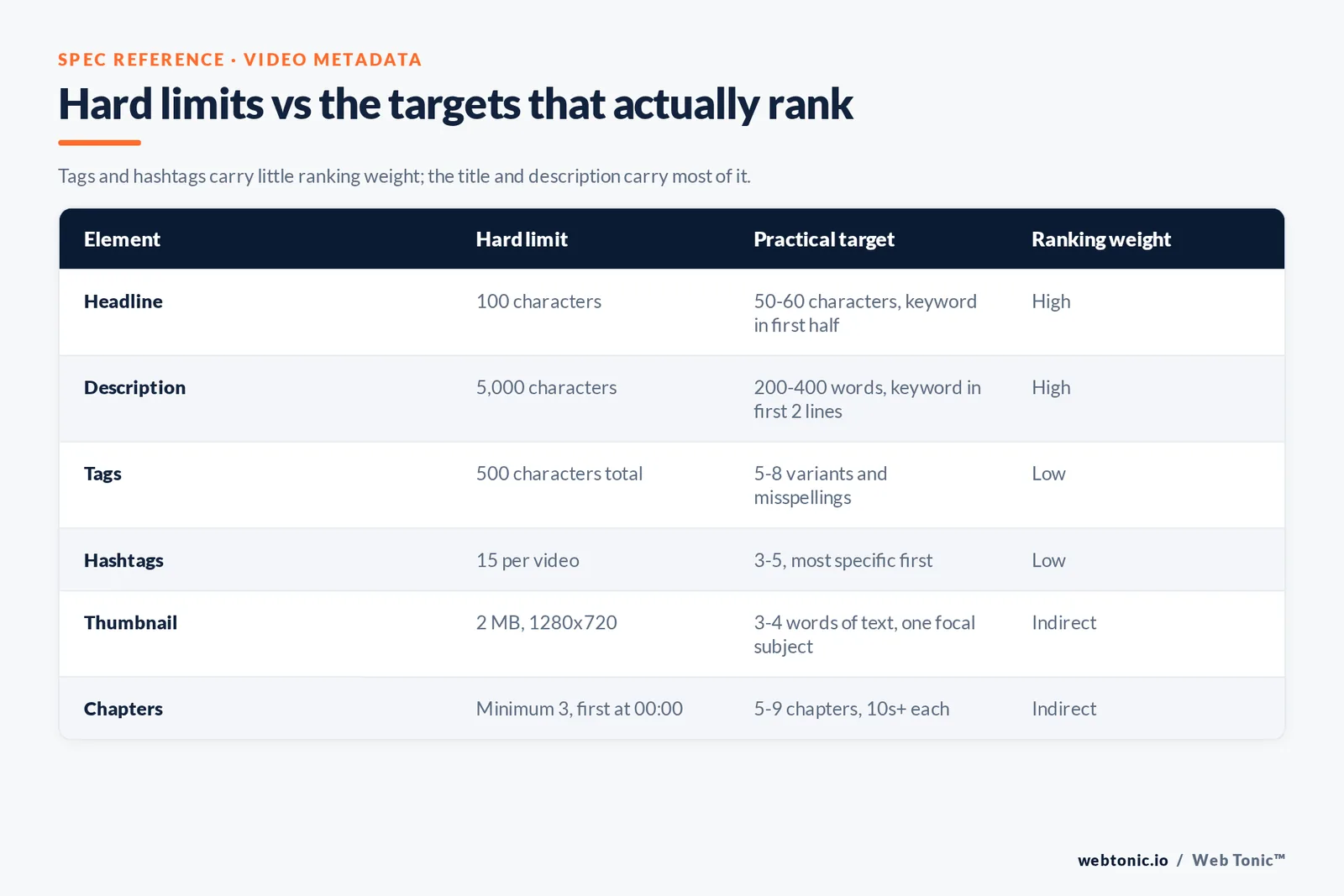
| Element | Hard limit | Practical target | Ranking weight |
|---|---|---|---|
| Headline | 100 characters | 50-60 characters, keyword in first half | High — direct match signal |
| Description | 5,000 characters | 200-400 words, keyword in first 2 lines | High for search relevance |
| Tags | 500 characters total | 5-8 variants and misspellings | Low — YouTube says "not important" |
| Hashtags | 15 per video | 3-5, most specific first | Low, but drives topical browse |
| Thumbnail | 2 MB, 1280x720 recommended | 3-4 words of text, one focal subject | Indirect — decides click-through |
| Chapters | Minimum 3, first at 00:00 | 5-9 chapters, 10s+ each | Indirect — retention and key moments |
Thumbnails and click-through: the part that decides distribution
Impressions are allocated to you; clicks are earned by you. That makes the thumbnail-plus-title pair the highest-leverage asset on the page, because it is the only thing standing between a served impression and a session. The custom thumbnail specifications call for 1280x720 pixels, a 16:9 ratio, and a file under 2 MB.
Design rules that survive contact with a mobile feed:
- One subject, one idea. At 168 pixels wide in a phone feed, a three-element composition becomes noise.
- Three to four words maximum, and never the same words as the title — the pair should combine into one message, not repeat.
- High contrast between subject and background. Test in greyscale; if the subject disappears, so does your click-through rate.
- Consistent visual grammar across the channel so a returning viewer recognises you before reading anything.
- No promise the video does not keep. Inflated packaging buys a click and pays it back in a five-second exit, which is the worst possible engagement signal.
On the question everyone asks — does swapping the thumbnail re-rank an upload? The official answer is nuanced and worth quoting in spirit: maybe, but because the system responds to how viewers now interact with the video, not because you edited a field. The corollary is the discipline most channels lack: don't change what is already working. Swap packaging on underperformers, leave winners alone, and treat each swap as a test with a recorded before-and-after.
On-video optimisation: content is a ranking signal
Because the platform names video content as one of the three match signals, what happens inside the file matters for ranking, not just for retention. Practically:
- Say the target phrase aloud in the opening 15-30 seconds. Automatic speech recognition transcribes it, creating a content-level match.
- Show it on screen in a title card or lower third for the same reason.
- Front-load the answer. Deliver the promised payoff early and then expand. A viewer who gets what they came for in 20 seconds tends to stay for the detail; one who is asked to wait through a 60-second intro leaves.
- Add captions. The platform generates automatic captions in many languages, but automatic output is imperfect. Uploading a corrected transcript gives you an accurate, indexable text layer and serves the substantial share of viewers watching sound-off.
- Use chapters properly. Chapters need at least three timestamps, the first beginning at 00:00, with every segment at least 10 seconds long. Below those thresholds the feature silently fails to render.
Chapters do double duty. On-platform they let people skip to the segment they want, which protects average view duration. Off-platform, they help surface key moments in web results, one of the few places where classic on-page work and video work converge.
Channel-level optimisation and the compounding effect of structure
Individual uploads rank, but channels compound. A channel that publishes twelve loosely related pieces offers twelve isolated data points; a channel that publishes twelve videos inside three tight topic clusters teaches the recommendation system who its audience is.
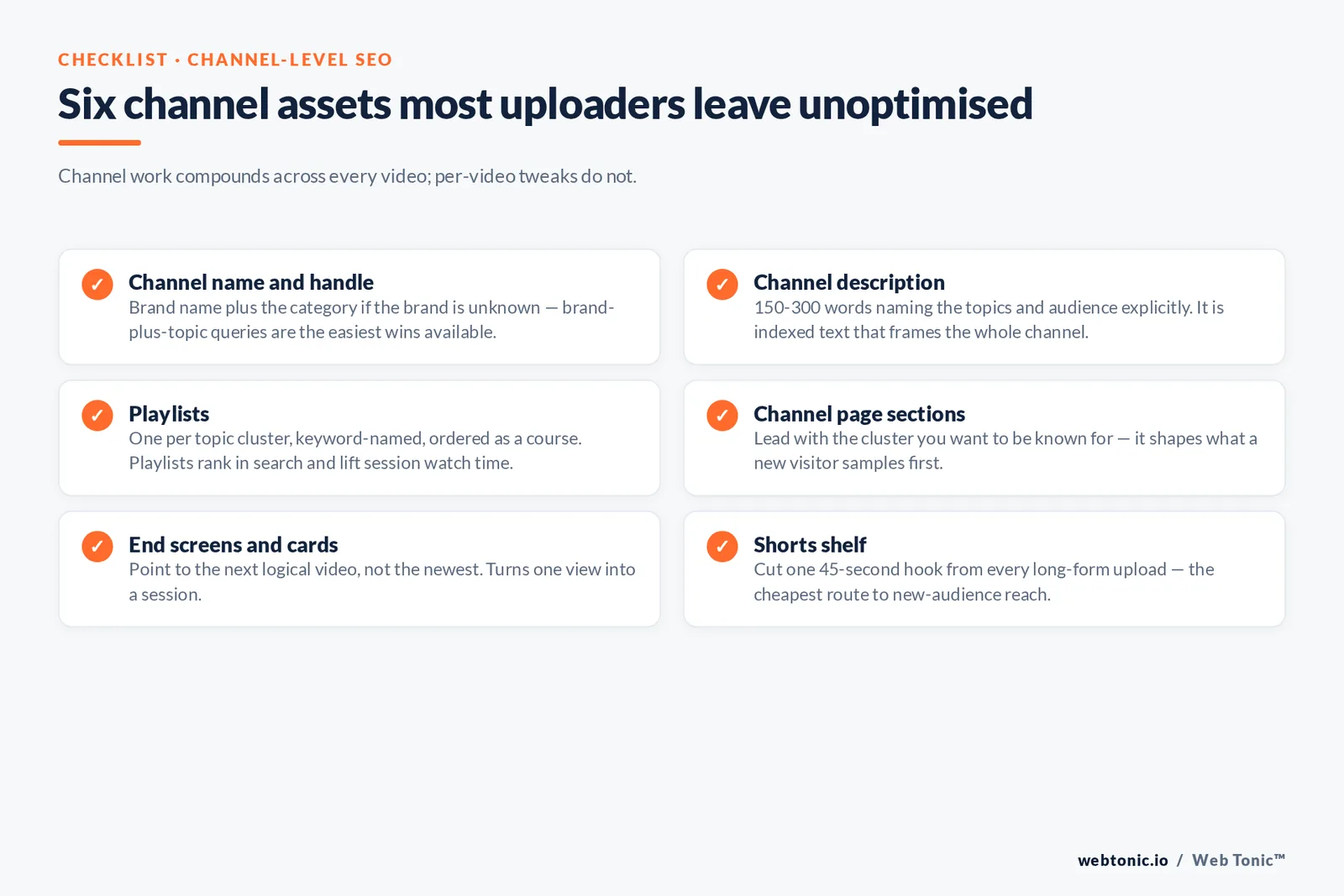
| Channel asset | What to do with it | Why it matters |
|---|---|---|
| Channel name and handle | Brand name, plus the category if the brand is unknown | Brand-plus-topic queries are the easiest wins available |
| Channel description | 150-300 words naming the topics and audience explicitly | Indexed text that frames the whole channel |
| Playlists | One per topic cluster, keyword-named, ordered as a course | Playlists rank in search and lift session watch time |
| Sections on the channel page | Lead with the cluster you want to be known for | Shapes what a new visitor samples first |
| End screens and cards | Point to the next logical video, not the newest | Turns one view into a session |
| Shorts shelf | Cut one 45-second hook from every long-form upload | Cheapest route to new-audience reach |
Shorts deserve explicit planning rather than leftovers. Short-form distribution is driven by swipe-through and rewatch, so the loop matters more than the metadata. A practical rhythm: one long-form video for the search query, two or three Shorts pulled from it for the recommendation surface, and one community post to reactivate subscribers. The long-form asset earns the ranking; the Shorts buy the audience that makes the ranking possible.
Getting video into Google web results
Video results in Google web search are a separate opportunity from on-platform search, and they are frequently left unclaimed. Google's video best-practice documentation covers the requirements: the file must sit on a publicly indexable page, the player must not be blocked, and a stable thumbnail must be available.
Two moves cover most of the value. First, embed each upload on a relevant page of your own site with a genuine text summary around it, so the page can rank for the query while the thumbnail earns the visual result. Second, add VideoObject structured data including name, description, thumbnailUrl, uploadDate and duration — plus Clip or seekToAction markup if you want key moments. This is standard technical implementation work and it is usually a one-time template change rather than a per-video task.
The metrics that tell you whether any of it is working
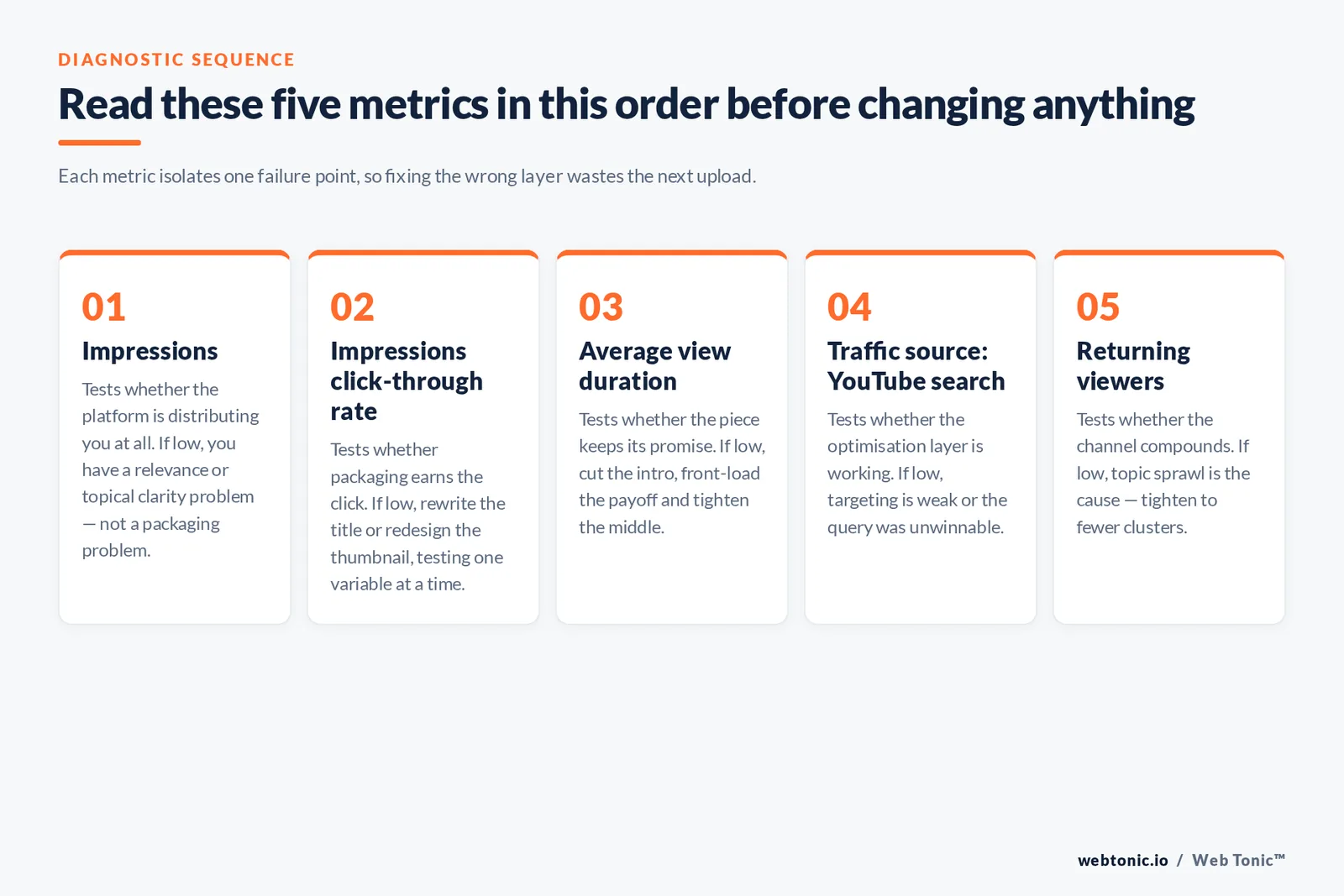
Views are a vanity aggregate. The diagnostic set is narrower, and each metric points at a specific failure.
| Metric | What it diagnoses | If it's low |
|---|---|---|
| Impressions | Whether the platform is distributing you at all | Relevance or topical clarity problem, not a packaging problem |
| Impressions click-through rate | Whether packaging earns the click | Rewrite the title, redesign the thumbnail, test one variable |
| Average view duration | Whether the piece keeps its promise | Cut the intro, front-load the payoff, tighten the middle |
| Average percentage viewed | Whether the length fits the topic | It runs longer than the question deserves |
| Traffic source: YouTube search | Whether the optimisation layer is doing its job | Weak targeting or an unwinnable query choice |
| Returning viewers | Whether the channel compounds | Topic sprawl — tighten to fewer clusters |
Read them as a chain, top to bottom. Low impressions with healthy retention is a targeting problem. High impressions with a low click-through rate is a packaging problem. High click-through with collapsing retention is a promise problem — the most expensive kind, because it teaches the recommendation system not to serve you again. Building that read-out into a proper reporting layer is the same job as any other marketing analytics build: define the chain once, then check it weekly.
What changed for 2026
Four shifts are worth planning around.
- Scale keeps growing while attention fragments. The platform reached about 2.58 billion users, roughly 42.8% of all internet users, per DataReportal's YouTube data. More audience, more competition per query.
- Connected TV is now a design constraint. With roughly 16% of watch time on television screens, thumbnails and on-screen text have to work at both 168 pixels and 55 inches.
- Short-form is the discovery layer, long-form is the ranking layer. Channels treating Shorts as the audience-acquisition engine and long-form as the search asset are outperforming channels that pick one.
- Clips are increasingly surfaced by AI answer layers, which favour clean transcripts, accurate captions and chaptered structure. The work that made video accessible also makes it machine-readable.
What has not changed is the fundamental: the systems rank satisfaction. Every durable tactic on the list — accurate titles, honest thumbnails, front-loaded answers, correct captions — is a proxy for the same thing. Comparative overviews such as Semrush's YouTube SEO guide and older correlation studies including Backlinko's analysis of 1.3 million videos are useful for benchmarking, but where third-party correlation and YouTube's own explanation of its recommendation system disagree, believe the platform.
A 10-step optimisation checklist
- Pick one query with proven on-platform demand and an intent your format can serve.
- Read the top 10 results and name the format pattern before you script.
- Script the payoff into the first 30 seconds and say the target phrase aloud there.
- Write the headline keyword-first, under 60 characters, with a specific promise.
- Design the thumbnail with one subject and at most four words that don't repeat the title.
- Write the description so the first two lines stand alone, then add context, chapters and links.
- Add 5-9 chapters starting at 00:00, each at least 10 seconds long.
- Upload a corrected transcript rather than trusting automatic captions alone.
- Add 3-5 hashtags, file the piece in a keyword-named playlist, and set an end screen to the next logical upload.
- Review at 7, 28 and 90 days on impressions, click-through rate and average view duration — and change one variable at a time.
Run that loop consistently for a quarter and the channel starts to accumulate the only asset that truly compounds here: a clear signal about who your audience is and what satisfies them. If you would rather have that built and measured for you, our services cover the search and content side end to end, and you can talk to the team about where video fits in your channel mix. More search and content breakdowns live on the Web Tonic blog.
FAQ
Does YouTube SEO still work in 2026?
Yes, and it is arguably better value than it was. The platform confirms that rankings depend on how well the title, description and content match a query plus which results drive engagement for it. That means a well-targeted piece on a mid-volume query can outrank a much larger channel that never optimised for the term. With about 2.58 billion people on the platform, even modest query volumes represent real audiences.
Do tags matter for YouTube SEO?
Barely. The official help documentation states plainly that they are "not important" and are used mainly to correct common spelling mistakes. Add a handful of genuine variants and misspellings, then spend the saved time on your thumbnail, opening 30 seconds and description — all of which have measurable impact.
How long should a video be to rank?
There is no length threshold in the ranking system; what matters is average view duration and average percentage viewed relative to the topic. A three-minute explainer that holds 70% of viewers outperforms a fifteen-minute version that holds 20%. Match length to the question: definitions run 3-6 minutes, tutorials 6-12, reviews and comparisons 8-15.
Should I change the title and thumbnail of an underperformer?
Yes, on underperformers only. The documentation explains that re-ranking after a change happens because people interact with the piece differently, not because the edit itself is a signal. Change one element at a time, record impressions and click-through rate before and after, and leave videos that are already performing untouched.
What is the difference between YouTube SEO and ranking video in Google?
The first targets on-platform search and recommendation surfaces using metadata, packaging and engagement. Ranking in Google web search requires an indexable page hosting the file, an unblocked player, an available thumbnail and ideally VideoObject structured data with key-moment markup. The two overlap on transcripts and chapters, but they are separate workstreams with separate checklists.
How many keywords should one video target?
One primary query, plus the two or three closest variants you can serve honestly in the same piece. Uploads that try to cover four unrelated queries dilute the content-match signal and usually produce weaker retention, because no single viewer wanted all four answers.
Sources: YouTube Help — search and discovery FAQ, descriptions, custom thumbnails, hashtags, automatic captioning; YouTube Official Blog — on YouTube's recommendation system; Google Search Central — video best practices and VideoObject structured data; DataReportal — YouTube users and trends; Ahrefs — YouTube keyword research; Semrush — YouTube SEO; Backlinko — analysis of 1.3 million YouTube videos.


