



Table of contents

Keyword research for ecommerce isn't the same exercise as keyword research for a blog. A blog reader searching "how to clean suede shoes" wants an answer. A shopper searching "waterproof suede boots size 10" wants a product page, not an article, and they want it now. Get that distinction wrong, and a store can rank for thousands of terms while converting almost none of them into sales.
This guide walks through exactly how to research, group, and prioritize keywords for an online store: which terms actually drive revenue, which tools are worth paying for, and how to avoid the single biggest mistake ecommerce teams make when building out category and product pages.
Key takeaways
- 70% of ecommerce searches are transactional in nature, meaning most shoppers searching in this category already know roughly what they want to buy.
- 65% of ecommerce keyword queries are long-tail (3+ word phrases), and long-tail terms convert at 2.5x the rate of shorter, broader head terms.
- Keywords with commercial intent get 1.8x higher click-through rates than purely informational searches, since the searcher is closer to a purchase decision.
- Google Keyword Planner overestimates search volume 54.28% of the time, so treat its numbers as directional and cross-check against real Google Search Console data.
- 68% of US online shoppers search Google before purchasing, and the average ecommerce brand ranks organically for roughly 1,783 keywords, driving an estimated 9,625 organic monthly visits, per Charle Agency's 2026 Ecommerce SEO Statistics.
Why ecommerce keyword research is a different discipline
Every keyword carries an intent, and for a store, that intent decides whether the right page even has a chance to rank. A category page optimized for "running shoes" competes for a broad, mixed-intent term. A product page optimized for "Nike Air Zoom Pegasus 40 men's size 11" competes for almost nobody, converts at a far higher rate, and maps directly to inventory that actually exists.
Search intent for ecommerce generally splits into four buckets:
- Informational — "how to break in new running shoes." The searcher isn't ready to buy; this is blog and guide content.
- Navigational — "Nike website" or a specific brand name. The searcher already knows the destination.
- Commercial — "best running shoes for flat feet." The searcher is comparing options before deciding.
- Transactional — "buy Nike Air Zoom Pegasus 40." The searcher is ready to purchase.
Only the last category directly drives revenue on a product page. 1Digital Agency's ecommerce keyword research guide puts it plainly: mapping the wrong intent to the wrong page type is the most common failure mode in ecommerce SEO, since a category page built around an informational term can pull thousands of visitors who came for a how-to article, not a checkout button.
Search itself is also a major discovery channel worth building for directly: roughly a third of consumers find new brands and products through search engines like Google in the first place, per GWI survey data cited in Shopify's 2026 Keyword Research Guide for Ecommerce Businesses.
Step 1: Start with seed keywords from your catalog
Seed keywords come from what a store actually sells, not from a keyword tool. List the broad terms that describe each product category, then note the specific attributes customers search by: brand, material, size, color, use case, and price qualifiers like "affordable" or "on sale."
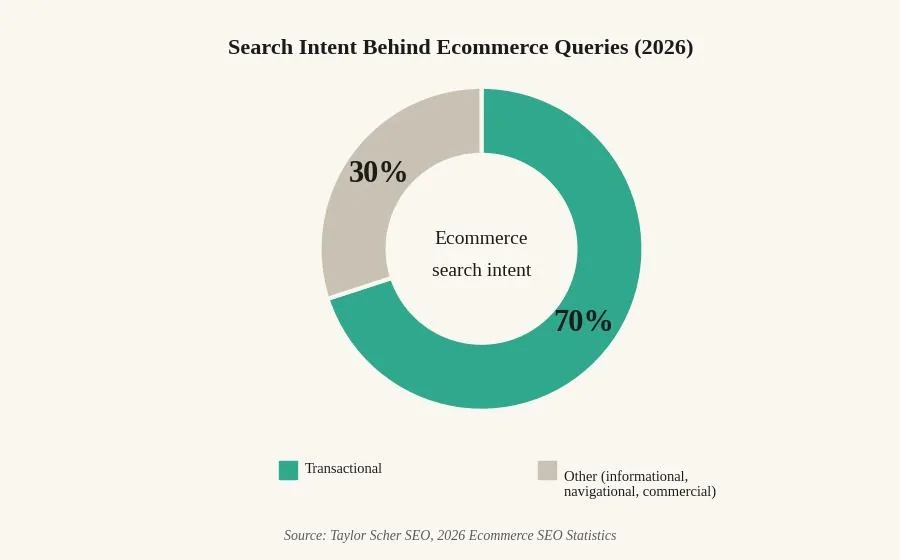
This matters more for ecommerce than most other content types because 70% of ecommerce searches are transactional in nature — Taylor Scher SEO's 2026 Ecommerce SEO Statistics has the full breakdown. Shoppers browsing an online store have largely already decided on the category; the keyword research job is figuring out exactly how they phrase what they want, not convincing them they need it in the first place.
Step 2: Expand into long-tail, high-intent variations
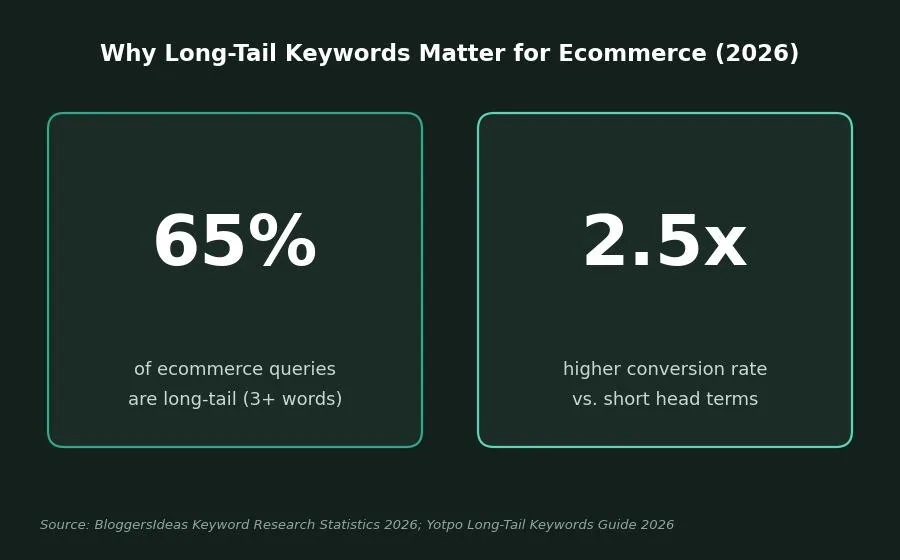
Once seed terms exist, expand each one into longer, more specific variations. 65% of ecommerce keyword queries are long-tail (three or more words), and these terms convert at 2.5 times the rate of shorter head terms, per BloggersIdeas' 2026 Keyword Research Statistics and Yotpo's 2026 Long-Tail Keywords Guide. A shopper searching "running shoes" is browsing. A shopper searching "waterproof trail running shoes for wide feet" has already narrowed the field and is close to buying.
Common expansion sources for ecommerce specifically:
- Product attributes and modifiers. Brand, model number, material, size, color, and use case ("wool runners," "organic cotton sheets," "for small kitchens").
- Purchase qualifiers. Terms like "buy," "sale," "discount," and "free shipping" signal a shopper further down the funnel.
- Internal site search data. What customers type into your own store's search bar is a direct feed of real customer language, including product gaps you don't currently carry.
- Competitor URL analysis. Checking which of a competitor's pages rank for a given term, category page vs. product page vs. blog post, reveals how Google interprets intent for that specific query.
Step 3: Group keywords by intent and map to page type
Every keyword should map to exactly one page type, and mixing intents on a single page is one of the fastest ways to underperform. Group your expanded list into the four intent buckets from Step 1, then assign:
- Informational keywords → blog posts and buying guides
- Commercial keywords → comparison pages and best-of lists
- Transactional keywords → individual product pages
- Navigational keywords → homepage and brand-specific landing pages
| Intent type | Example query | Content type | Funnel stage |
|---|---|---|---|
| Informational | "how to waterproof leather boots" | Blog post, buying guide | Top of funnel |
| Navigational | "Zappos" | Homepage, brand page | N/A (brand-specific) |
| Commercial | "best waterproof boots for hiking" | Comparison page, best-of list | Middle of funnel |
| Transactional | "men's waterproof hiking boots size 11" | Product detail page | Bottom of funnel |
Keywords with commercial intent see 1.8x higher click-through rates than purely informational searches, per Taylor Scher SEO's 2026 data, making the commercial and transactional rows the highest-priority targets for revenue-generating pages.
Step 4: Check volume and difficulty, but don't trust either blindly
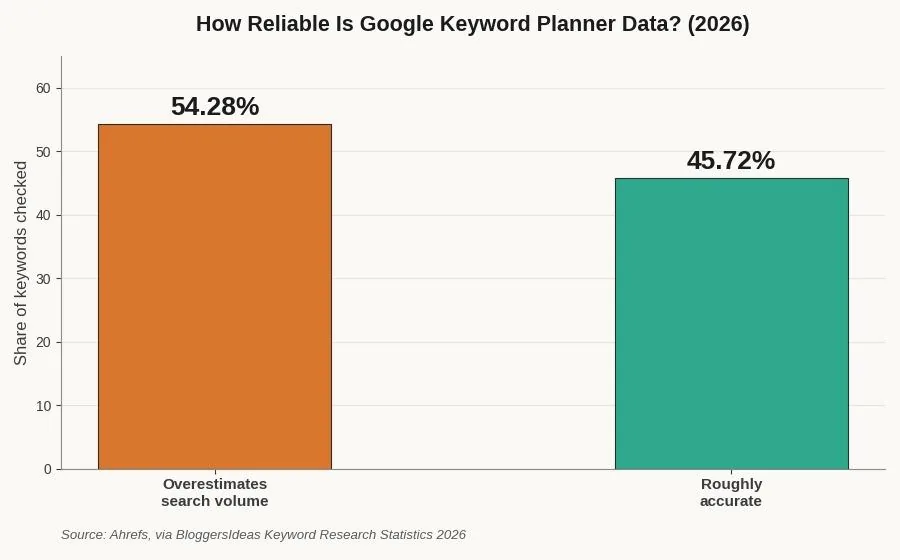
Search volume and keyword difficulty scores are directional, not exact. Google Keyword Planner overestimates actual search volume 54.28% of the time, according to Ahrefs' analysis as compiled by BloggersIdeas, which means a keyword showing "1,000 searches/month" might realistically be driving far less real traffic. Cross-reference tool estimates against Google Search Console, which shows real click and impression data for terms a store already ranks for, whenever possible.
For a new or lower-authority store, prioritizing high-difficulty head terms over lower-competition long-tail variants is usually the wrong call: a long-tail product term is both easier to rank for and, per the conversion data above, more likely to convert once it does.
Step 5: Choose the right tools for the job
Ecommerce keyword tool
Should you target this keyword?
Score a keyword against the factors that actually predict ecommerce ranking and conversion potential.
Priority score
--
Adjust the fields above to see a recommendation.
A mix of free and paid tools covers most ecommerce keyword research needs, per AdNabu's 2026 ecommerce keywords guide:
- Google Keyword Planner — free, ties directly into Google Ads data, useful for a starting volume estimate.
- Google Search Console — free, shows real click and impression data for keywords a store already ranks for.
- Google Trends — free, useful for spotting seasonal demand spikes before they happen.
- Ahrefs — paid, strong for competitor keyword gap analysis and identifying which URL type (category, product, or blog) ranks for a given term.
- Semrush Keyword Magic Tool — paid, breaks down volume, difficulty, and CPC by keyword cluster.
- AnswerThePublic — useful specifically for surfacing "how," "why," and "which" informational variations of a seed term.
Common ecommerce keyword research mistakes
- Targeting the same keyword across multiple pages. This creates keyword cannibalization, where a store's own category and product pages compete against each other instead of against outside competitors.
- Chasing head terms over long-tail variants. A broad, high-volume term is often the least efficient use of a smaller store's authority and content budget.
- Trusting tool-reported volume as exact. Treat every estimate as directional and validate against real Search Console performance once a page is live.
- Ignoring internal site search data. The exact phrases customers type into a store's own search bar are free, first-party keyword research that most teams never check.
- Building category pages around informational terms. This can pull real traffic while converting almost none of it, since the visitor came for an article, not a purchase.
Related reading
- How to Do Keyword Research: A Step-by-Step Walkthrough
- How Much Search Volume Is Enough for Keyword Research?
- What Is Keyword Difficulty? A Clear, Practical Explanation
- GEO & AEO services at Web Tonic
Frequently asked questions
How is ecommerce keyword research different from regular keyword research?
The core process is similar, but ecommerce keyword research weighs commercial and transactional intent much more heavily, since the end goal is a product sale rather than a page view. Roughly 70% of ecommerce searches are transactional, compared to a much lower share for general web search overall.
Do I need a paid tool for ecommerce keyword research?
No. Google Keyword Planner, Google Search Console, and Google Trends cover the fundamentals for free. Paid tools like Ahrefs or Semrush add competitor gap analysis and more precise difficulty scoring once a store is running keyword research at scale.
Should I target high-volume or long-tail keywords first?
For most stores, long-tail keywords first. They convert at roughly 2.5x the rate of head terms, face far less competition, and map more directly to specific products already in a catalog.
How do I know if a keyword matches my product page or my blog?
Search the term in Google and look at what's already ranking. If the results are mostly product listings, the intent is transactional and belongs on a product page. If the results are guides or comparison articles, build content instead of trying to force a product page to rank.
How often should ecommerce keyword research be updated?
At minimum, quarterly, and more often around major product launches or seasonal demand shifts. Search behavior, competitor positioning, and available tool data all change quickly enough that annual keyword research alone is no longer sufficient.
Turning search data into store revenue
Ecommerce keyword research isn't about finding the biggest volume number on a report. It's about matching the exact phrase a shopper types right before they're ready to buy with the exact page built to sell them that product. Do that consistently across a catalog, category by category, and the traffic that shows up converts instead of just passing through.
The stores that treat this as an ongoing discipline, revisiting keyword groupings as inventory, seasons, and search behavior shift, are the ones whose organic traffic keeps compounding instead of plateauing.
More from Web Tonic: growth marketing services, data & analytics, performance creative.
Sources: charleagency.com · 1digitalagency.com · shopify.com · taylorscherseo.com · bloggersideas.com · yotpo.com · blog.adnabu.com


