



Table of contents

Google Ads audience targeting adds people-based signals — who someone is, what they are researching, and how they have already interacted with your business — on top of the keyword or placement layer. The setting you choose next (Targeting or Observation) matters more than the segment you pick.
Key Takeaways
- 100 active users in the last 30 days is the minimum for a list to serve on Search, Display or YouTube; older lists still need 1,000 matched users.
- Membership duration defaults to 30 days and caps at 540 days on both Search and Display.
- Unused lists auto-close after 540 days of no targeting, and a new list needs 48 to 72 hours to populate.
- Observation changes nothing about reach; Targeting restricts delivery to the list. Confusing the two is the single most expensive audience mistake in Search.
- Google Ads exposes 7 age brackets, 3 gender values and 7 household income tiers — every one of them includes an Unknown bucket.

What Google Ads Means by Audience Segments
Google renamed most of this vocabulary, and old blog posts still use the retired words. What used to be called audience types is now audience segments, and remarketing lists now live under your data in the interface. The official audience segments documentation confirms the swap, and the Audiences report inside the Campaigns menu is where demographics, segments and exclusions now all appear together.
| Retired term | Current term | Where you see it now |
|---|---|---|
| Audience types | Audience segments | Audiences report, ad group settings |
| Remarketing | Your data | Audience manager, segment builder |
| Remarketing list | Data segment | Segment table, list membership rules |
| Similar audiences | Optimised targeting and lookalikes | Ad group targeting expansion controls |
| Customer list | Customer Match segment | Your data, upload interface |
Names aside, one thing has not changed: segments attach to ad groups and campaigns, not to accounts. That structural detail drives everything else on this page, and it is why an audience plan has to be written alongside a campaign type decision rather than after it.
The Five Segment Families and What Builds Them
Every option in the picker belongs to one of five families. Grouping them this way stops the common error of treating an interest signal as if it were purchase intent.
| Family | Built from | Signal strength | Best deployed on |
|---|---|---|---|
| Affinity | Long-term interests and habits | Broad, upper funnel | Display and video reach builds |
| In-market | Active research behaviour for one purchase | High, narrow window | Display, Demand Gen, Search observation |
| Life events | Infrequent milestones such as moving or marrying | Medium, wide purchase basket | Video, Display, Gmail placements |
| Detailed demographics | Durable traits such as homeowner or new parent | Medium, stable | Any campaign needing a qualification layer |
| Your data | Site visits, app events, video views, uploaded lists | Strongest, first party | Search bid modifiers, retargeting, exclusions |
Google’s documentation makes a subtle but useful point about relative size: because a life event triggers many related purchases at once, that pool is often larger than an in-market pool, which maps to a single purchase decision — while affinity pools are larger again. Sizing expectations should follow that hierarchy, not gut feel.
Custom segments sit slightly outside the five families. You build them from keywords, URLs and apps, and Google reviews each input against ad policy before it can serve. They are available on Display, Gmail, Demand Gen and Video inventory — not on standard Search.
Targeting Versus Observation: The Setting That Changes Delivery
This is the one control people get wrong. Both settings look identical in the interface, and only one restricts who sees the ad.
| Setting | Effect on reach | What you gain | Use it when |
|---|---|---|---|
| Targeting | Restricts delivery to segment members only | Tight qualification, cleaner spend | The list is large and proven, or budget is tiny |
| Observation | No restriction whatsoever | Reporting plus optional bid adjustments | Testing new segments on Search campaigns |
| Exclusion | Removes members from delivery | Suppression of buyers, applicants, bad fits | Post-purchase waste is visible in reports |
Rule 1 — never set a segment to Targeting on a Search campaign until observation data proves it converts better. Search already has keyword intent; layering a hard audience restriction on top can cut impression volume dramatically for no efficiency gain. Rule 2 — run 4 to 6 weeks of observation before you touch bid adjustments, because segment-level conversion counts are usually far too thin to read in a fortnight.
Where Each Segment Type Is Actually Eligible
Availability is the constraint that ruins otherwise good plans. Automated campaign types accept audience input as a signal rather than a rule, which is a different thing entirely.
| Campaign type | Affinity and in-market | Custom segments | Your data and Customer Match | Control level |
|---|---|---|---|---|
| Search | Observation or targeting | Not available | Yes, both modes | High |
| Display | Yes | Yes | Yes | High |
| Demand Gen | Yes | Yes | Yes, plus lookalikes | Medium |
| Video | Yes | Yes, except target frequency | Yes, except target frequency | Medium |
| Performance Max | Signal only | Signal only | Signal only | Low |
| Standard Shopping | Limited | Not available | Yes for bid modifiers | Medium |
Trap 1 — treating a Performance Max signal as a rule. Feeding a 200-person list into an automated campaign will not confine delivery to those 200 people; it nudges the model early on. If exclusive delivery matters, the campaign type has to change, not the segment.
Eligibility Thresholds and Membership Rules
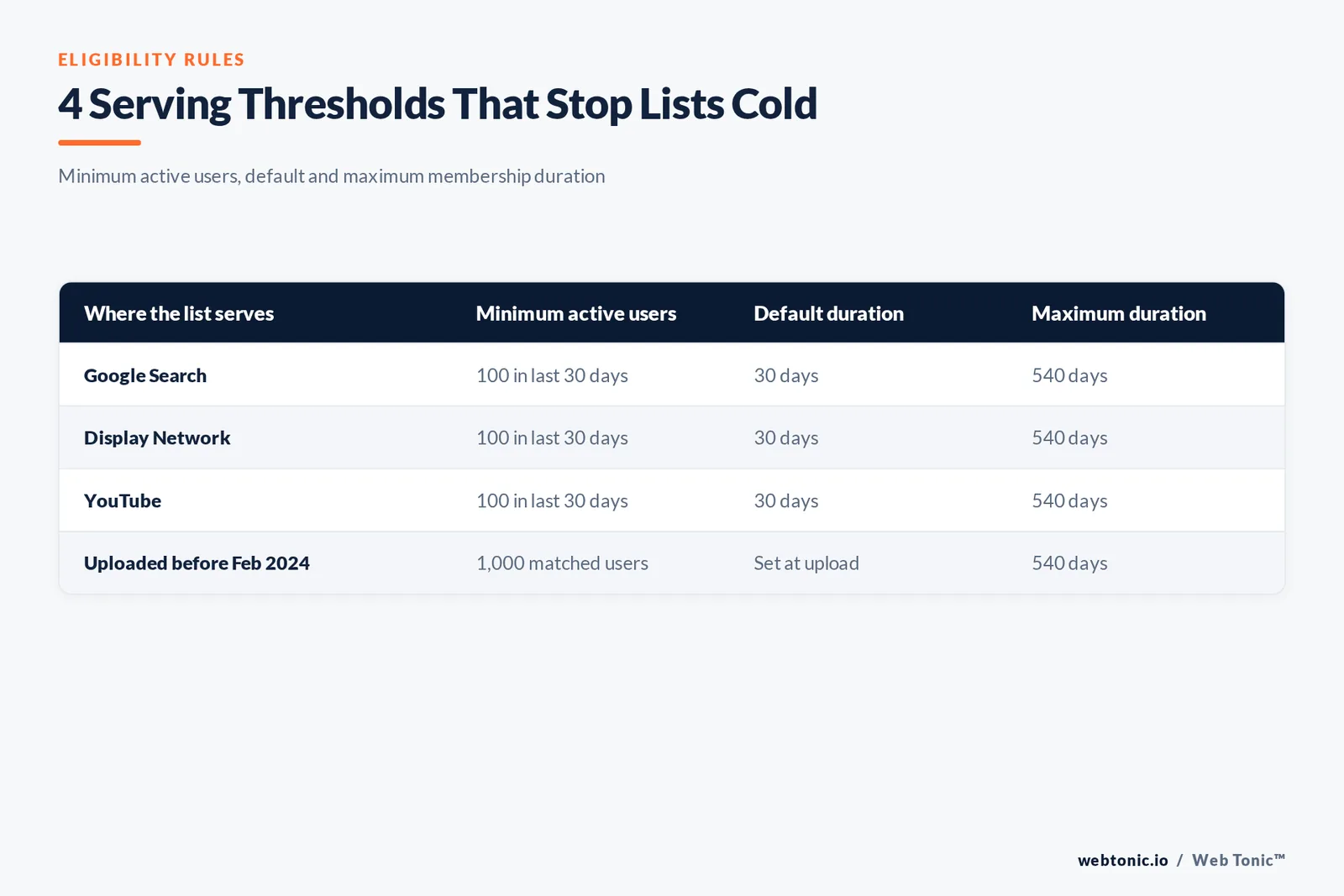
Lists fail silently. They exist, they show a size, and they simply never serve. Google’s data segment reference spells out the thresholds most accounts trip over.
| Network | Minimum active users | Default duration | Maximum duration |
|---|---|---|---|
| Google Search | 100 in the last 30 days | 30 days | 540 days |
| Display Network | 100 in the last 30 days | 30 days | 540 days |
| YouTube | 100 in the last 30 days | 30 days | 540 days |
| Uploaded lists before Feb 2024 | 1,000 matched users | Set at upload | 540 days |
Fact 1 — a freshly created list takes 48 to 72 hours to populate fully, so a same-day launch check will always look broken. Fact 2 — a segment untouched by any targeting for 540 days is set to Closed automatically; it stops collecting people but stays visible, and reopening restarts collection. Fact 3 — shortening duration removes people retroactively: cutting 60 days to 30 evicts everyone who joined 31 to 60 days ago, while extending it keeps existing members for the longer window.
Choose duration from the real decision cycle. Google’s own examples run from a few days for movie tickets to a year plus a few days for seasonal gifting, so the list refires on the next anniversary. A B2B pipeline that closes in five months should not sit on the 30-day default.
Customer Match: Rules, Limits and Realistic Match Rates
Customer Match turns hashed emails, phone numbers and addresses into a targetable segment. Two practical constraints matter more than the mechanics. First, Google now steers new implementations to the Data Manager API rather than building fresh Customer Match workflows on the Google Ads API. Second, since early March 2024, Customer Match lists no longer activate on Google Partner inventory or third-party exchanges for web and app in the European Economic Area, the UK and Switzerland.
| Use case | List to upload | Setting | Expected outcome |
|---|---|---|---|
| Suppress existing buyers | Purchasers in the last 90 days | Exclusion | Lower waste on branded search |
| Win back lapsed accounts | No order in 12 months | Targeting on Demand Gen | Cheaper reactivation than prospecting |
| Protect high-value clients | Top revenue decile | Observation with a positive modifier | Priority in competitive auctions |
| Seed a lookalike | Best 5,000 customers | Targeting on Demand Gen or Video | Prospecting anchored on real value |
| Feed automated bidding | All customers with value tiers | Signal on Performance Max | Better early model calibration |
Limit 1 — upload hygiene decides match rate: normalised lowercase emails, E.164 phone formatting and a single row per person routinely lift match by double digits versus a raw CRM export. Limit 2 — refresh monthly, because a stale list slowly drops below the 100-active-user floor and stops serving without warning.

Demographic Buckets You Can Actually Select
The demographic layer is deliberately coarse. Google’s demographic targeting reference lists the exact values, and every dimension carries an Unknown bucket that holds real volume.
| Dimension | Available values | Practical note |
|---|---|---|
| Age | 18-24, 25-34, 35-44, 45-54, 55-64, 65+, Unknown | Excluding Unknown can cut reach sharply |
| Gender | Female, Male, Unknown | Restricted for some ad categories |
| Household income | Top 10%, 11-20%, 21-30%, 31-40%, 41-50%, Lower 50%, Unknown | Available in about 20 markets including the US |
| Parental status | Parent, Not a parent, Unknown | Useful as an exclusion, blunt as a target |
| Detailed demographics | College students, homeowners, new parents and more | Downloadable as a curated CSV from Google |
Trap 2 — excluding Unknown by reflex. Unknown is not a low-quality bucket; it is an inference gap, and on some accounts it carries a third of conversions. Test it as its own reporting row before you cut it.
Managing Segments Programmatically
Once an account passes a few dozen lists, interface management stops scaling. The Google Ads API remarketing documentation covers the resources that matter for bulk work, and pairing it with a scheduled job removes the monthly refresh chore entirely.
| Job | Approach | Cadence | Why automate it |
|---|---|---|---|
| Refresh customer lists | Data Manager API upload | Weekly or monthly | Keeps lists above the serving floor |
| Audit segment sizes | API report on segment membership | Monthly | Catches closed and undersized lists |
| Apply exclusions at scale | Bulk criterion mutations | On campaign launch | Stops buyer waste in new campaigns |
| Sync value tiers | Segment per revenue decile | Quarterly | Bidding sees value, not just volume |
Before any of this, confirm the data pipeline is sound. Audience work built on broken conversion tracking amplifies noise, which is why our growth marketing engagements always fix measurement before they touch segment structure.
Segment Strategy by Business Model
The right first move differs sharply by model, mostly because list size and purchase frequency differ.
| Business model | First segment to build | Primary mode | Metric that proves it worked |
|---|---|---|---|
| Ecommerce | Cart abandoners in 7 days | Targeting on Display and Demand Gen | Recovered revenue per 1,000 impressions |
| Lead generation | Form starters who did not submit | Observation on Search, targeting on Display | Cost per qualified lead |
| Subscription | Trial users at day 3 with no activation | Targeting on Video | Trial to paid conversion rate |
| Local services | Site visitors within the service radius | Observation with a bid modifier | Booked jobs per 100 calls |
| B2B considered purchase | Pricing and case study page viewers | Observation, 180-day duration | Pipeline value per account reached |
Cost context helps set expectations before launch. Published Google Ads cost benchmarks and click-through rate averages by industry give a defensible starting model, and the Keyword Planner forecast tool converts that into monthly volume. Pair those numbers with the search behaviour research Google publishes to decide which funnel stage the audience layer should serve.

Five Worked Examples of Audience Segments in Use
Abstract families are easy to nod at and hard to build. These five examples show what you would actually create, which segment type it belongs to, and the specific interests or signals that populate it.
| Example | Segment type | How it is built | Reach users based on |
|---|---|---|---|
| Sports fans for a supplement launch | Affinity audiences | Pick the sports fans affinity in the ad group picker | Long-term interests and habits |
| People researching a used car | In-market segments | Select the vehicles market segments node | Active research for one purchase |
| Newly engaged couples for a venue | Life events | Choose the life events group in a video campaign | A milestone with many related purchases |
| Visitors who viewed a pricing page | Your data segments | Write a rule on the page URL and a 90-day window | A specific site view or app event |
| Newsletter subscribers | Customer Match | Upload hashed email addresses from your CRM | First-party email addresses you own |
Example 1 in that table costs the least to test: an affinity such as sports fans needs no data collection, so a $30 daily budget over 14 days gives a readable click and view profile. Example 4 is the highest intent, and it is also the one most often built with too short a window — 7 days is fine for checkout traffic and far too short for pricing-page traffic.
To find any of these, open the ad group, choose Audiences, then browse or search the picker. Custom segments accept keywords, URLs and apps directly, which is how you reach people with specific interests that Google has not packaged as a curated group. One caution: a custom segment built from a competitor app plus three URLs behaves very differently from one built from twenty broad keywords, so keep each custom segment to a single tight theme.
Audience Reporting: Where to Find Each Number
The Audiences report inside the Campaigns menu is now the single view for segment, demographic and exclusion data. Knowing which column answers which question saves a lot of guessing.
| Question | Where to look | Column or view | What good looks like |
|---|---|---|---|
| Is this segment eligible to serve | Audiences report, your data tab | Size for Search, Display and YouTube | Above 100 active users on each network |
| Which segments earn the click | Audiences report by ad group | Clicks, click-through rate, conversions | At least 30 conversions before judging |
| Which demographic groups convert | Demographics tab | Age, gender, income, parental status | Unknown reported separately, not excluded |
| What is being suppressed | Exclusions view | Excluded segments per campaign | A purchaser list on every prospecting campaign |
| Is a segment still collecting | Audience manager | Status: open or closed | Open, with membership growing week on week |
Rule 3 — segment the report by campaign type before drawing conclusions. Display and Demand Gen inflate impression counts so heavily that a blended view will always make Search audiences look irrelevant. Rule 4 — read a 90-day window, not a 7-day one, because most audience rows carry too few conversions to be significant inside a week.
Audience Management Through the Google Ads API
Bulk work belongs in the Google Ads API. The resources below are the ones that carry the audience layer, and each maps to something you would otherwise click through by hand.
| Resource or setting | What it controls | Typical value | Manual equivalent |
|---|---|---|---|
| User list | A data segment and its membership rule | Membership life span 30 to 540 days | Creating a segment in audience manager |
| Ad group criterion | Attaching a segment to an ad group | Targeting or observation per group campaign | Adding an audience in the ad group |
| Negative criterion | Exclusions at campaign level | Purchaser list, true for all prospecting | Adding an exclusion in the interface |
| Include unknown flag | Whether unknown demographics can see ads | Left true unless testing proves otherwise | Ticking the unknown demographic box |
| Bid modifier | Bid adjustment on an observed segment | Plus 15 to plus 30 percent on proven lists | Editing the bid adj column |
Fact 4 — a false setting on the unknown demographic flag can remove a third of eligible users, and because the change is silent in aggregate reporting, it usually surfaces weeks later as an unexplained volume drop. Treat every true or false toggle in this table as a documented decision, not a default. The Google Ads API guide is also the fastest route to a reliable monthly refresh of every customer list in the account.
Diagnosing Audience Targeting That Is Not Working
| Symptom | Likely cause | Check this first | Fix |
|---|---|---|---|
| Segment shows zero impressions | Below the 100 active user floor | Size column per network | Widen the rule or lengthen duration |
| Impressions collapsed after a change | Observation switched to targeting | Ad group targeting setting | Revert to observation and add a modifier |
| List stopped growing | Closed after 540 idle days | Segment status column | Reopen and attach it to a live ad group |
| Reported size differs from analytics | Different definition of an active user | Advertising segment in your analytics tool | Compare like for like, not totals |
| Retargeting reaches existing buyers | No purchaser exclusion applied | Exclusions tab per campaign | Upload a 90-day purchaser list as an exclusion |
Work that list top to bottom before rebuilding anything. In most audits, four of those five symptoms trace back to a threshold or a setting rather than to a bad segment choice. For a wider view of how these signals behave across other ad platforms, our overview of audience targeting fundamentals covers the cross-channel picture, and the guide to keyword match types explains the layer this one sits on top of. If you would rather have the audit run for you, get in touch.
FAQ
What is the difference between audience targeting and content targeting in Google Ads?
Audience targeting selects people based on who they are, what they are researching or how they have interacted with your business. Content targeting selects where the ad appears — keywords, topics, placements or search themes. On Display you can combine both, and the narrower of the two settings usually dictates delivery volume.
How many people do I need before a remarketing list will serve?
At least 100 active users in the last 30 days for Search, Display and YouTube. Lists uploaded or refreshed before 1 February 2024 still fall under the older requirement of 1,000 matched users, so re-uploading an old list can make it eligible again.
Should I use Targeting or Observation on Search campaigns?
Start with Observation. It leaves reach untouched while collecting segment-level performance data, and you can layer bid adjustments once you have four to six weeks of conversions. Move to Targeting only when the data shows the restriction improves efficiency, or when a small budget must be protected.
Can I use audience segments in Performance Max campaigns?
You can supply them as audience signals, but they act as a hint for the model rather than a hard restriction. If exclusive delivery to a defined list is a requirement, run Display, Demand Gen or Video where targeting mode is enforced.
How long should membership duration be?
Match the real decision cycle. Impulse purchases justify a few days, considered B2B purchases justify 90 to 180 days, and annual gifting occasions justify a year plus a few days so the segment refires next season. The ceiling is 540 days on both Search and Display.
Sources: Google Ads Help — About audience segments; About your data segments; About Customer Match; About custom segments; About demographic targeting. Google Ads API — Remarketing overview. Google Ads Keyword Planner. Think with Google — Search marketing strategies. Semrush — Google Ads cost benchmarks. WordStream — Average click-through rate by industry.


