



Table of contents

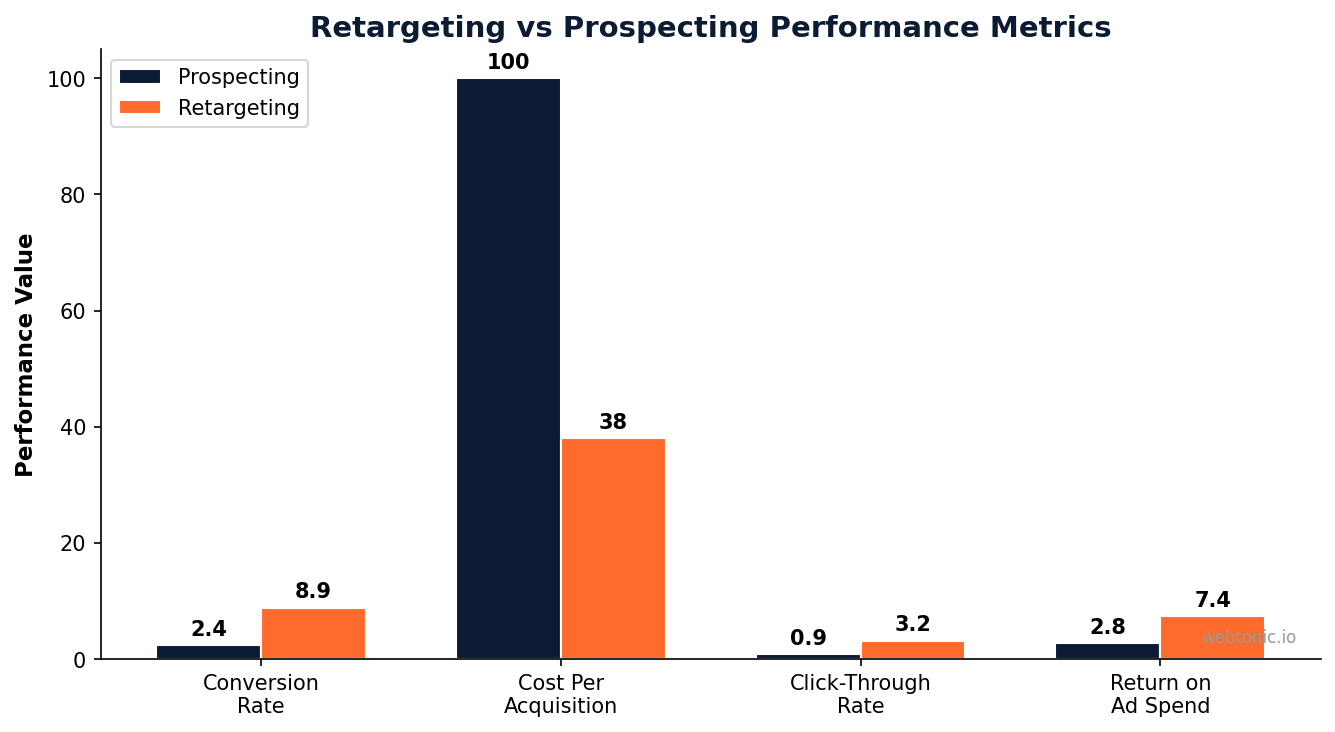
Facebook retargeting is the practice of showing ads to people who have already interacted with your business — visited your website, viewed a product, added something to their cart, or engaged with your content on Meta platforms. These warm audiences convert at 3 to 10 times the rate of cold prospecting audiences, making remarketing campaigns the highest-ROI component of nearly every Facebook Ads account.
Key Takeaways
- The average Facebook Ads conversion rate is 8.95% across all industries in 2025, but retargeting campaigns consistently outperform this benchmark by 2x to 4x depending on audience warmth and offer alignment.
- Cart abandonment retargeting delivers an average 9.2x ROAS, making it the single highest-returning audience segment in most ecommerce ad accounts.
- The Meta Pixel and Conversions API (CAPI) are both required for reliable retargeting in 2026 — relying on the pixel alone misses 15 to 30% of trackable events due to browser restrictions and ad blockers.
- Retargeting campaigns should use 1-day click, 1-day view attribution windows to avoid inflating results with stale view-through conversions from top-of-funnel campaigns.
- Frequency capping at 3 to 5 impressions per week prevents ad fatigue in retargeting audiences — beyond this threshold, cost per acquisition rises sharply and audience sentiment deteriorates. Read our marketing blog for more advanced campaign tactics.
This guide covers everything you need to build a Facebook remarketing funnel from scratch: pixel and CAPI setup, audience construction, campaign structure, creative sequencing, and the optimization tactics that separate mediocre retargeting from campaigns that consistently produce 5x to 10x ROAS.
How Facebook Retargeting Works
At its core, remarketing on Facebook works by matching website visitors and app users back to their Facebook profiles using tracking infrastructure — the Meta Pixel, Conversions API, and Facebook SDK. When someone visits your website, the pixel fires an event (PageView, ViewContent, AddToCart, Purchase). That event creates a data signal that Meta uses to build custom audiences you can target with ads.
The funnel logic is simple: someone visits your site → the pixel records their behavior → you create a custom audience of those visitors → you show them a specific ad designed for their stage of intent → they come back and convert. The power of this system is that you are advertising exclusively to people who have already demonstrated interest — they raised their hand by visiting your site, and you are following up with a relevant message.
What has changed since iOS 14 is the reliability of browser-side tracking. Apple's App Tracking Transparency prompt, browser privacy features, and ad blockers all reduce the pixel's ability to capture events. This is why the Conversions API (CAPI) is now essential — it sends event data directly from your server to Meta, bypassing browser restrictions entirely. Running both pixel and CAPI together, with proper deduplication, gives you the most complete picture of customer behavior and the largest possible retargeting audiences.
Setting Up the Meta Pixel and Conversions API
Your retargeting infrastructure starts with two components that work together: the Meta Pixel (browser-side) and the Conversions API (server-side).
Meta Pixel installation. The pixel is a JavaScript snippet you place on every page of your website. In Facebook Events Manager, go to Data Sources → Pixels → Add. You will get a base code that fires a PageView event on every page load. Beyond the base code, you need to add standard events for key user actions: ViewContent (product page views), AddToCart, InitiateCheckout, Purchase, Lead (form submissions), and CompleteRegistration. Each event can include parameters like value, currency, content_id, and content_type that make your retargeting audiences more granular.
Conversions API setup. CAPI sends the same events from your server rather than the browser. If you use Shopify, WooCommerce, or a major CMS, native CAPI integrations are available that require minimal technical work. For custom setups, implement server-to-server event posting using Meta's Marketing API. The critical detail is deduplication: every event must include an event_id that is identical in both the pixel fire and the CAPI call so Meta can merge them into a single event rather than double-counting.
Event Match Quality (EMQ). After setting up both pixel and CAPI, check your EMQ score in Events Manager. An EMQ of 6 or higher (out of 10) is the minimum target; 8+ is excellent. EMQ measures how well Meta can match your event data back to Facebook users. Improve it by passing additional customer parameters: email (hashed), phone number (hashed), first name, last name, city, state, zip code, and external_id. The more identifiers you pass, the higher your match rate and the larger your retargeting pools.
| Setup Component | Purpose | Priority | Impact if Missing |
|---|---|---|---|
| Meta Pixel | Browser-side event tracking for PageView, ViewContent, AddToCart, Purchase | Required | No retargeting possible without any tracking |
| Conversions API | Server-side event tracking that bypasses browser restrictions | Required | 15–30% of events lost to ad blockers and iOS privacy |
| Event Deduplication | Prevents double-counting when both pixel and CAPI fire the same event | Critical | Inflated conversion counts, broken optimization |
| Standard Events | Structured event names Meta's algorithm understands and optimizes for | Required | Algorithm cannot optimize toward your actual goals |
| EMQ Optimization | Maximizes user match rate for larger retargeting audiences | High | Smaller audiences, weaker signal, higher CPAs |
Building Your Custom Audiences
Custom audiences are the foundation of every retargeting campaign. They define exactly who sees your ads based on their past behavior. Here are the six most effective audience types for remarketing on Facebook, ranked by typical ROAS:
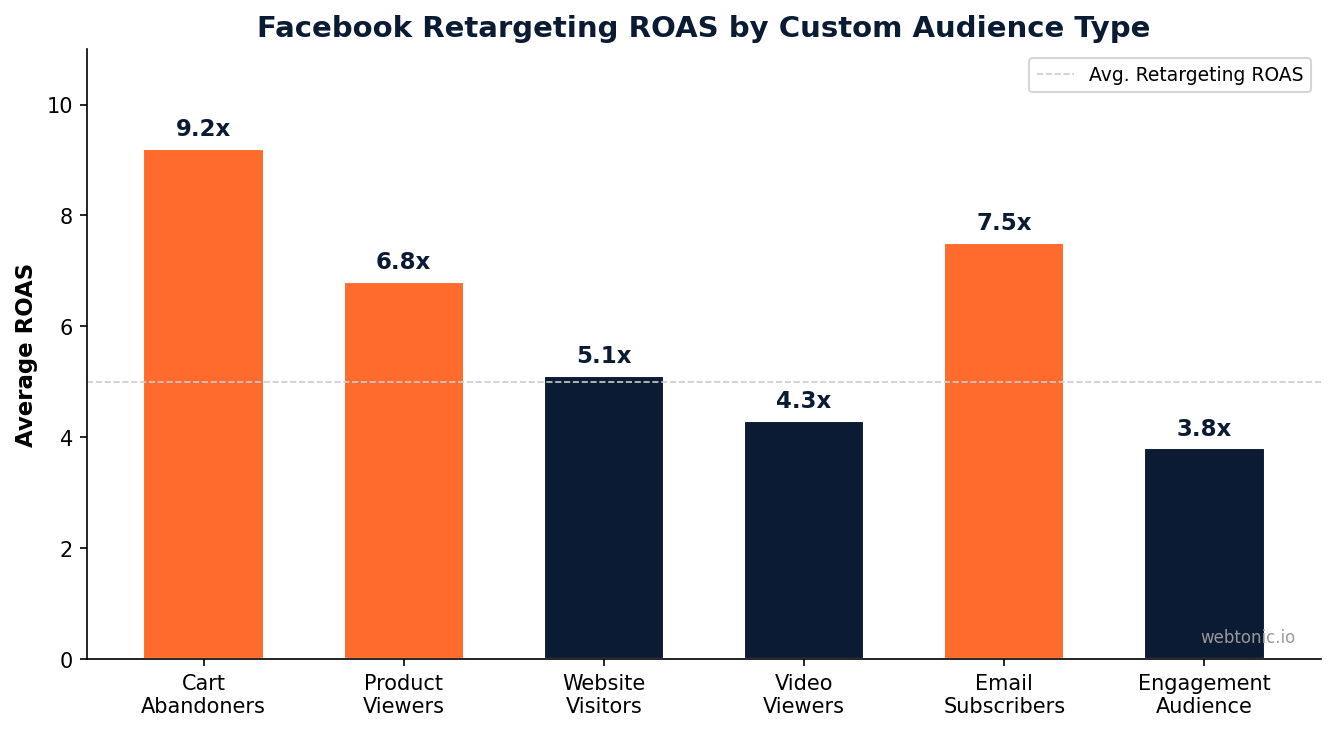
1. Cart Abandoners (7–30 day window). People who added a product to their cart but did not purchase. This is your hottest audience — they were one click away from buying. Create this audience in Ads Manager using the AddToCart event, excluding people who triggered the Purchase event. Cart abandonment retargeting averages 9.2x ROAS because the intent is already established; you just need to remove the final objection (shipping cost, trust, urgency).
2. Email Subscribers. Upload your email list as a customer file to create a matched audience. These people have already opted in to your brand. Target them with product launches, exclusive offers, and cross-sell campaigns. Email-based audiences consistently deliver 7.5x ROAS because the relationship already exists.
3. Product Viewers (7–14 day window). People who viewed specific product pages but did not add to cart. Use ViewContent events with content_id parameters to create dynamic product ads that show each visitor the exact products they browsed. Keep the window shorter than cart abandoners — product interest decays faster when no cart commitment was made.

4. Website Visitors (30–90 day window). A broader audience of everyone who visited your site. Segment by recency: 0–7 day visitors, 8–30 day visitors, and 31–90 day visitors. Show increasingly aggressive offers to older segments — someone who visited 60 days ago needs a stronger incentive to return than someone who visited yesterday.
5. Video Viewers. Create audiences based on people who watched your video ads — 25%, 50%, 75%, or 95% completion thresholds. Video viewers who watched 75%+ are highly engaged prospects. This audience is especially valuable because it is built entirely within Meta's ecosystem and is unaffected by browser tracking restrictions.
6. Engagement Audiences. People who interacted with your Instagram profile, Facebook Page, or ad creative. This includes likes, comments, shares, saves, and profile visits. Engagement audiences are top-of-funnel retargeting — warmer than cold but cooler than website visitors.
Campaign Structure for Retargeting
The most effective retargeting structure separates audiences by intent level and uses different messaging for each stage. A three-tier framework works for most businesses:
Tier 1 — Hot Retargeting (Cart Abandoners + Checkout Drop-offs). These people were seconds away from purchasing. Ads should address the most common objections: shipping concerns, price hesitation, and trust. Use dynamic product ads showing the exact items they left behind, paired with urgency messaging ("Still thinking about it?") or incentives (free shipping, limited-time discount). Budget allocation: 40–50% of your retargeting budget.
Tier 2 — Warm Retargeting (Product Viewers + Email List). These people showed interest but did not reach the cart. Ads should educate and build preference: customer testimonials, product demonstrations, comparison content, and social proof. Dynamic product ads work well here, but supplement them with lifestyle creative that shows the product in context. Budget allocation: 30–35%.
Tier 3 — Cool Retargeting (Website Visitors + Video Viewers + Engagement). These people are aware of your brand but have not shown strong purchase intent. Ads should nurture: brand story content, user-generated content, educational videos, and soft offers (quizzes, guides, free resources). The goal is to warm them up for Tier 2. Our data intelligence team uses this framework across hundreds of accounts. Budget allocation: 15–25%.
| Tier | Audience | Window | Creative Approach | Budget Share |
|---|---|---|---|---|
| Hot | Cart abandoners, checkout drop-offs | 7–14 days | Dynamic product ads + urgency + objection handling | 40–50% |
| Warm | Product viewers, email list | 14–30 days | Testimonials, demos, lifestyle creative, social proof | 30–35% |
| Cool | 30–90 days | Site visitors, video viewers, engagement | Brand story, UGC, educational content, soft offers | 15–25% |
Retargeting Creative Best Practices
The creative approach for retargeting is fundamentally different from prospecting because the audience already knows your brand. You do not need to introduce yourself — you need to remove objections and create urgency.
Dynamic Product Ads (DPA) are the workhorse of ecommerce retargeting. They automatically show each user the specific products they browsed, complete with current pricing and availability. Set up your product catalog in Meta Commerce Manager and connect it to your pixel events. DPAs require minimal creative work because Meta generates the ad from your catalog data, but you can customize the template with branded frames, promotional overlays, and call-to-action buttons.
Testimonial and review ads work extremely well for warm retargeting. Take your best customer reviews, overlay them on lifestyle imagery, and target them to product viewers and website visitors. Social proof removes the trust objection that often prevents first-time purchases. Ads featuring customer reviews see 28% higher conversion rates than product-only creative.

Sequential messaging is the most sophisticated retargeting creative strategy. Instead of showing the same ad repeatedly, create a sequence: Day 1–3 shows the product benefit, Day 4–7 shows a customer testimonial, Day 8–14 presents a limited-time offer. This mimics a natural sales conversation and prevents ad fatigue. Implement sequencing by creating multiple ad sets with different creative, targeting the same audience but excluding those who converted.
Frequency management is critical. Retargeting audiences are small, so they see your ads frequently. Cap frequency at 3–5 impressions per week to avoid fatigue. Monitor conversion rate trends by frequency — when your cost per acquisition starts climbing at a specific frequency level, that is your saturation point.
Optimization and Measurement
Retargeting campaigns require different optimization levers than prospecting campaigns because the audiences are smaller and the intent signals are stronger.
Attribution windows. Use 1-day click, 1-day view attribution for retargeting campaigns. Longer windows (7-day click, 1-day view) inflate retargeting ROAS by crediting conversions that would have happened organically. The shorter window gives you a more honest picture of your remarketing campaign's true incremental impact.
Audience exclusions. Always exclude recent purchasers from retargeting campaigns — typically a 7 to 30 day purchase exclusion window depending on your product's repurchase cycle. Without exclusions, you waste budget showing ads to people who already bought and risk annoying them. For subscription businesses, extend the exclusion to the full subscription period.
Bid strategy. Retargeting campaigns work well with both Lowest Cost and Cost Cap bidding. Lowest Cost is the simplest starting point — Meta's algorithm will efficiently reach your warm audiences without much manual tuning. Switch to Cost Cap when you need to control acquisition costs at scale. Avoid Bid Cap for retargeting unless your audiences are very large, as it can restrict delivery to your warmest segments.
Testing cadence. Refresh retargeting creative every 2 to 3 weeks. Because audiences see your ads frequently, fatigue sets in faster than with prospecting. Monitor ROAS trends weekly — a declining ROAS paired with rising frequency is the classic fatigue signal. When you see it, swap creative immediately rather than waiting for performance to crater.
Related reading
- Facebook Facts: The Numbers That Survive a Source Check
- Facebook Marketing for Small Business: Budgets, Posts and the 5 Numbers That Matter
- Facebook Ad Objectives: All 6 Goals and the Events Inside Them
- Meta Ads Agency services at Web Tonic
Frequently Asked Questions
What is Facebook retargeting and how does it work?
Facebook retargeting shows ads to people who previously interacted with your business online. It works by using the Meta Pixel and Conversions API to track website visitors and their actions, then creating custom audiences in Ads Manager to target those visitors with specific ads. The system matches website visitors back to their Facebook profiles, allowing you to serve ads only to people who have already shown interest in your products or services.
How do I set up the Meta Pixel for retargeting?
Install the Meta Pixel base code on every page of your website through Facebook Events Manager. Then add standard events like ViewContent, AddToCart, and Purchase to track specific user actions. Supplement the pixel with the Conversions API for server-side tracking, and ensure both systems use the same event_id for deduplication. Check your Event Match Quality score in Events Manager and aim for 6 or higher out of 10.
What is a good ROAS for Facebook retargeting campaigns?
A good retargeting ROAS varies by industry but generally falls between 4x and 10x. Cart abandonment campaigns typically see 8x to 12x ROAS. Product viewer retargeting averages 5x to 8x. Website visitor retargeting averages 4x to 6x. Compare your retargeting ROAS to your prospecting ROAS — retargeting should be at least 2x to 3x higher to justify the budget allocation.
How long should retargeting audience windows be?
The optimal window depends on your product and sales cycle. For ecommerce, use 7 to 14 days for cart abandoners, 14 to 30 days for product viewers, and 30 to 90 days for general website visitors. For B2B or high-consideration purchases, extend windows to 60 to 180 days. Shorter windows produce warmer audiences with higher conversion rates, while longer windows give you more reach at lower intent.
How often should I refresh retargeting ad creative?
Refresh retargeting creative every 2 to 3 weeks. Because retargeting audiences are small and see your ads frequently, fatigue develops faster than with prospecting campaigns. Monitor frequency and cost-per-acquisition weekly. When frequency exceeds 5 impressions per week and CPA starts rising, swap your creative immediately rather than waiting for performance to decline further.
Sources
adligator.com — Facebook Ads Retargeting 101
conversion.studio — Facebook Retargeting Guide
focus-digital.co — Facebook Ads Average Conversion Rate
focus-digital.co — Facebook Ads Average ROAS
toptal.com — Best Facebook Ads Campaign Structure
adlibrary.com — Meta Pixel and CAPI Setup
developers.facebook.com — Website Custom Audiences


