



Table of contents

Performance Max campaigns hand channel selection, bidding and creative assembly to Google machine learning. The tips below are the levers you still control: conversion tracking quality, asset groups, audience signals, the product feed and exclusions.
Key Takeaways
- A Google Ads account can hold up to 100 Performance Max campaigns, and each Performance Max campaign can hold up to 100 asset groups — consolidation almost always beats fragmentation.
- One Performance Max campaign serves across 8 surfaces: Google Search, Shopping, the Display Network, YouTube, Discover, Gmail, Google Maps and search partners.
- Smart Bidding needs volume. Below roughly 30 conversions per campaign per month, switch the conversion action to a higher-volume event before you touch targets.
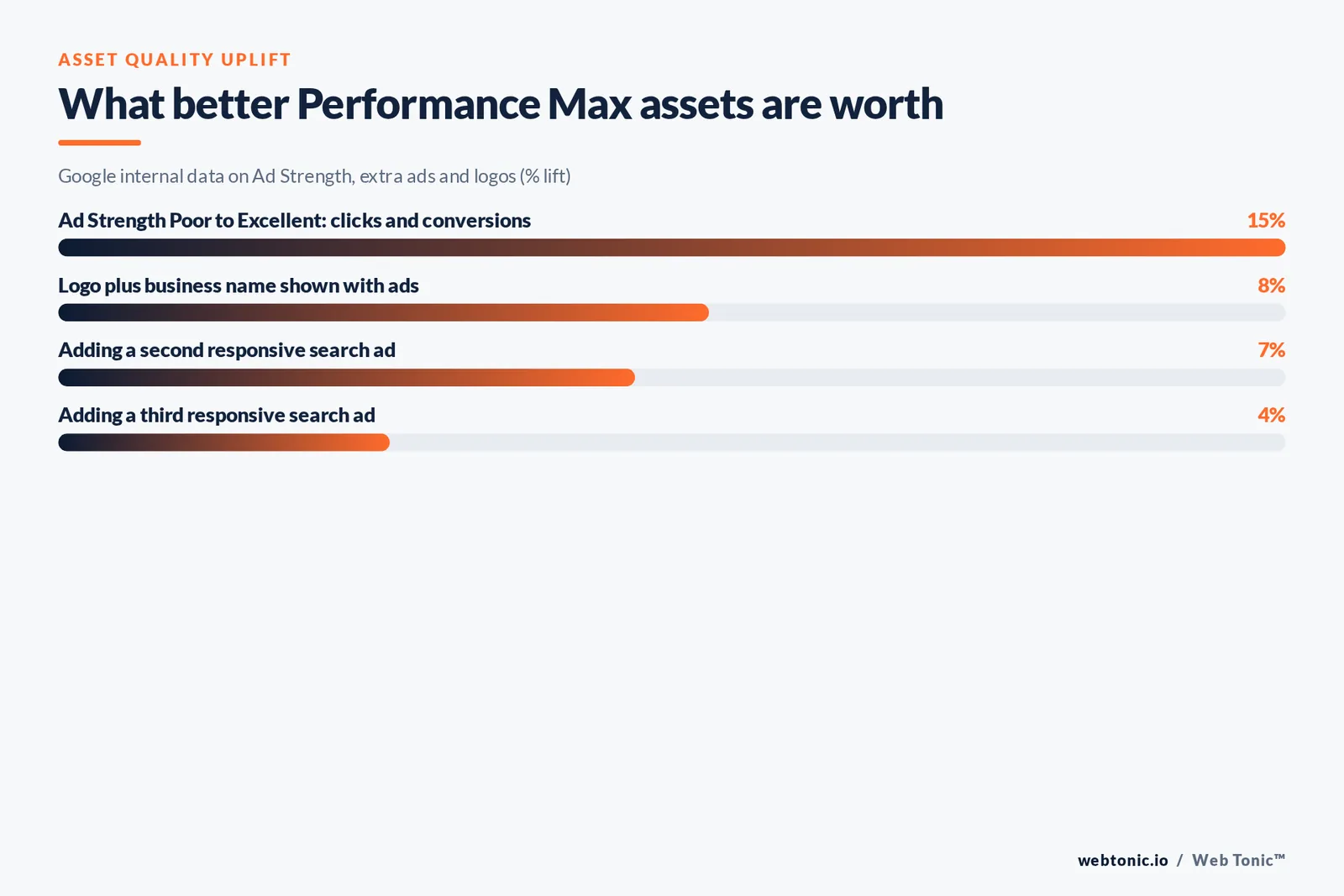
- Asset quality is measurable: advertisers moving Ad Strength from Poor to Excellent see 15% more clicks and conversions, and adding a logo plus business name lifts conversions 8% on average.
- Search themes are capped at 25 per asset group, and audience signals are hints, not targeting — they change how fast the campaign learns, not who is eligible.
- Data segments need at least 100 active users in 30 days to serve, and a new list can take 48 to 72 hours to populate.
Tip 1: Know what a Performance Max campaign actually decides for you
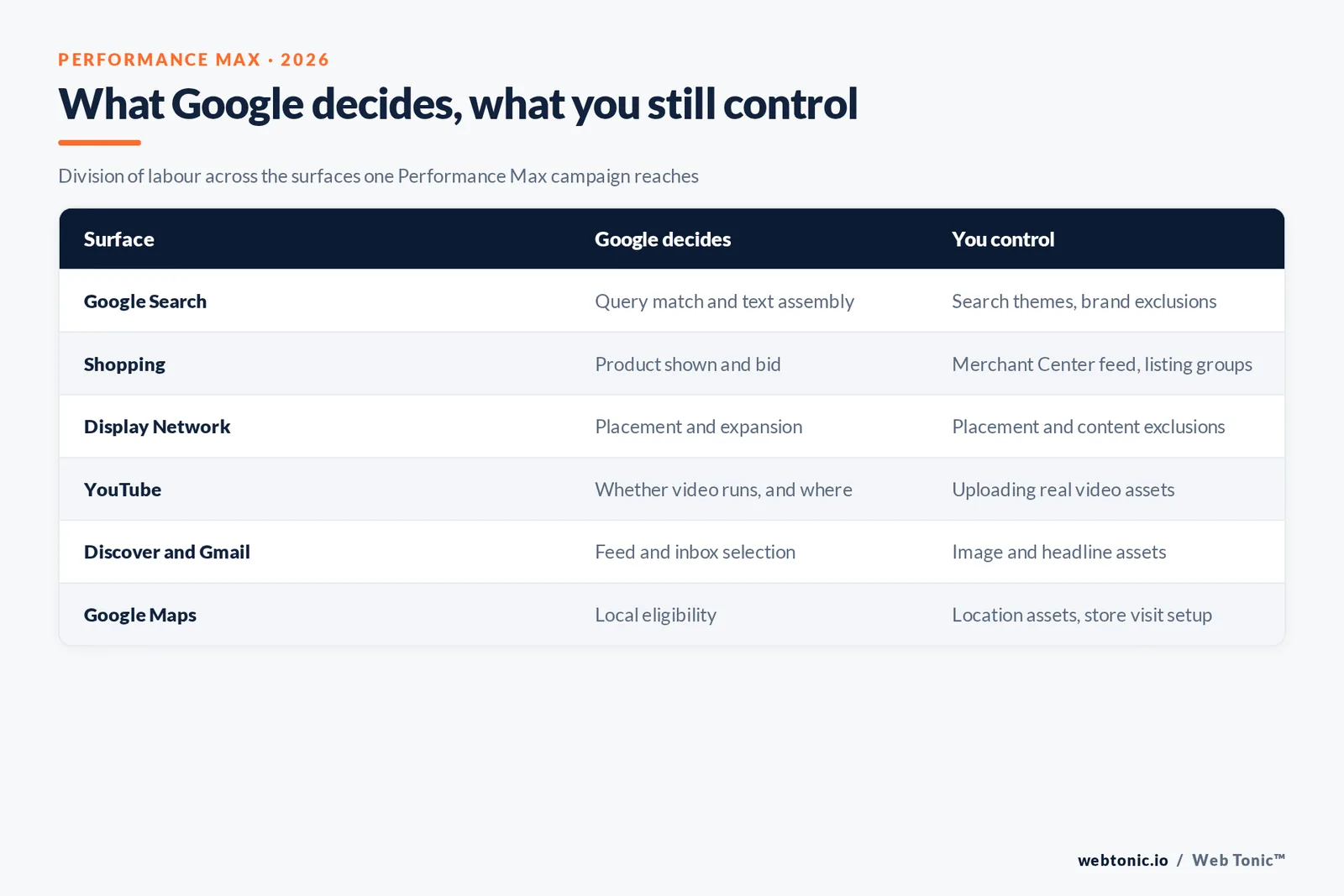
Every Performance Max optimization argument gets easier once you accept the split: Google decides placement, bid and creative combination in real time; you decide inputs and constraints. The table below is the honest division of labour across the surfaces a single PMax campaign can reach, documented in Google's About Performance Max campaigns guide.
| Surface | What Google decides | What you still control |
|---|---|---|
| Google Search | Which query triggers the ad and which text assets assemble | Search themes, brand exclusions, account negative keywords |
| Shopping | Which product from the feed shows and at what bid | Merchant Center feed quality, listing groups, product exclusions |
| Display Network | Placement and audience expansion | Content and placement exclusions, brand safety settings |
| YouTube | Whether a video asset runs and where | Whether you upload real video instead of auto-generated video |
| Discover and Gmail | Feed and inbox placement selection | Image and headline assets, creative refresh cadence |
| Google Maps | Local surface eligibility | Location assets and store visit conversion setup |
| Search partners | Partner site inclusion | Nothing at campaign level — monitor the network report |
Tip 2: Fix conversion tracking before you fix anything else
PMax is a bidding machine pointed at a conversion signal. If the signal is wrong, better assets just buy the wrong outcome faster. Audit these prerequisites before you rename a single headline. Google's own conversion tracking documentation defines the reporting fields you will be reading afterwards.
| Prerequisite | Minimum bar | Why it decides campaign performance |
|---|---|---|
| Primary conversion action | One action, counted once per lead or sale | Multiple primary actions make Smart Bidding chase the cheapest one |
| Conversion value | Real revenue or a defensible lead value | Maximize conversion value is unusable without differentiated values |
| Enhanced conversions | Enabled and validating | Recovers modelled conversions lost to consent and cross-device gaps |
| Google Analytics link | GA4 property linked and imports reconciled | Lets you separate a tracking drop from a real performance drop |
| Attribution window | 30-day click, documented | A 7-day window understates long sales cycles and starves bidding |
| Conversion lag | Measured in days, written down | You cannot judge a 14-day-old change if lag is 21 days |
Rule 1 — one asset group per intent, and no more than 5 asset groups until the campaign clears 50 conversions per month. Splitting earlier divides the same data across more learners.
Tip 3: Build asset groups around intent, not around your product catalogue
One asset group per meaningful audience-and-offer combination beats one per SKU. The technical ceiling is generous — the Google Ads API documentation confirms a maximum of 100 asset groups per campaign, none shared between campaigns — but every extra split divides the same conversion data.
| Asset type | Practical minimum per asset group | What good looks like |
|---|---|---|
| Headlines | 5, at least one under 15 characters | Distinct promises, not five rewordings of the same claim |
| Long headline | 1 (up to 90 characters) | The full value proposition without a truncated clause |
| Descriptions | 4, at least one under 60 characters | One proof point, one offer, one objection handled, one CTA |
| Images | At least 4 unique images across ratios | Landscape 1200x628, square 1200x1200, portrait 960x1200 |
| Logo | 1 square, ideally plus 4:1 landscape | Adding logo and business name lifts conversions 8% on average |
| Video | 1 uploaded video per asset group | Without one, Google auto-generates video from your assets |
| Search themes | Up to 25 per asset group | Phrases you have query data for, not aspirational categories |
Tip 4: Treat audience signals as accelerators, not filters
This is the single most misunderstood setting in Performance Max campaigns. Audience signals tell the model where to start looking; they never cap who becomes eligible. Google's guidance on how your data segments work sets the eligibility rules that decide whether a signal does anything at all.
| Audience signal input | Eligibility rule | How much it moves campaign performance |
|---|---|---|
| Your own customer list | 100 active matched users in 30 days; account needs 90 days history and USD $50,000 lifetime spend | Strongest signal available — build it first |
| Website data segment | 100 active visitors in the last 30 days | Strong for ecommerce, weak for low-traffic lead gen |
| Custom segment by search terms | No minimum; built from queries and browsing | Best proxy when you have no first-party data |
| In-market segment | Google provided, always available | Useful ceiling-raiser, rarely the deciding input |
| Affinity segment | Google provided, always available | Broad brand-building signal, weakest for direct response |
| New list population | 48 to 72 hours to populate | Do not judge a signal you uploaded yesterday |
| Inactive Google provided members | Removed after 18 months of inactivity | Refresh uploads on a schedule or lists quietly decay |
Limit 2: keep search themes to 25 per asset group and use fewer than 10 unless you have query data supporting them. Aspirational themes mostly add noise.
Tip 5: Decide final URL expansion deliberately
Final URL expansion lets Google send traffic to any relevant page on your site, including pages you never listed. It is a genuine growth lever on content-rich sites and a leak on thin ones.
| Setting | What happens | When to choose it |
|---|---|---|
| Expansion on, no exclusions | Google can route to any indexable page | Large catalogues and blog-heavy sites with clean templates |
| Expansion on, brand pages excluded | Non-brand traffic only routes to commercial pages | Accounts running separate brand Search campaigns |
| Expansion on with a page feed | Routing constrained to your listed URLs | The safe default for most lead gen accounts |
| Expansion off | Only the asset group final URL serves | Single-offer campaigns and strict landing page tests |
Tip 6: Match the Smart Bidding strategy to your conversion volume
Maximize conversions and maximize conversion value are the only two objectives available, with optional targets layered on top. The mistake is starting with a target. Read the strategy choice against monthly volume, not against ambition, and cross-check the auction fundamentals in Google's Quality Score explainer — it is still scored against advertisers who showed for the same query in the last 90 days.
| Monthly conversions | Bidding strategy | Target setting |
|---|---|---|
| Under 15 | Maximize conversions | No target CPA; switch to a mid-funnel action if needed |
| 15 to 30 | Maximize conversions | Add target CPA only after 4 stable weeks |
| 30 to 100 | Maximize conversions with target CPA | Set target at trailing 30-day CPA, then move 10-15% per step |
| 100+, revenue differentiated | Maximize conversion value with target ROAS | Start at trailing 30-day ROAS, never at the board's goal |
| Seasonal spike expected | Keep the strategy, use seasonality adjustments | Cap adjustments at 7 days and document the date range |
Rule 3 — never set a target CPA in the first 14 days of a Performance Max campaign. The model has no cost curve to optimise against yet.
Tip 7: Set the budget so the learning period can finish
The Google Ads interface offers up to three recommended daily budget levels (Low, Medium and High) based on your settings and account history. The useful discipline is a floor tied to your own cost per acquisition, benchmarked against the 2026 all-industry search figures published by WordStream and priced against Google's own Google Ads pricing page.
| Budget rule | Calculation | Worked example |
|---|---|---|
| Daily floor | Target CPA x 3 | $70 target CPA needs about $210 per day |
| Learning window | Two conversion cycles, minimum 14 days | 21-day conversion lag means a 42-day read, not a 14-day one |
| Change ceiling | One material change per learning window | Budget and target changed together makes the result unreadable |
| Spend reality check | All-industry search CPC $5.42, CVR 8.18% | About 12 clicks per conversion, roughly $66 cost per lead |
| Scaling step | Plus 20% when 7-day CPA sits under target | Faster steps restart learning and flatten campaign performance |
Tip 8: Optimize the Google Merchant Center feed, because the feed is the targeting
For retail, the product feed decides which queries a Performance Max campaign can win. Titles, product types and image quality do the work keywords do in Standard Shopping campaigns. Google's guidance on the product data specification and product type attribute is the reference; advertisers in Europe should also confirm their Comparison Shopping Service (CSS) arrangement before comparing costs.
| Feed attribute | Fix | Effect on Performance Max |
|---|---|---|
| title | Front-load brand, model, key spec, size | Directly widens or narrows query matching |
| product_type | One consistent taxonomy value per product | Google recommends submitting only one value for bidding and reporting |
| google_product_category | Use the most specific valid node | Improves surface eligibility on Shopping and Google Maps |
| image_link | White background, no promotional overlay | Overlay text is the most common disapproval cause |
| availability and price | Sync at least daily | Mismatches suppress products silently |
| custom_label_0-4 | Encode margin, season, bestseller tier | The only reliable way to split priority products |
| Listing groups | Exclude zero-margin and out-of-stock lines | Removes the spend PMax would otherwise allocate for you |
Feed rule 4: product titles carry 150 characters, but the first 70 do almost all the query-matching work. Front-load brand, model and size.
Tip 9: Read the reports that actually exist
PMax reporting is thinner than Search reporting, but it is not a black box. Four reports carry almost every decision. Search terms insights, for example, are auto-generated categories over a rolling 56 days, and their conversion counts will not tie exactly to your row-level reports.
| Report | Where to look | Decision it supports |
|---|---|---|
| Asset group performance | Asset group table, filtered to last 30 days | Which group deserves the next creative round |
| Asset details and Ad Strength | Asset group, Assets view | Which Low-rated asset to replace this week |
| Search terms insights | Campaign, Insights page | Which theme to extract into a Search campaign |
| Product performance | Products view, segmented by custom label | Which lines to exclude or promote |
| Placement report | Campaign, Where ads showed | Which apps and channels to exclude |
| Combinations report | Asset group, Combinations | Whether the model is over-using one weak headline |
Reporting rule 5 — search terms insights are auto-generated over a rolling 56 days, so treat any week-over-week swing under 20% as noise.
Tip 10: Use exclusions as your real steering wheel
You cannot bid down a channel inside a Performance Max campaign, so exclusions are the steering mechanism. Set them at the right level or they will not apply. Brand terms belong in the brand exclusion list, not the negative keyword list, and Google's trademark policy still governs what a competitor can do with your name — note that violations trigger a warning at least 7 days before any suspension.
| Control | Level it applies at | What to put in it |
|---|---|---|
| Brand exclusion list | Campaign | Your own brand plus misspellings, to keep brand spend separate |
| Negative keyword list | Account or campaign | Job seekers, DIY, free, competitor names you do not want |
| Placement exclusions | Account | Mobile app categories and low-quality domains |
| Content suitability | Account | Sensitive content categories for brand safety |
| Product exclusions | Listing group | Out-of-stock, clearance and negative-margin SKUs |
| Location exclusions | Campaign | Regions you cannot service or ship to |
Tip 11: Run a fixed 90-day optimization cadence
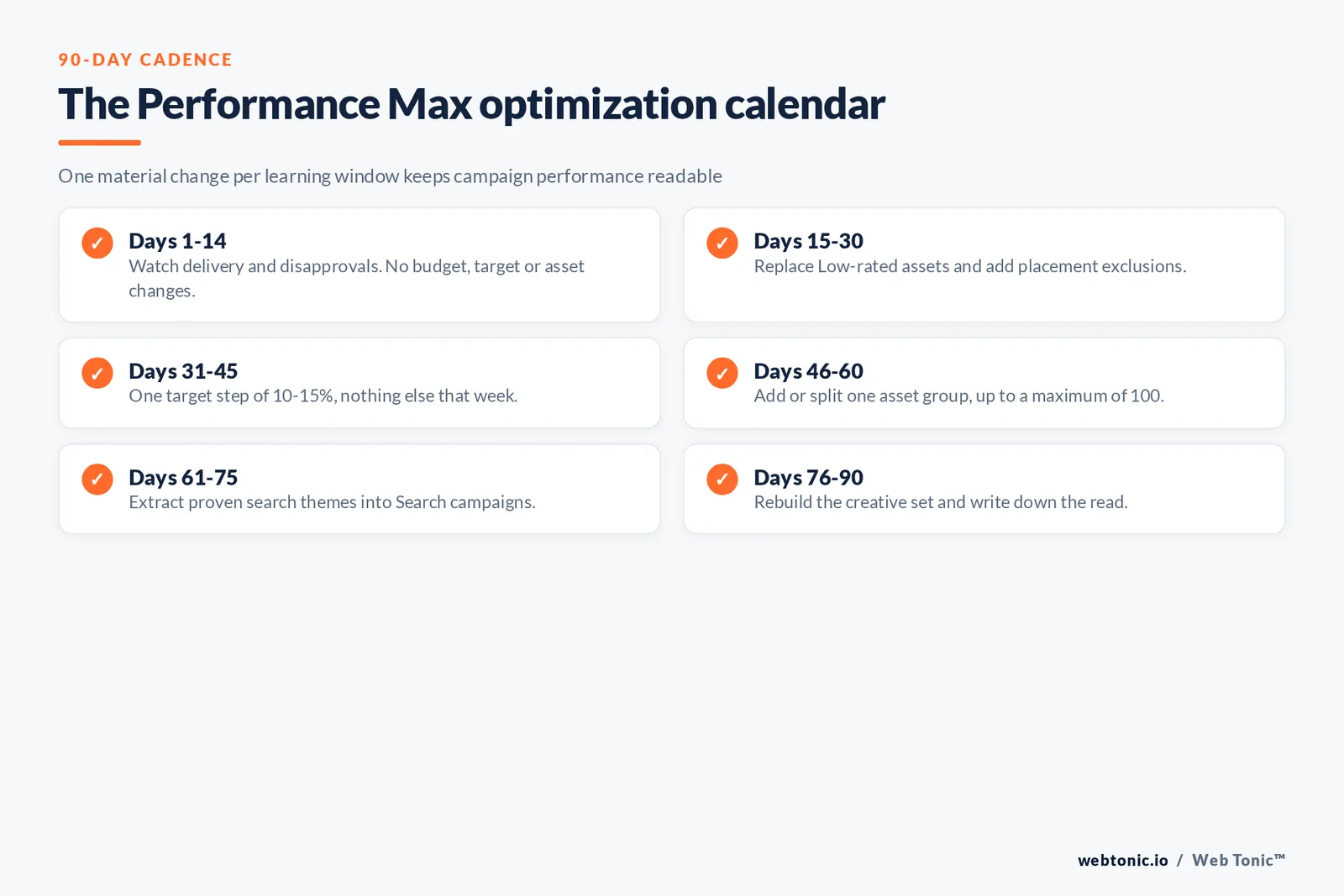
Most damage to Performance Max campaigns comes from daily fiddling. A written cadence prevents it and makes results attributable. Pair it with the structural fundamentals in our guide to how to run Google Ads and the reporting habits in our Google Ads benchmarks breakdown.
| Window | Allowed actions | Explicitly banned |
|---|---|---|
| Days 1-14 | Watch delivery and disapprovals only | Any budget, target or asset change |
| Days 15-30 | Replace Low-rated assets, add exclusions | Changing bidding strategy |
| Days 31-45 | One target step of 10-15% | Simultaneous budget and target changes |
| Days 46-60 | Add or split one asset group | Splitting into multiple campaigns |
| Days 61-75 | Extract proven themes into Search campaigns | Removing the PMax campaign that found them |
| Days 76-90 | Rebuild the creative set, document the read | Restarting the campaign from scratch |

Cadence rule 6: one material change per learning window, and at most 3 changes in any 30-day period. Everything else waits for the next window.
Tip 12: Avoid the seven mistakes that flatten PMax results
Each of these shows up repeatedly in account audits, and each has a cheap fix. Coverage of platform changes at Search Engine Land and Search Engine Journal is worth tracking, because the defaults move more often than the mechanics do.
| Mistake | Symptom in the data | Fix |
|---|---|---|
| One campaign per product | Every campaign stuck in learning | Consolidate; up to 100 campaigns is a ceiling, not a target |
| No uploaded video | YouTube spend with auto-generated creative | Upload one real video per asset group |
| Audience signals treated as targeting | Confusion about who is being reached | Document that signals are hints, then judge on ramp speed |
| Target CPA set at launch | Thin delivery, low impression volume | Start on maximize conversions with no target |
| Micro-conversions as primary | Great CPA, no revenue | Demote to secondary and rebid on the real outcome |
| Brand traffic inside PMax | Suspiciously strong ROAS | Turn on the brand exclusion list and compare again |
| Weekly target changes | Permanent learning state | One material change per learning window, in writing |
Coverage rule 7 — expect 60% to 80% of Performance Max spend to land outside Search once expansion is on. Check the placement report monthly rather than assuming a Search-heavy mix.
How this fits the rest of the account
Performance Max is not a replacement for Search campaigns; it is the coverage layer around them. Keep exact-match brand and high-intent terms in Search where you can read query data, let PMax find demand across Google Search, YouTube, Discover, Gmail and Maps, and move proven themes back into Search once they earn it. If you want that structure designed and monitored for you, our performance creative team and data intelligence practice run this cadence on client accounts every month, and you can talk to us about a PMax audit.
FAQ
How long does a Performance Max campaign take to stabilise?
Plan on two full conversion cycles and a minimum of 14 days, extended by your measured conversion lag. If your lag is 21 days, a genuine read takes about 42 days, and any change inside that window resets the picture.
What are the most effective ways to optimize assets in Performance Max?
Replace Low-rated assets rather than adding more, keep at least 4 unique images plus one uploaded video per asset group, and include a logo and business name. Advertisers moving Ad Strength from Poor to Excellent see 15% more clicks and conversions on average.
Do audience signals restrict who sees my ads?
No. Audience signals only tell Google machine learning where to start; the campaign remains eligible to reach people outside them. They change how quickly the campaign learns, which is why a matched customer list is worth more than three Google provided segments.
Should I run Standard Shopping campaigns alongside Performance Max?
Only for a specific reason, such as a CSS arrangement in Europe or a product set needing manual bid control. When both target the same products, Performance Max takes priority, so overlapping them mainly costs you clarity.
How often should Performance Max campaigns be reviewed?
Weekly for delivery, disapprovals and product coverage; monthly for targets, asset refreshes and exclusions. Anything more frequent tends to keep the campaign in a permanent learning state.
Sources
Google Ads Help — About Performance Max campaigns, About assets, Best practices for responsive search ads, How your data segments work, Customer Match policy, Quality Score for Search campaigns, Targeting and Observation settings, Trademark policy. Google Ads API — Performance Max asset groups and assets. Google Merchant Center Help — product data specification, product_type. WordStream 2026 Google Ads benchmarks. Google Ads pricing. Search Engine Land and Search Engine Journal Google Ads coverage. Figures verified August 2026.


