



Table of contents

Running Google Ads means picking one campaign type that matches a single business goal, then funding it long enough for the bidding system to learn. Everything else is sequence.
Key Takeaways
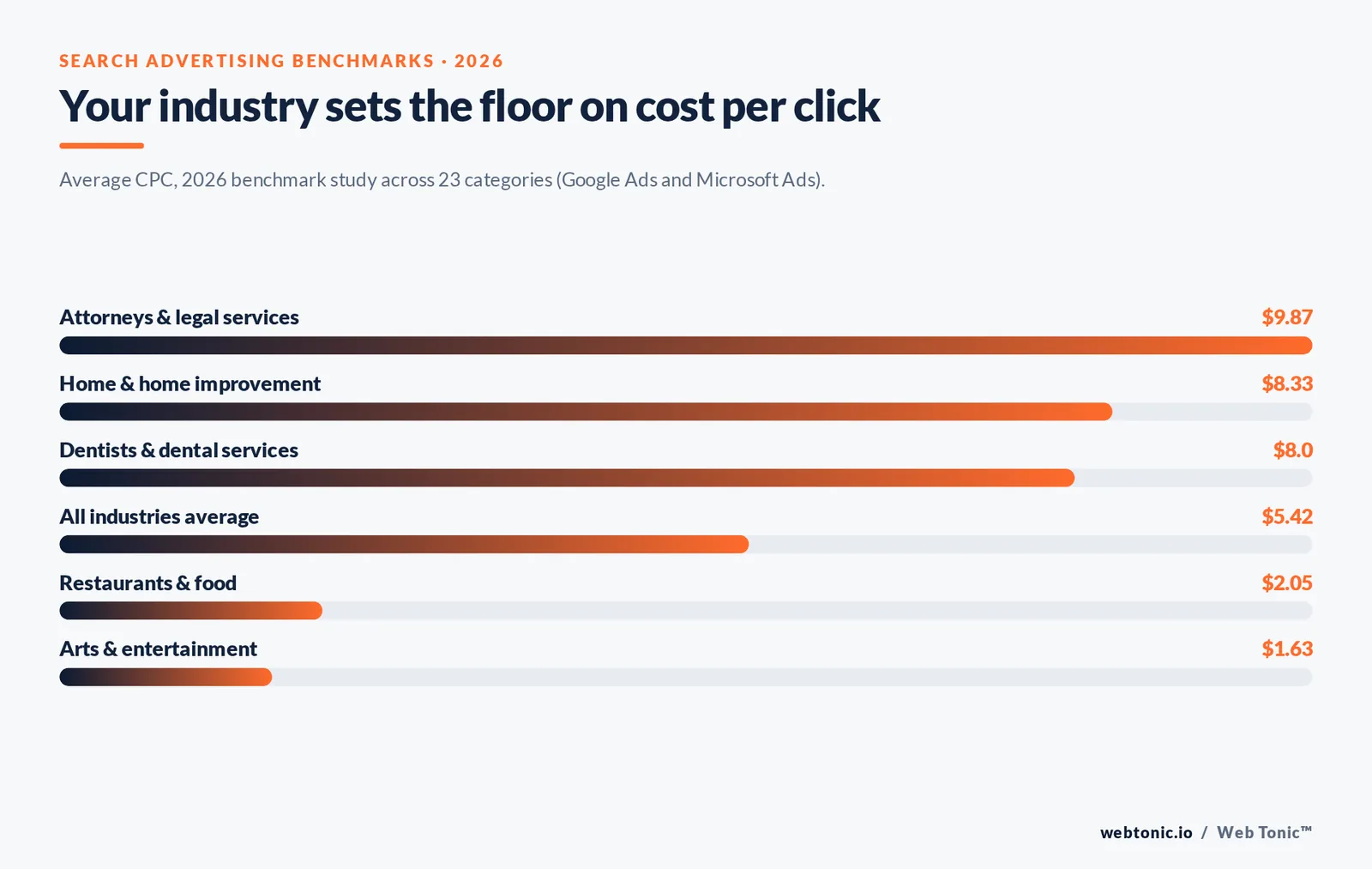
- The average cost per click across search advertising is $5.42, ranging from $1.63 in arts and entertainment to $9.87 for legal services.
- Average search click-through rate sits at 6.64% and average cost per lead at $66.69, so a 30-lead month realistically needs about $2,000 in spend.
- Google Ads offers 8 campaign types; new advertisers should run exactly one of them for the first 30 days.
- Smart Bidding needs roughly 30 conversions in 30 days per campaign before its targets behave predictably.
- Daily budgets are multiplied by 30.4 to produce your monthly charge ceiling, not by 30.
This guide is the operational version: what to prepare, what to click, what to budget, and what to change in weeks two through twelve. The vocabulary follows Google's own guide to Google Ads, and the benchmarks come from aggregated account data rather than estimates.
Before You Open the Google Ads Account: 7 Prerequisites
Most first campaigns fail on preparation, not on ad copy. Google Ads will happily spend money against a page that cannot convert. Work through the seven items below first — each one is a hard prerequisite, not a nice-to-have.
| Prerequisite | Why it matters | Done when |
|---|---|---|
| Requirement 1 — One primary goal | Campaign type, bid strategy and reporting all derive from it | You can name one action worth money |
| Requirement 2 — Conversion tracking | Without it, automated bidding optimises toward clicks, not customers | A test lead or sale appears in the account |
| Requirement 3 — A dedicated landing page | Homepages convert paid traffic far worse than focused pages | One page, one offer, one form |
| Requirement 4 — Analytics linked | You need a second source of truth on behaviour after the click | Google Analytics property is linked |
| Requirement 5 — Budget for 90 days | Learning periods eat the first 2–4 weeks of data | Spend is committed, not month-to-month |
| Requirement 6 — Lead handling | Slow follow-up destroys paid lead economics | Someone owns the inbox and phone |
| Requirement 7 — A billing profile | Suspended billing pauses delivery mid-learning | Card verified, backup added |
If you cannot clear requirement 2, stop. Conversion tracking is the single input that turns Google Ads from an auction lottery into a measurable channel, and it is the foundation every bid strategy in Google's bid strategy documentation depends on.
Step 1 to Step 8: How to Run Google Ads End to End
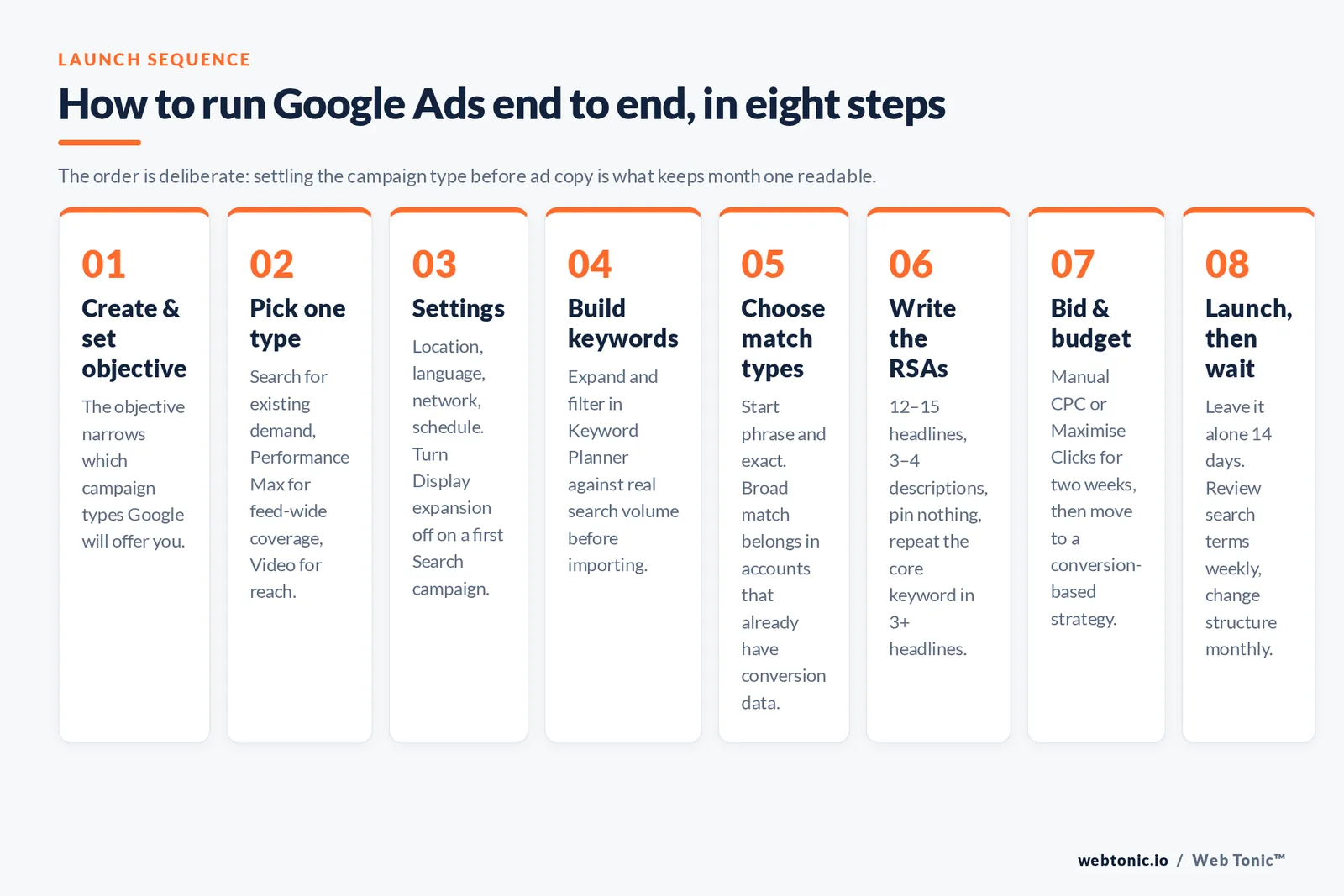
The order below is deliberate. Skipping ahead to ad copy before the campaign type is settled is the most common reason accounts churn in month one.
- Step 1 — Create the account and set the objective. Google Ads asks for an advertising objective before it shows you settings; the objective narrows which campaign types you will be offered, as explained in Google's overview of campaign objectives.
- Step 2 — Select one campaign type. Search for existing demand, Performance Max for broad coverage with a feed, Video for reach on YouTube. Google's guidance on how to choose the right campaign type is the reference; the table below is the practical shortcut.
- Step 3 — Set location, language, network and schedule. Turn off Display Network expansion on your first Search campaign so you can read the data cleanly. All of these live in campaign settings.
- Step 4 — Build keywords from real search volume. Use Keyword Planner to expand and filter ideas, then refine the list before importing, following Google's process to refine new keywords in Keyword Planner.
- Step 5 — Choose match types deliberately. Start phrase and exact; broad match belongs in accounts that already have conversion data. The behaviour of each option is defined in Google's reference on keyword matching options.
- Step 6 — Write responsive search ads properly. Supply 12–15 headlines and 3–4 descriptions, pin nothing at first, and repeat the core keyword in at least 3 headlines. Google publishes explicit best practices for responsive search ads.
- Step 7 — Set the bid and budget. Manual CPC or Maximise Clicks with a cap for the first two weeks, then move to a conversion-based strategy once data exists. Google's guidance on how to choose your bid and budget covers the mechanics.
- Step 8 — Launch, then leave it alone for 14 days. Daily bid edits reset learning. Review search terms weekly and add negatives; change structure monthly.
Which Campaign Type Should You Actually Run?
Google Ads campaigns reach people across Google Search, the Google Display Network, YouTube, Gmail, Discover and Maps. The campaign type decides which of those surfaces you buy and how much control you keep.
| Campaign type | Where ads appear | Best for | Control level |
|---|---|---|---|
| Search | Google Search results and search partners | Existing demand, leads, high-intent queries | High |
| Performance Max | All 8 Google surfaces from one campaign | Ecommerce and mature accounts with a feed | Low |
| Display | Google Display Network sites and apps | Remarketing and cheap brand awareness reach | Medium |
| Video | YouTube, including skippable in-stream ads | Awareness and consideration at scale | Medium |
| Shopping | Shopping tab and Search | Retailers with a Merchant Center feed | Medium |
| Demand Gen | YouTube, Discover, Gmail | Visual products creating new demand | Low |
| App | Play, Search, YouTube, Display | App installs and in-app actions | Low |
| Local / store goals | Maps, Search, Display, YouTube | Footfall for physical locations | Low |
Rule 1: run one campaign type for the first 30 days. A single Search campaign with 2 ad groups produces cleaner learning than four campaigns splitting the same budget. Performance Max campaigns absorb budget across every surface at once, which is powerful in a mature account and unreadable in a new one — Google's description of Performance Max campaigns makes the trade-off explicit.
How Much Does It Cost to Run Google Ads?
There is no platform fee and no minimum spend. You pay per click, and the auction price depends on competition, Quality Score and Ad Rank. What that means in practice is that your industry sets your floor.
| Industry | Average CPC | Average CTR | Average cost per lead |
|---|---|---|---|
| All industries | $5.42 | 6.64% | $66.69 |
| Attorneys & legal services | $9.87 | 5.87% | $131.63 |
| Home & home improvement | $8.33 | 6.47% | $90.92 |
| Dentists & dental services | $8.00 | 5.66% | $72.97 |
| Personal services | $7.17 | 7.16% | $— |
| Health & fitness | $6.17 | 5.81% | $67.36 |
| Business services | $5.87 | 6.10% | $93.69 |
| Physicians & surgeons | $4.76 | 6.61% | $— |
| Automotive — repair & service | $4.35 | 5.56% | $29.96 |
| Real estate | $3.22 | 7.61% | $— |
| Restaurants & food | $2.05 | 6.83% | $— |
| Arts & entertainment | $1.63 | 12.75% | $26.84 |
Benchmarks are from the 2026 search advertising benchmark study covering 23 business categories across Google Ads and Microsoft Ads; the longer-running industry benchmark series shows how much these averages have drifted upward over a decade.
Limit 2: your daily budget is multiplied by 30.4, not 30. A $50 daily budget means a monthly ceiling near $1,520, and Google may spend up to twice the daily amount on a single high-traffic day while balancing the month. Plan against the monthly figure.
Working backwards is the honest way to set a first budget. If your category converts clicks to leads at the all-industry average and your cost per lead is $67, then 10 leads a month costs roughly $670 and 40 leads costs about $2,700. If that number breaks your unit economics, fix pricing or the offer before launching.
Budget Tiers and What Each One Realistically Buys
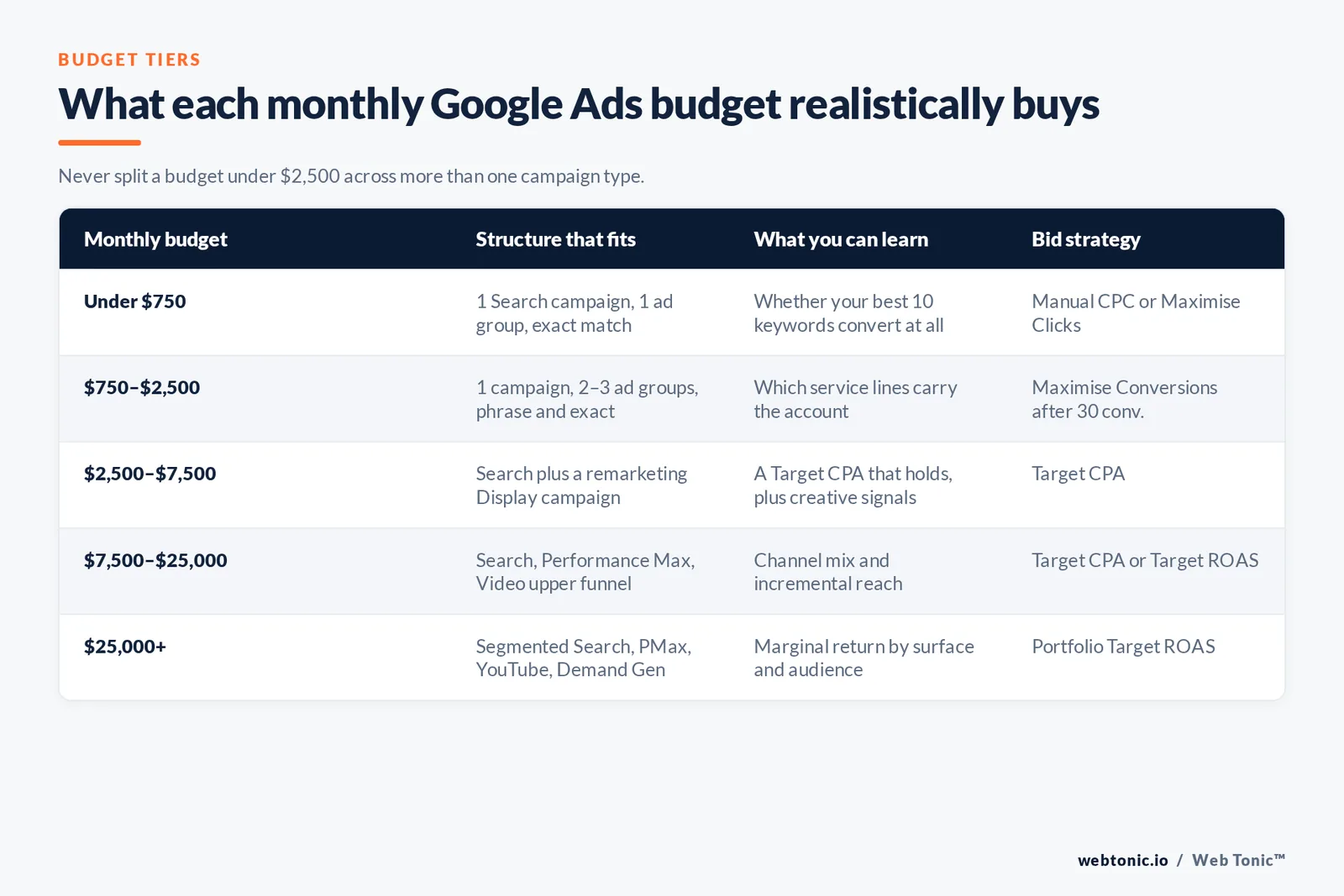
| Monthly budget | Structure that fits | What you can learn | Bid strategy |
|---|---|---|---|
| Under $750 | 1 Search campaign, 1 ad group, exact match only | Whether your best 10 keywords convert at all | Manual CPC or Maximise Clicks |
| $750–$2,500 | 1 Search campaign, 2–3 ad groups, phrase and exact | Which service lines carry the account | Maximise Conversions after 30 conversions |
| $2,500–$7,500 | Search plus a remarketing Display campaign | Target CPA that holds, plus creative signals | Target CPA |
| $7,500–$25,000 | Search, Performance Max, Video for upper funnel | Channel mix and incremental reach | Target CPA or Target ROAS |
| $25,000+ | Segmented Search, Performance Max, YouTube, Demand Gen | Marginal return by surface and audience | Portfolio Target ROAS |
Rule 3: never split a budget under $2,500 across more than one campaign type. Automated bidding models need volume in one place; four thin campaigns each stay in learning indefinitely.
Why Two Advertisers Pay Different Prices for the Same Click
Position and price are decided per auction by Ad Rank, which combines your bid with ad quality, the context of the search, and expected impact of assets. Two accounts bidding the same amount on the same keyword can therefore pay very different prices — the mechanism is documented in Google's explanation of Ad Rank, and the diagnostic version of it is Quality Score for Search campaigns.
The practical implication: the cheapest lever in a new account is relevance, not bid. Tightening an ad group so its keywords, headlines and landing page all say the same thing usually moves cost per click more than a 20% bid increase. That is also why a dedicated page beats a homepage — a point we cover in our approach to growth marketing.
The First 90 Days: A Week-by-Week Operating Plan
| Period | Do this | Do not do this | Metric that matters |
|---|---|---|---|
| Week 1 | Verify conversions fire, check search terms daily | Change bids or budgets | Impressions and conversion firing |
| Week 2 | Add 20–40 negative keywords, pause zero-impression keywords | Add new campaign types | Search term relevance |
| Weeks 3–4 | Rewrite the 3 weakest headlines, add sitelinks and callouts | Switch bid strategy yet | Click-through rate vs 6.64% |
| Weeks 5–8 | Move to conversion-based bidding once 30 conversions exist | Set an aggressive Target CPA on day one | Cost per conversion |
| Weeks 9–12 | Split the winning theme into its own campaign, test a second surface | Rebuild the account from scratch | Conversion rate and lead quality |
Step 4 of that plan is where most accounts break. Advertisers switch to Target CPA with 6 conversions on file, set the target 40% below current cost per conversion, and delivery collapses. Set the first target at or slightly above your existing cost per conversion, then tighten 10–15% at a time.
How the Approach Changes by Business Type
| Business type | Start with | Primary conversion | Add in month 3 |
|---|---|---|---|
| Local service business | Search, tight radius, call assets | Phone calls over 60 seconds | Local campaigns and remarketing |
| Ecommerce store | Shopping with a clean feed | Purchase with value | Performance Max |
| B2B / SaaS | Search on category and competitor terms | Qualified demo request | Demand Gen and YouTube retargeting |
| Professional services | Search on high-intent problem queries | Form fill plus call | Display remarketing |
| Course or info product | Video ads on YouTube for cheap reach | Email signup | Search on branded demand created |
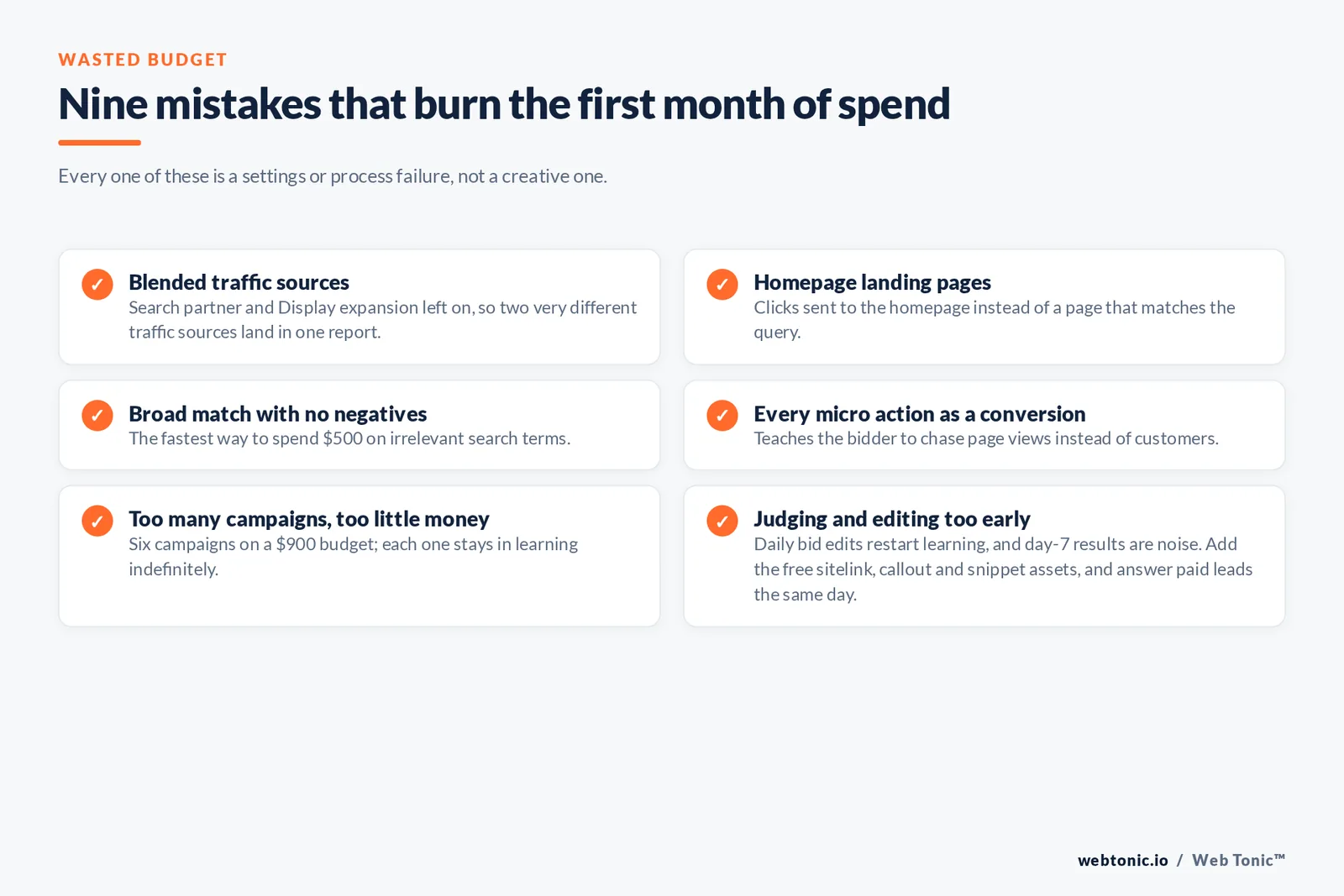
9 Mistakes That Waste the First Month's Budget
- Mistake 1 — Leaving Search Network partner and Display expansion on, which blends 2 very different traffic sources into one report.
- Mistake 2 — Sending clicks to the homepage instead of a page that matches the query.
- Mistake 3 — Broad match with no negatives, the fastest way to spend $500 on irrelevant search terms.
- Mistake 4 — Tracking every micro action as a conversion, which teaches the bidder to chase page views.
- Mistake 5 — Running 6 campaigns on a $900 budget.
- Mistake 6 — Editing bids daily and restarting the learning period each time.
- Mistake 7 — Judging results at day 7, before a single conversion cycle has closed.
- Mistake 8 — Ignoring the 3 asset types (sitelinks, callouts, structured snippets) that lift click-through rate for free.
- Mistake 9 — No follow-up process, so paid leads sit unanswered for 2 days.
Google maintains a checklist-style set of Google Ads best practices that covers most of these at platform level, and industry coverage such as ongoing Google Ads reporting and practitioner analysis tracks changes as they ship. For accounts that outgrow manual management, automation through the Google Ads API is the next step — and reporting discipline is exactly what our data intelligence work exists to solve. If you would rather hand the whole build over, talk to us.
FAQ
How much money do I need to start running Google Ads?
There is no minimum, but a realistic floor is 20–30 clicks per week so the campaign generates readable data. At the all-industry average cost per click of $5.42, that is roughly $500–$650 per month; in expensive categories like legal at $9.87 per click, the same test costs closer to $1,200.
How long before Google Ads works?
Expect 2 weeks of learning before the numbers stabilise and 8–12 weeks before a cost per conversion is trustworthy. Anything you judge in the first 7 days is noise, especially in low-volume accounts with fewer than 30 conversions a month.
Should a beginner use Performance Max or Search?
Search, almost always. It exposes the search terms you are buying, which is how you learn what your market actually types. Performance Max spreads spend across the Google Display Network, YouTube, Gmail, Discover and Maps and reports far less granularly, which suits accounts that already know their winning products.
Do I need a website to run Google Ads?
You need a destination that can convert. A single well-built landing page is enough, and for local businesses call-only formats can work with a minimal site — but sending paid traffic to a slow or generic page is the most expensive mistake on this list. Our web development work usually starts there.
What is a good click-through rate for search ads?
The 2026 average across industries is 6.64%. Above 8% is strong for a commercial keyword set; below 4% usually signals a mismatch between the keyword, the headline and the offer rather than a bidding problem.
Sources: Google Ads Help (guide to Google Ads, campaign objectives, choosing a campaign type, campaign settings, keyword matching options, responsive search ads best practices, bid and budget, Ad Rank, Quality Score, Performance Max, Keyword Planner, best practices); LocaliQ 2026 Search Advertising Benchmarks; WordStream industry benchmarks; Google Ads API documentation; Search Engine Land; Search Engine Journal.


