



Table of contents
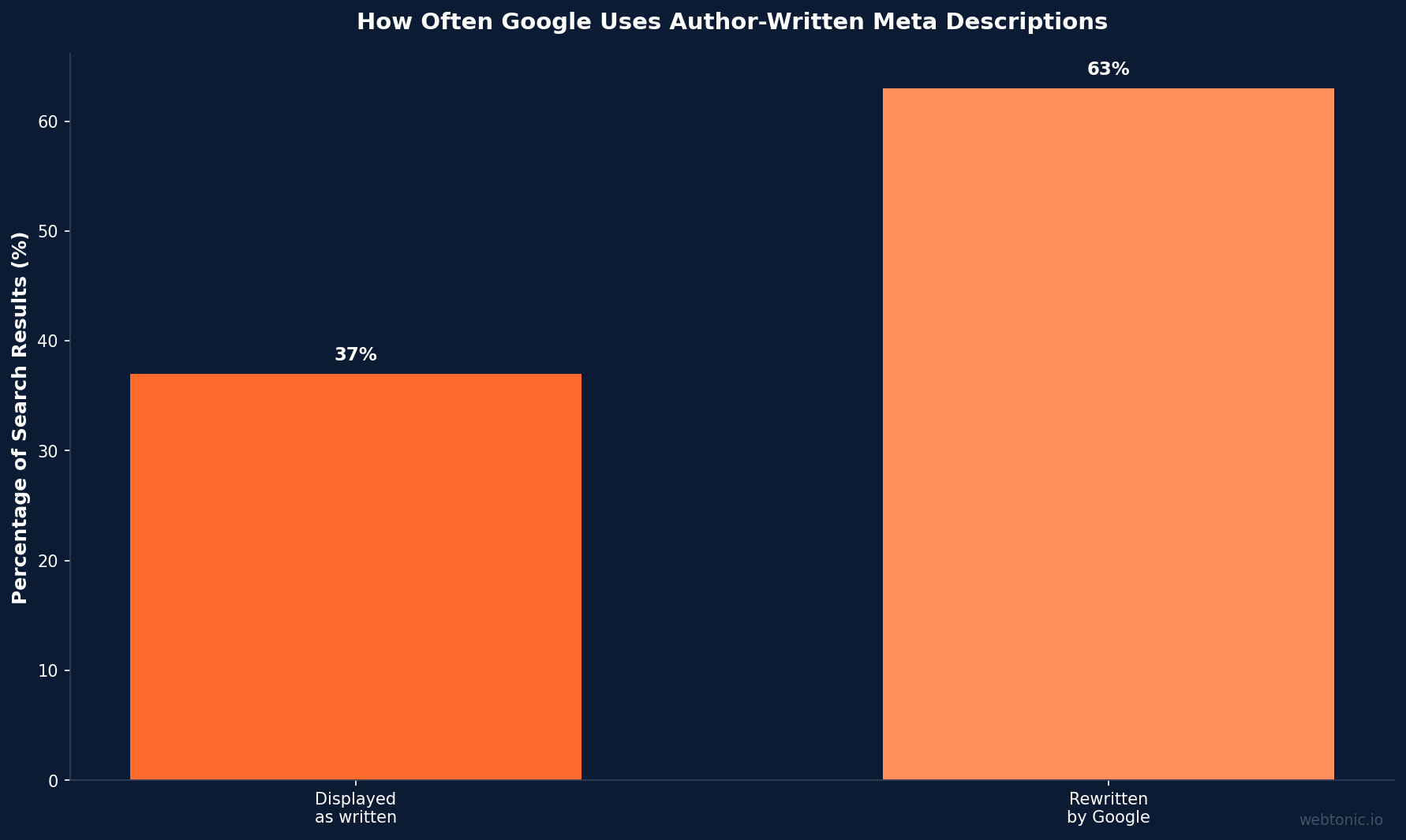
Meta descriptions are the short HTML snippets that appear below page titles in search results — they don't directly affect rankings, but they control whether a searcher clicks your link or scrolls past it. Google rewrites them roughly 63 % of the time, yet a well-crafted description still outperforms an auto-generated one when it does show.
Key Takeaways
- Google displays the author-written meta description only about 37 % of the time, generating its own snippet from page content for the remaining 63 % of queries (Ahrefs study of 192,000+ pages).
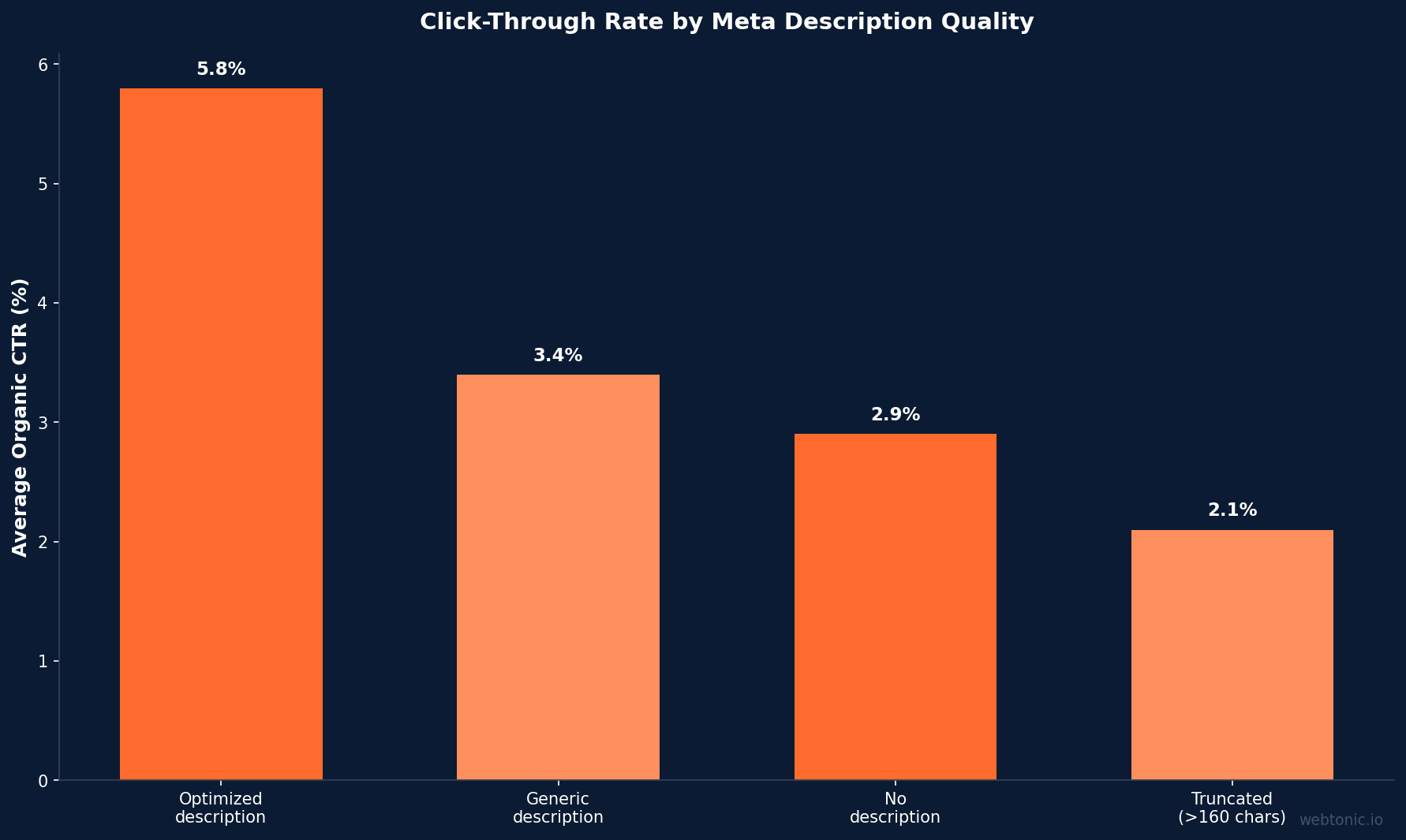
- Pages with optimized meta descriptions see an average 5.8 % higher click-through rate than pages with no description or a truncated one.
- The safe character length in 2026 is 120 characters for mobile and 150–160 characters for desktop — Google measures pixel width (~920 px), not character count.
- Meta descriptions are not a direct Google ranking factor, but higher CTR from a compelling snippet sends positive engagement signals that can improve position over time.
- Including a call to action, a specific benefit, and the primary keyword in the first 120 characters yields the highest snippet survival rates.
What Is a Meta Description?
A meta description is an HTML tag (<meta name="description" content="…">) that provides a brief summary of a webpage's content. Search engines display it as the snippet text beneath the blue title link in results pages. The tag sits inside the <head> section of your page and is invisible to on-page visitors — its only audience is the search result itself.
While Google's official documentation confirms that meta descriptions are not a ranking signal, they remain the primary tool for influencing click-through rate from organic results. Think of them as the ad copy for your organic listing: a well-written description tells the searcher exactly what they will find after clicking, reducing bounce rates and improving overall marketing efficiency.
Why Meta Descriptions Still Matter in 2026
Despite Google's frequent rewrites, investing in quality meta descriptions remains one of the highest-ROI SEO tasks available. Here is why:
- CTR lift — Even at a 37 % display rate, optimized descriptions lift clicks measurably. A page earning 50,000 monthly impressions that raises CTR from 4 % to 4.5 % gains nearly 100 additional organic clicks per month at zero ad cost.
- AI answer engines — Tools like Google AI Overviews and ChatGPT search increasingly pull from the meta description to cite sources. A clear, accurate description improves your chance of being referenced in an AI-generated answer.
- Social sharing — Platforms such as Facebook, LinkedIn, and Slack display the meta description in link previews when Open Graph tags are absent. A polished description doubles as social copy.
- Brand consistency — Controlling the snippet ensures every SERP appearance matches your brand voice, preventing Google from pulling random paragraphs that misrepresent the page.
| Benefit | Impact | Measurement |
|---|---|---|
| Higher CTR | 5–8 % lift on pages with optimized descriptions vs. auto-generated snippets | Google Search Console CTR by page |
| AI citation | Clear descriptions help answer engines attribute source correctly | Referral traffic from AI overviews |
| Social previews | Replaces generic text in link cards on social platforms | Social click-through analytics |
| Bounce reduction | Accurate descriptions set correct expectations, lowering pogo-sticking | Bounce rate delta post-optimization |
| Brand control | Prevents Google from pulling off-brand sentence fragments | Manual SERP audit cadence |
Ideal Meta Description Length
Google does not enforce a strict character limit — it truncates based on pixel width (~920 px on desktop). Wide characters like "W" or "M" take more space, so a 155-character description can get cut while a 160-character one survives.
The practical guidelines for 2026:
| Display Surface | Safe Length | Notes |
|---|---|---|
| Desktop SERP | 150–160 characters | ~920 px pixel-width limit; wide characters truncate sooner |
| Mobile SERP | ~120 characters | Most searches are mobile — treat this as the real constraint |
| AI Overviews | Varies | AI engines may show the full description or summarize it |
| Social previews | ~155 characters | Facebook/LinkedIn truncate around 155 c; OG description overrides if set |
Rule of thumb: front-load the most important phrase and value proposition into the first 120 characters so the snippet remains coherent even if the tail gets cut. Never pad with filler words just to hit 160.
How to Write High-Performing Meta Descriptions
Follow this seven-step process for every page. The goal is a description that matches search intent, includes the target keyword naturally, and gives the searcher a reason to click.
Step 1 — Start With the Search Intent
Read the top five results for your target keyword. Identify whether the intent is informational, commercial, navigational, or transactional. Your description should mirror that intent within the first sentence. A product page description that reads like an educational guide will mismatch intent and lose clicks.
Step 2 — Include the Primary Keyword Early
Google bolds words in the snippet that match the user's query. Placing your keyword in the first 50 characters ensures the bold match is visible even on mobile. Avoid exact-match stuffing — a natural phrase that contains the keyword works best.
Step 3 — Add a Specific Benefit or Stat
Generic descriptions ("Learn everything about X") get ignored. Instead, promise a concrete outcome: "See the 12 meta description templates that increased our CTR by 34 % in Q1 2026." Specificity earns trust.
Step 4 — Include a Call to Action
Phrases like "See how," "Learn the steps," "Compare pricing," or "Get the template" nudge the reader toward clicking. The CTA should match the page type — a blog post earns "Read the guide," while a pricing page earns "Compare plans."
Step 5 — Keep It Under 155 Characters
Write the full description, then trim anything after 155 characters. Read the first 120 characters in isolation — if they make complete sense, your mobile snippet will survive truncation.
Step 6 — Make Every Page Unique
Google Search Central explicitly warns against duplicate descriptions. Identical meta descriptions across multiple pages signal low-effort content and reduce the chance Google will display any of them.
Step 7 — Audit With Google Search Console
After deploying, monitor Google Search Console for pages where CTR is below your site average. Re-write those descriptions first — they represent the lowest-hanging improvement opportunity.

Meta Description Examples by Page Type
Different pages demand different description styles. Below are proven templates for the four most common page types.
| Page Type | Template | Example |
|---|---|---|
| Blog post | [Answer/Promise] + [Specific proof point] + [CTA] | "Meta descriptions don't rank pages — but they drive 5.8 % more clicks. See 12 templates that work in 2026." |
| Product page | [Key feature] + [Social proof] + [CTA] | "The X500 espresso machine pulls shots at 15 bars with a 58 mm portafilter. Rated 4.8/5 by 3,200+ buyers. Shop now." |
| Service page | [Outcome] + [Differentiator] + [CTA] | "We grew organic traffic 140 % for B2B SaaS brands in 6 months. See how our SEO retainer works." |
| Homepage | [Brand promise] + [Category] + [CTA] | "Web Tonic is a 360° growth marketing agency. Google Ads, SEO, creative, and analytics under one roof." |
Common Meta Description Mistakes
Even experienced marketers fall into these traps. Each one lowers your snippet quality and wastes the opportunity to control how your page appears in search results.
- Keyword stuffing the description — Repeating the keyword three times signals spam to both Google and searchers. One natural mention is sufficient.
- Using the same description site-wide — Google treats duplicate descriptions as if they don't exist and generates its own snippet instead.
- Writing longer than 160 characters — The excess text gets cut, and the truncated snippet often ends mid-sentence, looking unprofessional.
- Omitting a call to action — Without a CTA, the description reads like a sentence fragment rather than an invitation to click.
- Ignoring mobile truncation — Desktop-first descriptions lose meaning when mobile cuts them at ~120 characters.
- Promising content the page doesn't deliver — Misleading descriptions spike bounce rate, which hurts rankings indirectly.
Using Yoast SEO and Other Tools
SEO plugins simplify meta description management. Here is how the most popular tools handle them:
- Yoast SEO (WordPress) — Provides a real-time snippet preview and warns when the description is too short or too long. Recommends a density of one keyphrase mention.
- Rank Math — Includes an AI-powered suggestion engine and scores the description alongside the title and content SEO.
- Google Search Console — Reports pages with missing or duplicate descriptions under the "Enhancements" tab. Use the Performance report to find low-CTR pages for description rewrites.
- Screaming Frog — Crawls the entire site and flags missing, duplicate, or over-length descriptions in a single export. Ideal for auditing sites with 500+ pages.
Meta Descriptions and AI Search
The rise of AI-powered search experiences — Google AI Overviews, Bing Copilot, ChatGPT with browsing — changes the meta description's role. These engines use the description as one of several signals to decide which pages to cite in their generated answers.
A clear, factual description increases the likelihood that your page is surfaced as a source. Vague or marketing-heavy descriptions get passed over in favor of pages whose snippets contain specific data points. For example, a description that says "The average meta description display rate is 37 % — here is how to maximize your CTR" gives the AI engine a concrete fact to latch onto.
FAQ
Does Google use meta descriptions as a ranking factor?
No. Google has confirmed repeatedly that the meta description tag is not used in its ranking algorithm. However, a compelling description improves click-through rate, and CTR can indirectly influence ranking through user engagement signals.
How long should a meta description be in 2026?
Target 120–155 characters. Google measures pixel width (~920 px on desktop), not characters, so front-load the key message within the first 120 characters to survive mobile truncation.
What happens if I don't write a meta description?
Google will auto-generate a snippet from your page content. The auto-generated snippet may not reflect the angle or CTA you prefer, so writing your own gives you greater control over how your page appears in search results.
How often does Google rewrite meta descriptions?
Studies show Google rewrites the meta description for approximately 63 % of queries. The rewrite rate is lower for well-crafted descriptions that closely match the search query and page content.
Should I include the brand name in the meta description?
Only on your homepage and key brand pages. For blog posts and service pages, the space is better used for the value proposition and a call to action. The brand name already appears in the title tag and URL.
Sources
Google Search Central — Control Snippets
Ahrefs — How to Write the Perfect Meta Description
Aetos SEO — Meta Descriptions: The Complete 2026 Guide
The SEO Engine — Meta Description Examples: 15 Proven Templates
Google Search Console
Yoast — Meta Descriptions and SEO


