



Table of contents

Finding the right keyword ideas is the foundation of every successful SEO strategy — and tools like Google Keyword Planner, which draws from over 8.5 billion daily Google searches, give you direct access to what your audience is actually looking for. Here are 12 free methods and tools that generate actionable keyword ideas without paid subscriptions.
Key Takeaways
- Google processes over 8.5 billion searches per day, making Google Keyword Planner the most reliable free source for search volume data and keyword ideas.
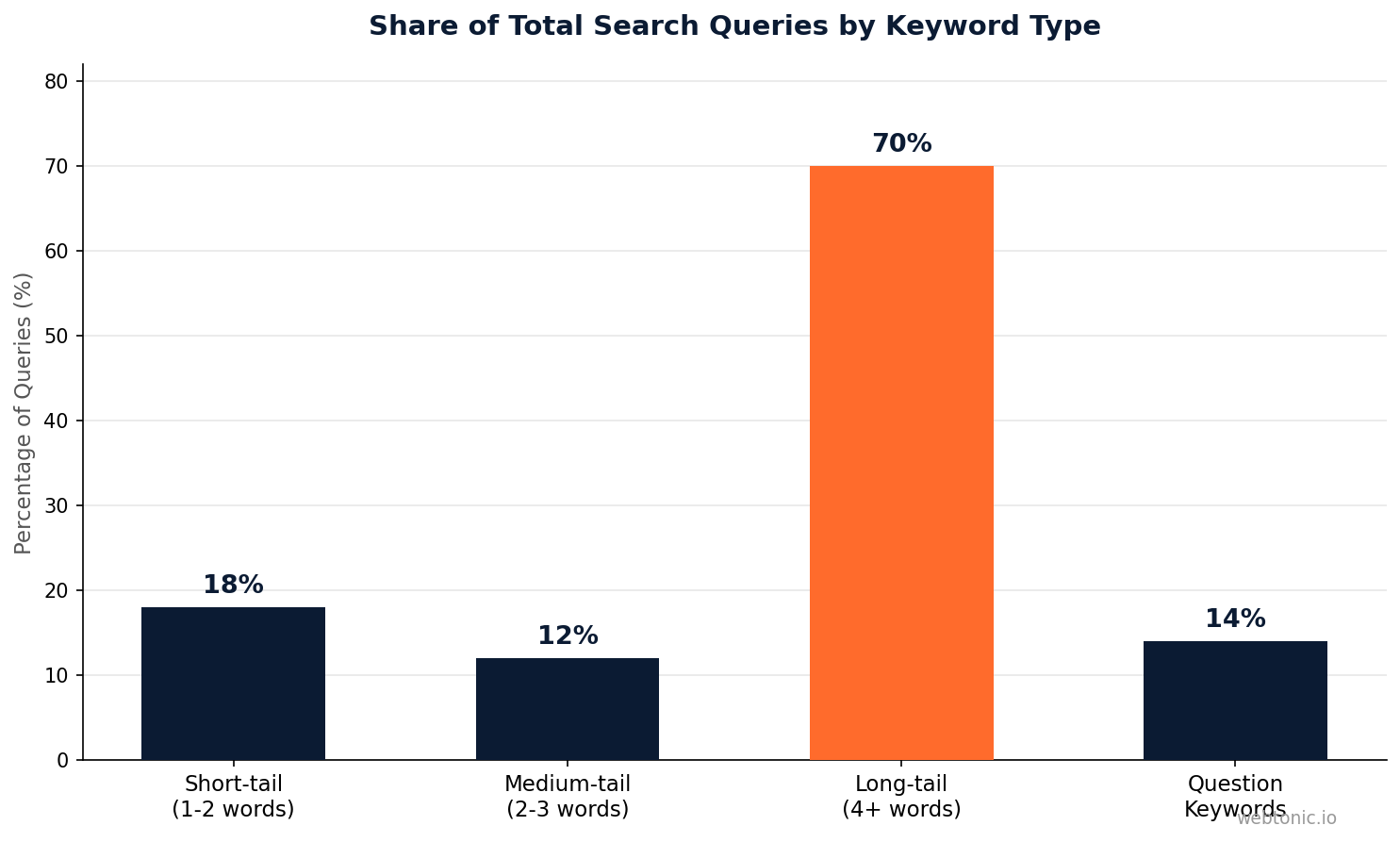
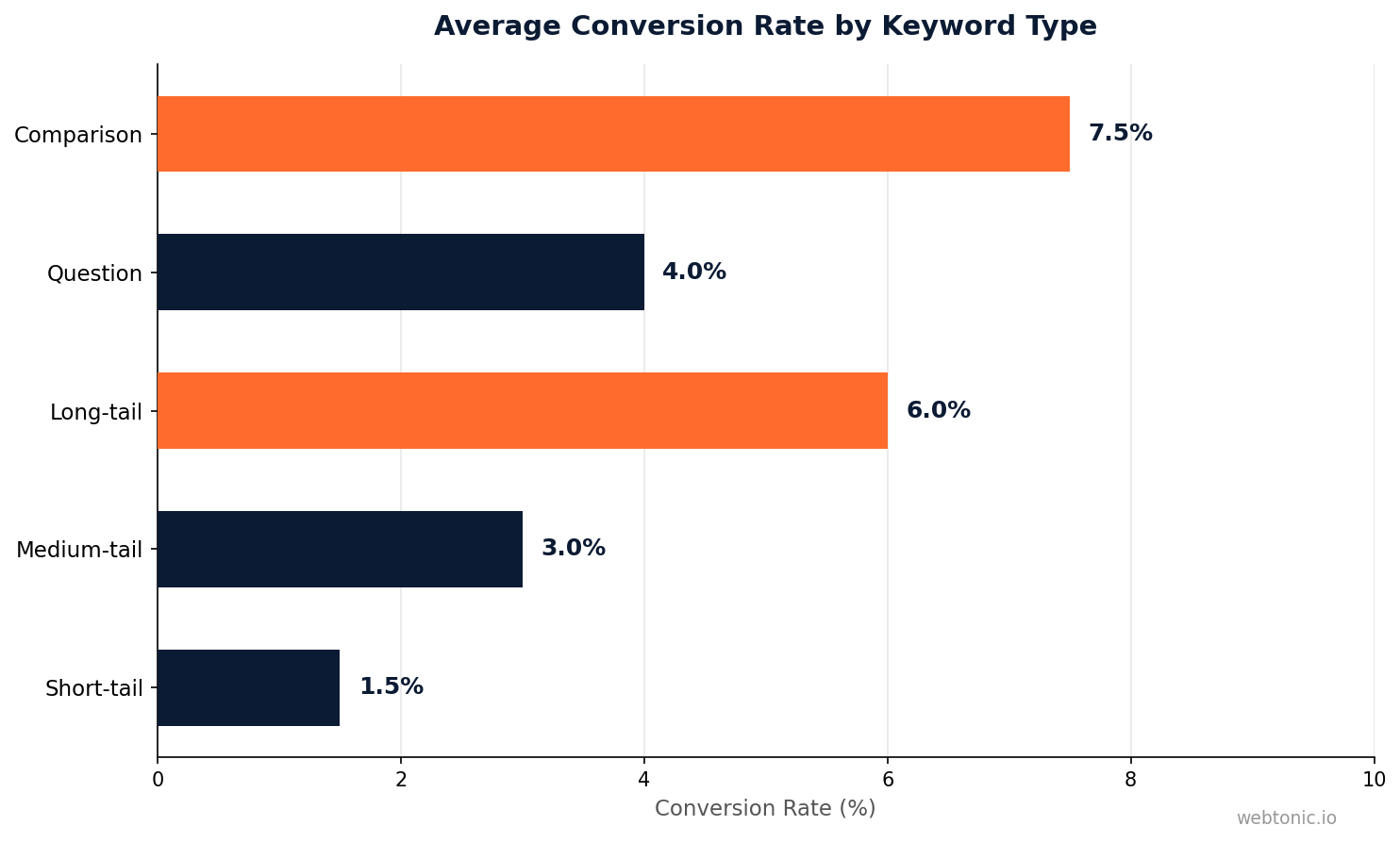
- Long-tail keywords (3+ words) account for over 70% of all search queries according to Backlinko's research and convert at 2.5× higher rates than short-tail keywords because they capture more specific intent.
- Competitor keyword gap analysis reveals keywords your rivals rank for that you do not, providing a direct path to content opportunities that are already validated by search demand.
- Free tools like Google Search Console, AnswerThePublic, and Keyword Surfer provide real search data without monthly subscriptions — paid tools aggregate the same sources with a more polished interface.
- Search intent classification (informational, navigational, commercial, transactional) determines whether a keyword idea is worth pursuing for your specific business goals.
Keyword ideas are the search terms and phrases that real people type into Google, Bing, YouTube, and other search engines when looking for information, products, or services. Finding the right keyword ideas is not about guessing what people search for — it is about using data to discover exactly what your target audience needs and creating content that answers those needs better than what currently exists. Whether you are building an organic growth strategy or planning content for a blog, the keyword research process determines whether your pages attract traffic or sit invisible on page five.
Why Keyword Ideas Matter for SEO Success
Every piece of content that ranks on Google started with a keyword idea. Without keyword research, you are creating content based on assumptions rather than data — and assumptions are expensive. According to Ahrefs' analysis of over 1 billion web pages, 90.63% of all pages get zero traffic from Google. The primary reason is that those pages target keywords with no search volume or compete against pages they cannot outrank.
Keyword ideas serve three critical functions in an SEO strategy:
1. They validate content demand. Before writing a 2,000-word article, keyword research confirms that people are actually searching for the topic. A keyword with 500 monthly searches represents real demand; a topic with zero search volume means you are publishing into a vacuum.
2. They reveal intent. The same topic can be searched with different intents. "CRM software" (informational) is different from "best CRM software for small business" (commercial) is different from "HubSpot CRM pricing" (transactional). Each intent requires a different page type and content approach.
3. They expose competitive gaps. Keyword gap analysis shows terms your competitors rank for that you do not. These gaps represent validated opportunities — someone else has already proven the search demand exists, and you can capture a share of that traffic with better content.
12 Free Methods To Find Keyword Ideas
These methods range from zero-cost tools that tap directly into Google's data to creative research techniques that uncover keywords no tool will surface. Use a combination of at least 3–4 methods per project to build a comprehensive keyword list.
Method 1: Google Keyword Planner
Google Keyword Planner remains the gold standard for free keyword research because it pulls data directly from Google's search index. Create a free Google Ads account (no spending required), navigate to Tools → Keyword Planner → "Discover new keywords," and enter seed keywords or a competitor URL. The tool returns keyword suggestions with monthly search volume, competition level, and CPC data. Filter by location, language, and search volume to narrow results to actionable opportunities. The main limitation is that search volume ranges are broad (e.g., "1K–10K") unless you have an active ad campaign running.
Method 2: Google Search Console
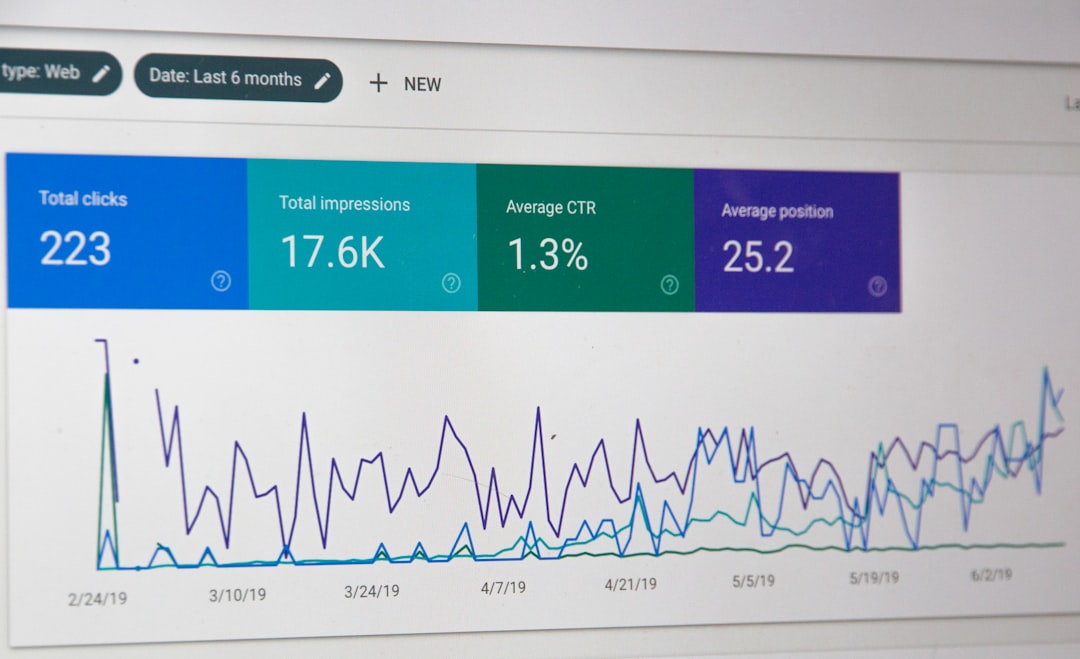
Google Search Console shows the actual search queries that already drive impressions and clicks to your site. Navigate to Performance → Search Results and sort by impressions. Keywords with high impressions but low clicks are your biggest opportunities — these are terms where Google already shows your page but users are not clicking through. Improving title tags and meta descriptions for these queries can increase traffic without creating new content. This is the only free tool that provides exact, real click and impression data from Google.
Method 3: Google Autocomplete and Related Searches
Type your seed keyword into Google's search bar and review the autocomplete suggestions that appear. These suggestions are generated from actual user search behavior and represent high-volume, validated queries. After running a search, scroll to the bottom of the results page and check "Related searches" for additional keyword variations. For a systematic approach, type your keyword followed by each letter of the alphabet (e.g., "keyword ideas a," "keyword ideas b") to uncover long-tail variations across the entire suggestion spectrum.
Method 4: AnswerThePublic
AnswerThePublic generates question-based keyword ideas by pulling autocomplete data and organizing it into visual maps of questions (who, what, where, when, why, how), prepositions (for, with, without, near), and comparisons (vs, or, and). The free version provides 3 searches per day — enough for initial research. These question-based keywords are particularly valuable for creating FAQ sections, blog posts, and featured snippet-targeted content that captures informational search intent.
| Method | Best For | Data Source | Limit |
|---|---|---|---|
| Google Keyword Planner | Search volume + CPC data | Google Ads index | Free with Google Ads account |
| Google Search Console | Existing opportunity mining | Your site's Google data | Site verification required |
| Google Autocomplete | Long-tail discovery | Real user queries | Unlimited |
| AnswerThePublic | Question-based keywords | Autocomplete data | 3 searches/day free |
| Keyword Surfer | SERP-level volume data | Clickstream + Google | Free Chrome extension |
| Ubersuggest (free tier) | Keyword suggestions + difficulty | Clickstream data | 3 searches/day free |
| Semrush Keyword Magic | Large-scale keyword discovery | 26+ billion keywords | 10 free queries/day |
| People Also Ask | Featured snippet targeting | Google SERP features | Unlimited |
Method 5: Keyword Surfer (Chrome Extension)
Keyword Surfer is a free Chrome extension that displays search volume data directly in Google's search results page. Every time you search, you see the estimated monthly volume next to each result, plus a sidebar with related keywords and their volumes. This turns every Google search into a keyword research session without switching tools. The extension also shows estimated traffic and word count for each ranking page, helping you assess competitive difficulty.
Method 6: Competitor Website Analysis
Your competitors' websites are keyword research goldmines. Review their blog titles, category pages, service pages, and URL structures to identify topics they target. Use the free tier of tools like Ahrefs Keywords Explorer or Semrush to run a competitor domain and see which keywords drive their organic traffic. The Content Gap analysis (available in Ahrefs' free webmaster tools for your own domain) reveals keywords where competitors rank but you do not — these are pre-validated opportunities.
Method 7: Reddit and Quora Mining
Search Reddit and Quora for your topic to discover the exact language your audience uses when discussing their problems. These platforms surface raw, unfiltered questions that keyword tools often miss. Search Reddit with `site:reddit.com [topic]` in Google, then read the top threads to find recurring questions and terminology. Convert these into keyword ideas: a Reddit thread asking "how do I find keywords for my niche blog?" becomes the keyword "find keywords for niche blog" — a long-tail term with clear intent.
Method 8: YouTube Autocomplete
YouTube is the world's second-largest search engine, processing over 3 billion searches per month. Its autocomplete suggestions reveal keyword ideas that may not appear in traditional SEO tools because they reflect video-first search behavior. Type your seed keyword into YouTube's search bar and note the suggestions. These terms often have lower competition in traditional search because most SEO-focused content creators ignore video-first keywords — creating an opportunity to rank in both Google and YouTube simultaneously.
Method 9: Google Trends
Google Trends does not show absolute search volume, but it reveals relative interest over time, seasonal patterns, and geographic distribution for any keyword. Use it to compare keyword ideas head-to-head (e.g., "keyword research" vs "keyword analysis") to see which term has growing versus declining interest. The "Related queries" section surfaces breakout topics — keywords with sudden surges in search interest that represent emerging opportunities before they become competitive.
Method 10: People Also Ask (PAA) Mining
Google's People Also Ask boxes contain questions that searchers frequently ask about a topic. Each question you click expands to reveal more related questions, creating an expanding tree of keyword ideas. These PAA questions are valuable because Google has already validated that users searching for your seed keyword also want answers to these related questions. Target PAA questions as H2/H3 headings in your content to win featured snippets — pages that answer PAA questions directly have a significantly higher chance of appearing in the featured snippet position.
Method 11: Seed Keyword Expansion With Modifiers
Take your core keyword and systematically add modifiers to generate long-tail variations. The modifier categories include: intent modifiers (how to, best, vs, review, alternative), audience modifiers (for beginners, for small business, for freelancers), temporal modifiers (2026, this year, latest), and location modifiers (near me, in [city], [country]). A single seed keyword like "email marketing" can generate 50+ long-tail variations using this systematic approach, each targeting a more specific slice of search intent.
Method 12: Internal Site Search Data
If your website has a search function, the queries visitors type into it are direct signals of unmet content needs. Check your site search reports in Google Analytics 4 (navigate to Reports → Engagement → Events → view_search_results) to find what visitors search for after arriving on your site. High-volume internal searches for topics you do not have dedicated pages for represent the most qualified keyword opportunities — these users are already on your site and actively looking for this information from your analytics data.
| Keyword Type | Example | Avg. Search Volume | Competition | Conversion Rate |
|---|---|---|---|---|
| Short-tail (1-2 words) | "keyword research" | 22,000/mo | Very high | 1–2% |
| Medium-tail (2-3 words) | "keyword research tools" | 6,500/mo | High | 2–4% |
| Long-tail (4+ words) | "free keyword research tools for beginners" | 480/mo | Low | 4–8% |
| Question-based | "how to find keywords for SEO" | 1,200/mo | Medium | 3–5% |
| Comparison | "Ahrefs vs Semrush keyword tool" | 2,800/mo | Medium | 5–10% |
How To Evaluate and Prioritize Keyword Ideas
Generating keyword ideas is only half the process — the other half is deciding which ones to pursue. Not every keyword with search volume deserves a page. Use these four criteria to filter your keyword list down to the opportunities that will actually drive results for your content strategy.
Search volume threshold. For most sites, target keywords with at least 100–300 monthly searches as recommended by WordStream's keyword research guide as a starting point. Keywords below this threshold can still be valuable if they have high commercial intent, but they will not generate meaningful traffic individually. Combine multiple low-volume related keywords into a single comprehensive page to capture aggregate demand.
Keyword difficulty. If your site has a Domain Authority under 30, target keywords with difficulty scores under 30 (using tools like Ahrefs or Semrush). Competing for high-difficulty keywords with a new site is a losing strategy because established sites have too much authority advantage. Build topical authority by winning easy keywords first, then progressively target harder terms.
Search intent alignment. Every keyword has an intent: informational (how to), navigational (brand searches), commercial (best/comparison), or transactional (buy/pricing). Match your page type to the intent — informational keywords need blog posts, commercial keywords need comparison pages, and transactional keywords need product or service pages. Publishing the wrong content type for a keyword's intent almost guarantees a ranking failure.
Business relevance. A keyword with 10,000 monthly searches is worthless if it attracts visitors who will never become customers. Prioritize keywords where the searcher's intent connects to your product or service. A SaaS company selling project management software should prioritize "project management for remote teams" over "project management certification" — the first attracts potential customers, the second attracts job seekers.

Related reading
- Keyword Grouping: What It Is & How to Use It
- Keyword Mapping: What It Is & How to Use It
- Keyword Intent: The Complete Guide to Understanding Search Intent
- GEO & AEO services at Web Tonic
FAQ
What is the best free keyword research tool?
Google Keyword Planner is the best free keyword research tool because it provides data directly from Google's search index, making its volume estimates the most reliable available without a paid subscription. For sites already getting traffic, Google Search Console is equally valuable because it shows exact queries driving impressions and clicks. Using both together — Keyword Planner for discovery and Search Console for optimization — covers the full keyword research workflow at zero cost.
How many keyword ideas should I generate per topic?
Aim to generate 20–50 keyword ideas per topic during the research phase, then filter down to 5–10 primary and secondary targets per page. A single piece of content can realistically rank for 10–20 related keywords if structured properly with H2 sections targeting variations. The goal is not to create a separate page for every keyword — it is to identify clusters of related terms that can be addressed by one comprehensive page.
What is the difference between short-tail and long-tail keywords?
Short-tail keywords are 1–2 word phrases (e.g., "SEO tools") with high search volume and high competition. Long-tail keywords are 3+ word phrases (e.g., "best free SEO tools for small business") with lower volume but higher conversion rates. Long-tail keywords account for over 70% of all search queries and are easier to rank for because fewer pages target them specifically. For new sites, focusing on long-tail keywords builds traffic faster than competing for broad, high-competition terms.
How often should I do keyword research?
Conduct keyword research at three intervals: before creating any new content (to validate demand), quarterly for existing content (to find new opportunities and refresh stale pages), and whenever entering a new market or launching a new product (to understand the search landscape). Google Trends data should be monitored monthly to catch emerging topics before they become competitive. Keyword research is not a one-time project — search behavior changes constantly, and your strategy should evolve with it.
Can I do keyword research without any tools?
Yes, several effective keyword research methods require no tools at all. Google Autocomplete suggestions, Related Searches at the bottom of search results, and People Also Ask boxes all provide keyword ideas directly from Google without any third-party tool. Reviewing competitor websites, reading Reddit and Quora discussions, and analyzing your own site's internal search data are also tool-free methods. While tools add efficiency and volume data, the core of keyword research — understanding what your audience searches for — can be done manually with careful observation.
Sources
helpmeinseo.com — Keyword Research for Beginners Guide
keywordintent.io — Keyword Research Without Paid Tools
ahrefs.com — Keyword Competitive Analysis
moz.com — Competitor Keyword Gap Analysis
ahrefs.com — Keywords Explorer
wordstream.com — Keyword Research Guide
backlinko.com — Long-Tail Keywords Guide
ads.google.com — Google Keyword Planner


